
Pinterest Search Scraper: Pins & Boards, No Login
Pricing
from $1.20 / 1,000 pin or board rows
Pinterest Search Scraper: Pins & Boards, No Login
Scrape Pinterest search results, boards and profiles without login or cookies. Get pin title, description, image URL, outbound link, board, pinner, saves, created date and dominant color, or board stats. Clean JSON, CSV or Excel.
Pricing
from $1.20 / 1,000 pin or board rows
Rating
0.0
(0)
Developer

Cliqto Media
Maintained by CommunityActor stats
1
Bookmarked
1
Total users
0
Monthly active users
7 days ago
Last modified
Categories
Share
Pinterest Search Scraper gets pins and boards from Pinterest search, public boards and public profiles, with no login and no cookies, and saves them as clean rows: title, description, image URL, outbound link, board, pinner, saves, created date and dominant color.
It is for marketers, content teams, e-commerce sellers and trend researchers. The smallest run is one keyword, for example home office ideas, with 20 pins. It finishes in a few seconds and costs $0.034 on the Free plan.
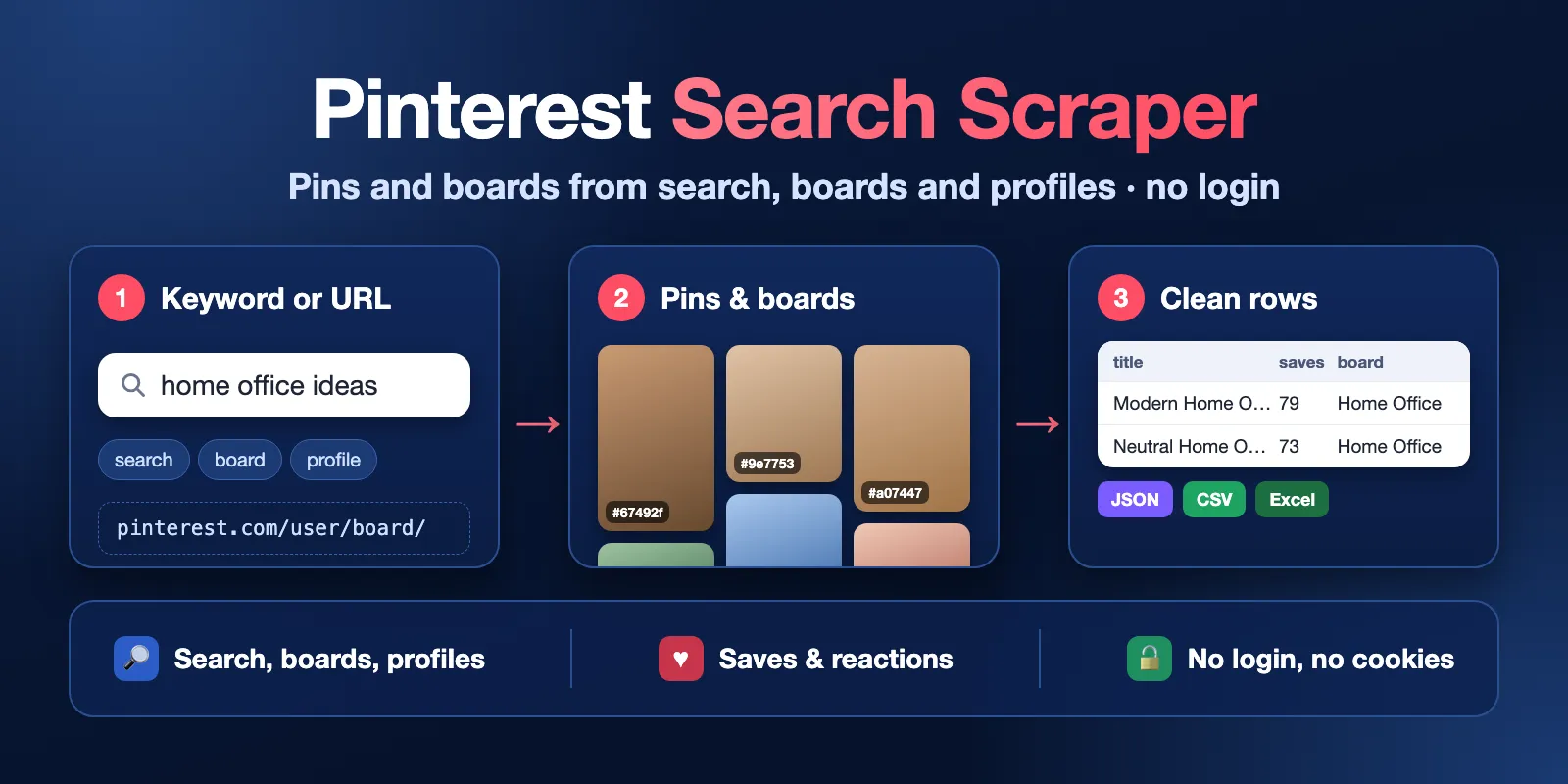
Table of contents
- What it does
- Quick start
- Use cases
- Input
- Output
- Pricing and limits
- API, export and integrations
- Use with AI agents (MCP)
- Troubleshooting
- FAQ
- Support
What it does
The Actor reads public Pinterest pages the way a logged-out visitor sees them. It has three modes:
- search: you give keywords (or
pinterest.com/search/...URLs). You get the pins, or the boards, that Pinterest shows for each keyword. - board: you give board URLs. You get the pins of each board.
- profile: you give profile URLs or usernames. You get the pins of the profile, or its boards.
Each pin or board is one row in the Dataset. Every row also says where it came from: the keyword or URL and its position in the Pinterest results.
The Actor does not download images. It saves image links only.
Good fit
- Find popular pins and outbound shop links for a product keyword.
- Collect the boards and board stats (pins, followers) of a brand profile.
- Build a list of image URLs, titles and colors for a mood board or a dataset.
Not a fit / limits
- No login. Private boards, secret boards and your own account data are not available.
- A board gives only about 100 of its newest pins without login. The Actor tells you this in the run summary when a board has more pins.
- Pinterest decides how deep a search goes. One keyword usually gives 300–970 pins, and the number changes from day to day.
- Comments as text, related pins, board sections and video files are not collected.
Quick start
- Open the Input tab.
- Keep What to scrape =
searchand type a keyword in Search keywords, for examplehome office ideas. - Keep Max results per keyword or URL =
20(the form's prefill; the API default is 50). - Click Start.
- Open the Output tab and the Pins view. Check the
title,imageUrlandlinkcolumns.
Expected result: 20 pin rows for the keyword in a few seconds.
Use cases
| Buyer job | Input path | Output entity | Key fields | Next step |
|---|---|---|---|---|
| Trend and content research | mode: search, queries | pin | title, description, reactionCount, createdAt | sort by createdAt in a spreadsheet |
| Find shops and outbound links | mode: search, queries | pin | domain, link (when Pinterest returns it) | group by domain |
| Competitor or brand boards | mode: profile, urls, resultType: boards | board | name, pinCount, followerCount | compare profiles |
| Collect one board | mode: board, urls | pin | imageUrl, title, dominantColor | mood board, image dataset |
Input
Input fields
| Field | Plain name | Type | Required | Default / prefill | Allowed values | Effect | Example | Recommendation |
|---|---|---|---|---|---|---|---|---|
mode | What to scrape | string | yes | default search, prefill search | search, board, profile | What to read | "search" | Pick the mode that matches your inputs |
queries | Search keywords | array of strings | no* | prefill ["home office ideas"] | up to 50 | Each keyword is searched separately; duplicates run once. In board or profile mode you can put username/board or usernames here too | ["home office ideas"] | Use plain words, any language |
urls | Pinterest URLs | array of strings | no* | none | up to 50; any Pinterest country domain | Board, profile or search URLs. @username and username/board also work | ["https://www.pinterest.com/marthastewart/"] | Pin, section and non-Pinterest URLs are skipped and listed in the run summary |
resultType | Results | string | no | pins | pins, boards | Pins or boards (search and profile). Board mode always gives pins. A search URL's own /pins/ or /boards/ path wins | "boards" | Use boards for board stats |
maxItems | Max results per keyword or URL | integer | no | default 50, prefill 20 | 1–1000 | Stops each keyword, board or profile after this many rows | 200 | You pay per saved row, so set what you need |
includePinDetails | Try to add saves to search pins | boolean | no | false | true / false | Opens search pins that have a numeric ID to add saves, commentCount and a missing link | true | Most search pins now have new-style IDs (e1_…) and stay without saves. For saves use board or profile mode. Same price per row |
proxyConfiguration | Proxy | object | no | {"useApifyProxy": true} | Apify Proxy or your own | Which IPs reach Pinterest | {"useApifyProxy": true} | Change only if runs get blocked (try the RESIDENTIAL group) |
* Give at least one keyword or URL. Empty input stops the run with INVALID_INPUT and no requests.
Total keywords and URLs: up to 50 per run. Duplicates are removed. Wrong URLs (a pin URL, a non-Pinterest site) are marked invalid; the other inputs still run.
Interacting settings
| When | Input A | Input B | Effective behavior | Cost/result effect |
|---|---|---|---|---|
| Board mode | mode: board | resultType | Always pins | none |
| Search URL with path | urls: [".../search/boards/?q=..."] | resultType: pins | The URL path (boards) wins | none |
| Search pins | mode: search | includePinDetails: false | saves and commentCount are null | faster |
| Search pins | mode: search | includePinDetails: true | One extra request per pin with a numeric ID. Since October 2026 Pinterest search returns new-style pin IDs (e1_…) that the detail lookup this Actor uses does not accept: those pins keep saves and commentCount as null and are counted in RUN_SUMMARY.counts.detailFailures | slower: about 5 pins per second |
Input examples
Search pins for a keyword (the prefill)
Expected behavior: one search, 20 pins. Expected output: pin rows with title, imageUrl, link, boardName, createdAt.
Several keywords with pin details
Expected behavior: 3 keywords × 100 pins. Pins with a numeric ID are opened for saves; pins with new-style IDs (e1_…, most search pins since October 2026) are kept without saves and counted in RUN_SUMMARY.counts.detailFailures. For saves, use board or profile mode.
Boards of profiles
Expected behavior: one board row per board of each profile, with pinCount and followerCount.
Output
Results go to the default Dataset. The Output tab has two views: Pins and Boards. A run summary is saved as RUN_SUMMARY in the Key-value store.
Output fields
Pin rows (type: "pin"):
| Field | Meaning | Type | Can be empty? | Example |
|---|---|---|---|---|
type | Row kind | string | no | pin |
pinId | Pinterest pin ID: numeric or, for search since October 2026, new-style e1_…; both open as url | string | no | 847802698648761780 |
url | Pin page | string | no | https://www.pinterest.com/pin/847802698648761780/ |
title | Pin title | string | yes | Boho Rattan Pendant Light Ideas… |
description | Pin description; blank text becomes null | string | yes | Create a warm and relaxing space… |
altText | Image alt text | string | yes | a living room filled with… |
imageUrl | Largest image link | string | yes | https://i.pinimg.com/originals/…jpg |
imageWidth, imageHeight | Image size in pixels | integer | yes | 564, 1002 |
link | Outbound link of the pin | string | yes | https://indochinadecor.com/products/… |
domain | Domain of the outbound link | string | yes | indochinadecor.com |
isVideo | Pin is a video | boolean | yes | false |
isPromoted | Pin is an ad | boolean | yes | false |
boardId, boardName, boardUrl | Board of the pin | string | yes | Lighting ideas for boho style living room |
pinnerUsername, pinnerFullName | Who saved the pin | string | yes | indochinalamp |
pinnerFollowerCount | Followers of the pinner | integer | yes | 190 |
saves | How many times the pin was saved | integer | yes: search pins need includePinDetails and a numeric pin ID | 48 |
commentCount | Comments | integer | yes: search pins need includePinDetails and a numeric pin ID | 0 |
reactionCount | Reactions | integer | yes | 2 |
createdAt | When the pin was created (ISO 8601, UTC) | string | yes | 2026-03-14T11:15:25.000Z |
dominantColor | Main image color | string | yes | #9d8464 |
Board rows (type: "board"):
| Field | Meaning | Type | Can be empty? | Example |
|---|---|---|---|---|
boardId | Board ID | string | no | 32088284784055018 |
url | Board page | string | no | https://www.pinterest.com/marthastewart/baby-shower-planning-and-ideas/ |
name | Board name | string | yes | Baby Shower Planning and Ideas |
description | Board description | string | yes | From baby shower themes… |
pinCount | Pins on the board | integer | yes | 194 |
followerCount | Board followers | integer | yes: usually empty in board search, filled for profile boards | 1503742 |
sectionCount, collaboratorCount | Sections and collaborators | integer | yes | 0 |
isCollaborative | Group board | boolean | yes | false |
ownerUsername, ownerFullName | Board owner | string | yes | marthastewart |
coverImageUrl | Cover image link | string | yes | https://i.pinimg.com/474x/…jpg |
createdAt | When the board was created | string | yes: usually empty in board search | 2013-04-11T13:34:45.000Z |
Fields in every row:
| Field | Meaning | Type | Can be empty? | Example |
|---|---|---|---|---|
mode | Mode of the run | string | no | search |
searchQuery | Keyword of the row | string | yes (board/profile rows) | home office ideas |
inputUrl | Board or profile URL of the row | string | yes (keyword rows) | https://www.pinterest.com/marthastewart/ |
input | Your input exactly as typed | string | no | @marthastewart |
position | Position in the Pinterest results for this input, from 1 | integer | no | 4 |
fetchedAt | When the row was read | string | no | 2026-10-14T11:54:57.617Z |
Rows of different inputs can be mixed in the Dataset, because up to 3 inputs are read at the same time. Sort by input and position to get the Pinterest order back.
Output entities and surfaces
| Situation | Where | Result shape | What to do |
|---|---|---|---|
| Normal result | Dataset, views Pins / Boards | one row per pin or board | open, export or use via API |
| Keyword with no results | RUN_SUMMARY | target empty, run NO_RESULTS if all are empty | check the spelling or try another keyword |
| Board or profile does not exist | RUN_SUMMARY | target not_found, run NOT_FOUND if none exist | check the URL |
| Your max total charge was reached | Dataset + RUN_SUMMARY | rows saved so far, run PARTIAL / CHARGE_LIMIT, run status Succeeded | raise the max charge or lower maxItems |
| Run timeout was near | Dataset + RUN_SUMMARY | rows saved so far, PARTIAL / DEADLINE_REACHED | raise the run timeout or lower maxItems |
| Pinterest refused or blocked after some rows | Dataset + RUN_SUMMARY | rows saved so far, PARTIAL / SOURCE_ERROR, run status Failed | run again later or use the RESIDENTIAL proxy group |
| Pinterest refused before any row | RUN_SUMMARY | ERROR, run status Failed | same as above |
RUN_SUMMARY has status, message, counts (rows, complete, empty, not found, invalid, skipped), one targets entry per keyword or URL with its own status, and warnings (for example, a board that has more than the ~100 pins available without login).
Output example
One pin from a board run (mode: board, Martha Stewart's "Baby Shower Planning and Ideas" board; description and link shortened). Search pins look the same, but saves and commentCount are usually null:
null means Pinterest did not give this value for this pin. Values are what a logged-out visitor sees at run time.
Pricing and limits
Pricing unit
This Actor uses pay-per-event pricing. You pay:
- Actor start: $0.004 per run (one event for runs up to 1 GB memory; the default is 256 MB).
- Pin or board row: one event per row saved to the Dataset.
| Store plan | Price per row | Per 1,000 rows |
|---|---|---|
| Free | $0.0015 | $1.50 |
| Bronze | $0.0014 | $1.40 |
| Silver | $0.0013 | $1.30 |
| Gold and higher | $0.0012 | $1.20 |
Platform usage (compute, proxy, storage) is included; you do not pay it separately. includePinDetails does not change the price per row.
Every run pays the start event, $0.004, also a run with no rows (all keywords empty, all boards or profiles not found, or invalid input). Empty, not found, invalid and skipped inputs add no rows and are not charged. If your max total charge is reached, the Actor stops, keeps the rows it saved and does not save more.
Cost examples (Free plan)
| Scenario | Input scope | Rows | Charge | Run time in our tests |
|---|---|---|---|---|
| Prefill | 1 keyword × 20 | 20 | $0.004 + $0.030 = $0.034 | 2–6 s |
| Small | 1 keyword × 100 | 100 | $0.004 + $0.150 = $0.154 | 10–20 s (estimate) |
| Three keywords | 3 keywords × 100 | 300 | $0.004 + $0.450 = $0.454 | about 1 min (estimate) |
| Large (timeout 600 s) | 10 keywords × 1000 | about 9,000 | $0.004 + about $13.50 | about 5 min |
| Nothing found | 50 profiles that do not exist | 0 | $0.004 | about 30 s |
Limits
- Up to 50 keywords and URLs per run, up to 1,000 rows each. Our largest test: 10 keywords × 1000 gave 9,097 rows in about 5 minutes with no blocks.
- Search depth is set by Pinterest: usually 300–970 pins per keyword.
- Boards: about 100 newest pins without login.
- Up to 3 inputs at a time and up to 4 requests to Pinterest at a time.
- The default run timeout is 300 seconds. For more than about 2,000 rows, raise the timeout in the run options.
API, export and integrations
- API: start the Actor with
POST https://api.apify.com/v2/acts/cliqtomedia~pinterest-search-scraper/runsand the input JSON. Read rows from the run's default Dataset. - Export: download the Dataset as JSON, CSV, Excel, XML or HTML from the Output tab or the Dataset API.
- Scheduling: use an Apify schedule to collect the same keywords every day or week. Each run is a fresh snapshot, not a diff.
- No-code: connect the Dataset to Google Sheets, Make, Zapier or n8n with Apify integrations.
Use with AI agents (MCP)
- MCP server URL with only this Actor:
https://mcp.apify.com?tools=cliqtomedia/pinterest-search-scraper. See Apify MCP server. - Smallest useful input:
{"mode": "search", "queries": ["home office ideas"], "maxItems": 20}. - Key output fields:
title(pin title),imageUrl(image link),link(outbound shop or blog link),saves(popularity, when Pinterest provides it),boardName(where the pin is saved). - A 20-row run takes a few seconds and costs $0.034 on the Free plan. Keep
maxItemssmall and readRUN_SUMMARY.statusbefore you use the rows.
Troubleshooting
saves is empty
Symptom: saves and commentCount are null for search pins.
Reason: Pinterest search results do not include these numbers, and search pins with new-style IDs (e1_…) cannot be opened for details.
Action: use board or profile mode, where pins include saves. includePinDetails helps only for search pins with a numeric ID.
A board gives fewer pins than it has
Symptom: a board shows 500 pins, but you get about 100.
Reason: without login Pinterest shows only about 100 newest pins of a board. RUN_SUMMARY.warnings says so.
Action: search for the board topic with keywords to get more pins.
Fewer search results than maxItems
Symptom: target status complete, but fewer rows than you asked for.
Reason: Pinterest ended the search results. The depth changes from day to day.
Action: add related keywords.
Run status is Failed with SOURCE_ERROR or ERROR
Symptom: the run failed and RUN_SUMMARY.status is PARTIAL with SOURCE_ERROR, or ERROR.
Reason: Pinterest refused requests (for example, too many requests or a block). This is not an empty result.
Action: rows saved before the error stay in the Dataset. Run again later, or set the proxy group to RESIDENTIAL.
FAQ
Do I need a Pinterest account or cookies?
No. The Actor reads only what a logged-out visitor sees. Do not put cookies or passwords in the input.
Does it download images?
No. It saves image links (imageUrl, coverImageUrl). You can download them later with your own tool.
Why do I get different pins than yesterday?
Pinterest changes search results all the time and shows logged-out visitors different results. Each run is a snapshot of that moment.
Is the output the same as other Pinterest scrapers?
The rows are flat: one level, no nested objects. If you move from another Pinterest Actor, map the field names using the tables above.
Can I scrape comments, related pins or board sections?
Not in this version. You get reactionCount in every pin row. commentCount comes only from pin details, which work for search pins with a numeric ID.
Support
For bugs, questions or feature requests, open an issue on the Issues tab of this Actor. Add the run ID, the mode and the error text from RUN_SUMMARY. Do not send tokens, cookies or passwords.


