

Pinterest Full Scraper - Pins, Profiles & Boards
Pricing
from $1.00 / 1,000 pin scrapeds
Pinterest Full Scraper - Pins, Profiles & Boards
Scrape Pinterest without login or API key. Get pins, profiles, boards, sections, user pins & related pins — with images, video & GIF URLs and engagement stats. Bulk keyword & URL input, export to JSON/CSV/Excel. Pay only per result from $1.50/1,000. No subscription.
Pricing
from $1.00 / 1,000 pin scrapeds
Rating
0.0
(0)
Developer

Raven
Maintained by CommunityActor stats
0
Bookmarked
63
Total users
20
Monthly active users
12 hours ago
Last modified
Categories
Share
Pinterest Scraper — Pins, Profiles, Boards & Search (no login, no API key)
Scrape Pinterest data without login, without a Pinterest API key, and without code — from $1 per 1,000 pins on paid plans ($3 per 1,000 on the free plan). Turn any keyword, pin, profile, or board URL into clean, structured JSON, CSV or Excel and pay only per result — no monthly rental, no proxies to set up.
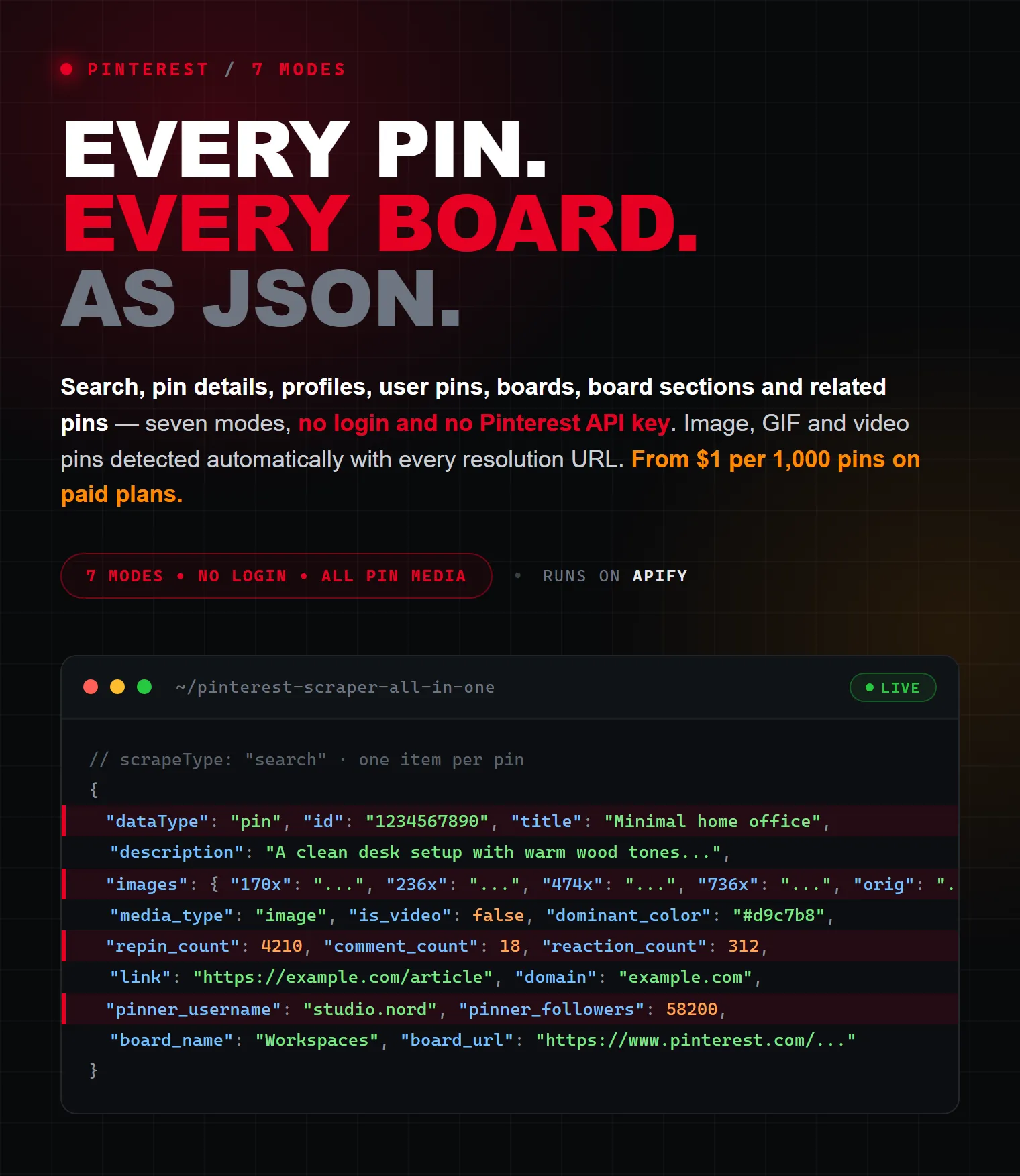
One actor covers 7 Pinterest scraping modes: search pins by keyword, full pin details, user profiles, a user's pins, boards (with every pin), board sections, and related/similar pins. Each pin comes back with 35+ fields — every image resolution, video and GIF URLs, and engagement counts (saves/repins, comments, reactions).
A practical Pinterest API alternative: Pinterest's official Developer API is gated behind an app-review/approval process and mostly limited to your own account. This scraper reads the same publicly visible content with no application, no OAuth token, and no login.
| Raven · Social-media suite • Instagram, TikTok, YouTube, Reddit, Threads, Pinterest | |||
 Pinterest Scraper Pinterest Scraper➤ You are here |
 Instagram Scraper Instagram ScraperPosts, followers, comments |
 Threads Scraper Threads ScraperPosts, profiles, replies |
 YouTube Scraper YouTube ScraperVideos, comments, transcripts |
What does this Pinterest Scraper do?
Pick a scrape mode, paste your keywords or Pinterest URLs (one per line — mix as many as you like), set a result cap, and run. Every record is flattened into one export-friendly row.
| Mode | Input | Returns |
|---|---|---|
| 🔎 Search pins by keyword | keywords | matching pins (or videos, boards, or profiles — your choice of scope) |
| 📌 Pin details | pin URL / id | full data for a single pin |
| 👤 Profile / user info | profile URL / @handle | full profile + follower/pin/board stats |
| 🖼️ User's pins | profile URL / @handle | pins published by that user |
| 🗂️ Board info + pins | board URL | board metadata + every pin on it |
| 📁 Board sections | board URL | the board's sections |
| ♻️ Related / similar pins | pin URL / id | visually similar pins |
No Pinterest developer account, no cookies, no login. Works on public pins, profiles, and boards.
Why use this Pinterest Scraper?
- ✅ All-in-one — 7 modes (pins, profiles, boards, sections, user pins, related pins, search) in a single actor instead of one scraper per data type.
- ✅ No login / no Pinterest API key required — reads only public data.
- ✅ Pay per result — no $30–35/month subscription like rental actors; each data type has its own fair per-result price.
- ✅ 35+ fields per pin — full text, every image resolution, video/GIF/Idea-pin media, links, source domains, creator stats and engagement counts.
- ✅ Real media detection — tells images apart from GIFs, videos, and Idea/Story pins, with direct MP4 and HLS URLs and duration.
- ✅ Bulk input — mix unlimited keywords and URLs in one run, up to 100,000 results per input.
- ✅ Export anywhere — JSON, CSV, Excel, XML, HTML, or the Apify API.
How it compares
| Official Pinterest API | Typical single-purpose scraper | This actor | |
|---|---|---|---|
| Access | App review / approval required | Usually one data type per actor | 7 modes in one, no approval |
| Login / API key | OAuth token required | Some need a login cookie | None |
| Data types | Mostly your own account | Pins or profiles or boards | Pins, profiles, boards, sections, user pins, related, search |
| Media | Limited | Image URL only | Every resolution + video + GIF + Idea pins |
| Export | JSON via code | Varies | JSON / CSV / Excel / XML / HTML / API |
| Pricing | Free but gated & rate-limited | Flat ~$2–4 / 1,000 typical | From $1 / 1,000 (paid), $3 / 1,000 (free) |
What data can you extract?
Pin fields (search, user pins, board pins, related pins, pin details)
| Group | Fields |
|---|---|
| Identity | id, url, title, grid_title, description, alt_text, created_at, dominant_color |
| Media | media_type (image/gif/video), is_video, is_story_pin, image, image_width, image_height, images (all resolutions), video_url, video_hls_url, video_duration_ms, video_thumbnail |
| Engagement | repin_count (saves), comment_count, share_count, reaction_count, reactions |
| Source | link (outbound URL), domain, is_repin, is_promoted (any paid placement, incl. promoted repins), is_downstream_promotion |
| Creator | pinner_id, pinner_username, pinner_full_name, pinner_image, pinner_followers, pinner_is_verified |
| Board | board_id, board_name, board_url |
Profile fields
id, username, url, full_name, about, website, location, follower_count, following_count, pin_count, board_count, video_pin_count, is_verified_merchant, is_partner, image_small, image_medium, image_large, created_at.
Board fields
id, name, url, description, privacy, category, pin_count, follower_count, section_count, is_collaborative, collaborator_count, owner_id, owner_username, owner_full_name, image_cover, created_at.
Board section fields
id, title, slug, board_id, board_url, pin_count.
Every record also carries dataType, the scrapeType you ran, and the input it came from, so mixed runs stay easy to filter.
How to scrape Pinterest step by step
- Open the actor on Apify and click Try for free (new accounts get $5 in free monthly usage credits — enough for ~1,600 pins).
- Choose What to scrape (e.g. 🔎 Search pins by keyword).
- Paste your keywords or URLs — one per line. Mix as many as you like.
- Set Max results per input (how many records each keyword/URL should return).
- Click Start.
- When the run finishes, export to JSON, CSV, Excel, XML or HTML from the Storage / Output tab, or pull the data from the Apify API.
How does it detect images, GIFs, and videos?
Pinterest stores GIFs and Idea/Story-pin media in different places than regular videos, so most scrapers mislabel them. This actor scans every media subtree and matches by file type, then returns a single reliable media_type (image / gif / video). Video and Idea/Story pins also come back with a direct MP4 URL (video_url), an HLS stream URL (video_hls_url), duration, and a thumbnail. Static pins include every image resolution Pinterest offers (thumbnail through original) under images.
How do I control search results?
For the search mode, set Search scope to choose what comes back:
- Pins — standard image/video pins (default).
- Videos — video pins.
- Boards — matching boards (billed as boards).
- Users / profiles — matching creator profiles (billed as profiles).
You can also pass an optional raw Search filters string for advanced refinement. Each keyword paginates independently until it hits your Max results per input or Pinterest runs out of results.
How do I scrape a whole board?
Use the board mode with a board URL. By default the actor returns the board's metadata and then every pin on it. Turn off Include board pins to get board metadata only. To list a board's sections instead, use the board sections mode.
Input parameters
| Parameter | Key | Type | Description |
|---|---|---|---|
| What to scrape | scrapeType | select | search, pinDetail, profile, userPins, board, boardSections, relatedPins |
| Keywords or URLs | items | array | One entry per line — keywords (search) or Pinterest URLs / ids / @handles |
| Max results per input | maxResults | integer | Cap per keyword/URL (1–100,000). Profiles & single pins always return one record |
| Search scope | searchScope | select | pins, videos, boards, users (search mode only) |
| Search filters | searchFilters | string | Optional raw Pinterest filter string |
| Include board pins | includeBoardPins | boolean | Board mode: return the board's pins after its metadata (default on) |
| Pinterest cookies | cookies | string (secret) | Optional logged-in session for search & related pins — see below |
| Max retries | maxRetries | integer | Retries on transient network errors before skipping an input (default 5) |
| Proxy configuration | proxyConfiguration | proxy | Residential US proxy recommended and on by default |
Optional: Pinterest cookies for real pin ids
Since October 2026 Pinterest hides the real pin id from anonymous visitors in search and related pins results: those pins come back with an obfuscated id like e1_AfqPSh... that Pinterest itself can't open (no pin page, no pin details). A logged-in session gets the normal numeric ids (998462179911208399) and working pin URLs.
How the actor handles it — you don't have to do anything:
- Your own cookies (optional). Paste the cookies of a logged-in pinterest.com session into Pinterest cookies (
cookies). Accepted formats: a JSON cookie export (Cookie-Editor / EditThisCookie extension, Export → JSON) or a plainname=value; name2=value2string. Only_pinterest_sessis required. Your cookies always take priority, are stored as a secret input, and are used only forsearchandrelatedPins— read-only requests, nothing is posted from your account. - No cookies? The actor uses one of our own logged-in sessions when one is free.
- No session at all (none free, or Pinterest rejected it): the run still finishes anonymously. Pins with an obfuscated id are marked
id_is_encrypted: trueand geturl: null, so you never receive a dead link. For related pins Pinterest now serves anonymous visitors only its public "More to explore" feed: up to 250 pins per pin, with images and videos but without title, description or pinner. - Ads. Logged-in feeds mix in paid placements. They carry their own ad id instead of a numeric one (the
urlstill opens the pin) and always come withis_promoted: true— including promoted repins, which Pinterest itself flags only asis_downstream_promotion.
Other modes (pin details, profiles, user pins, boards, sections) don't need a login and never use cookies.
Ready-to-paste input recipes
Search pins by keyword (bulk)
Find creator profiles by keyword
Scrape a full board with all its pins
Get full details for specific pins
Scrape a user's profile + their pins
Discover related / similar pins
Output examples
Pin record
Profile record
Board record
Board sections and a user's pins come back the same way — one flat record per row.
How much does it cost to scrape Pinterest?
There is no monthly fee. You pay per result, and each data type is priced for what it costs to gather. Prices below are per 1,000 records:
| Data type | Free plan / 1,000 | Paid plans / 1,000 |
|---|---|---|
| 🔎 / 🖼️ / 🗂️ / ♻️ Pins (search, user pins, board pins, related) | $3.00 | from $1.00 |
| 📁 Board sections | $4.00 | from $1.50 |
| 🗂️ Boards | $6.00 | from $2.00 |
| 📌 Pin details (full single pin) | $5.00 | from $3.00 |
| 👤 Profiles | $5.00 | from $3.00 |
Paid-plan (higher-tier) prices apply on Apify's Starter/Scale/Business plans. A negligible $0.00005 run-start fee applies once per run.
What that looks like in practice (Free plan)
| Run | Records | Cost |
|---|---|---|
| Keyword search | 1,000 pins | $3.00 |
| Board with pins | 500 pins | $1.50 |
| Related pins | 200 pins | $0.60 |
| Creator profiles | 100 profiles | $0.50 |
| Boards | 50 boards | $0.30 |
The Apify Free plan includes $5 of usage credits every month — roughly 1,600 pins, 1,000 profiles, or 830 boards at no cost. On paid plans the same 1,000 pins drop to $1.00.
The price is all-inclusive: proxies and compute are covered — nothing else to pay on top.
Integrations
Connect Pinterest data to the tools you already use — no glue code required:
- Make, Zapier and n8n — trigger workflows on new results.
- Google Sheets, Airtable, Slack and Discord — via webhooks or native integrations.
- Webhooks — POST every run's dataset to your endpoint.
- Apify API & clients (JavaScript / Python) — run the actor and fetch data programmatically.
- Scheduler — run scrapes hourly, daily, or weekly on autopilot.
Use with AI agents (MCP)
This actor works as a tool for AI agents through the Apify MCP server, so assistants like Claude or Cursor can run Pinterest scrapes on demand. Example prompt:
"Use the Pinterest scraper to find the top 50 pins for minimalist kitchen design and give me their titles, image URLs, and save counts."
Popular use cases
- Marketing & trend research — track what's trending by keyword, scope, and niche.
- Competitor & influencer analysis — pull profile stats, follower counts, and top boards.
- E-commerce & product discovery — find product pins, outbound links, and source domains.
- Lead generation — collect creator profiles and their website/contact links at scale.
- SEO & content — harvest pin titles, descriptions, and alt text for keyword ideas.
- AI / ML datasets — build image+text datasets with captions, alt text, and rich metadata.
Is it legal to scrape Pinterest?
Scraping publicly available data is generally lawful — in the US this was reaffirmed by hiQ Labs v. LinkedIn (2022). This actor accesses only public Pinterest content and never uses login credentials. You remain responsible for how you use the data: respect Pinterest's Terms, avoid collecting personal data unlawfully, and comply with GDPR/CCPA and other applicable laws. For a deeper overview, see Apify's guide: Is web scraping legal?
FAQ
Do I need a Pinterest account or login to use this scraper?
No. It reads only public data — no login, no cookies, no Pinterest developer account. Optionally you can add your own Pinterest cookies to get real numeric pin ids in search and related-pins results — see Optional: Pinterest cookies.
Does Pinterest have a public API, and is this a Pinterest API alternative?
Pinterest's official Developer API exists but requires app review/approval and mostly returns your own account's data. This actor is a no-approval alternative for public pins, profiles, and boards.
How do I scrape Pinterest pins by keyword?
Choose the search mode, paste one keyword per line, and set Max results per input. Use Search scope to return pins, videos, boards, or profiles.
Can I scrape a Pinterest profile, board, or board sections?
Yes — separate modes return full profile info (followers, pin/board counts, bio, website), entire boards including all their pins, and a board's sections.
Does it tell images apart from GIFs and videos?
Yes. Every pin has a media_type field (image / gif / video). Videos and Idea/Story pins also include a direct MP4 URL, an HLS stream URL, and duration.
Can I get full-resolution images and video URLs?
Yes — the images object holds every resolution Pinterest offers (thumbnail through original), and video pins include downloadable MP4/HLS URLs.
Does it include engagement metrics?
Yes — repin_count (saves), comment_count, share_count, reaction_count, and a reactions breakdown where Pinterest exposes them. (Comment counts are included; comment text is not scraped.)
How many results can I get per keyword or URL?
Up to 100,000 per input. Profiles and single pins always return exactly one record.
Do I need proxies?
No. Residential US proxy rotation is built in and on by default; you can also plug in your own proxies.
Can I export Pinterest data to CSV or Excel?
Yes — export to JSON, CSV, Excel, XML, or HTML from the Storage tab, or pull from the Apify API.
How much does it cost to scrape Pinterest?
From $1 per 1,000 pins on paid plans ($3 per 1,000 on the free plan). Other data types are priced separately — see the pricing table above. No subscription.
Will I be charged for URLs that return nothing?
No per-result charge for empty results — you're billed only for records delivered to your dataset (plus the negligible $0.00005 run-start fee).
Can I cap my spend?
Yes — set Max results per input, and use the run's charge/results limit in the Apify console to stop automatically at a budget.
Why did I get fewer results than my limit?
Some keywords, boards, or related feeds simply have fewer public items than your cap, and Pinterest interleaves non-pin modules that are filtered out. The actor stops when the feed is exhausted.
Why are some fields empty or null?
Pinterest doesn't populate every field on every pin (e.g. no outbound link on many pins, or no video_url on static images). Empty values are dropped from each record, so absent fields simply weren't provided by Pinterest. The one exception is url: it is null when Pinterest served an obfuscated e1_... pin id (id_is_encrypted: true), because such a pin has no working page.
Is it legal to scrape Pinterest?
This actor collects only publicly available data. You are responsible for using it in line with applicable laws and Pinterest's terms — see the legality section above.
Feedback & support
Found a bug or need a new field or mode? Open an issue on the actor's Issues tab, or share a run to help us reproduce it. We read every report.
More scrapers by this developer
- Instagram Scraper — Posts, Profiles, Followers & Hashtags
- Threads Scraper — Posts, Profiles & Replies
- TikTok Profile API Scraper + Contacts & Analytics
- Reddit Scraper All-in-One — Posts, Comments & Email Finder
- Ultimate YouTube Scraper — Videos, Transcripts & Comments
- Facebook Ads Library Scraper — Meta & Instagram Ad Spy
Tags: pinterest scraper · pinterest api · scrape pinterest · pinterest data extractor · pinterest pin scraper · pinterest profile scraper · pinterest board scraper · pinterest search scraper · pinterest crawler · scrape pinterest without login · pinterest image scraper · pinterest video scraper · pinterest gif scraper · pinterest followers · pinterest export csv · pinterest marketing data · pinterest lead generation · pinterest trends · pinterest bulk scraper · pinterest no api key
Not affiliated with or endorsed by Pinterest. Scrapes publicly available data only. Use in line with applicable laws and Pinterest's terms.


