

Trustpilot Reviews Scraper - Ratings & Replies, No Login
Pricing
from $0.27 / 1,000 review saveds
Trustpilot Reviews Scraper - Ratings & Replies, No Login
Get public Trustpilot reviews for any company domain: star rating, title, text, date, country, verification and the company's reply. Filter by stars, language and date; onlyNew for monitoring. No login.
Pricing
from $0.27 / 1,000 review saveds
Rating
0.0
(0)
Developer

Cliqto Media
Maintained by CommunityActor stats
0
Bookmarked
2
Total users
1
Monthly active users
a day ago
Last modified
Share
Trustpilot Reviews Scraper gets public Trustpilot reviews for the companies you list: star rating, title, text, date, country, verification and the company's reply, one review per row. You pay $0.52 per 1,000 reviews on the free plan (less on paid plans), plus $0.007 per run and $0.001 per company lookup. No login and no Trustpilot account are needed.
Use it for review monitoring, competitor research, customer feedback analysis and AI pipelines. The smallest run is one domain, for example apify.com, with 20 reviews: it finishes in under half a minute.
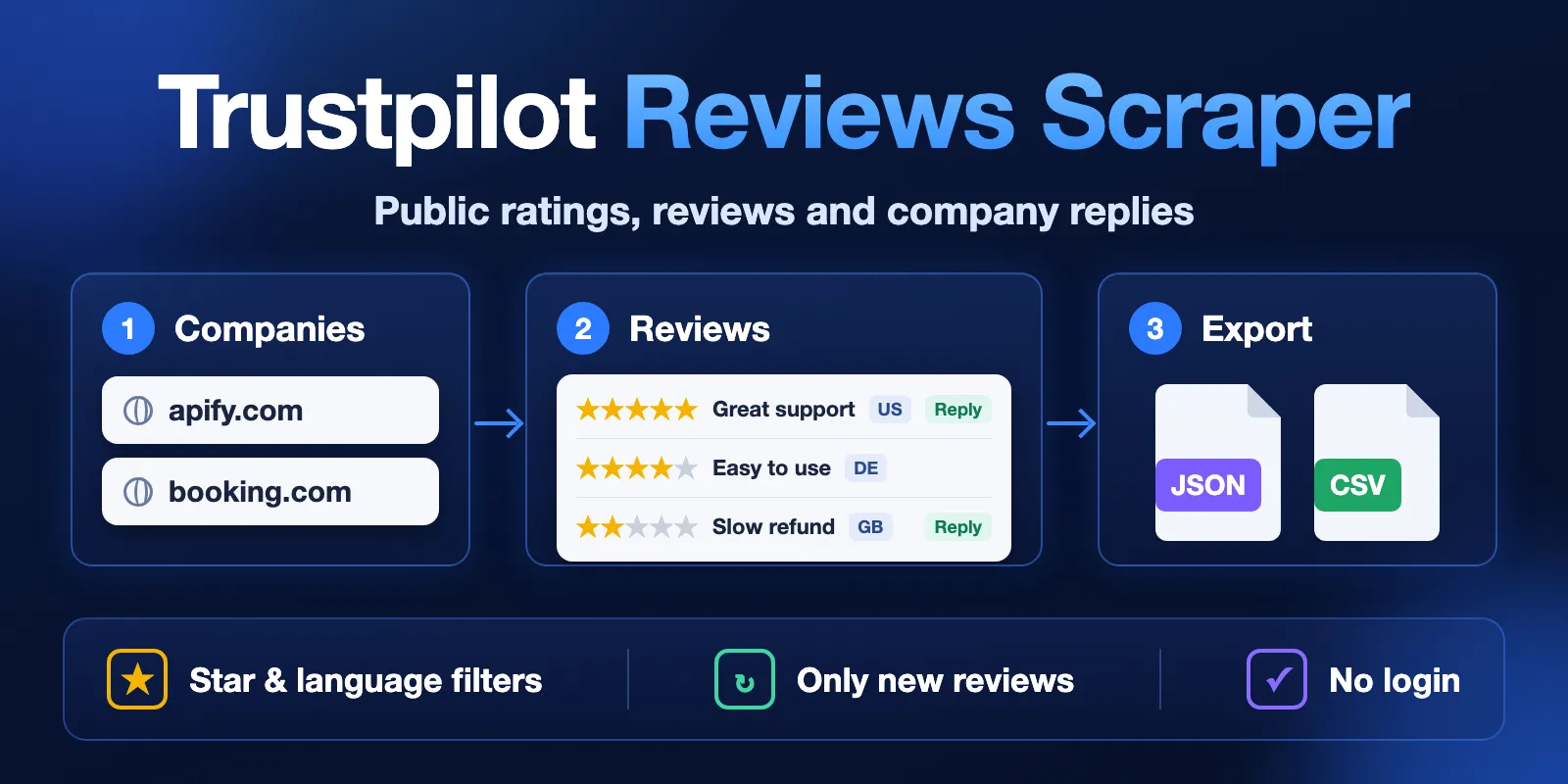
Table of contents
- What it does
- What data you get
- Quick start
- Input
- Input examples
- Output
- Pricing
- Use cases
- Monitoring with onlyNew
- API, export and integrations
- Use with AI agents (MCP)
- Limits and partial results
- Troubleshooting
- FAQ
- Support
What it does
You give the Actor company domains (apify.com), company website URLs or Trustpilot review page URLs (https://www.trustpilot.com/review/apify.com). For each company it opens the public Trustpilot review page and saves the reviews to a Dataset.
- It reads only what any visitor can see. It does not log in.
- It follows Trustpilot's own redirect, so
booking.comgives the reviews ofwww.booking.com. - A domain that is not on Trustpilot gets the status
not_foundin the run summary. It is not mixed up with "0 reviews" or with an error. - Filters: star ratings, languages, date range, verified only, only reviews with a company reply. Order: newest first or "most relevant".
onlyNewskips reviews you already got in earlier runs. Skipped reviews are free.
Good fit
- Track new reviews of your company or your competitors every day.
- Collect 1- and 2-star reviews with company replies for support quality checks.
- Feed review text into sentiment analysis, topic search or an AI assistant.
Not a fit
- Reviewer contact data. The Actor does not collect emails, phones, reviewer IDs or profile photos.
- Every review of a very big company. Trustpilot shows visitors only 10 pages per filter. See Limits.
- Private Trustpilot Business data (invitations, private notes, analytics).
What data you get
| Group | Fields |
|---|---|
| Review | reviewId, rating, title, text, language, date, experienceDate, updatedDate, likes, url |
| Reviewer (public only) | reviewerName, country, reviewerReviewCount |
| Trust | verified, verificationLevel, reviewSource |
| Company reply | replyText, replyDate |
| Company | company, companyName, companyTrustScore, companyTotalReviews, companyUrl |
| Provenance | source, fetchedAt |
Quick start
- Open the Input tab.
- Keep the prefilled
companyDomains:apify.com, or write your own domains, one per line. - Keep
maxReviewsat 20 (the prefill) or set up to 1000. - Click Start.
- Open the Output tab. The Reviews view shows one row per review.
Expected result: 20 reviews of apify.com, newest first, in about 3–25 seconds.
Input
| Field | Type | Required | Default | Allowed values | What it does |
|---|---|---|---|---|---|
companyDomains | array of strings | yes | — (prefill apify.com) | 1–50 items: domain, website URL or Trustpilot review URL | Which companies to read. Duplicates are merged. |
maxReviews | integer | no | 100 (prefill 20) | 1–1000 | Maximum reviews per company. |
stars | array of strings | no | all | 1–5 | Only reviews with these star ratings. |
languages | array of strings | no | all | two-letter codes (en, de, fr…) or all | Only reviews in these languages, read in this order. Up to 10 languages. A language the company has no reviews in is skipped. |
sort | string | no | recency | recency, relevance | Newest first, or Trustpilot's "most relevant" order. |
dateRange | string | no | any | any, last30days, last3months, last6months, last12months | Only reviews from this period. |
verifiedOnly | boolean | no | false | Only reviews Trustpilot marks as verified. | |
withRepliesOnly | boolean | no | false | Only reviews the company answered. | |
onlyNew | boolean | no | false | Skip reviews you already got in earlier runs with the same companies and filters. |
How settings work together:
- All filters work together (AND). Example:
stars["1","2"]+withRepliesOnly= only 1- and 2-star reviews that have a reply. maxReviewscounts per company. 5 companies ×maxReviews100 = up to 500 reviews.onlyNewalways reads newest first, so it ignoressort.- Empty
companyDomainsor a value that is not a domain stops the run with statusINVALID_INPUTbefore any request to Trustpilot.
Input examples
Latest reviews of one company
You get the 20 newest reviews of apify.com in all languages.
Negative reviews with replies
You get up to 200 one- and two-star reviews that the company answered, with replyText and replyDate.
Daily check of competitors
The first run saves up to 100 reviews per company. Later runs save only reviews that appeared since the last run.
Output
One Dataset row = one review. This row comes from the first example (reviewer name, title and text replaced with examples here):
Output fields
| Field | Type | Can be null? | Meaning |
|---|---|---|---|
company | string | no | Company domain on Trustpilot, after Trustpilot's redirect (www.booking.com). |
companyName | string | yes | Company name on Trustpilot. |
companyTrustScore | number | yes | TrustScore, 1–5. |
companyTotalReviews | integer | yes | All reviews of the company on Trustpilot. |
reviewId | string | no | Trustpilot review ID. Unique in one run. |
rating | integer | yes | Stars, 1–5. |
title | string | yes | Review title. |
text | string | yes | Review text, as written. |
language | string | yes | Review language, two-letter code. |
date | ISO date | yes | When the review was published. |
experienceDate | ISO date | yes | Date of the experience, if the reviewer gave it. |
updatedDate | ISO date | yes | When the review was changed. null = not changed. |
country | string | yes | Reviewer's country, two-letter code. |
reviewerName | string | yes | Public display name. |
reviewerReviewCount | integer | yes | How many reviews this reviewer wrote. |
verified | boolean | yes | true/false from Trustpilot; null when Trustpilot does not say. |
verificationLevel | string | yes | Trustpilot verification label, for example invited, verified, not-verified. |
reviewSource | string | yes | How the review was collected, for example Organic or BasicLink. |
likes | integer | yes | "Useful" votes. |
replyText | string | yes | Company reply. null = no reply. |
replyDate | ISO date | yes | When the company replied. |
url | string | no | Link to the review on Trustpilot. |
companyUrl | string | no | Link to the company page on Trustpilot. |
source | string | no | Always trustpilot. |
fetchedAt | ISO date | no | When the Actor saved the row. |
null means Trustpilot does not show this value. The Actor never puts 0 or an empty string instead of a missing value.
Run summary
Each run also writes RUN_SUMMARY to the default key-value store (Output tab → Run summary). It has:
status:COMPLETE,NO_RESULTS,PARTIAL,ERROR,INVALID_INPUTorCANCELLED, andreason(CHARGE_LIMIT,TIME_LIMIT,SOURCE_ERRORornull);counts: companies, found, notFound, reviewsSaved, chargedReviews, chargedCompanies (company lookups charged), skippedSeen;companies: one line per company withstatus(complete,no_reviews,not_found,partial,error,skipped),reason,totalReviews,matchingReviews,pagesFetchedandsaved.
| Situation | Dataset | Run summary | What to do |
|---|---|---|---|
| Normal | review rows | COMPLETE | Use the rows. |
| Company not on Trustpilot | no rows for it | company not_found | Check the domain on trustpilot.com. |
| Filters match nothing | no rows | NO_RESULTS, matchingReviews 0 | Relax the filters. |
| Time or spending limit reached | rows saved so far | PARTIAL + TIME_LIMIT or CHARGE_LIMIT | Raise the timeout or the limit, or use onlyNew. |
| Trustpilot blocked or failed | rows saved so far | PARTIAL or ERROR + SOURCE_ERROR; run FAILED | Run again later. |
Pricing
Pay per event. You pay only for these events; platform usage is included.
| Event | Price | When |
|---|---|---|
| Actor start | $0.007 | Once per run (1 GB memory). |
| Company lookup | $0.001 | Once per company, for each language in languages (once when languages is empty), when Trustpilot answers, including not_found. The first lookup of a company is always charged; each further language is charged only if the company has reviews in it. Not charged for invalid input or source errors. |
| Review saved | see below | Once per review row in the Dataset. Reviews skipped by onlyNew are free. |
Review price by Apify plan:
| Plan | Per review | Per 1,000 reviews |
|---|---|---|
| Free | $0.00052 | $0.52 |
| Bronze | $0.00045 | $0.45 |
| Silver | $0.00035 | $0.35 |
| Gold | $0.00027 | $0.27 |
| Platinum | $0.00027 | $0.27 |
| Diamond | $0.00027 | $0.27 |
Cost examples on the Free plan:
| Run | Reviews | Price |
|---|---|---|
| 1 company × 20 (prefill) | 20 | $0.0184 |
| 1 company × 100 | 100 | $0.0600 |
| 5 companies × 200 | 1,000 | $0.5320 |
| 3 companies × 1,000 | 3,000 | $1.5700 |
1 company × 100, languages en and de | 100 | $0.0610 |
| 1 domain not on Trustpilot | 0 | $0.0080 |
onlyNew, 1 company, nothing new | 0 | $0.0080 |
To stop at a fixed amount, set Maximum cost per run in the run options. The Actor stops before it goes over, keeps the rows it saved and ends with PARTIAL + CHARGE_LIMIT.
Use cases
| Job | Input | Key fields | Next step |
|---|---|---|---|
| Reputation monitoring | your domain + onlyNew | rating, text, date, url | Schedule daily, send new rows to Slack or a sheet. |
| Competitor research | 3–10 competitor domains | rating, country, language, companyTrustScore | Compare ratings by country and month. |
| Support quality | stars 1,2 + withRepliesOnly | replyText, replyDate, date | Measure reply time and tone. |
| AI and sentiment | any domains | title, text, language, rating | Send text to an LLM or a sentiment model. |
Monitoring with onlyNew
Turn on onlyNew and create a schedule in Apify Console (for example, daily).
- The first run works like a normal run.
- Later runs read newest first and stop when they reach reviews you already got. Only new reviews are saved and charged.
- The list of delivered review IDs is kept in your key-value store named
trustpilot-reviews-seen, separately for each company and filter set. Delete this store to start again. - A run with nothing new ends with
NO_RESULTSand costs the start and company lookup events only.
API, export and integrations
- Export: download the Dataset as JSON, CSV, Excel, XML or HTML from the Output tab.
- API: start the Actor and read the Dataset with the Apify API or the JavaScript and Python clients. The input is the same JSON as in the examples.
- Schedules and webhooks: run on a schedule and send results to your system with a webhook.
- No-code: connect to Make, Zapier, Google Sheets or Slack through Apify integrations.
Use with AI agents (MCP)
This Actor works as a tool in AI agents through the Apify MCP server:
https://mcp.apify.com?tools=cliqtomedia/trustpilot-reviews-scraper
- Smallest useful input:
{"companyDomains": ["apify.com"], "maxReviews": 20}. - Key output fields:
rating(1–5 stars),text(review text),date(published),replyText(company reply ornull),url(review link). - Typical run: 20 reviews in 3–25 seconds for $0.0184 on the Free plan. 200 reviews of one company take about 30 seconds.
- Input limits: up to 50 companies, 10 languages and 1,000 reviews per company per run. Trustpilot shows visitors only part of a big company's reviews, so you may get fewer (see
PUBLIC_PAGE_LIMIT). CheckRUN_SUMMARYfornot_foundandPARTIAL.
Limits and partial results
- Visitor page limit. Trustpilot shows visitors 10 pages (200 reviews) for one filter. Above 200 the Actor reads several views (by stars, language, order and other filters) and merges them without duplicates. This reaches many more reviews, but not always all. Example: apify.com, 1,000 asked → 322 of 800 saved. The run summary then shows reason
PUBLIC_PAGE_LIMITfor that company. - Speed. The Actor makes at most about one request per second to be polite to Trustpilot. Measured: 200 reviews in about 30 seconds; 3 companies × 1,000 reviews in about 8 minutes.
- Timeout. The default run timeout is 300 seconds. That fits about one company × 1,000 reviews or several companies × 200. For bigger lists, raise Timeout in the run options. If time runs out, you keep all saved rows and the run ends with
PARTIAL+TIME_LIMIT. - Languages. With empty
languages, you get all languages. trustpilot.com by itself shows only English, so the Actor asks for all languages for you. - Public data only. No login, no private Business data, no reviewer contact data.
Troubleshooting
A company shows not_found
Symptom: no rows for one domain; in RUN_SUMMARY the company has status not_found.
Reason: Trustpilot has no page for this domain.
Action: open https://www.trustpilot.com/review/<domain> in a browser. Try the domain with or without www, or paste the Trustpilot review URL.
Fewer reviews than maxReviews
Symptom: the company has 5,000 reviews, you asked for 1,000 and got fewer.
Reason: the visitor page limit (reason PUBLIC_PAGE_LIMIT), or the filters match fewer reviews (see matchingReviews).
Action: split the job by languages, stars or dateRange, or use onlyNew regularly so you collect new reviews as they appear.
The run ended with PARTIAL + TIME_LIMIT
Reason: the run timeout was reached. All saved rows are kept. Action: raise Timeout in the run options or split the companies into several runs.
The run FAILED with SOURCE_ERROR
Reason: Trustpilot blocked the request or did not answer. Rows saved before that are kept. Action: wait a few minutes and run again. If it repeats, open an issue with the run ID.
FAQ
Do I need a Trustpilot account or login?
No. The Actor reads only public review pages, like a visitor.
Is it legal to scrape Trustpilot?
The Actor collects only public review data and no contact data. Trustpilot's terms limit automated access, and data protection laws (for example GDPR) apply to names in reviews. Check with your lawyer how you may use the data.
Do I pay for a domain that is not on Trustpilot?
Yes, $0.001 for the company lookup, plus the run start ($0.008 for a run with one such domain). For invalid input you pay only the run start ($0.007): the run stops before any request, so there are no company or review charges.
Is this the official Trustpilot API?
No. The official Trustpilot API needs a Trustpilot Business account. This Actor reads the public review pages, and you get the data through the Apify API, export or integrations.
How fresh is the data?
Each row is read live from Trustpilot during the run. fetchedAt shows when.
I used another Trustpilot scraper. What are the field names here?
Common names elsewhere → names here: authorName → reviewerName, publishedDate → date, isVerified → verified, replyMessage → replyText, replyPublishedDate → replyDate, reviewUrl → url, companyDomain → company, authorReviewCount → reviewerReviewCount. This Actor does not return reviewer IDs or profile photos.
Support
For bugs, questions or feature requests, open the Issues tab of this Actor. Add the run ID, your input (you can shorten the domain list) and the status and reason from RUN_SUMMARY. Never send tokens, cookies or passwords.


