

Facebook Search Scraper — People, Pages, Posts & More
Pricing
from $1.90 / 1,000 search results
Facebook Search Scraper — People, Pages, Posts & More
The most complete Facebook search: people, pages, places, events, posts, videos and top — in one actor, no login and no cookies. Get names, URLs, profile pictures, verified badges, event dates, and post text with authors. Auto-paginates across results. Export to JSON, CSV or Excel.
Pricing
from $1.90 / 1,000 search results
Rating
5.0
(2)
Developer

Muhamed Didovic
Maintained by CommunityActor stats
3
Bookmarked
26K
Total users
252
Monthly active users
1.1 hours
Issues response
3 days ago
Last modified
Categories
Share
Facebook Search Scraper

Search Facebook across every tab — people, pages, events, posts and videos — and get clean structured data. No login, no cookies, no setup. Enter a keyword, pick a search type, and the actor queries Facebook's own search and returns names, profile/page URLs, profile pictures, verification badges, page descriptions, the business's own website, and post text with author IDs.
| You give | You get |
|---|---|
| A keyword + a search type | One structured row per matching result |
No account, no cookies. Results come straight from Facebook search, not scraped from Google.
Why use this scraper
- No login and no cookies. You don't provide a Facebook account or session. The actor searches Facebook directly.
- Six search types, one actor. People, pages, events, posts, videos, or "top" (all) — selected with a single
searchTypefield. - Native Facebook results. Straight from Facebook's ranking, not a Google
site:workaround. - City filtering by name. Type
"Manchester, NH"or"London, UK"and the search is scoped to that city — Facebook's own City filter, on people, pages, places and events. The actor resolves the name to Facebook's place UID itself; no separate lookup step, no ID database to maintain. - Auto-pagination. Set
maxItemsand the actor walks the result cursor across pages for you. - Business websites. Pages and places return the site the business links to, already unwrapped from Facebook's
l.phpredirect — feed it straight into enrichment. - Rich fields. Names, URLs, pictures, verified badges, page descriptions, the profile's "Lives in" line, and for posts and videos the body text, author name + numeric ID + profile URL, permalink and timestamp.
How it works
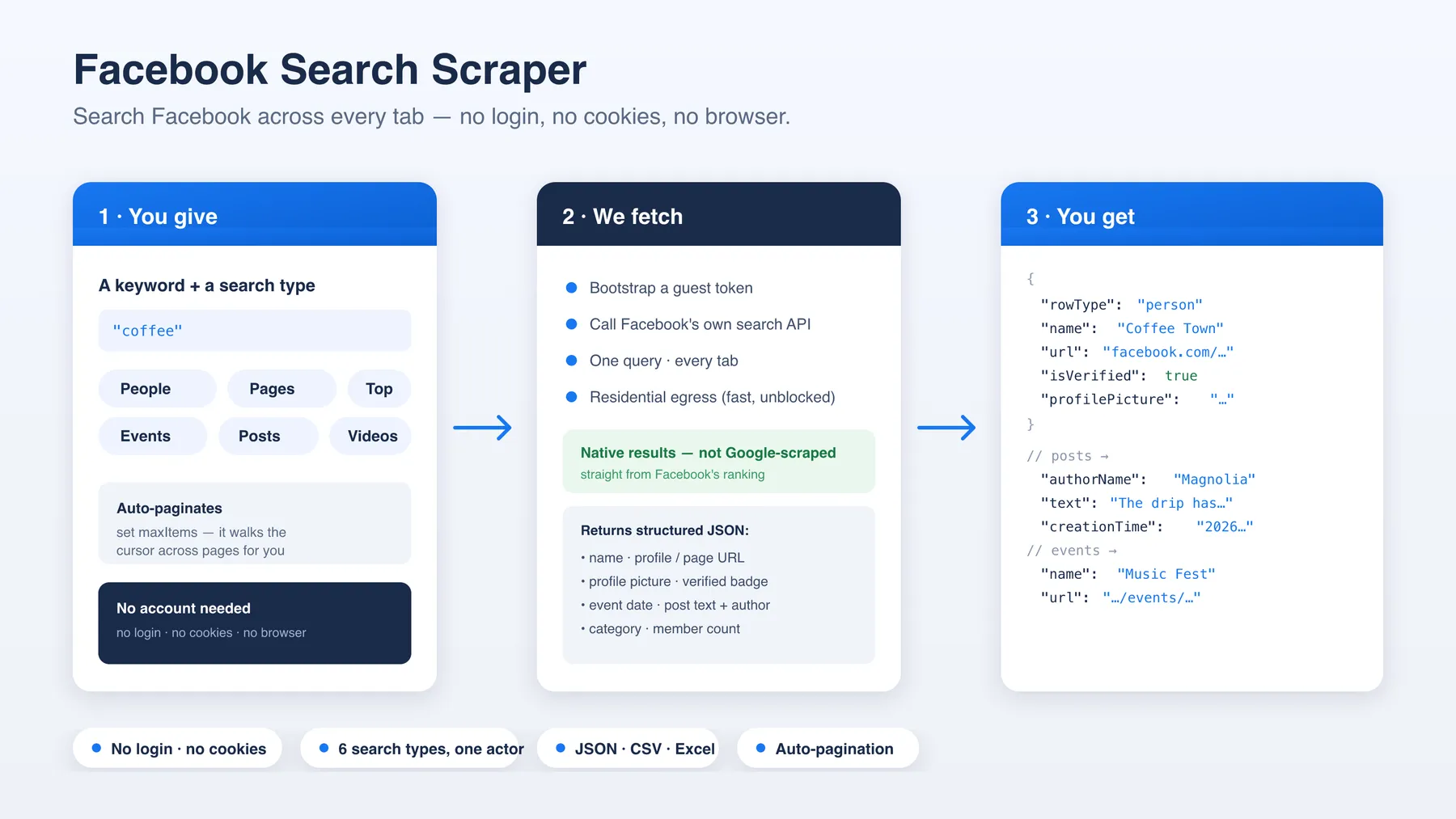
- You give a keyword (or several) and a search type.
- We fetch — run your search (one query serves every tab) and page through all the results.
- You get structured rows (JSON, CSV, or Excel), each tagged with a
rowType.
Supported search types
searchType | Returns | Key fields | City filter |
|---|---|---|---|
people | Profiles | name, profile URL, picture, verified, "Lives in" line | yes |
pages | Pages | name, page URL, picture, verified, description, website | yes |
places | Places / businesses | name, URL, picture, verified, description, website | yes |
events | Events | name, event URL, picture | yes |
posts | Public posts | text, author + author ID, permalink, time | no |
videos | Reels & videos | caption, reel URL, thumbnail, uploader + ID, time | no |
top | Mixed (all of the above) | per-entity fields | no |
Use cases
- Lead generation — find people and pages matching a niche, brand, or location.
- Brand & competitor monitoring — track public posts and pages mentioning a keyword.
- Event discovery — pull events matching a topic or city.
- Audience & influencer research — surface profiles and pages around a theme.
- Social listening — collect public post text + authors for a keyword over time.
Input configuration
| Field | Type | Notes |
|---|---|---|
searchType | select | top, people, pages, places, events, posts, videos |
searchQueries | array | One or more keywords to search |
location | string | Optional. City name to scope the search to, e.g. "Manchester, New Hampshire", "Manchester, NH", "London, UK" |
locationUid | string | Optional, advanced. The Facebook place UID directly; overrides location |
onlyPostsNewerThan | string | Optional. Start of a date window, e.g. 2026-01-01. Posts only |
onlyPostsOlderThan | string | Optional. End of the window, e.g. 2026-03-31 (that whole day included). Posts only |
recentPosts | boolean | Optional. Posts tab only. Sort by recent posts instead of Facebook's default ranking |
maxItems | integer | Max total results across all queries |
pageDelayMs | integer | Pause between result pages |
proxy | object | The default works out of the box. Switch to RESIDENTIAL if large runs slow down or fail |
Example input
Searching one city
location applies Facebook's own City filter, so places searches return
businesses in that city and people searches return profiles who list it as
their location:
At run start the actor asks Facebook's place lookup for the name, picks the city page, and logs what it chose along with the runners-up:
Name the region. Facebook's lookup is a string matcher, so
"Manchester, New Hampshire""Manchester, NH", "Manchester NH" and "Manchester, NH, USA" all
land on the same city page (US state and Canadian province codes are expanded
for you, as are UK, USA and UAE). A bare "Manchester" returns Manchester,
United Kingdom; a bare "London" returns London, Ontario, because that is the
first city Facebook lists. When the name is common, add the state or country.
Boroughs and large districts work too — "Brooklyn" resolves to the Brooklyn,
NY page and filters correctly — but small neighbourhoods return nothing, so
prefer the city.
Already have the UID? Put it in locationUid and the lookup is skipped. That
field accepts the bare number, a facebook.com/places/<uid>/ URL, or a Facebook
search URL with the City filter applied, and it takes precedence over location.
A few: London 106078429431815, Paris 110774245616525, Portland OR
112548152092705.
Two things to know. If Facebook has no place for the name, the run ends
immediately with a status message saying so — nothing is charged. And Facebook
has no city filter for posts, videos or top; set a location there and the
actor runs unfiltered and logs a warning instead of failing.
Output
Null fields are omitted from the samples below; every row carries the full key set, so CSV and Excel exports line up.
rowType: "page" / "place"
rowType: "person"
rowType: "event"
rowType: "post"
rowType: "video"
Key output fields
| Field | Description |
|---|---|
rowType | person / page / event / post / video |
name | Profile / page / event name (or post author) |
url | Facebook URL of the result |
id | Facebook numeric ID of the profile, page, place, event or post |
profilePicture | Avatar / cover image (video rows carry the thumbnail here) |
isVerified | Verified badge (people & pages) |
description | Page / place description from the result card |
website | The business's own site, unwrapped from Facebook's l.php redirect |
subtitle | The profile's location line, e.g. "Lives in San Antonio, Texas" |
locationDescriptor | Address or neighbourhood when Facebook appends one to the name |
text | Post body, or the video caption |
authorName / authorId / authorUrl | Post or video author, with their numeric ID |
postUrl / creationTime | Permalink and timestamp (posts & videos) |
query / searchType | The search that produced the row |
locationUid / locationName | The city UID the row was filtered by, and Facebook's label for it when it came from a location lookup (only when a city was set) |
FAQ
Do I need a Facebook account or cookies? No. The actor works fully logged-out, so there is nothing to provide.
Is this Facebook's real search? Yes. Results and ranking match what you'd see when you search on Facebook itself (not a Google site:facebook.com workaround).
Can I search a date range? Yes, on the posts tab. Set onlyPostsNewerThan and/or
onlyPostsOlderThan. Facebook's own date filter is month-granular at the edges and lets a few
out-of-window posts slip through — verified live: a 2019 window returned three posts dated into
January 2020. So the filter is used to narrow the crawl, and results are then trimmed to your exact
dates. Anything outside the window is never pushed and never charged, and the run log reports how
many were trimmed. Date windows do not apply to the other tabs; ask for one there and the run says so
rather than pretending to filter.
Can I search a specific city? Yes — set location to a city name ("Manchester, New Hampshire", "Manchester, NH", "London, UK") and people, pages, places and events searches are scoped to that city. The actor resolves the name to Facebook's place UID and logs the match plus the runners-up. If you already know the UID, locationUid skips the lookup. Facebook offers no city filter for posts, videos or top.
How do I search many cities? One run per city, each with its own location — for example from a loop or a scheduled task list. Every row is stamped with locationUid and locationName, so results from different runs merge cleanly.
Do I get the business's website? Yes, when the page publishes one — website holds the real destination, already unwrapped from Facebook's l.php redirect, so it drops straight into an enrichment step.
Do posts come with like and comment counts? No. Facebook hides engagement counts from logged-out visitors, and this actor never logs in. You get the body, author (with numeric ID), permalink and timestamp.
Which proxy should I use? The default works out of the box. For large runs, switch to RESIDENTIAL if runs slow down or fail.
How many results can I get? It auto-paginates until maxItems or the results run out. Each keyword returns its own paginated set.
Why isn't group search supported? Facebook gates group search behind a login, which this no-cookie actor deliberately avoids. People, pages, events, posts and videos are all available logged-out. To find groups, use our Facebook Groups Search Scraper: it finds groups by keyword without a login and returns each group's URL, exact member count, privacy and posts per day.
Notes & limitations
- Only public search results are returned (logged-out visibility).
- Group search is not available without a login and is intentionally omitted here; the Facebook Groups Search Scraper covers it.
- City filtering (
location/locationUid) covers people, pages, places and events; Facebook exposes no city filter for posts, videos or top. - City names are resolved with Facebook's own place lookup, which is a plain string match: add the state or country for common names, and spell out anything that is not a US/Canadian region code (
"Manchester, NH"works;"Madrid, ES"needs"Madrid, Spain"). - Reaction, comment and share counts are not returned — Facebook does not show them to logged-out visitors.
- Event start times are not shown in Facebook's search results; event rows carry the name, URL and cover image, and the date lives on the event page itself.
descriptionandwebsiteare present only when the page publishes them;subtitleappears on the minority of profiles that show a public location.- Facebook changes its site from time to time; the actor is maintained to keep pace.
Support
Found a bug or need a search type that isn't exposed? Open an issue on the Actor's Issues tab on Apify, or reach out via the Apify Store profile. Include your input JSON and the run ID.
Explore more scrapers
More Facebook and social tools from the same developer:
- Facebook Marketplace Scraper — newest Marketplace listings, fast
- Facebook Groups Search Scraper — find groups by keyword, with exact member counts and activity
- Facebook Public Group Posts & Comments — no cookies needed
- Facebook Comments Scraper — full comment threads for any public post
- Facebook Ads Library Scraper — ads intel with reach included
- Google Flights Scraper — fares & multi-city from $1/1k
🤖 For AI Agents & LLM Apps
Compact reference for AI agents calling this actor via the Apify MCP server or the Apify API (actor: memo23/facebook-search-scraper).
Purpose: Facebook's own native search across people, pages, places, events, posts and videos — fully logged-out (no account, no cookies), so results match Facebook's ranking rather than a Google site: workaround.
Minimal input:
Output: one row per result — rowType, id, name, url, profilePicture, isVerified, query, searchType. Pages and places add description and website (the business's own site, already unwrapped from Facebook's l.php redirect); people add subtitle (the "Lives in …" line); posts and videos add text, authorName, authorId, authorUrl, postUrl and creationTime. Every row carries the full key set with nulls where a field does not apply.
Behaviors an agent should know:
searchTypeselects the tab:top,people,pages,places,events,posts,videos(defaultpeople); one query serves every tab.locationscopes the search to one city by name ("Manchester, New Hampshire","Manchester, NH","London, UK"); the actor resolves it to a Facebook place UID at run start. Include the state or country for common names — a bare"London"picks London, Ontario. If Facebook knows no such place the run ends with a status message and zero rows, nothing charged. Works onpeople,pages,places,events; onposts,videosandtopFacebook has no city filter, so the actor ignores it and logs a warning.locationUidis the advanced form: pass the Facebook place UID directly (e.g.106078429431815= London) to skip the lookup. It overrideslocation. A UID that is not a place returns zero rows rather than an error.- Output rows carry
locationUidandlocationNamewhen a city was set, so multi-city runs merge cleanly. - Always set
maxItems(total across all queries, default 100) — the actor auto-paginates the result cursor until the cap or the results run out. - Group search is not supported (login-gated and deliberately omitted); only public, logged-out results are returned. For groups, call
memo23/facebook-search-groups-scraperwith{"searchQueries": ["your topic"]}. - The default proxy works well; switch to RESIDENTIAL only if large runs slow down or fail.
- Engagement counts (reactions, comments, shares) and event start times are not available logged-out and are never returned; do not prompt for them.
- Billing: Pay-per-event billing — see the Pricing tab on the actor page.
⚠️ Disclaimer
This actor collects publicly available data from Facebook search for legitimate purposes such as market research, lead generation, and social listening. You are responsible for how you use the data. Comply with Facebook's Terms of Service, applicable data-protection law (including the GDPR when handling personal data), and all local regulations. Do not use collected personal data for unsolicited contact where prohibited. This tool is not affiliated with, endorsed by, or connected to Facebook or Meta.
SEO Keywords
Facebook search scraper, Facebook scraper, Facebook people search, Facebook pages scraper, Facebook posts scraper, Facebook events scraper, Facebook search API, scrape Facebook without login, Facebook data extraction, social media scraper, Facebook profiles scraper, Facebook keyword search, Facebook lead generation, social listening tool, Facebook public data, no-cookie Facebook scraper, Facebook video search, Meta search scraper, Apify Facebook scraper, Facebook search results, Facebook search by city, Facebook search by location name, Facebook location filter, Facebook city UID, Facebook place ID search, Facebook location UID lookup, Facebook local business search, Facebook business website scraper, Facebook page description scraper, Facebook reels scraper.


![Facebook Ad Library Scraper · Meta Ads · Reach [From $0.3💰] avatar](https://images.apifyusercontent.com/bf6DAKrnMs_0oZXj6V0XGD7D1C-ESUBLCmhAdxV7R6Y/rs:fill:76:76/cb:1/aHR0cHM6Ly9hcGlmeS1pbWFnZS11cGxvYWRzLXByb2QuczMudXMtZWFzdC0xLmFtYXpvbmF3cy5jb20vbmduOHZSRVNUa3NleVdFNnAtYWN0b3ItZGVIQ2pzQVBLTUhyTlFZVzEtR3dVTlJ3ZW1PNC1GYWNlYm9va19pY29uXzIwMTMuc3ZnLnBuZw.webp)