
USAspending Federal Awards Monitor: Contracts & Grants
Pricing
from $2.00 / 1,000 award records
USAspending Federal Awards Monitor: Contracts & Grants
Track awarded US federal contracts, grants, loans and IDVs from USAspending.gov by recipient, UEI, agency, NAICS or PSC. Obligations and outlays kept separate, award links, and new/updated alerts between runs.
Pricing
from $2.00 / 1,000 award records
Rating
0.0
(0)
Developer

Cliqto Media
Maintained by CommunityActor stats
0
Bookmarked
2
Total users
1
Monthly active users
11 days ago
Last modified
Categories
Security
Limited permissionsShare
USAspending Federal Awards & Recipient Monitor finds US federal contracts, grants, loans and other awards in the official USAspending.gov data. Filter by recipient name or UEI, awarding agency, NAICS, PSC, keyword and dates. You get one clean row per award, with the recipient, the agencies, the obligated amount and the outlays as separate numbers, dates, codes and links to USAspending.
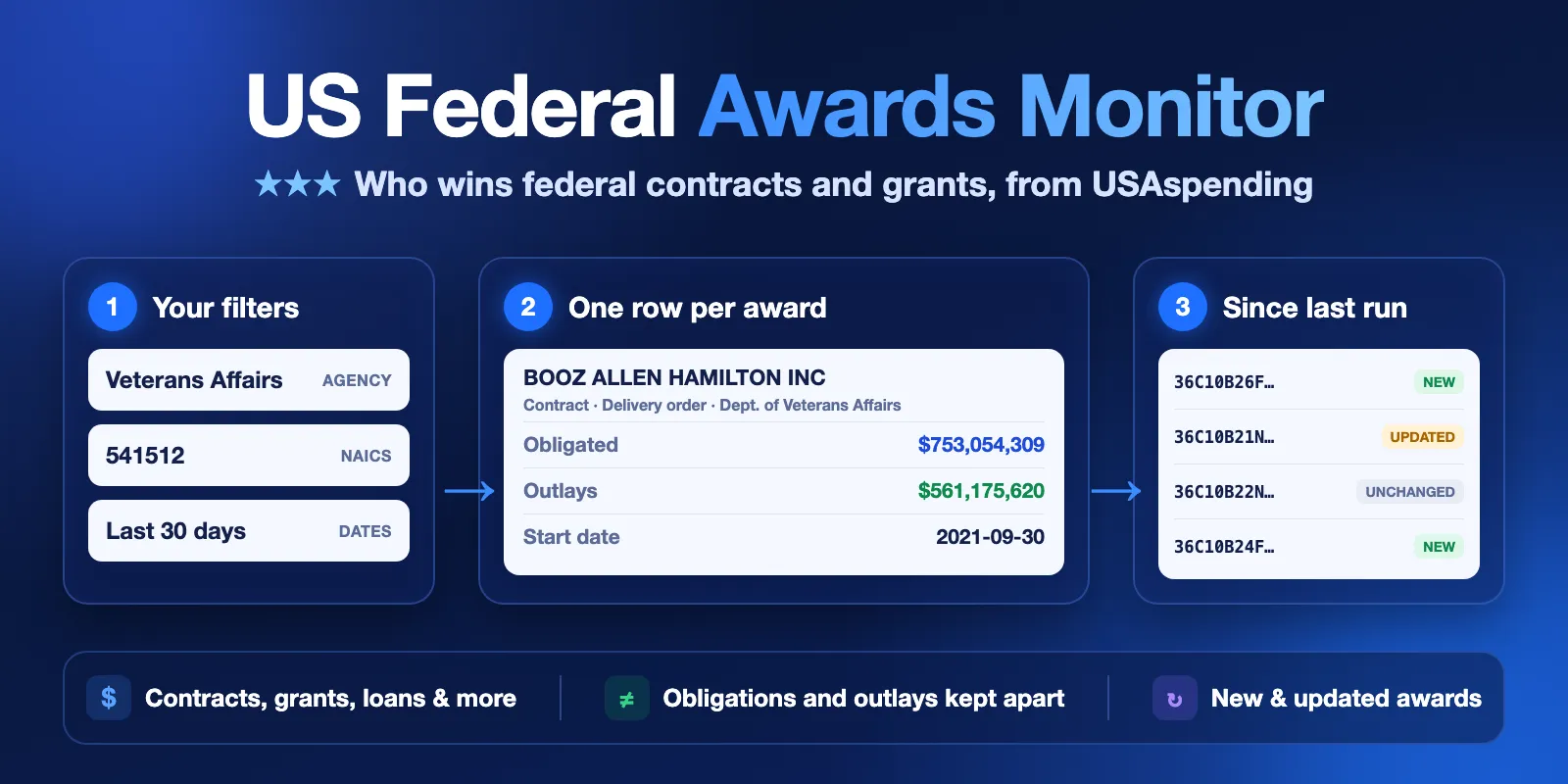
It is made for B2G sales and capture teams, due diligence and grant research. Save a monitor key and the next run shows only new and updated awards. No login and no API key are needed. The form example (20 Veterans Affairs IT contracts from the last 30 days) finishes in a few seconds and costs $0.042.
Contents
- What it does
- Quick start
- Use cases
- Input
- Output
- Pricing
- Limits
- API and integrations
- Troubleshooting
- FAQ
- Data source and licence
- Support
What it does
The Actor reads the public USAspending API of the U.S. Department of the Treasury. It runs the same award search as the USAspending.gov Award Search page, live, one request at a time.
- Award search. Pick award types (contracts, IDVs, grants, loans, direct payments, other assistance) and filters. Each award type is searched on its own, and
maxResultsapplies to each type. - Clear names. Agency names and abbreviations (
VA,NIH,DOD) are checked against the official agency list. A name that does not exist stops the run with suggestions. It does not silently return nothing. - Monitoring. With a
monitorKey, the Actor saves the awards it saw in your account. The next run marks each awardnew,updatedorunchanged, and by default writes only the new and updated ones.
Awards are money that the government already awarded. They are not open tenders or bids. For open opportunities, use SAM.gov.
Prime awards only. Sub-awards are not included, and IDVs (contract vehicles such as GWACs, BPAs and IDIQs) are their own award type, so the same money is not counted twice.
Good fit
- See who wins contracts at an agency for your NAICS or PSC codes.
- List all federal awards of a company or university by name or UEI.
- Watch an agency, a competitor or a market every week and get only the changes.
- Find grants or loans of an agency in a period, with the amount obligated and the amount already paid out.
Not a fit
- Open tenders, solicitations or bid deadlines. This is award data, not SAM.gov.
- Sub-awards, transaction history or contract officers.
- A full copy of USAspending. Use the official bulk downloads for that.
- Phone numbers, emails or company ownership data.
Quick start
- Open the Input tab. The form already has an example: contracts of the Department of Veterans Affairs, NAICS 541512 (computer systems design), last 30 days, 20 awards.
- Click Start.
- Open the Awards view in the Output tab. Check
recipientName,awardAmount,totalOutlaysandawardUrl. - Change the agency, codes or recipients to your own. To get only changes next time, add a
monitorKeysuch asva-it-contracts.
Expected result: 20 award rows in a few seconds, largest awards first.
Use cases
| Buyer job | Input | Output | Key fields |
|---|---|---|---|
| Who wins in my market | awardingAgencies + naicsCodes or pscCodes | contract rows | recipientName, recipientUei, awardAmount, awardingSubAgency |
| Company due diligence | recipients (name or UEI), several awardTypes | all award types of that recipient | awardTypeGroup, awardAmount, totalOutlays, recipientUrl |
| Grant research | awardTypes: ["grants"] + agency + dates | grant rows | assistanceListings, awardAmount, totalOutlays, description |
| Weekly competitor watch | filters + monitorKey, on a schedule | only new and updated awards | changeType, changedFields, previousValues |
Input
All filters are optional and combine with AND. Lists inside one filter combine with OR. Without any filter, the run returns the largest awards of the period.
| Field | Type | Default | Allowed values | What it does |
|---|---|---|---|---|
awardTypes | array | ["contracts"] | contracts, idvs, grants, loans, direct_payments, other | Which kinds of awards to search. Each type is a separate search. |
awardingAgencies | array of strings | all agencies | up to 10 | Department or sub-agency, full name or abbreviation: Department of Veterans Affairs, VA, National Institutes of Health, NIH. Unknown names stop the run with suggestions. |
recipients | array of strings | all recipients | up to 20 | Recipient name or 12-character UEI. Names use the USAspending text search, so check recipientName and recipientUei. |
naicsCodes | array of strings | all | up to 50; 2–6 digits | Industry codes. Contracts and IDVs only. |
pscCodes | array of strings | all | up to 50; 1–4 letters or digits | Product and Service Codes, like DA01. Contracts and IDVs only. |
keywords | array of strings | none | up to 10; 3–100 characters | Words in the award description and other text fields. |
dateFilter | string | activity | activity, new_awards, last_modified | activity: any transaction in the range. new_awards: the first action is in the range. last_modified: the record changed in the range. |
lookbackDays | integer | 30 | 1–3650 | Days back from dateTo. Ignored when dateFrom is set. |
dateFrom, dateTo | date | dateTo = today (UTC) | YYYY-MM-DD | Exact range. Search data starts on 2007-10-01; earlier dates move to that day. |
sortBy | string | amount | amount, last_modified | Which awards come first when there are more than maxResults. Loans sort by face value. |
maxResults | integer | 100 | 1–500 | Maximum awards per award type. |
monitorKey | string | none | 1–40 letters, digits or dashes | Saves this run's awards and compares the next run with them. Use one key per saved search. |
previousDatasetId | string | none | dataset ID | Compares with the dataset of an earlier run of this Actor. Use this or monitorKey, not both. |
onlyChanges | boolean | true | With a comparison, skip unchanged awards. You do not pay for skipped awards. |
NAICS and PSC exist only on contracts and IDVs. If you add them with other award types, those types are skipped with a warning. If only such types are left, the run stops with INVALID_INPUT.
Input examples
All awards of one company, by UEI:
Weekly watch of new NIH grants, only changes:
Output
Each Dataset row is one award. Use the Awards view for the main fields and the Changes view for monitoring. The key-value store has a RUN_SUMMARY record with the run status and counts.
Fields
| Field | Meaning | Example |
|---|---|---|
awardTypeGroup | The award type you selected | "contracts" |
generatedInternalId | Stable USAspending award key. Use it to join and compare. | "CONT_AWD_36C10B21N10150057_3600_VA11816D1015_3600" |
awardId, awardType | PIID or FAIN, and the detailed type | "36C10B21N10150057", "DELIVERY ORDER" |
recipientName, recipientUei, recipientId | Recipient and its IDs | "BOOZ ALLEN HAMILTON INC", "KHK6E1JW9C15" |
recipientLocation | City, county, state, ZIP, country, congressional district | {"city": "EATONTOWN", "stateCode": "NJ", …} |
awardingAgency, awardingAgencyCode, awardingSubAgency, awardingSubAgencyCode | Agency that made the award | "Department of Veterans Affairs" |
fundingAgency, fundingSubAgency | Agency that pays | "Department of Veterans Affairs" |
awardAmount | Amount obligated (committed), in USD. For loans it is null; see the loan fields. | 753054309.17 |
totalOutlays | Amount paid out so far, in USD. Kept separate from awardAmount; never added up. | 561175619.99 |
loanFaceValue, loanSubsidyCost | Loans only: face value and subsidy cost | null |
covid19Obligations, infrastructureObligations | Part of the obligation from COVID-19 or infrastructure (IIJA) funds | 1544364.8 |
currency | Always USD | "USD" |
startDate, endDate | Period of performance (for loans, startDate is the issued date). endDate is always null for IDVs and loans (see Limits). | "2021-09-30", "2027-09-23" |
lastDateToOrder | IDVs only: last date to place orders | null |
baseObligationDate | Date of the first obligation | "2021-09-29" |
lastModifiedDate | When USAspending last changed the record, as published (no time zone) | "2026-09-25T16:41:40" |
naicsCode, naicsDescription, pscCode, pscDescription | Contracts and IDVs | "541512", "DA01" |
assistanceListings | Grants, loans and other assistance: CFDA / Assistance Listing numbers and titles | [] |
description | Award description | "THE CONTRACTOR SHALL PROVIDE …" |
placeOfPerformance | Where the work is done | {"city": "HERNDON", "stateCode": "VA", …} |
awardUrl, recipientUrl | USAspending pages | "https://www.usaspending.gov/award/CONT_AWD_…" |
source | Provider, endpoint and fetchedAt | |
changeType | initial (first monitor run), new, updated, unchanged, or null without a comparison | "updated" |
changedFields, previousValues | For updated: which fields changed and their old values | ["totalOutlays"], {"totalOutlays": 540000000} |
null means the source has no value. It never means zero. Negative amounts (de-obligations) are kept as published.
An award is updated when one of these fields changes: awardAmount, totalOutlays, loanFaceValue, loanSubsidyCost, startDate, endDate, lastDateToOrder, lastModifiedDate. An award is new when it was not in the saved list; this can also be an older award that has now moved into your top maxResults.
Output example
A trimmed contract row. The award values are real; the change fields show what a monitor run adds when outlays change:
Run summary
RUN_SUMMARY.status is one of:
| Status | Meaning | Run result |
|---|---|---|
COMPLETE | Rows were written. truncated: true means the source has more awards than maxResults. | succeeded |
NO_RESULTS | The source answered, and no award matches your filters. | succeeded |
NO_CHANGES | Comparison run: no new or updated awards. | succeeded |
PARTIAL | Some award types failed or time ran out; the rows you got are correct. | succeeded |
CAPPED | Your maximum cost per run was reached. | succeeded |
ERROR | USAspending was not available or changed its format. This is not an empty result. | failed |
INVALID_INPUT | The input is wrong, or an agency name was not found. message explains why. | failed |
RUN_SUMMARY also has counts (fetched, written, charged, new, updated, unchanged), one groups entry per award type with its own status, the filters used (with matched agency names), the comparison baseline, warnings and the data source.
Pricing
Pay per event. Platform usage is included.
| Event | Price | When |
|---|---|---|
| Actor start | $0.002 | Once per run (per GB of memory; the default 256 MB counts once) |
| Award record | $0.002 | Each award row written to the Dataset |
Unchanged awards hidden by onlyChanges are free. A run with no results, no changes, an input error or a USAspending error costs only the start.
| Run | Example cost |
|---|---|
| 10 awards | $0.022 |
| 20 awards (form example) | $0.042 |
| 100 awards | $0.202 |
| 1,000 awards (for example 500 contracts + 500 grants) | $2.002 |
| Weekly monitor run with 5 changes | $0.012 |
| No results or no changes | $0.002 |
Set a maximum cost per run in the run options to cap your spend. The Actor stops before a row that does not fit and reports CAPPED.
Limits
- Up to 500 awards per award type, so up to 3,000 rows per run with all six types. In our test, 3,000 rows took about 85 seconds.
- The Actor sends one request at a time, with a pause between requests, and retries when the source is busy. USAspending does not publish a rate limit.
- Internal time budget is 270 seconds. If time runs out, you get the rows found so far and
PARTIAL. - If USAspending is down or does not answer (up to 30 seconds per try and about 60 seconds per request in total, at most 3 tries and 2 timeouts), the run stops early and does not ask for the other award types. You get the rows found so far.
- Monitor snapshots keep up to 20,000 awards per
monitorKey.previousDatasetIdreads up to 20,000 rows. totalOutlays,endDateand other values come from the USAspending search index. The search index can be behind the award page on USAspending.gov, so outlays on the award page can be higher.endDateis alwaysnullfor IDVs (uselastDateToOrder) and for loans: the search index does not have it.- Loans have no
awardAmountin the source. UseloanFaceValueandloanSubsidyCost. For loans,startDateis the loan's issued date.
API and integrations
Start a run with the same JSON input through the Apify API (POST /v2/acts/cliqtomedia~usaspending-federal-awards-monitor/runs), then read the Dataset. Export to CSV, Excel or JSON, or send the rows to Google Sheets, Slack or a webhook with the usual Apify integrations.
For monitoring, save the input as a task with a monitorKey and add an Apify schedule (for example every Monday). Each run then gives only new and updated awards. Join rows on generatedInternalId.
Use with AI agents (MCP)
AI agents can call this Actor through the Apify MCP server: add https://mcp.apify.com?tools=cliqtomedia/usaspending-federal-awards-monitor to your MCP client (Claude, Cursor, VS Code and others). The MCP server needs your Apify account (OAuth sign-in or an Apify API token); USAspending itself needs no key. The agent builds the input from the input schema. The smallest useful input:
Key output fields for an agent: recipientName, awardTypeGroup, awardAmount (obligated), totalOutlays (paid), awardingAgency, startDate, awardUrl, and RUN_SUMMARY.status. A call with 10–100 awards usually finishes in under 10 seconds and costs $0.022–$0.202. Very large runs (thousands of rows) can take over a minute, so the agent may need to poll the run for its result.
Troubleshooting
| Symptom | Check | Action |
|---|---|---|
INVALID_INPUT, agency not found | RUN_SUMMARY.message | Use one of the suggested names, or the full official name. |
NO_RESULTS | RUN_SUMMARY.filters | Widen the date range, remove a filter, or try dateFilter: "activity". |
| Other recipients than expected | recipientName, recipientUei | Name search is text search. Use the UEI for an exact recipient. |
| Grants missing with NAICS | RUN_SUMMARY.warnings | NAICS and PSC exist only on contracts and IDVs. Remove them for grants. |
truncated: true | groups[].hasMoreAtSource | Raise maxResults (up to 500) or narrow the filters. |
| Outlays differ from the USAspending award page | totalOutlays | The search index can be behind the award page. Open awardUrl for the latest value. |
ERROR | RUN_SUMMARY.message | USAspending was down or busy. Run again later. Your monitor snapshot is not changed by a failed run. |
FAQ
Are these open tenders I can bid on?
No. These are awards that were already made. For open opportunities, use SAM.gov.
What is the difference between awardAmount and totalOutlays?
awardAmount is the money the agency obligated (committed). totalOutlays is the money already paid out. They are different numbers, so the Actor never adds them up.
Do I need an API key?
No. USAspending is open and free. You only need your Apify account.
How fresh is the data?
Each run reads USAspending live. Agencies report awards to USAspending with some delay, so the newest awards can appear days or weeks after they are made. Each row has lastModifiedDate (source) and source.fetchedAt (our read time).
Does monitoring cost more?
No. Unchanged awards are not written and not charged when onlyChanges is on.
Data source and licence
Data: USAspending.gov API, U.S. Department of the Treasury, Bureau of the Fiscal Service. U.S. federal government data is in the public domain. Recipient business names and addresses can include D&B Open Data. Source of that data: Dun & Bradstreet, Inc. (D&B). USAspending's Limitation on Permissible Use of D&B Data asks you to name D&B when you use it and not to use it in bulk. The Actor does not output DUNS numbers. This Actor is independent and not endorsed by the U.S. Treasury or USAspending.gov.
Support
Use the Issues tab of this Actor. Add the run ID, your input (without private data) and RUN_SUMMARY.status and message. Do not send API tokens.


