

Xiaohongshu (RedNote) Notes Scraper, No Login
Pricing
from $1.74 / 1,000 notes
Xiaohongshu (RedNote) Notes Scraper, No Login
Get public Xiaohongshu (RedNote) notes with title, text, hashtags, images, video, likes, saves, comments, author and date from note links, author profiles or the trending feed. No login, no cookies.
Pricing
from $1.74 / 1,000 notes
Rating
0.0
(0)
Developer

Cliqto Media
Maintained by CommunityActor stats
0
Bookmarked
2
Total users
1
Monthly active users
5 days ago
Last modified
Categories
Features
Share
Get public Xiaohongshu (RedNote, 小红书) notes as clean data rows: title, text, hashtags, images, video, likes, saves, comments, shares, author and date. Start from note links, author profiles or the trending Explore feed.
It is for marketers, brand teams and researchers who track content on RedNote. The form opens ready to run: 20 full notes from the trending feed in under a minute, for about $0.06. No login and no cookies.
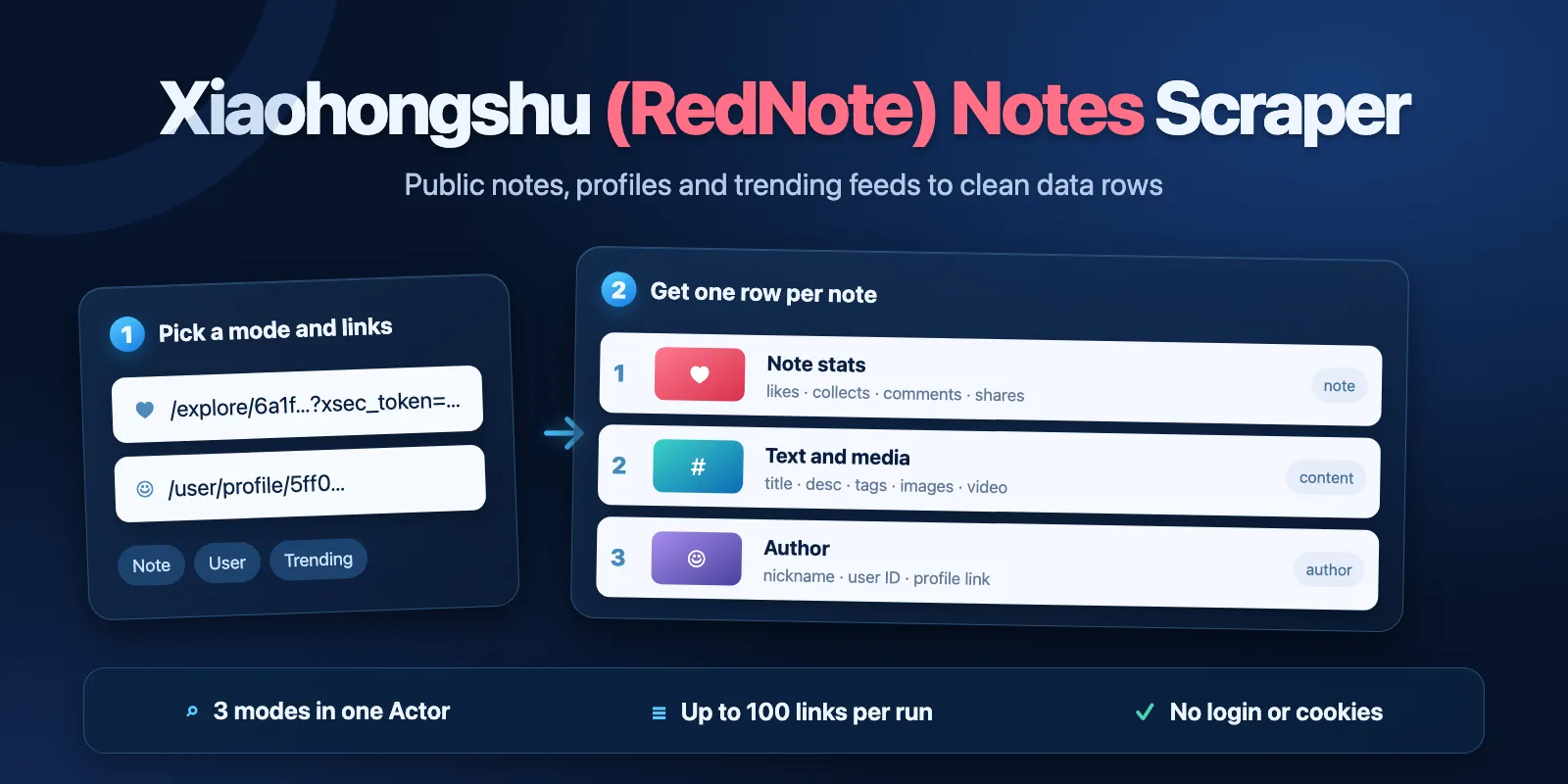
Table of contents
- What it does
- How it works
- Quick start
- Use cases
- Input
- Output
- Pricing
- Limits
- API, export and integrations
- Troubleshooting
- FAQ
- Related Actors
- Support
What it does
The Actor reads public Xiaohongshu pages the same way a visitor sees them and saves one row per note. It has three modes:
- Note links — full notes from your links: text, hashtags, all images, video link, counters, author, dates.
- Author profiles — the notes a profile shows to visitors (about 30 latest per profile). Xiaohongshu hides note text and note IDs on profiles from visitors, so these rows are short "cards": title, cover, likes, author, date.
- Trending feed — notes from the Explore feed or one of its channels (fashion, food, travel and more). Each note is opened and saved in full.
It does not log in and does not search by keyword: Xiaohongshu shows search only to signed-in users.
Good fit
- Check likes, saves and comments of your own or competitor notes.
- See what the Explore feed of a channel shows right now, on a schedule. The feed mixes new and older notes, so check
createdAtif you need only recent ones. - Watch the latest posts of creators you work with.
How it works
- The Actor opens each public note page, profile page or Explore feed page.
- It reads the note data from the page and cleans it: hashtags without the
[话题]mark, empty counters as0, dates in ISO format. - It saves one Dataset row per note, and a short run report (
RUN_SUMMARY) with a status for every link.
Quick start
-
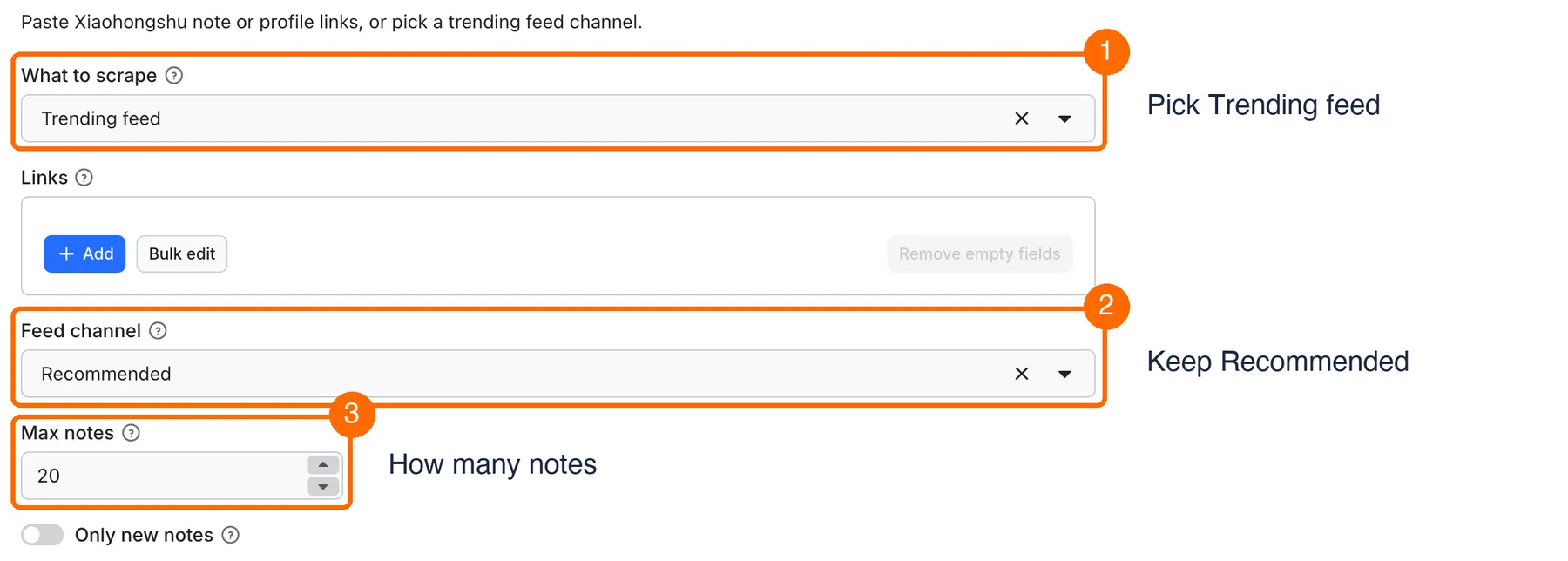
Open the Input tab. What to scrape is already
Trending feed(box 1). To use your own links, pickNote linksorAuthor profilesand add them in Links. -
Keep Feed channel =
Recommended, or pick another channel (box 2). -
Keep Max notes =
20(box 3), then click Start at the bottom of the form. -
Open the Output tab and check the title, author, likes, saves and comments (box 4).
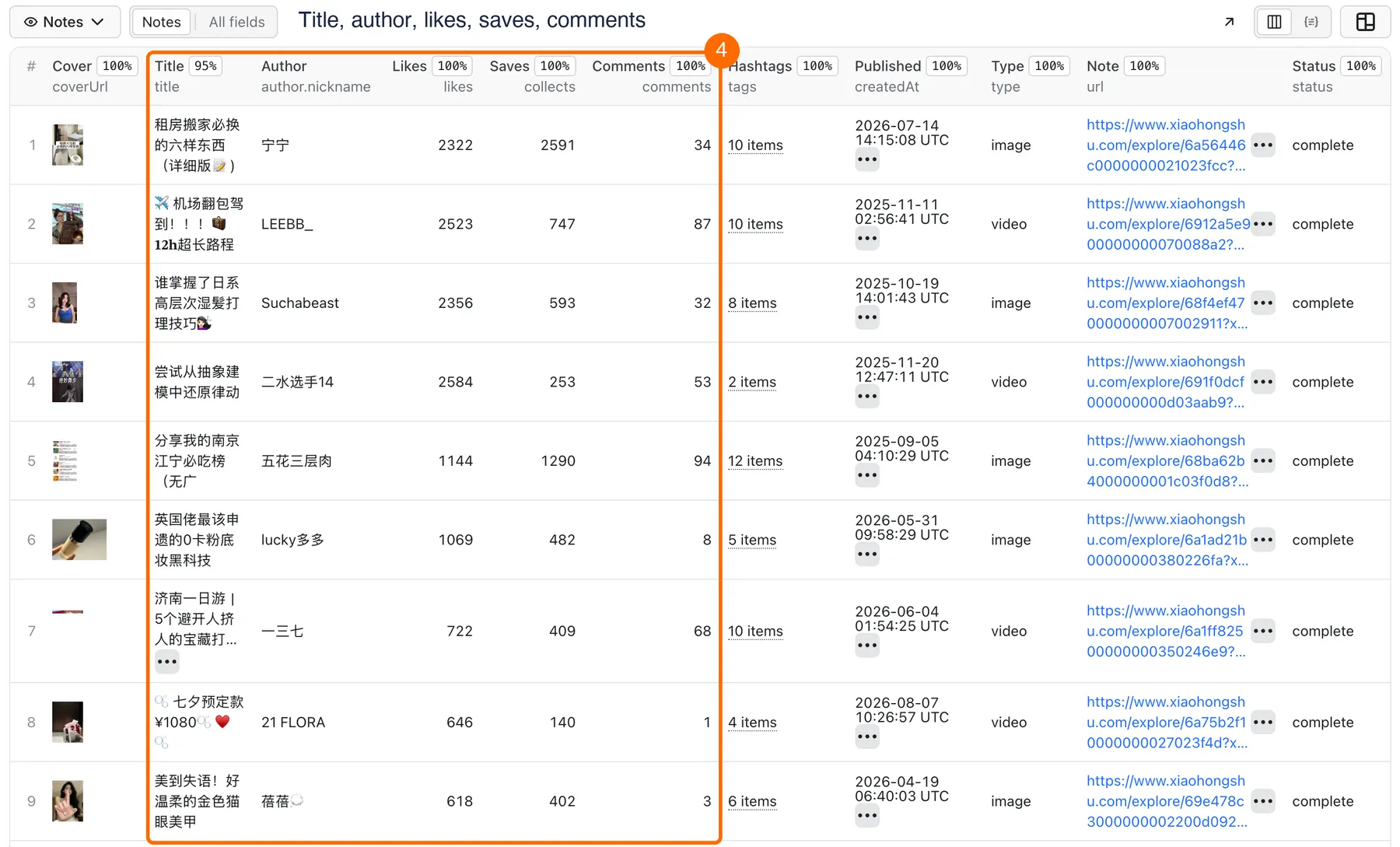
Expected result: 20 full notes in under a minute (our test runs took 15 and 33 seconds) for about $0.06.
Use cases
| Buyer job | Input path | Output entity | Key fields | Next integration |
|---|---|---|---|---|
| Track counters of chosen notes | mode: note, urls | full note | likes, collects, comments, shares | schedule + export to Google Sheets |
| Find trending content in a niche | mode: trending, channel | full note | title, tags, likes, createdAt | schedule + onlyNew |
| Watch creators' new posts | mode: user, urls | note card | title, likes, coverUrl, createdAt, author.followers | schedule + onlyNew, webhook |
Input
Input fields
| Field | Plain name | Type | Required | Default / prefill | Allowed values | Effect | Example | Recommendation |
|---|---|---|---|---|---|---|---|---|
mode | What to scrape | string | yes | default note, prefill trending | note, user, trending | picks the source | trending | note for exact notes, trending for discovery |
urls | Links | array of strings | in note and user modes | none | note links with xsec_token, xhslink.com share links, profile links, 24-character user IDs | what to open | https://www.xiaohongshu.com/user/profile/5ff0e6410000000001008400 | up to 100 note links or 20 profiles; duplicates are removed |
channel | Feed channel | string | no | default and prefill recommend | recommend, fashion, food, cosmetics, movies, career, relationships, home, gaming, travel, fitness, video | Explore channel | food | only for trending |
maxItems | Max notes | integer | no | 20 | 1–500 | most notes in the whole run | 100 | you pay per saved note, so set it to what you need |
onlyNew | Only new notes | boolean | no | false | true / false | skips notes this account already got before | true | for scheduled runs |
stateName | Memory name | string | no | default | letters, digits, - | which memory onlyNew uses | food-daily | one name per monitoring task |
proxyConfiguration | Proxy | object | no | Apify Proxy (datacenter) | Apify Proxy settings | how pages are fetched | — | keep the default; it is included in the price. Residential and other paid proxy groups are not used; your own proxy URLs work |
deliveryConnector | Send results to (optional) | string | no | none | one of your Apify MCP connectors | posts a short run summary to Slack or Notion | your Notion connector | leave empty if you do not need it |
deliveryTarget | Notion page or channel (optional) | string | no | none | a Notion page link or a Slack channel ID | where the summary goes | a Slack channel ID | needed only with deliveryConnector |
Note links must keep their xsec_token=… part. Xiaohongshu opens a note to visitors only with this token. Links copied from Share in the app or from the browser address bar have it. The token does not last forever: after some time the same link stops opening and gives a free not_found row. If that happens, copy a fresh link. Trending and profile runs do not need a token from you.
Interacting settings
| When | Input A | Input B | Effective behavior | Example | Cost/result effect |
|---|---|---|---|---|---|
| Many links | urls | maxItems | stops when maxItems notes are saved; links not opened get the status skipped | 20 profiles, maxItems: 25 | you pay for 25 notes only |
| Monitoring | onlyNew | stateName | notes saved before under the same memory name are skipped | daily run, stateName: food-daily | only new notes are charged |
| Trending | mode: trending | maxItems | Xiaohongshu shows visitors about 180–280 notes of a channel per run | maxItems: 500 | you get about 180–280 and a warning in RUN_SUMMARY |
Input examples
Full notes from links
Expected behavior: opens the note and saves it. This example link can expire; use a fresh one if you get not_found.
Expected output: one full note with title, desc, tags, likes, collects.
Limit or cost note: one start fee and one Note event.
Daily trending in one channel
Expected behavior: reads the fashion feed and opens new notes.
Expected output: up to 100 full notes with channel: "fashion".
Limit or cost note: about 180–280 notes per run at most; the next run pays only for new notes.
Output
Output fields
| Field | Meaning | Type | Can be empty? | Example / enum | Source / notes |
|---|---|---|---|---|---|
noteId | note ID | string | yes, on profile cards | 64abf31b00000000120125be | Xiaohongshu hides IDs on profiles from visitors |
url | note link that opens | string | yes, on profile cards | https://www.xiaohongshu.com/explore/…?xsec_token=… | with a fresh token |
title | title | string | yes | 大家要的短裙来咯 | some notes have no title |
desc | note text | string | yes, on cards | text with #hashtags | [话题] marks removed |
type | note type | string | yes | image, video | |
author | author | object | yes | {userId, nickname, avatarUrl, profileUrl, redId, followers, following, likesAndCollects, location} | public fields only. redId, followers, following, likesAndCollects and location come from the profile page, so they are filled in user mode and null in other modes. The site rounds the numbers: 10+ becomes 10, 1万+ becomes 10000 |
likes | likes | integer | yes | 2526 | big numbers are rounded by the site: 8.7万 becomes 87000 |
collects | saves | integer | yes, on cards | 646 | rounded like likes |
comments | comments | integer | yes, on cards | 140 | the site shows an empty value for zero; we save 0 |
shares | shares | integer | yes, on cards | 151 | |
tags | hashtags | array of strings | no (can be []) | ["ootd穿搭"] | |
images | images | array of objects | no (can be []) | [{url, width, height}] | all images of the note |
coverUrl | cover image | string | yes | image link | |
videoUrl | video stream | string | yes | .mp4 link | video notes only |
createdAt | publish time | string (ISO) | yes | 2023-07-10T12:01:31.000Z | |
updatedAt | last edit time | string (ISO) | yes | not on cards; can be earlier than createdAt, as the site shows it | |
ipLocation | author region as the site shows it | string | yes | 浙江 | often empty: the site does not show it on many notes |
detail | how complete the row is | string | no | full, card | card = profile or feed card only |
mode | mode that found the note | string | no | note, user, trending | |
channel | feed channel | string | yes | fashion | trending only |
inputUrl | your link | string | yes | empty in trending | |
status | row status | string | no | complete, partial | partial = feed card saved, note page did not open |
error | reason for partial | string | yes | ||
fetchedAt | when it was collected | string (ISO) | no |
Moving from another RedNote scraper? Common names: id → noteId, engagement.liked_count → likes, collected_count → collects, comments_count → comments, shared_count → shares, video → videoUrl, timestamp → createdAt.
Output entities and surfaces
| Situation | Dataset/API/KVS/live view | Result shape | User action |
|---|---|---|---|
| Normal item | Dataset, view Notes | one row per note, status: complete | open, export or use likes, tags |
| Domain-empty result | Dataset holds only free not_found rows, RUN_SUMMARY | status: not_found rows and inputs[] with the reason | check the link and its xsec_token |
| Partial result | Dataset | status: partial, detail: card, no text | run the note link again in note mode |
| Source stopped answering partway | Dataset, RUN_SUMMARY | saved rows stay, the run ends as Succeeded, status: partial, stopReason: SOURCE_ERROR, a warning in warnings | run again for the rest |
| Technical failure with nothing saved | RUN_SUMMARY | the run ends as Failed, status: failed, stopReason, message | try again later |
Output example
This is one real row from the fashion feed; image and video links are shortened. null means the site did not show this value to a visitor. A profile card has detail: "card", noteId: null, url: null, desc: null and only likes from the counters, and its author also has redId, followers, following, likesAndCollects and location.
Send results to Slack or Notion
Pick your connector in the optional deliveryConnector field. After the run saves its data, the Actor posts a short summary (up to 25 rows and a link to the full dataset) there. Put a Notion page link or a Slack channel ID in deliveryTarget: in Notion every run is added on top of that one page, so your workspace does not fill up with new pages. A delivery error never fails the run and costs nothing extra. Connect a service once in Apify Console → MCP connectors.
Use case → fields
| Buyer job | Input path | Output entity | Key fields | Next integration |
|---|---|---|---|---|
| Track counters of chosen notes | mode: note, urls | full note | likes, collects, comments, shares | schedule + export to Google Sheets |
| Find trending content in a niche | mode: trending, channel | full note | title, tags, likes, createdAt | schedule + onlyNew |
| Watch creators' new posts | mode: user, urls | note card | title, likes, coverUrl, createdAt, author.followers | schedule + onlyNew, webhook |
Pricing
Pricing unit
You pay per event:
- Actor Start — $0.01 per run. It scales with run memory: one event per GB, at least one. The default memory is 256 MB, so it is one event.
- Note — per saved note row: $2.49 per 1,000 notes on the free plan, lower on paid plans (down to $1.74 per 1,000 on Gold).
Every saved row is a Note event, also a partial row (feed card without text). Links that are not found, fail or are skipped are free. A run with no notes costs only the start fee. A monitoring run with onlyNew and no new notes costs only the start fee. A failed or stopped run is charged the start fee and the notes it saved. Platform usage and the proxy are included.
Cost examples
| Scenario | Input scope | Expected item/event count | Base charge | Optional charge | Stop/cap behavior |
|---|---|---|---|---|---|
| One note | 1 note link | 1 note | $0.0125 | none | — |
| Default | 20 notes | 20 notes | $0.06 | none | stops at maxItems |
| Trending run | one channel, maxItems: 100 | 100 notes | $0.259 | none | about 180–280 at most per run |
| Large run | one channel, maxItems: 300 | 280 notes, measured in our largest test | $0.707 | none | the feed ended at 280 |
| Nothing found | 100 deleted note links | 0 notes | $0.01 | none | statuses in RUN_SUMMARY |
Prices are for the free plan. On Gold, 100 notes cost $0.184.
Limits
- No keyword search: Xiaohongshu shows search only to signed-in users.
- Note links need their
xsec_token. A bare/explore/<id>link, or a link with an expired token, givesnot_found. - Profiles show visitors about 30 latest notes, as short cards without text, hashtags or note IDs.
- Xiaohongshu refuses profile pages more often than note pages. A run with many profiles can stop early with
SOURCE_ERROR; rows saved before the stop stay in the Dataset, and the run still ends as Succeeded with a warning. For big lists, use several smaller runs. - The trending feed shows visitors about 180–280 notes per channel per run (280 in our largest test). For more, run it on a schedule with
onlyNew. - Up to 100 note links or 20 profiles per run. In our tests 20 profiles gave 500 short cards in one run and stopped at 246 after a refusal in another; see the line above.
- The Actor stops opening pages 240 seconds after the start (
stopReason: TIMEOUT) and keeps the saved rows. - If you set a maximum charge per run, the run stops there (
stopReason: CHARGE_LIMIT) and keeps the saved notes. - "Only new notes" remembers the last 50,000 notes per Memory name. Older ones can count as new again. Memory name (
stateName) takes up to 40 characters: letters, digits and-. - The memory is kept in a store named
xiaohongshu-seen-<name>. If that name is taken and not available to the Actor, it usesxiaohongshu-scraper-m-<name>. - A page larger than 5 MB is not read. Its note is not saved and not charged.
- No comments text, no follower lists, no private profiles. Contacts from profile bios are not collected.
- Counters change all the time; a row shows the value at
fetchedAt. - Image and video links are signed by Xiaohongshu and can stop working after some time. Download the files soon if you need them.
API, export and integrations
- Source: public pages of xiaohongshu.com, opened as a visitor.
- API: start the Actor with the same JSON input and read the Dataset items.
- Export: JSON, CSV, Excel and other Dataset formats from the Output tab.
- Scheduling: create a Task with
onlyNew: trueand astateName, then add a schedule. - Webhooks / no-code: use Apify integrations to send new rows on run finish.
Use with AI agents (MCP)
- MCP server with only this Actor:
https://mcp.apify.com?tools=cliqtomedia/xiaohongshu-scraper. - Smallest useful input:
{"mode": "trending", "channel": "recommend", "maxItems": 20}. It gives 20 full notes for about $0.06. - Key output fields:
titleanddesc(note text),likes,collectsandcomments(engagement),tags(hashtags),author.nickname. - One note takes a few seconds; 50 note links took 19 seconds; 100 note links took 30 seconds; 20 trending notes took 15–33 seconds; a full trending run of 280 notes took about 3 minutes. Up to 100 note links or 20 profiles per run.
Troubleshooting
The run saved 0 notes
Symptom: the Dataset has only free status: not_found rows and RUN_SUMMARY lists not_found with "note not available: deleted, private or the share token expired".
Likely reason: the note was deleted or hidden, or the link has no xsec_token, or the token is old.
Check: open the link in a private browser window.
Action: copy a fresh link from Share in the app and run again.
The run failed with "Xiaohongshu did not answer"
Symptom: the platform run is Failed, RUN_SUMMARY.status is failed, stopReason is SOURCE_ERROR, and no notes were saved.
Likely reason: Xiaohongshu refused many requests in a row. The Actor stops early so you do not pay for an empty long run.
Check: RUN_SUMMARY.counts.blocked.
Action: try again later.
The run succeeded with "Xiaohongshu stopped answering partway"
Symptom: the run is Succeeded, it has some notes, RUN_SUMMARY.status is partial and warnings has this message.
Likely reason: Xiaohongshu began to refuse requests after a part of the run. You paid only for the saved notes.
Action: keep the saved notes and run again for the rest, with fewer links per run.
A warning says "asked to slow down"
Symptom: warnings in RUN_SUMMARY says Xiaohongshu asked to slow down (HTTP 429).
Likely reason: too many requests through too few proxy addresses. The Actor lowers its pace by itself and goes on, so the run only takes longer.
Action: use fewer notes per run or more proxy addresses.
A warning says the "Only new notes" memory could not be opened or saved
Symptom: warnings in RUN_SUMMARY names the memory; the run is Succeeded and has its notes.
Likely reason: a storage with the same name already exists on your account and the Actor has no access to it.
Check: Apify Console → Storage → Key-value stores, a store named xiaohongshu-seen-<Memory name>.
Action: use another Memory name. Notes from earlier runs may repeat once.
Trending gave fewer notes than maxItems
Symptom: a warning "The guest feed gave … new notes".
Likely reason: Xiaohongshu shows visitors only part of a channel per run.
Action: run it on a schedule with onlyNew.
A row has status: partial
Symptom: a feed row with title and likes but no text.
Likely reason: the note page did not open in time.
Action: run its url again in note mode.
FAQ
Do I need a Xiaohongshu account or cookies?
No. The Actor reads only what any visitor sees.
Why are some ipLocation or title values empty?
The site does not show them on many notes. null means "not shown", not an error.
Why do profile rows have no text and no note ID?
Xiaohongshu shows visitors only note cards on a profile. To get the full note, open it in the app, copy its link and use note mode.
Do I pay for links that do not work?
No. Only saved rows (also partial ones) and the start fee are charged.
Related Actors
- Bilibili Scraper: videos, comments and creators from Bilibili, no login.
- Weibo Scraper: posts, comments and profiles from Weibo, no login.
- Douyin Scraper: videos, search and trends from Douyin, no login.
Support
For a bug, question or feature request, open the Actor's Issues tab on Apify. Include the run ID, the mode and the error text from RUN_SUMMARY. Do not send tokens or cookies.


