

Bilibili Scraper: Videos, Comments & Creators, No Login
Pricing
from $2.40 / 1,000 data rows
Bilibili Scraper: Videos, Comments & Creators, No Login
Scrape public Bilibili data with no login: keyword search, video stats, up to 2,000 root comments per video and creator profiles with their videos. Views, likes, coins, favorites, danmaku, tags and comment text in clean rows, with a free status row for not-found inputs.
Pricing
from $2.40 / 1,000 data rows
Rating
0.0
(0)
Developer

Cliqto Media
Maintained by CommunityActor stats
0
Bookmarked
2
Total users
1
Monthly active users
a day ago
Last modified
Categories
Share
Scrape public Bilibili data with no login. Search videos by keyword, get full stats for video links, collect up to 2,000 root comments per video, or read creator profiles and their latest videos. Each item is one clean row with views, likes, coins, favorites, danmaku, tags and more. A typical run with 20 rows takes about 5 seconds and costs $0.062 on the Free plan.
Use it for trend research, creator analysis and comment studies on Bilibili (哔哩哔哩), the Chinese video platform. Start with the keyword AI and 20 results.
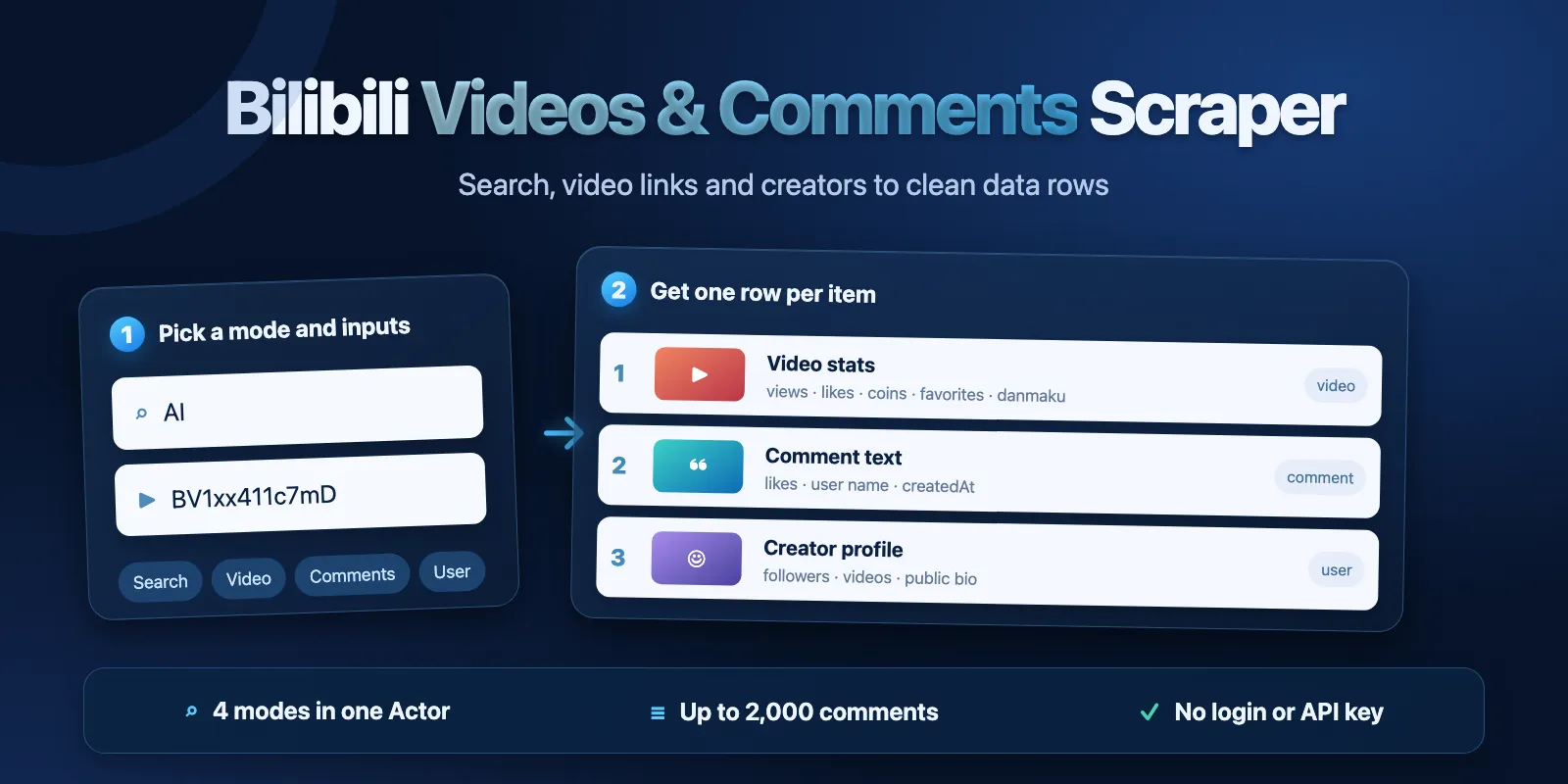
Table of contents
- What it does
- Quick start
- Input
- Output
- Pricing and limits
- Use cases
- Scheduling and monitoring
- API, export and integrations
- Limitations and partial results
- Troubleshooting
- FAQ
- Related Actors
- Support
What it does
The Actor has four modes. You pick one mode per run.
| Mode | You give | You get |
|---|---|---|
search | Up to 20 keywords | Video rows in Bilibili search order, up to 1,000 per keyword |
video | Up to 50 video links or IDs | One video row with full stats and tags for each video |
comments | Up to 25 video links or IDs | Root comments, up to 2,000 per video, hot or newest first |
user | Up to 50 creator IDs or links | One creator profile row, plus up to 1,000 of their latest videos |
It reads public Bilibili web API responses. It does not sign in, download videos, read danmaku text, read replies to comments or read private data.
Data you get
- Videos: BV ID, av ID, title, URL, description, cover image, duration, publish time, author name and ID, views, likes, coins, favorites, shares, danmaku count, comment count, tags and category.
- Comments: comment ID, text, likes, reply count, user name, user ID, user level, created time, pinned flag and the video it belongs to.
- Creators: user ID, name, profile URL, public bio, level, followers, following, video count, total likes, official title and avatar URL.
- Status: one free row that lists inputs that were not found, invalid, duplicate or failed, with a reason for each.
Quick start
- Open Input.
- Keep What to scrape as
search, Search keywords asAIand Max items as20. - Click Start.
- Open the Videos tab of the Output to see the rows. Open Run summary to check each input.
The example returns 20 video rows in about 5 seconds. Search results change over time.
Input
Only mode is required. Each mode also needs its list: keywords for search, videoUrls for video and comments, userIds for user. The new form prefills mode: "search", keywords: ["AI"] and maxItems: 20. The default build is latest.
| Field | Type | Default / prefill | Allowed values | What it changes / advice |
|---|---|---|---|---|
mode | string | search / same | search, video, comments, user | What to scrape. Only the list for this mode is used. |
keywords | array of strings | none / ["AI"] | 1–20 keywords, up to 100 characters each | Search mode. Chinese or English. Exact duplicates are merged. |
videoUrls | array of strings | none | 1–50 in video mode, 1–25 in comments mode | https://www.bilibili.com/video/BV… (also m.bilibili.com), BV1xx411c7mD, av170001 or 170001. Short b23.tv links are not supported and get an INVALID_INPUT status. |
userIds | array of strings | none | 1–50 | User mode. Numeric user ID (mid), uid:946974 or https://space.bilibili.com/946974. |
maxItems | integer | 20 / same | 1–1,000 in search and user mode, 1–2,000 in comments | Search: videos per keyword. Comments: comments per video. User: videos per creator (the profile row is extra). Not used in video mode. A value over the mode limit fails validation before any request. |
searchOrder | string | totalrank | totalrank, click, pubdate, dm, stow | Search mode. Relevance, most viewed, newest, most danmaku or most favorited. |
commentSort | string | hot | hot, time | Comments mode. hot puts the most liked first and includes pinned comments. time lists newest first. |
includeFullStats | boolean | false | true, false | Search and user modes. Opens each video page to fill the counters that lists do not have. One extra request per video, so runs are slower. Video mode always has full stats. |
includeUserVideos | boolean | true | true, false | User mode. false returns only the profile rows. |
proxyConfiguration | object | {"useApifyProxy": true} | Apify Proxy settings | Apify Proxy datacenter IPs work for Bilibili. Keep the default. The Actor changes the proxy session when Bilibili refuses a request. |
What each mode fills
| Field group | search | video | user videos |
|---|---|---|---|
| views, likes, favorites, danmaku, comments | yes | yes | views only |
| coins, shares | with includeFullStats | yes | with includeFullStats |
| likes, favorites, danmaku, comments (user mode) | — | — | with includeFullStats |
| tags | yes | yes | no (null) |
Input examples
Search two keywords, newest first:
Returns up to 50 video rows per keyword with searchKeyword and searchRank.
Stats for video links:
Returns one row per video with all counters and tags.
Comments of one video:
Returns up to 500 root comments, most liked first.
A creator and their latest videos:
Returns one profile row and up to 100 video rows.
Output
All rows go to the default Dataset. The type field tells the row kind: video, comment, user or status.
Output examples
A search row (type: "video"):
A comment row:
A creator row (bio shortened):
Video fields
| Field | Type | Null? | Meaning / example |
|---|---|---|---|
bvid | string | no | Bilibili video ID, e.g. BV1xx411c7mD. |
aid | integer | yes | Old numeric video ID (av), e.g. 2. |
url | string | no | Public video URL. |
title | string | no | Video title, HTML highlight tags removed. |
description | string | yes | Video description. |
thumbnailUrl | string | yes | Cover image URL. |
durationSec | integer | yes | Length in seconds. Some search results report 0; this comes from Bilibili. |
publishedAt | string | yes | Publish time, ISO UTC. |
authorMid | integer | yes | Uploader user ID. |
authorName | string | yes | Uploader name. |
views | integer | yes | Play count. |
likes | integer | yes | Likes. Null in user mode without includeFullStats. |
coins | integer | yes | Coins given. Null in search and user mode without includeFullStats. |
favorites | integer | yes | Favorites. Null in user mode without includeFullStats. |
shares | integer | yes | Shares. Null in search and user mode without includeFullStats. |
danmaku | integer | yes | Danmaku (bullet comment) count. Null in user mode without includeFullStats. |
comments | integer | yes | Comment count. Null in user mode without includeFullStats. |
tags | array of strings | yes | Video tags. [] when the video has none. Null in user mode. |
category | string | yes | Bilibili category name, e.g. 小剧场. |
source | string | no | search, video or user_videos: which list gave the row. |
fullStats | boolean | no | true when the counters come from the video page. |
searchKeyword | string | yes | Keyword in search mode, else null. |
searchRank | integer | yes | Position in this run's search results, from 1. Null outside search mode. |
input | string | no | The input line that produced the row. |
fetchedAt | string | no | UTC fetch time, ISO format. |
Comment fields
| Field | Type | Null? | Meaning / example |
|---|---|---|---|
commentId | string | no | Comment ID, e.g. 495059. |
text | string | no | Comment text. |
likes | integer | yes | Likes on the comment. |
replyCount | integer | yes | Number of replies. Replies themselves are not collected. |
userMid | integer | yes | Commenter user ID. |
userName | string | yes | Commenter public name. |
userLevel | integer | yes | Commenter level, 0–6. |
createdAt | string | yes | Comment time, ISO UTC. |
isPinned | boolean | no | true for a pinned comment (hot sort only). |
videoBvid | string | no | The video BV ID. |
videoAid | integer | yes | The video av ID. |
videoTitle | string | yes | The video title. |
input | string | no | The input line. |
fetchedAt | string | no | UTC fetch time. |
Creator fields
| Field | Type | Null? | Meaning / example |
|---|---|---|---|
mid | integer | no | User ID, e.g. 946974. |
url | string | no | Public space URL. |
name | string | no | Public name. |
sign | string | yes | Public bio, as the creator wrote it. It can hold contact details; treat it as personal data. |
level | integer | yes | Account level, 0–6. |
followers | integer | yes | Follower count. |
following | integer | yes | Number of accounts the creator follows. |
videoCount | integer | yes | Public video count from the profile. |
totalLikes | integer | yes | Total likes on the creator's content. |
officialTitle | string | yes | Bilibili verification title, if any. |
faceUrl | string | yes | Avatar image URL. |
input | string | no | The input line. |
fetchedAt | string | no | UTC fetch time. |
Status row
When some inputs give no new data, the run adds one free type: "status" row. It has a message (for example 2 input(s) returned no new data: 1 not found, 1 duplicate, 0 failed or not processed. Free row.) and an inputs list. Each entry has input, status (not_found, error, duplicate or not_processed), code and reason.
Output tabs
The Output has Videos, Comments and Creators tabs and a Run summary. Each tab shows the columns for its row kind. Apify Dataset views cannot filter rows, so every tab lists all rows of the run, and rows of other kinds show empty cells. In search, video and comments mode all data rows are one kind. User mode has creator rows and their video rows. The status row comes on top when some inputs gave no data. For clean exports, filter by type or use the JSON export.
Run summary is the RUN_SUMMARY record in the default key-value store. It has status, partialReason, message, counts (rows by kind, charged rows, inputs complete, partial, not found, errors, not processed), per-input inputs, http (requests, retries, blocks) and timing.
| Situation | Dataset | Run result |
|---|---|---|
| Results found | Data rows | Succeeded, COMPLETE. |
| Video or creator does not exist | Status row lists it | Succeeded. NOT_FOUND when nothing at all was found. |
| Same video or creator given twice | One data row; status duplicate | Succeeded. The repeat is not charged. |
| Your maximum cost per run reached | Rows that fit the budget | Succeeded, partial CHARGE_LIMIT. Other inputs are not_processed. |
| Run time almost over | Rows saved so far | Succeeded, partial TIME_LIMIT. The status message tells you to raise the timeout or split the input. |
| Bilibili refuses or fails repeatedly | Rows saved so far stay | Failed, partial SOURCE_ERROR. Not the same as "no results". |
| Invalid input | Empty | Failed before any Bilibili request. |
Pricing and limits
Pay per event: a start fee per run plus each saved data row (video, comment or creator). The status row is free. Platform compute and proxy traffic are included.
| Plan | Start fee per run | Per data row | Per 1,000 rows, excluding start |
|---|---|---|---|
| Free | $0.006 | $0.0028 | $2.80 |
| Bronze | $0.006 | $0.0026 | $2.60 |
| Silver | $0.006 | $0.0025 | $2.50 |
| Gold / Platinum / Diamond | $0.006 | $0.0024 | $2.40 |
The start fee is charged once per run (the Actor runs with up to 512 MB). It also applies when nothing is found. Duplicates, not-found inputs and invalid inputs are not charged as rows. Partial and failed runs charge only the start fee and the rows that were saved.
| Saved rows | Runs | Free-plan total | Gold-plan total |
|---|---|---|---|
| 0 | 1 | $0.006 | $0.006 |
| 1 | 1 | $0.0088 | $0.0084 |
| 20 | 1 | $0.062 | $0.054 |
| 100 | 1 | $0.286 | $0.246 |
| 1,000 | 1 | $2.806 | $2.406 |
| 2,000 | 1 (comments) | $5.606 | $4.806 |
These are price calculations, not promised result counts. Set Maximum cost per run to control spending. The run stops cleanly when it reaches your limit.
Limits per run: 20 keywords and up to 1,000 results per keyword (Bilibili serves no more), 50 videos in video mode, 25 videos and 2,000 comments per video in comments mode, 50 creators and 1,000 videos per creator in user mode. Measured on Apify: 20 search rows in about 5 s, 500 comments in 16 s, 970 search rows in 19 s, 2,000 comments in 65 s, a creator with 935 videos in 89 s. The default timeout is 300 seconds.
Use cases
| Task | Input | Useful fields | Next step |
|---|---|---|---|
| Track a topic on Bilibili | search, several keywords, pubdate | title, views, publishedAt, tags | Compare topics by views and dates. |
| Compare video performance | video with a list of links | views, likes, coins, favorites, danmaku | Rank videos by engagement. |
| Study audience opinion | comments, hot, maxItems: 1000 | text, likes, createdAt | Run sentiment or keyword analysis. |
| Research creators | user with creator IDs | followers, videoCount, totalLikes, videos | Build a creator shortlist. |
Scheduling and monitoring
You can save the input as an Apify task and schedule it, for example daily for the same keywords or videos. Each run is a new snapshot and is charged normally. There is no "only new items" mode. Compare snapshots in your own system by bvid, commentId or mid and fetchedAt.
API, export and integrations
Start the Actor with the Apify API using the same JSON input. When the run ends, read the default Dataset and the RUN_SUMMARY record. Export as JSON, CSV, Excel or XML from the Dataset. tags is a list; in CSV it becomes several columns.
Apify webhooks, Make, Zapier and n8n can start runs and pass the Dataset ID on. Use bvid as the key for videos, commentId for comments and mid for creators.
Use with AI agents (MCP)
Add https://mcp.apify.com?tools=cliqtomedia/bilibili-scraper to your MCP client. A small input:
Read title, url, views, likes, danmaku, tags and publishedAt. This run took about 5 seconds and costs $0.062 on the Free plan. Check RUN_SUMMARY.status before you treat a partial run as complete.
Limitations and partial results
- Field names are this Actor's own (
views,likes,danmaku…). They are not a drop-in copy of other Bilibili scrapers' output. - Bilibili search serves at most 1,000 results per keyword. Some keywords return fewer; the run summary warns about it.
- A creator's public video list can be shorter than
videoCount, because Bilibili hides some videos. - Comments mode collects root comments only. Replies are counted in
replyCountbut not collected. Danmaku text is not collected. - Bilibili sometimes refuses requests from cloud IPs (HTTP 412). Creator video lists are refused more often than other pages. The Actor retries on a new proxy session up to 6 times within about one minute and keeps going after a single refused input. Two refused inputs in a row stop the run as a partial
SOURCE_ERRORwith all saved rows kept. - The Actor waits 0.5 s between requests to stay polite. Large creator lists and comment runs take longer than search.
- Counters change all the time. Keep
fetchedAtwith your data. - Short
b23.tvlinks are not resolved. Open them in a browser and copy the full video link. - This Actor is not affiliated with or endorsed by Bilibili. It reads public data only. Use the data in line with Bilibili terms and local law, and respect the privacy of commenters and creators.
Troubleshooting
| Symptom | Possible reason | Check | Action |
|---|---|---|---|
| Run fails with "Invalid input" | Missing list for the mode, or a value over a limit | The message in the run log | Use an example above and change one field at a time. |
NOT_FOUND, no data rows | Videos or creators do not exist or are hidden | The status row | Check the IDs in a browser. |
duplicate in the status row | The same video or creator was given twice (BV and av forms count as one) | The status row | Nothing to do; it was not charged twice. |
Partial CHARGE_LIMIT | Your maximum cost per run was reached | counts.chargedRows in Run summary | Raise the limit if you need more rows. |
Partial TIME_LIMIT | Too much work for the run timeout | Status message | Raise the timeout or split the input into several runs. |
Partial SOURCE_ERROR | Bilibili refused or failed repeatedly | http.blocked in Run summary | Run again later; keep the default Apify Proxy. |
coins or shares are null in search | Search lists do not carry these counters | fullStats is false | Set includeFullStats: true. |
| Other tabs show empty cells | Dataset views cannot filter rows by kind | type column | Filter by type in your export. |
FAQ
Do I need a Bilibili account or cookies?
No. The Actor uses public guest access. Do not add your cookies.
Can I get comment replies or danmaku text?
No. It collects root comments and the danmaku count only.
Are BV and av IDs both supported?
Yes. BV1xx411c7mD, av2 and the full link point to the same video, and the Actor saves and charges it once.
Why did a search return fewer rows than maxItems?
Bilibili had fewer results for that keyword, or it reached its limit of 1,000 results.
Do empty runs cost money?
Only the start fee of $0.006. Inputs that are not found do not create paid rows.
Is the data the same as on the website?
Yes, it comes from the same public data. Counters change quickly, so values can differ a little minutes later.
Related Actors
- YouTube Comments Scraper — public comments for YouTube videos.
- YouTube Subtitles & Transcript Scraper — transcripts for selected YouTube videos.
- Bluesky Scraper — public Bluesky posts, profiles and threads.
Support
Use the Actor's Issues tab for questions or bugs. Include the run ID and the error code from the Run summary. Do not send API tokens or cookies.


