

XING Jobs Scraper: DACH Job Ads, Salaries & Descriptions
Pricing
from $0.63 / 1,000 job ads
XING Jobs Scraper: DACH Job Ads, Salaries & Descriptions
Scrape public XING job ads in Germany, Austria and Switzerland by keyword and location. Title, company, salary, employment type, remote, date, description and apply link. No login.
Pricing
from $0.63 / 1,000 job ads
Rating
0.0
(0)
Developer

Cliqto Media
Maintained by CommunityActor stats
0
Bookmarked
2
Total users
1
Monthly active users
5 days ago
Last modified
Categories
Features
Share
Search public XING job ads in Germany, Austria and Switzerland by keyword and location. You get one row per job: title, company, location, salary, employment type, career level, remote option, posting date, the full description and the apply link.
Use it for job market research, salary benchmarks, recruiting leads or a job board feed. The smallest run is one keyword in one city, for example Data Engineer in Berlin with 20 jobs: it usually takes under 20 seconds and costs about $0.019. No login and no XING account.
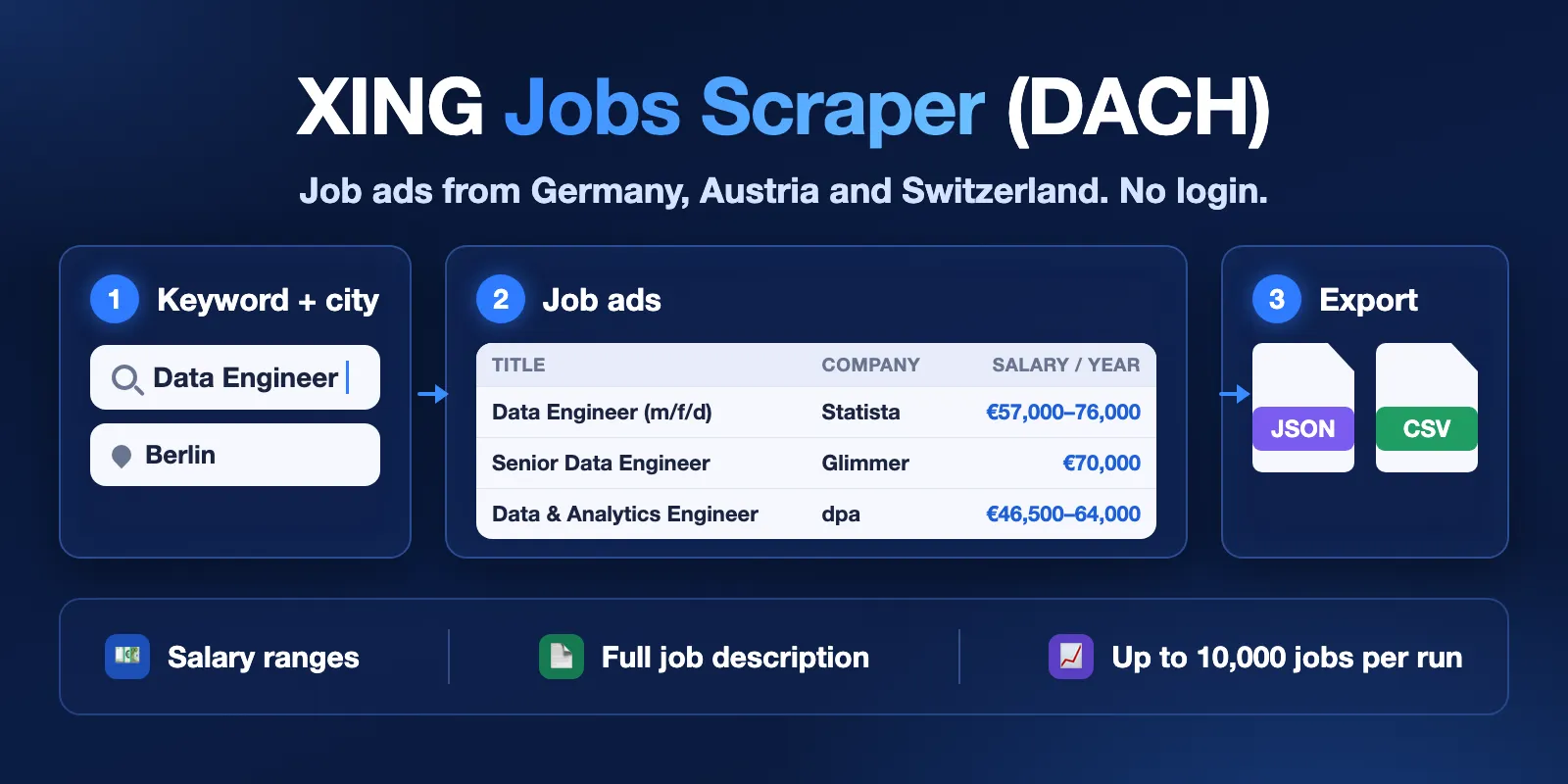
Table of contents
- What it does
- How it works
- Quick start
- Use cases
- Input
- Output
- Pricing
- Limits
- API, export and integrations
- Troubleshooting
- FAQ
- Support
What it does
The Actor reads the public job search of XING, the business network of the German-speaking countries (DACH). You give job titles or keywords and cities, or paste XING search links or links to single job ads. You get one row per job ad.
| You give | You get one row per job with |
|---|---|
keywords and locations, for example Pflegefachkraft in München | title, company, city, region, country, salary range, employment type, career level, remote option, posted date, description, apply link |
| XING search links from xing.com/jobs/search | the same fields; the keywords, location and filters are read from the link |
links to single job ads, for example https://www.xing.com/jobs/berlin-data-engineer-158133174 | the same fields for that one job |
It reads only what XING shows to a visitor who is not logged in. It does not collect profiles or contact persons. The job description stays as the employer wrote it, so it may include a contact the employer put in the ad.
Good fit
- Collect all open jobs for a role in a city and compare companies.
- Build a salary benchmark: XING shows a salary or its own salary estimate for most jobs.
- Find companies that hire right now, as sales or recruiting leads.
- Feed new job ads into a spreadsheet, a job board or Slack every day.
How it works
- You give keywords and locations (each keyword is searched in each location), or XING search links.
- The Actor runs each search on XING and reads all result pages. XING gives at most 1,000 jobs per search; for bigger searches, the Actor splits the search by employment type and career level to get more.
- It saves one row per job in the Dataset and removes jobs it has already saved in the same run. It also writes a run summary with the result of each search.
Quick start
-
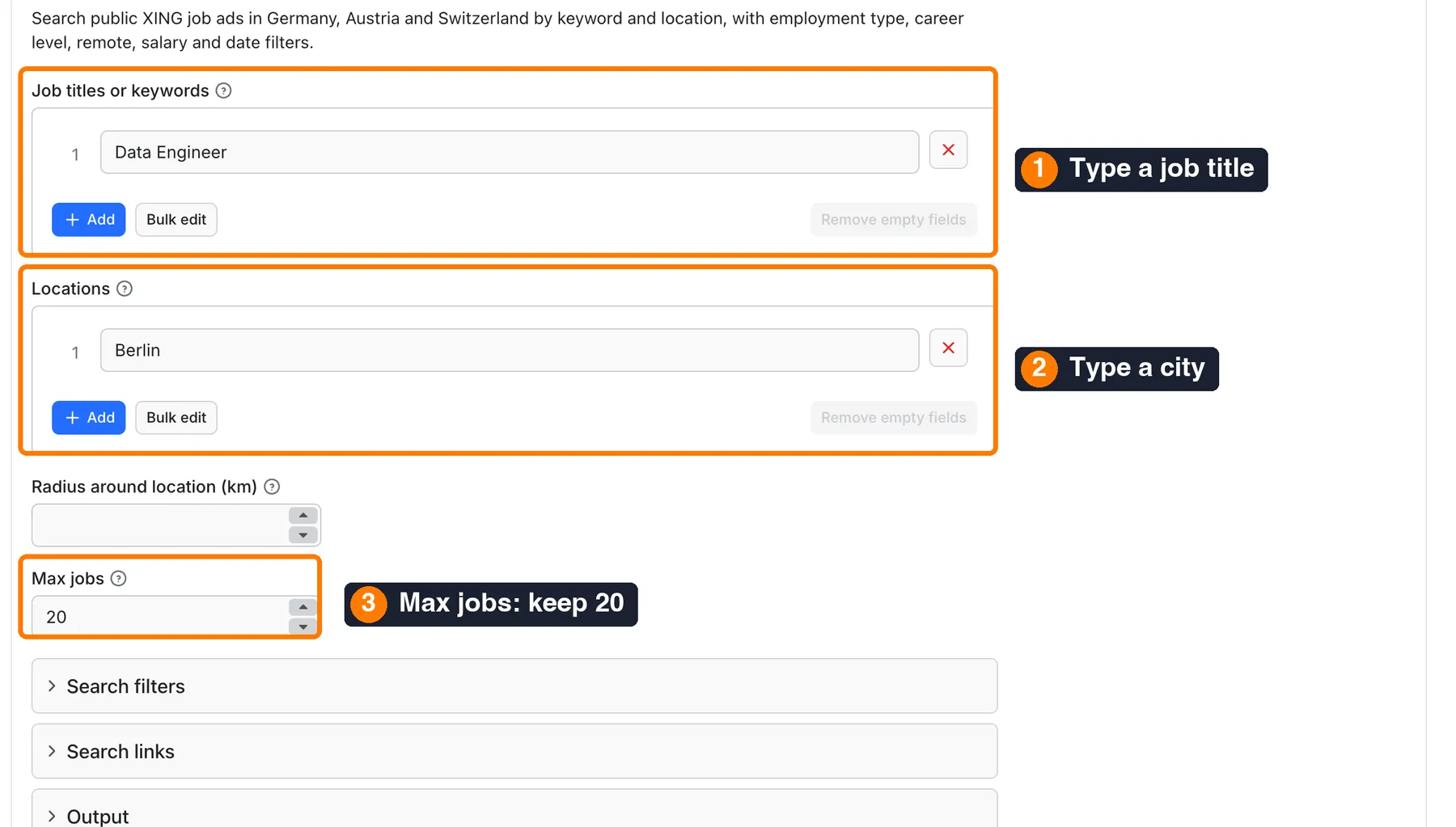
Open the Input tab. Type a job title in Job titles or keywords, for example
Data Engineer(box 1). -
Type a city in Locations, for example
Berlin(box 2). -
Keep Max jobs at 20, the form's prefill (box 3).
-
Click Start.
-
Open the Output tab. The Jobs view shows title, company, location and salary first (box 4).
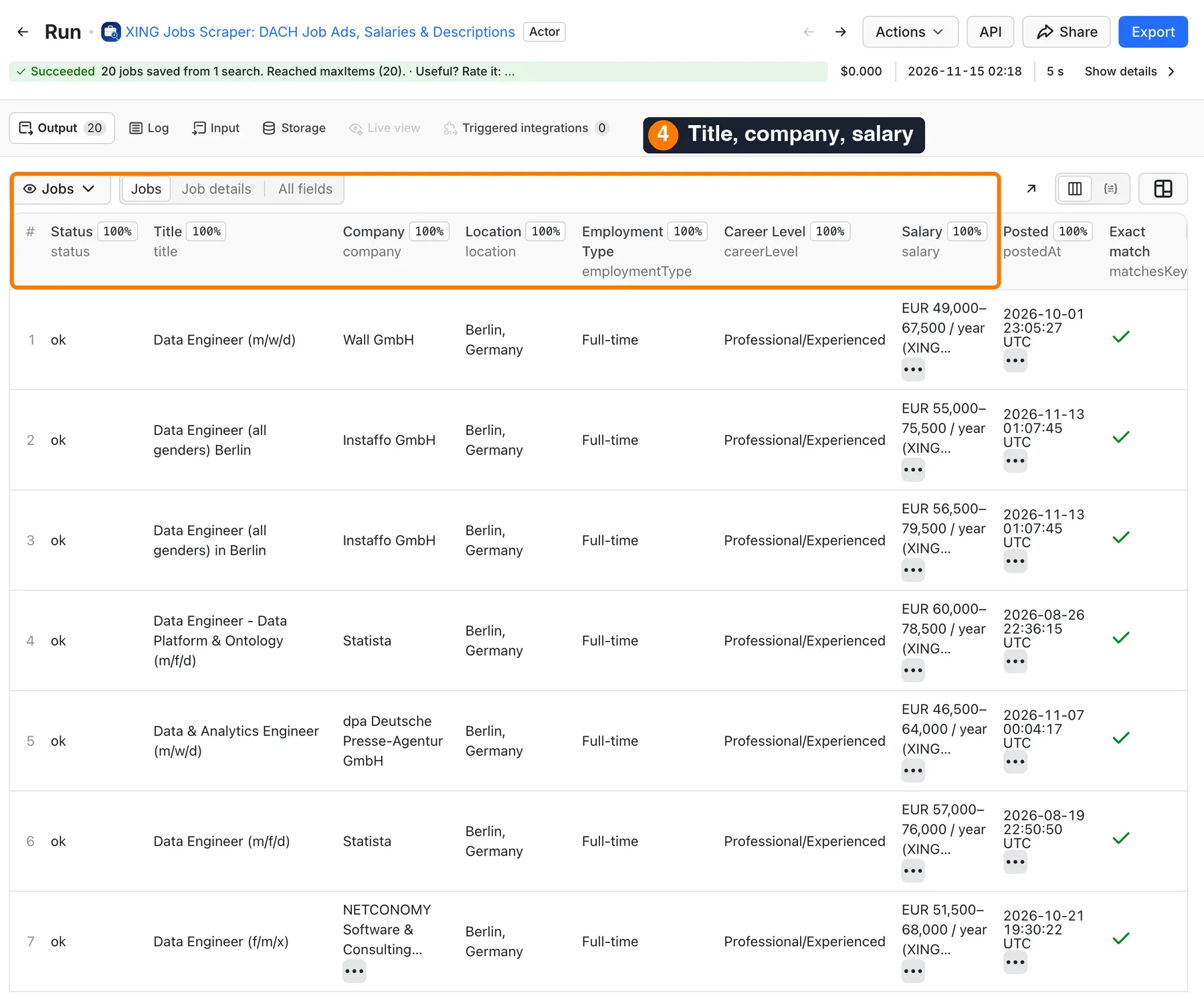
Expected result: 20 job rows for Data Engineer in Berlin, in the order XING shows them, usually in under 20 seconds.
Use cases
| Buyer job | Input path | Output entity | Key fields | Next integration |
|---|---|---|---|---|
| Job market research | keywords × location | job | title, company, city, postedAt | export to CSV or Google Sheets |
| Salary benchmark | keywords, salaryMin | job | salaryMin, salaryMax, salaryType, careerLevel | spreadsheet, BI tool |
| Recruiting or sales leads | keywords, location, postedWithin: 7d | job | company, companyUrl, companyIndustry, applyUrl | CRM import |
| Daily job feed | keywords, postedWithin: 24h, schedule | job | title, company, url, postedAt | Slack or Notion |
| Remote jobs list | remoteOption: FULL_REMOTE | job | remoteOptions, title, applyUrl | job board |
Input
Input fields
| Field | Plain name | Type | Default / prefill | Allowed values | Effect |
|---|---|---|---|---|---|
keywords | Job titles or keywords | array of strings | prefill Data Engineer | up to 20, each up to 200 characters | Each keyword is searched in each location |
location | Locations | array of strings | prefill Berlin | up to 20 cities or regions in DACH | Empty searches all of XING |
radiusKm | Radius around location (km) | integer | empty (XING default) | 0 – 500 | Search radius around each location |
maxItems | Max jobs | integer | 100 (prefill 20) | 1 – 10,000 | The run stops when this many jobs are saved |
employmentType | Employment type | array | empty (all) | FULL_TIME, PART_TIME, CONTRACTOR, INTERN, SEASONAL, TEMPORARY, VOLUNTARY | Only these types |
careerLevel | Career level | array | empty (all) | STUDENT_INTERN, ENTRY_LEVEL, PROFESSIONAL, MANAGER, EXECUTIVE, SENIOR_EXECUTIVE | Only these levels |
remoteOption | Remote work | array | empty (all) | FULL_REMOTE, PARTLY_REMOTE, NON_REMOTE | Only these remote options |
postedWithin | Posted within | string | any | any, 24h, 7d, 30d | Only jobs posted or refreshed in this period. XING uses refreshedAt, so a renewed older ad is included |
salaryMin | Minimum yearly salary (EUR) | integer | empty | 1 – 1,000,000 | Only jobs whose salary or XING estimate reaches this amount |
startUrls | XING search or job links | array | empty | up to 20 links: searches from xing.com/jobs/search or single job ads from xing.com/jobs/… | A search link is read like keywords + filters; a job link gives one row for that job |
language | Label language | string | en | en, de | Language of labels like employment type and industry; job texts stay as written |
includeDescription | Include job description | boolean | true | Off: smaller, faster rows without description | |
splitLargeSearches | Get more than 1000 jobs per search | boolean | true | Splits big searches by employment type and career level | |
deliveryConnector | Send results to | string | empty | your MCP connector | Posts a short summary after the run |
deliveryTarget | Notion page or channel | string | empty | Notion page link or Slack channel ID | Where the summary goes |
proxyConfiguration | Proxy | object | Apify datacenter proxy | Change it only if you have a reason |
A run needs at least one keyword or one XING link. Without them, it stops with INVALID_INPUT and an example of a valid input. Limits per run: 20 keywords, 20 locations, 20 links, 200 characters per keyword or location, and at most 100 searches (keywords × locations plus search links). A job link given twice runs once. The same search given twice (for example Data Engineer and data engineer) runs once.
Interacting settings
| When | Input A | Input B | Effective behavior |
|---|---|---|---|
| Several keywords and cities | keywords | location | Every keyword is searched in every city: 3 keywords × 4 cities = 12 searches |
| Filters and links | employmentType, postedWithin, … | startUrls | Filters apply to keyword searches; a link keeps the filters it already has |
| Big search | splitLargeSearches | maxItems | The split runs only when maxItems is more than 1,000 |
| Same job in two searches | keywords | location | The job is saved once, for the first search that found it |
| Job links and searches | startUrls (job links) | keywords | Job links run first; a job found again by a search is not saved twice. Filters do not apply to job links |
| Max jobs in two places | maxItems | platform Max items option | The smaller of the two is used |
Input examples
Jobs for one role in one city
Expected behavior: runs one XING search and reads the first result page.
Expected output: 20 job rows with title, company, city, salary, postedAt.
New full-time jobs in three cities, last 7 days
Expected behavior: runs 6 searches (2 keywords × 3 cities) and saves up to 500 jobs. Last-7-days searches are often smaller: a test run saved 109 full-time jobs, and one of the 6 searches found nothing.
Expected output: job rows with searchKeyword and searchLocation that show which search found each job.
Single job ads by link
Expected behavior: reads each job ad by its link, one request per link.
Expected output: one job row per link with searchUrl set to the link; searchKeyword, searchPosition and searchTotal are null. A removed job gives a free not_found row.
Output
Output fields
Every row has status, url, searchKeyword, searchLocation, searchUrl and scrapedAt.
| Field | Meaning | Type | Can be empty? |
|---|---|---|---|
jobId, title | XING job ID and job title | string | no |
company, companyUrl, companyIndustry, companySize | Employer and its XING company data | string | companyUrl and companySize often |
location, city, zipCode, region, country, countryCode | Where the job is | string | zipCode often |
salary | Salary as text, for example EUR 60,000–78,500 / year (XING estimate) | string | yes: about 38 % of jobs have no salary |
salaryMin, salaryMax, salaryMedian, salaryCurrency | Salary as numbers | number, string | same as salary |
salaryType | range or exact (from the employer) or estimate (XING's estimate) | string | same as salary |
employmentType, careerLevel, discipline, industry | Job labels in the chosen language | string | rarely |
remoteOptions | FULL_REMOTE, PARTLY_REMOTE or NON_REMOTE | array | rarely |
postedAt, refreshedAt, activeUntil | Dates | ISO date | activeUntil sometimes |
description, descriptionHtml | Full job text, plain and HTML | string | empty with includeDescription: false |
applyUrl, applicationType | Where to apply | string | sometimes |
skills | Skill words XING attached to the job | array | sometimes empty |
matchesKeywords | true when the title or text contains all search words; false for jobs XING added as similar; null for rows from a job link | boolean | yes (job links) |
searchPosition, searchTotal | Place in the XING results and XING's total for the search; null for rows from a job link | number | yes (job links) |
Output entities and surfaces
| Situation | Where | Result shape | What to do |
|---|---|---|---|
| Normal job | Dataset | one row with status: ok | open the Output tab or export |
| Search found nothing | Dataset + RUN_SUMMARY | one row with status: not_found and statusReason | try another keyword or a wider location |
| Link that is not a XING search or job link | Dataset + RUN_SUMMARY | one row with status: invalid_input | fix the link |
| Job link to a removed job | Dataset + RUN_SUMMARY | one row with status: not_found | the ad is gone from XING |
| XING error for one search | Dataset + RUN_SUMMARY | one row with status: error; other searches still run | run again later |
| Run stopped at a limit | RUN_SUMMARY | stopReason (MAX_ITEMS, CHARGE_LIMIT, DEADLINE) and unprocessedSearches | raise the limit, or run the unprocessed searches |
RUN_SUMMARY in the key-value store has the run status, counts, the result of each search (XING total, pages, jobs saved, duplicates) and warnings.
Output example
One job row from the Quick start run, trimmed (long description, descriptionHtml and some company fields removed):
null means XING did not show the value; it never means zero.
Send results to Slack or Notion
Pick your connector in the optional deliveryConnector field. After the run saves its data, the Actor posts a short summary (up to 25 jobs and a link to the full dataset) there. Put a Notion page link or a Slack channel ID in deliveryTarget: in Notion every run is added on top of that one page, so your workspace does not fill up with new pages. Without a page link, Notion delivery is skipped and the run summary says so. A delivery error never fails the run and costs nothing extra. Connect a service once in Apify Console → MCP connectors.
Use case → fields
| Buyer job | Input path | Output entity | Key fields | Next integration |
|---|---|---|---|---|
| Salary benchmark | keywords, location | job | salaryMin, salaryMax, salaryType | spreadsheet |
| Hiring companies | keywords, postedWithin | job | company, companyUrl, companyIndustry | CRM |
| Daily feed | postedWithin: 24h, schedule | job | title, url, postedAt | Slack or Notion |
Pricing
Pricing unit
You pay per job, plus a small fee per search:
| Event | Price (free plan) | When |
|---|---|---|
| Actor start | $0.0005 | once per run |
| Job ad | $0.0009 ($0.90 per 1,000) | each job row with status: ok |
| Search run | $0.0001 | each keyword × location search, search link or job link the run starts |
Higher Apify plans get a lower job price: Bronze −10 %, Silver −20 %, Gold and above −30 %. The start fee scales with run memory (per GB); the default 256 MB keeps it at the price above. Platform usage is included.
Rows with not_found, invalid_input or error are free. A search that finds nothing costs only its $0.0001 search fee. Searches the run did not start (because it hit Max jobs or the cost limit) are not charged. The run stops at Max jobs or at the maximum cost per run you set.
Cost examples
Free plan:
| Scenario | Input scope | Jobs | Searches | Total |
|---|---|---|---|---|
| Quick start | 1 keyword, 1 city, maxItems: 20 | 20 | 1 | $0.019 |
| One city, all jobs | 1 keyword, 1 city (about 260 jobs) | 257 | 1 | $0.23 |
| 100 jobs from 25 searches | 5 keywords × 5 cities, maxItems: 100 | 100 | up to 25 | $0.09–0.093 |
| 2,000 jobs | 2 keywords, maxItems: 2000 | 2,000 | 2 | $1.80 |
| 10,000 jobs (maximum) | 3 keywords, maxItems: 10000 | 10,000 | 3 | $9.00 |
| Search with no results | 1 keyword, 1 city | 0 | 1 | $0.0006 |
Limits
- Up to 10,000 jobs per run and up to 100 searches (keywords × locations plus search links).
- Input limits: 20 keywords, 20 locations, 20 links, 200 characters per keyword or location. More gives
INVALID_INPUTwith the exact limit. - The platform Max items option (run options) also limits paid job rows; the run stops at the smaller of it and Max jobs.
- XING gives at most 1,000 jobs per search. With
splitLargeSearcheson, bigger searches are split by employment type and career level; if a split part still has more than 1,000 jobs, the rest is not reachable andRUN_SUMMARYmarks the search withcappedBySource. - A query can only return what XING has: for example,
Managergave about 6,200 jobs in total. - Speed: about 10–14 jobs per second. 2,000 jobs take about 3.5 minutes; 10,000 jobs take about 13 minutes.
- The default run timeout is 60 minutes. If a run hits its timeout, it stops early, keeps the jobs saved so far and ends as
CAPPEDwithDEADLINE. - About 38 % of jobs have no salary and no XING estimate: the salary fields are null.
- XING hides some jobs from visitors outside Germany, Austria and Switzerland. The Actor skips these and counts them in
RUN_SUMMARY; the default Apify proxy keeps this number low. - Only public job ads. No profiles or contact persons; the job description is kept as written and may contain a contact the employer added.
API, export and integrations
- API: start a run with the input JSON above through the Apify API and read the Dataset items.
- Export: JSON, CSV, Excel, XML or HTML from the Output tab or the API.
- Scheduling: create a schedule in Apify Console with
postedWithin: 24hto get the new and refreshed jobs every day. - Webhooks / no-code: use Apify integrations (Make, Zapier, n8n, webhooks) to send each finished run's Dataset to the next tool.
- Slack or Notion: set
deliveryConnector(see Output).
Use with AI agents (MCP)
- MCP server URL with only this Actor:
https://mcp.apify.com?tools=cliqtomedia/xing-jobs-scraper. - Smallest useful input:
{"keywords": ["Data Engineer"], "location": ["Berlin"], "maxItems": 20}. - Key output fields:
title(job),company(employer),city(place),salaryMinandsalaryMax(pay per year),postedAt(date),url(link to the ad). - Typical run: under 20 seconds and about $0.019 for 20 jobs. Keep
maxItemsat 10,000 or less.
Troubleshooting
The run saved no jobs
Symptom: status NO_RESULTS and only not_found rows.
Likely reason: XING has no job for this keyword and place, or the filters are too strict. For a word XING does not know, it shows unrelated jobs; the Actor does not save them.
Check: statusReason in the row and the searches in RUN_SUMMARY.
Action: use a more common job title, a bigger city or fewer filters.
Some jobs do not contain my keyword
Symptom: rows with matchesKeywords: false.
Likely reason: XING adds similar jobs to the results, for example other spellings or related roles.
Check: the matchesKeywords column.
Action: filter the rows by matchesKeywords: true if you need exact matches.
The run stopped early
Symptom: status CAPPED and a message about the cost limit or the time limit.
Likely reason: the maximum cost per run or the timeout was reached.
Check: the run message, stopReason and unprocessedSearches in RUN_SUMMARY.
Action: raise the cost limit or the timeout and run again. Jobs already saved stay in the Dataset. If stopReason is MAX_ITEMS, the run reached Max jobs or the platform Max items option; raise the smaller one.
The run failed with a XING error
Symptom: the run is marked failed, status ERROR or PARTIAL, stopReason: SOURCE_ERROR, or RATE_LIMITED / SOURCE_UNAVAILABLE in statusReason.
Likely reason: XING did not answer or limited requests after several retries.
Check: error rows in the Dataset, warnings and unprocessedSearches in RUN_SUMMARY. Jobs saved before the error stay in the Dataset and are charged; the error rows are free.
Action: run again later with the default Apify proxy, or only the searches from unprocessedSearches.
The run stopped with INVALID_INPUT
Symptom: status INVALID_INPUT, no Dataset rows except free invalid_input rows, the run is marked failed.
Likely reason: no keyword and no usable XING link, a value over the input limits, or a wrong field type.
Check: the run message; it names the field and shows a valid example.
Action: fix the field and run again. Nothing is charged except the start fee.
FAQ
Do I need a XING account or cookies?
No. The Actor reads only the public job search that XING shows without login.
What does "XING estimate" mean in the salary?
When the employer does not state a salary, XING often shows its own estimate. Then salaryType is estimate; a salary from the employer has salaryType range or exact.
Can I search jobs outside Germany, Austria and Switzerland?
XING is a DACH job board. You can leave location empty to search all of XING, but most jobs are in Germany, Austria and Switzerland.
How fresh is the data?
Each run reads XING at that moment. postedAt shows when the job was posted and scrapedAt when the row was read.
Is it legal to scrape XING?
The Actor reads only public job ads, not profiles or contact data. XING's terms restrict automated access. You are responsible for using the data in line with XING's terms and the laws that apply to you (for example GDPR). This is an unofficial tool, not affiliated with XING or New Work SE.
Support
For a bug, question or feature request, open the Actor's Issues tab on Apify. Include the run ID, your input and the error text. Never send tokens, cookies or private data.
⭐ Found it useful? Rate this Actor. Something wrong? Report a problem — we fix reported problems.


