

Twitter Comments & Replies Scraper — X Thread Extractor
Pricing
from $0.17 / 1,000 comments
Twitter Comments & Replies Scraper — X Thread Extractor
Ultra-fast Twitter (X) comments and replies scraper at $0.20/1k replies. Extract all replies, nested conversation threads, author analytics, metrics, media attachments, and timestamps from any X/Twitter post URL or Tweet ID. Includes 1-click English translation.
Pricing
from $0.17 / 1,000 comments
Rating
0.0
(0)
Developer

CodeScraper
Maintained by CommunityActor stats
0
Bookmarked
3
Total users
2
Monthly active users
10 days ago
Last modified
Categories
Features
Share
💬 Twitter Comments & Replies Scraper — X Thread Extractor
Extract real-time comments, nested conversation threads, author analytics, engagement metrics, media attachments, and timestamps from any X (formerly Twitter) post URL or Tweet ID at scale. Powered by direct API ingestion and server-side rendering (SSR), Twitter Comments & Replies Scraper captures the complete discussion landscape without brittle browser automation or expensive compute surcharges.
Whether you need conversation data for sentiment analysis, brand reputation tracking, community feedback, customer support insights, viral debate research, or AI/LLM model training, this Actor delivers clean, structured, and deduplicated records in ready-to-use JSON, CSV, and Excel formats.
💰 Transparent Pay-Per-Event Pricing
This Actor uses Apify's Pay-Per-Event monetization model with Platform Usage (Compute & Proxies) 100% INCLUDED. You never pay for expensive hourly server compute or bandwidth — you only pay for the exact volume of comments and replies scraped.
Official Pricing Table
| Event / Resource | Free Tier (No discount) | Starter (Bronze) | Scale (Silver) | Business (Gold) | Description |
|---|---|---|---|---|---|
| Comment / Reply Scraped | $0.20 / 1,000 ($0.00020) | $0.19 / 1,000 ($0.00019) | $0.18 / 1,000 ($0.00018) | $0.17 / 1,000 ($0.00017) | Charged only when an authentic comment or reply with full metrics is extracted. |
| Result (Dataset Record) | $0.15 / 1,000 ($0.00015) | $0.15 / 1,000 ($0.00015) | $0.15 / 1,000 ($0.00015) | $0.15 / 1,000 ($0.00015) | Charged per delivered record stored in your Apify dataset. |
| Actor Start | $0.0005 / run | $0.0005 / run | $0.0005 / run | $0.0005 / run | Flat micro-charge to initialize the Actor container per crawl run. |
| Platform Usage (Compute & Proxies) | FREE ($0.00) | FREE ($0.00) | FREE ($0.00) | FREE ($0.00) | Cloud compute, memory, and automated rotating datacenter proxy rotation are included at zero cost. |
🧮 Real-World Cost Examples
You only pay for verified comments collected and saved to your dataset. Empty or invalid URLs cost $0.00.
🔹 500 Comments Run (e.g. Medium Thread or Announcement Feedback)
- Actor Start: $0.0005
- Results (Dataset Records): 500 records × $0.00015 = $0.075
- Comments Scraped: 500 comments × $0.00020 = $0.100
- Compute & Proxies: FREE ($0.00)
- 💵 Total Cost: $0.175 (Only ~17¢ for 500 comments! Starter: $0.170 | Scale: $0.165 | Business: $0.160)
🔹 1,000 Comments Run (e.g. Viral Post or Competitor Campaign Audit)
- Actor Start: $0.0005
- Results (Dataset Records): 1,000 records × $0.00015 = $0.150
- Comments Scraped: 1,000 comments × $0.00020 = $0.200
- Compute & Proxies: FREE ($0.00)
- 💵 Total Cost: $0.35 (Only 3.5¢ per 100 comments! Starter: $0.34 | Scale: $0.33 | Business: $0.32)
🔹 5,000 Comments Run (e.g. Massive Product Launch Discussion)
- Actor Start: $0.0005
- Results (Dataset Records): 5,000 records × $0.00015 = $0.750
- Comments Scraped: 5,000 comments × $0.00020 = $1.000
- Compute & Proxies: FREE ($0.00)
- 💵 Total Cost: $1.75 (Starter: $1.70 | Scale: $1.65 | Business: $1.60)
🔹 10,000 Comments Run (e.g. Deep AI Sentiment & Topic Research)
- Actor Start: $0.0005
- Results (Dataset Records): 10,000 records × $0.00015 = $1.500
- Comments Scraped: 10,000 comments × $0.00020 = $2.000
- Compute & Proxies: FREE ($0.00)
- 💵 Total Cost: $3.50 (Starter: $3.40 | Scale: $3.30 | Business: $3.20)
🔹 0 Comments Found (e.g. Invalid Status ID or Deleted Tweet)
- Actor Start: $0.0005
- Results (Dataset Records): 0 × $0.00015 = $0.000
- Comments Scraped: 0 × $0.00020 = $0.000
- 💵 Total Cost: $0.0005 (You never pay for comments that do not exist!)
✨ Why Choose This Scraper?
| Capability | 💬 Twitter Comments Scraper | Conventional Browser Scrapers | Official X API v2 |
|---|---|---|---|
| Cost per 10K Comments | $3.50 flat | $18.00 – $45.00 (heavy compute) | $100.00+ (Basic tier) |
| Compute & Bandwidth Fees | 100% Free (Included in PPE) | Expensive ($0.30–$0.60/hr) | Monthly subscription |
| Extraction Speed | 60 – 100 comments/second | 2 – 5 comments/second | Rate limited |
| Parent-Child Thread Tree | ✅ Direct replies vs sub-threads | ❌ Flat unorganized text | ⚠️ Complex hydration |
| Media Attachments | ✅ Images, video MP4s & GIFs | ⚠️ Often broken URLs | ⚠️ Limited metadata |
| Author Profile Analytics | ✅ Follower ratio, age, verification | ❌ Minimal | ⚠️ Requires extra calls |
| Zero-Login Free Guest Mode | ✅ Works out of the box | ❌ Requires login | ❌ Impossible |
| Real-Time Data Streaming | ✅ Pushed per page batch | ❌ All-or-nothing risk | ⚠️ Manual batching |
🎯 What Data Does It Extract?
Every scraped reply record includes comprehensive, enriched metadata:
- 💬 Comment Content: Full unclipped reply text (supporting long-form Note Tweets), language code, and client source platform.
- 🌐 One-Click Translation: Optional automatic translation to English (
translateToEnglish: true). Saves translated text infullTextwhile preserving the original non-English comment inoriginalTextwithisTranslated: trueand detected language code. - 📈 Real-Time Engagement Metrics: Exact Likes, Reposts, Replies, Quotes, Bookmarks, and impression Views.
- 🔗 Thread & Hierarchy Mapping:
replyId: Unique status ID of the reply.replyUrl: Direct permanent link to the comment on X.inReplyToPostId: ID of the post or parent comment being answered.inReplyToUserHandle: Handle of the user being replied to.conversationId: Root conversation ID tying the entire thread together.isDirectReply:trueif replying directly to the original tweet,falseif part of a sub-reply tree.isFocalPost: Identifies the parent/original post if captured.
- 🖼️ Media Attachments: Complete array of images, highest-bitrate MP4 direct video URLs, and GIFs with dimensions.
- 👤 Author Analytics: Handle, display name, user ID, verified status, premium subscriber badge, follower count, following count, total post count, follower-to-following ratio, registration timestamp (
accountCreatedAt), and exact account age in days (accountAgeDaysvia Twitter Snowflake ID decoding). - 🏷️ Entities: Extracted arrays of mentioned users (
@handle), hashtags (#topic), and external destination URLs.
🔓 Guest Mode vs. Cookie Mode
This actor works 100% free without any login or cookies for public threads. However, Twitter/X caps logged-out visitors to initial public preview replies:
| Feature | Free Guest Mode (No Login) | Cookie Mode (Unlocked) |
|---|---|---|
| Initial Public Preview Replies | ✅ Extracts all available preview comments | ✅ Extracts all available preview comments |
| Original Focal Post Capture | ✅ Full Data & Metrics | ✅ Full Data & Metrics |
| Media & Author Analytics | ✅ Included | ✅ Included |
| Deep Reply Pagination (300+, 1K+, 10K+) | ⚠️ Limited by X's logged-out wall | ✅ Unlimited pagination across all replies |
[!TIP] When should you provide cookies? If a tweet has 3 to 10 comments, Free Guest Mode captures them immediately with zero setup! If a tweet has 500 or 10,000 comments, adding your session cookies (
auth_token&ct0) unlocks deep cursor pagination to extract the entire discussion.
🍪 How to Get Your Twitter / X Cookies (Step-by-Step Guide)
You only need two values: auth_token and ct0. Both methods take less than 60 seconds:
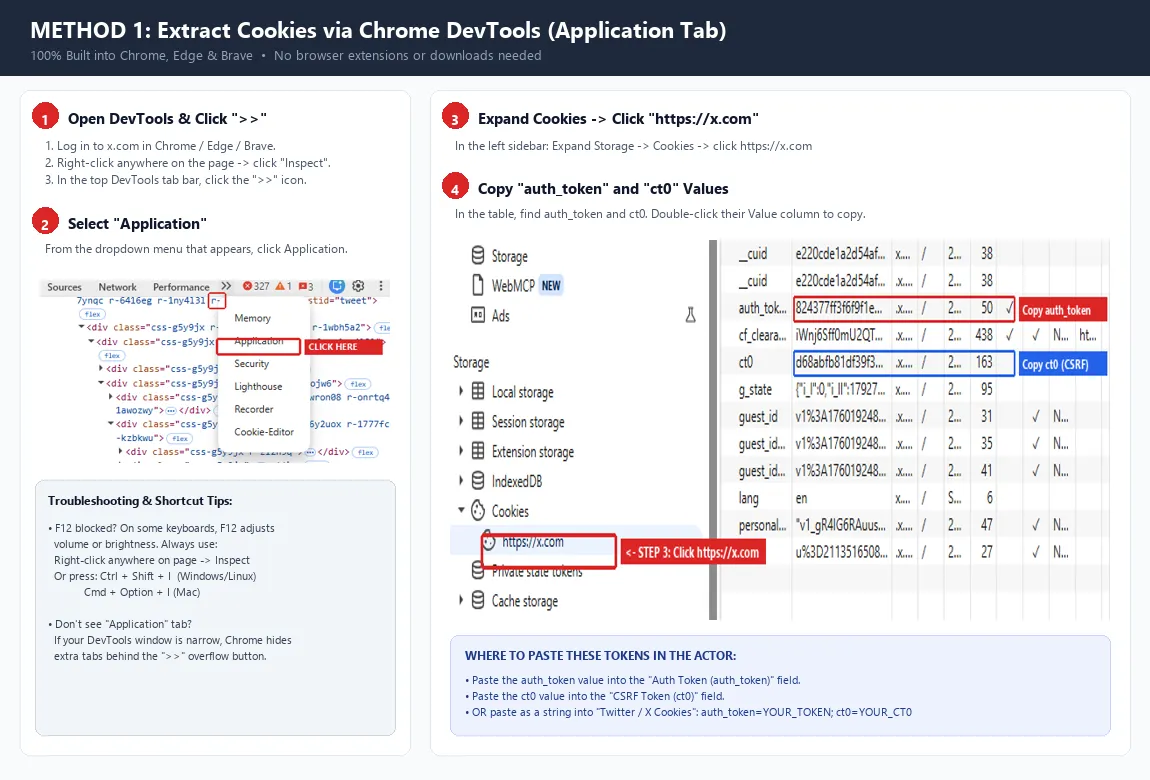
Method 1: Built-in Chrome DevTools (Application Tab — No Extensions Needed)
Works out of the box in Google Chrome, Microsoft Edge, and Brave Browser:
- Log In: Open x.com in your browser and log into your account.
- Open Inspect: Right-click anywhere on the page and select Inspect (or press
Ctrl+Shift+Ion Windows/Linux orCmd+Option+Ion Mac). (Note: On many laptops, pressingF12controls screen brightness or volume. Right-clicking → Inspect always works!) - Open Application Tab: In the top DevTools tab bar, click
>>(overflow menu) to reveal hidden tabs, then click Application. - Navigate to Cookies: In the left sidebar: Expand Storage → Cookies → click
https://x.com. - Copy Tokens: In the table, find:
auth_token: Double-click itsValueto copy (40-character hex string).ct0: Double-click itsValueto copy (CSRF token string).
Method 2: Using the Free Cookie-Editor Chrome Extension (Fastest — 1 Click)
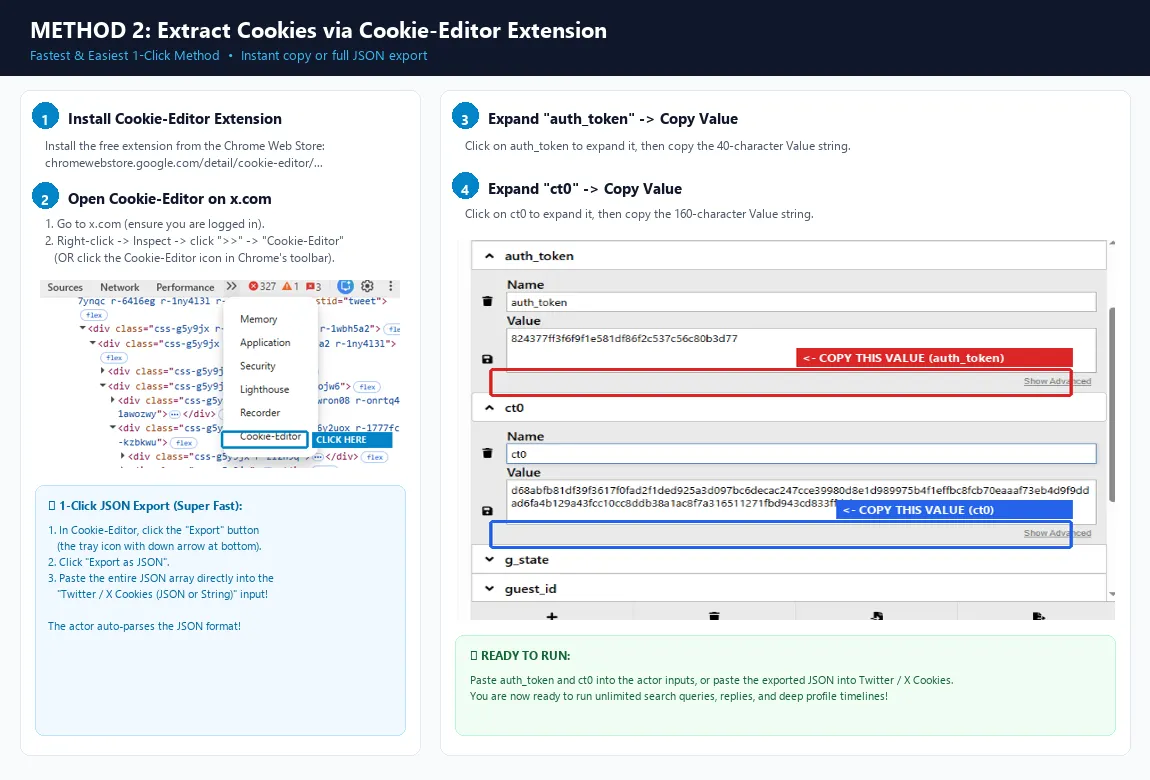
If you prefer a 1-click visual interface or want to export cookies as a clean JSON array:
- Install Extension: Add the free Cookie-Editor Extension from Chrome Web Store.
- Open on X.com: Navigate to x.com while logged in.
- Open Cookie-Editor:
- Click the Cookie-Editor icon in your browser's extensions toolbar, OR
- Right-click anywhere → Inspect → click
>>in the DevTools bar → select Cookie-Editor.
- Copy Tokens or Export JSON:
- Option A (Individual Tokens): Click on
auth_tokento expand and copy theValue. Do the same forct0. - Option B (1-Click JSON Export): Click the Export button at the bottom of Cookie-Editor → choose Export as JSON → paste the entire JSON array directly into the Twitter / X Cookies (JSON or String) field in the actor!
- Option A (Individual Tokens): Click on
⚙️ Input Configuration
Configure your extraction run using the input parameters below. You only need to provide at least one post URL or status ID.
Input Parameters Table
| Field | Type | Description | Default |
|---|---|---|---|
postUrls | Array | Required. List of X/Twitter post URLs (e.g. https://x.com/ZippoJeje/status/1905584213761351970) or numeric Tweet IDs. | ["https://x.com/ZippoJeje/status/1905584213761351970"] |
maxRepliesPerPost | Integer | Maximum comments to extract per individual tweet. Leave empty or 0 for unlimited. | 200 |
resultLimit | Integer | Total maximum comments across all posts combined. Leave empty for unlimited. | 500 |
includeFocalPost | Boolean | When enabled, also saves the main original parent tweet in your dataset (marked with isFocalPost: true). | true |
sortOrder | String | Preferred sorting order for replies (Relevant, Latest, or Top). | "Relevant" |
minLikes | Integer | Only include replies with at least this many likes. | 0 |
minViews | Integer | Only include replies with at least this many views/impressions. | 0 |
containsImages | Boolean | When enabled, filters for replies with photo attachments. | false |
containsVideos | Boolean | When enabled, filters for replies with video or GIF attachments. | false |
containsLinks | Boolean | When enabled, filters for replies with outbound external links. | false |
verifiedAccountsOnly | Boolean | When enabled, only extracts replies from verified or Premium commenters. | false |
contentLanguage | String | Filter replies by ISO language code (e.g. en, es, fr, ja). | "" (Any Language) |
translateToEnglish | Boolean | Automatically translates foreign-language comments into English (matching X's "Translate post"). Original text is kept in originalText with isTranslated: true. | false |
includeUserAnalytics | Boolean | Enrich each reply with account age in days, follower ratios, and badges. | true |
extractHashtags | Boolean | Extract hashtags into a dedicated array field. | true |
extractMentions | Boolean | Extract mentioned users into a dedicated array field. | true |
extractMediaUrls | Boolean | Extract all media direct URLs into a dedicated array. | true |
outputTransformFunction | String | Custom JavaScript function to reshape or filter output objects. | "" |
twitterCookies | String | Paste exported cookies (JSON array from Cookie-Editor, or auth_token=...; ct0=...). | "" |
authToken | String | Individual auth_token cookie value (overrides twitterCookies if provided). | "" |
csrfToken | String | Individual ct0 CSRF token value. | "" |
[!NOTE] Zero Proxy Setup Required: Apify rotating datacenter proxies are automatically configured and 100% free ($0.00). No manual proxy setup or external proxy subscriptions needed.
Sample Input Example
📤 Output Format & Sample Dataset
The actor stores clean, structured records directly in your default Apify dataset. You can download results in JSON, CSV, Excel, XML, or HTML table format.
Full Output Record Example (Comment Reply)
💡 Business Use Cases
- 📊 Sentiment & Public Reaction Analysis: Gauge authentic audience reaction to product announcements, political speeches, and corporate crises.
- 🛡️ Brand Reputation & Crisis Management: Monitor hostile or supportive reply threads in real time to catch emerging PR issues before they escalate.
- 🤝 Customer Support & Feature Discovery: Aggregate user bug reports, complaint threads, and feature requests directly from product release tweets.
- 🧠 AI & LLM Training: Extract natural conversational trees, debate dialogs, and question-and-answer pairs for fine-tuning conversational AI models.
- 🔍 Influencer & Creator Feedback: Analyze audience engagement quality, top commenter profiles, and reaction sentiment on sponsored posts.
❓ Frequently Asked Questions (FAQ)
Can I scrape multiple post URLs in a single run?
Yes. Add as many URLs or Tweet IDs as you need to postUrls. The scraper processes them sequentially, distributing your maxRepliesPerPost and resultLimit gracefully.
Does this scraper support deep sub-replies (replies to replies)?
Yes. Conversation modules and nested tree replies are captured automatically with parent tracking (inReplyToPostId and isDirectReply: false).
What if a tweet has no comments yet?
If a post has zero replies, the actor simply logs that no comments were found and charges $0.00 for replies. You only incur the base startup micro-charge ($0.0005).
Are proxies included in the price?
Yes! Automated Apify Datacenter Proxies and high-speed cloud compute are 100% included for free with no hidden hourly or bandwidth fees.
🏷️ Tags & Categories
twitter-comments, twitter-replies, x-comments-scraper, twitter-thread-extractor, tweet-replies, x-thread-scraper, social-media-sentiment, conversation-analysis, tweet-comments-downloader, twitter-scraper, x-scraper
👨💻 Support & Developer Info
Developed and maintained with ❤️ by codescraper.
Need assistance, custom feature integrations, or enterprise volume handling?
- Email: codescraper011@gmail.com
- Author Profile: Apify Store - codescraper


