

eBay Sold Listings API: 3 Years History + Real Best Offer
Pricing
$2.00 / 1,000 sold listings
eBay Sold Listings API: 3 Years History + Real Best Offer
eBay sold prices for any keyword: 240 sales per search on 8 eBay sites, up to 3 years of sold history, and the real accepted Best Offer price, not the asking price. Median and range included. 5.4% wrong items in a 40-search benchmark vs 25.7% to 31.6% for other eBay sold APIs.
Pricing
$2.00 / 1,000 sold listings
Rating
0.0
(0)
Developer

CompSniper
Maintained by CommunityActor stats
0
Bookmarked
5
Total users
2
Monthly active users
2 days ago
Last modified
Categories
Security
Limited permissionsShare
eBay sold listings API: 3 years of sold history and real Best Offer prices
Short answer: this Actor is an eBay sold listings API on Apify, powered by CompSniper. Type a product, get up to 240 real completed eBay sales with a price summary, with the wrong items already removed.
Why CompSniper
- AI cleanup, on by default. A plain eBay sold search mixes in accessories, parts, empty boxes, lots, reprints and other models. CompSniper's AI cleanup removes them before you see the results, so your median is the price of the item you searched for.
- Measured accuracy. In a blind 40-search benchmark (October 2026), 5.4% of the sales CompSniper returned were the wrong product, against 25.7% to 31.6% for other eBay sold data APIs. Read the benchmark.
- The real accepted Best Offer price. When a listing sells through an accepted offer, eBay's sold page shows only the asking price. Turn on Real Best Offer prices and each accepted-offer sale gets
acceptedOfferPrice, the amount the buyer actually paid. In a November 2026 benchmark, 95.1% of CompSniper's Best Offer sales were the right product at the real accepted price, against 84.8% for the next API tested. Read the Best Offer benchmark. - Up to 3 years (1,095 days) of sold history. Switch Mode to Sold history and pick any two dates. eBay's own sold search and most scrapers stop at about 90 days.
- 8 eBay marketplaces, each in its own currency: US, UK, Germany, France, Italy, Spain, Canada and Australia.
- A price summary with every search: median, middle half (p25 to p75), minimum, maximum and average shipping.
Every sale includes the price it sold for, sold date, condition, shipping, seller and listing URL. $2.00 per 1,000 sales, no start fee.
How it compares
| This Actor | Typical eBay sold scraper | |
|---|---|---|
| Wrong items removed | Yes, AI cleanup on by default | No, raw search results |
| Wrong-item rate (40-search benchmark) | 5.4% | 25.7% to 31.6% |
| Accepted Best Offer price | Yes (acceptedOfferPrice) | Asking price only, or a flag |
| Sold history | Up to 3 years | About 90 days |
| Marketplaces | 8 eBay sites | Often US only, or US and UK |
| Price summary per search | Median, p25 to p75, min, max | Usually none |
| Price | $2.00 per 1,000 sales, no start fee | Often more per 1,000, sometimes plus a start fee |
There are two ways to get eBay sold data programmatically: eBay's own Marketplace Insights API, which needs eBay's approval and covers about 90 days, or a sold listings API like this one, which needs no eBay login, developer account, cookies or proxies.
Use this Actor to research resale prices, export sold comps to a spreadsheet, or feed a pricing workflow through the Apify API. You do not need to supply an eBay login, cookies, proxies, or a separate CompSniper API key.
Get your first results
- Click Try for free and open the Actor in Apify Console.
- Enter a specific product in Keywords, such as
Sony WH-1000XM5 headphones. - Choose the marketplace, condition, and maximum results per keyword. Start with 5 or 10 results to check your input.
- Run the Actor. Open the dataset to inspect the returned listings.
- Open Price summary in the run output, or the
SUMMARYrecord in its key-value store, for the per-keyword statistics.
Use Apify's dataset export controls to download JSON, CSV, or Excel. In Google Sheets, choose File > Import > Upload and import the CSV. The dataset contains individual listings; the price summaries are a separate output.
Example input
You can put several products in keywords. The Actor searches them sequentially and tags each returned row with its keyword. It does not combine prices from different products into one median.
What the output looks like
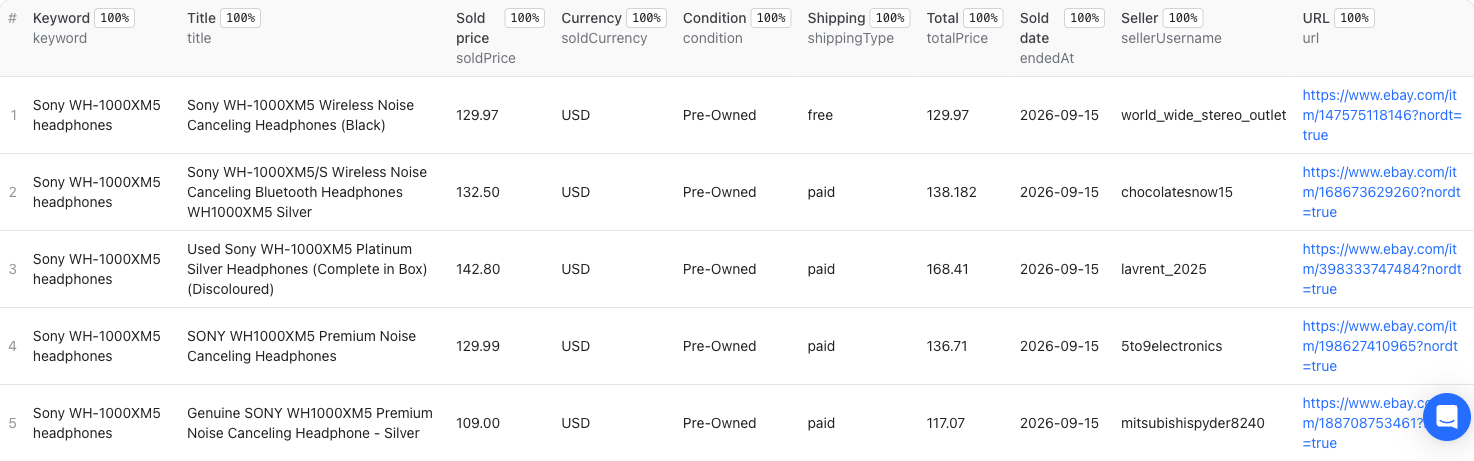
Actual Apify output from the September 15, 2026 owner test. Click the image to view the full-resolution table. Prices in this example are dated, not a current valuation.
The example above returned five listings in an owner test on September 15, 2026. Here is a trimmed, unmodified row from that run. It is a dated example, not a current price quote or a promise of identical results.
The same run's SUMMARY record contained:
returned is the number of rows in this sample. totalResults is eBay's displayed search count, not the number downloaded. p25 and p75 describe the middle half of the priced sample, not a valuation guarantee. The summary uses item prices; compare shipping separately when estimating total cost.
Input reference
| Input | Default | What it does |
|---|---|---|
keywords | Required | Product keywords. Include the model, size, capacity, card number, or other identifiers that matter. |
count | 240 | Maximum returned listings per keyword, from 1 to 240. Fewer may be available or remain after filtering. |
ebaySite | ebay.com | Selects the eBay marketplace. |
itemCondition | any | Broad condition filter: any, new, or used. |
minPrice / maxPrice | Not set | Optional non-negative price bounds in the search marketplace's displayed currency. The form accepts whole numbers. |
relevance | true | Applies relevance cleaning. false disables semantic cleaning, but normal invalid-row checks still apply. |
Keep the required keywords list in both Console and API input. The existing Actor also accepts optional sortOrder in JSON: endedRecently, timeNewlyListed, pricePlusPostageLowest, pricePlusPostageHighest, or distanceNearest.
Supported marketplaces: United States (ebay.com), United Kingdom (ebay.co.uk), Germany (ebay.de), France (ebay.fr), Italy (ebay.it), Spain (ebay.es), Canada (ebay.ca), and Australia (ebay.com.au). Check the returned currency instead of assuming every price is USD.
Conditions, Best Offers, and matching
conditionpreserves category-specific wording when available, such as Pre-Owned or New with tags.conditionIdis included when it can be mapped. Missing values can benull.bestOfferAccepted: truemarks a sale that closed on an accepted offer. The sold price eBay displays is the asking price; turn on Real Best Offer prices to getacceptedOfferPrice, the amount the buyer paid. Anullmarker means it was unavailable or not detected, not proof that no offer was accepted.- AI cleanup (
relevance: true, the default) removes accessories, parts, lots, reprints and other models. For high-value comps, still glance at the title, condition and variant of each sale before relying on it. - A low result count can reflect a specific query, selected market, filters, or limited available listings.
countis a ceiling, not a guaranteed batch size. - This Actor covers recent sold listings and up to 3 years of sold history (Sold history mode). Active listings, Card Batch and Shipping Rates are available through the CompSniper API, not this Actor.
- Results may be served from cache. This is not a complete archive of every eBay transaction.
Pricing and usage
$2 per 1,000 returned listings, or $0.002 per listing saved to your Apify dataset. Pay for the rows actually returned, not the requested maximum.
| Listings saved | Result fee |
|---|---|
| 5 | $0.01 |
| 60 | $0.12 |
| 240 | $0.48 |
| 1,000 | $2.00 |
Price summaries are included. There is no monthly Actor rental, no start fee, and no additional platform-usage charge for this Actor. Your Apify subscription or available credits are separate.
A search that saves no listings has no result fee. If some keywords succeed and another fails, only the successfully saved listings are billable. Re-running a search can charge for its results again, including when the underlying data comes from cache.
Set Maximum cost per run in Apify to control spending. The Actor reduces the next search's result count to fit the remaining budget and stops searching new keywords when the budget is used. Check the returned keyword summaries before assuming that the full keyword list completed.
The Try for free button uses any available Apify trial or plan credits; it is not unlimited free usage. A direct CompSniper subscription or API key is not required and does not replace Apify billing.
API access and automation
Open this Actor's API tab for code examples and the endpoint that runs this exact Actor. Authenticate with your Apify token, not a direct CompSniper cs_live_ key. Keep tokens server-side.
After the run finishes, retrieve its default dataset for listing rows and its default key-value store's SUMMARY record for price statistics. Apify schedules and integrations can automate recurring workflows. Start with a small result count before scheduling a larger keyword list.
Troubleshooting and support
Missing results for a keyword? Check both the dataset and the run log. A keyword that encountered a request error can be skipped while other keywords finish. A Succeeded run status alone does not prove that every keyword returned data. Do not treat a request error as evidence that the product has no sold listings.
No useful comps? Check spelling and marketplace, remove unnecessary filters, then inspect the titles returned. For exact variants, include the identifying model, size, capacity, grade, or card number in the query.
Need help? Open an issue in this Actor's Issues tab or email support@compsniper.com. Include the Apify run ID, keyword, marketplace, and relevant log message. Do not send API tokens.
Further reading: CompSniper methodology, CSV and Google Sheets workflow, and direct API documentation. Direct API features and billing are separate from this Actor's supported inputs and Apify billing.
CompSniper is independent and is not affiliated with or endorsed by eBay.
FAQ
Is there an API for eBay sold listings?
Yes. eBay's own Marketplace Insights API returns sold data but needs eBay's approval. This Actor, and the CompSniper API behind it, return real eBay sold listings for any keyword without an eBay developer account.
How far back does the data go?
Recent mode returns eBay's recent sold listings, about the last 90 days. Sold history mode goes back up to 3 years (1,095 days): set Start date and End date (YYYY-MM-DD), and the Actor fetches history rows 50 per page, newest first, up to Max history rows per keyword. History prices are in US dollars on every eBay site, and each row is billed like any other dataset row.
What else does the CompSniper API cover?
The real accepted price on Best Offer sales, PSA prices by grade and population, TCGplayer sales, and Goldin, Fanatics Collect, Pristine Auction and MySlabs auction results, on one key. See the Pokemon card price API and the API documentation.


