
Copart Search Scraper — Salvage & Used Auction
Pricing
from $0.50 / 1,000 results
Copart Search Scraper — Salvage & Used Auction
Scrapes vehicle auction lots from any Copart search results page or lot page: damage, odometer, current bid, sale date, yard and photos, with optional VIN decoding to manufacturer and country of origin. Optional cache project skips lots from earlier runs.
Pricing
from $0.50 / 1,000 results
Rating
0.0
(0)
Developer
ActorFlow
Maintained by CommunityActor stats
0
Bookmarked
2
Total users
1
Monthly active users
11 hours ago
Last modified
Categories
Share
Copart Auction Lot Scraper — Salvage & Used Vehicles with VIN Decoding
Scrape vehicle auction lots from Copart (copart.com) — paste any search results page or a single lot page and get each lot's damage, odometer, current bid, sale date, yard, title and photo, plus the manufacturer and country of origin decoded from the VIN. Results export as JSON, CSV or Excel and the actor can be called as an API. No login needed: copy a URL from your browser, press Start. Give a cache project name and repeat runs skip lots you already have, so scheduled jobs return only new lots.
Target website: copart.com
✨ Features of this Copart auction lot scraper
- Auction lot extraction — about 50 fields per lot, including vehicle details, damage, title, odometer, estimated retail value, current bid, sale date and yard location
- Any search URL — apply the filters you want on copart.com (make, damage, location, year, keyword…), copy the address bar URL and paste it in
- Single lot lookup — paste a lot page URL to get just that vehicle
- Optional VIN decoding — switch on Decode VINs to decode the visible part of the VIN into manufacturer, make, model year, plant and country of origin, even when Copart masks the rest of the number
- Optional full photo gallery — every full-size photo URL per lot, on request
- Cache project — name a cache project and lots scraped in earlier runs are skipped (and not charged), so each scheduled run returns only new lots
- Pagination support — keeps paging through the results until your limit is reached
- Proxy support — runs through Apify proxy, with residential proxies as a fallback
- No browser required — fast, low-cost runs
🚀 How to scrape Copart auction lots in 5 steps
- Sign up for a free Apify account — includes $5 monthly credit.
- Open the actor page and click Try for free.
- Paste one or more Copart search results or lot URLs in Copart URLs.
- Click Start and wait for the run to complete.
- Download results from the Output tab in JSON, CSV, or Excel format.
You can also run this actor via the Apify API or integrate it directly into your workflows using Zapier, Make, or n8n.
💰 Pricing
This actor uses pay-per-result billing: you pay for each lot saved to the dataset.
- New Apify accounts include $5 of free monthly credit.
- The actor uses plain HTTP requests rather than a browser, so it costs significantly less to run than browser-based scrapers.
- VIN decoding is free and adds no extra charge. With a cache project name, lots you already have are skipped and not charged.
🔧 Input configuration
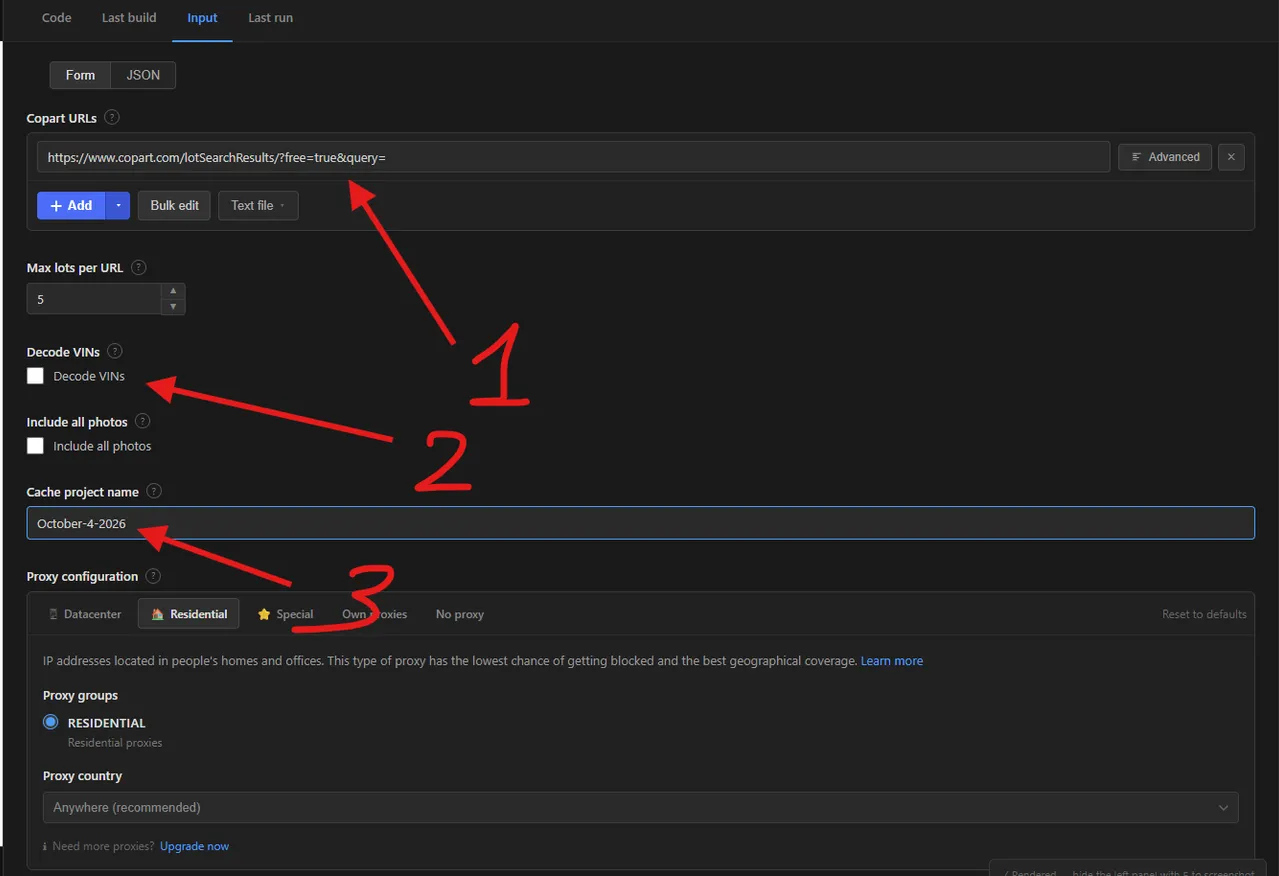
- Copart URLs — where you enter the Copart search results or lot URLs to scrape.
- Max lots per URL — the
maxItemslimit: how many lots are returned for each URL. - Cache project name — how to use the cache. In the example the name is
October-4-2025, so if the scraper runs more than once on the same day, every run after the first skips the lots already scraped under that project name that day. Use a new name (for example, the next day's date) to start fresh, or leave the field empty to scrape everything every time.
| Field | Type | Required | Default | Description |
|---|---|---|---|---|
Copart URLs (startUrls) | array | — | All lots search | Search results pages and/or single lot pages from www.copart.com. |
Max lots per URL (maxItems) | integer | — | 5 | Maximum lots returned for each start URL (up to 1,000,000). |
Decode VINs (enrichVin) | boolean | — | false | Off by default. Adds manufacturer, make, model year and country of origin from the visible VIN. |
Include all photos (includeImages) | boolean | — | false | Adds a lotImages list with every full-size photo URL. One extra request per lot. |
Cache project name (cacheProjectName) | string | — | — | Optional. Lots already scraped under this name in an earlier run are skipped and not charged. Leave empty to scrape everything. |
Proxy configuration (proxyConfiguration) | object | — | Apify proxy | Copart blocks many hosting and home IPs, so a proxy is on by default. |
Supported URL types:
- Search results:
https://www.copart.com/lotSearchResults/?free=true&query=toyota, or any filtered search URL copied from your browser - Single lot:
https://www.copart.com/lot/73672065/salvage-2021-kia-forte-gt-wa-spanaway
📦 Copart auction lot scraper output data
The output is a dataset with one record per lot. Fields: lotNumber, url, title, year, make, model, trim, bodyStyle, vehicleType, color, vin, odometer, odometerStatus, engine, cylinders, fuel, transmission, drive, hasKeys, primaryDamage, secondaryDamage, titleType, titleGroup, titleState, estimatedRetailValue, estimatedRepairCost, currentBid, buyItNowPrice, currency, saleStatus, bidStatus, saleDate, timeZone, yardName, yardNumber, city, state, country, zipCode, latitude, longitude, highlights, features, imageUrl, lastUpdated and sourceUrl. With Decode VINs switched on (it is off by default), vinDecoded, vinWmi, vinMake, vinManufacturer, vinModel, vinSeries, vinTrim, vinModelYear, vinBodyClass, vinVehicleType, vinDoors, vinEngineCylinders, vinDisplacementL, vinEngineHP, vinEngineModel, vinFuelType, vinFuelTypeSecondary, vinTransmission, vinDriveType, vinGvwr, vinCountryOfOrigin, vinPlantState, vinPlantCity, vinPlantCompanyName and vinErrorCode are added (vinErrorCode 6 means an incomplete VIN, which is normal for Copart's masked VINs); with photos on, lotImages is added. The dataset has 1 view, Overview, a compact table of photo, vehicle, odometer, damage, current bid, sale date, yard, state, country of origin and lot link.
Sample output (with Decode VINs switched on; without it the vin* fields are absent):
🐍 How to scrape Copart with Python, JavaScript or the API
Run the actor programmatically with the official Apify clients. Replace <YOUR_API_TOKEN> with the token from your Apify Console.
Python (pip install apify-client):
JavaScript (npm install apify-client):
cURL — start a run and wait for the dataset:
💡 What you can use Copart auction lot data for
- Daily feeds of fresh salvage inventory by make, damage type and location
- Spotting undervalued lots by comparing current bid, estimated retail value and odometer
- Finding export candidates by manufacturer and country of origin
- Tracking bid levels and inventory volumes by yard and state
- Pulling one vehicle's details and decoded VIN into a spreadsheet before bidding
Auto dealers, salvage buyers, exporters, insurers and market analysts typically use this data.
⚠️ Limitations & known issues
- Public lots only — lots and fields that need a Copart member login are not available.
- Masked VINs — Copart hides the last six VIN characters on most lots. Decoding uses the visible first 11 characters, so trim-level details can be missing, and lots with a fully hidden VIN get
vinDecoded: false. - Search depth — Copart stops serving results at a certain depth of a very large search, so narrow broad searches with filters.
- Cache and bids — with a cache project name, a lot is returned once; later runs skip it, so its bid is not refreshed. Leave the name empty to re-scrape current bids.
- copart.com only — other Copart country sites are not supported.
❓ Frequently asked questions
Can I scrape Copart legally?
The actor only collects data that is already publicly visible on copart.com — no login, paywall or private content is accessed. Scraping publicly available data is generally considered lawful (see hiQ Labs v. LinkedIn). You are responsible for complying with Copart's Terms of Service and applicable laws such as GDPR/CCPA if personal data is involved.
How does the VIN decoding work on masked VINs?
Copart shows only the first part of most VINs. That visible prefix still identifies the manufacturer, model line, model year and assembly plant, so the actor decodes it with a free public vehicle database and adds the result to each lot.
How does the caching work?
Enter a Cache project name and the actor remembers every lot it saved under that name. On the next run with the same name those lots are skipped and not charged, so you only get new lots. Leave the name empty to scrape everything every time. Use a different name for each saved search.
How many lots can I scrape from one URL?
Up to the Max lots per URL limit, which applies to each start URL separately. Very large searches are capped by how deep Copart itself serves results, so add filters to get complete data.
Do I need a proxy to scrape copart.com?
Yes. Copart blocks requests from many hosting and home IP addresses, so the actor uses Apify proxy by default. If runs are blocked, switch to residential proxies.
How do I scrape Copart with Python?
Use the Apify client as shown in the Python example above, then iterate over the dataset items.
Can I run this Copart scraper on a schedule?
Yes. Use Apify Schedules to run it daily on a saved search URL. Add a cache project name to receive only new lots on each run.
What output formats are supported?
JSON, CSV, Excel, XML and RSS, either from the Output tab or through the Apify API.
🔗 Other actors you may find useful
| Actor | Description |
|---|---|
| 🚗 Cheapest Cars & Bids Scraper | Scrapes auction listings, sale prices, vehicle specs and photos from Cars & Bids. |
| 🧴 INCIDecoder Scraper | Scrapes skincare product pages with full ingredient lists, ratings and explanations. |
| 🌐 WHOIS Domain Lookup Scraper | Bulk WHOIS lookups with registration dates, registrar, name servers and contacts. |
| 🎟️ Gametime Events Scraper | Collects event, venue and ticket offer records from Gametime. |
| 📈 Nasdaq Short Interest Scraper | Scrapes short interest history for any Nasdaq-listed stock or ETF. |
💬 Support & contact
If you encounter any issues or have questions, please open an issue or reach out via the Apify Community Forum.
You can also find more of our actors on the Actor Flow page.


