

Kalshi Markets Scraper - Prediction Market Prices & Odds
Pricing
from $0.50 / 1,000 results
Kalshi Markets Scraper - Prediction Market Prices & Odds
Scrapes Kalshi prediction markets: yes/no prices, implied probability, spread, volume, open interest, close times, rules, series tags and optional orderbook and recent trades. Search by keyword, category, series, event or Kalshi URL.
Pricing
from $0.50 / 1,000 results
Rating
0.0
(0)
Developer

ActorFlow
Maintained by CommunityActor stats
0
Bookmarked
2
Total users
1
Monthly active users
3 days ago
Last modified
Categories
Share
Scrape prediction markets from Kalshi (kalshi.com): yes/no bid and ask prices, implied probability, spread, last price, volume, 24h volume, open interest, close and expiration times, resolution rules, category, series tags and, optionally, the live orderbook and recent trades. Export the results as JSON, CSV or Excel, or call the actor as an API. Paste a Kalshi market or category URL, or type a keyword, press Start, and get clean Kalshi odds data.
Target website: kalshi.com
✨ Features of this Kalshi markets scraper
- Prediction market extraction — every market of an event with prices in dollars, implied probability, spread, volume, open interest, dates, rules and settlement sources.
- Search by keyword, category, series or event — match event and market titles (for example bitcoin, fed, trump), pick a category such as Politics or Crypto, or pass Kalshi series and event tickers.
- Status and volume filters — open, closed, settled or any events, and a minimum traded volume.
- Orderbook and trades — optional yes/no bid levels with quantities and the most recent trades of each market.
- Pagination support — keeps paging through all Kalshi events until Max items is reached.
- Incremental runs, no repeat charges — with a cache project name, markets you already scraped are skipped, so scheduled runs return only newly listed markets.
- Proxy support — optional Apify Proxy, off by default.
- No browser required — plain HTTP requests keep runs fast and cheap.
🚀 How to scrape Kalshi markets in 5 steps
- Sign up for a free Apify account — includes $5 monthly credit.
- Open the actor page and click Try for free.
- Fill in the Input fields (a Kalshi URL, keyword, category, series or event ticker is required).
- Click Start and wait for the run to complete.
- Download results from the Output tab in JSON, CSV, or Excel format.
You can also run this actor via the Apify API or integrate it directly into your workflows using Zapier, Make, or n8n.
💰 Kalshi scraper pricing
This actor uses pay-per-result billing: you pay for each market saved to the dataset.
- New Apify accounts include $5 of free monthly credit.
- The actor uses plain HTTP requests, so it costs significantly less to run than browser-based scrapers.
- The proxy is disabled by default; leaving it off keeps runs cheapest.
- Markets skipped by the cache are not charged.
🔧 Kalshi scraper input configuration
| Field | Type | Required | Default | Description |
|---|---|---|---|---|
Kalshi URLs (startUrls) | array | — | kalshi.com/category/crypto (prefill) | Kalshi market pages or category pages. |
Search keywords (searchQueries) | array | — | — | Keywords matched against event and market titles. Each keyword is a separate search. |
Cache project name (cacheProjectName) | string | — | — | Same name on every run returns only new markets; cached markets are skipped and not charged. Records get changeType: new. |
Max markets per search (maxItems) | integer | — | 5 | Maximum markets saved for each URL, keyword, category, series or event. |
Categories (categories) | array | — | — | Kalshi categories, for example Politics, Economics, Crypto, Sports, Climate and Weather. |
Series tickers (seriesTickers) | array | — | — | Series tickers such as KXFED or KXHIGHNY. |
Event tickers (eventTickers) | array | — | — | Event tickers such as KXELONMARS-99. |
Event status (status) | string | — | open | open, closed, settled or any. Does not apply to event tickers. |
Minimum volume (minVolume) | integer | — | 0 | Skip markets with lower total traded volume (contracts). |
Include orderbook (includeOrderbook) | boolean | — | false | Add yes/no bid levels with quantities. One extra request per market. |
Orderbook depth (orderbookDepth) | integer | — | 10 | Price levels per side; 0 returns all. |
Recent trades per market (tradesLimit) | integer | — | 0 | Add up to this many latest trades (max 1000). 0 turns it off. |
Max concurrency (maxConcurrency) | integer | — | 5 | Parallel requests (Kalshi allows about 20 per second). |
Proxy configuration (proxyConfiguration) | object | — | no proxy | Works without a proxy. |
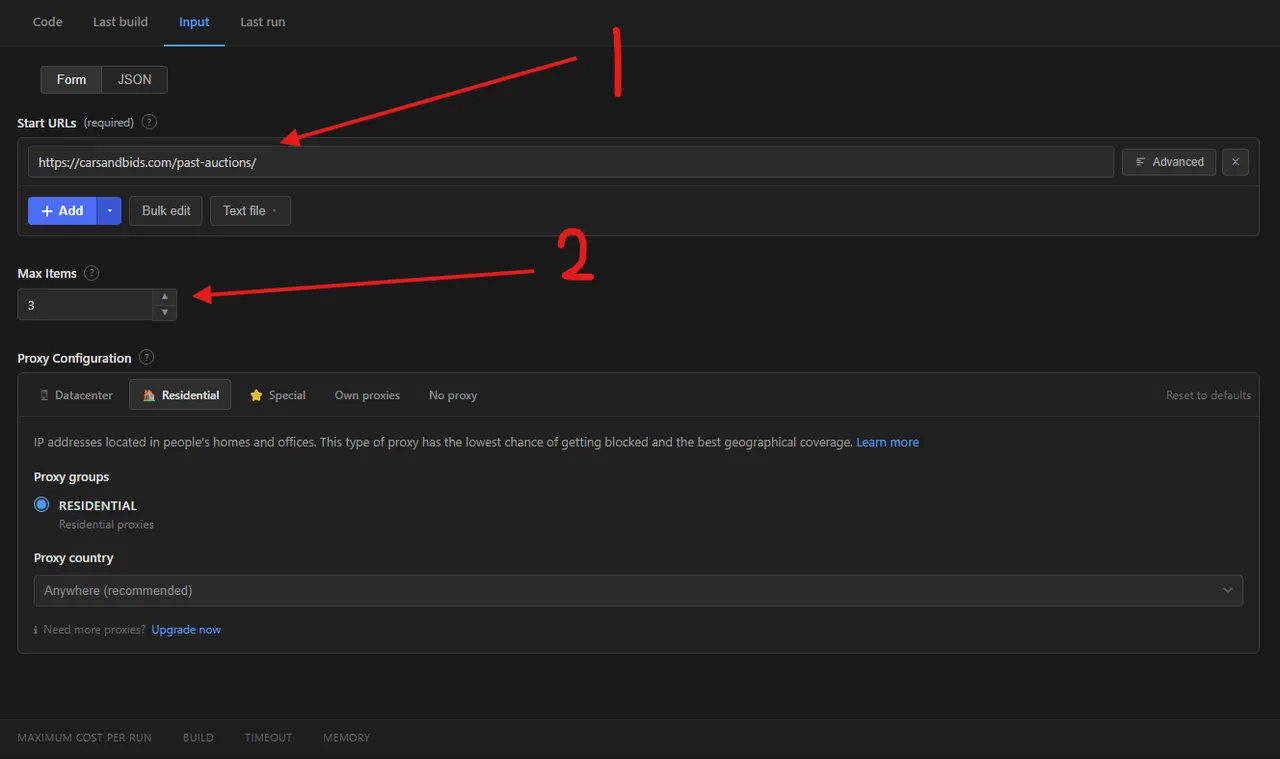
The numbered markers in the screenshot show the two fields most runs need:
- Start URLs — paste a Kalshi series, event or category page.
- Max items — how many markets to save for each URL.
Supported URL types:
- Series:
https://kalshi.com/markets/kxelonmars - Event:
https://kalshi.com/markets/kxelonmars/elon-mars/kxelonmars-99 - Category:
https://kalshi.com/category/crypto
📦 Kalshi scraper output data
Each market is one dataset item with the fields id, ticker, eventTicker, seriesTicker, title, subtitle, yesSubTitle, noSubTitle, eventTitle, eventSubtitle, seriesTitle, category, tags, frequency, marketType, status, result, yesBid, yesAsk, noBid, noAsk, lastPrice, previousPrice, impliedProbability, spread, yesBidSize, yesAskSize, volume, volume24h, openInterest, notionalValue, strikeType, floorStrike, capStrike, mutuallyExclusive, canCloseEarly, createdTime, openTime, closeTime, expectedExpirationTime, expirationTime, latestExpirationTime, occurrenceTime, updatedTime, settlementValue, expirationValue, earlyCloseCondition, rulesPrimary, rulesSecondary, settlementSources, contractUrl, url, scrapedAt, plus orderbook and recentTrades when switched on and changeType when caching is on. Prices are in US dollars (0 to 1, equal to the probability), volumes and open interest in contracts. The dataset has 1 view, Overview, a table of ticker, market, outcome, category, status, prices, probability, volume, open interest, close time and page link.
occurrenceTime is when the real-world event happens, expirationValue is the value the market settled on (for example the Bitcoin price), and earlyCloseCondition describes when the market can close early.
impliedProbability is the midpoint of the yes bid and ask when both sides are quoted, otherwise the last traded price.
Output at a glance:
| Market | Yes bid | Yes ask | Probability | Volume | Closes |
|---|---|---|---|---|---|
| Bitcoin above $130,000 by Oct 29, 2026 | 0.00 | 0.03 | 0.03 | 1,136 | 2026-10-29 |
| Bitcoin above $130,000 by Nov 26, 2026 | 0.01 | 0.02 | 0.015 | 4,528 | 2026-11-26 |
| Bitcoin above $130,000 by Dec 24, 2026 | 0.02 | 0.07 | 0.045 | 1,945 | 2026-12-24 |
| Bitcoin above $130,000 by Jan 21, 2027 | 0.02 | 0.07 | 0.045 | 1,643 | 2027-01-21 |
| Bitcoin above $130,000 by Feb 18, 2027 | 0.03 | 0.10 | 0.065 | 274 | 2027-02-18 |
Sample output (raw JSON):
With Include orderbook and Recent trades switched on, each item also gets:
🐍 How to scrape Kalshi with Python, JavaScript or the API
Run the actor programmatically with the official Apify clients. Replace <YOUR_API_TOKEN> with the token from your Apify Console.
Python (pip install apify-client):
JavaScript (npm install apify-client):
cURL — start a run and wait for the dataset:
💡 What you can use Kalshi market data for
- Tracking market-implied probabilities for elections, Fed decisions, inflation, weather or crypto prices
- Arbitrage and comparison against Polymarket, sportsbooks or other prediction markets
- Building time series of odds, volume and open interest with scheduled runs
- Feeding forecasting models, dashboards and news alerts with crowd probabilities
- Finding newly listed markets every day with the cache
Traders, quant researchers, journalists, data scientists and forecasting teams in finance, media and politics typically use this data.
⚠️ Kalshi scraper limitations and known issues
- Keyword and category searches scan all events — Kalshi has no server-side text or category search, so the actor pages through all events (about 15,000 open events, roughly 75 pages) and filters titles and categories. Rare keywords can take up to a minute; series and event tickers are fastest.
- Combo (parlay) markets — multivariate combo markets are not included.
- Market page link —
urlis built from the series, its title and the event ticker; Kalshi routes by the tickers, so the slug may differ from the one on the site. - Open events list only active markets — with status
open, markets of an open event that are already closed are skipped; useanyto keep them.
❓ Kalshi scraper FAQ
Can I scrape Kalshi legally?
The actor only reads public market data that Kalshi publishes for everyone, without logging in or touching any account. Scraping publicly available data is generally considered lawful (see hiQ Labs v. LinkedIn), but you are responsible for complying with Kalshi's Terms of Service and applicable laws.
What data does the Kalshi scraper return?
Every market has its ticker, titles, category, series tags, yes/no bid and ask, last price, implied probability, spread, volume, open interest, dates, result and rules. Turn on Include orderbook for bid levels and Recent trades per market for the latest trades.
How many Kalshi markets can I scrape from one search?
maxItems limits the number of markets per URL, keyword, category, series or event, not for the whole run. There is no depth limit: the actor pages through every Kalshi event until Max items is reached.
Do I need a proxy to scrape kalshi.com?
No. The actor works without a proxy by default, which keeps runs cheapest. Turn on Apify Proxy only if you get blocked.
How do I scrape Kalshi odds with Python?
Use the Python example above: call the actor with ApifyClient, then iterate over the dataset items of the finished run.
Can I run this Kalshi scraper on a schedule?
Yes. Use Apify Schedules to record odds over time. Set a Cache project name if you only want newly listed markets: markets already saved under that name are skipped, not charged, and new ones get changeType: new.
What formats can I export Kalshi data in?
JSON, CSV, Excel, XML and RSS, either from the Output tab or through the Apify API.
Why does a keyword search take longer than a series search?
Kalshi offers no text search for events, so the actor reads all events page by page and keeps the matching ones. Use series or event tickers when you know them for the fastest runs.
🔗 Other actors you may find useful
| Scraper | Description |
|---|---|
| 🎲 Action Network Odds & Public Betting Scraper | Sportsbook odds, public betting splits, line movement and sharp-money signals from Action Network. |
| 📉 Nasdaq Short Interest Scraper | Short interest history for any Nasdaq-listed stock or ETF: settlement date, short shares and days to cover. |
| 📰 Google News AI Scraper | Google News articles by keyword, with optional full article text and AI summaries. |
| 💬 Sentiment Analysis Using Jev | Classifies texts as positive, negative, neutral or mixed, or into your own custom labels. |
| ✍️ Substack Scraper | Substack posts and comments by keyword, publication or post URL: title, author, date and full text. |
💬 Support & contact
If you encounter any issues or have questions, please open an issue or reach out via the Apify Community Forum.
You can also find more of our actors on the Actor Flow page.


