

StreetEasy Updated Scraper
Pricing
from $1.50 / 1,000 results
StreetEasy Updated Scraper
Scrapes New York City apartment listings from StreetEasy (streeteasy.com), including address, neighborhood, price, bedrooms, bathrooms, square footage, amenities, availability and photos, for both rentals and sales.
Pricing
from $1.50 / 1,000 results
Rating
0.0
(0)
Developer

ActorFlow
Maintained by CommunityActor stats
0
Bookmarked
2
Total users
1
Monthly active users
2 days ago
Last modified
Categories
Share
StreetEasy NYC Real Estate Scraper
Scrape New York City apartment listings from StreetEasy (streeteasy.com) — both rentals and sales. This StreetEasy scraper extracts the address, unit, neighborhood, price, bedrooms, bathrooms, square footage, amenities, availability date, concessions and photos for every listing in a search, and exports them to JSON, CSV or Excel — or straight into your code through the Apify API. Paste any StreetEasy search URL, press Start.
Target website: streeteasy.com
✨ Features of this StreetEasy real estate scraper
- Rental and sales listings — works with
/for-rentand/for-salesearches alike - Full listing data — address, unit, neighborhood, ZIP, price, beds, baths, square footage, building type
- Rental concessions — net effective price and months free, where the listing offers them
- Amenities and features — collected from each unit page
- Keeps your search filters — paste a filtered StreetEasy search URL and every filter is preserved
- Pagination support — walks through result pages until your item limit is reached
- Fast mode — skip unit pages to scrape roughly twice as fast from search results alone
- Monitor mode — set a project name and later runs skip listings you already scraped, returning only new ones — ideal for monitoring and saving money
- Proxy support — configurable, with US residential recommended for larger runs
- No browser required — runs on plain HTTP requests, which makes it fast and cheap
🚀 How to scrape StreetEasy listings in 5 steps
- Sign up for a free Apify account — includes $5 monthly credit.
- Open the actor page and click Try for free.
- Paste a StreetEasy search URL into Start URLs.
- Click Start and wait for the run to complete.
- Download results from the Output tab in JSON, CSV, or Excel format.
You can also run this actor via the Apify API or integrate it directly into your workflows using Zapier, Make, or n8n.
💰 Pricing
This actor uses pay-per-result billing based on the compute units a run consumes.
- New Apify accounts include $5 of free monthly credit.
- It runs on plain HTTP requests rather than a headless browser, so it costs significantly less to run than browser-based real estate scrapers.
- Turning off Visit each listing page roughly halves the requests per listing when you only need the headline fields.
🔧 Input configuration
| Field | Type | Required | Default | Description |
|---|---|---|---|---|
startUrls | array | — | https://streeteasy.com/for-rent/nyc | StreetEasy search URLs or unit URLs. Page type is detected automatically. |
maxItems | integer | — | 5 | Maximum listings to scrape per start URL. Set to 0 for no limit. |
scrapeDetails | boolean | — | true | Visit each unit page for description, amenities and features. |
cacheProjectName | string | — | — | Project name. When set, the actor runs in monitor mode: listings scraped in earlier runs under this name are skipped. |
proxyConfiguration | object | — | Apify Proxy, RESIDENTIAL, US | Required. StreetEasy refuses most IPs; US residential proxies are what make a run succeed. |
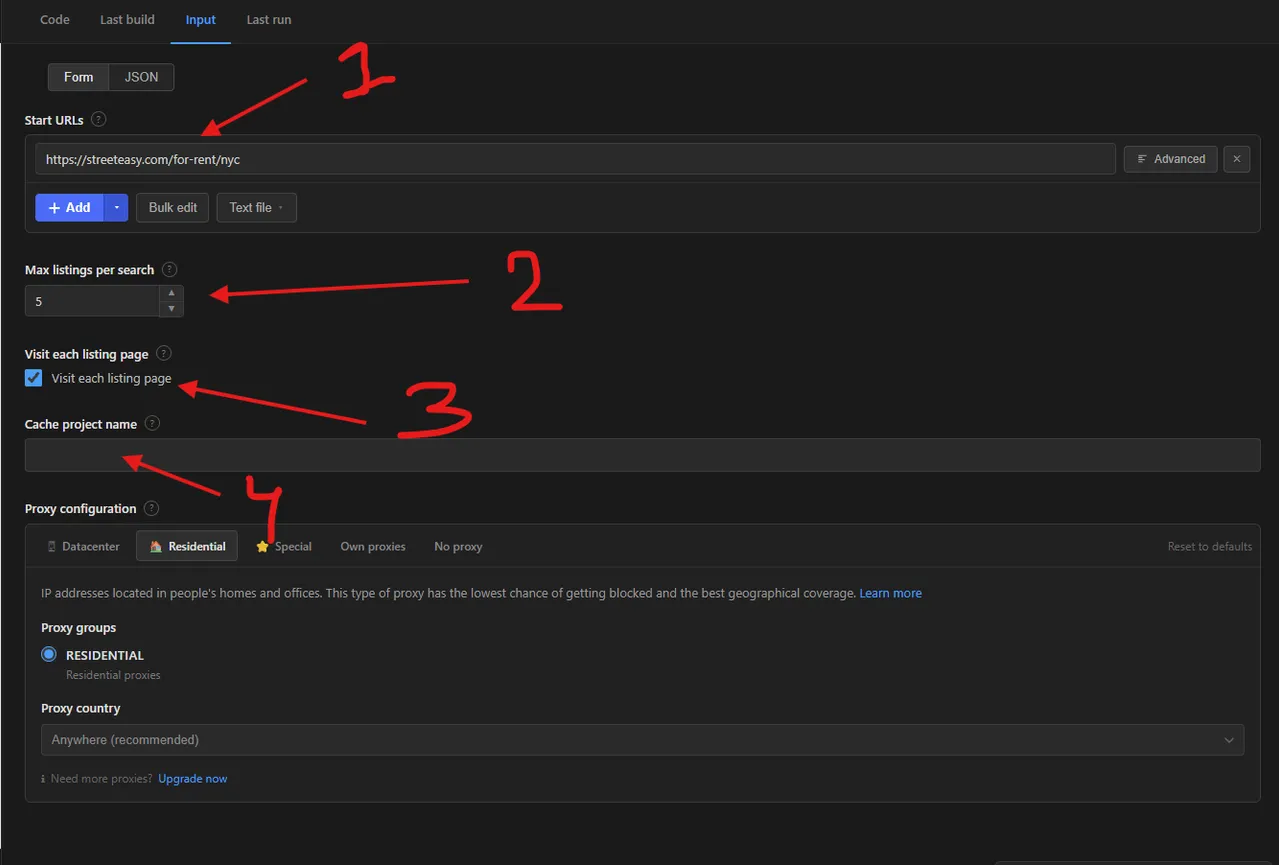
- Start URLs — the StreetEasy search URLs (or single unit URLs) to scrape, e.g.
https://streeteasy.com/for-rent/nyc. Add as many as you like; filters in the URL are kept. - Max listings per search (
maxItems) — the most listings to collect for each start URL. The default of5is a quick test; raise it for real runs, or set0for no limit. - Visit each listing page (
scrapeDetails) — when ticked, the actor opens every unit page to add the description, amenities and features. Untick it for a faster, cheaper run with search-result fields only. - Cache project name (
cacheProjectName) — leave empty for a normal run. Enter a name to turn on monitor mode (below).
The Proxy configuration section below the form is already set to US-friendly residential proxies; leave it on, as StreetEasy refuses most other IPs.
Monitor mode: give cacheProjectName a name (for example nyc-2br-rentals) and the actor remembers every listing it has scraped under that name. On the next run, previously scraped listings are skipped and only new ones are returned and charged. This makes it ideal for monitoring a search on a schedule and saves money, since you only pay for new results. Leave it empty for a normal full run, and use a different name for each search you want to track separately.
Supported URL types:
- Rental search —
https://streeteasy.com/for-rent/nyc - Sale search —
https://streeteasy.com/for-sale/nyc - Filtered search —
https://streeteasy.com/for-rent/nyc/price:-4000%7Cbeds:2 - Single unit —
https://streeteasy.com/building/51-hamilton-terrace-new_york/1
📦 StreetEasy scraper output data
Each result is a JSON object with the keys url, listingId, listingType, address, unit, neighborhood, zipCode, state, price, totalMonthlyPrice, netEffectivePrice, monthsFree, bedrooms, bathrooms, livingAreaSize, buildingType, furnished, status, availableAt, leaseTermMonths, isNewDevelopment, hasVideos, hasTour3d, source and photos. When unit pages are visited, these are added: the full description, roomCount, amenities, features, fullAddress, the listing agent (agentName, agentPhone, agentCompany and an agents list), daysOnMarket, onMarketAt, attributes, aboutBuilding, propertyHistory and neighborhoodInfo (described below). The dataset ships with two views: Overview, a compact table of address, neighborhood, price and room counts; and Full listing details, which adds amenities, agent contact, building facts, price history and neighborhood info.
Sample output:
Extra detail fields (added when unit pages are visited):
attributes— policies, amenities and features as{ "name", "value" }pairs, e.g.{ "name": "policies", "value": ["PETS_ALLOWED"] }. Other names appear when present:petPolicy,doormanTypes,parkingTypes,sharedOutdoorSpaceTypes,storageSpaceTypes,fireplaceTypes,privateOutdoorSpaceTypes,views. Empty ones are left out.agentName,agentPhone,agentCompany— the first listed agent or company, plusagents, the full list withlicenseType.aboutBuilding— building name, type, status, year built, floors, residential units, address, coordinates and documents link.propertyHistory— the unit's listing history, one row per event (date,eventsuch asACTIVE,PRICE_CHANGEorDELISTED,price,priceChangePercent,listedBy).neighborhoodInfo— the "About" and "Explore" blocks of the page: neighborhooddescription,medianAskingRentandmedianAskingSalePriceformedianBedrooms, and nearbytransit,colleges,parks,museumsandschoolswith distances in miles.
Captured from a real run on 2026-09-12. The
photosarray is trimmed to three entries here; a live listing typically carries 7 to 15.
🐍 How to scrape StreetEasy with Python, JavaScript or the API
Run the actor programmatically with the official Apify clients. Replace <YOUR_API_TOKEN> with the token from your Apify Console.
Python (pip install apify-client):
JavaScript (npm install apify-client):
cURL — start a run and wait for the dataset:
💡 What you can use StreetEasy listing data for
- Rental market analysis — track asking rents by neighborhood over time
- Investment research — compare sale prices and price per square foot across areas
- Concession tracking — monitor how often landlords offer months free and how that moves
- Comparable analysis — pull comps for a specific building or block
- Inventory monitoring — watch how long listings stay on the market
- Relocation research — shortlist apartments matching a budget and bedroom count
Real estate agents, investors, appraisers, property managers, market analysts and relocation services use this data across residential real estate, proptech and financial research.
⚠️ Limitations & known issues
- New York City only — StreetEasy covers the five boroughs, so there is no data for other cities.
- Listing URL forms —
/building/{slug}/{unit},/rental/{id}and/sale/{id}unit pages are all accepted as start URLs. - Contact details — the agent or company name and phone number shown on the listing are collected; agent email addresses are not.
- Missing sections — some listings have no policies, no neighborhood description or no price history, in which case that field is empty or
null.
❓ Frequently asked questions
Can I scrape StreetEasy legally?
This actor only collects data that is already publicly visible on StreetEasy — no login, paywall, or private content is accessed. Scraping publicly available data is generally considered lawful (see hiQ Labs v. LinkedIn as precedent). You remain responsible for complying with StreetEasy's Terms of Service and for how you use listing content, which may be copyrighted by the listing broker.
Why did my run return no results?
Almost always the proxy setting. StreetEasy refuses roughly five out of six IP addresses with an HTTP 403, so a run without US residential proxies returns nothing at all. Leave proxyConfiguration on its default. Seeing several 403 lines in the log is normal and expected — the scraper simply retries from a different address until one is accepted.
Does this scrape both rentals and sales?
Yes. Paste a /for-rent or /for-sale search URL and the actor labels every row with listingType so you can tell them apart in a mixed dataset.
How many listings can I scrape from one search?
maxItems limits results per start URL, so three searches with maxItems: 100 returns up to 300 listings. Set it to 0 to follow the search to its end.
Do I need a proxy to scrape streeteasy.com?
For a handful of listings, often not. For anything larger, yes — US residential proxies are strongly recommended, because StreetEasy blocks aggressively by IP.
How do I scrape StreetEasy with Python?
Install apify-client, then call the actor with your search URL and iterate the dataset — see the Python example above. Each listing comes back as flat JSON ready for pandas.
Can I run this StreetEasy scraper on a schedule?
Yes. Use Apify Schedules to run it daily, and set cacheProjectName to enable monitor mode, so each run skips previously scraped listings and returns only new ones — exactly what you want for market monitoring, and it keeps costs down.
Is this the cheapest streeteasy scraper in Apify?
Possibly yes, as this streeteasy scraper has caching feature which might save you money across multiple runs.
What output formats are supported?
JSON, CSV, Excel, XML and RSS, either from the Output tab or through the Apify API.
🔗 Other actors you may find useful - Student Housing and Rent Website Scrapers
| Actor | Description |
|---|---|
| HousingAnywhere Property Scraper | Scrapes rental listings from HousingAnywhere across every city and room type it lists. |
| Spotahome Property Scraper | Scrapes mid- and long-term rental listings from Spotahome across European cities. |
| Casita Student Accommodation Scraper | Scrapes student accommodation listings from Casita, including pricing, room types and facilities. |
| University Living Housing Scraper | Scrapes student housing listings and property details from University Living. |
| AmberStudent Accommodation Scraper | Scrapes AmberStudent student accommodation listings — pricing, availability, photos, amenities, location and reviews. |
| Student.com Accommodation Scraper | Scrapes student accommodation listings from Student.com by city or university page. |
| Rightmove Listing Availability Checker | Checks whether Rightmove listing URLs are still active or have been removed. |
💬 Support & contact
If you encounter any issues or have questions, please open an issue.
You can also find more of our actors on the Apify Store.


