

Google Maps Website & Contact Extractor
Pricing
from $3.00 / 1,000 business results
Google Maps Website & Contact Extractor
Extract Google Maps business listings and enrich them with lightweight website contact details such as emails, contact page URL, phone numbers, and social profile links.
Pricing
from $3.00 / 1,000 business results
Rating
0.0
(0)
Developer

Delowar Munna
Maintained by CommunityActor stats
0
Bookmarked
37
Total users
7
Monthly active users
a month ago
Last modified
Categories
Share
Google Maps Email & Contact Extractor
Extract Google Maps business listings by keyword + location and enrich each row with shallow website contact data — emails, contact page URL, website phone, and social profile links. Returns a clean, flat, CSV-friendly row per business — built for B2B lead generation, sales outreach, web design and SEO agencies, and local marketing.
V1 stays deliberately shallow on the website side (homepage + a small number of likely contact/about pages, capped by maxPagesPerWebsite) so runs are fast and cost-predictable. You pay a start fee when the run starts (charged per GB of run memory) plus one flat event per unique business row that passes your filters — same per-row price whether or not the website extraction found extra contact data. See Pricing for both events.
✨ Why this scraper
- Maps + website in one pass — 74 flat fields covering Maps data plus emails, contact page, website phone, and social links.
- Finds websites the results cards hide — turn on
scrapePlaceDetailPageto read each business's own Maps listing, recovering websites, phones,place_idand full addresses that never appear on the search card. See Place details. - Finds businesses that have no email at all — many small businesses take enquiries only through a contact form, and every Maps scraper returns them as
email_count: 0dead ends. This one records the form, its endpoint and its fields, so you can still reach them. See Contact forms. - Emails verified, free — every primary email is checked against DNS for syntax, a real mail server (MX), throwaway-inbox domains and role addresses. Competitors charge per email for this; here it is included and on by default. See Email verification.
- Shallow by design — homepage + up to
maxPagesPerWebsite-1extra contact/about pages per site. No deep crawling, no AI, no review scraping. - Pay-Per-Event — a start fee charged per GB of run memory, plus one flat event per saved business row, whether or not contact data was found. Duplicates and filtered rows are not charged, and filters carry no surcharge.
- No login, no cookies, no sessions — just keyword + location.
- CSV-friendly output — flat structure, no nested objects, drops cleanly into Sheets/Excel/CRMs.
- Transparent contact-quality score — rule-based (no AI), explained below.
🚀 Quick start — sample inputs
Every field below has a sensible default, so a working input is much shorter than the full schema. These four cover the workflows people actually run.
Example 1 — the simplest useful run
Keyword + location, keep only businesses that have a website, visit each site for contact details.
Example 2 — several searches, email required, full listing detail
searches is the same thing as searchQueries written as objects — easier to express from the API or a script. emailRequired discards rows we could not find an email for, and those rows are not billed. scrapePlaceDetailPage opens each business's own Maps listing to recover websites, phones and full addresses the result cards omit — slower, and worth it when you need the contact rate.
Example 3 — prospecting for web-design and SEO agencies
Invert the website filter: return the businesses that have no website at all. These are the hardest leads to build a list of anywhere else, and the phone number from Maps is usually the only way to reach them.
Use
scrapePlaceDetailPagehere in particular. A result card only shows a website when Google chooses to render the button, so filtering on card data alone would hand you businesses that do have a site.
Example 4 — re-enrich a list you already have
Feed listings directly instead of searching. placeIds accepts the hex ID this actor emits in its own place_id column, so yesterday's output is today's input. The skip lists keep businesses you have already contacted out of the run — and out of the bill.
Covering a large area. A single Google Maps search term returns roughly 120 results however far the feed is scrolled — that is Google's ceiling, not ours. To get past it, pin an area with customGeolocation and split it with searchAreaCells; each cell becomes its own search with its own viewport, and duplicates across cells are removed before anything is saved or billed. Each cell is a full page render, so this multiplies runtime and cost per delivered row — maxTotalResults still bounds what you pay.
Two ways to write searches.
searchQueriesuses Apify's Key/Value editor — Key is the keyword (plumbers), Value is the location (Canberra ACT), one row per search.searchestakes the same pairs as objects ({ "query": ..., "location": ... }) and is easier from the API. Both work, and a query listed in both is only run once. You can also leave the location blank on every row and set Country / City / State / Postal code once instead.
The actor blocks Apify Residential proxy. If you need residential routing, supply your own provider via
proxyConfiguration.proxyUrls— see 🚦 Proxy policy below.
🎬 What you can feed it
Three entry points, and they combine freely in one run. Every saved row records which one produced it in source_type / source_input.
| Input | What it does | source_type |
|---|---|---|
searchQueries | Keyword + location pairs, one search each ("plumbers in Canberra ACT"). | search |
searches | The same thing written as objects — [{ "query": "plumbers", "location": "Canberra ACT" }]. Easier from the API or a script. A query listed in both fields is only searched once. | search |
startUrls — place link | A /maps/place/... URL is resolved straight to that one business. No searching, so no risk of matching the wrong listing. | start_url_place |
startUrls — search link | A /maps/search/... URL is run as a search. Any map viewport pinned into the URL is preserved. | start_url_search |
placeIds | Place IDs enriched directly. Accepts the hex feature ID this actor outputs in its own place_id column, a Places API ChIJ... ID, or a numeric CID. | place_id |
Because place_id round-trips, the fastest way to re-enrich a list you already have is to paste yesterday's place_id column into placeIds. Place links and place IDs always open the listing page, whether or not scrapePlaceDetailPage is on — it is their only source of data.
Result limits
| Input | Meaning |
|---|---|
maxTotalResults | The one that bounds your bill. Ceiling on rows saved across the whole run — every search, start URL and place ID combined. Default 500, hard cap 5,000. |
maxResultsPerSearch | Optional per-search cap, under Advanced settings, so one broad search cannot consume the whole total. Hard cap 500. |
maxResults | The former name of the per-search cap. Still accepted so existing Tasks and API calls keep working; maxResultsPerSearch wins if both are set. |
These caps are ceilings, not promises. They bound what the actor will save; they cannot make Google return more than it has. A plain keyword search on Google Maps stops at roughly 120 results per search term no matter how far the list is scrolled — that is Google’s behaviour, not a limit of this actor, and every Maps scraper is subject to it. To go past it you run more, narrower searches. The actor can do that for you: set
customGeolocationto the area you want covered andsearchAreaCellsto how many pieces to break it into, and each cell is searched separately with its own map viewport, so the ~120 ceiling applies per cell instead of to the whole area. Businesses found in more than one cell are deduplicated before anything is saved, so overlapping cells cost you nothing extra. Splitting by suburb, postcode or sub-niche by hand works too.
Location
Fill in city, state and postalCode to give every search the same location — then the search list only needs keywords. A location typed into a search row always wins over these. countryCode is different: it is sent to Google as the locale hint (gl=) and is not added to the search text, so on its own it does not give a search a location.
Covering a large area — searchAreaCells. One search returns roughly 120 results however far it is scrolled. To cover a whole city, set customGeolocation to the area and searchAreaCells to the number of pieces to split it into (up to 64). Each cell becomes its own search pinned to its own viewport, so the ceiling applies per cell. Cells are sized to be roughly square on the ground, not in degrees, so a wide area gets more columns than rows rather than long thin strips. Every saved row records which cell found it in search_area_name.
Splitting multiplies Maps page loads, so runs take proportionally longer — but your maxTotalResults cap still bounds what you are charged, and cross-cell duplicates are removed before any row is saved or billed. Splitting needs an area to split: without customGeolocation the actor logs a warning and runs unsplit.
customGeolocation (Advanced) pins searches to a map area instead of letting Google choose one. It accepts a GeoJSON geometry, Feature or FeatureCollection, a plain { "north": -35.24, "south": -35.42, "east": 149.22, "west": 149.02 } rectangle (usually the easiest to write by hand), or a { "lat": -35.28, "lng": 149.13, "zoom": 12 } centre point. This matters more than it sounds: Google returns roughly 120 results for a plain keyword search no matter how far the list is scrolled, and anchoring the search to an area is how you get past that.
📦 Output
The dataset has six views over one flat table of 74 columns. Business contact leads shows every column; the other five are narrower, task-shaped column sets you can export straight to CSV.
| View | What it carries |
|---|---|
| Business contact leads | All 74 columns, in row order. The default. |
| Outreach list (CRM-ready) | One contact route per business plus enough context to write the first line. The one to import into a CRM. |
| Email outreach | Every email column with its DNS verification result and the page it was read from. |
| Website prospecting | Who has a site, whose site failed to load, and how established the business looks — for web-design and SEO agencies. |
| Extraction diagnostics | Lineage, redirects, pages scanned and contact provenance. Open this when a value looks wrong. |
| Map data (lat/lng) | The columns to paste into a mapping tool. |
Apify dataset views select and order columns; they cannot filter rows, and a table is the only thing they can render. So these are column sets, not saved filters — "Map data" means the data for a map, not a rendered one. To narrow rows, use the actor's own filters (
emailRequired,websiteFilter,minRating…), which also keep the filtered rows off your bill.
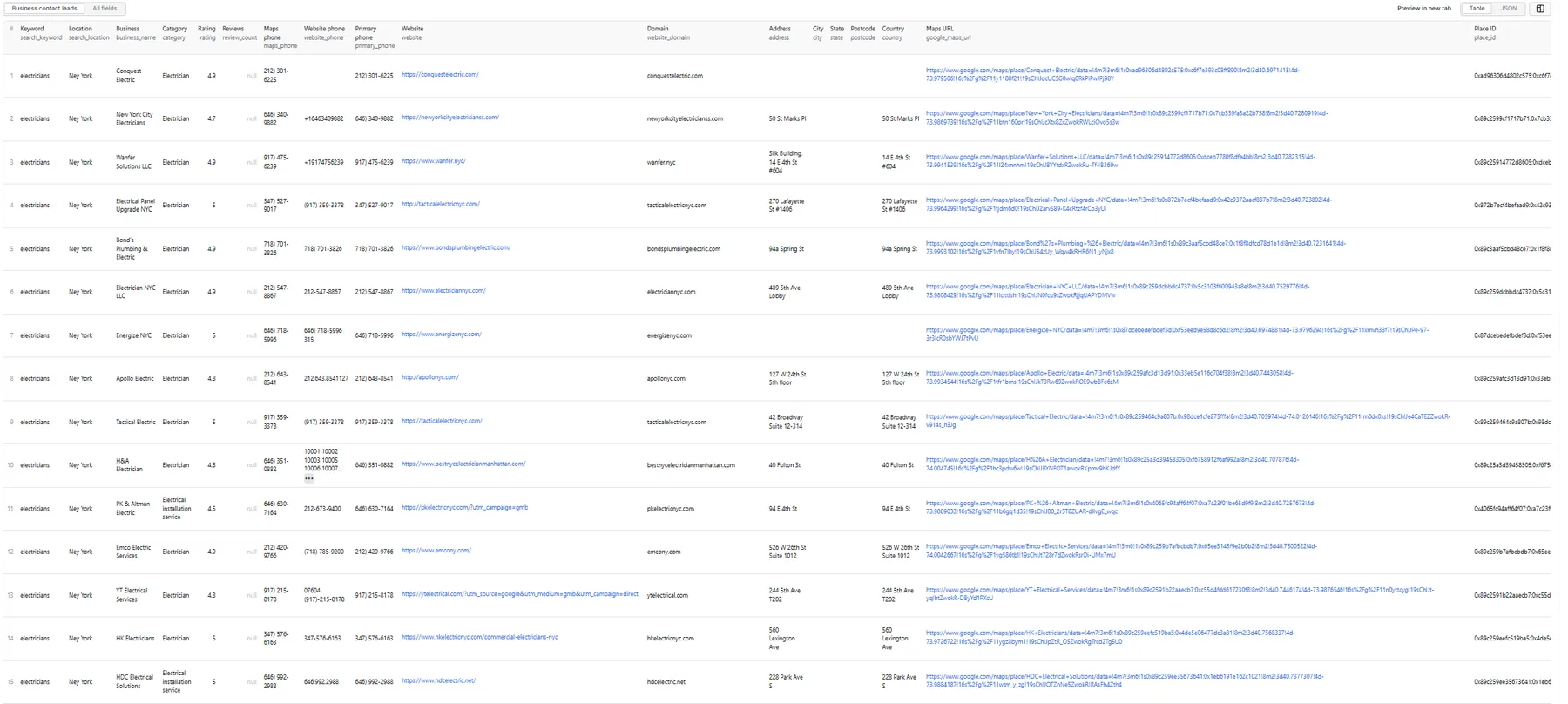
Output fields (74)
source_type, source_input, search_keyword, search_location, search_area_name, business_name, category, categories, rating, review_count, maps_phone, maps_phone_e164, website_phone, website_phone_e164, primary_phone, primary_phone_e164, phone_source_urls, website, website_final_url, website_redirected, website_domain, address, street, neighborhood, city, state, postcode, country, google_maps_url, place_id, fid, cid, latitude, longitude, opening_hours, business_status, permanently_closed, temporarily_closed, has_website, has_maps_phone, has_website_phone, has_email, emails, primary_email, email_count, email_types, email_source_urls, primary_email_source_url, email_status, email_mx_valid, email_is_role, email_is_disposable, contact_page_url, contact_form_url, has_contact_form, contact_form_action, contact_form_fields, facebook_url, instagram_url, linkedin_url, x_url, youtube_url, tiktok_url, pinterest_url, discord_url, social_links_count, social_source_urls, website_pages_scanned, website_status, contact_quality_score, contact_quality_label, contact_tags, place_detail_scraped, scraped_at.
Sample record — Business contact leads
A real row from a live run on 2026-09-10 — electricians in Canberra ACT, with place-detail resolution and website extraction on. Nothing here is hand-written.
The same row in the Outreach list view
The narrow views are column projections of the row above — same data, fewer columns, exported straight to CSV. This is what Outreach list (CRM-ready) returns for the same business:
🧾 Address, identity and phone columns
Four groups of columns exist to make a row usable somewhere other than a spreadsheet.
Parsed address. address is Google's single-line string; street, neighborhood, city, state, postcode and country are parsed out of it. The parser works from the postcode inwards, because the postcode is the one segment recognisable without knowing the country, so it handles 18 Geelong St, Fyshwick ACT 2609, 350 5th Ave, New York, NY 10118, United States and 1 Rue de Rivoli, 75001 Paris, France alike. Cards carry a truncated address fragment, so turn on place-detail resolution if you need these columns filled reliably — the detail panel is where the full address lives.
Place identity. place_id and fid are Google's hex feature ID (the same value; fid is the name most tooling uses). cid is the decimal form of the same listing, which is what the rest of the Maps ecosystem tends to ask for. business_status follows the Google Places vocabulary — OPERATIONAL, CLOSED_TEMPORARILY, CLOSED_PERMANENTLY — and is derived from permanently_closed / temporarily_closed, so it inherits their limitation: closed detection reads Google's English wording and under-reports on non-English runs.
E.164 phones. Every phone column is paired with an *_e164 one — maps_phone_e164, website_phone_e164, primary_phone_e164 — because (02) 6195 9991 and +61 2 6195 9991 are the same number and a CRM or dialer import wants exactly one of them. Normalization uses Google's own libphonenumber metadata rather than a dialing-code table, which matters more than it sounds: most countries drop a leading 0 when internationalising and Italy does not. A number that does not validate yields an empty *_e164 column, never a guess — a wrong number in a dialer costs you a call to a stranger.
Redirects and reachability. website_final_url is where the homepage actually resolved after redirects — the URL the emails were really read from — and website_redirected says whether that differs from the link Google published. A business whose Maps link lands somewhere else has usually rebranded, parked the domain, or pointed it at an agency page, and that is worth knowing before you write to them. has_email is the boolean twin of email_count > 0, because filtering a spreadsheet on a checkbox is easier than on a number.
Contact provenance. email_source_urls names the page each address was read from, index-aligned with emails exactly as email_types is, and primary_email_source_url does the same for the one address you would actually write to. phone_source_urls and social_source_urls cover the website phone and the social profiles (platform=url, semicolon-separated). This is the answer to "is this email real?" and the way to debug a false positive. maps_phone never gets a source URL: it came from the Maps card, and pointing it at a page we did not read it from would make the column worthless.
🔎 Place details
Google's search results cards are lossy. A business's website link only appears on the card when Google chooses to render a "Website" button — plenty of businesses that do have a website simply don't show one there, and sponsored listings show a Google Ads redirect instead of the real URL. Phone numbers, place_id, full addresses and opening hours are missing from cards just as often.
Set scrapePlaceDetailPage: true to open each business's own Maps listing and read those fields properly:
| Field | From the card alone | With scrapePlaceDetailPage |
|---|---|---|
website | Only when Google renders the button; ad redirects on sponsored listings | Real business URL from the listing's authority link |
maps_phone | Occasionally | Reliably |
place_id | Rarely (most card links omit it) | Reliably |
address + city / state / postcode | Truncated street fragment | Full address, parsed into components |
latitude / longitude | Usually | Reliably |
opening_hours | Short summary when shown | Panel hours when shown |
This matters most with the default websiteFilter: "hasWebsite": without detail resolution, a business whose card hides its website is discarded before the actor ever looks at it. Those are exactly the leads competitors miss.
The cost is one extra Google Maps page load per business, so runs take substantially longer. Billing does not change — you still pay one flat business-result event per saved row, and detail pages are not charged. It is off by default purely to keep default runs fast.
Rows carry place_detail_scraped so you can tell which were resolved this way. If a detail page fails or Google changes its markup, that row simply keeps its card data and reports place_detail_scraped: false — the run continues.
📝 Contact forms
The most common complaint about any Google Maps email scraper is that so many rows come back with no email. Usually that is not a scraping failure — it is a business that deliberately publishes no address and takes enquiries through a form instead. Every scraper on the market hands those back as dead ends.
This one records the form:
| Column | Meaning |
|---|---|
has_contact_form | A contact form was found on the site |
contact_form_url | The page it is on |
contact_form_action | Where the form submits (its endpoint) |
contact_form_fields | What it asks for, e.g. your-name, your-email, your-message |
A row with has_contact_form: true and no email is tagged form_only_contact — reachable, just not by email. On a sample run of nine Canberra plumbers, five had detectable forms and two had no email whatsoever; without this they would have looked like dead leads.
What is deliberately not counted. Site search boxes, login forms and newsletter signups are all <form> elements with a text input and a button. Reporting one of those as "you can contact them here" would be worse than reporting nothing, so a form needs a free-text box, or an email field together with something that says enquiry rather than subscribe. A subscribe box with a name and an email is not counted.
This reads pages that have already been fetched for emails, so it costs nothing extra and is on by default (includeContactForm).
✅ Email verification
Every row with a primary_email is checked before it is saved. This is free and on by default (verifyEmails) — both major competitors bill a separate per-email event for it.
| Column | Meaning |
|---|---|
email_status | valid · no_mx · disposable · invalid_syntax · unknown · unverified |
email_mx_valid | true when the domain publishes mail servers (MX records) |
email_is_role | true for shared mailboxes — info@, sales@, admin@ — rather than a named person |
email_is_disposable | true when the domain is a throwaway-inbox provider |
Sort or filter on email_status = valid for a send-ready list, and use email_is_role to decide tone: a role mailbox reaches a department, not a person.
What this is, precisely. It is DNS-level verification: is the address well formed, is the domain a throwaway provider, does the domain actually accept mail. It is not SMTP probing — we never connect to the mail server to ask whether an individual mailbox exists. That needs paid infrastructure, and pretending otherwise would be dishonest about what the flag means.
Two honest caveats:
no_mxmeans the domain publishes no mail servers. For a business domain that is a strong bounce risk, but it is not proof the address is dead — RFC 5321 lets a domain receive mail on its A record. Treat it as risky, not impossible.unknownmeans the DNS lookup failed or timed out. It is deliberately distinct fromno_mx: we do not know, and saying so beats guessing in either direction.
🎯 Contact-quality score
Transparent rule-based score (0–100) computed from extracted fields — no AI, no external enrichment.
| Signal | Points |
|---|---|
| Has website | +15 |
| Has Maps phone | +15 |
| Has website phone | +10 |
| Has at least one email | +30 |
| Has primary email | +10 |
| Has contact page URL | +10 |
| Has contact form | +10 |
| Has at least one social | +10 |
| Has address | +5 |
| Has category | +5 |
Score is capped at 100.
Labels: Excellent Contact Lead (80–100) · Good Contact Lead (60–79) · Basic Contact Lead (40–59) · Low Contact Data (0–39).
contact_tags includes contact_ready whenever primary_email, primary_phone or a contact form is present — sort by this tag for a clean outreach list. A business reachable only through a form is tagged form_only_contact as well.
Contact-form detection does contribute to the score above (+10), because a form is a real route to the business and often the only one. Email verification does not.
Verification adds three more tags: email_verified (email_status is valid), email_risky (no_mx or disposable), and role_email. These are tags only — they do not change the score above. The points table is published, and quietly re-weighting it would shift every score with no visible cause and break comparability with rows you scraped last month.
💰 Pricing
Pay-Per-Event. Two events — a start fee charged per GB of run memory, plus one event per saved row. Current per-tier prices for both are always shown on the actor's Pricing tab (both are lower on paid Apify plans than on the Free plan):
| Event | Charged when |
|---|---|
apify-actor-start | When the run starts, once per GB of memory the run is given — once for runs up to 1 GB, and once more for each additional GB: 1 event at 1 GB, 2 at the default 2 GB, 4 at 4 GB. It covers container startup for the headless browser and applies to every run — including a run that is aborted early, fails, or finishes having saved zero rows. |
business-result | Once per unique business row that passed all filters and was successfully written to the dataset — whether or not the website extraction found additional contact data. |
So your bill is:
Rows where website enrichment found emails / contact pages / socials cost the same as Maps-only rows; the business-result price is averaged across both kinds.
On small runs, the start fee is a meaningful share of the bill. It does not depend on how many rows you save, so at the same memory a 10-row test run pays the same start fee as a 5,000-row production run. It does depend on memory: raising a run's memory raises the start fee in proportion. If you are evaluating the actor, a single larger run is far better value than several small ones.
The actor honors the user-configured per-run spending cap (Apify eventChargeLimitReached) and stops charging business-result cleanly when reached.
This README deliberately quotes no prices. Per-tier rates change, and a figure copied into documentation goes stale the moment they do. The Pricing tab beside this page always shows the current rate for your plan.
🚦 Proxy policy
Use Apify Datacenter proxy or no proxy for normal runs — both work reliably for Google Maps search and shallow website fetches at this actor's conservative concurrency.
Apify Residential proxy is not supported. The actor will fail at startup if proxyConfiguration.apifyProxyGroups includes RESIDENTIAL. Reason: in pay-per-event actors, residential bandwidth is billed to the developer rather than to the run user, so a single bandwidth-heavy run can cost more than the rows it produces earn.
If you genuinely need residential routing, supply your own residential provider via the proxy editor's Custom proxy URLs field — that traffic goes through your provider, not Apify, and is unaffected:
What you are not charged for
No business-result event is charged for:
- Duplicates (de-duplicated by
place_id, listing URL, website domain, or name+address/phone). - Rows filtered out by
websiteFilter,phoneRequired, oremailRequired— including rows we fetched a website for and then discarded because they did not meet your bar. We absorb that work. - Rows missing a
business_name. - Failed dataset pushes.
- Failed website fetches when no row was saved.
- Anything after the per-run spending cap is reached.
Filters and cross-query deduplication are themselves free — there is no per-filter surcharge.
The one exception:
apify-actor-startis charged when the run starts (once per GB of run memory), so it applies even to a run that ends up saving no rows at all. Everything in the list above refers to per-row charges.
🆚 How this compares
Three things this actor does differently from the other Google Maps contact scrapers on Apify. These are structural billing differences, not claims about output quality — check each one against any competitor’s own pricing tab.
1. Website contact extraction is included in the per-row price.
Visiting the business website for emails, phones, contact page and social links is part of what you already pay for; there is no second event. The two largest competitors bill it separately — a place-scraped event for the listing, plus a contact-details-scraped event on top for the contact layer. Their headline per-place rate is not what an enriched row actually costs.
2. Filters are free.
Every filter here — websiteFilter, phoneRequired, emailRequired — costs nothing to apply. Both major competitors charge a filter-applied event per filter, per place, so turning a filter on raises the price of every place they process, including the ones the filter then removes.
3. Email verification is included, not a paid add-on. Every primary email is DNS-verified at no extra cost. compass and lukaskrivka both charge a separate per-email event for verification. Ours is free because it uses only DNS and a static list — there is no verification provider behind it to pay.
4. Contact forms are detected — nobody else does this.
When a business publishes no email, competitors return an empty email column and nothing else. This actor records the form, where it submits and what it asks for, so the lead stays actionable instead of looking dead.
5. Rows you filter out are never billed.
phoneRequired and emailRequired run after the website has been fetched. When a business turns out to have no email, we have already done the work — and we drop the row and charge you nothing for it. Duplicates removed by deduplicateResults are likewise unbilled. You pay one flat event per row that actually lands in your dataset.
Two more differences worth knowing:
- Many locations in one run. Every row in
searchQueriescarries its own location, so "plumbers in Canberra + electricians in Sydney + roofers in Perth" is a single run. Competitors generally scope a run to one location. - You do not have to search at all. Hand it Maps URLs or place IDs via
startUrls/placeIdsand it goes straight to the contact layer — no search, so no chance of matching the wrong listing. - Skip lists. Feed back the
place_id,google_maps_urlor website domains you already hold and those businesses are dropped before they cost you anything. A scheduled weekly campaign stops re-paying for the same leads. No competitor on Apify ships this.
The honest other side: this actor deliberately does not do reviews, images, Q&A, menus, popular times or AI analysis. If you need those, a broader Maps scraper is the right tool. This one is narrow on purpose.
📊 Run summary
After each run, a RUN_SUMMARY entry is written to the key-value store:
business_events_charged always equals results_saved.
The direct_places_* counters cover businesses reached through startUrls place links and placeIds rather than through a search; they are zero on a search-only run.
contact_forms_found, emails_verified and emails_mx_valid cover the contact-form and email-verification passes: how many businesses had a usable contact form, how many primary emails were checked against DNS, and how many of those resolved to a real mail server. emails_verified is zero when verifyEmails is off.
websites_recovered_by_detail is the one to watch when scrapePlaceDetailPage is on: it counts businesses whose website was found only because the detail page was opened. Those leads would have been lost entirely under the default hasWebsite filter. The details_* counters are all zero when detail resolution is off.
⚙️ Filters
| Filter | Stage | Effect |
|---|---|---|
websiteFilter | Pre-extraction | any / hasWebsite / missingWebsite. Default hasWebsite. |
minRating | Pre-extraction | Keep businesses rated at least this highly (1–5). Unrated businesses are dropped when set. |
minReviewCount | Pre-extraction | Keep businesses with at least this many reviews. Needs scrapePlaceDetailPage on — see below. |
categoriesInclude | Pre-extraction | Keep only these Google categories. Case-insensitive partial match, so plumb matches "Plumber". |
categoriesExclude | Pre-extraction | Drop these categories. Wins over categoriesInclude when both match. |
skipClosedPlaces | Pre-extraction | Drop businesses Google marks permanently or temporarily closed. |
searchMatching | Pre-extraction | all / includes / exact — how strictly the business name must match your keyword. A plain substring test: plurals match their singular, but plumbers will not match "Acme Plumbing". Never applies to Start URL or Place ID rows. |
phoneRequired | Post-extraction | If true, keep rows where maps_phone or website_phone is present. |
emailRequired | Post-extraction | If true, keep only rows where at least one website email was found. |
deduplicateResults | Both stages | Drop duplicates across queries (recommended ON). |
Filters are applied before dataset push or event charges — a row removed by any of them is never saved and never billed. None of them carries a surcharge.
minReviewCountneeds place details. Google usually leaves the review count off the results card, so withscrapePlaceDetailPageoff most businesses have no review count to test and get filtered out. The actor warns you in the log when you set it without detail resolution.
🔁 Skip lists — do not pay twice for the same business
For scheduled or repeated campaigns. Anything matched here is dropped before it is saved, so you are never charged twice for a business you already have. No competitor on Apify offers this.
| Input | Matches on |
|---|---|
skipPlaceIds | Place ID. Paste the place_id column from a previous run. Accepts the same three formats as the Place IDs input. |
skipGoogleMapsUrls | Listing URL. Paste the google_maps_url column from a previous run. Query strings are ignored. |
skipWebsiteDomains | Website domain, e.g. example.com. Subdomains are skipped too, and full URLs are reduced to their domain. |
Matching happens as early as it possibly can, so a skipped business usually costs no page loads at all. The skipped_by_list counter in RUN_SUMMARY tells you how many were dropped this way.
🚧 Limitations (V1)
-
review_countis not guaranteed from search results alone. Google serves two result-card layouts and chooses per page load: one prints the review count beside the rating, the other omits it entirely. When it is there we read it; when it is not, there is nothing on the card to read. Turn on place-detail resolution if you need this column reliably — the listing page always has it. -
Card-level Maps extraction by default: with
scrapePlaceDetailPageoff (the default), each business is read straight from the search results panel. Phone, website, full opening hours andplace_idthen only appear when Google surfaces them on the card itself. TurnscrapePlaceDetailPageon to fix this — see Place details. It is off by default only because it makes runs slower, not because it is experimental. -
Shallow website extraction: homepage + up to
maxPagesPerWebsite-1extra pages (default 3 total) — contact pages first, then legal-notice (Impressum), about and privacy pages. No deep crawling and no JavaScript rendering: an address that only appears after a site's scripts run in a browser is not found, although addresses in a page's structured data, or in its scripts on the business's own domain, are. -
No SMTP mailbox verification or AI scoring. Free DNS-level email verification is included (syntax, MX, role and disposable checks — see Email verification); what is not done is probing the mailbox itself to confirm a specific address accepts mail, which needs paid infrastructure.
-
No full review text, sentiment, photos, menus, prices, or popular times.
-
No login/cookie/session-based scraping.
-
Closed-business detection reads the words Google prints ("Permanently closed" / "Temporarily closed"), so
skipClosedPlaces,permanently_closedandtemporarily_closedwork on English-language runs (the default) and will under-report on otherlanguagesettings. -
Address parsing into
street/neighborhood/city/state/postcode/countryis best-effort and works from the postcode inwards; the fulladdressstring is always the source of truth. Cards carry a truncated address, so these columns fill far more reliably withscrapePlaceDetailPageon. -
A single search term yields roughly 120 results, whichever Maps scraper you use — a Google limit, not ours. The caps below bound what we save; they are not a promise of volume. Reaching higher numbers means running more, narrower searches. See the FAQ.
-
Result caps:
maxTotalResultsbounds the whole run (default 500, hard cap 5,000); the per-search cap is 500; the per-website page cap is 5.
❓ FAQ
Why is email_count zero on some businesses?
Many local businesses don't publish an email publicly — they take enquiries through a contact form instead. The actor reads addresses the business itself publishes in its pages — visible text, mailto: links, Cloudflare-protected addresses, schema.org structured data, and addresses on the business's own domain inside page scripts. It does not guess addresses. That business is still reachable, though: check has_contact_form and contact_form_url, and look for the form_only_contact tag, which marks exactly the rows with a form and no email. Set emailRequired: true if you want to drop them anyway — those rows are not billed.
I'm getting fewer results than expected with websiteFilter: "hasWebsite". Why?
Because a business's website only shows on the Google Maps results card when Google decides to render a "Website" button — many businesses that do have one are not advertising it there, so they get filtered out. Set scrapePlaceDetailPage: true and the actor opens each listing to check properly. Watch websites_recovered_by_detail in RUN_SUMMARY to see how many leads that recovers. Separately, Google occasionally serves a degraded results page whose cards carry no website link at all; the actor detects that, retries the search on a fresh session, and if it persists says so in the run log and counts it in blocked_requests.
Why are city, state, postcode empty on some rows?
Because the search results card usually carries only a truncated address fragment, and there is nothing to parse. The fix is scrapePlaceDetailPage: true — the listing page shows the full address, and street, neighborhood, city, state, postcode and country are all parsed from it. The full address string remains the source of truth either way.
Can I use Apify Residential proxy?
No — the actor rejects Apify Residential at startup. Apify Datacenter, no proxy, and user-supplied custom proxy URLs all work fine. If you genuinely need residential routing for a specific region or site, supply your own provider (IPRoyal, BrightData, Oxylabs, etc.) via the proxy editor's Custom proxy URLs field — that traffic bypasses Apify billing entirely. See the 🚦 Proxy policy section above.
Can I export to CSV?
Yes — every field is flat (no nested objects). Use Apify's CSV / Excel export from the dataset page, or call the dataset API with format=csv.
How am I billed for rows that don't have any extracted emails or socials?
The same as rows that do — one flat business-result event per saved row. The per-event price is averaged across both outcomes, so a run with high enrichment hit-rate and a run with low hit-rate cost the same per row. If you only need Maps directory data (no website enrichment at all), set includeWebsiteContactExtraction: false to skip the website fetches — billing is unchanged but the run is faster.
Is there a per-run charge as well as the per-row charge?
Yes. apify-actor-start is charged when the run starts, covering container startup for the headless browser — once per GB of memory the run is given: 1 event at 1 GB, 2 at the default 2 GB, 4 at 4 GB. It applies to every run, including one that saves no rows. Both events and their current per-tier prices are listed on the actor's Pricing tab. Because it does not depend on the number of rows, it is proportionally largest on very small runs — a single 200-row run costs less in total than four 50-row runs returning the same leads.
What happens if a run returns zero results?
You are charged the apify-actor-start events for the run's memory and nothing else — no business-result events are charged, because none were saved. If this happens unexpectedly, check RUN_SUMMARY in the key-value store: raw_results_found vs filtered_out will show whether Maps returned nothing or your filters removed everything.
How do I get more results per query?
Usually you cannot, and the limit is Google’s rather than ours. A single Google Maps search term returns roughly 120 results however far the results list is scrolled. Our caps sit deliberately above that (maxResultsPerSearch 500, maxTotalResults up to 5,000) so that they are never the binding constraint — the search itself is. The way to get more businesses is more searches, each covering less ground: split by suburb or postcode, break a broad keyword into sub-niches, or set customGeolocation to pin each search to a smaller area. The actor dedupes across searches within a run, so overlapping areas do not produce duplicate rows.
Will I get blocked?
The actor uses conservative concurrency (Maps min=1, max=3; website pool =5), HTTP-only website fetching that identifies itself as a crawler and retries once with ordinary browser headers only when a site refuses that outright, and respects retry/backoff. Default Apify Proxy (Datacenter) is sufficient for typical lead-gen volumes. If a specific site or region still blocks you, supply your own residential provider via the proxy editor's Custom proxy URLs field — see the 🚦 Proxy policy section. Do not select Apify Residential in the proxy selector: this actor rejects it at startup and the run will fail immediately.
What does website_status mean?
not_attempted— website extraction was disabled or there was no website to fetch.no_website— Maps had no website link for that business.success— homepage fetched successfully (regardless of whether emails were found).failed— the homepage returned an HTTP error, the network call failed, or the site answered with a bot-challenge (CAPTCHA) page, which the actor does not solve.timeout— the request was cut off by the per-page (15s) or per-business (45s) timeout.
🔐 Data & compliance
This is not legal advice. It is a plain description of what the actor does, so you can assess it against your own obligations.
What it collects. Business contact details published on public web pages: business names, addresses, phone numbers, categories, ratings, and email addresses and social links found on the business's own website. Most of it is company data. Some of it is not: an address like firstname@business.com, or a sole trader's mobile number, is personal data under the GDPR, UK GDPR and the Australian Privacy Act even though it was published for business use.
How it collects. It reads pages that are publicly accessible without logging in. It does not sign in, does not use cookies or sessions, does not solve CAPTCHAs, and does not attempt to reach anything behind an authentication wall. It reads a business's homepage plus a small number of likely contact, about, legal-notice and privacy pages — never a deep crawl. Requests identify the actor as a crawler; if a site refuses that outright (HTTP 401/403/406), the same public page is requested once more with ordinary browser headers. A rate limit (HTTP 429) is not retried that way.
Who is responsible for what. Apify runs the actor; you decide what to collect and what to do with it, which under the GDPR generally makes you the data controller for the output. Your dataset is yours: it lives in your Apify account, and this actor keeps no copy of it and sends it nowhere else.
Things worth doing.
- Prefer role addresses.
info@,sales@andcontact@are published precisely to be written to.email_is_roleflags them, andemail_typesclassifies all nine kinds, so you can droppersonal_or_staffaddresses before you send anything. - Have a lawful basis before you send. Legitimate interest can cover B2B outreach in the EU/UK, but it is a test you have to actually pass, and marketing consent rules (PECR in the UK, ePrivacy in the EU, the Spam Act in Australia) apply to the sending, not to the collection.
- Say where you got it. Article 14 of the GDPR expects you to tell people when you obtained their data indirectly.
email_source_urlsandprimary_email_source_urlrecord the exact page each address came from, which makes that answerable rather than guesswork. - Honour erasure and objection requests for data you hold, and keep a suppression list.
skipWebsiteDomainsandskipPlaceIdswill keep those businesses out of future runs.
What it deliberately does not collect. Review text and reviewer identities, personal profiles, photos of people, or anything from a logged-in view. See Limitations.
🛠️ Technical notes
- Stack: Node.js 18+ · Apify SDK 3 · Crawlee · Puppeteer (Maps) · Cheerio + native fetch (websites).
- Concurrency: Maps
min=1,max=3(conservative); website poolconcurrency=5. - Memory: 1 GB min · 2 GB default · 4 GB max.
- Proxy: Apify Proxy enabled by default; custom configs accepted.
- Diagnostics: On the first failed Maps render (no feed, or feed but zero cards), the actor saves the page HTML and URL to the key-value store as
debug-no-feed-html/debug-zero-cards-html.


