

LinkedIn Recruiter / Job Poster Finder
Pricing
$4.00 / 1,000 lead-results
LinkedIn Recruiter / Job Poster Finder
Find recruiters, hiring managers, and job posters from public LinkedIn jobs - one flat lead row per person, with job context (matched job, company, role keyword, location), relevance score, and reason tags. No LinkedIn login or cookies required.
Pricing
$4.00 / 1,000 lead-results
Rating
0.0
(0)
Developer

Delowar Munna
Maintained by CommunityActor stats
3
Bookmarked
81
Total users
33
Monthly active users
a month ago
Last modified
Categories
Share
LinkedIn Recruiter & Hiring Manager Finder — Job Poster Leads, No Login
Find the person behind the job.
Most LinkedIn job scrapers give you the vacancy and leave you to work out who to contact. This actor gives you the person. Search public LinkedIn jobs by role, location, search URL or target company, and get recruiters, hiring-team members and direct job posters back as flat, CRM-ready leads — with the matched job, a transparent 0–100 relevance score you can audit, and pipe-separated reason tags explaining that score.
No LinkedIn login, no cookies, no session IDs. Just LinkedIn's public guest job pages over HTTP. And if LinkedIn does not publicly expose a person for a job, that job is never billed as a lead.
What you get per lead
- The person — name, first/last, title, raw headline, company, LinkedIn profile URL and stable profile ID.
- Their role — one canonical
lead_role_type: direct job poster, recruiter, talent acquisition, hiring manager, or hiring-team member. - The job that surfaced them — title, company, company URL, location, posted date (text and numeric days-ago), employment type, seniority, function, industries, applicant count, Easy Apply flag, and a description snippet for outreach.
- Why this lead — a 0–100 relevance score, a High/Medium/Low/Weak label, and pipe-separated reason tags.
- Where it came from — matched keyword, matched location, matched company, the search URL, and the target-company URL when you used one.
- A ready-to-send opener —
outreach_opener, a template-filled (non-AI) first line, andlead_jobs_posted_countshowing how many roles that person has open right now. - 43 flat columns, one row shape. No nested objects. Drops straight into Sheets, Excel or a CRM.
Will I actually get leads? Read this first
LinkedIn does not attach a named hiring contact to every public job. This is a limit of LinkedIn's public data, not of this actor — when a job exposes nobody, the profile simply is not in the page for anyone to read.
Measured over 140 public jobs in two independent batches (2026-09-01/02):
| Search type | Jobs exposing a hiring contact | Sample |
|---|---|---|
Recruiter-titled searches (recruiter, talent acquisition) | ~43% | 20/47 |
Generic tech roles (software engineer, data analyst) | ~17% | 8/46 |
Non-tech roles (marketing manager, warehouse operative) | ~17% | 8/47 |
| Overall | ~26% | 36/140 |
One recruitment agency's own postings (via companyUrls) | ~93% | single company |
Treat these as indicative, not a guarantee. Individual searches ranged from 5% to 56%, and the two batches disagreed on the non-tech figure (5% vs 26%) — the per-class sample is small and visibility varies by employer, region and how recently a job was posted.
The one result that held in both batches: recruiter-titled searches yield the most contacts. That, and targeting specific companies with companyUrls, are the two levers you control — agencies and in-house recruiters attach themselves to their own postings, so a target-account run is far denser than a broad keyword sweep.
You are not charged for jobs that expose nobody. Expect to inspect several job pages per lead delivered; maxJobsToInspect controls that budget and costs you nothing on its own.
Quick start
Example 1 — jobs with visible posters (default)
Example 2 — target accounts (find who is hiring at these companies)
Example 3 — a pasted LinkedIn jobs search URL
Example 4 — a daily schedule that only returns new people
jobs_with_postersneeds at least one ofkeywords(with optionallocations),jobUrls,searchUrls, orcompanyUrls.
recruiter_searchandcombinedneed none of them — they search LinkedIn's recruiter job titles on their own, so{ "mode": "recruiter_search", "locations": ["Sydney"] }is a complete input. Addkeywordsonly to narrow the recruiters to an industry, ortitleKeywordsto replace the built-in title set.
The two kinds of people this actor returns
| What it means | Fields | |
|---|---|---|
| Direct job poster | LinkedIn visibly attaches this person to the posting — the "message the job poster" module. The strongest signal there is. | is_direct_job_poster: true, lead_role_type: "direct_job_poster" |
| Recruiter-like hiring contact | A visible hiring-team member whose title indicates recruiting / talent / hiring responsibility. | is_recruiter_like: true, lead_role_type: recruiter · talent_acquisition · hiring_manager · hiring_team |
Both are real leads. The first is attached to the job by LinkedIn; the second is inferred from the person's own title.
Discovery modes
| Mode | What it does |
|---|---|
jobs_with_posters (default) | Searches jobs by your keywords / URLs and extracts the visible job poster or hiring-team people. |
recruiter_search | Runs job searches seeded with recruiter-style job titles, then extracts the people behind those postings. This is not LinkedIn people search — it searches jobs, not profiles. |
combined | Both of the above, deduplicated. |
companyUrls works in every mode — a target-account list is an explicit instruction, not a mode.
Output
One dataset view: Recruiter / job-poster leads — a 43-column flat table.
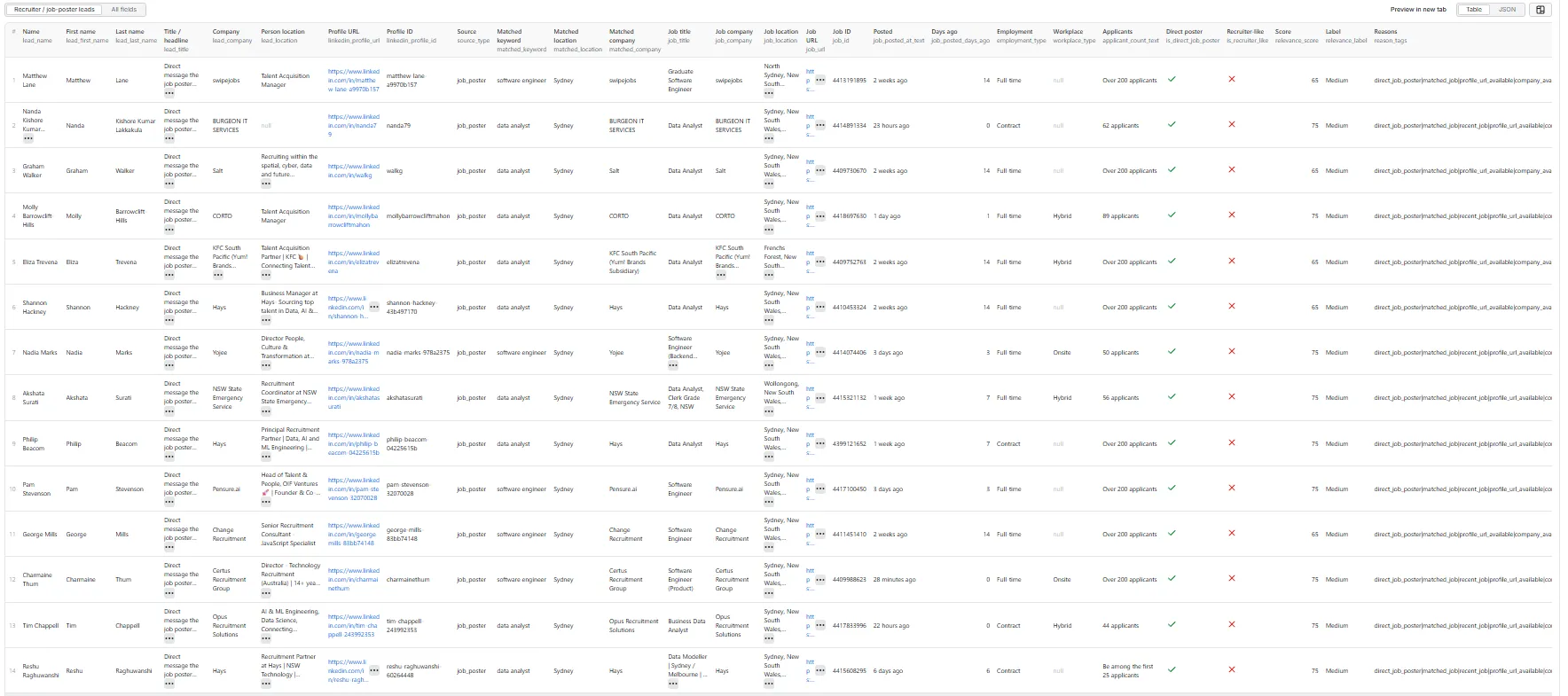
Fields (43)
Person — lead_name, lead_first_name, lead_last_name, lead_title, lead_headline, lead_company, lead_location, linkedin_profile_url, linkedin_profile_id
Qualification — source_type, lead_role_type, is_direct_job_poster, is_recruiter_like, relevance_score, relevance_label, reason_tags, is_new_in_run, lead_jobs_posted_count, outreach_opener
Matched search — matched_keyword, matched_location, matched_company
Matched job — job_title, job_company, job_company_url, job_location, job_url, job_id, job_posted_at_text, job_posted_days_ago, employment_type, workplace_type, applicant_count_text, applicant_count, job_seniority_level, job_function, job_industries, job_description_snippet, easy_apply
Provenance — source_company_url, search_url, input_url, scraped_at
Notable ones:
| Field | Why it's there |
|---|---|
lead_headline | The person's headline exactly as LinkedIn rendered it. lead_title is the cleaned version; this is the raw string, so no parsing heuristic can lose data. |
lead_role_type | One canonical role instead of making you reconstruct it from two booleans. |
job_company_url | The company's LinkedIn page — what most CRMs join on. |
applicant_count | Numeric, alongside the original applicant_count_text. |
job_description_snippet | ≤300 chars of the job description, for outreach personalisation. |
is_new_in_run | Proof this person was not delivered by an earlier run (see skipSeenLeads). |
There is deliberately no
direct_apply_url. LinkedIn does not expose the employer's external apply URL on the public guest surface, and a permanently-empty column is worse than no column.
Sample record
A real, unedited row from a live run on 2026-09-02 — all 43 fields, exactly as delivered. The three
nulls are honest:lead_locationis not exposed on LinkedIn's public hiring-contact module, andmatched_keyword/matched_locationare empty because this run targeted a company rather than a keyword search.
Relevance score
A transparent rule-based score (0–100) computed from extracted fields — no AI, no external enrichment, no black box.
| Signal | Points |
|---|---|
| Direct job poster or hiring-team contact visible | +35 |
| Title / headline contains a recruiter / hiring / talent keyword | +25 |
| Matched to a specific job posting | +15 |
| Job posted within the last 7 days (where parsed) | +10 |
| LinkedIn profile URL available | +10 |
| Company available | +5 |
Capped at 100. Labels: High 80–100 · Medium 60–79 · Low 30–59 · Weak 0–29.
reason_tags is pipe-separated so it survives as a single CSV cell. Vocabulary: direct_job_poster, hiring_team_visible, recruiter_title, talent_acquisition_title, matched_job, recent_job, profile_url_available, company_available, keyword_match.
Use minRelevanceScore to pay only for the leads you want. Set it to 60 for Medium-and-above, or 80 for High only — anything below the bar is never saved and never charged.
Pricing — what you are charged for
Pay-Per-Event: one flat lead-result event per unique lead row saved to the dataset. Your bill is simply results_saved × price_per_event.
This README deliberately does not quote figures — see the actor's Pricing tab for the live rate, which is the only place it can't go stale.
A worked run, in units:
Never charged:
- Jobs with no visible person (the majority — see the coverage table above).
- Duplicates, within a run and across runs when
skipSeenLeadsis on. - Rows filtered out by company / title / date / workplace / relevance filters.
- Failed or blocked requests, and empty runs.
The actor honours the per-run spending cap you set on Apify: it caps how many results it collects up front to what your limit can pay for, and stops cleanly the moment the cap is reached.
Free plan
Apify's free plan includes monthly platform credit that applies here like any other actor. There is no actor-specific gate — every feature works on every plan.
Scheduled runs — don't pay twice for the same person
Set skipSeenLeads: true and the actor remembers everyone it has already delivered. The next run returns only new people.
It also remembers the jobs it has fully covered — every visible contact already delivered, or no contact at all — and skips re-opening them for 30 days, so a schedule spends its maxJobsToInspect budget on new postings instead of re-reading old ones. The trade-off: a contact LinkedIn adds to such a job inside that window is picked up when the 30 days pass, not on the next run. Jobs where a contact was filtered out or not delivered are never remembered, so changing your filters still reaches them.
Without it, a daily schedule re-delivers — and re-charges for — the same recruiters every day.
For your own suppression list (a do-not-contact list from your CRM, say), use skipProfileIds, skipProfileUrls or skipJobIds. These work with or without skipSeenLeads.
skipSeenLeadsneeds the actor to open a named key-value store. If your deployment runs under limited permissions and can't, the run continues without cross-run memory and says so clearly in the log rather than silently charging you twice.
Filters
| Filter | Stage | Effect |
|---|---|---|
mode | Source | Which searches get run. |
companyUrls | Source | Only jobs at these companies. |
datePosted | Source + post | any / past_24h / past_week / past_month. |
remoteFilter | Source + post | any / remote / hybrid / onsite. |
employmentTypes | Source | Full-time, part-time, contract, temporary, internship, volunteer, other. |
experienceLevels | Source | Internship → Executive. |
sortBy | Source | relevance or date (most recent first). |
companyNames | Pre + post | Case-insensitive substring on any company field. |
titleKeywords | Post | Case-insensitive substring on the person's title. Direct posters always pass. |
minRelevanceScore | Post | Drop leads below a 0–100 score — before push and before charge. |
skipSeenLeads + skip lists | Pre + post | Skip jobs already covered or listed; suppress people already delivered or listed. |
maxResults | Both | Caps saved unique lead rows for the run. |
maxJobsToInspect | Crawl | Caps detail pages opened. |
Unsupported employmentTypes / experienceLevels values fail the run with a clear message rather than being silently ignored — a filter you believe is applied but isn't produces data you'd wrongly trust.
Every filter is applied before any dataset push or event charge.
Run summary
A RUN_SUMMARY record is written to the key-value store after each run, including yield diagnostics that answer "why was this run lean?" before you have to ask:
| Field | Meaning |
|---|---|
jobs_with_no_visible_person | Inspected jobs that exposed nobody. Never charged. |
person_visibility_rate | % of inspected jobs that did expose someone. |
leads_per_100_jobs_inspected | Saved leads per 100 job pages opened — the real yield number. |
unique_lead_rate | % of found leads that survived deduplication. |
cross_run_duplicates_skipped | People suppressed because an earlier run already delivered them. |
previously_inspected_jobs_skipped | Jobs not re-opened because a run in the last 30 days had already covered them. |
blocked_requests / rate_limited_requests | Requests LinkedIn refused. Rising values mean throttling, not a bad input — use a proxy. |
charged_events | What the platform actually billed. |
uncharged_events | Rows delivered but not billed — should always be 0. |
Measured reliability
Two measurement sets: a 140-job coverage study (2026-09-01/02, five workloads) for yield, and 8 proxied runs (2026-09-02, Apify Datacenter) for reliability.
| Metric | Result |
|---|---|
| Person-visibility | ~26% overall, 5%–70% by workload (see the coverage table above) |
| Blocked / rate-limited / failed requests | 0 / 0 / 0 across 8 proxied runs |
| In-run duplicate rate | 0%–57% of raw leads, depending on workload — duplicates are never charged |
| Throughput | ~1.0–1.5 requests/second at the default concurrency |
| Typical run | 30 job pages inspected in ~25s |
The duplicate range is a feature, not noise. Targeting one company (
companyUrls) often finds the same recruiter behind many roles — one run returned 21 raw leads that deduplicated to 9 people. You are charged for the 9. Keyword searches spread across employers and duplicate far less.
Run these through a proxy. The 0-failure result above is with Apify Datacenter; sustained unproxied testing from a single IP gets rate-limited by LinkedIn, and a throttled run looks like a thin one. The
rate_limited_requestsfield in the run summary tells the two apart.
Integrations
Every Apify integration works here: Zapier, Make, n8n, webhooks, Google Sheets, plus scheduled runs and the REST API. Pair with your CRM by joining on job_company_url or linkedin_profile_url.
Python
Node.js
cURL
CSV / Excel
Every field is flat, so Apify's CSV and Excel exports work directly — or call the dataset API with format=csv.
How this compares to a jobs scraper
| This actor | A LinkedIn jobs scraper | |
|---|---|---|
| One row is… | a person | a job listing |
| Answers "who do I contact?" | Directly | You still have to find out |
| Contact profile URL + stable ID | Yes | Usually none |
| Charged per… | unique person delivered | job row, whether or not it helps you |
| Jobs with no contact | Free | Charged as a row |
| Lead scoring | Transparent, published rules | None |
If you want job market data, use a jobs scraper — that's the right tool. If you want someone to contact, this is.
Proxy policy
Use Apify Datacenter proxy for normal runs. You do not need residential proxy.
Do use a proxy for anything beyond a small test. LinkedIn throttles a single IP hard: sustained unproxied runs start returning HTTP 429 and requests fail. The run summary reports this honestly as rate_limited_requests and blocked_requests rather than presenting a throttled run as a thin one. If you see those climbing, enable Apify Proxy or lower maxJobsToInspect.
Apify Residential proxy is not supported. The actor fails at startup if apifyProxyGroups includes RESIDENTIAL. Reason: in pay-per-event actors, residential bandwidth is billed to the developer rather than the run user, so one bandwidth-heavy run could exceed the actor's per-result revenue.
If you genuinely need residential routing, supply your own provider via the proxy editor's Custom proxy URLs — that traffic goes through your provider, not Apify:
Limitations
- Public guest data only. No login, cookies, or member-only content. Most public jobs do not expose a hiring contact at all — see the coverage table. Those jobs are dropped and never charged.
lead_locationis usuallynull. LinkedIn rarely exposes a hiring contact's location publicly. The actor returnsnullrather than guessing — a wrong location is worse than none.- No people-search crawling.
recruiter_searchdoes not touch LinkedIn's auth-walled people search; it expands recruiter titles into the same public jobs surface. - No email enrichment, company-website crawling, or AI scoring.
- No external apply URL — not exposed on the public surface.
- LinkedIn guest pagination tops out around ~1,000 results per search source. Narrow searches, or
companyUrls, give better coverage than one broad search. maxResultscaps saved unique rows for the whole run, not per query.
FAQ
Do I need a LinkedIn account or cookies? No. The actor only uses LinkedIn's public guest job endpoints. There is nowhere to enter credentials.
Why did my run return so few leads?
Because most public jobs don't name a hiring contact — see the coverage table above. You weren't charged for those. Recruiter-style keywords, or targeting companies with companyUrls, return several times more contacts.
Am I charged if a run returns nothing? No. Empty runs, person-less jobs, duplicates, filtered rows and failed requests are all free.
What if I run this every day — do I pay for the same people repeatedly?
Not if you set skipSeenLeads: true. The actor remembers who it has delivered and returns only new people.
How is is_direct_job_poster different from is_recruiter_like?
is_direct_job_poster means LinkedIn visibly attaches that person to the posting. is_recruiter_like is a title-based signal and applies to both direct posters and hiring-team members. lead_role_type combines both into one value.
Can I paste a LinkedIn jobs search URL?
Yes — put it in searchUrls. Its filters are preserved and the actor paginates it. Individual job links go in jobUrls. Either field accepts either kind and routes it correctly.
Can I target specific companies?
Yes — companyUrls. This is the highest-yield mode by a wide margin, because recruiters attach themselves to their own company's postings.
Can I export to CSV or Google Sheets?
Yes. Every field is flat with no nested objects. reason_tags is pipe-separated so it stays in one cell.
Will I get blocked? The actor uses conservative concurrency (1–5), realistic headers, session rotation and retry with backoff. Default Apify Proxy is sufficient for typical runs; residential is not required.
Is this GDPR-compliant / is the data public? The actor reads only pages LinkedIn serves to logged-out visitors — no login, no scraping behind an auth wall. You remain the data controller for how you use the output, including your own lawful-basis and outreach obligations.
Technical notes
- Stack: Node.js 22 · Apify SDK 3 · Crawlee
CheerioCrawler· Cheerio + native fetch. No browser — fast and cheap to run. - Endpoints: LinkedIn public guest
seeMoreJobPostings(search) andjobPosting(detail). - Concurrency: min 1, max 5.
- Memory: 1 GB min · 1 GB default · 4 GB max.


