

Tiktok Live Scraper
Pricing
from $3.00 / 1,000 live room results
Tiktok Live Scraper
Extract active and trending TikTok live rooms, creator info, and public audience signals for creator monitoring, event tracking, and live trend analysis.
Pricing
from $3.00 / 1,000 live room results
Rating
0.0
(0)
Developer

Delowar Munna
Maintained by CommunityActor stats
0
Bookmarked
88
Total users
20
Monthly active users
2 months ago
Last modified
Categories
Share
TikTok LIVE Discovery & Monitoring Scraper
Discover trending TikTok LIVE rooms, check whether creators are live, and search LIVE by keyword — with viewer counts, creator profiles, playback URLs, and an explainable priority score on every room.
TL;DR
- Three ways to find rooms — trending (no keyword needed), a watchlist of creators, or keyword search. Combine them in one run.
- No mode to select — fill the fields you care about and the Actor runs the matching discovery.
- One flat row per live room, 51 fields, ready for Sheets, Excel, BI tools, or an LLM prompt.
- Momentum, not just size — every room reports how long it has been live and how fast it is pulling viewers.
- Playback URLs included — HLS, FLV and RTMP, with quality, resolution and an explicit expiry timestamp.
- Every room is scored 0–100 with a plain-English reason, so you know which ones are worth opening.
- No TikTok login, cookies, or API key required.
- You are charged only for live rooms actually saved. Offline creators, empty searches, duplicates, filtered-out rooms, and the run summary are all free.
Why choose this Actor
Most TikTok LIVE scrapers do one thing: you give them a keyword, they give you rooms. This one answers four different questions in a single run:
| Question | How |
|---|---|
| "What's live and trending right now?" | trending mode — no keyword needed |
| "Is this creator live?" (for a whole list of creators) | creator mode |
| "Who's live about this topic?" | keyword mode |
| "Which of these rooms actually deserves my attention?" | built-in priority scoring, in every mode |
Quick start — 3 steps
- Leave every discovery field empty.
- Set Max live rooms per source to
50for a fast, cheap first run. - Click Start. You get ~50 scored trending live rooms in about a minute.
No input is required at all. When you want something more specific, fill in creators or keywords — there is no mode to switch.
How discovery works
What you fill decides what runs. There is no mode selector to keep in sync with your inputs.
| What you fill | What runs | Best for |
|---|---|---|
| Nothing | Trending — hot/active rooms across gaming, music, chat, dance, cooking, sports, beauty, comedy and more | Broad monitoring, "what's happening now" |
| Creators to check | A liveness check per creator. Full room data when live, a clear NOT_LIVE row when offline | Creator watchlists, go-live tracking, agency monitoring |
| Keywords to search | One search per keyword | Niche tracking, markets, games, interest areas |
| Both | Both, in one run | Full LIVE intelligence sweeps |
| Either, plus "Also discover trending rooms" | Adds a trending sweep on top | Broad coverage alongside a watchlist |
Two things follow from this that are worth knowing:
- A trending-only run needs no input. Press Start. The "Also discover trending rooms" toggle is only for adding trending alongside creators or keywords.
- No combination produces an empty run. With nothing filled you get trending, so there is no way to configure a run that has nothing to do.
Input reference
| Parameter | Type | Default | Description |
|---|---|---|---|
creatorProfiles | string[] | [] | Creators to check — @name, name, or profile URL. Filling this runs creator discovery |
keywords | string[] | [] | Keywords to search. Filling this runs keyword discovery |
includeTrending | boolean | false | Add a trending sweep alongside creators/keywords. Not needed for a trending-only run |
trendingTerms | string[] | [] | Override the built-in trending seed terms |
minViewerCount | integer | 0 | Minimum current viewers. Filtered rooms are not charged |
sortBy | string | priorityScore | priorityScore, viewerCount, or default |
maxRooms | integer | 300 | Cap per discovery source |
maxRoomsPerKeyword | integer | 50 | Cap applied to each keyword separately |
maxTotalRooms | integer | 1000 | Absolute ceiling for the whole run — the hard cost cap |
includeCreatorFields | boolean | true | Include creator-level fields |
includeActivitySignals | boolean | true | Include audience/engagement fields |
includeStreamUrls | boolean | true | Include playback URLs, quality, resolution and expiry |
includeSummary | boolean | true | Save the run summary to the key-value store |
deduplicateRooms | boolean | true | Drop rooms found by more than one route, before billing |
proxyConfiguration | object | No proxy | Proxy settings — none by default; see the proxy policy below |
Cost controls — how the three caps interact
They are applied in this order, and the total always wins:
Worked example. Mode ["trending","keyword"], 5 keywords, maxRooms: 300, maxRoomsPerKeyword: 50, maxTotalRooms: 1000:
- trending can contribute up to 300 rooms
- each keyword can contribute up to 50 → up to 250
- so the run saves at most 550 rooms, and would stop at 1,000 regardless
Without maxTotalRooms, the same run with maxRoomsPerKeyword raised to 300 could save 1,500 rooms. That is why the total cap exists and defaults to a finite value.
Sample input — trending discovery
Sample input — creator monitoring + keyword search
Sample input — gaming vertical via custom trending terms
Output
Each record is one public TikTok LIVE room with a flat, CSV-friendly schema (51 fields), available in five dataset views:
- Overview — key metrics and monitoring buckets at a glance
- Live Rooms — full room details with engagement and activity signals
- Creators — creator-focused view with follower and profile data
- Playback — stream URLs with quality, resolution and expiry
- Monitoring — qualification view with priority scores, buckets, and reasons
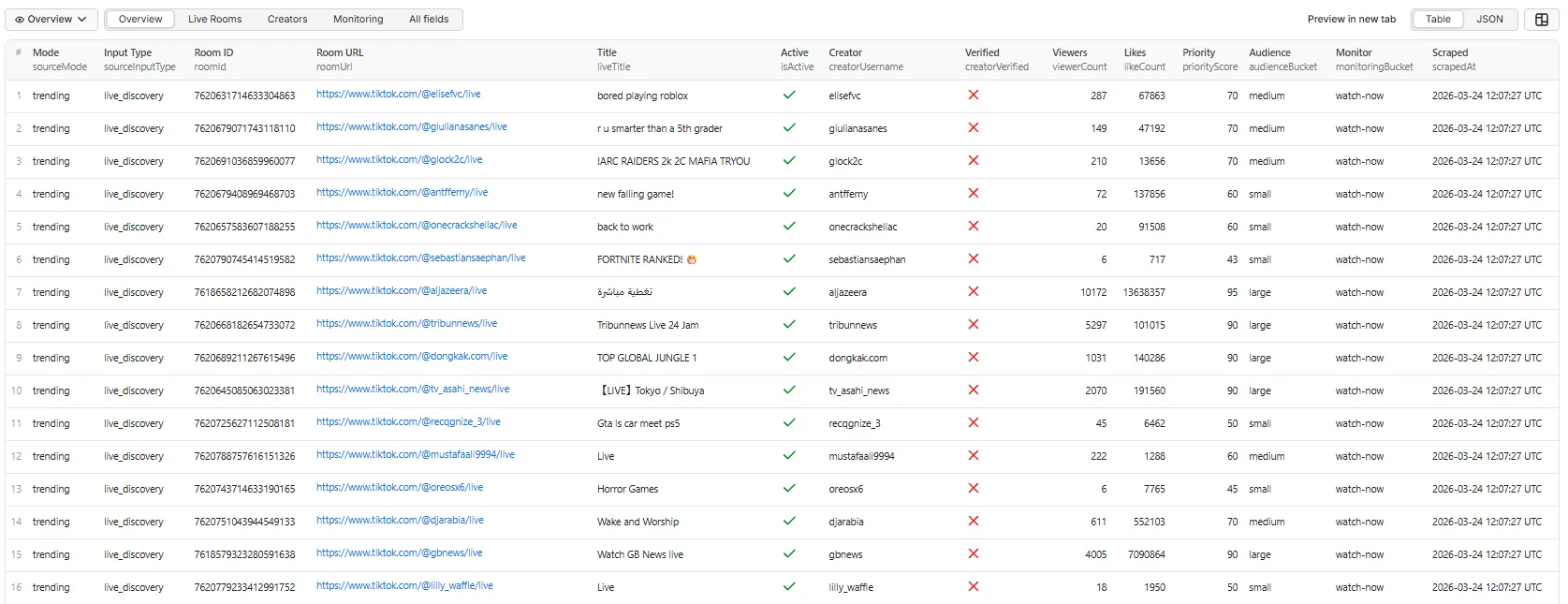
The Overview tab in the Apify console. Switch tabs with the view selector above the table.
Full example record
One sample record per dataset view
Every view is a projection of the same row, so a field means the same thing in all of them. URLs are shortened below for readability; real output carries the full signed URL.
Overview tab
Key metrics and monitoring buckets at a glance — the view to scan first.
Live Rooms tab
Full room detail with engagement, category and commerce signals.
Creators tab
Creator-focused view for watchlists and outreach shortlists.
Playback tab
Stream URLs with quality, resolution and expiry. Check streamUrlExpiresAt before using a URL.
Monitoring tab
Qualification view — scores, buckets, reasons, and any extraction errors.
Creator offline — example NOT_LIVE record
When a creator you asked about is not currently live, you get an explicit row rather than silence. This row is not charged.
Error rows carry the same columns as a live-room row, so a CSV export keeps a stable header.
Output fields
Source lineage fields (5)
| Field | Description |
|---|---|
sourceMode | Discovery mode that found this room (trending, creator, keyword) |
sourceInputType | Input type (live_discovery, creator_profile, keyword_search) |
sourceKeywords | Keywords used in this discovery (array) |
sourceCreators | Creator usernames targeted (array) |
scrapedAt | ISO 8601 timestamp of extraction |
Room identity fields (12)
| Field | Description |
|---|---|
roomId | TikTok LIVE room ID |
roomUrl | Direct URL to the live room |
liveTitle | Stream title set by the creator |
roomDescription | Room description (usually the creator's bio) |
isActive | Whether the room is currently active |
startTime | Stream start time (ISO 8601) |
minutesLive | How long the room had been live when it was scraped |
coverImageUrl | Static cover/thumbnail image |
snapshotImageUrl | A frame captured from the stream as it is now |
categoryLabel | Room category or tag (e.g. Gaming) |
categoryId | Numeric category/game tag ID |
gameTags | Game tags on the room (array) |
Creator fields (8)
| Field | Description |
|---|---|
creatorUsername | TikTok username |
creatorProfileUrl | Full profile URL |
creatorId | TikTok user ID |
creatorDisplayName | Display name / nickname |
creatorAvatarUrl | Profile picture URL |
creatorVerified | Verified badge status |
creatorFollowersCount | Follower count |
creatorFollowingCount | Following count |
creatorBio | Profile bio |
Audience / activity fields (7)
| Field | Description |
|---|---|
viewerCount | Viewers watching right now |
totalUserCount | Cumulative viewers for the whole session |
viewersPerMinute | Audience accumulation rate — see Reading momentum below |
likeCount | Like count on the live session |
commentCount | Comment count |
shareCount | Share count |
hasCommerce | Whether the room has shopping/commerce enabled |
Playback fields (7)
Included when includeStreamUrls is on.
| Field | Description |
|---|---|
streamUrlHls | HLS playback URL for the best available quality |
streamUrlFlv | FLV playback URL for the best available quality |
streamUrlRtmp | RTMP pull URL |
streamQuality | Quality key of the selected stream (e.g. hd) |
streamResolution | Stream dimensions, e.g. 960x1920 |
streamUrlExpiresAt | When these URLs stop working (ISO 8601) |
streamVariants | Every available quality with its FLV/HLS URLs (nested array) |
Discovery / qualification fields (7)
| Field | Description |
|---|---|
priorityScore | Composite priority score (0–100) |
priorityReason | Human-readable explanation for the score |
audienceBucket | small / medium / large based on viewer count |
activityBucket | low / medium / high based on engagement signals |
isTrendingCandidate | Whether the room qualifies as trending |
monitoringBucket | watch-now / watchlist / low-priority |
monitoringReason | Explanation for the monitoring classification |
Run metadata fields (4)
| Field | Description |
|---|---|
position | Rank of the row in the delivered, sorted results |
isPartial | Whether the record has incomplete data |
errorType | Why a row carries no room: NOT_LIVE, NO_ROOMS, or REQUEST_FAILED |
errorMessage | Error message if extraction failed |
Reading momentum
Two derived fields separate a room that is big from a room that is taking off. No other TikTok LIVE scraper in the Apify store returns anything derived.
| Field | Meaning |
|---|---|
minutesLive | Minutes between the stream starting and this row being scraped |
viewersPerMinute | totalUserCount ÷ minutesLive — how fast the room is pulling viewers |
Why it matters: two rooms can both show 5,000 cumulative viewers, but one reached that in 10 minutes and the other took 10 hours. The first is worth opening now.
Note the denominator: the rate is built on totalUserCount (everyone who has passed through the
room), not on viewerCount (who is watching right this second). Dividing a concurrent count by
elapsed time would not mean anything.
Both fields are null when the room has been live for under a minute — the denominator is too
small to say anything useful, and a burst of early joins would otherwise report an implausible rate.
They are also null when TikTok does not expose a start time.
Sort by viewersPerMinute to build a "what's catching fire right now" feed; sort by viewerCount
for "what's biggest right now". They are different questions.
Working with playback URLs
The playback URLs are signed and time-limited. Always check streamUrlExpiresAt before using one — after that timestamp the URL returns an error, and the fix is to re-run the Actor rather than to retry the old URL.
streamUrlHlsis the most broadly compatible (players, browsers, ffmpeg).streamUrlFlvis what TikTok's own web player uses.streamVariantslists every quality, includingao(audio-only). The flatstreamUrl*fields always point at the best video quality, never at audio-only.
This Actor does not record streams — but it hands you everything a recorder needs.
Recording handoff — worked example
streamUrlHls opens directly in ffmpeg, VLC, or any HLS player. To archive a single room:
To record every live room a run found, straight from the dataset:
Three things to get right:
- Start promptly. The URLs are signed and expire — check
streamUrlExpiresAt. If a recording fails to start, re-run the Actor for fresh URLs rather than retrying the old ones. - Filter to
isActive: true. A room that ended between discovery and playback has a URL that resolves to nothing. - Cap your concurrency. The snippet above backgrounds every room at once; for a 300-room run, batch it instead.
For a managed alternative, feed streamUrlHls into a dedicated recorder Actor — this Actor is the
discovery half of that pipeline, not a replacement for it.
Run summary
When includeSummary is enabled, an aggregated summary is written to the key-value store under the key SUMMARY — not to the dataset. It is not charged.
It lives outside the dataset deliberately: a summary carries aggregates, arrays and nested objects, so appending it to a dataset of flat room rows breaks the "one row = one live room" contract and corrupts a straight CSV export.
Find it under the run's Storage → Key-value store → SUMMARY, or via the API at /key-value-stores/{id}/records/SUMMARY.
Field availability
Not every field is available for every room. This table reflects what the Actor returns today.
| Availability | Fields |
|---|---|
| Always present | sourceMode, sourceInputType, scrapedAt, roomId, roomUrl, isActive, startTime, coverImageUrl, snapshotImageUrl, creatorUsername, creatorProfileUrl, creatorId, creatorDisplayName, creatorAvatarUrl, creatorFollowersCount, creatorFollowingCount, totalUserCount, likeCount, commentCount, shareCount, hasCommerce, streamUrlFlv, streamUrlRtmp, streamQuality, streamResolution, streamUrlExpiresAt, streamVariants, priorityScore, priorityReason, audienceBucket, monitoringBucket, monitoringReason, position |
| Usually present | liveTitle, viewerCount, roomDescription, creatorBio, streamUrlHls |
| Only when applicable | categoryLabel, categoryId, gameTags — rooms carrying a hashtag or game tag |
| Rarely populated | creatorVerified — the live-search surface does not expose the badge, so it reads false |
Unavailable fields are null rather than omitted, so the column set stays stable across runs and exports.
Priority scoring
Each room receives a composite score (0–100):
| Signal | Points |
|---|---|
| Active room | +20 |
| Very high viewers (10,000+) | +30 |
| Solid viewers (1,000+) | +25 |
| Moderate viewers (100+) | +15 |
| High engagement (10,000+ total) | +20 |
| Large creator (1M+ followers) | +15 |
| Mid-size creator (100K+) | +10 |
| Trending discovery | +10 |
| Keyword/creator discovery | +5 |
priorityReason names the factors that contributed, so the score is auditable rather than magic.
Monitoring buckets
| Bucket | When assigned |
|---|---|
watch-now | Active room with score 60+, medium/large audience, or high activity |
watchlist | Score 40+ or 50+ viewers |
low-priority | Low signals or insufficient data |
Use cases
- LIVE trend discovery — what is trending on TikTok LIVE right now
- Creator monitoring — track when creators go live, at list scale
- Audience research — public engagement signals from live rooms
- Niche monitoring — LIVE activity for specific topics or markets
- Live-commerce research — find rooms with shopping enabled via
hasCommerce - Recording pipelines — hand
streamUrlHlsto a downstream recorder - AI/analytics workflows — structured LIVE data for dashboards, alerts, and LLM analysis
Pricing & billing
This Actor is pay-per-event, with two charges depending on how you discover rooms:
| Mode | What you pay for |
|---|---|
| trending / keyword | Each live room saved to the dataset |
| creator | Each creator checked, live or not — the room data is then included, not charged again |
Creator mode is billed per check because the work is per creator: the Actor loads a profile whether or not that creator turns out to be live. Billing that way means your cost is predictable from your input list before you press Start. The current rates are shown on the Actor's Pricing tab and in the Apify Console — this README deliberately does not quote figures, because rates change and the Console is always authoritative.
A check you are charged for is a check that produced an answer. If TikTok withholds the page —
throttling sometimes returns a near-empty shell instead of the real one — the Actor retries with a
fresh session, and if the page still cannot be read it writes a REQUEST_FAILED row and does not
charge. It will not report a creator as offline on evidence it does not have: NOT_LIVE means the
page was read and carried no live room.
What you are charged for
| Charged? | |
|---|---|
| A live room found by trending or keyword | Yes — one result |
| A creator checked in creator mode | Yes — one check, live or not |
| A creator whose page could not be read | Free — see below |
| A live room found via creator mode | Free — covered by the check |
| The same creator retried after a failure | Free — checks are deduplicated per run |
A search that returns nothing (NO_ROOMS row) | Free |
A request that failed all retries (REQUEST_FAILED row) | Free |
An offline creator's NOT_LIVE row itself | Free — the check is the charge, not the row |
| A duplicate room found by a second discovery route | Free — dropped before billing |
A room excluded by minViewerCount | Free — filtered before billing |
Rooms beyond maxTotalRooms | Free — never collected |
| The run summary | Free — and stored outside the dataset |
| Playback URLs, commerce flags, creator enrichment | Free — included in the row price |
In short: trending and keyword bill for rooms you receive; creator mode bills for creators you asked us to check.
Estimating a run
Because billing is per saved room, the row count is the bill. Use the caps to bound it:
| Run | Rooms saved (max) |
|---|---|
Trending, maxRooms: 50 | 50 |
Trending, maxRooms: 300 | 300 |
5 keywords, maxRoomsPerKeyword: 50 | 250 |
| Mixed (trending 300 + 5 keywords × 50) | 550 |
Any run with maxTotalRooms: 1000 | 1,000, whatever else is set |
| 200 creators in creator mode | 200 checks — the count of creators you submitted |
Set maxTotalRooms to the largest number of rooms you are willing to pay for in one run, and the run cannot exceed it.
See Memory below — the default of 1 GB suits every run mode.
Memory — leave it at 1 GB
The Actor is browserless. Every mode — trending, creator and keyword — reads TikTok's public JSON APIs and server-rendered page data over plain HTTP. No Chromium is started at any point, so there is no browser to give memory to.
1 GB is the default and is right for every mode. Raising it does not make runs faster; Apify bills memory × runtime, so a higher setting simply costs more for the same work.
| Run contains | Recommended memory |
|---|---|
| Anything | 1 GB (the default) |
Earlier versions launched a browser for trending and keyword discovery and needed 4 GB. That is no longer true, and runs are both faster and cheaper as a result.
Spending limits
The Actor respects the per-run spending limit set in the Apify Console. When the limit is reached it stops collecting gracefully — results already saved stay in the dataset and the run finishes normally rather than erroring.
Authentication, proxy & reliability
No TikTok login, cookies, or API key are required. You never supply credentials, and the Actor reads only public LIVE surfaces.
No proxy is the default. The Actor is browserless and does not need one: measured runs found no extra rooms with a proxy, it costs roughly 30% more runtime, and a proxy exit TikTok refuses will stop the run from establishing a session at all. Datacenter remains available if you want it.
🚦 Proxy policy
Use Apify Datacenter proxy or no proxy. Both work for TikTok LIVE discovery at this Actor's conservative request rate.
A proxy is not required, and it makes runs noticeably slower. Two production runs of the same input, minutes apart, measured:
| No proxy | Datacenter proxy | |
|---|---|---|
| Rooms delivered | 129 | 130 |
| Runtime | ~20 s | ~26 s |
Same results, and the proxy costs roughly 30% more runtime. Because the Actor is browserless it makes few, small requests, so it draws blocks far less readily than a browser-driven scraper would.
Either setting is fine. Leave Datacenter on if you have ever seen block symptoms — NO_ROOMS
across every search term, or repeated session-refresh warnings in the log — and run without one
otherwise.
If a proxy is configured but cannot be set up, the run fails rather than quietly continuing unproxied — a run that reports a proxy it is not using is worse than one that stops.
Apify Residential proxy is not supported. The run stops immediately if apifyProxyGroups
includes RESIDENTIAL. The reason is structural rather than technical: this Actor is pay-per-event,
so Apify platform usage — including proxy bandwidth — is billed to the developer, not to you.
Residential bandwidth costs an order of magnitude more than datacenter, and this Actor has no need
of it: it is browserless, so it fetches JSON and server-rendered HTML rather than the megabytes of
scripts, fonts and images a browser would pull. Blocking residential is what keeps the per-result
price low for everyone else.
If you genuinely need residential routing, supply your own provider through the proxy editor's Custom proxy URLs field. That traffic goes through your provider and your account, so it is unaffected by this policy:
Reliability behaviour worth knowing:
- Failed pages are retried with exponential backoff and jitter, up to 4 attempts.
- Auth and billing failures (
401,402,403) are not retried — they never succeed. - If a page still fails, the run logs
result set is TRUNCATEDwith the counts, so a short result is never mistaken for "TikTok had no more rooms". - A failing trending term is isolated — the other terms continue.
- Partial records are marked
isPartial: truerather than dropped.
Limitations
- All data comes from public TikTok LIVE surfaces. No private data, login-required features, or private analytics.
- Playback URLs expire. They are signed and time-limited — check
streamUrlExpiresAt. Re-run the Actor to get fresh URLs. - No country/region filter. TikTok's public live-search surface does not expose a region for rooms, so no reliable geo filter is possible and none is offered.
- Live rooms are time-sensitive. Rooms may end between discovery and extraction.
maxRoomsis a cap, not a guarantee. TikTok may return fewer active rooms than requested, and results vary through the day.- Some fields are source-dependent. See the field availability table above.
- Viewer counts may be approximate. TikTok may expose rounded or delayed counts.
- Prioritization fields are heuristics. Scores and buckets are derived from public signals — practical guidance, not exact rankings.
- Keyword mode depends on TikTok's search surface supporting live-room results, which varies by region and availability.
What this Actor is NOT
- Not a LIVE video recorder — it returns playback URLs, not video files. Pair it with a recorder if you need the footage.
- Not a real-time chat or gift listener — it takes a snapshot per run, it does not stay attached to a stream.
- Not a continuous monitor — schedule repeat runs instead (see below).
- Not a private-data scraper — public surfaces only.
Common mistakes
| Mistake | What happens | Fix |
|---|---|---|
| Expecting a trending sweep alongside keywords | Keywords alone run keyword discovery only | Turn on Also discover trending rooms |
| Turning on Also discover trending rooms for a trending-only run | Harmless, but unnecessary — trending already runs when nothing else is filled | Leave it off |
Confusing Keywords to search with Trending seed terms | Keywords each run their own capped search; seed terms steer one trending sweep | Use Keywords for topics you want searched; seed terms only to redirect trending |
Expecting maxRooms to cap the whole run | Each source gets its own budget | Set maxTotalRooms |
Setting minViewerCount high on a quiet niche | Few or no rows returned (and nothing charged) | Lower the threshold, or set it to 0 |
| Storing playback URLs for later | They expire — see streamUrlExpiresAt | Use them promptly, or re-run for fresh URLs |
| Looking for the summary in the dataset | It is in the key-value store under SUMMARY | Storage → Key-value store |
Troubleshooting
| Symptom | Likely cause | Fix |
|---|---|---|
| Run fails with "Could not establish a TikTok session" | The exit IP was refused a session cookie, so no mode could have worked | Enable Apify Proxy (Datacenter), or try a different proxy group |
NO_ROOMS on every source | There genuinely are no matching live rooms. A soft block is retried automatically with a fresh session, and reports itself in the log if it persists | Try broader keywords; enable Apify Proxy (Datacenter) and retry |
A row with errorType: REQUEST_FAILED | The request never produced a usable answer — it timed out, errored on every retry, or TikTok withheld the page. The result is missing, not empty. Never charged | Re-run. If it persists on creators, wait a few minutes or switch proxy group |
REQUEST_FAILED on every creator, mentioning server-rendered state | TikTok is throttling this exit IP and returning a shell page instead of the real one. Reported as unknown rather than offline, on purpose | Wait a few minutes, or enable/switch Apify Proxy (Datacenter) |
Log says result set is TRUNCATED | A page of results kept failing after all retries, so fewer rooms were returned than requested | Re-run; if it persists, switch proxy group |
Far fewer rooms than maxRooms | The cap is a ceiling, not a target | Normal. Try broader keywords or trending mode |
NOT_LIVE for a creator you know is live | Creator status is a point-in-time snapshot | Re-run |
| Playback URL returns an error | The URL expired | Check streamUrlExpiresAt; re-run for fresh URLs |
minViewerCount above 0 returns almost nothing | Rooms whose viewer count TikTok does not expose are excluded by the filter | Set minViewerCount: 0 |
| Run stopped early with "maxTotalRooms reached" | Working as designed — the cost ceiling was hit | Raise maxTotalRooms |
| Run stopped with "spending limit reached" | The per-run spend limit in your Console was hit | Raise the limit in the Console |
| Run failed at startup mentioning residential proxy | RESIDENTIAL was selected in the proxy groups | Switch to Datacenter, or add your own provider under Custom proxy URLs — see Proxy policy |
| Run failed with "Nothing to run" | Only possible with a legacy saved input that still sends mode | Remove mode from the saved input and just fill the fields you want |
Integrations & scheduling
Because LIVE is a moment-in-time surface, the usual pattern is a scheduled run:
- Open the Actor → Schedules → create a schedule (for example every 15 minutes).
- Point a webhook at your endpoint on
ACTOR.RUN.SUCCEEDEDto push new rooms into Slack, a sheet, or your own service. - Diff on
roomIdbetween runs to detect rooms that are newly live.
Results export as JSON, JSONL, CSV, Excel, HTML, or XML, and are reachable through:
- the Apify API (
/datasets/{id}/items) - the JavaScript and Python clients
- the Apify MCP server, for LLM and agent workflows
- Zapier, Make, and other Apify integrations
FAQ
Which discovery mode should I pick? There isn't one to pick. Fill creators, or keywords, or neither — the Actor runs the matching discovery. Leave everything empty for a trending sweep.
Do I need a TikTok account, login, cookies, or an API key? No. None of them. You only need an Apify account.
Am I charged if a creator is offline?
Yes — creator mode bills per creator checked, not per creator found live, because the Actor loads
the profile either way. The NOT_LIVE row itself is free; the check is the charge. This is what makes
the cost predictable: it equals the number of creators you submitted.
Am I charged twice when a creator is live — once for the check and once for the room? No. Rooms found through creator mode are not charged as room results; the check covers them.
Am I charged if a search returns nothing?
No. NO_ROOMS rows are free.
Am I charged twice if the same room appears in two modes?
No. With deduplicateRooms on (the default), duplicates are removed before billing.
Am I charged for rooms filtered out by minViewerCount?
No. Filtering happens before billing.
Can I play or download the stream? You get playback URLs (HLS/FLV/RTMP) that a player or ffmpeg can open. The Actor itself does not record.
Why did my playback URL stop working?
It expired. Check streamUrlExpiresAt and re-run for fresh URLs.
Where is the run summary?
In the key-value store under the key SUMMARY, not in the dataset — so your dataset stays one-row-per-room and exports cleanly to CSV.
Why did I get fewer rooms than I asked for?
maxRooms is a cap, not a guarantee. TikTok's live inventory changes constantly.
Can I filter by country? No. TikTok's public live-search surface does not expose a region for rooms, so a reliable country filter is not possible and the Actor does not pretend to offer one.
How do I monitor creators continuously? Schedule the Actor to run on an interval and diff the results.
How do I keep a run cheap?
Use one mode, set maxRooms to 50, and set maxTotalRooms to the maximum you are willing to pay for.
Changelog
Last verified: 2026-08-18
1.0
- Three discovery modes (trending, creator, keyword) with mixed-mode runs
- Playback stream URLs — HLS, FLV, RTMP with quality, resolution and an explicit expiry, plus all quality variants
- New fields —
snapshotImageUrl,categoryId,gameTags,creatorAvatarUrl,creatorFollowingCount,totalUserCount,hasCommerce commentCountis now populated (it was always empty before)- Removed permanently-empty fields —
giftSignal,streamLanguage,creatorLikesCount,cohostCount. TikTok's live-search surface returns an emptylink_micstub on every room, so co-host state is not available from it - Removed the
countriesinput andregionfield — TikTok's live-search surface exposes no region, so the filter could never work; it is gone rather than misleading - Run summary moved to the key-value store (
SUMMARY), keeping the dataset one-row-per-room minViewerCount,sortByanddeduplicateRoomsare now applied (previously accepted but not enforced)- Cross-mode deduplication — a room found by two routes is saved and charged once
- New cost controls:
maxRoomsPerKeywordandmaxTotalRooms - New
trendingTermsinput to steer trending discovery - Apify Residential proxy is now rejected at startup — Datacenter, no proxy, and your own Custom proxy URLs are all supported. Keeps the per-result price sustainable.
- Removed the
modeselector — discovery now follows the fields you fill, so the selector and the inputs can no longer disagree. Previously, filling a field whose mode was not selected dropped that input silently. Saved inputs that still sendmodekeep their old behaviour. - New
includeTrendingtoggle for adding a trending sweep alongside creators or keywords - Removed the unused
debugModeinput - A mode selected with an empty input now fails with a clear message instead of finishing as an empty successful run
- New
creator-live-checkcharge — creator mode now bills per creator checked rather than per creator found live, so cost is predictable from your input list. Rooms found this way are no longer charged separately. - Page-level retry with backoff, explicit truncation warnings, per-term failure isolation
- Filtered, duplicate and error rows are excluded from billing
- Five dataset views, including a new Playback view
Support
Found a bug, or need a field the Actor does not return yet? Open an issue on the Actor's Issues tab in the Apify Console with your run ID and input.


![TikTok Live Status Monitor - Stream URLs [NO LOGIN] ✅ avatar](https://images.apifyusercontent.com/5m9bqNVHYQMHy-cOJHsF1euOfoDMUT2aQwlmHLW0a-c/rs:fill:76:76/cb:1/aHR0cHM6Ly9hcGlmeS1pbWFnZS11cGxvYWRzLXByb2QuczMudXMtZWFzdC0xLmFtYXpvbmF3cy5jb20vc0NDU2R3bm1LTUoxUTJzVG4tYWN0b3ItYm1SMEdMeDJnMVBmUHp2Y0QtcTUyTmFhQmJUZS1jYW52YS10aWstdG9rLWxvZ28tTUFHek5nb0lIancucG5n.webp)


