
Tiktok Profile Scraper
Pricing
from $2.00 / 1,000 creator profiles
Tiktok Profile Scraper
TikTok Profile Scraper extracts public TikTok profile data including bio, followers, following, likes, verification, profile URL, and recent videos. Use it for creator research, influencer discovery, competitor monitoring, lead generation, and analytics.
Pricing
from $2.00 / 1,000 creator profiles
Rating
5.0
(1)
Developer

Delowar Munna
Maintained by CommunityActor stats
0
Bookmarked
153
Total users
31
Monthly active users
2 months ago
Last modified
Categories
Share
TikTok Profile Scraper — Creator Finder & Lead Enrichment
Profiles, not posts. Priced per creator.
Most TikTok "profile" scrapers are really post scrapers — you hand them a creator and they bill you for a hundred videos you didn't ask for. This one returns one clean row per creator, and charges you for that row.
What does TikTok Profile Scraper do?
Give it profile URLs or usernames — or skip the URLs entirely and give it a keyword like fitness coach, and it will find the creators for you. Every result is one spreadsheet-ready row:
- Identity — username, display name, user ID, avatar, verification status
- Engagement stats — followers, following, likes, video count
- Business signals — bio links, email from bio, Instagram/YouTube handles, business category
- Contact hints — boolean flags summarizing available contact signals
- Provenance — which keyword discovered the profile, timestamps, success/error status
What this does — and what it doesn't
It does: return profile-level data for creators you name, or creators it finds by keyword. One row per creator, one charge per creator.
It doesn't: return a creator's full video catalogue. An optional recent-video snapshot (default off, billed separately) returns their latest posts with engagement counters — see Recent video snapshot. For every video behind a hashtag or keyword, use TikTok Video Scraper.
Need video data? Use TikTok Video Scraper instead — that's what it's built for.
It complements the TikTok scraper suite:
- TikTok Video Scraper — deep video-level data
- TikTok Comment Scraper — comment extraction
- TikTok Trend & Discovery Scraper — trending content discovery
Together they support: discover trends → inspect videos → inspect comments → inspect creators
Why use TikTok Profile Scraper?
- Find creators by keyword — discover TikTok profiles in any niche without needing URLs upfront. No other TikTok profile Actor does this.
- Public email and contact extraction —
bioEmail,bioPhone, WhatsApp/Telegram/booking links, Instagram/YouTube handles, and a classified, tracking-stripped bio link telling you whether a creator is selling, reachable, or just cross-posting — extracted for you rather than left in a bio string - One row per creator — drops straight into Sheets, Excel, or a CRM. No deduplicating a hundred video rows to find the author.
- Priced per profile, not per post — see Pricing
- You are never charged for a profile that fails — error rows are returned so you can see what broke, and they cost nothing
- Traceable and normalized data — input echo, source keyword, timestamps, and consistent field naming
Input
| Parameter | Type | Default | Description |
|---|---|---|---|
profiles | string[] | [] | TikTok profile URLs or usernames |
searchKeywords | string[] | [] | Keywords to search for TikTok user profiles |
resultsPerKeyword | integer | 10 | Max profiles to scrape per search keyword (1–100) |
maxTotalProfiles | integer | 100 | Safety cap on total profiles per run, across all inputs (1–1000) |
strictKeywordMatch | boolean | true | Drop creators with no trace of your keyword in username, display name, or bio |
minFollowerCount | integer | 0 | Only keep creators with at least this many followers (0 = no minimum) |
maxFollowerCount | integer | 0 | Only keep creators with at most this many followers (0 = no maximum) |
onlyBusinessAccounts | boolean | false | Only return business-like creators (email / link / business category) |
includeRecentVideos | boolean | false | Recent video snapshot per creator — billed as a separate event |
maxRecentVideos | integer | 12 | Recent videos to inspect per profile (1–20) |
Business links, contact hints, and pinned-video detection are always on and have no setting — they read data the run has already fetched, so they cost nothing extra and there is nothing to trade off.
No proxy configuration needed — see Proxy.
You can use profiles and searchKeywords together or separately.
If you run the Actor with no input at all, it scrapes one well-known public profile (@tiktok) so you can see the output format straight away. Provide either input and that demo profile is never included.
Finding creators by size
minFollowerCount and maxFollowerCount answer the query this Actor exists for — "fitness coaches with 50,000–500,000 followers":
For keyword-discovered creators the follower filter is applied before the profile is fetched, so creators outside your range cost you nothing and do not consume maxTotalProfiles. The Actor automatically searches deeper to still return the number you asked for.
Profiles you name directly in profiles are always fetched — there is no follower count to filter on until we have them — but a direct profile that fails your filter is not returned and not charged.
onlyBusinessAccounts can only be judged from the finished profile, so unlike the follower filters it does not reduce your bill.
Controlling how much a run costs
maxTotalProfiles (default 100) is a hard ceiling on profiles scraped in one run, counted across direct input and every keyword combined. Without it, 5 keywords × resultsPerKeyword: 100 could scrape 500 profiles.
- Directly supplied profiles are always scraped first — keyword discovery uses whatever budget is left.
- Profiles that fail count against the cap, because the work was still done. They are not billed.
- A creator found by two different keywords is scraped once, not twice.
Accepted profile formats
- Full URL:
https://www.tiktok.com/@examplecreator - With @:
@examplecreator - Username only:
examplecreator
Duplicates are automatically removed before processing.
Sample input: Scrape profiles directly
Sample input: Discover profiles by keyword
Each discovered profile carries the sourceKeyword that found it, so a multi-keyword run stays attributable.
Output
Each output item represents one TikTok profile. Results are available in JSON, CSV, Excel, and through three dataset views in the Apify console.
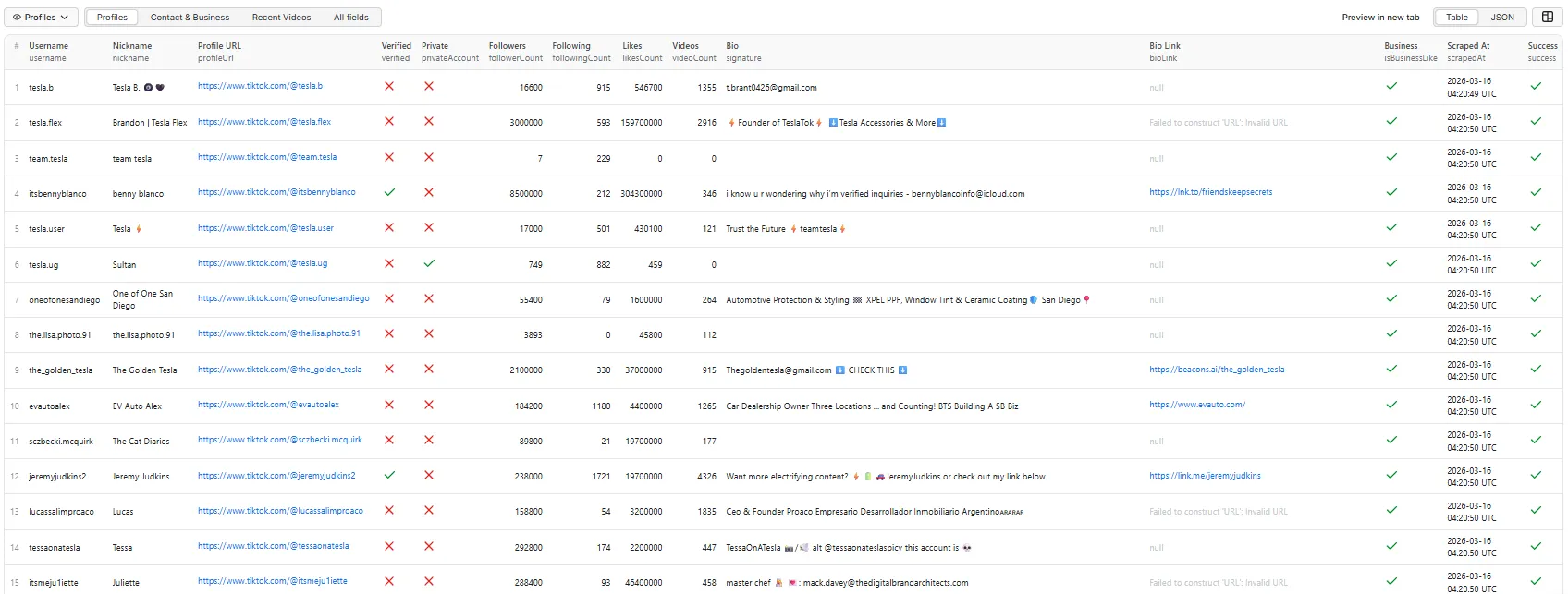
Output tab: Profiles
The Profiles view shows identity, stats, and verification status at a glance.
Output tab: Contact & Business
The Contact & Business view leads with the contact columns and is ordered for CRM import — export it as CSV and the columns land where you'd expect, no post-processing.
Output tab: Creator Scoring
The Creator Scoring view ranks creators by campaign value and shows the full calculation — populated when includeRecentVideos is on.
Read it left to right: huge reach (73), thin engagement (9 — under 1% of viewers react), posts daily (consistency 100), verified (trust 100). The score is 56 and you can see exactly where it came from. Disagree with our weighting? Sort on videoMetrics instead.
Sending leads to your CRM
The output is shaped for this: one row per creator, with the contact fields already parsed out of the bio. Everything below is configured by you, on your own runs — nothing here needs a change to the Actor.
The one thing that trips everyone up: the webhook does not contain your data. Apify POSTs the run, not the results. You get resource.defaultDatasetId and eventData.actorRunId, then fetch the rows yourself:
Field mapping. This is the part that's specific to this Actor:
| This Actor | Typical CRM field | Notes |
|---|---|---|
bioEmail | The natural dedupe key — most CRMs match on it | |
bioPhone | Phone | International format, or absent |
nickname | Name | Display name; username is the handle |
bioLinkNormalized | Website | Cleaned — no tracking params to pollute matching |
profileUrl | Social profile / lead URL | |
creatorScore | Lead score | Maps directly onto CRM lead-scoring fields |
followerCount, videoMetrics.avgViews | Custom properties | Avg views is the honest reach number |
isBusinessLike, bioLinkType | Qualification / lifecycle stage | shop and contact are buying signals |
sourceKeyword, searchRank | Lead source / campaign | Which keyword found them, and at what rank |
secUid | External ID | Use this, not username — handles change, secUid never does |
Three ways to wire it up:
1. Webhook — most direct, works anywhere. In the Console, add an integration on your run/task for ACTOR.RUN.SUCCEEDED. Apify retries non-2XX responses 11 times with backoff from ~1 minute out to ~32 hours, so a brief outage at your end won't lose a run. Custom payloads are supported with {{variable}} templates if your endpoint wants a specific shape.
2. Zapier / Make / n8n — no code. Zapier's "Finished Actor run" trigger plus its "Fetch dataset items" search hands the rows to Salesforce, Google Sheets, Slack, or anything else in the catalogue, where you map the columns above onto their fields.
3. Manual export — the Console exports CSV/JSON/Excel directly. The Contact & Business dataset view is already trimmed to the lead columns, so exporting it gives you an import-ready file with no post-processing.
Notes we'd rather you hear from us:
- Apify's HubSpot app won't help here. It's an official integration, but it's built around Apify's Contact Details Scraper and writes that Actor's output into HubSpot. It isn't a generic any-Actor pipe. Use the webhook or Zapier route instead.
- Scheduled runs re-scrape and re-bill. There's no built-in diffing against a previous run — pointing this at a schedule gives you a fresh full pull each time, billed each time. Dedupe on your side (
bioEmailorsecUid) and it works fine as a recurring lead feed. - These recipes describe the platform's behaviour, not tests we ran. Verifying a HubSpot or Salesforce mapping end-to-end needs an account on those systems, and we'd rather point you at Apify's own integration docs than publish steps we haven't executed.
Creator scoring — and why follower count lies
creatorScore (0–100) ranks creators by what a sponsored post would actually be worth. It needs includeRecentVideos enabled; without it the field is null and scoreBasis says no_video_data. That's deliberate — see below.
The problem it solves. TikTok's feed is interest-based, not follow-based, so follower count is a poor predictor of reach. Real output from this Actor:
| Creator | Followers | Avg views/post | Views per follower | Score |
|---|---|---|---|---|
@claude | 231,900 | 837,900 | 361% | 56 |
@nike | 8,900,000 | 90,156 | 1% | 41 |
@tesla.u.s | 106,700 | 979 | 0.9% | 0 |
@claude has 38× fewer followers than @nike and gets 9× more views per post. Nike's 8.9M followers see roughly 1% of its posts; a campaign priced on that number is priced on the wrong number. And @tesla.u.s has 107k followers who don't watch at all.
Sorting by followers gets all three wrong. That is what creatorScore is for.
How the score works — the whole formula:
Reach is a ceiling, not an ingredient. A creator nobody sees can't be rescued by good engagement, so quality only moves a score ±50% from raw reach. Every part is exposed in scoreFactors so you can check our arithmetic — or ignore our weighting and sort on videoMetrics yourself.
| Factor | Built from |
|---|---|
reach | Average views per post, log-scaled. 1,000 views → 0, 10M → 100 |
engagement | (likes + comments + shares) ÷ views, shrunk toward the average for low-view creators — a 27% rate on 106 views is noise, not excellence |
consistency | Median days between posts. Daily → 100, monthly-or-worse → 0 |
trust | Verified badge |
A score of 100 means ~10M average views — a global megastar. In practice strong creators land in the 40–70 range; the scale is absolute, so a 55 means the same thing in every run.
Why there's no score without video data. We tried it. Falling back to follower-based signals didn't merely weaken the ranking, it inverted it: @the_golden_tesla scored 72 on profile data alone versus 22 with real video evidence, and the genuinely strongest creator was under-rated. A profile-only score can only rank by followers — the exact number this feature exists to replace. Rather than hand you a confident, wrong number, we return null.
What we deliberately don't score. No "audience quality" — we can't see the audience, and views-per-follower mostly reflects TikTok's algorithm rather than audience composition. It's reported as a raw metric in videoMetrics.viewsPerFollower for you to interpret. No growth or velocity metrics either: those need historical follower counts across runs, which a single scrape cannot know.
Lead signals: what the bio link tells you
A bio link is the single most useful field on a creator's profile, and it arrives messy — sometimes without https://, often carrying ?fbclid=… tracking junk. This Actor cleans it and says what it is, so you can triage a list instead of opening 200 tabs.
bioLinkType | Means | Typical |
|---|---|---|
contact | A direct line — you can message or book them now | wa.me/…, t.me/…, calendly.com/… |
shop | They're selling: storefront, checkout, or a booking funnel | stan.store/…, *.myshopify.com, theirsite.com/shop |
social | A cross-platform profile | instagram.com/…, youtube.com/… |
link_hub | A link-in-bio page — the real destination is one hop further | linktr.ee/…, beacons.ai/… |
own_site | A domain that matches their handle — they run it | fitwithnicolecoaching.com for @fitwithnicole._ |
other | A domain we can't attribute — often an affiliate link | a retailer they promote |
Measured on ten live "fitness coach" creators: 3 shop, 3 link hub, 2 social, 1 direct contact, 1 other — and 5 of 10 were directly reachable by email, phone, or a contact link.
Two limits worth knowing, because we'd rather say so than have you find out:
We don't follow link hubs. When bioLinkType is link_hub, the creator's real shop or booking page is one click past a Linktree, and we return the Linktree. Expanding it would mean fetching third-party pages — which we measured: linktr.ee responds, but beacons.ai and affiliate shorteners return 403 to a datacenter IP. Doing it properly needs a residential proxy whose cost would land in your bill, to expand roughly a quarter of profiles, about half of which would fail anyway. linkIsHub flags the rows where the link under-describes the creator.
bioPhone is deliberately strict. International format only (+1 415 555 0132). TikTok bios are full of numbers that aren't phone numbers — PBs, discount codes, dates, "24/7" — and on a lead list a wrong number gets dialled. We'd rather return null than a plausible mistake, so a bare 4155550132 is skipped.
A note on follower counts
TikTok publishes rounded display values, and this Actor returns them as-is. A creator shown as 3000000 has roughly 3 million followers, not exactly 3,000,000. The same applies to likesCount, followingCount, and videoCount. This is a TikTok limitation, not a scraping one — no Actor can return an exact count TikTok doesn't publish. Treat these as magnitudes, and be careful building precise analytics or growth deltas on them.
Recent video snapshot
Default: off. Enable includeRecentVideos to get each creator's most recent posts alongside their profile. maxRecentVideos sets an upper limit — you may get fewer, because TikTok serves one page and decides its size (measured at 10 on 2026-07-17, and it has moved during a single day). We fetch one page only: a second would double the API cost per profile without finding you more creators.
| Field | Meaning |
|---|---|
videoId | TikTok's video ID |
description | Caption, including hashtags |
createTime | Post date, ISO 8601 |
url | Direct link to the video |
viewCount · likeCount · commentCount · shareCount | Public engagement counters |
duration | Length in seconds |
isPinned | Whether the creator pinned it |
This is a separately billed recent-videos event, charged once per profile, and only when videos are actually returned. A creator with no public posts costs you nothing extra. Every row reports what happened via recentVideosStatus:
recentVideosStatus | Meaning |
|---|---|
not_requested | includeRecentVideos was off (the default) |
paid_plan_only | You enabled it, but you're on the Apify Free plan — skipped, and not billed. See below |
success | Videos were returned in recentVideos — the normal result |
empty | The creator has no public posts, or the account is private — not billed |
failed | The video lookup errored. The profile record is still returned intact — not billed |
Profile data, stats, and contact signals are never affected by this setting: if the video lookup fails, you still get the full profile row.
This gives you a creator's recent performance, not their full catalogue. To scrape video-level data at scale — every video for a hashtag, keyword, or creator — use TikTok Video Scraper.
Free plan limitations
The recent video snapshot requires a paid Apify plan. On the Free plan it is skipped and you are not charged for it — every row reports recentVideosStatus: paid_plan_only so you can see exactly what happened.
| Free plan | Any paid plan | |
|---|---|---|
| Profiles returned | ✅ Full, no row cap | ✅ Full |
| Profile stats, bio, avatar, verification | ✅ Included | ✅ Included |
| Business links, contact hints, pinned-video detection | ✅ Included | ✅ Included |
| Creator scoring | ✅ Included | ✅ Included |
| Keyword discovery | ✅ Included | ✅ Included |
Recent video snapshot (includeRecentVideos) | ❌ Skipped, not charged | ✅ Included |
Why: the video snapshot costs one upstream API call per profile, while everything else is parsed from a payload already fetched. Restricting that single option keeps the Actor sustainable without capping how many profiles you get. Runs are never failed because of this — you'll see it in the log and in the run's status message.
Full output example (all 41 fields)
Real output from this Actor — @claude, scraped with includeRecentVideos enabled. Note avgViews of 837,900 against 231,900 followers: 3.6× more views than followers, which is why reach scores 73 while the follower count alone would undersell it.
bioLink arrives as TikTok published it — "Claude.ai", no scheme. bioLinkNormalized is the CRM-ready form.
Error output example
When a profile cannot be found or extracted, the actor returns a structured error record:
Error rows are never charged. You see what broke and don't pay for it.
errorCode is a stable machine-readable reason, so you can tell your problem from ours: NOT_FOUND (the handle doesn't exist) · EXTRACTION_FAILED · UPSTREAM_ERROR · REQUEST_FAILED · AUTH_ERROR / BILLING_ERROR (ours, not yours). The free-text error stays alongside it, so existing consumers keep working.
Output fields reference
Identity and profile
| Field | Type | Description |
|---|---|---|
input | string | The original input (URL, username, or @handle) |
username | string | TikTok unique username |
profileUrl | string | Canonical profile URL |
userId | string | Numeric TikTok user ID |
secUid | string | TikTok security user ID |
nickname | string | Display name |
signature | string | Bio text |
avatarUrl | string | Profile image URL |
verified | boolean | Blue check verification status |
privateAccount | boolean | Whether the account is private |
language | string | Profile language code |
Public counters
| Field | Type | Description |
|---|---|---|
followerCount | number | Number of followers |
followingCount | number | Number of accounts following |
likesCount | number | Total likes received across all videos |
videoCount | number | Number of videos posted |
friendCount | number | Mutual follower count (when available) |
Business and contact signals
| Field | Type | Description |
|---|---|---|
engagementRate | number | likesCount ÷ followerCount, to 4 dp. A lifetime popularity ratio — not a per-post engagement rate, since TikTok no longer exposes per-video data on profile pages. Both inputs are rounded display values, so treat it as a comparison aid, not a precise metric. |
bioLink | string | External website URL, exactly as TikTok publishes it |
bioLinkNormalized | string | The same link, cleaned: scheme added, utm_*/fbclid/igsh tracking stripped. Use this one — it's stable and CRM-ready |
bioLinkType | string | What the link is for: shop · contact · social · link_hub · own_site · other |
bioLinkDomain | string | Host, minus www. — useful for grouping |
bioEmail | string | Email address extracted from bio text |
bioPhone | string | Phone from bio, international format only (see below) |
contactChannel | string | Direct channel the link opens: whatsapp · telegram · messenger · booking |
instagramHandle | string | Instagram handle from linked accounts or bio |
youtubeChannel | string | YouTube channel from linked accounts or bio |
businessCategory | string | TikTok business category (e.g., "Automotive & Transportation") |
isBusinessLike | boolean | Real commercial intent: a TikTok commerce account, a published email/phone, a shop/contact/own-domain link, or a business phrase in the bio. A Linktree or a cross-posted Instagram does not count on its own |
contactHints | object | Summary flags: hasEmailInBio, hasExternalLink, hasInstagram, hasYouTube, hasPhoneInBio, hasDirectContactLink, hasShopLink, linkIsHub |
creatorScore | number | 0–100 campaign value. null unless includeRecentVideos is on — see above |
scoreBasis | string | recent_videos when scored, no_video_data when not |
scoreFactors | object | The score's full breakdown: reach, engagement, consistency, trust (0–100 each) |
videoMetrics | object | Raw numbers behind the score: videosSampled, avgViews, avgEngagementRate, postingCadenceDays, viewsPerFollower |
Content and metadata
| Field | Type | Description |
|---|---|---|
accountCreatedAt | string | Account creation date (ISO 8601, when available) |
recentVideos | array | Recent video objects — [] unless includeRecentVideos is on (see above) |
recentVideosStatus | string | Why recentVideos looks the way it does: not_requested | success | empty | failed |
scrapedAt | string | Extraction timestamp (ISO 8601) |
sourceType | string | How the profile was provided: "url", "username", or "search" |
sourceKeyword | string | Which keyword discovered this profile (null for directly supplied profiles) |
searchRank | number | TikTok's own relevance position for that keyword, 1-based (null for directly supplied profiles). Preserved through filtering — a gap in the ranks means a creator was filtered out, not mis-numbered. |
success | boolean | Whether extraction succeeded |
error | string | Human-readable error message (only present on failed items) |
errorCode | string | Stable code for automation (only on failed items) — see below |
Error codes
Branch on errorCode rather than string-matching error, whose wording may change.
errorCode | Meaning |
|---|---|
NOT_FOUND | The handle does not exist |
EXTRACTION_FAILED | Responded, but carried no usable profile |
UPSTREAM_ERROR | Upstream/network failure — usually worth retrying |
BILLING_ERROR | Our data provider's balance is exhausted — please report this |
AUTH_ERROR | Our data provider rejected the request — please report this |
REQUEST_FAILED | Request failed after all retries |
How keyword search works
When you provide searchKeywords, the Actor queries TikTok's own creator search and then fetches the full profile for each creator it finds.
Because the results come from TikTok itself rather than from a web index:
searchRankis a real relevance rank — TikTok's own ordering for that keyword, not "whatever a search engine listed first". Rank is preserved even when filters remove creators above you in the list, so rank 7 always means TikTok ranked that creator 7th.sourceKeywordtells you which keyword found each creator, so a multi-keyword run stays attributable.- Results reflect what TikTok users would actually see, not what happens to be indexed publicly.
Each keyword can return up to resultsPerKeyword profiles (default 10, max 100).
Why you might see unrelated creators — and how it's handled
TikTok's search returns genuine matches while it has them, then pads deeper pages with unrelated popular accounts. Searching tesla for 100 results, the first ~20 are all real Tesla creators; past roughly rank 50 TikTok starts returning big accounts with no Tesla connection at all.
strictKeywordMatch (default true) removes them. A creator is kept when your keyword appears in their username, display name, or bio. Matching is per word, so fitness coach still keeps a creator matching only coach — requiring the whole phrase would throw away real leads.
Filtered creators are dropped before their profile is fetched, so they cost you nothing.
It is a heuristic, so it can occasionally drop a relevant creator who never names the topic in their profile text. Set strictKeywordMatch: false to see everything TikTok returns, and use searchRank to judge for yourself — relevance is reliably high at low ranks.
Practical tip: narrow keywords run out of genuine matches quickly. Asking for 100 results for a niche term mostly buys padding, so a smaller resultsPerKeyword is often better and cheaper.
Use cases
- Influencer discovery — find creators in any niche by keyword, extract profiles for campaign research
- Competitor monitoring — track competing brand or creator accounts over time
- Lead generation — collect bios, external links, emails, and business contact clues at scale
- Creator database building — build structured datasets for outreach, analytics, or CRM import
- Trend follow-up — after discovering trending content, inspect the creators behind it
- AI enrichment — feed creator data into classification, scoring, or summarization pipelines
Tips and best practices
- Start small — test with 2–3 profiles or a single keyword first to verify output format
- Mix input modes — use URLs, @handles, and keywords in the same run
- Use with other actors — discover trending creators with TikTok Trend & Discovery Scraper, then feed their usernames here for full profile data
- Schedule for monitoring — run on a schedule to track creator growth over time
- Enable contact hints — the
contactHintsobject provides quick boolean flags useful for filtering leads
Proxy
None needed. There is no proxy setting, and nothing to configure.
Profile data comes from an API rather than by loading TikTok's website, so the Actor never requests a TikTok page — which means there is no IP for TikTok to block and no proxy to buy. That is why runs are reliable without one.
Practically, for you this means: no proxy setup, no proxy bill, no residential-vs-datacenter decision, and no 403s to debug.
The scraper works without proxies for small batches and keyword search, but may encounter rate limiting on larger runs.
Integrations
Connect TikTok Profile Scraper to your existing tools and workflows:
- Google Sheets — export profile data directly to spreadsheets
- Slack / Email — get notifications when scraping runs complete
- Webhooks — trigger downstream workflows automatically
- Apify API — access results programmatically for custom integrations
- Other actors — combine with TikTok Video Scraper, Comment Scraper, and Trend & Discovery Scraper for full-funnel creator intelligence
FAQ
How many profiles can I scrape in one run?
maxTotalProfiles caps it — 100 by default, up to 1000.
Am I charged for profiles that fail?
No. Failed profiles return a row with success: false and a description of what went wrong, so you can see exactly what happened, but they are never billed. They do count against maxTotalProfiles, since the work was still performed.
Is one result one profile, or one video? One profile. That is the core difference between this Actor and most alternatives, which return one result per post and bill accordingly.
How does keyword search find profiles?
It queries TikTok's own creator search, then fetches each discovered creator's full profile. That is why searchRank is a genuine relevance position rather than a web-index artefact.
Why is recentVideos empty?
Most likely because it is off by default — turn on includeRecentVideos. If it is already on, recentVideosStatus tells you why: empty means the creator has no public posts or the account is private, and failed means the lookup errored. You are not billed for either. This Actor is built for profile data; for video-level data at scale use TikTok Video Scraper.
Why are some fields null?
Fields like businessCategory, friendCount, bioEmail, and instagramHandle depend on what the creator has configured and what TikTok includes in its page data. They are extracted on a best-effort basis.
What if a profile is not found?
The actor returns a record with success: false and a descriptive error message. Other profiles in the batch continue processing normally. Profiles discovered via keyword search that return 404 are silently skipped.
Does this work for private accounts? Private accounts return limited data (username, nickname, verification status). Most counters and content fields will not be available.
Can I use this without proxies? Yes — always, and there is no proxy option to turn on. The Actor never loads a TikTok page, so there is no block to work around. See Proxy.


![TikTok User Search Scraper - Find Creators [NO LOGIN] ✅ avatar](https://images.apifyusercontent.com/xQN1VJN2CrdTx_ww-l8Mdp0h4WEd5eETlcN_nftk4Wc/rs:fill:76:76/cb:1/aHR0cHM6Ly9hcGlmeS1pbWFnZS11cGxvYWRzLXByb2QuczMudXMtZWFzdC0xLmFtYXpvbmF3cy5jb20vc0NDU2R3bm1LTUoxUTJzVG4tYWN0b3ItR3BOSzFGUEtBakpmYjFFVGctam5mZjh4UUMzNC1jYW52YS10aWstdG9rLWxvZ28tTUFHek5nb0lIancucG5n.webp)


