
YouTube Channel Contacts & Social Links Scraper
Pricing
from $5.00 / 1,000 channel results
YouTube Channel Contacts & Social Links Scraper
Find YouTube creators fast: get channel stats plus public contact signals—websites and social links (X, Instagram, LinkedIn, TikTok, etc.). Perfect for influencer outreach, lead lists, partnerships, and market research.
Pricing
from $5.00 / 1,000 channel results
Rating
5.0
(1)
Developer

Delowar Munna
Maintained by CommunityActor stats
3
Bookmarked
157
Total users
13
Monthly active users
4 days ago
Last modified
Categories
Share
Advanced YouTube channel scraper that extracts contact information and social media links from channel About pages. Get 41 enriched fields including external links (websites, social profiles), email addresses (with optional MX validation), a 0–100 contactability score, CRM qualification tier, discovery lineage, and all standard channel metadata. Uses a hybrid architecture: YouTube Data API v3 for reliable metadata + a browserless TikHub path for fast contact extraction. No residential proxy required.
Key Features
- Hybrid API + Scraping: YouTube Data API v3 for reliable standard fields, Puppeteer only for contacts
- Contact Extraction: Extracts email addresses from channel About pages with confidence scoring
- Social Links: Captures and categorizes all external links (Instagram, X, LinkedIn, Facebook, TikTok, etc.)
- Enhanced Discovery: Extracts channels from BOTH channel results AND video results (5-20+ per search)
- No Proxy Required: Works reliably without residential proxy
- 41 Enriched Fields: Complete channel profile — 15 standard + 19 contact + 4 status/discovery-lineage + 1 contactability score + 2 CRM qualification
- Email Validation (optional): MX-record check with disposable & role-address detection
- Linked-Website Scanning: in full-contacts mode, also scans the channel's linked website(s) for emails — decodes Cloudflare-obfuscated addresses and, when the linked page has none, follows a contact/about page to find the business email
- Video-Description Scanning: when the About page and linked sites yield no email, scans the channel's recent video descriptions — where many creators put their business contact — recovering emails other scrapers miss
- Smart Deduplication: Automatically filters duplicate channels by ChannelId
- Link Categorization: Automatically detects and categorizes social platforms and link aggregators
- Extract Contacts toggle: full contacts (emails + social links + website scan), or metadata-only for fast, cheap discovery
- Automatic Fallback: Full Puppeteer scraping activates if API is unavailable
Best for: Influencer outreach, partnership campaigns, creator collaborations, B2B marketing, PR activities, and any use case requiring direct contact with YouTube creators
Public data only — no CAPTCHA bypass. This scraper extracts publicly accessible emails and contact links (from the channel's About page and description). It does not log into Google or solve CAPTCHAs to reveal YouTube's gated "business email" — when a channel has one, we flag
BusinessInquiryAvailable: trueso you know it exists, but we don't extract it. This keeps the actor ToS-safe and reliable.
At a Glance
| Feature | Value |
|---|---|
| Architecture | Hybrid: YouTube Data API v3 + Puppeteer |
| Speed | ~2-4s per channel (with contacts), <1s (API only) |
| Standard Field Reliability | ≈99% (API-sourced) |
| Discovery | 5-20+ channels per search |
| Throughput | 15-30 channels/minute |
| Fields | 41 total (15 standard + 19 contact + 4 status/lineage + 1 contactability score + 2 CRM qualification) |
| Contact Success Rate | 40-60% have external links, 10-20% have emails |
| Email Detection | Balanced sensitivity with confidence scoring (tuned internally) |
| Proxy Required | No |
| Concurrency | 20 parallel requests (configurable 1-50) |
| Deduplication | Automatic by ChannelId |
How It Works
Hybrid Architecture
This scraper uses a two-phase approach for each channel:
-
Phase 1 - YouTube Data API v3: Fetches standard channel metadata (subscribers, views, country, join date, description, keywords, etc.) in a single API call. This is fast (~100ms) and reliable -- no DOM parsing failures.
-
Phase 2 - Puppeteer (About page only): When contact extraction is enabled, navigates to the channel's About page to extract external links, emails, and the verification badge. These fields are not available through the API.
-
Fallback: If the API is unavailable (quota exhausted, network error), the full Puppeteer scraping pipeline activates automatically -- no data loss.
Why This Scraper?
| Feature | This Scraper (Hybrid) | Traditional Scrapers |
|---|---|---|
| Standard field reliability | ≈99% (API) | 80-95% (DOM parsing) |
| Contact information | Emails & social links | Not available |
| Fields per channel | 41 enriched fields | 10-15 basic fields |
| SubscriberCount/Country/JoinedDate | Always populated (API) | Often null |
| Discovery per search | 5-20+ channels | 1-2 channels |
| Email extraction | 3 detection modes | None |
| Link categorization | Auto-categorized | None |
| Time per channel | ~2-4s (with contacts) | ~5-8s |
| Outreach ready | Export to CRM | Manual enrichment |
| Proxy required | No | Often yes |
Input Parameters
Core Discovery
| Parameter | Type | Default | Description |
|---|---|---|---|
| searchQueries | Array | [] | Keywords or topics — runs a YouTube channel search (relevance-ranked, not an exact lookup) |
| startUrls | Array | [] | Channels — one per line: channel handle (@name), channel ID (UC…), channel URL, or video URL. Exact lookup |
| maxResultsPerQuery | Integer | 10 | Max channels per search (1-50) |
| maxTotalChannels | Integer | (none) | Hard cap on total channels returned across the whole run (cost control). Empty = no cap |
| onlyWithContact | Boolean | false | Keep only channels that have an email or a social/website link |
| minSubscribers | Integer | (none) | Keep only channels with at least this many subscribers |
| maxSubscribers | Integer | (none) | Keep only channels with at most this many subscribers |
| regionCode | String | "US" | ISO country code (US, GB, CA, AU, etc.) |
| language | String | "en" | Language code (en, es, de, fr, etc.) |
| dateFrom | String | "" | Filter by channel join date (Joined After, YYYY-MM-DD) |
| dateTo | String | "" | Filter by channel join date (Joined Before, YYYY-MM-DD) |
Contact Extraction
| Parameter | Type | Default | Description |
|---|---|---|---|
| extractContacts | Boolean | true | ON = full contacts (emails + social links + linked-website scan); OFF = metadata only (fastest, no contacts) |
| validateEmails | Boolean | false | Validate emails via MX check; flag disposable/role addresses (adds EmailValidationStatus) |
Extraction depth, email-detection sensitivity, and concurrency are handled internally — when Extract Contacts is on, the actor always extracts emails + social links, scans linked websites, and (only when no email is found yet) scans recent video descriptions for more emails.
CRM & Integrations
| Parameter | Type | Default | Description |
|---|---|---|---|
| minQualificationScore | Integer (0–100) | 60 | A channel is flagged IsQualified = true when its ContactabilityScore ≥ this value. Every channel also gets a QualificationTier. Annotation only — no channels are dropped. |
| webhookUrl | String | null | Optional http/https endpoint. Each delivered channel is POSTed as JSON in real time (one request per channel) — for Zapier, Make, n8n, or a CRM. Best-effort delivery. |
| webhookAuthHeader | String (secret) | null | Optional value sent as the Authorization header on each webhook POST (e.g. Bearer <token>). Used only when a Webhook URL is set. |
Performance Tips
- Turn Extract Contacts off (
extractContacts: false) for the fastest, cheapest runs (no contact extraction)
Output Schema
Standard Channel Fields (15 fields, from API)
| # | Field | Type | Description |
|---|---|---|---|
| 1 | ChannelId | String | Unique YouTube channel ID |
| 2 | ChannelName | String | Display name of the channel |
| 3 | ChannelHandle | String | The @handle (e.g., @nateherk) |
| 4 | ChannelURL | String | Full canonical channel link |
| 5 | ThumbnailURL | String | Channel profile image URL |
| 6 | Description | String | Channel description text |
| 7 | Country | String / null | Channel's listed country (from API) |
| 8 | JoinedDate | String / null | Channel creation date (YYYY-MM-DD, from API) |
| 9 | SubscriberCount | Integer / null | Total subscribers (exact number from API) |
| 10 | VideoCount | Integer / null | Total videos uploaded (from API) |
| 11 | TotalViews | Integer / null | Lifetime view count (from API) |
| 12 | Keywords | Array | Channel keywords from branding settings |
| 13 | IsVerified | Boolean | Verification badge (from page scraping) |
| 14 | ChannelType | String / null | Category: Music, Entertainment, Gaming, etc. (from API topic data) |
| 15 | ScrapedAt | String | ISO 8601 timestamp of extraction |
Contact Fields (19 fields, from About page scraping)
| # | Field | Type | Description |
|---|---|---|---|
| 16 | ExternalLinks | Array | All external links with labels, URLs, and types |
| 17 | WebsiteUrl | String / null | Primary website URL |
| 18 | InstagramUrl | String / null | Instagram profile URL |
| 19 | XUrl | String / null | X (Twitter) profile URL |
| 20 | LinkedInUrl | String / null | LinkedIn profile URL |
| 21 | FacebookUrl | String / null | Facebook page URL |
| 22 | TikTokUrl | String / null | TikTok profile URL |
| 23 | DiscordUrl | String / null | Discord server invite URL |
| 24 | TelegramUrl | String / null | Telegram channel URL |
| 25 | PrimaryAggregatorUrl | String / null | Link aggregator (Linktree, Beacons, etc.) |
| 26 | OtherLinks | Array | Additional uncategorized links |
| 27 | Emails | Array | All extracted email addresses |
| 28 | PrimaryEmail | String / null | Highest confidence email |
| 29 | EmailConfidence | Number / null | Confidence score (0-100) |
| 30 | EmailSources | Array | Where emails were found |
| 31 | HasLinks | Boolean | Whether channel has external links |
| 32 | HasEmail | Boolean | Whether email was found |
| 33 | BusinessInquiryAvailable | Boolean | Whether a hidden business email exists (behind CAPTCHA) |
| 34 | EmailValidationStatus | String / null | Email validation result when validateEmails is on: mx_valid, role_valid, no_mx, disposable, or unknown (null when disabled) |
Status & Discovery Fields (4 fields)
| # | Field | Type | Description |
|---|---|---|---|
| 35 | Status | String | success, or no_contact when the channel has no email/links |
| 36 | SourceType | String / null | How the channel was discovered: search, video, or channel |
| 37 | SourceQuery | String / null | The search keyword or input URL the channel came from |
| 38 | SearchRank | Integer / null | Position within the search results (null for Channels entries) |
| 39 | ContactabilityScore | Integer (0–100) | Outreach-readiness score bundling email presence + confidence, MX/disposable validation, alternative contact routes (website, socials, aggregator), and credibility (business-inquiry, verification). Higher = easier to reach. |
| 40 | QualificationTier | String | CRM tier from the score: Hot (≥80), Warm (≥60), Cold (≥40), Unqualified (<40). |
| 41 | IsQualified | Boolean | true when ContactabilityScore ≥ your Qualification Threshold input (default 60). |
Note on ContactabilityScore: A single 0–100 signal to sort and qualify leads. A deliverable direct email dominates the score (up to 60 pts), with the rest from contact-route richness (up to 28) and credibility (up to 12). Channels with only social links (no direct email) typically land in the 20–50 range. When
validateEmailsis off, the email is scored as "unknown" (not penalized as undeliverable).
Note on qualification & webhooks (CRM-ready): Every channel is tiered (
QualificationTier) and flagged (IsQualified) against your Qualification Threshold input — no channels are dropped, they're just annotated so you can sort/segment in your CRM. Set an optional Webhook URL to stream each delivered channel to Zapier, Make, n8n, or your own endpoint as a real-time JSON POST (one request per channel); add a Webhook Authorization Header to secure it. Webhook delivery is best-effort — a failed POST is logged and never stops the run.
Note on BusinessInquiryAvailable: Some YouTube channels have a "View email address" button that requires solving a reCAPTCHA. This scraper does not attempt to bypass the CAPTCHA. Instead, it flags
BusinessInquiryAvailable = trueso you know the channel has a business email available, even though it cannot be extracted automatically.
Output Example
Table View - Results Overview
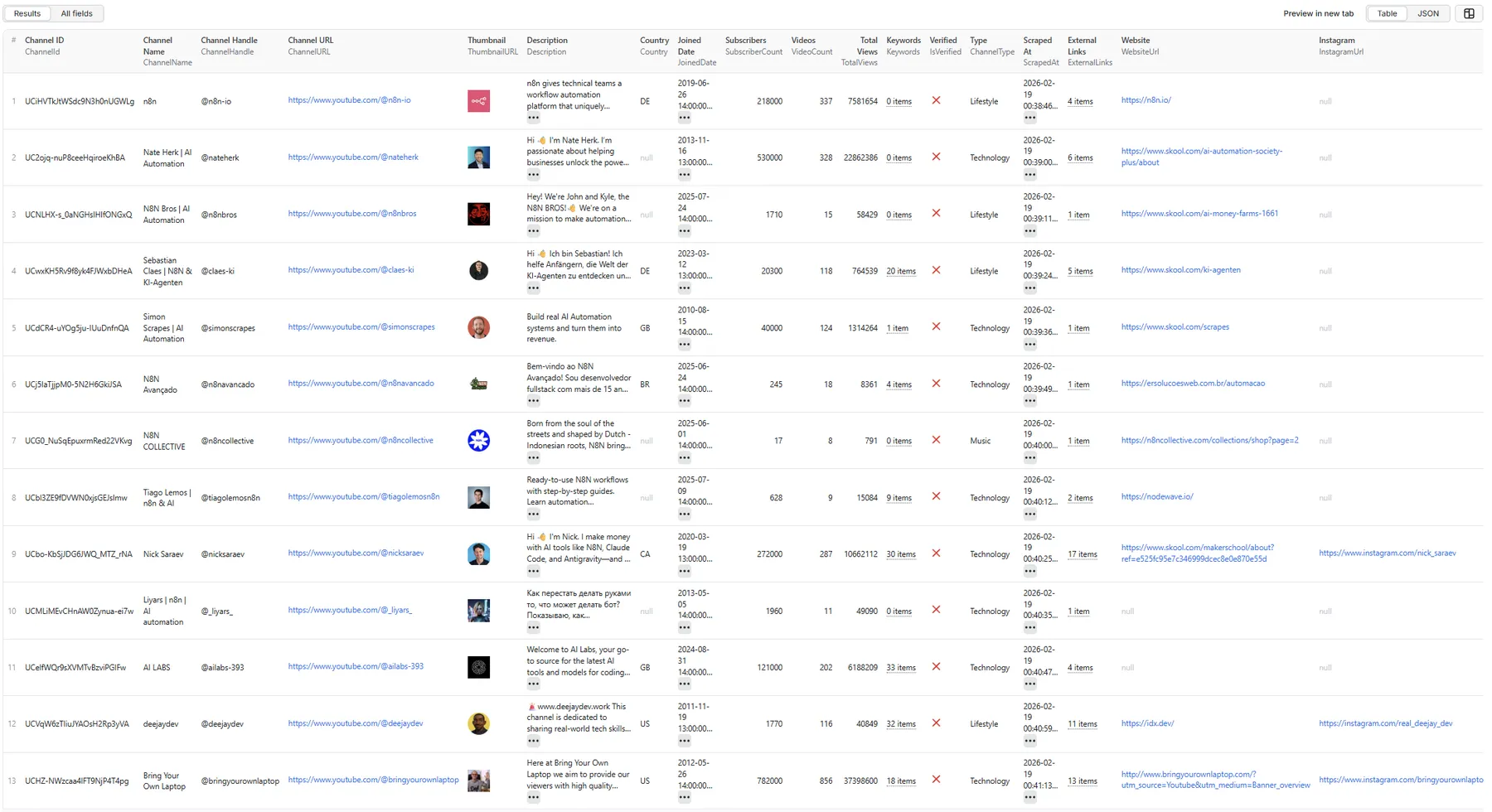
Table View - All Fields

JSON View
Quick Start
Example 1: Keywords Search with Full Contact Extraction
Example 2: Specific Channels with Email Validation
Provide channels by handle, ID, channel URL, or video URL — one per line. Each is an exact lookup.
Example 3: Fast Mode - Metadata Only (No Contact Extraction)
How to read the source fields: results record where they came from. Channels you request in the Channels field return
SourceType: "channel"(or"video"when you pass a video URL) withSearchRank: null. Channels discovered via Search Keywords returnSourceType: "search", the keyword inSourceQuery, and aSearchRank(1, 2, 3…) for their position in YouTube's results.
Performance & Reliability
Throughput
| Channels | With Contacts (hybrid) | API Only (no contacts) |
|---|---|---|
| 10 channels | ~20-40 seconds | ~10-15 seconds |
| 50 channels | ~2-3 minutes | ~1-2 minutes |
| 100 channels | ~4-5 minutes | ~2-3 minutes |
| 500 channels | ~15-25 minutes | ~8-12 minutes |
Architecture
- YouTube Data API v3: Fast, reliable metadata (subscribers, views, country, date)
- Puppeteer: Targeted About page scraping for contacts only
- Automatic fallback: Full scraping pipeline if API unavailable
- Enhanced discovery: Channel filter + dual extraction from search results
- Smart deduplication: ChannelId-based duplicate prevention
- Error handling: Automatic retries with exponential backoff
- Anti-detection: Realistic browser fingerprinting and human-like behavior
Use Cases
Influencer Outreach
Find creators in your niche with their contact information. Export to CRM for automated outreach campaigns. Filter by subscriber count and engagement metrics.
PR & Media Relations
Build media lists with journalist YouTube channels. Extract business emails for press releases. Identify channels covering your industry.
B2B Partnerships
Discover business channels with LinkedIn profiles. Find decision makers through channel descriptions. Connect via multiple social platforms.
Competitive Analysis
Map competitor social media presence. Discover partnership networks. Analyze market communication channels.
Content Marketing
Identify collaboration opportunities. Find guest posting channels. Build relationships with content creators.
Best Practices
- Start small: Test with
maxResultsPerQuery: 10to verify results - Use keywords effectively: Broad keywords discover more channels through dual extraction
- Qualify leads fast: Sort by
ContactabilityScoreor filter onIsQualified/QualificationTierto prioritize reachable channels - Respect privacy: Only use publicly available contact information ethically
- Filter results: Use
HasEmailandHasLinksto find contactable channels - Verify contacts: Higher
EmailConfidencescores are more reliable - Export strategically: Use CSV for CRM import, JSON for programmatic access
- Fast mode: Turn off
extractContactsfor fastest extraction when you don't need contacts
Changelog
2026-07-20 — Scoring, CRM & fairer billing (v1.0)
A major update driven by a marketplace assessment — adding lead scoring, CRM integration, email validation, and fairer pricing. Output grew to 41 fields (15 standard + 19 contact + 4 status/lineage + 1 contactability score + 2 CRM qualification).
Scoring & CRM (new)
- Contactability score (0–100) — one outreach-readiness number per channel (
ContactabilityScore), bundling email presence + confidence, MX/disposable validation, contact-route richness, and credibility. No competitor offers this. - Lead qualification — every channel gets a
QualificationTier(Hot / Warm / Cold / Unqualified) and anIsQualifiedflag against yourminQualificationScorethreshold (default 60). Annotation only — nothing is dropped. - Per-record webhooks — stream each delivered channel as a real-time JSON POST to Zapier, Make, n8n, or your CRM (
webhookUrl+ optional secretwebhookAuthHeader). Best-effort; a failed POST is logged and never stops the run.
Contact enrichment & validation
- Email validation — optional MX check + disposable/role detection →
EmailValidationStatus(mx_valid,role_valid,no_mx,disposable,unknown). - Linked-website email scan — fetches the channel's linked site(s) and scans for additional emails beyond the About page. Now also decodes Cloudflare-obfuscated emails (
data-cfemail) and, when the linked page has none, follows a same-origin contact/about page (capped) — recovering business emails that a plain scan misses. - Video-description email scan — when the About page and linked sites yield no email, scans the channel's recent video descriptions (public data) — the source that lets some competitors surface emails others miss. Runs only when no email is found yet (1 free YouTube API quota unit); results pass the junk-domain blocklist. Precision guards: an email must recur across ≥2 descriptions (drops one-off guest/sponsor/scam addresses), and a brand-matching domain is preferred as the primary contact.
- Subscriber filters —
minSubscribers/maxSubscribers. - Status & discovery lineage —
Status,SourceType,SourceQuery,SearchRankshow where each channel came from.
Discovery, billing & UX
- Fairer billing — discovery is now free; the
search-querycharge was removed, so you pay only per channel returned. Filtered-out / not-found / errored channels are never charged. - Result controls —
onlyWithContact(only keep reachable channels) andmaxTotalChannels(hard run cap). - Simplified input — universal options internalized (email-detection sensitivity, link depth, concurrency); use-case options kept as toggles/filters.
Positioning
- Evaluated premium gated-email (CAPTCHA) retrieval and deliberately declined it — we keep "public data, no CAPTCHA bypass" as a ToS-safe stance.
BusinessInquiryAvailablestill flags when a channel has a gated business email, without revealing it.
v1.0 — Initial release (Feb 2026) + performance tuning (Apr 2026)
- Hybrid architecture — YouTube Data API v3 for metadata + a browserless/Puppeteer path for contacts, with automatic fallback when the API is unavailable.
- Contact extraction — public emails with confidence scoring from the About page.
- Social links — all external links categorized by platform (Instagram, X, LinkedIn, TikTok, Discord, Telegram, …).
- Link-aggregator detection — Linktree, Beacons, and similar hubs.
- Business-inquiry flag — detects when a gated business email exists (without bypassing the CAPTCHA).
- Performance tuning — browserless pipeline with high concurrency (~100+ channels/min) and no residential proxy required.
Pricing
This actor uses pay-per-event pricing. You are charged only per channel returned (channel-result) — no search fee and no setup fee. Keyword searches and channel lookups cost nothing extra; you pay only for the channels you actually get.
- Fair billing: you are not charged for channels that are filtered out, not found, or fail — only for a channel that is successfully returned to your dataset.
- Pay only for contactable channels: turn on Only Channels With Contact (
onlyWithContact) to drop contactless channels before they're saved or billed. - Cost control: use
maxTotalChannelsto hard-cap the number of channels a run can return. - Email validation (optional): when
validateEmailsis enabled, each validated email adds a smallemail-validatedcharge.
The exact per-event prices are shown on this actor's Apify pricing tab (set on the platform, not in the code).
FAQ
Do you extract the hidden "business email" behind YouTube's CAPTCHA?
No. We flag BusinessInquiryAvailable: true when one exists, but we never bypass CAPTCHAs or log into Google. We extract emails that are publicly visible in the About page / description.
Do I pay for channels with no email?
Only if you ask for them. By default you get (and pay for) every discovered channel, since the full profile has value. Turn on onlyWithContact to pay only for channels that have an email or link.
Do I need a proxy? No. The actor works without any residential proxy.
How is this different from an email-only scraper? You get the whole creator profile — subscribers, country, join date, categorized social links, and email with a confidence score — discoverable from a keyword, channel, video, or playlist URL. It's built for CRM-ready outreach, not just a raw email dump.
How fast is it? The default browserless pipeline processes ~100+ channels/minute. Discovery and enrichment run without launching a browser.
⭐ Found this useful? A rating on the Apify Store really helps — and if something's missing, open an issue with your use case and we'll take a look.
Compliance
- Intended for legitimate channel discovery, influencer research, and business intelligence
- Collects only public YouTube channel data
- Uses YouTube Data API v3 within Google's usage policies
- Does not attempt to bypass CAPTCHAs or access gated content
- Users responsible for compliance with applicable laws in their jurisdiction
Support
- Issues: Report via GitHub or Apify support
- Feature requests: Open an issue with your use case
- Documentation: See
/docsfolder for detailed PRD and guides
Built for production-ready channel discovery and outreach


