

YouTube Competitor Channel Monitor
Pricing
$3.00 / 1,000 channel checks
YouTube Competitor Channel Monitor
Monitor competitor YouTube channels and get only what changed: new videos, Shorts and live streams, breakout videos versus each channel's own baseline, view and subscriber surges, upload cadence and content-mix shifts, plus a cross-competitor ranking. No login, no API key needed.
Pricing
$3.00 / 1,000 channel checks
Rating
0.0
(0)
Developer

Delowar Munna
Maintained by CommunityActor stats
0
Bookmarked
2
Total users
1
Monthly active users
5 days ago
Last modified
Categories
Share
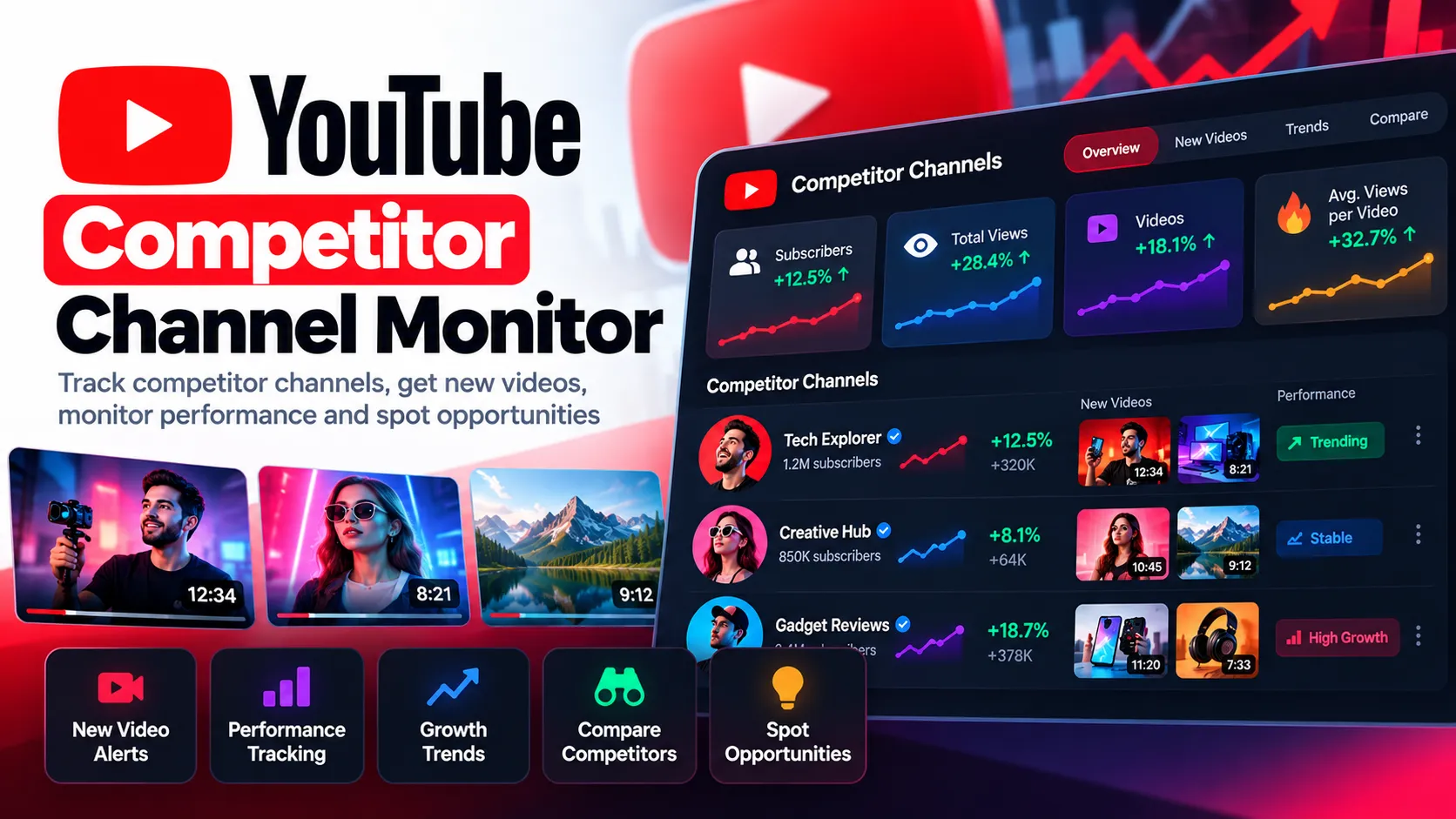
Track your competitors' YouTube channels and get only what changed: new videos, Shorts and live streams, videos breaking out against the channel's own normal performance, view and subscriber surges, upload-cadence changes, and Shorts/long-form mix shifts. Every run also ranks the competitors against each other.
Schedule it daily and connect it to Slack, email, Google Sheets, Make, Zapier or n8n to get a competitor briefing without opening YouTube. You don't need a login, cookies or a YouTube API key.
✨ What it answers
- What did my competitors publish since the last run?
- Which competitor has a video doing far better than their usual content?
- Whose channel views are suddenly accelerating?
- Did a competitor start posting more often, or go quiet?
- Is a competitor shifting toward Shorts?
- Which competitor has the strongest recent median views, and who uploads most often?
- Which title keywords keep coming up, and which are new?
🆚 How is this different?
| Answers | This actor | |
|---|---|---|
| YouTube Channel Scraper | "What content and stats exist now?" | Remembers what it has seen and reports only the changes since the last run |
| YouTube Channel Growth Tracker | "How has this channel grown over months?" | Tracks growth lightly (since the last run, plus a 7-day trend). It focuses on competitor activity and how each new video performs |
| Other "new videos only" monitors | New uploads, subscriber and view deltas | Also compares each video with the channel's own videos at the same age, detects breakouts, tracks cadence and content mix, and ranks competitors |
🚀 Quick start
- Add the competitor channels:
@handle, a channel URL, a channel ID or any of their video URLs. - Give the monitor a name, such as
tech-competitors. - Run it once. The first run saves a baseline for each channel and does not report old videos as new.
- Schedule it (daily is ideal). Each later run reports only what changed.
With the default input, a run checks 2 channels (@mkbhd, @veritasium) and reads up to 30 recent videos and 30 recent Shorts from each. It returns one channel summary row per channel, plus an event row for each change found.
🧭 Modes
| Mode | What it does |
|---|---|
MONITOR (default) | Reports only what changed since the last run. A channel seen for the first time gets a baseline (BASELINE_CREATED) instead. |
BASELINE | Saves or resets the state without reporting changes. Use it to restart a monitor from a clean point. |
COMPARE | Returns a full current summary and ranking for every channel. It does not change the saved state, so the next MONITOR run still reports everything new. |
📦 What you get
Event rows (rowType: youtube_competitor_event)
| Event | When |
|---|---|
NEW_VIDEO / NEW_SHORT / NEW_LIVE_STREAM / NEW_PREMIERE | A video ID the monitor has not seen before |
VIDEO_METRICS_UPDATED | A recent video's views, likes or comments grew past your thresholds |
VIDEO_BREAKOUT | A recent video reaches the breakout tier against the channel's own baseline |
VIDEO_UNDERPERFORMING | Opt-in. A video at least a day old is well below the channel's views at the same age |
CHANNEL_VIEW_SURGE | Total channel views per day jumped against the previous 7-day rate |
CHANNEL_GROWTH_SURGE | Subscribers per day jumped, counted only when the change is larger than YouTube's rounding |
UPLOAD_FREQUENCY_INCREASED / UPLOAD_FREQUENCY_DECREASED | Uploads per week changed by your threshold |
SHORTS_SHARE_INCREASED / CONTENT_MIX_CHANGED | The Shorts / long-form / live mix shifted |
HANDLE_CHANGED | The channel changed its @handle. History is kept, because channels are identified by channel ID |
CHANNEL_DORMANT | No uploads for your dormancy period (reported once) |
Each event includes confidence (HIGH / MEDIUM / LOW), the channel, the video (where relevant), metric metrics deltas, performance, a change block, signals, alertTriggered and alertReasons.
Output preview: Competitor events
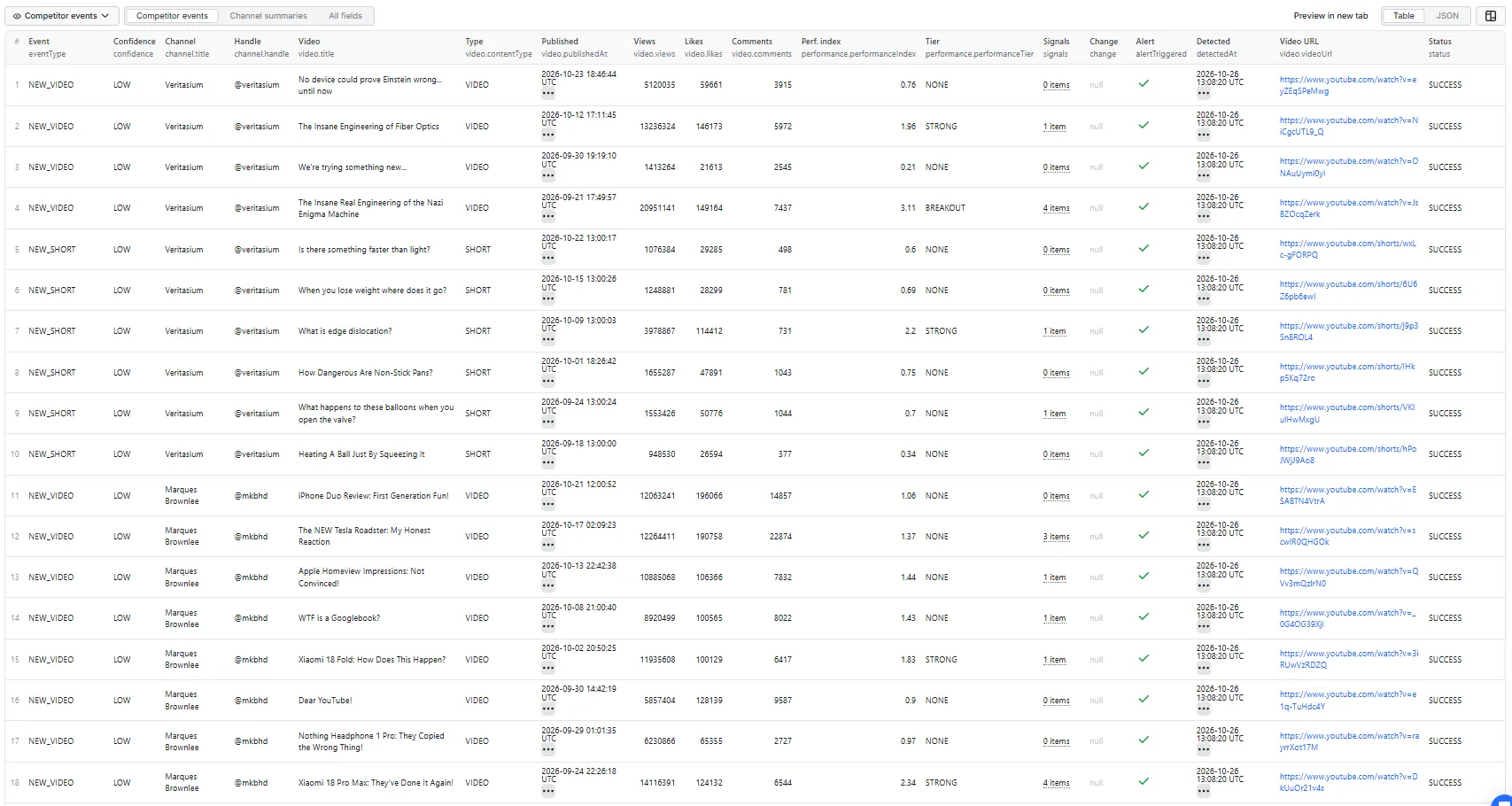
This is a first run of two channels with Report recent videos on the first run turned on, so every upload of the last 45 days appears once as NEW_VIDEO or NEW_SHORT with confidence: LOW. On later runs, only uploads that appear since the previous run are reported, with HIGH or MEDIUM confidence.
Example event from that run (tags and description shortened):
category is YouTube's numeric category ID (27 is Education). performanceIndex: 3.11 means 3.11× the median views of Veritasium's previous long-form videos at the same age.
Channel summary rows (eventType: CHANNEL_CHECKED)
There is one row per channel on every run, so a run always has output, even when nothing changed. Each row contains:
- status:
BASELINE_CREATED,SUCCESS,NO_CHANGESor an error status (see below) - channel: ID, handle, title, subscribers (with precision), total views, video count, country, topics
- summary: new videos/Shorts/lives this run, breakout videos in the window, median and average recent views (overall and by type), uploads per week, subscriber and view deltas, views per day, Shorts share, days since last upload, top 3 recent videos by
performanceIndex - cadence: uploads in the last 7 and 30 days, uploads per week, the previous 30 days (when that history is known), days since the last upload, and upload consistency
- contentMix: counts and shares of long-form, Shorts and live in the lookback window
- growth: subscriber / total-view / video-count deltas since the last run, views per day, and the prior 7-day rates
- titleKeywords:
topTitleKeywords,newTitleKeywords,risingTitleKeywords - competitorRank: the channel's rank by
RECENT_PERFORMANCE,VIEW_GROWTH,UPLOAD_ACTIVITYandBREAKOUT_COUNT.VIEW_GROWTHneeds a previous run, so it is missing on the first run, as is thegrowthblock - coverage: which content types were read, how many items, how many had exact metrics, subscriber precision, and lookback coverage
Example summary row from the same first run (channel.description, channel.keywords and topRecentVideos shortened):
Run summary (RUN_SUMMARY in the key-value store)
The run summary has totals across all channels (new content, metric updates, breakouts, surges, cadence changes, dormant channels, failed channels), plus a cross-competitor comparison: fastestGrowingByViews, highestMedianRecentViews, mostActiveUploader, mostBreakoutVideos, highestShortsShare and mostConsistentUploader.
❓ FAQ
What happens on the first run?
Each channel's current stats and recent videos are saved as a baseline (BASELINE_CREATED), and its summary row is returned. Old videos are not reported as new. To list them once anyway, turn on Report recent videos on the first run.
What counts as a new video?
A video ID the monitor has not seen before for that monitor name. confidence shows how sure the timing is:
- HIGH: published after the previous successful check
- MEDIUM: the publish time is unclear, or the video went public shortly before the previous check
- LOW: an older video seen for the first time (for example after you raise the item count). These are saved but not reported while Only report genuinely new uploads is on
Are Shorts and live streams supported?
Yes. Choose any of Videos, Shorts and Live. Upcoming premieres and scheduled streams are reported once, when they first appear, with isUpcoming: true.
What is performanceIndex?
A video's views divided by the median views of the channel's previous videos of the same kind (Shorts, long-form or live). For example, 2.4 means 2.4× the channel's normal. Shorts are never compared with long-form videos.
How does age-normalized performance work?
A 3-hour-old video should not be compared with 30-day-old ones. On every run, the monitor records each video's views at its current age bucket: 0–6 h, 6–24 h, 1–3 d, 3–7 d, 7–30 d or 30 d+. A new video is compared with the channel's previous videos at the same age (performanceBasis: AGE_BUCKET). Until enough of those samples exist, it falls back to the median views of comparable videos at least as old (RECENT_MEDIAN). That fallback can understate a young video, but it never overstates it. Age-matched baselines build up as you keep running the monitor.
How are breakout videos detected?
A recent video gets a tier from its performanceIndex:
- Strong: 1.5× or more
- Breakout: 2.5× or more
- Exceptional: 5× or more
Signals such as HIGH_VIEW_VELOCITY, HIGH_LIKE_VELOCITY and HIGH_COMMENT_VELOCITY (at least 2× the comparable rate at that age) are attached. VIDEO_BREAKOUT is reported when a video reaches your chosen tier, and again only if it climbs to a higher tier. Videos that were already hits when the baseline was taken are not reported as new breakouts.
Are subscriber counts exact?
No. YouTube rounds public subscriber counts to three significant figures, so 21,412,345 shows as 21.4M. Each channel carries subscriberCountPrecision (EXACT, ROUNDED or HIDDEN) and the rounding step. Subscriber changes smaller than that step are never reported as growth. View counts are the stronger short-term signal.
Which channel metrics are monitored? Subscribers (with precision), total channel views, video count, views per day since the last run, and the prior 7-day rate.
How long are video metrics refreshed? For Refresh videos for days after publishing (default 7). Videos that reached the breakout tier keep being refreshed for up to 30 days. Older videos stop being refreshed, which keeps runs fast.
Can I monitor upload cadence? Can I track Shorts share?
Yes. Every summary row has uploads per week, the last 7 and 30 days, days since the last upload, and the Shorts / long-form / live shares. Changes larger than your thresholds become UPLOAD_FREQUENCY_*, SHORTS_SHARE_INCREASED and CONTENT_MIX_CHANGED events.
Are unchanged videos emitted? No. A video produces a row only when something about it is worth reporting. Channel summary rows can be turned off if you want events only.
Does it require a YouTube API key or login? No. You don't supply any credentials. The actor reads public YouTube data only.
How often should I schedule it? Daily suits most competitor tracking. Every 6–12 hours suits fast-moving niches, and 2–3 times a week suits channels that rarely post. Hourly is rarely useful. Always use the same monitor name on scheduled runs.
Can I trigger Slack, email or webhooks?
Yes. Every event has alertTriggered and alertReasons. You choose which event types count as alerts. Add an Apify webhook on Run succeeded, or use the Slack, email, Google Sheets, Make, Zapier or n8n integrations, and filter rows on alertTriggered = true.
What happens if a run is partial?
One failed channel never fails the run. It gets a summary row with an error status such as CHANNEL_NOT_FOUND, CHANNEL_TERMINATED, VIDEOS_UNAVAILABLE, PARTIAL_VIDEOS, RATE_LIMITED, PROVIDER_ERROR, STATE_READ_ERROR or STATE_WRITE_ERROR. A failed check never overwrites saved state. A video missing from a listing is never treated as deleted. A partial check does not move the "new since" reference point, so nothing is missed or re-announced on the next run.
Can I monitor the same channel in two projects?
Yes. State is saved per monitor name (monitorKey) and channel ID, so client-a and client-b keep separate histories.
How is pricing calculated?
You pay per successful channel check. One channel checked in one run is one charge, whether or not anything changed. Scanning a channel costs the same work either way. Event rows, summary rows, and failed or skipped channels are not charged. If your run has a spending limit, the actor checks only as many channels as the limit covers and marks the rest SKIPPED_SPENDING_LIMIT. See the Pricing tab for current rates. This README deliberately doesn't quote figures, because they can change.
Can I call it via API or MCP? Yes, like any Apify actor. Use the Apify API, the JavaScript or Python clients, or an MCP server with Apify tools:
🧪 Example inputs
First-run snapshot (the input behind the examples above: 2 channels, 22 event rows and 2 summary rows)
emitBaselineContent only lists videos on a monitor name's first run. Run it again with the same monitorKey and you get the 2 summary rows only, until something changes.
Daily competitor monitor
Breakout video watch
Shorts strategy monitor
Competitor comparison
💾 Where state is kept
State is kept in a named key-value store in your Apify account, youtube-competitor-monitor-state, with one record per monitor name and channel. If Save history dataset is on, each run's channel observations and events are also added to the named dataset youtube-competitor-monitor-history, which builds a long-term log. Deleting the state store resets every monitor.
Avoid running two monitors with the same name at the same time. Each run reads the state when it starts and writes it when it finishes.
🚦 Proxy policy
Most runs need no proxy. A proxy is only used if the actor falls back to reading public YouTube pages. If you use one, choose Apify Datacenter proxy or no proxy. Both work reliably for reading YouTube channel and video pages at this actor's request rate.
Apify Residential proxy is not supported. The actor fails at startup if apifyProxyGroups includes RESIDENTIAL. In pay-per-event actors, residential bandwidth is billed to the developer, not the run user, so one bandwidth-heavy run could cost more than the run earns.
If you need residential routing, add your own residential provider in the proxy editor's Custom proxy URLs field. That traffic goes through your provider, not Apify:
⚖️ Notes and limits
- This is an unofficial product and is not affiliated with YouTube or Google. It uses public YouTube data only.
- Subscriber counts are rounded by YouTube. Video metrics change continuously, and each run captures them at one moment.
- Breakout tiers,
performanceIndexand signals are calculated by this actor. They are not YouTube metrics. - Monitoring starts from the first baseline, and comparisons use a sample of recent public videos.
- A video doing well alongside channel growth does not prove that the video caused the growth.
- The actor does not provide YouTube Analytics data such as watch time, audience retention, CTR, impressions, revenue or where subscribers came from.
- If YouTube's data API is unavailable, the actor falls back to reading public pages. Total channel views and comment counts are then unavailable (
null). Each summary row'scoverageshows which source was used.


