
Youtube Highlights Hooks Analyzer
Pricing
from $4.00 / 1,000 video analysis results
Youtube Highlights Hooks Analyzer
Advanced YouTube analytics that extracts chapters, intro pacing, and hook suggestions for editors and creators. Analyze Shorts and long videos to find viral moments, engagement patterns, and optimal clip timestamps with an API-first design for blazing-fast performance.
Pricing
from $4.00 / 1,000 video analysis results
Rating
5.0
(1)
Developer

Delowar Munna
Maintained by CommunityActor stats
0
Bookmarked
31
Total users
0
Monthly active users
2 months ago
Last modified
Categories
Share
YouTube Highlights & Hooks Analyzer 🎣
Find the exact moments worth clipping. Give this actor a video, a channel, or a search query and it returns — per video — ranked hook timestamps with the line spoken at each one, the chapter map, the full timestamped transcript, and first-15-second pacing metrics. Metadata comes from the official YouTube Data API v3: no cookies, no logins, no browser sessions.
The problem this solves
You have a 38-minute interview and you need eight Shorts out of it by Friday.
Scrubbing the timeline finds the moments you already remember. It doesn't find the ones worth cutting, and it certainly doesn't do it across a competitor's last thirty uploads. Generic YouTube scrapers hand you view counts and a description — useful, but you still have to watch everything.
This actor returns decisions: cut at 659s, call it "XAI: Competing in the AI Race", here is the sentence spoken there, confidence 0.21. For one video or for five hundred.
What you get, per video
- 🪝 Ranked hook timestamps — clip start, suggested length, a generated title, the transcript text at that moment, and a confidence score
- 📑 Chapter map — parsed from creator timestamps in the description
- 📝 Full timestamped transcript — every cue with start time and duration, not just a wall of text
- ⚡ Intro pacing metrics — dialogue changes, words-per-second, first call-to-action, detected hook type
- 📊 Engagement + channel data — views, likes, comments, channel identifiers, highest-quality thumbnail
- 🎬 Shorts and long-form — both handled; Shorts get a tighter hook budget automatically
- 🔍 Discovery built in — direct URLs, channels, or a keyword search, with date/view/duration filters
How this compares
| YouTube Data API v3 | Most-Replayed scrapers | This actor | |
|---|---|---|---|
| Hook timestamps + titles | ❌ | ❌ | ✅ |
| Chapters | ❌ | ❌ | ✅ |
| Timestamped transcript | ❌ (owner-only OAuth) | ❌ | ✅ |
| Intro pacing metrics | ❌ | ❌ | ✅ |
| Search / channel discovery | ✅ | ❌ | ✅ |
| Date / view / duration filters | partial | ❌ | ✅ |
| Most-Replayed heat map | ❌ | ✅ | ✅ optional paid enrichment |
| Needs an API key from you | ✅ | ❌ | ❌ |
| Numeric counts + ISO dates | ✅ | ❌ (display strings) | ✅ |
Where we're honest: if the Most-Replayed curve is all you need, a dedicated heat-map scraper is simpler and cheaper — ours is an optional extra, priced accordingly. What no other actor on the Store does is combine that curve with the transcript and tell you which seconds to cut and what is said there.
Quick start
That's it — every other field has a working default. You'll get one record back with hooks, chapters, transcript and pacing.
Input modes
There are two inputs. videoRefs analyzes exactly the videos you list. channelPlaylistRefs discovers videos from a source. Use either or both.
Specific videos — videoRefs
Accepts watch?v=, youtu.be/, /shorts/, /embed/, or a raw 11-character video ID. One record per video, nothing expanded.
Discovery sources — channelPlaylistRefs
One list, four kinds of entry:
| Entry | What you get |
|---|---|
youtube.com/@handle, /channel/UC…, /c/…, /user/… | That channel's uploads |
…?list=PL… | That playlist's videos |
| A video URL or ID | That video's whole channel — it's a seed, not a target |
Plain text, e.g. ai automation tutorial | Top YouTube search results |
Each source is capped by maxVideosPerSource; the run as a whole is capped by maxVideos.
Two things to watch:
- A video URL here expands to its whole channel. To analyze just that video, put it in
videoRefsinstead. watch?v=X&list=Yis read as the playlist here, and as video X undervideoRefs— because that's the URL YouTube gives you when you copy while watching inside a playlist, and the intent differs by which box you paste it in.
Unlike some scrapers, discovery sources here do respect the date, view-count and duration filters. Search keywords are ordered by relevance; sortBy can change that over the API (see API-only parameters).
Deprecated:
startUrlsandsearchQuerystill work and are mapped automatically — video URLs tovideoRefs, everything else tochannelPlaylistRefs— so existing saved tasks keep their exact behaviour. They no longer appear in the input form; migrate when convenient.
Input parameters
| Parameter | Type | Default | Range | Description |
|---|---|---|---|---|
videoRefs | Array | [] | — | Specific videos: URLs or raw 11-char IDs |
channelPlaylistRefs | Array | [] | — | Channels, playlists, seed videos, or search keywords |
maxVideosPerSource | Integer | 50 | 1–500 | Cap per discovery source (not applied to videoRefs) |
maxVideos | Integer | 50 | 1–500 | Max videos across all sources |
since | String | null | ISO date | Only videos published on/after |
until | String | null | ISO date | Only videos published on/before |
minViews | Integer | 0 | ≥0 | Minimum view count |
maxViews | Integer | null | ≥0 | Maximum view count |
durationFilter | Enum | any | — | any, shorts, under_4m, 4_to_20m, over_20m |
maxHooksPerVideo | Integer | 10 | 1–25 | Hook suggestions per video |
hookLengthSec | Integer | 7 | 3–15 | Suggested clip length |
transcriptLanguage | Enum | "" (auto) | 34 languages | Preferred caption language |
fetchReplayHeatmap | Boolean | false | — | Paid enrichment — Most-Replayed curve, billed per delivered result |
heatmapRequestTimeoutSecs | Integer | 20 | 5–120 | Heat map fetch timeout |
heatmapMaxRetries | Integer | 2 | 0–5 | Heat map fetch retries |
On transcriptLanguage: matters more than it looks. Some videos carry dozens of caption tracks, and hook titles are generated from transcript text — so picking the wrong language quietly degrades the main output.
API-only parameters
These are not in the input form — they run at the defaults below, which are the measured good values. They are still accepted over the API, so existing saved tasks and integrations keep working unchanged.
| Parameter | Default | Notes |
|---|---|---|
concurrency | 5 | Videos analyzed at once, 1–10. TikHub rate-limits around 10 req/s per endpoint and one video can make several calls, so 10 concurrent videos risk turning cheap retries into failures. |
fetchTranscript | true | Transcripts drive hooks, intro pacing and hook titles. With it off there is little left worth paying for. |
computeIntroPacing | true | Free once the transcript is in hand. Produces nothing (rather than failing) when there are no captions. |
transcriptOutput | both | both, segments, text, metadata. segments can run to thousands of entries on a long video and is the largest field in the dataset — text or metadata is friendlier for spreadsheets and costs the same. |
analysisMode | full | full, highlights_only, metadata_only. Every saved row bills the same, so a lighter mode costs what a full one does. |
sortBy | relevance | relevance, date, viewCount, rating. Orders search discovery, not the dataset — it affects only search-keyword entries in channelPlaylistRefs. |
dryRun | false | Legacy alias for analysisMode: "metadata_only"; analysisMode wins if both are sent. |
Things worth knowing:
maxVideosis capped at 500. A search-driven run spends 100 YouTube API quota units per 50 videos against a 10,000-unit daily ceiling, so 500 is already a fifth of a day's capacity.durationFilter: "shorts"keeps videos ≤60s. YouTube also allows vertical Shorts up to 3 minutes; those come back underunder_4minstead.- Shorts cap hooks at 5 regardless of
maxHooksPerVideo.
Output
Field reference
Every field below is what the actor actually emits. Nested paths are shown with dots.
| # | Field | Type | Description |
|---|---|---|---|
| 1 | video_id | String | 11-character YouTube ID |
| 2 | video_url | String | Canonical watch URL |
| 3 | thumbnail_url | String | null | Highest quality available (maxres → high → medium → default) |
| 4 | title | String | Video title |
| 5 | published_at | String | ISO 8601 timestamp |
| 6 | duration_sec | Integer | Duration in seconds |
| 7 | content_type | String | short | long_form | live | unknown — see below |
| 8 | is_shorts | Boolean | Compatibility alias for content_type === 'short' |
| 9 | view_count / like_count / comment_count | Integer | Flat, spreadsheet-friendly |
| 10 | statistics.* | Object | Same three counts, nested (kept for compatibility) |
| 11 | channel_subscriber_count | Integer | null | Null when the channel hides it |
| 12 | engagement_rate | Number | null | (likes + comments) / views |
| 13 | views_per_day | Integer | null | views / days since publication |
| 14 | viral_score | Number | null | views / subscribers. Null when hidden — not 0 |
| 15 | discovery | Object | source, query, input_url — which input produced this row |
| 16 | replay | Object | available, source, unavailable_reason, point_count, peak_count |
| 17 | replay_heat[] | Array | 100 { ts, score } intensity buckets when a curve is published; [] otherwise |
| 18 | replay_max_score | Number | Peak intensity, 0 when none |
| 19 | replay_peaks[] | Array | Peak timestamps in seconds, e.g. [276.92, 415.38, …] |
| 20 | chapters[] | Array | title, start_sec, duration_sec, source |
| 21 | intro_pacing | Object | null | See breakdown below. Null when no transcript was available |
| 22 | highlights[] | Array | The main output. Ranked clip suggestions, each carrying the evidence behind its score — see below |
| 23 | highlight_score | Integer | null | 0–100 composite: how clippable this video is. Null when no clips could be suggested |
| 24 | highlight_score_components | Object | best_highlight, replay_strength, intro_strength. Null per component when that signal was unavailable |
| 25 | hooks[] | Array | ⚠️ Deprecated alias of highlights[], kept for one release. Same moments, without the evidence object |
| 26 | transcript.available | Boolean | Whether a transcript was obtained |
| 27 | transcript.language | String | null | e.g. en |
| 28 | transcript.source | String | null | tikhub-info-v2 (primary), tikhub (fallback), or youtube-transcript-api (last resort) |
| 29 | transcript.word_count | Integer | null | Total words |
| 30 | transcript.duration_covered_sec | Integer | null | Seconds covered by cues |
| 31 | transcript.entries[] | Array | null | start, duration, text per cue |
| 32 | transcript.text | String | null | Plain text, present when transcriptOutput includes it |
| 33 | analysis_metadata | Object | processing_notes, processing_time_sec, features_analyzed, features_unavailable, actor_version, processed_at, mode |
| 34 | channel_id | String | Channel ID |
| 35 | channel_title | String | Channel name |
| 36 | channel_url | String | Channel URL |
| 37 | error | String | null | Failure reason; null on success |
| 38 | error_code | String | null | Stable failure code; null on success |
| 39 | retryable | Boolean | null | Whether a retry could succeed |
highlights[] breakdown — this is the field the actor exists to produce:
| Field | Type | Description |
|---|---|---|
rank | Integer | 1 = best clip candidate |
start_sec / end_sec / length_sec | Number | Where to cut |
title | String | Generated clip title |
transcript_excerpt | String | What is actually said at that timestamp |
score | Integer | 0–100, the confidence rescaled |
confidence | Number | 0–1, normalised by the signals available, so it is comparable across videos with and without a heat map |
evidence.replay_intensity | Number | null | Most-Replayed intensity here; null without a curve |
evidence.transcript_hook_score | Number | null | Keyword/phrasing strength of the line |
evidence.chapter_boundary | Boolean | Whether a chapter starts here |
evidence.intro_signal | Boolean | Whether this is an opening moment |
reasons[] | Array | high_replay, chapter_start, early_moment, keyword_boost |
source | String | Which detector proposed it |
intro_pacing breakdown:
| Field | Type | Description |
|---|---|---|
first_15s_dialogue_changes | Integer | Transcript cues starting in the first 15s |
first_15s_pacing_score | Number | null | Words per second across the first 15s |
first_15s_replay_score | Number | null | Public Most-Replayed intensity at 15s. Populated when the Most-Replayed enrichment is on and a curve was returned; null otherwise |
first_15s_retention_score | Number | null | ⚠️ Deprecated alias of first_15s_replay_score. Will be removed — migrate now. |
first_cta_ts | Number | null | Timestamp of the first call-to-action |
first_cta_text | String | null | The CTA line |
hook_detected | Boolean | Whether an opening hook pattern matched |
hook_type | String | null | question, teaser, shock, curiosity, or promise |
On the word "retention". This actor has no access to YouTube Studio audience-retention analytics — that data is private to the channel owner.
first_15s_pacing_scoreis a transcript heuristic;first_15s_replay_scoreis YouTube's public Most-Replayed signal. The oldfirst_15s_retention_scorename implied otherwise, which is why it is deprecated.
Dataset views
Four ready-made views — no transformation needed to get a readable table. Every sample below is a real record from a real run, abridged only where an array is long (marked …).
| View | Contents |
|---|---|
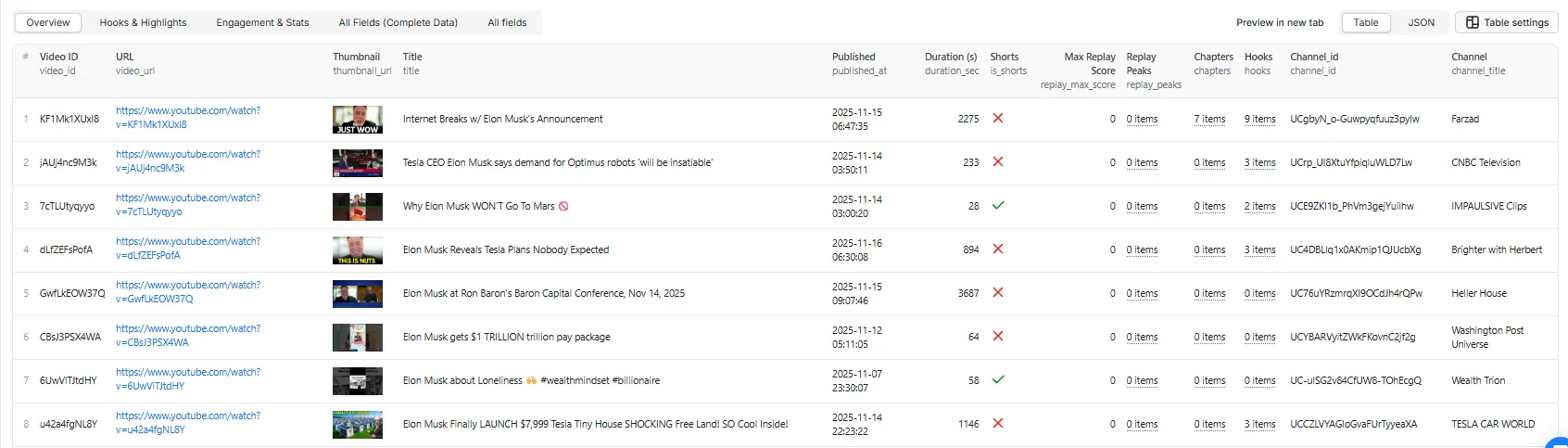
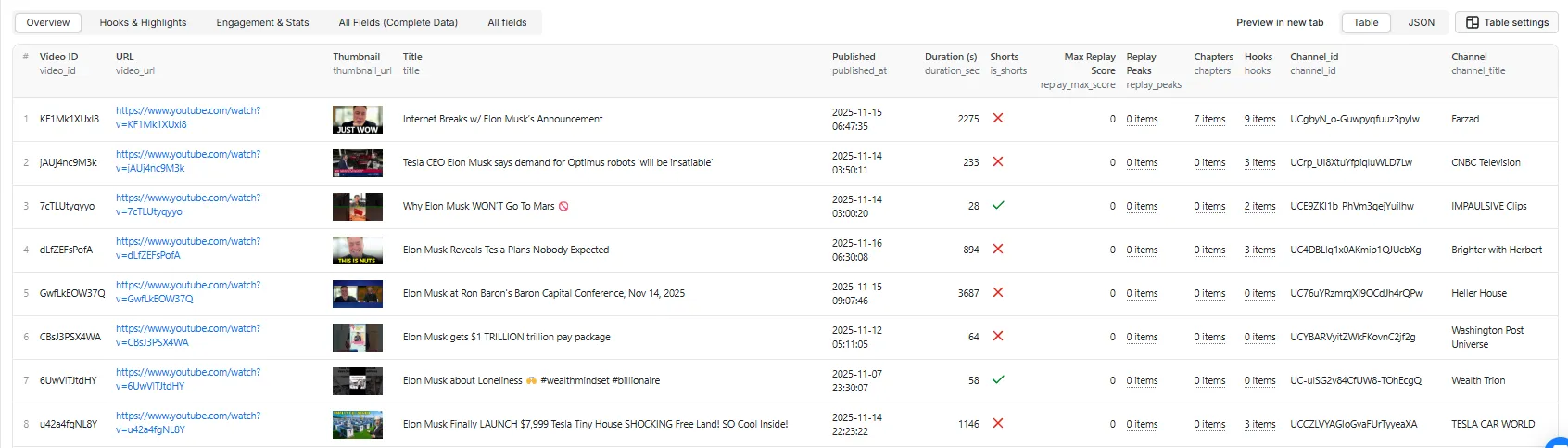
| Overview (default) | Thumbnail, title, channel, duration, engagement, hook/chapter counts |
| Hooks & Highlights | The editing view: ranked clips with evidence, chapters, intro pacing |
| Engagement & Stats | Counts, derived metrics, transcript word counts, pacing |
| All Fields | Everything, including the full timestamped transcript |
1. Overview
The scannable table. One row per video, no nested payloads to unfold.
2. Hooks & Highlights
The one you actually edit from. Every score carries the evidence behind it, so "why this moment" is answerable from the row rather than taken on trust.
Read the top row as: cut at 25:25 for 7 seconds, call it "Real Use Cases" — it sits on a chapter boundary and at 99.7% replay intensity, which is why it outranks everything else.
3. Engagement & Stats
Spreadsheet-shaped. Flat scalars only, with the derived metrics computed for you.
viral_score is views ÷ subscribers — 0.79 means this video reached about 79% of the channel's subscriber count. It is null, never 0, when a channel hides its count, because 0 would read as "no traction".
4. All Fields
Everything, including the 100-bucket replay curve and every transcript cue.
On the run these came from: 25 videos, 24 with transcripts, 22 with a Most-Replayed curve, 102s wall clock. The one video that returned no transcript also returned no hooks and
highlight_score: null— and was not charged. Nothing here is a best case picked from a larger set; it is one search query's worth of output.
Highlights — the scores show their working
highlights[] is the editing-facing output. Every entry carries the evidence behind its score, so "why this moment?" is answerable from the row itself:
replay_intensity is null when the video has no published heat map — that's a missing signal, not a zero.
highlight_score (0–100) answers a different question: how clippable is this video at all? One sortable number across a whole run. It averages the components that were actually available:
| Component | Needs | Meaning |
|---|---|---|
best_highlight | hooks | Confidence of the top moment |
replay_strength | a heat map | Peak concentration of the replay curve |
intro_strength | a transcript | Opening pace and whether a hook pattern was detected |
highlight_score_components exposes each one. A missing signal is excluded from the average rather than counted as zero — a video without captions isn't worse, we simply know less about it.
On comparability. confidence is normalised by the signals that were available, so it means the same thing on a video with a heat map and one without. Before v1.2 it wasn't: a video lacking replay data could never exceed 0.5 while one with it reached 0.9, which made cross-video ranking misleading.
hooks[]is retained as a deprecated alias ofhighlights[]for one release. It lacks the evidence object — migrate when convenient.
How hooks are scored
A multi-strategy scoring pass, then de-duplication:
| Strategy | Weight | What it looks for |
|---|---|---|
| Chapter boundaries | 30% | Natural content transitions |
| Early moments | 25% | The first 30 seconds |
| Keyword scoring | 35% | Action, emotion, questions, direct address, urgency, value words |
| De-duplication | 10% | Jaccard similarity ≥60% between hook titles removes near-duplicates |
confidence is the normalised composite of those signals on a 0–1 scale. It is a relative ranking aid within a video, not a probability that a clip will perform — treat rank order as the signal, not the absolute number.
source tells you which strategy produced the hook: chapter_boundary, early_moment, shorts_sample, or replay_peak (the last requires heat-map data, unavailable in API-only mode).
Transcript handling
- Availability: roughly 70–80% of videos. Age-restricted videos generally fail.
- Sources, in order: TikHub API, then the
youtube-transcriptlibrary as a backstop. - Format: timestamped cues (
start,duration,text) — required for hook and pacing analysis, which are both timestamp-driven. - Auto-generated captions are used when no manual track exists; they contain transcription errors and their cue timings can overlap.
- Check
transcript.availablebefore relying onhooksorintro_pacing.
Reliability & compliance
Metadata comes from the official YouTube Data API v3, with our own key. That is unusual for this category and it has consequences you benefit from:
- No cookies, no login, no session harvesting. Nothing is impersonated.
- No dependency on page markup. Most YouTube scrapers parse
ytInitialDataout of the watch page and break when YouTube changes its layout. Metadata here comes from a documented, versioned API. - You supply no credentials. No API key, no proxy configuration, no account.
- Public data only. Everything returned is visible to any logged-out visitor.
Transcripts are the one path that does not come from the Data API — YouTube's captions.download requires OAuth as the video's owner, so third-party captions are fetched via TikHub with a free-library backstop.
Error handling
A video that fails analysis is still saved so you can see what happened — and is never charged.
The same applies to a video that finishes without producing anything usable. If no transcript could be retrieved from any source and no hooks could be generated, the row is saved with a NOT_CHARGED_NO_ANALYSIS note in processing_notes and you are not billed for it — you are paying for an analysis, and there wasn't one. (The Most-Replayed enrichment is billed separately and still applies if a curve was returned, since that data was delivered.) The same applies to a video that completes but yields nothing usable: if no transcript could be retrieved and no hooks could be generated, the row is saved with a NOT_CHARGED_NO_ANALYSIS note and you are not billed for it.
Error rows carry error (human-readable), error_code (stable), and retryable:
error_code | Meaning | retryable |
|---|---|---|
RATE_LIMITED | Upstream throttling | ✅ true |
UPSTREAM_ERROR | Timeout, connection reset, or 5xx | ✅ true |
QUOTA_EXCEEDED | YouTube Data API daily quota exhausted | ❌ false — resets next day |
VIDEO_UNAVAILABLE | Private, deleted, or not found | ❌ false |
AGE_RESTRICTED | Age-gated | ❌ false |
BLOCKED_REGION | Region-locked or access denied | ❌ false |
API_ERROR | Unclassified failure | ❌ false |
Filter on retryable: true to build a re-run list.
Successful rows carry error: null, error_code: null, retryable: null.
Limitations & known issues
The Most-Replayed enrichment is off by default and charged separately. YouTube blocks datacenter IP ranges from the page that carries this data, so it can only be fetched over residential egress — which costs real money per request. Enabling it adds a per-result charge, billed only when a curve is actually returned. Everything else in the actor works without it.
Not every video has a Most-Replayed graph. YouTube only publishes one once a video has accumulated enough watch history. When there is none, replay.available is false with unavailable_reason: "NO_HEATMAP_PUBLISHED" — that's a normal result, not an error. A blocked page fetch reports BLOCKED instead, so you can tell the two apart.
The heat map depends on YouTube's page structure. Unlike the metadata, which comes from the official API, the Most-Replayed curve is parsed out of the watch page. YouTube has already relocated this payload once. It works today and is monitored, but it is the one part of this actor that can break without warning.
Chapters need creator timestamps. Only ~30–40% of videos have them in the description.
Transcripts are ~70–80% available, and auto-generated ones carry transcription errors.
Caption access depends on YouTube's tolerance for where the request comes from. On 2026-08-11 YouTube began answering caption requests from datacenter IP ranges with an empty body rather than an error, which made captioned videos look uncaptioned. The actor now fetches captions over residential egress, which restores them. It is handled internally — there is nothing to configure — but it is the second time this data has moved, and it can move again.
Shorts cannot always be identified. YouTube allows vertical Shorts up to 3 minutes and exposes no "is a Short" flag. A canonical /shorts/ URL is definitive, and anything ≤60s is safely a Short — but a 61–180s video submitted as a plain watch URL is genuinely ambiguous, and content_type reports unknown rather than guessing.
YouTube API quota is a hard daily ceiling — 10,000 units/day. Search costs 100 units per 50 videos; video details cost 1 unit per 50. Roughly 100 search-driven runs per day, and it is shared across our YouTube actors.
Pricing
Pay-per-event with two events:
- Video Analysis Result — charged once per video successfully analyzed and saved. This is the base charge and covers everything except the enrichment below.
- Most-Replayed Data Extracted — optional enrichment, off by default. Charged only when a non-empty Most-Replayed curve is actually returned. Videos with no published graph, and videos where extraction fails, are never charged even though we still pay to try.
You are not charged for:
- Videos that fail analysis. Saved with
error_codeso you can see what happened, but never billed. - Empty runs. No Actor start fee, no flat fee, no subscription. A run that returns nothing costs nothing.
- Videos filtered out by your view-count, date or duration filters before analysis runs.
Worked examples:
| Run | Charged events |
|---|---|
| One video, analyzed successfully | 1 |
| 50 videos, 6 unavailable/private | 44 |
| Search returning 0 matches | 0 |
| Dry run over 50 videos | 50 (metadata only, but each row is a result) |
This README deliberately doesn't quote figures. Prices change and a copy here would go stale — see the Pricing tab for the current live rate.
Performance
Measured on Apify, v1.6, at the default concurrency of 5:
| Scenario | Videos | Time |
|---|---|---|
| Single video | 1 | ~5s |
| Small batch | 10 | ~25s |
| Medium batch | 50 | ~2 min |
| Large batch | 100 | ~4 min |
Roughly 2.3s per video effective, against 14.2s when videos were processed one at a time. Most of the per-video time is spent waiting on the transcript API, which is why running several at once helps so much — raise concurrency toward 10 for large runs, and lower it if you hit upstream rate limits.
FAQ
Does this access private YouTube Studio retention data?
No. That data is only available to a channel's owner. Everything here is public: transcript heuristics and, where available, YouTube's public Most-Replayed signal. See the note under intro_pacing.
What's the difference between "Most Replayed" and retention? Most Replayed is the public graph YouTube shows on the scrubber for some videos. Retention is the private analytics curve in Studio. This actor never has the latter. It does return the former, as an optional enrichment that is off by default and charged only when a curve actually comes back — see Limitations for when YouTube publishes one.
What happens if a video has no heat map?
Nothing breaks. replay_heat is [] and replay_max_score is 0. In API-only mode this is true of every video.
Do I need cookies, a login, or a YouTube API key? No, none of the three.
Does it work on Shorts?
Yes. Shorts are detected at ≤60s and get a tighter hook budget (max 5). Vertical Shorts between 60s and 3 minutes are analyzed normally but aren't flagged is_shorts.
Why is a transcript missing?
The video has captions disabled, is age-restricted, or both sources were unavailable. Check transcript.available; hooks and intro pacing depend on it.
How is the hook confidence calculated? A weighted composite of chapter boundaries, position in the video, and keyword scoring, de-duplicated by title similarity. See "How hooks are scored". Use rank order rather than the absolute number.
Am I charged for videos that fail?
No. Failed videos are saved with an error_code and are never billed. Empty runs cost nothing.
How many videos can I process in one run? Up to 500. Above roughly that, YouTube API quota becomes the limiting factor — split across runs.
What does dry run mode do? Returns metadata only: no transcripts, no hooks, no intro pacing. Useful for validating a search query or filter set before committing to full analysis.
Can I export to Google Sheets or Excel? Yes — every Apify dataset exports to CSV, JSON, XLSX and HTML. Start from the Overview view; All Fields includes full transcripts, which are unwieldy in a spreadsheet.
Can I call this from an AI agent? Yes. It runs over the standard Apify API and through Apify's MCP server, so it can be wired into Claude, ChatGPT, n8n, Make or LangChain as a tool. See Integrations.
Integrations
Callable from JavaScript, Python, the CLI, plain REST, and via MCP for AI agents.
MCP server: point your agent at https://mcp.apify.com and this actor is available as a tool.
More examples
Repurpose one long video
Benchmark a competitor's last 30 uploads
Mine a playlist — a podcast season, a course
Research what works in a niche
Found one good video — analyze everything that creator makes
Batch of Shorts
Compare several niches in one run
Validate a query cheaply first
Related actors
- YouTube Transcript Scraper — transcripts at volume, with paragraph formatting and SRT/VTT output
- YouTube Scraper Fast — broad video metadata extraction across search, channels and playlists
- YouTube Shorts Scraper — Shorts-specific discovery and engagement metrics
Changelog
1.9 — 2026-08-11
- Captions are now fetched over residential egress. YouTube began answering caption requests from datacenter IP ranges with an empty body instead of an error, which made captioned videos look uncaptioned — a run went from 25/25 transcripts to 0/25 with no code change. Measured on one video, same URL: 6 cues from a residential IP, 0 from a datacenter IP. Restored to 24/25. Handled internally; nothing to configure.
- Rows with no transcript and no hooks are no longer charged. A video whose captions are refused by every route can still save cleanly — with chapters, metadata and nothing you can edit from. You are paying for an analysis, so where there isn't one, there is no charge. Tagged
NOT_CHARGED_NO_ANALYSIS. highlight_scoreis nownullrather than a number when no clips could be suggested. Previously a video with no transcript but a strong Most-Replayed curve could score 100/100 — the emptiest row sorting to the top of the list.- The run summary reports upstream API calls (billable vs attempted), residential bytes transferred, and cost per charged row. None of this appears in Apify's own usage figures, because third-party API spend is invoiced separately.
1.8 — 2026-08-11
- Fixed the Most-Replayed enrichment being unreachable: the proxy connection was not being tunnelled correctly, so every heat-map fetch failed. Delivery is now ~88% of videos that have a published curve.
- Fixed a dataset-schema mismatch that rejected every row carrying a replay peak — affected videos saved as error rows instead of results.
1.7 — 2026-08-11
- Advanced Options removed from the input form.
concurrency,fetchTranscript,computeIntroPacing,transcriptOutput,analysisModeandsortBynow run at their defaults and remain available over the API. Existing saved tasks and integrations are unaffected. transcriptLanguagemoved into Analysis Settings.
1.6 — 2026-08-11
- Videos are now analyzed concurrently (default 5, configurable 1-10). Measured 10 videos in 23.4s at 5x — 2.34s/video effective against 14.2s sequential. Apify bills memory x wall clock, so this cuts the compute cost roughly 12x.
- The run summary now reports wall clock and an estimated compute cost per 1,000.
- Log lines are tagged with the video id, since several videos now log at once.
1.5 — 2026-08-11
- Most-Replayed is now an opt-in enrichment, off by default, with its own charge. It is unreachable from Apify's datacenter IPs — measured 0 of 25 page fetches succeeded — so it runs over residential egress, which costs money per request. You are charged only when a curve is actually returned. No proxy settings to configure: you opt into the outcome, not the plumbing.
- Circuit breaker stops retrying the page after 3 consecutive blocks, so a blocked run no longer burns compute for nothing.
- Transcript retries raised 2 -> 4. Each costs a fraction of the fallback it avoids; on a 25-video run the fallbacks were 16% of videos but 72% of the API bill.
- Default memory set to 1 GB. The Chromium-era 2 GB default was still applying to an actor that launches no browser, doubling compute.
1.3 — 2026-08-11
highlights[]— ranked clip suggestions where every score carries itsevidence(replay intensity, transcript hook score, chapter boundary, intro signal) andreasons[].hooks[]stays as a deprecated alias.highlight_score(0–100) plushighlight_score_components— one sortable "how clippable is this video" number, averaged only over the signals actually available.- Confidence is now comparable across videos. It is normalised by the signals present, rather than by a fixed maximum — previously a video without a heat map could never score above 0.5 while one with it reached 0.9.
- Replay peaks now feed hook generation, so
source: "replay_peak"finally appears. transcriptLanguageis a dropdown of 34 languages rather than a free-text code.dryRunis gone from the form — useanalysisMode: "metadata_only"; the old field is still accepted so existing tasks keep working.
1.2 — 2026-08-11
- Most-Replayed heat map now works.
replay_heat,replay_max_scoreandreplay_peaksare populated from YouTube's public curve (100 buckets), andfirst_15s_replay_scorereturns real values instead of always null. Newreplayobject distinguishes "no graph published" from "fetch blocked". content_type(short/long_form/live/unknown) replaces duration-guessing. YouTube allows Shorts up to 3 minutes and exposes no flag, so ambiguous 61–180s videos reportunknownrather than a wrong answer.durationFilter: "shorts"now means ≤3 minutes and no longer under-delivers.- Flat
view_count/like_count/comment_count, pluschannel_subscriber_count,engagement_rate,views_per_dayandviral_score. discoveryrecords which input produced each row — source, query and original URL.analysisMode(full/highlights_only/metadata_only) replaces thedryRunboolean, which stays as an alias.transcriptLanguageandtranscriptOutputadded. Caption selection now prefers your language over manual-vs-auto — previously a video with auto-English and manual-Arabic returned Arabic, which quietly wrecked hook titles.- Run-end economics report: caption availability, heat map delivery rate, page block rate.
1.1 — 2026-08-11
- Renamed
first_15s_retention_score→first_15s_pacing_score(transcript heuristic) andfirst_15s_replay_score(public Most-Replayed). The old name remains as a deprecated alias for one release. It implied access to private Studio analytics we do not have. - Added
first_15s_pacing_score— words per second across the intro, previously documented but never emitted. - Added
error_codeandretryableto error rows; documented the full code list. - Published a complete output schema and field-level dataset contract.
- Corrected the output documentation, which named six fields that did not exist and one (
billing_events) that was never emitted. maxVideosmaximum lowered 5000 → 500 to match real YouTube API quota;maxHooksPerVideo50 → 25 andhookLengthSec30 → 15 to match the documented ranges.sortBymoved to Advanced and clarified: it orders search discovery, not the dataset.- Transcript source migrated from Supadata to TikHub.
- Discovery inputs restructured.
startUrls+searchQueryare replaced byvideoRefs(specific videos — URLs or raw 11-character IDs) andchannelPlaylistRefs(channels, playlists, seed videos, or search keywords), plusmaxVideosPerSource. New capabilities: playlist expansion, raw video IDs, seed-video-to-channel resolution, and multiple search keywords in one run. The old inputs still work and are mapped automatically — video URLs tovideoRefs, everything else tochannelPlaylistRefs— so saved tasks keep their exact previous behaviour.
1.0 — 2025-11
- Initial release: hooks, chapters, intro pacing, transcripts, search/channel/URL discovery.
Support
- Issues and feature requests: GitHub Issues on the actor repository
- Apify platform docs: docs.apify.com
License
ISC — free for commercial and personal use.


