

YouTube Shorts Scraper Pro
Pricing
from $1.00 / 1,000 video-results
YouTube Shorts Scraper Pro
Find viral YouTube Shorts by keyword, hashtag, channel or URL. Filter by views, likes and comments, sort by popularity, and export views, likes, comments, publish time, channel and subscriber count. No login, no proxy. $1 per 1,000 Shorts.
Pricing
from $1.00 / 1,000 video-results
Rating
0.0
(0)
Developer

Delowar Munna
Maintained by CommunityActor stats
1
Bookmarked
90
Total users
2
Monthly active users
17 hours ago
Last modified
Categories
Features
Share
YouTube Shorts Scraper Pro 🎬
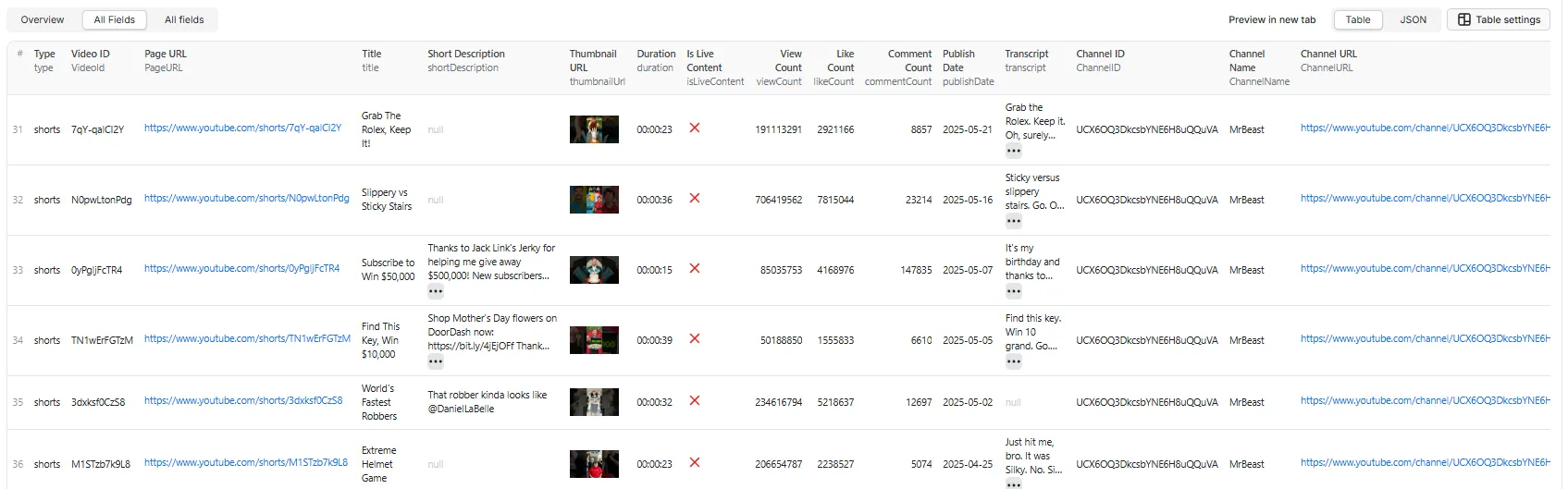
Find the YouTube Shorts that are taking off in any niche. Search by keyword, hashtag, channel, playlist or URL, keep only Shorts above your view, like or comment thresholds, sort by most popular, and export 22 clean, flat fields per Short: views, likes, comments, publish time, channel and subscriber count. Pay per Short delivered, with no proxies and no browser.
⚡ Need a real-time API?
This Actor also powers the YouTube Scraper API on RapidAPI. POST /youtube/shorts returns YouTube Shorts with views, likes and publish dates as JSON in a single HTTP request, with a free Basic plan and no Apify account needed.
Use the API for on-demand lookups inside your app. Use this Actor for bulk runs, schedules, datasets and integrations.
🚀 Key Features
- 🔍 Discovery-first, one box: Find Shorts by keyword/hashtag, channel, playlist, or seed video (a video → its channel's Shorts) — all auto-detected in a single input. Plus a separate direct URLs input for one-off videos.
- 🔥 Outlier finder:
minViews/minLikes/minCommentsplussortShorts: "popular"surface the Shorts that over-performed - ⚡ API-only architecture: No browser automation, no proxies, no bot-detection fragility
- 📊 22 clean, flat fields: Metadata, engagement metrics and source attribution — ready for Sheets/Excel/BI
- 🌍 Localization: Country and language targeting for regional Shorts
- 🧭 Source tracking: Every row records which input (
sourceType/sourceInput) surfaced it - 📅 Date filtering & sorting: Publish-date range + newest / oldest / popular
Best for: short-form content research, viral trend monitoring, influencer/channel discovery, mobile-first SEO, and finding Shorts formats worth copying.
🎯 At a Glance
| Feature | Value |
|---|---|
| Architecture | API-only (TikHub search + YouTube Data API v3) |
| Discovery modes | Keyword/hashtag, channel, playlist, seed video, direct URL |
| Fields | 22 flat fields (high reliability for core metadata) |
| Max duration | 180 seconds (YouTube Shorts max) |
| Proxy | Not required |
💡 Why This Scraper?
Unlike channel-only Shorts scrapers, this actor is discovery-first and API-only:
| Capability | YouTube Shorts Scraper Pro | Channel-only / browser scrapers |
|---|---|---|
| Keyword & hashtag discovery | ✅ via TikHub search | ❌ usually channel-only |
| View / like / comment filters | ✅ | Sometimes |
| Localization (region/language) | ✅ | ❌ |
| Proxy requirement | ❌ none | Often yes |
| Bot-detection risk | None (API-only) | High (browser-based) |
| Shorts filtering | Automatic (≤180s) | Manual/unreliable |
Architecture benefits: predictable performance, no browser fingerprinting, clean flat output, and quota-efficient discovery (keyword search runs on TikHub, so it never burns YouTube's expensive search.list quota).
💵 Pricing
This actor uses pay-per-event pricing on the Apify platform — see the live pricing on the actor's store page for current rates (configured in the Apify Console, not hardcoded).
What you're charged for:
- Per Short delivered — one charge for each Short returned to your dataset. That's the only charge.
No surprises:
- Failed/empty lookups and
type: "error"rows are not charged. - Runs honor the maximum cost per run you set on Apify — the actor stops once your limit is reached.
- You're billed only per Short delivered — never for underlying API calls.
📋 Input Parameters
The actor has two discovery inputs:
| Field | Key | Type | Default | Description |
|---|---|---|---|---|
| Search, Channels, Playlists & Videos | searchQueries | Array<string> | [] | The merged discovery box. Each entry is auto-detected as a keyword/#hashtag (TikHub search — a bare #tag or a youtube.com/hashtag/<tag> URL both work, attributed sourceType: "hashtag"), a channel (URL/@handle/UC…/c//user), a playlist (…list=… or PL…/UU…), or a video URL/ID (a seed — its owning channel's Shorts are returned). Results are filtered to Shorts (≤180s). |
| Direct Shorts URLs | shortsUrls | Array<{url}> | [] | One record per entry, for that video only — returned as-is (no channel expansion, exempt from the filters below). Accepts video URLs or 11-char IDs; supports manual entry, text-file upload, or a remote list. |
Plus these settings:
| Field | Key | Type | Default | Description |
|---|---|---|---|---|
| Max Shorts per source | maxResultsPerQuery | integer | 50 | Max videos to scan from EACH discovery source before filtering to Shorts. Does not affect Direct Shorts URLs. |
| Max Total Results | maxTotalResults | integer | 0 | Global cap on candidates across all sources (before metadata). 0 = unlimited |
| Country | regionCode | string | "US" | ISO country code (US, GB, IN, BR, …) |
| Language | language | string | "en" | Language code (en, es, pt, hi, …) |
| From Date | fromDate | string | "" | Only Shorts published on/after this date (ISO 8601: YYYY-MM-DD) |
| To Date | toDate | string | "" | Only Shorts published on/before this date (ISO 8601: YYYY-MM-DD) |
| Sort Shorts By | sortShorts | string | "newest" | "newest", "oldest", or "popular" (view count) |
| Min Views | minViews | integer | 0 | Only include discovered Shorts with at least this many views (0 = no filter) |
| Min Likes | minLikes | integer | 0 | Only include discovered Shorts with at least this many likes (0 = no filter) |
| Min Comments | minComments | integer | 0 | Only include discovered Shorts with at least this many comments (0 = no filter) |
Notes:
- 📱 Shorts-only for discovery:
searchQueriesresults are filtered to vertical short-form videos (≤180s).maxResultsPerQueryis a candidate scan budget — non-Shorts are dropped, so the final count can be lower (raise it to scan deeper). - 🎯 Direct URLs are exempt: entries in
shortsUrlsare explicit requests and are returned as-is (even if >180s), bypassing the Shorts / date / engagement filters. Thetypefield showsshortsvsvideo. Entries that can't be fetched produce atype: "error"row. - 📅 Date/engagement filters apply to discovered results only; keyword/hashtag search returns TikHub relevance order, so date filters have limited effect there.
- 🔄 Sorting: newest, oldest, or most popular (view count).
📤 Output Schema
22 flat fields
Core metadata comes from the YouTube Data API v3; search discovery comes from TikHub.
| # | Field | Type | Description | Source |
|---|---|---|---|---|
| 1 | type | String | shorts (or live for live content) | YouTube API + duration |
| 2 | videoId | String | YouTube video ID | YouTube API |
| 3 | videoUrl | String | Full Shorts URL (youtube.com/shorts/{ID}) | Constructed |
| 4 | title | String | Shorts title | YouTube API |
| 5 | shortDescription | String | null | First 200 characters of description | YouTube API |
| 6 | thumbnailUrl | String | null | Thumbnail URL | YouTube API |
| 7 | duration | String | null | Duration HH:MM:SS (≤ 00:03:00) | YouTube API |
| 8 | durationSeconds | Integer | null | Duration in seconds (easy filtering/BI) | YouTube API |
| 9 | isLiveContent | Boolean | Whether the Short is/was a live stream | YouTube API |
| 10 | viewCount | Integer | null | Total view count | YouTube API |
| 11 | likeCount | Integer | null | Total like count | YouTube API |
| 12 | commentCount | Integer | null | Total comment count | YouTube API |
| 13 | publishDate | String | null | Publish date (YYYY-MM-DD) | YouTube API |
| 14 | publishDateTime | String | null | Full publish timestamp (ISO 8601) | YouTube API |
| 15 | hashtags | Array<string> | Hashtags found in the title + description | Extracted |
| 16 | channelId | String | null | Channel ID (UC…) | YouTube API |
| 17 | channelName | String | null | Channel display name | YouTube API |
| 18 | channelHandle | String | null | Channel @handle / custom URL | YouTube API |
| 19 | channelUrl | String | null | Full channel URL | Constructed |
| 20 | subscriberCount | Integer | null | Channel subscriber count (null if the channel hides it) | YouTube API |
| 21 | sourceType | String | null | Which input surfaced this Short: keyword, hashtag, channel, playlist, seed, or direct | Actor |
| 22 | sourceInput | String | null | The exact keyword, #hashtag, channel, playlist, seed video, or direct URL it came from | Actor |
Reliability note: core metadata fields are populated from the official YouTube API and are highly reliable.
📊 Output Examples
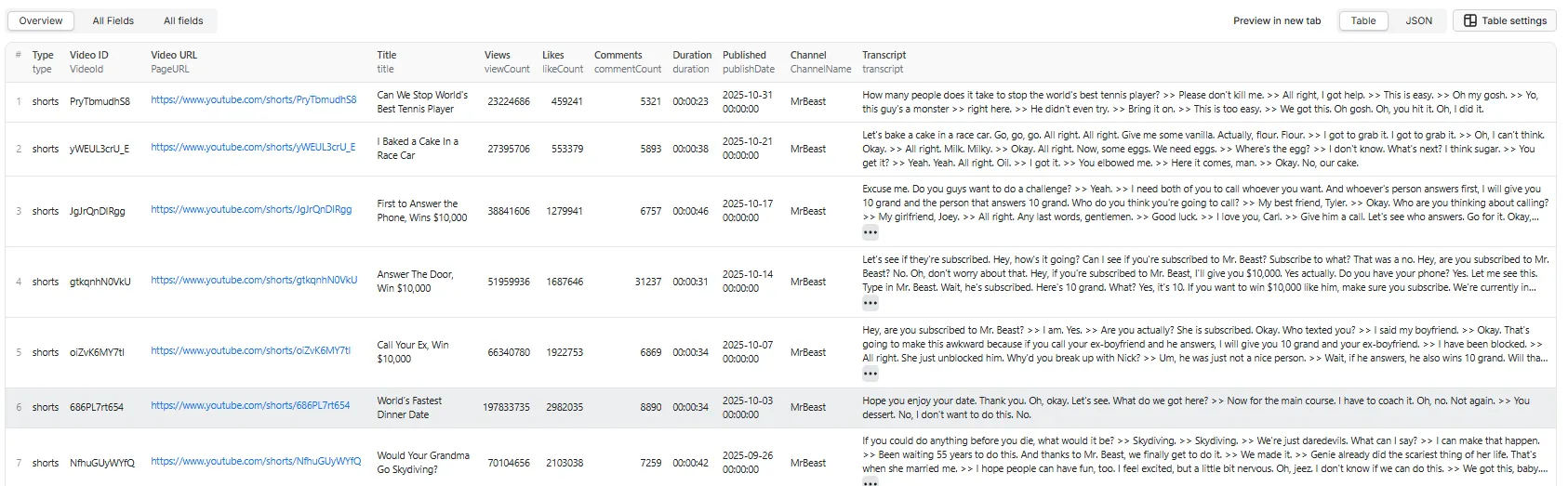
Overview Table View
All Fields Table View
Example: Short from a channel
Example: Short from a keyword search
🎬 Quick Start
Example 1: Mixed discovery (keywords + channels + playlist)
Every entry is auto-detected: "cooking tips" is a keyword; "#viral" and the youtube.com/hashtag/gaming URL are both hashtags (labelled sourceType: "hashtag"); @mrbeast expands the channel's Shorts; the playlist URL expands the playlist. All results are filtered to Shorts (≤180s).
Example 2: Channel Shorts, most popular, date range
Example 3: Seed video → that creator's Shorts
A video in searchQueries is a seed: its owning channel is found and that channel's Shorts are returned (not just the one video).
Example 4: Direct Shorts (one record each, returned as-is)
Each entry is fetched exactly as given (no expansion, no ≤180s filter). You can also upload a text file of URLs/IDs.
Example 5: Viral-only Shorts with a cost cap
maxTotalResultscaps how many candidates are fetched (bounding cost);minViews/minLikes/minCommentskeep only high-engagement discovered Shorts.
Example 6: Outlier Shorts in a niche
Shorts on a topic from the last two months with 500k+ views, most popular first. Compare
viewCountwithsubscriberCountto spot small channels whose Shorts broke out.
💪 How It Works
API-only architecture (v2.2):
- Discovery (
searchQueries, auto-detected per entry)- Keyword & hashtag → TikHub
get_shorts_search— Shorts-only results (paid per page, no YouTube quota). Works for single keywords, #hashtags, and multi-word phrases; falls back toget_general_search(filtered to Shorts) if a term returns nothing. - Channel → resolve channel ID → TikHub
get_channel_shorts(returns the channel's Shorts directly). Falls back to scanning the uploads playlist via the YouTube API if TikHub is unavailable. - Playlist → expand via
playlistItems.list(free), then filter to Shorts. - Seed video →
videos.listfinds the owning channel, whose Shorts are returned.
- Keyword & hashtag → TikHub
- Direct (
shortsUrls) → each video ID used as-is, one record per entry (no expansion, no filters). - Metadata → YouTube Data API v3
videos.list(batched 50 IDs/call = 1 quota unit); a ≤180s Shorts filter runs as a safety net on discovered results.
Data flow:
📚 Use Cases
- Topic & keyword discovery — find viral Shorts by keyword/hashtag across YouTube
- Channel & influencer research — pull a creator's recent Shorts and engagement
- Trend monitoring — track view/like/comment metrics and publish patterns
- Mobile-first SEO — analyze titles, descriptions and hashtags of top Shorts
- Format research — find small channels whose Shorts out-performed their size
- Regional research — target Shorts by country/language
❓ FAQ
Q: Do I need API keys or proxies? A: No. Enter your searches and run it.
Q: How do you identify Shorts vs regular videos?
A: The YouTube Data API has no explicit Shorts flag, so results are filtered by duration (≤180 seconds — YouTube's current Shorts max). Shorts use the /shorts/ URL path in videoUrl.
Q: How does #hashtag search work?
A: Enter a bare #tag (e.g. #viral) or a youtube.com/hashtag/<tag> URL in the Search & Discovery box. It's routed through the same TikHub Shorts search as keywords and labelled sourceType: "hashtag". Note: results are YouTube's search results for that tag (filtered to Shorts), not the exact curated hashtag feed — no public API exposes that.
Q: Why might a channel return fewer Shorts than my limit?
A: maxResultsPerQuery is a per-source cap; playlists mix long-form + Shorts so some get dropped by the ≤180s Shorts filter. Channels use get_channel_shorts (Shorts directly), so they return the full cap. (Direct URLs in shortsUrls bypass all of this — returned as-is.)
Q: Does it return transcripts?
A: No. Transcripts were removed in November 2026. The includeTranscript input is still accepted for older integrations, but it is ignored.
Q: Can I extract individual comments?
A: No — commentCount (the total) is included, but individual comment text/threads are not extracted.
Q: Does this work for private/unlisted Shorts? A: No, only public Shorts are accessible via API.
Q: Can I export to CSV/Excel/Sheets? A: Yes. The output is flat (no nested objects), so Apify's JSON/CSV/Excel exports and Google Sheets integration work cleanly.
⚠️ Known Limitations
- No dislike counts. YouTube removed public dislikes from its Data API in 2021, so dislikes cannot be provided. (Scrapers that show dislikes rely on third-party estimate APIs.)
- No individual comments. Only the total
commentCountis returned — comment text and threads are not extracted. - Keyword coverage depends on TikHub's index. Discovery uses TikHub's raw
get_shorts_search, with a fallback toget_general_search(filtered to Shorts) when a term returns nothing. Single keywords, #hashtags, and multi-word phrases all work; only extremely niche terms may be sparse. - Playlist is a scan budget. Playlists mix long-form and Shorts, so
maxResultsPerQuerybounds videos scanned, not Shorts returned. (Channels now useget_channel_shorts, which returns Shorts directly.) - Direct URLs are returned as-is. Entries in
shortsUrlsare explicit requests, so a non-Short (>180s) is still returned (withtype: "video"); an unfetchable entry produces atype: "error"row. subscriberCountcan benull. Some channels hide their subscriber count; the field isnullin that case.- No transcripts. Spoken text is not extracted.
- Public content only. Private/unlisted Shorts are not accessible via the API.
🔌 Integrations
Because the output is a clean, flat Apify dataset, it plugs into Apify's native integrations with no transformation: Make, Zapier, Slack, Google Drive/Sheets, Airbyte, webhooks, and the Apify API/SDKs (JS & Python). Push results straight into your spreadsheet, database, or automation flow.
🛠️ Technologies
- TikHub API — keyword/hashtag search, channel-ID resolution
- YouTube Data API v3 — official metadata + channel/playlist expansion
- Node.js 18+ — native
fetch, async processing - Apify SDK — actor runtime and dataset management
Why API-only? No browser automation (no bot detection), predictable cost/performance, clean flat output, and zero maintenance for YouTube UI changes.
📜 Changelog
v2.4 (Current)
- ✂️ Transcripts removed. The only reliable caption route needed a residential proxy and app-style requests, which this Actor no longer uses.
includeTranscriptis still accepted and ignored, so existing integrations keep working; thetranscriptfield is gone from the output. - 🔥 Docs: outlier-Shorts example; pricing is now a single per-Short charge.
v2.3
- 📝 Transcripts fixed — TikHub's
get_video_captions_v2route was silently returning 404 (dead), so every transcript came back empty. Now calls the liveget_video_captionsendpoint, and probes a candidate list at run start so a future rename self-heals. - ⚡ ~7x faster transcript runs — transcripts are now extracted 8 at a time instead of one-by-one (measured 4,409 → 640 ms/video; a 50-Short run drops from ~220 s to ~32 s). Your spending limit is still honored exactly: each batch is trimmed to what the run can still charge, so nothing is delivered or fetched beyond the cap.
- 🔎 Transcript misses are now logged — the run summary reports why transcripts were empty (
no-tracks,list-failed:404, …) instead of failing silently. - 🔐 Keys now come from Apify secrets referenced in
actor.json(@youtube_api_key_shorts_scraper_pro,@tikhub_api_key) rather than the Console env-var tab, whichapify pushwipes.
v2.2
- 🎯 Real Shorts discovery: keyword/hashtag uses TikHub raw
get_shorts_search(Shorts-only, with aget_general_searchfallback) and channels useget_channel_shorts(Shorts directly) instead of general search + uploads scan — far higher Shorts yield, no long-form noise. - #️⃣ First-class #hashtag search: a bare
#tagor ayoutube.com/hashtag/<tag>URL is now auto-detected, routed through the Shorts search, and attributedsourceType: "hashtag"(previously a bare#tagworked but was mislabelledkeyword, and a hashtag URL was silently dropped).
v2.1
- 🧩 Consolidated inputs to two boxes:
searchQueries(auto-detects keyword/hashtag, channel, playlist, or seed-video) +shortsUrls(direct videos, one record each, returned as-is with text-file upload support). - ➕ New discovery modes: playlists and seed-video → channel expansion.
- 🎚️ Single
maxResultsPerQuerycap replaces the separate per-search / per-channel caps. - 🧾 Direct entries that can't be fetched now emit a
type: "error"row.
v2.0
- 🔁 Re-architected to API-only (TikHub + YouTube Data API v3) — removed the previous Supadata dependency.
- 🔎 Working keyword & hashtag discovery via TikHub
get_general_search_v2(avoids YouTube's 100-unitsearch.list). - 📝 Transcripts now via TikHub
get_video_captions_v2(optional enrichment). - 🆕 Richer output — 23 flat fields: added
subscriberCount,channelHandle,hashtags,durationSeconds,publishDateTime, and source-tracking (sourceType,sourceInput). - ✏️ Normalized field names to lowerCamelCase (
VideoId→videoId,PageURL→videoUrl,ChannelID→channelId,ChannelName→channelName,ChannelURL→channelUrl). - 🎛️ New controls:
maxTotalResultsglobal cap andminViews/minLikes/minCommentsengagement filters. - 🔐 Keys moved to Console environment variables (
YOUTUBE_API_KEY,TIKHUB_API_KEY) — no secrets in source. - 🧹 Honest docs: clarified reliability, Shorts scan-budget behavior, pricing, and known limitations.
v1.0
- Initial release (Supadata + YouTube Data API v3), channel & direct-URL discovery, optional transcripts, date filtering, and sorting.
🤝 Compliance
- Intended for legitimate research & business intelligence.
- Uses official/public APIs (TikHub, YouTube Data API v3); collects only public Shorts data.
- Respects YouTube's Terms of Service and API usage policies.
- Users are responsible for compliance with applicable laws (GDPR, CCPA, etc.).
💬 Support
- Issues: GitHub Issues or Apify support.
- API keys:
- YouTube Data API: Google Cloud Console
- TikHub: https://tikhub.io
Built with ❤️ for short-form content research.


