

Youtube Shorts Scraper Pro
Pricing
from $2.40 / 1,000 results
Youtube Shorts Scraper Pro
Fast and reliable YouTube Shorts data extractor powered by Supadata API and YouTube Data API v3. Extract complete Shorts metadata with 100% field population and guaranteed reliability for short-form vertical content.
Pricing
from $2.40 / 1,000 results
Rating
0.0
(0)
Developer

Delowar Munna
Maintained by CommunityActor stats
1
Bookmarked
85
Total users
4
Monthly active users
2 days ago
Last modified
Categories
Share
YouTube Shorts Scraper Pro 🎬
Fast, API-only YouTube Shorts finder & metadata extractor powered by TikHub search and the official YouTube Data API v3. Discover Shorts by keyword, hashtag, channel, or direct URL and export clean metadata — with optional transcript enrichment — for short-form vertical content.
🚀 Key Features
- 🔍 Discovery-first, one box: Find Shorts by keyword/hashtag, channel, playlist, or seed video (a video → its channel's Shorts) — all auto-detected in a single input. Plus a separate direct URLs input for one-off videos.
- ⚡ API-only architecture: No browser automation, no proxies, no bot-detection fragility
- 📊 23 clean, flat fields: Metadata, engagement metrics, source attribution, and optional transcripts — ready for Sheets/Excel/BI
- 📝 Optional transcript enrichment: Full captions/transcripts via TikHub for content and AI workflows
- 🌍 Localization: Country and language targeting for regional Shorts
- 🧭 Source tracking: Every row records which input (
sourceType/sourceInput) surfaced it - 📅 Date filtering & sorting: Publish-date range + newest / oldest / popular
Best for: short-form content research, viral trend monitoring, influencer/channel discovery, mobile-first SEO, and transcript-based NLP/AI datasets.
🎯 At a Glance
| Feature | Value |
|---|---|
| Architecture | API-only (TikHub search + YouTube Data API v3) |
| Discovery modes | Keyword/hashtag, channel, playlist, seed video, direct URL |
| Fields | 23 flat fields (high reliability for core metadata) |
| Transcript support | Optional enrichment (~60–80% availability) |
| Max duration | 180 seconds (YouTube Shorts max) |
| Proxy | Not required |
💡 Why This Scraper?
Unlike channel-only Shorts scrapers, this actor is discovery-first and API-only:
| Capability | YouTube Shorts Scraper Pro | Channel-only / browser scrapers |
|---|---|---|
| Keyword & hashtag discovery | ✅ via TikHub search | ❌ usually channel-only |
| Transcript enrichment | ✅ optional | ❌ rare |
| Localization (region/language) | ✅ | ❌ |
| Proxy requirement | ❌ none | Often yes |
| Bot-detection risk | None (API-only) | High (browser-based) |
| Shorts filtering | Automatic (≤180s) | Manual/unreliable |
Architecture benefits: predictable performance, no browser fingerprinting, clean flat output, and quota-efficient discovery (keyword search runs on TikHub, so it never burns YouTube's expensive search.list quota).
🔑 Setup: Environment Variables
This actor calls two APIs and reads their keys from Apify Console environment variables (Actor → Settings → Environment variables). Set these before running:
| Env variable | Used for | Required |
|---|---|---|
YOUTUBE_API_KEY | Video metadata + channel/playlist expansion (YouTube Data API v3) | ✅ Yes |
TIKHUB_API_KEY | Keyword/hashtag search, channel-ID resolution, transcript extraction (TikHub) | ✅ for keyword/hashtag/transcripts |
Notes:
- Set these directly as Console environment variables — not via
apify secrets add. - YouTube issues one key per project, so there is no key rotation. The key draws on a shared 10,000-unit/day quota (resets at midnight Pacific); heavy/concurrent usage can exhaust it.
- If
YOUTUBE_API_KEYis missing, metadata calls fail with a clear error. IfTIKHUB_API_KEYis missing, keyword/hashtag search and transcript extraction are skipped (channel + direct-URL discovery still work with just the YouTube key).
💵 Pricing
This actor uses pay-per-event pricing on the Apify platform — see the live pricing on the actor's store page for current rates (configured in the Apify Console, not hardcoded).
What you're charged for:
- Per Short delivered — one charge for each Short returned to your dataset.
- Per transcript — an additional charge only when you enable
includeTranscriptand a transcript is actually returned.
No surprises:
- Failed/empty lookups and
type: "error"rows are not charged. - Runs honor the maximum cost per run you set on Apify — the actor stops once your limit is reached.
- Metadata runs on YouTube's free quota and discovery/transcripts run on TikHub, but you're billed only by the two events above — never by underlying API calls.
📋 Input Parameters
The actor has two discovery inputs:
| Field | Key | Type | Default | Description |
|---|---|---|---|---|
| Search, Channels, Playlists & Videos | searchQueries | Array<string> | [] | The merged discovery box. Each entry is auto-detected as a keyword/#hashtag (TikHub search — a bare #tag or a youtube.com/hashtag/<tag> URL both work, attributed sourceType: "hashtag"), a channel (URL/@handle/UC…/c//user), a playlist (…list=… or PL…/UU…), or a video URL/ID (a seed — its owning channel's Shorts are returned). Results are filtered to Shorts (≤180s). |
| Direct Shorts URLs | shortsUrls | Array<{url}> | [] | One record per entry, for that video only — returned as-is (no channel expansion, exempt from the filters below). Accepts video URLs or 11-char IDs; supports manual entry, text-file upload, or a remote list. |
Plus these settings:
| Field | Key | Type | Default | Description |
|---|---|---|---|---|
| Max Shorts per source | maxResultsPerQuery | integer | 50 | Max videos to scan from EACH discovery source before filtering to Shorts. Does not affect Direct Shorts URLs. |
| Max Total Results | maxTotalResults | integer | 0 | Global cap on candidates across all sources (before metadata). 0 = unlimited |
| Country | regionCode | string | "US" | ISO country code (US, GB, IN, BR, …) |
| Language | language | string | "en" | Language code (en, es, pt, hi, …) |
| From Date | fromDate | string | "" | Only Shorts published on/after this date (ISO 8601: YYYY-MM-DD) |
| To Date | toDate | string | "" | Only Shorts published on/before this date (ISO 8601: YYYY-MM-DD) |
| Sort Shorts By | sortShorts | string | "newest" | "newest", "oldest", or "popular" (view count) |
| Min Views | minViews | integer | 0 | Only include discovered Shorts with at least this many views (0 = no filter) |
| Min Likes | minLikes | integer | 0 | Only include discovered Shorts with at least this many likes (0 = no filter) |
| Min Comments | minComments | integer | 0 | Only include discovered Shorts with at least this many comments (0 = no filter) |
| Include Transcript | includeTranscript | boolean | false | Optional transcript enrichment (adds ~1–2s per video) |
| Transcript Language | transcriptLanguage | string | "" | Preferred transcript language (e.g., "en"). Auto-detect if empty |
Notes:
- 📱 Shorts-only for discovery:
searchQueriesresults are filtered to vertical short-form videos (≤180s).maxResultsPerQueryis a candidate scan budget — non-Shorts are dropped, so the final count can be lower (raise it to scan deeper). - 🎯 Direct URLs are exempt: entries in
shortsUrlsare explicit requests and are returned as-is (even if >180s), bypassing the Shorts / date / engagement filters. Thetypefield showsshortsvsvideo. Entries that can't be fetched produce atype: "error"row. - 📅 Date/engagement filters apply to discovered results only; keyword/hashtag search returns TikHub relevance order, so date filters have limited effect there.
- 🔄 Sorting: newest, oldest, or most popular (view count).
📤 Output Schema
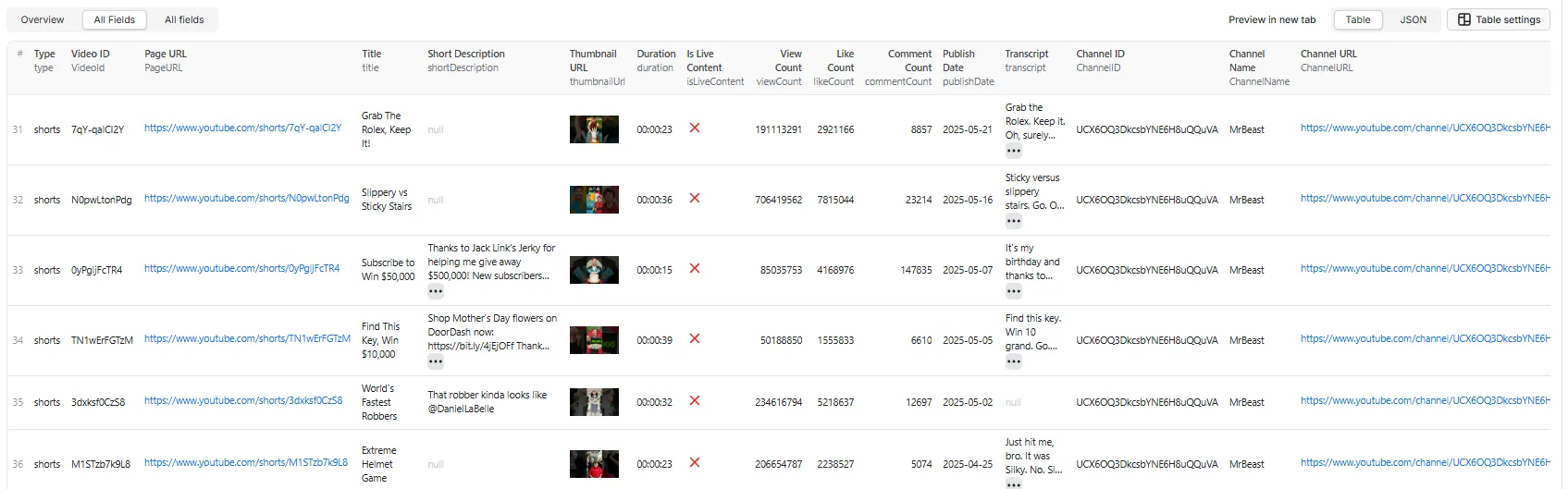
23 flat fields
Core metadata comes from the YouTube Data API v3; transcripts and search discovery come from TikHub.
| # | Field | Type | Description | Source |
|---|---|---|---|---|
| 1 | type | String | shorts (or live for live content) | YouTube API + duration |
| 2 | videoId | String | YouTube video ID | YouTube API |
| 3 | videoUrl | String | Full Shorts URL (youtube.com/shorts/{ID}) | Constructed |
| 4 | title | String | Shorts title | YouTube API |
| 5 | shortDescription | String | null | First 200 characters of description | YouTube API |
| 6 | thumbnailUrl | String | null | Thumbnail URL | YouTube API |
| 7 | duration | String | null | Duration HH:MM:SS (≤ 00:03:00) | YouTube API |
| 8 | durationSeconds | Integer | null | Duration in seconds (easy filtering/BI) | YouTube API |
| 9 | isLiveContent | Boolean | Whether the Short is/was a live stream | YouTube API |
| 10 | viewCount | Integer | null | Total view count | YouTube API |
| 11 | likeCount | Integer | null | Total like count | YouTube API |
| 12 | commentCount | Integer | null | Total comment count | YouTube API |
| 13 | publishDate | String | null | Publish date (YYYY-MM-DD) | YouTube API |
| 14 | publishDateTime | String | null | Full publish timestamp (ISO 8601) | YouTube API |
| 15 | hashtags | Array<string> | Hashtags found in the title + description | Extracted |
| 16 | transcript | String | null | Transcript text (when includeTranscript: true) | TikHub |
| 17 | channelId | String | null | Channel ID (UC…) | YouTube API |
| 18 | channelName | String | null | Channel display name | YouTube API |
| 19 | channelHandle | String | null | Channel @handle / custom URL | YouTube API |
| 20 | channelUrl | String | null | Full channel URL | Constructed |
| 21 | subscriberCount | Integer | null | Channel subscriber count (null if the channel hides it) | YouTube API |
| 22 | sourceType | String | null | Which input surfaced this Short: keyword, hashtag, channel, playlist, seed, or direct | Actor |
| 23 | sourceInput | String | null | The exact keyword, #hashtag, channel, playlist, seed video, or direct URL it came from | Actor |
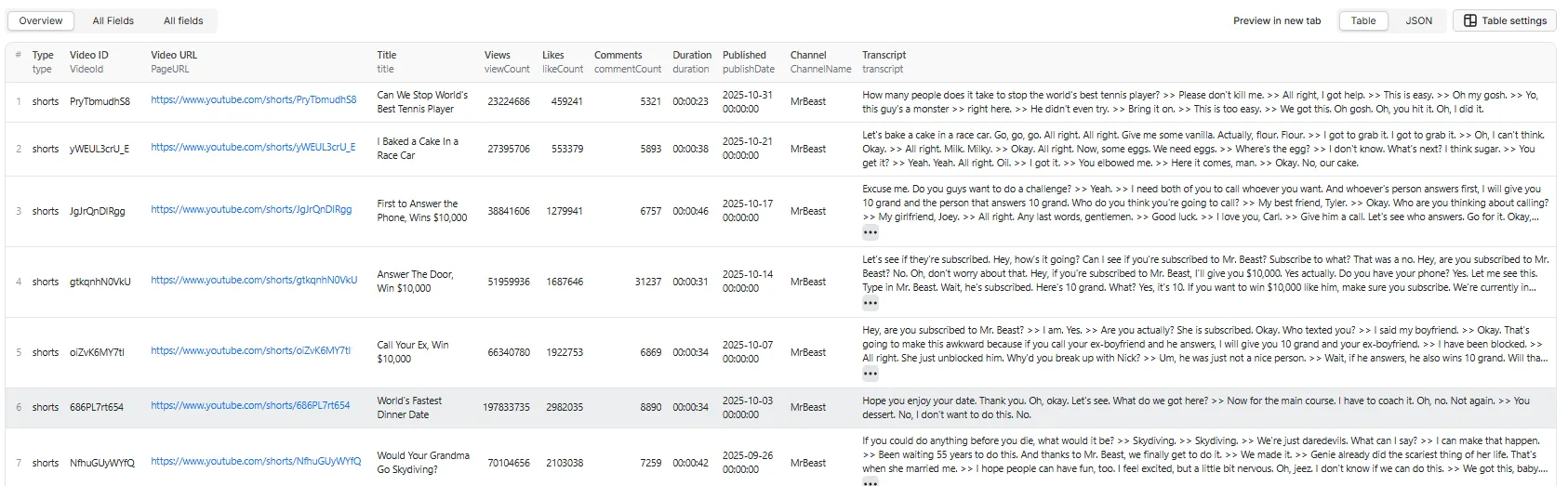
Reliability note: core metadata fields are populated from the official YouTube API and are highly reliable. Transcript availability is ~60–80% (many Shorts have no captions), so transcript may be null.
📊 Output Examples
Overview Table View
All Fields Table View
Example: Short with transcript (includeTranscript: true)
Example: Short from a keyword search (no transcript)
🎬 Quick Start
Example 1: Mixed discovery (keywords + channels + playlist)
Every entry is auto-detected: "cooking tips" is a keyword; "#viral" and the youtube.com/hashtag/gaming URL are both hashtags (labelled sourceType: "hashtag"); @mrbeast expands the channel's Shorts; the playlist URL expands the playlist. All results are filtered to Shorts (≤180s).
Example 2: Channel Shorts, most popular, date range
Example 3: Seed video → that creator's Shorts
A video in searchQueries is a seed: its owning channel is found and that channel's Shorts are returned (not just the one video).
Example 4: Direct Shorts (one record each, returned as-is)
Each entry is fetched exactly as given (no expansion, no ≤180s filter). You can also upload a text file of URLs/IDs.
Example 5: Viral-only Shorts with a cost cap
maxTotalResultscaps how many candidates are fetched (bounding cost);minViews/minLikes/minCommentskeep only high-engagement discovered Shorts.
Example 6: Shorts with transcripts
Enabling
includeTranscriptadds ~1–2 seconds per video and a small TikHub pay-as-you-go cost, but yields spoken text for SEO, keyword extraction, and sentiment/NLP analysis.
💪 How It Works
API-only architecture (v2.2):
- Discovery (
searchQueries, auto-detected per entry)- Keyword & hashtag → TikHub
get_shorts_search— Shorts-only results (paid per page, no YouTube quota). Works for single keywords, #hashtags, and multi-word phrases; falls back toget_general_search(filtered to Shorts) if a term returns nothing. - Channel → resolve channel ID → TikHub
get_channel_shorts(returns the channel's Shorts directly). Falls back to scanning the uploads playlist via the YouTube API if TikHub is unavailable. - Playlist → expand via
playlistItems.list(free), then filter to Shorts. - Seed video →
videos.listfinds the owning channel, whose Shorts are returned.
- Keyword & hashtag → TikHub
- Direct (
shortsUrls) → each video ID used as-is, one record per entry (no expansion, no filters). - Metadata → YouTube Data API v3
videos.list(batched 50 IDs/call = 1 quota unit); a ≤180s Shorts filter runs as a safety net on discovered results. - Transcripts (optional) → TikHub
get_video_captions_v2.
Data flow:
📚 Use Cases
- Topic & keyword discovery — find viral Shorts by keyword/hashtag across YouTube
- Channel & influencer research — pull a creator's recent Shorts and engagement
- Trend monitoring — track view/like/comment metrics and publish patterns
- Mobile-first SEO — analyze titles, descriptions, and (with transcripts) spoken keywords
- NLP/AI datasets — build training data from transcript-enriched Shorts
- Regional research — target Shorts by country/language
❓ FAQ
Q: How do I set it up?
A: Add YOUTUBE_API_KEY (and TIKHUB_API_KEY for keyword/hashtag search and transcripts) as environment variables in the Apify Console (Actor → Settings → Environment variables). See Setup above.
Q: Which discovery modes need TikHub? A: Keyword search, hashtag search, and transcript extraction use TikHub. Channel and direct-URL discovery work with just the YouTube key.
Q: How do you identify Shorts vs regular videos?
A: The YouTube Data API has no explicit Shorts flag, so results are filtered by duration (≤180 seconds — YouTube's current Shorts max). Shorts use the /shorts/ URL path in videoUrl.
Q: How does #hashtag search work?
A: Enter a bare #tag (e.g. #viral) or a youtube.com/hashtag/<tag> URL in the Search & Discovery box. It's routed through the same TikHub Shorts search as keywords and labelled sourceType: "hashtag". Note: results are YouTube's search results for that tag (filtered to Shorts), not the exact curated hashtag feed — no public API exposes that.
Q: Why might a channel return fewer Shorts than my limit?
A: maxResultsPerQuery is a per-source cap; playlists mix long-form + Shorts so some get dropped by the ≤180s Shorts filter. Channels use get_channel_shorts (Shorts directly), so they return the full cap. (Direct URLs in shortsUrls bypass all of this — returned as-is.)
Q: Can I get transcripts for any Short?
A: Transcripts are extracted via TikHub for public Shorts that have captions (~60–80%). Set includeTranscript: true and optionally transcriptLanguage. When no captions exist, transcript is null.
Q: Can I extract individual comments?
A: No — commentCount (the total) is included, but individual comment text/threads are not extracted.
Q: Does this work for private/unlisted Shorts? A: No, only public Shorts are accessible via API.
Q: Can I export to CSV/Excel/Sheets? A: Yes. The output is flat (no nested objects), so Apify's JSON/CSV/Excel exports and Google Sheets integration work cleanly.
⚠️ Known Limitations
- No dislike counts. YouTube removed public dislikes from its Data API in 2021, so dislikes cannot be provided. (Scrapers that show dislikes rely on third-party estimate APIs.)
- No individual comments. Only the total
commentCountis returned — comment text and threads are not extracted. - Keyword coverage depends on TikHub's index. Discovery uses TikHub's raw
get_shorts_search, with a fallback toget_general_search(filtered to Shorts) when a term returns nothing. Single keywords, #hashtags, and multi-word phrases all work; only extremely niche terms may be sparse. - Playlist is a scan budget. Playlists mix long-form and Shorts, so
maxResultsPerQuerybounds videos scanned, not Shorts returned. (Channels now useget_channel_shorts, which returns Shorts directly.) - Direct URLs are returned as-is. Entries in
shortsUrlsare explicit requests, so a non-Short (>180s) is still returned (withtype: "video"); an unfetchable entry produces atype: "error"row. subscriberCountcan benull. Some channels hide their subscriber count; the field isnullin that case.- Transcripts ~60–80% coverage. Many Shorts have no captions, so
transcriptis oftennull. - Public content only. Private/unlisted Shorts are not accessible via the API.
🔌 Integrations
Because the output is a clean, flat Apify dataset, it plugs into Apify's native integrations with no transformation: Make, Zapier, Slack, Google Drive/Sheets, Airbyte, webhooks, and the Apify API/SDKs (JS & Python). Push results straight into your spreadsheet, database, or automation flow.
🛠️ Technologies
- TikHub API — keyword/hashtag search, channel-ID resolution, transcript extraction
- YouTube Data API v3 — official metadata + channel/playlist expansion
- Node.js 18+ — native
fetch, async processing - Apify SDK — actor runtime and dataset management
Why API-only? No browser automation (no bot detection), predictable cost/performance, clean flat output, and zero maintenance for YouTube UI changes.
📜 Changelog
v2.2 (Current)
- 🎯 Real Shorts discovery: keyword/hashtag uses TikHub raw
get_shorts_search(Shorts-only, with aget_general_searchfallback) and channels useget_channel_shorts(Shorts directly) instead of general search + uploads scan — far higher Shorts yield, no long-form noise. - #️⃣ First-class #hashtag search: a bare
#tagor ayoutube.com/hashtag/<tag>URL is now auto-detected, routed through the Shorts search, and attributedsourceType: "hashtag"(previously a bare#tagworked but was mislabelledkeyword, and a hashtag URL was silently dropped).
v2.1
- 🧩 Consolidated inputs to two boxes:
searchQueries(auto-detects keyword/hashtag, channel, playlist, or seed-video) +shortsUrls(direct videos, one record each, returned as-is with text-file upload support). - ➕ New discovery modes: playlists and seed-video → channel expansion.
- 🎚️ Single
maxResultsPerQuerycap replaces the separate per-search / per-channel caps. - 🧾 Direct entries that can't be fetched now emit a
type: "error"row.
v2.0
- 🔁 Re-architected to API-only (TikHub + YouTube Data API v3) — removed the previous Supadata dependency.
- 🔎 Working keyword & hashtag discovery via TikHub
get_general_search_v2(avoids YouTube's 100-unitsearch.list). - 📝 Transcripts now via TikHub
get_video_captions_v2(optional enrichment). - 🆕 Richer output — 23 flat fields: added
subscriberCount,channelHandle,hashtags,durationSeconds,publishDateTime, and source-tracking (sourceType,sourceInput). - ✏️ Normalized field names to lowerCamelCase (
VideoId→videoId,PageURL→videoUrl,ChannelID→channelId,ChannelName→channelName,ChannelURL→channelUrl). - 🎛️ New controls:
maxTotalResultsglobal cap andminViews/minLikes/minCommentsengagement filters. - 🔐 Keys moved to Console environment variables (
YOUTUBE_API_KEY,TIKHUB_API_KEY) — no secrets in source. - 🧹 Honest docs: clarified reliability, Shorts scan-budget behavior, pricing, and known limitations.
v1.0
- Initial release (Supadata + YouTube Data API v3), channel & direct-URL discovery, optional transcripts, date filtering, and sorting.
🤝 Compliance
- Intended for legitimate research & business intelligence.
- Uses official/public APIs (TikHub, YouTube Data API v3); collects only public Shorts data.
- Respects YouTube's Terms of Service and API usage policies.
- Users are responsible for compliance with applicable laws (GDPR, CCPA, etc.).
💬 Support
- Issues: GitHub Issues or Apify support.
- API keys:
- YouTube Data API: Google Cloud Console
- TikHub: https://tikhub.io
Built with ❤️ for short-form content research.


