
Upwork Job Scraper – Job Alerts with Client Intel
Pricing
from $2.80 / 1,000 results
Upwork Job Scraper – Job Alerts with Client Intel
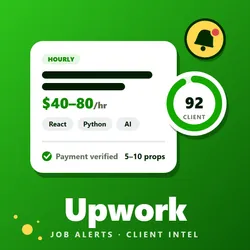
Scrolling Upwork for good jobs means missing them and wasting connects. Get jobs by keyword or link with pay, skills, exact proposal count and client history, plus a client score, opportunity score and red flags. Set alerts for new jobs only.
Pricing
from $2.80 / 1,000 results
Rating
0.0
(0)
Developer

Crawl Craft
Maintained by CommunityActor stats
0
Bookmarked
2
Total users
1
Monthly active users
3 days ago
Last modified
Categories
Security
Limited permissionsShare
Upwork Job Scraper — job pay, proposals, client history and scores
Upwork Job Scraper collects public Upwork jobs by keyword, search link or job link and returns each job's pay, skills, exact proposal count and the client's country, spend, hire rate and rate paid. It adds a client score, an opportunity score and red flags to spot good leads before spending connects. Every response is structured JSON — ready to pass directly to an LLM, index into a vector store, or feed a lead-alert pipeline. No Upwork account or cookies needed. Schedule it with "only new jobs" for fresh leads.
What is the Upwork Job Scraper?
It reads the job pages any visitor can see on Upwork and turns every job into one clean row. Use it to scrape Upwork jobs for lead generation, to build Upwork job alerts, to compare clients before you apply, or to export Upwork jobs to CSV or Excel.
What Upwork job data can the Upwork Job Scraper extract?
- Job: title, full description, job type, budget or hourly range, experience level, project length, workload, category, skills, tools and publish time.
- Competition: exact Upwork proposals count, freelancers being interviewed, invites sent and unanswered, hires made, and a low / medium / high competition level.
- Upwork client history: country, city, time zone, member since, payment verification, total spent, rating, reviews, total hires, hire rate, jobs posted, open jobs, average hourly rate paid, industry and company size. Some jobs hide the client details from visitors; those rows still carry the job data and
detailsStatussayslogin_required. - Scores: a client quality score (0-100) with the reasons behind it, an opportunity score (0-100), and red flags such as an unverified payment method or 50+ proposals.
- Requirements: minimum job success score, English level, Rising Talent allowed, portfolio required, preferred locations.
- Run info: the keyword or link that found the job, a re-post marker and the time scraped.
How to Use (Apify Console)
- Log in at https://console.apify.com → Actors and open Upwork Job Scraper – Job Alerts with Client Intel.
- Add keywords, Upwork search links or job links to Keywords, search links or job links.
- Set Max jobs per keyword or link (each input gets its own limit), then the filters you want: job type, experience level, budget, client country, minimum client score and more.
- For job alerts, pick a short Posted within window, tick Only new jobs since the last run and add an alert webhook.
- Click Start and watch the log — the first 25 jobs are listed in the log, then a running count, and every job appears in the Output tab while the run is going.
- Open the Output tab, switch between the job views and the per-section tables, then export to JSON, CSV or Excel.
Upwork Job Scraper input
| Field | What it does |
|---|---|
urls | One per line: a keyword, an Upwork job search link (its filters are used) or a job link. Required. |
maxResults | Total jobs, shared fairly between your keywords and links. 0 returns everything Upwork serves (about 5,050 per search). |
jobType, experienceLevel, workload, duration | Pay model, level, weekly hours and project length. any means no filter. |
budget, hourlyRate | USD ranges such as 500-5000, 50- (at least 50) or -200 (up to 200). |
proposals, clientHires | Ranges such as 0-4,5-9, 50+ or 10+. Proposals are checked against the exact count of every job. |
location, excludeLocations | Client countries or regions to keep or drop. |
verifiedPaymentOnly, contractToHire | Keep only payment-verified clients or contract-to-hire jobs. |
minClientScore, minClientTotalSpent, minClientRating, minClientReviewCount | Skip weak clients. 0 keeps every client. |
includeKeywords, excludeKeywords | Keep or drop jobs by words in the title, description or skills. |
postedWithin, fromDate, toDate | How recent the jobs must be. |
incrementalMode | Return only jobs not returned by an earlier run in your account. |
alertWebhookUrl | Optional Slack or Discord webhook (top 10 jobs by opportunity score) or any URL (jobs as JSON). |
maxConcurrency, maxRequestRetries | Speed and retry settings. |
proxyConfiguration | Runs start without a proxy. If Upwork refuses the request, the run switches to a datacenter proxy, then to a residential proxy, and stays on it. |
Competitor-style names such as query, searchUrl, startUrls, maxAgeMinutes, slackWebhookUrl and discordWebhookUrl are accepted too.
Output
Each job is one row in the Jobs table, with seven views: Jobs, Pay and terms, Competition, Client intel, Scores and red flags, Freelancer requirements and Description. Separate tables hold the same data split by section: skills, red flags, client open jobs, clients, searches and failed inputs.
Some fields are empty on purpose. A job whose client hides their details has detailsStatus: "login_required"; its client history, scores and red flags stay empty. budgetAmount is empty on hourly jobs and the hourly range is empty on fixed-price jobs. Jobs are saved in the order they finish, not in search order.
Use via API / MCP
Use the Actor as an Upwork jobs API from your own code with the Apify API:
For AI agents, add the Apify MCP server and let the agent find and call this Actor:
The agent finds the Actor through the server's search, details and call tools.
Best Use Cases
- Freelancers: find fresh, low-competition jobs from clients who pay, before the proposal count climbs.
- Agencies: use the Upwork client scraper to build an Upwork lead generation feed filtered by budget, country and client score.
- Market research: track which skills, rates and budgets Upwork clients ask for.
- Job alerts: schedule the Actor with Only new jobs and a webhook to get new leads in Slack or Discord.
Frequently Asked Questions
Do I need an Upwork account or cookies? No. The Actor reads public data that any visitor can see.
Why are some client fields empty? Upwork hides client details on some jobs from visitors. Those rows keep the job data and are marked login_required.
How many jobs can I get from one search? Upwork serves about 5,050 results per search. Split bigger searches with filters such as job type, budget or country.
How do I get only new jobs? Turn on Only new jobs since the last run and schedule the Actor. It remembers the jobs it already returned in your account.
Can I filter by client quality? Yes. Use minClientScore, minClientTotalSpent, minClientRating and minClientReviewCount. The filters are checked on each job's full details.
What does the opportunity score mean? It is a 0-100 score from freshness, competition, budget and client quality. The client score and its reasons are in the same row.
Can I export to CSV or Excel? Yes. Open the Output tab and export any view or table.
What if a run is slow or refused? The Actor starts without a proxy and switches to a datacenter and then a residential proxy when Upwork refuses a request. Lower Parallel requests if you see rate-limit pauses.
What if Upwork changes its pages? The Actor adjusts to many small changes by itself. If a run returns nothing, report it through the Actor's Issues tab.
Support and Feedback
Found a bug or need a field? Open an issue from the Actor's Issues tab in Apify Console.


