
AI Directories Scraper
Pricing
from $3.00 / 1,000 results
AI Directories Scraper
Scrape the aidirectori.es directory of AI tools. Filter by category, pricing, tag, keyword or featured, or export the full catalog with name, website, description, tags, rating and more.
Pricing
from $3.00 / 1,000 results
Rating
0.0
(0)
Developer
DataCach
Maintained by CommunityActor stats
0
Bookmarked
2
Total users
1
Monthly active users
3 months ago
Last modified
Categories
Share
Extract the full aidirectori.es catalog of AI tools — names, websites, descriptions, categories, tags, pricing, ratings and more — as structured JSON, CSV or Excel. No API key, no login, no code.
What is the AI Directories Scraper?
The AI Directories Scraper is a fast, no-code tool that scrapes the aidirectori.es AI tools directory through its public JSON API. It returns clean, structured data for every listed AI tool — roughly 1,443 tools and growing. Leave every filter empty to export the entire directory in one run, or narrow the results by category, pricing, tag, keyword, or featured status.
It's built for anyone who needs the AI tools landscape as a dataset: market researchers, founders, marketers, investors, directory builders, and data teams. Because it talks directly to the site's API, it's quick, reliable, and complete — not a fragile page scraper.
What can the AI Directories Scraper do?
- 🗂️ Scrape the full AI tools catalog (~1,443 tools) in a single run, or a targeted slice.
- 🔍 Filter by category (29 categories such as
image,video,business,nsfw,seo), pricing (FREE,FREEMIUM,PAID), tag (276 tags), or a free-text search query. - ⭐ Extract only featured AI tools with a single toggle.
- 🧬 Optionally include the complete raw API object (40+ fields per tool) alongside the curated output.
- 📤 Export to JSON, CSV, Excel, HTML or XML straight from the Apify dataset.
- 🔌 Use the Apify API, schedule recurring runs, set up monitoring, and connect to Zapier, Make, Google Sheets, Slack and more.
- 🌐 Optional proxy rotation via Apify Proxy for large exports.
What data does the AI Directories Scraper extract?
Each AI tool is returned as one dataset item with these primary fields (representative — the full record has 29 curated fields):
| Field | Description |
|---|---|
name | AI tool name |
url | Listing page on aidirectori.es |
website | The tool's own website |
tagline | Short one-line pitch |
description | Full description |
category | Category (slug + name) |
tags | List of topic tags (slug + name) |
pricing | FREE, FREEMIUM or PAID |
rating | Directory rating |
opens | Popularity (times opened) |
featured | Whether the tool is featured |
icon / frame / screenshots | Tool imagery |
founderName / location | Maker details |
socials | Social links |
domainRating | Domain authority score |
faqs | Tool FAQ entries |
discountCode / isForSale / askingPrice | Deal & acquisition info |
createdAt / updatedAt | Listing timestamps |
With Include raw data enabled, an extra rawData field carries the complete, untouched API object (40+ fields).
How do I scrape aidirectori.es AI tools?
- Click Try for free / Start to open the Actor.
- (Optional) Pick one or more categories, pricing types, or tags, or type a search query. Leave everything empty to grab the whole catalog.
- (Optional) Set Max items to cap the results, or leave it at
0for no limit. - Click Run.
- When the run finishes, download your data as JSON, CSV or Excel from the Output/Storage tab — or pull it via the Apify API.
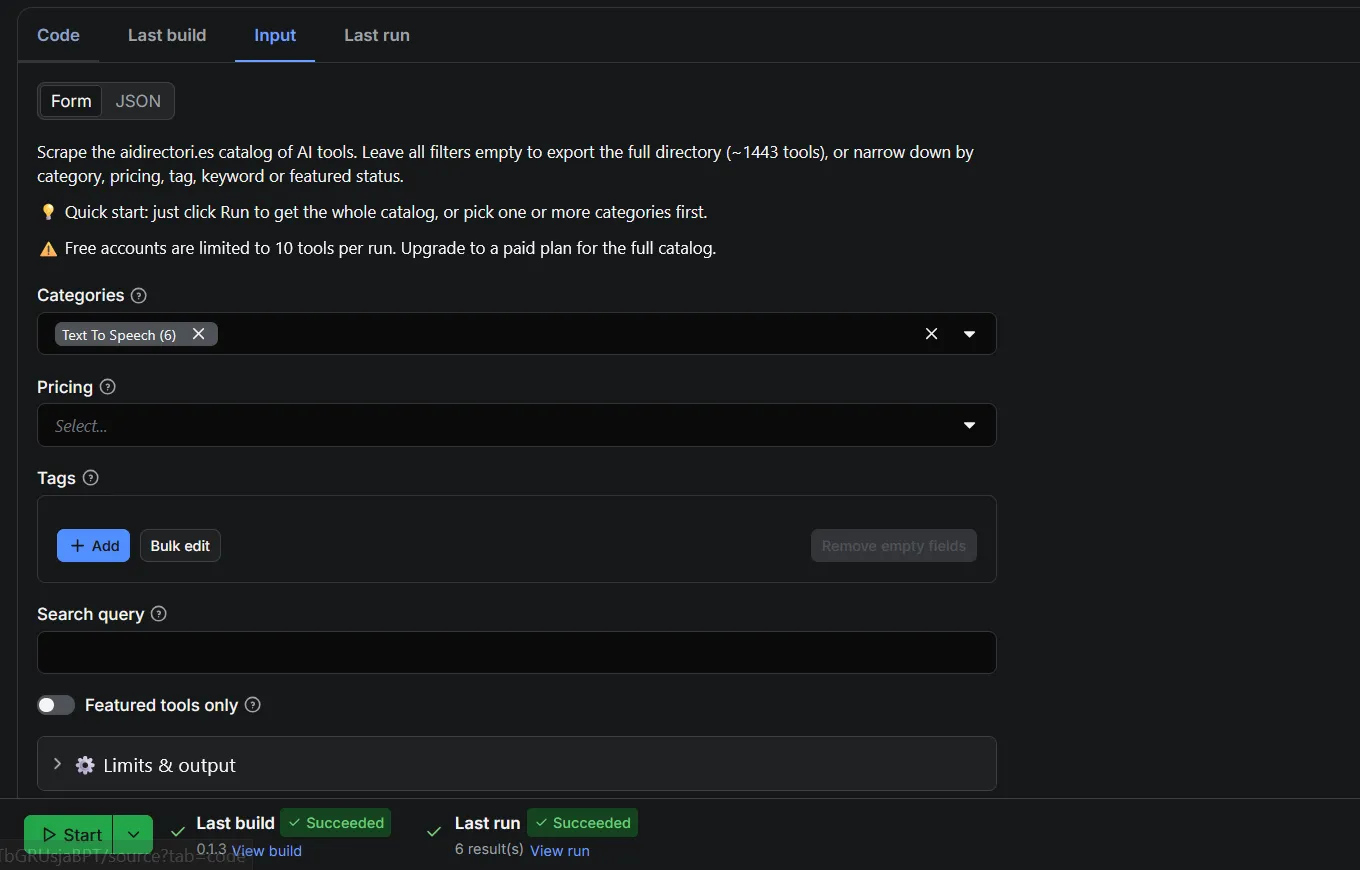
Input
All inputs are optional — the simplest run is just clicking Run to export the full directory.
- Categories — filter to one or more categories (e.g.
image,video,business). Empty = all. - Pricing — keep only
FREE,FREEMIUM, and/orPAIDtools. Empty = all. - Tags — filter by tag slugs (e.g.
photography,ai-productivity-tools). Empty = all. - Search query — free-text search across name, tagline, description and tags.
- Featured tools only — return only featured listings.
- Max items — maximum number of tools to return (
0= no limit). - Include raw data — add the full raw API object to each item.
- Proxy configuration — optional Apify Proxy routing.
Filters combine as OR within a field, AND across fields — e.g. categories image OR video, that are also priced FREE.
Free vs paid plans
Every filter and feature works on both plans — a paid plan simply removes the free-run caps. Limits are enforced automatically based on your Apify account, so there's nothing to configure.
| 🆓 Free plan | ⭐ Paid plan | |
|---|---|---|
| AI tools per run | Up to 10 | Unlimited (full catalog, ~1,443 tools) |
| Filter combinations per run | Up to 3 | Up to 200 |
| Max items setting | Capped at 10 | Honored as set (0 = no limit) |
| All filters — category, pricing, tag, search, featured | ✅ | ✅ |
| Include raw data | ✅ | ✅ |
| Proxy, scheduling, API & integrations | ✅ | ✅ |
A filter combination is one selection across the filter dimensions (
categories × pricing × tags). For example, picking 2 categories and 2 pricing types creates 4 combinations — a free run uses the first 3. Leaving filters empty is a single combination (the whole catalog).
Output example
Each result looks like this (JSON, one AI tool — trimmed for readability):
Use cases
- 📊 Market research — build a complete map of the AI tools landscape by category and pricing.
- 🎯 Lead generation — collect tool websites, founders, and locations for outreach.
- 📈 Trend tracking — schedule daily runs to catch newly added AI tools.
- 📰 Directory & newsletter building — power your own AI tools directory, roundup, or newsletter.
- 🆓 Free-tool lists — export only
FREEtools in a niche (e.g.image,video). - 🔬 Data analysis & AI datasets — feed structured AI-tool data into dashboards, models, or research.
Other Actors you might like
Looking for more data scrapers? Explore the rest of my Actors on my Apify profile — from directory and marketplace scrapers to search-by-keyword tools.
FAQ
Is it legal to scrape aidirectori.es?
This Actor collects publicly available data from the aidirectori.es API. Scraping public data is generally legal, but you are responsible for how you use the results. Do not collect personal data you don't have a lawful basis to process, and always respect the target site's terms of service and applicable laws (e.g. GDPR). If in doubt, seek legal advice.
Do I need an API key or account to use it?
No. The Actor requires no API key and no login to aidirectori.es. You only need a free Apify account to run it.
How many AI tools can I scrape?
The full directory is around 1,443 tools and can be exported in a single run. Use Max items to cap the output, or leave it at 0 for everything that matches your filters.
Can I export the data to CSV or Excel?
Yes. Results are stored in an Apify dataset and can be downloaded as JSON, CSV, Excel, HTML or XML, or fetched programmatically via the Apify API.
How do I scrape only free AI tools?
Set the Pricing filter to FREE (optionally combine with a category or tag). You'll get only tools listed as free.
Can I schedule the scraper to run automatically?
Yes. Use Apify Schedules to run the Actor hourly, daily, or weekly, and connect it to Zapier, Make, Google Sheets, Slack, or webhooks to automate delivery.
Can I get the complete raw data for each tool?
Yes. Enable Include raw data and every item gains a rawData field with the full, untouched API object (40+ fields).
What's the difference between the free and paid plan?
Every filter and feature is available on both plans. Free runs are capped at 10 tools and 3 filter combinations per run; a paid plan lifts both caps — up to the full ~1,443-tool catalog and 200 filter combinations. See the Free vs paid plans section above for the full comparison.
Support
Found a bug or need a change? Open an issue on the Actor's Issues tab, and I'll take a look. Need a custom scraper or a tailored export? Reach out — custom solutions are welcome.