

Instagram Reels Transcript Scraper & Hook Analyzer
Pricing
from $55.00 / 1,000 analyzed reels
Instagram Reels Transcript Scraper & Hook Analyzer
Instagram Reels transcript scraper and hook analyzer: spoken transcript, on-screen text (OCR), hook and its type, timed beats, CTA and views against the creator's median. Add your own checklist, new scripts and AI-content checks. Pay only for results. No login.
Pricing
from $55.00 / 1,000 analyzed reels
Rating
0.0
(0)
Developer

DatAPI Team
Maintained by CommunityActor stats
0
Bookmarked
2
Total users
1
Monthly active users
2 days ago
Last modified
Categories
Features
Share
Instagram Reels transcript scraper with AI analysis: an Instagram video transcript for any reel: the spoken transcript, the on-screen text burned into the frames, the hook and its type, the structure with start and end seconds for every section and the call to action — read from the video in one pass. Then compare creators, get new scripts built on what worked, monitor competitors for new outliers, and score reels against your own checklist or brief. Paste reel links, a creator handle, or a keyword or hashtag. No login, no cookies, no Instagram account.
Start in 10 seconds
- Input:
{ "reelUrls": ["https://www.instagram.com/reel/DCmx0GIO7T1/"] }. That one field is enough; a creator handle ("usernames": ["jalalsamfit"]) or a keyword works too. - Price: $0.069 per analyzed reel on the Apify Free and Starter plans, $0.062 on Scale, $0.055 on Business. Data, AI and platform costs of a run are included. Every extra (checklist, scripts, report, AI checks) is its own priced option and costs nothing while it is off.
- Charged only for results: private, deleted or failed reels and results that fail the quality check cost nothing. A reel you paid for is delivered again for free for 90 days.
- Time marks where they matter: every section has start and end seconds, the hook says when it ends, and each checklist answer says the second it happens, so you can jump straight to the moment.
- Free plan: 30 reels a month, no card needed. Cap any run with Maximum cost per run.
- See it before you spend anything: the full sample dataset, 8 reels of a public creator, unedited.
What you get for every reel
| Field | What it is |
|---|---|
spokenTranscript, hasSpeech, voiceType, wordsPerMinute | Every spoken word, verbatim, in the original language. voiceType says whether the voice talks, sings, both, or there is none — song lyrics are never transcribed as speech. |
onScreenText | Text drawn on the frames, one entry per card. Word-by-word subtitles are not counted as cards. |
hookSpoken, hookOnScreen, hookType, hookEndSeconds | The opening line, the type of hook, and the second it ends. |
beats | 3–8 sections (hook, context, proof, demo, cta …) with start and end seconds, checked against the reel's real length. |
cta, ctaType | What the creator asks for, verbatim and typed. |
contentFormat, topics, summary, takeaways, entities, visualNotes, language | Written in the reel's own language. |
viewCount, likeCount, commentCount, shareCount, facebookPlayCount | Performance. |
viewsVsCreatorMedian, isOutlier | How far a reel beat its creator's median views (creator mode) — measured, not a guessed "virality score". |
audioSource, audioOwnerUsername, audioTitle, audioArtist | Own original sound, someone else's sound (and whose), or a licensed track — when Instagram's data says so. |
checklist, briefFit | Your checklist answers and brief verdicts with evidence and the second they happen (when you give criteria). |
carouselSlides | Carousel posts: the text of every slide and what it shows. |
analysisStatus, error, charged, redelivered, schemaVersion | What happened to each reel and whether it was charged. |
One real row, exactly as the actor produced it
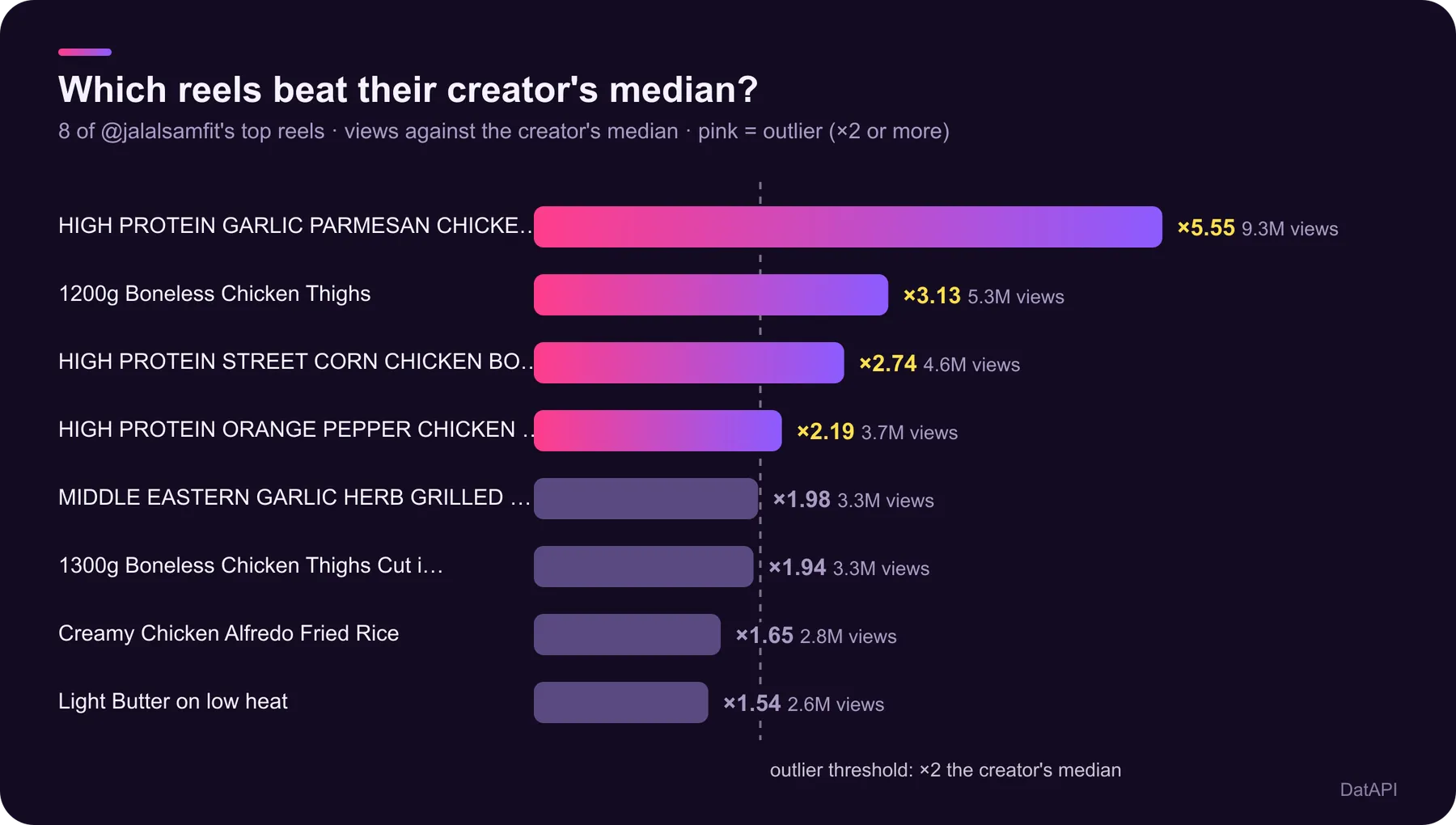
A public creator, their 8 top reels, every option on. Four of the eight beat the creator's median views by 2× or more, the best by 5.5×. Long text is shortened with … on this page; the sample dataset has it in full.
What the run showed
The charts in this README are drawn from the data the actor returns (the dataset rows and the REPORT record), so you can build the same views, or your own, in Sheets, Looker Studio, a notebook or n8n. The comparison report page (REPORT.html) is produced by the actor itself.
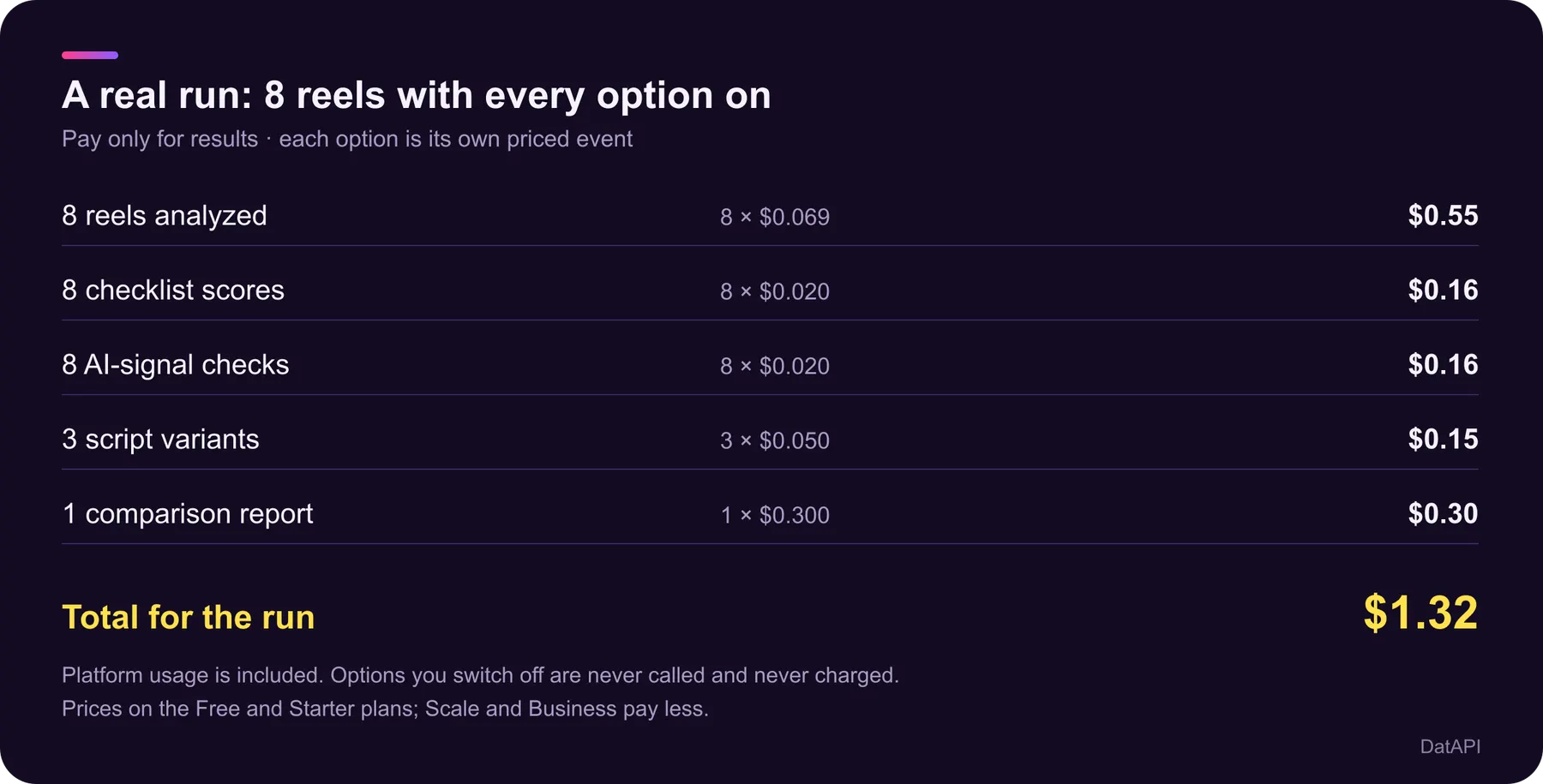
What it cost
Ways to start
- Reel links — paste
/reel/links or shortcodes. - Creator handles — the run reads each creator's recent reels, computes their median views, then analyzes the top (or newest) ones. The rest are listed in
NOT_ANALYZED, free. Limit the period with Posted after / before (a date, or "3 weeks"). The first 60 reels read per creator are included; deeper catalogs (up to 5,000 reels) cost $0.015 per page of 12, and you set the cap. - Keyword or hashtag — the reels Instagram's search returns for a word, a phrase or a
#hashtag, most viewed first. A reel found twice is analyzed and charged once. - A dataset — give a dataset ID from another actor; rows with a reel link or shortcode are analyzed, rows that already carry the video need no second read of Instagram.
- Carousels — switch on Carousel posts to analyze image and video slides too.
- Empty input — a 3-reel demo.
Field names are forgiving: urls, handles, keywords, startUrls and similar are read as the right field, a reel link typed into the handles field is still a reel link, and the run log shows the exact input to use next time.
Copy-paste inputs
Every example below is a JSON you can paste into the Input tab (JSON view) as it is. The first one is the exact input behind the real comparison run shown in this README.
Compare two creators with your own checklist and a report (the head-to-head chart and the report screenshots come from this input: 8 top reels of each creator, 16 reels in total):
Every option on, one reel (checklist, brief, AI checks and a new script in one run):
Analyze specific reels (the cheapest start):
One creator, newest reels of the last 3 weeks:
Niche research by hashtag, most viewed first:
Monitoring: only new outliers, run it every Monday on a schedule:
New scripts from the best reels of a niche:
What teams use it for
1. Take a competitor apart in one run. Input { "usernames": ["creator"], "report": true }. You get every top reel with its hook, structure and call to action, the creator's median views, which reels beat it, and a one-page report: hook types, typical reel length, how long the hook lasts, how much of the content is spoken and how often they post.
2. Compare two accounts side by side. Input { "usernames": ["brand_a", "brand_b"], "report": true }. The report puts both creators next to each other and adds a benchmark (25th, 50th, 75th and 90th percentile of views, length, hook length and speaking pace), so you see who hooks faster, who talks more and whose hits are really outliers.
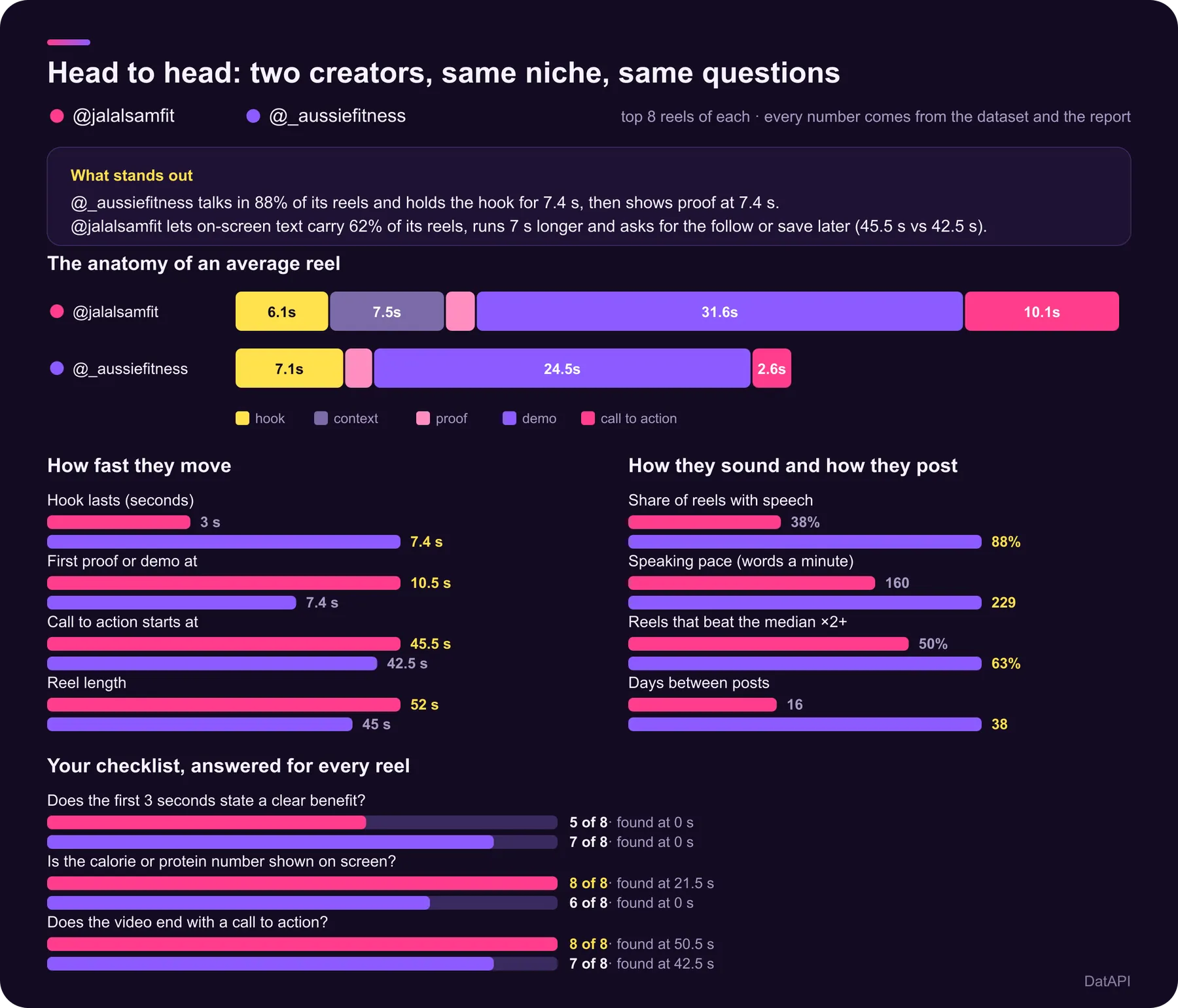
Real run on two creators of the same size, 8 top reels each, the same three checklist questions for both. The anatomy bars, the pace and style comparison and the checklist answers with the seconds where each was found are all built from the rows and the report this run returned.
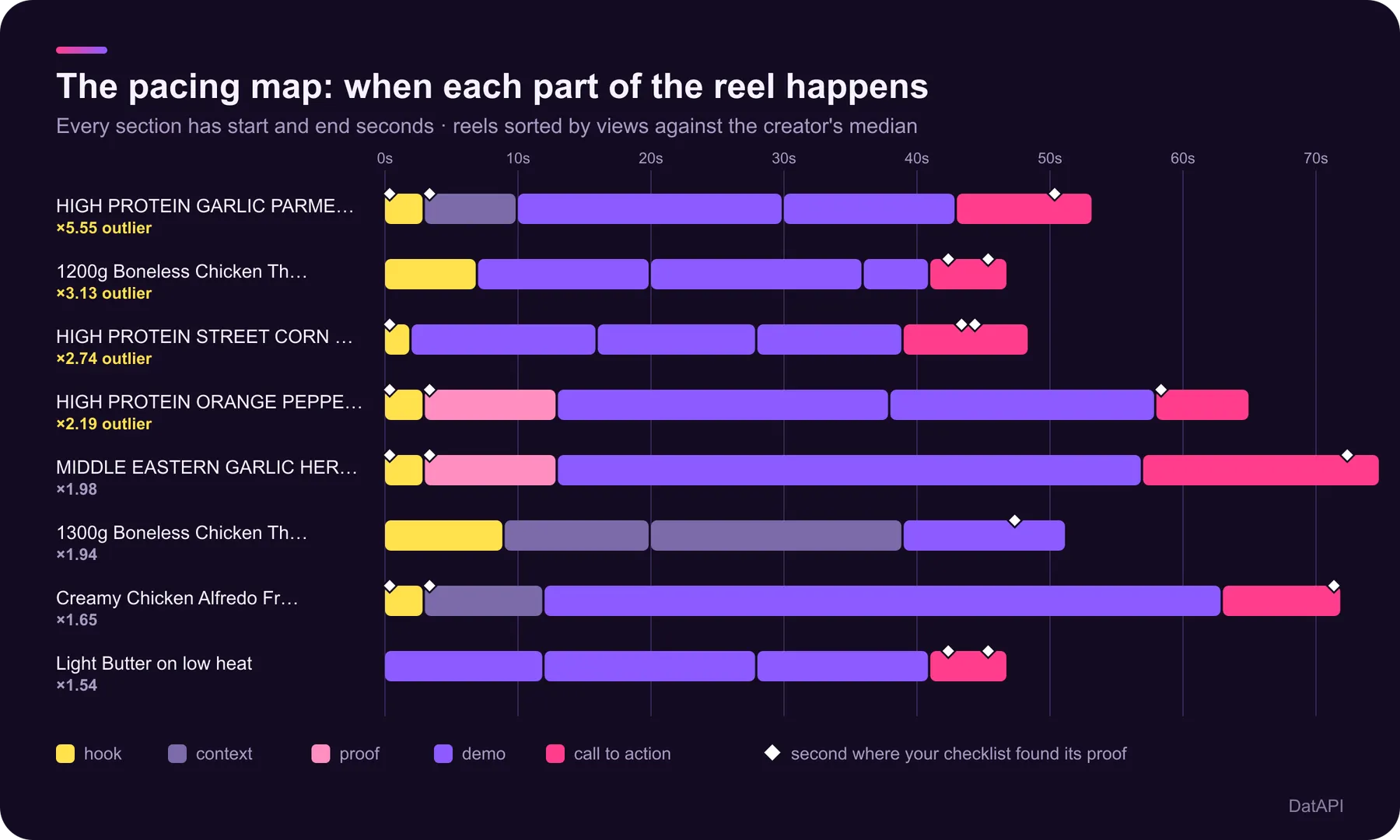
3. Find out what the hits do differently. Every section of every reel has start and end seconds, so pacing is data, not opinion. Real run, 8 top reels of one creator, split into the 4 that beat the creator's median by 2× or more and the 4 that did not:
| The 4 hits (×2 or more) | The other 4 | |
|---|---|---|
| First proof or demo starts at | 5.5 s | 13.5 s |
| Call to action starts at | 45 s | 54 s |
| Reel length | 53 s | 61 s |
| Sections per reel | 5 | 4 |
The hits get to the point faster, ask for the follow or the save sooner and run shorter. You get the same columns for any creator: beats, hookEndSeconds and viewsVsCreatorMedian are in every row.
4. Get a message when someone you watch posts a hit. Switch on Only new outliers, put the creators on a schedule and send the result to Telegram, Slack, Notion or Google Sheets. A ready n8n workflow for the Telegram alert is linked in the section on n8n templates below.
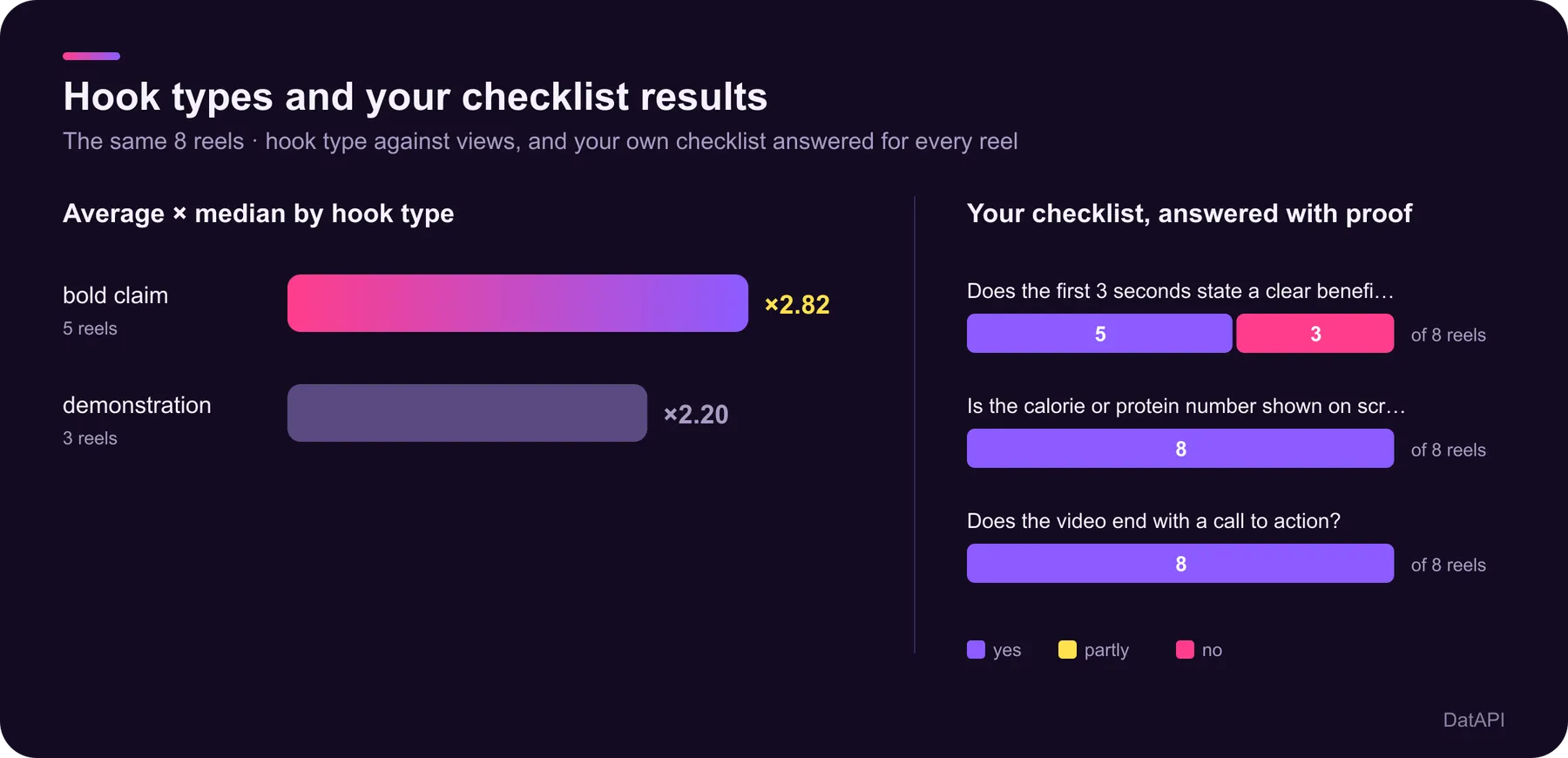
5. Check content against a brief, with proof. Paste a checklist or a creative brief. Each answer comes with the evidence and the second it happens, for example "Does the first 3 seconds state a clear benefit? yes, at 0 s, on-screen text 'HIGH PROTEIN GARLIC PARMESAN CHICKEN WRAPS'". Good for agencies checking creators' videos and for UGC disclosure checks. On the pacing map above, each white marker is a second where a checklist answer was found.
6. Turn the best reels into your next scripts. Pick the top reels of a niche and get script variants built on their structure, with the hook, timed beats, what to say and what to show, in your tone and language.
On top of the per-reel data
Comparison report
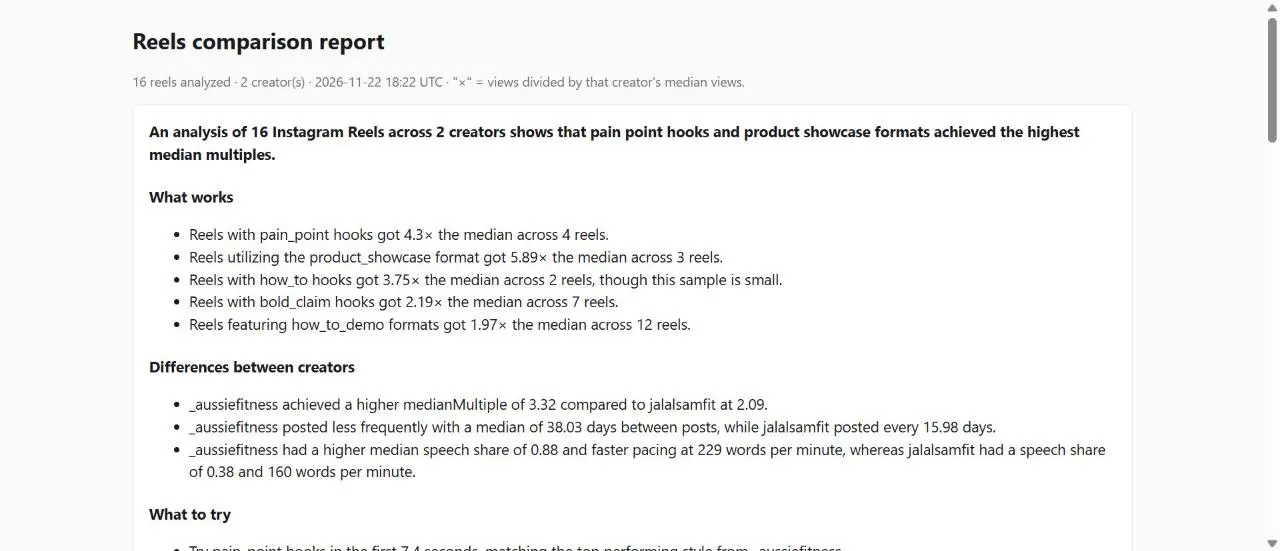
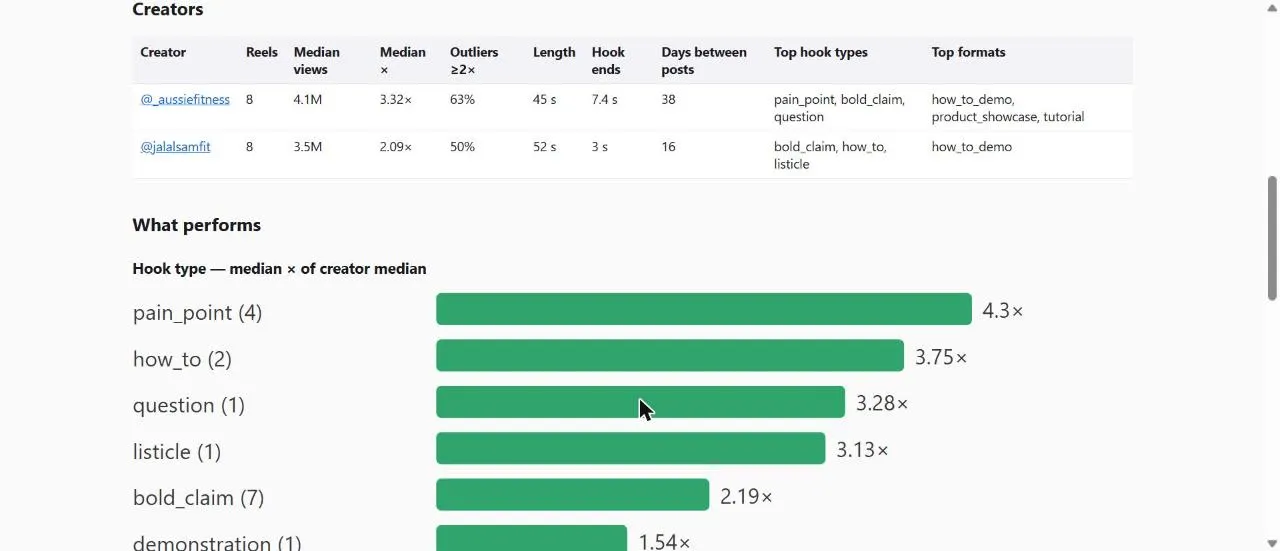
The screenshots below come from the first input in Copy-paste inputs: two creators, 8 top reels each, 3 checklist questions.
Switch on Comparison report and get REPORT.html (charts) and REPORT (JSON): each creator's median views, share of outliers, hook types, formats, CTAs, length and posting cadence; which hook types and formats beat the median; a niche benchmark (percentiles of views, length, hook length, speaking pace); short insights written only from those numbers.
New scripts from the best reels
Set Script variants per reel and your topic: the best reels of the run (by multiple of the creator's median) are turned into new scripts that keep the structure — hook type, beats and timing, CTA type — with new words, beat by beat (what to say, what to show, on-screen text). Variants that copy the source's wording are dropped automatically. Result: the SCRIPTS record.
Monitoring: only new outliers
With Only new outliers and a schedule (for example every Monday), each run checks your list of creators and analyzes only reels you have never received that are 2–14 days old and beat the creator's median by your threshold (2× by default). Nothing new → no rows, a tiny check charge.
Score reels against your checklist or brief
- Checklist: yes/no questions like Is the product shown? Is there an #ad disclosure? Does it open with a question? Each answer comes with evidence and the second it happens; without evidence the answer is
unclear. - Brief: paste a creative brief; it is split into its requirements and each is marked yes / partly / no / unclear with evidence and the second it happens. The 1–10 fit score is calculated from those marks (1 + 9 × average, yes = 1, partly = 0.5), so the same marks always give the same score. Useful for vetting creators and UGC.
AI-content checks
Two separate options, each charged on its own:
- AI signals in the video — signs of a synthetic voice, an AI avatar or AI-generated footage, each with evidence.
- AI-written text check — a probability that the transcript and the caption were written by AI. Texts under 300 characters are not checked and not charged; longer ones are checked on their first 3,000 characters.
Both are signals and probabilities, not a verdict.
How much does it cost?
Pay only for results. Data, AI and platform costs of a run are included in the prices below — there is no extra compute bill on top. Every extra is optional and has its own price; a feature you leave off costs nothing.
What typical jobs cost (Free and Starter plans)
| Job | Cost |
|---|---|
| One reel by link | $0.069 |
| A creator's 10 best reels | $0.69 |
| 10 reels with a 3-question checklist and AI signals | $1.09 |
| 8 reels with every option on (checklist, AI signals, 3 scripts, comparison report), a real run | $1.32 |
| 100 reels | $6.90 ($5.50 on Business) |
Apify's free $5 monthly credit pays for about 70 analyzed reels.
| Event | Price (Free / Bronze plan) |
|---|---|
| Analyzed reel | $0.069 |
| Extra minute of a video longer than 3 minutes (when switched on) | $0.042 |
| Script variant | $0.05 |
| Comparison report (per run) | $0.30 |
| Reel scored against your checklist / brief | $0.02 |
| AI signals in the video, per reel | $0.02 |
| AI-written text check, per reel whose text was checked | $0.05 |
| Creator checked in monitoring | $0.01 |
| Creator catalog page beyond the first 60 reels (12 reels) | $0.015 |
| Carousel (up to 10 images) | $0.22 |
| Carousel: each 5 more images | $0.03 |
| Carousel: each video slide | $0.07 |
Higher Apify plans get lower prices. Never charged: private, deleted or failed reels, photos, carousels you did not switch on, too-long videos, expired links, results the quality check flags as suspect — they come back as free rows with the reason in error. A reel you paid for in the last 90 days is delivered again for free. Apify's free $5 monthly credit covers about 70 analyzed reels.
Free plan: 30 reels a month in total, 3 per run, one creator or one search per run; AI signals, checklist and brief included; one script variant and one carousel a month. The comparison report, monitoring and the AI text check need a paid Apify plan. A reel that fails does not count against the 30.
Live view and summary
While a run works, the Live view tab shows progress and a card per reel; the page is saved as STATUS.html. At the end you get a free "what worked" summary — best hook type, format, length and call-to-action effect — computed from the numbers of the run (no AI call, no charge). The full comparison report stays an option.
Repeat a run from code
The run log and the RUN_SUMMARY record contain howToRepeat: the same run as JavaScript (apify-client), Python and a curl call that returns the rows directly — put your token in APIFY_TOKEN.
For AI agents and automations
- MCP: add
https://mcp.apify.com?tools=datapi/instagram-reels-transcript-scraperto Claude, Cursor or any MCP client (sign in with Apify on first use, or sendAuthorization: Bearer <APIFY_TOKEN>). The actor becomes a tool your agent can call. - Compact output: set Output to Compact — short rows (hook, CTA, summary, views, scores) without transcripts, ready to drop into a prompt.
- n8n, Make, Zapier: run the actor with the Apify integration, then send the dataset to Google Sheets, Telegram, Slack or Notion. Three free n8n workflows are linked below.
- Stable output: fields are only ever added, never renamed or removed; every row carries
schemaVersion. New values can appear in closed lists such ashookType— treat unknown values as "other".
Free n8n templates
Three ready workflows, no community nodes needed. In n8n open a new workflow, then the menu (three dots) → Import from URL, paste the link, add one Header Auth credential (Authorization: Bearer <your Apify token>) and replace the creators with your own.
- Competitor reels to a Google Sheets swipe file:
https://api.apify.com/v2/key-value-stores/8jbDqzGqmAnXkyTDQ/records/competitor-swipe-file-google-sheets.json - Weekly outlier alerts to Telegram: only new reels that beat the creator's median, every Monday.
https://api.apify.com/v2/key-value-stores/8jbDqzGqmAnXkyTDQ/records/weekly-outlier-alerts-telegram.json - Best reels to new scripts in Notion:
https://api.apify.com/v2/key-value-stores/8jbDqzGqmAnXkyTDQ/records/best-reels-to-scripts-notion.json
API
FAQ
Does it translate? No. Transcript and on-screen text stay in the original language; summaries and labels are written in that language too.
Which language is a reel with no speech and no text written in? The language of its caption, or English when the caption is empty — never the language of a background song.
Is the sound always identified? Licensed tracks usually are. For original sounds Instagram's data often does not say whose sound it is; then audioSource stays empty rather than guessed.
Can I get SRT/VTT subtitles? Not yet. Beats carry start and end seconds; the transcript is plain text.
Is it legal? It reads publicly available posts only and does not log in. Use it in line with Instagram's Terms and privacy laws (GDPR, CCPA).


