

Clutch.co Agency Directory Scraper — B2B Leads & Company Data
Pricing
from $2.50 / 1,000 agency profile scrapeds
Clutch.co Agency Directory Scraper — B2B Leads & Company Data
Turn the Clutch.co agency directory into B2B leads for lead generation: 19 always-present company data fields, public client reviews, the agency's real website, and an optional AI ICP-fit score. $2.50/1,000, 98.1% complete. Never charged for an empty or blocked result. JSON/CSV, API, schedule.
Pricing
from $2.50 / 1,000 agency profile scrapeds
Rating
0.0
(0)
Developer

Vitalii Kurovskyi
Maintained by CommunityActor stats
0
Bookmarked
3
Total users
0
Monthly active users
5 days ago
Last modified
Categories
Security
Limited permissionsShare
What is Clutch.co Scraper?
Clutch.co Scraper turns the Clutch.co agency directory — any category, search, or profile URL on it — into B2B leads you can work: clean, guaranteed-complete company data with each agency's public client reviews, its real website, and an optional AI ICP-fit score that tells you which agencies to act on first.
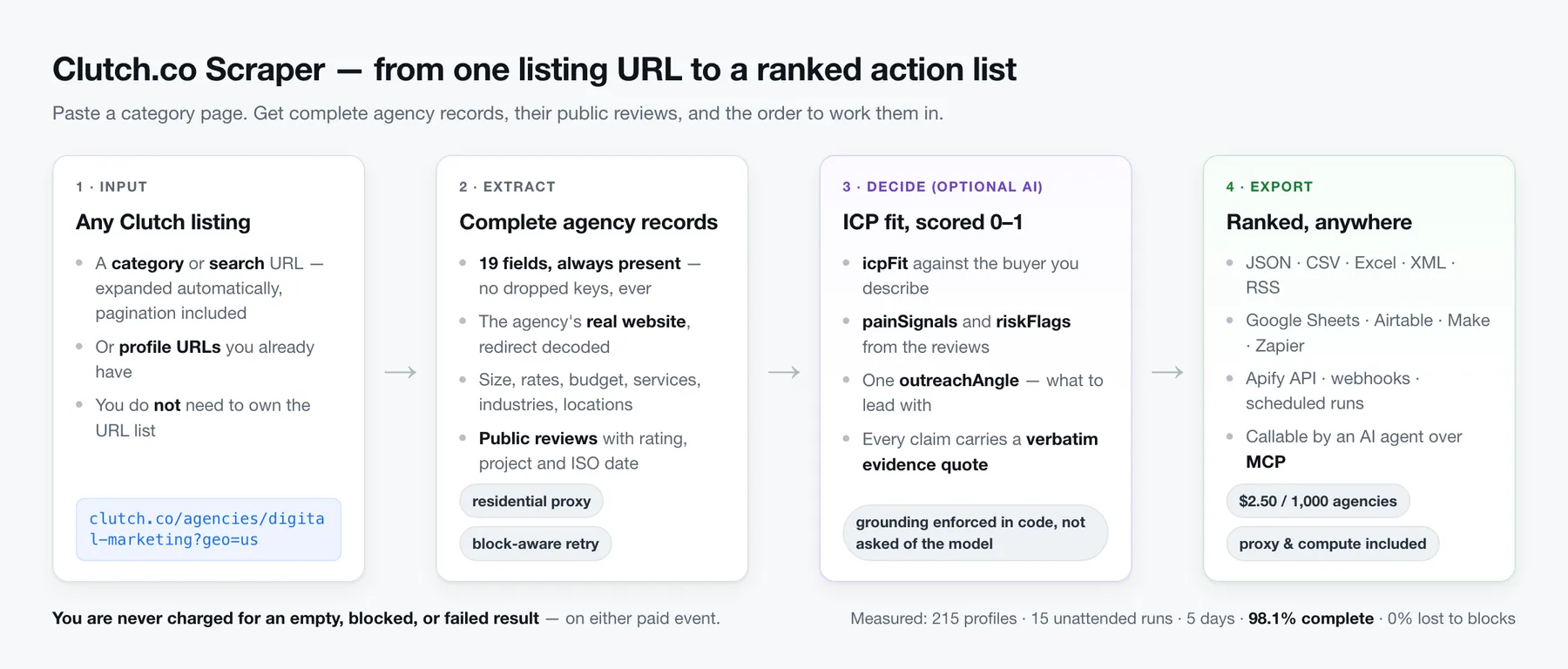
- Feed it a listing, not a URL list — hand it a Clutch category or search page and it expands the listing into full profiles, pagination included. No need to already own the URLs.
- Get a schema with no holes — every field is always present. Missing data becomes a typed
default (empty string,
null, empty array), never a dropped key or a half-filled record. - Get the agency's real website, decoded from Clutch's outbound redirect and stripped of tracking parameters — the key you actually need for outreach.
- Get the public reviews — reviewer, role, project, rating, text, and an ISO date for every review Clutch renders on the profile.
- Rank the list with AI — an optional per-agency decision object: ICP fit, pain signals, risk flags, and the one outreach angle to lead with, every claim backed by a verbatim quote.
- Never pay for nothing — you are never charged for an empty, not-found, blocked, or failed result, on either paid event.
- Export anywhere — JSON, CSV, Excel, XML, HTML, RSS; Google Sheets, Airtable, Make, Zapier, webhooks; the Apify API; scheduled runs; and any AI agent via an MCP server.
Built for lead generation, agency shortlisting, competitive research, and market mapping — anywhere you need structured company data out of a directory that only publishes it as pages. The difference is reliability and presentation, not raw volume: a complete schema, fair billing, and an AI layer that ranks who to contact instead of dumping rows.
What data can this scraper extract?
Every agency record always contains every field below. When a value is genuinely absent on the source you get its typed default — never a dropped key.
Every emitted dataset row carries a type discriminator. Agency records are
type: "agency_profile"; the optional AI artifact is a separate type: "agency_intelligence"
row. Filter on type to split the two.
| Field | Type | Description | Default when absent |
|---|---|---|---|
type | string | Row discriminator — always "agency_profile" for an agency record | "agency_profile" |
name | string | Agency name | "" |
tagline | string | Short positioning line | "" |
locations | array | { city, region, country, line } per office | [] |
size | string | Employee band, e.g. "50 - 249" | "" |
hourlyRate | string | e.g. "$100 - $149 / hr" | "" |
minProjectBudget | string | e.g. "$10,000+" | "" |
services | array | Service-line strings | [] |
industries | array | Industry strings | [] |
resolvedWebsite | string | The agency's real site (redirect decoded, tracking params stripped) | "" |
companyEmail | string | Public work email — see the note below: Clutch does not publish these | "" |
companyPhone | string | Public phone | "" |
socialLinks | array | LinkedIn / X / Facebook profile URLs | [] |
rating | number | null | Aggregate rating in [0, 5] | null |
reviewCount | integer | Reviews the agency has on Clutch in total | 0 |
reviewsIncluded | integer | Reviews actually present in reviews on this row (see below) | 0 |
sourceUrl | string | The Clutch profile URL this record came from | "" |
scrapedAt | string | ISO-8601 UTC timestamp of when this row was scraped | "" |
reviews | array | Public reviews (see below), when includeReviews is on | [] |
companyEmailis almost always"", and that is the source, not the scraper. Clutch does not render a public email on its agency profiles — it routes contact through its own form. The field stays in the schema so the record shape never changes, but do not plan a workflow around it. For outreach, useresolvedWebsite(the agency's real domain, redirect-decoded) as the key.
reviewCountandreviewsIncludedare different numbers on purpose.reviewCountis the agency's lifetime total as Clutch reports it;reviewsIncludedis how many this run returned — the reviews Clutch renders on the profile page itself, which for a heavily-reviewed agency is the most recent page of them, not all several hundred. Compare the two before you treat a record'sreviewsarray as complete.
Each review is likewise guaranteed-complete:
| Field | Type | Description | Default when absent |
|---|---|---|---|
reviewer | string | Reviewer name | "" |
role | string | Reviewer role & company | "" |
project | string | Project title | "" |
rating | number | null | Review rating in [0, 5] | null |
reviewRating | number | null | The same value under a name that cannot collide with the agency's own rating — this is what the Reviews table view shows | null |
text | string | Public review text | "" |
date | string | Review date, normalized to ISO YYYY-MM-DD | "" |
sourceUrl | string | The profile URL the review came from | "" |
The run's Output tab has a third table view, Reviews, which expands every review out of its agency record into one row per review — the same data you already paid for, reshaped for export.
How much does Clutch.co Scraper cost?
This actor is pay-per-event: you pay for results, not for run time.
| Event | Price | Charged when |
|---|---|---|
agency_profile | $0.0025 / agency — $2.50 per 1,000 | A complete agency record is stored |
agency_intelligence | $0.035 / agency | A valid, grounded AI artifact is produced (opt-in) |
Residential proxy and compute are included. They are paid out of our side, never added to your bill — the price above is the price.
On the Apify Free plan you get $5 of credit every month, which scrapes 2,000 agency profiles here without costing you anything.
The fair-billing promise: you are never charged for an empty, not-found, blocked, or failed result — for either event. A profile that comes back empty is free. An AI artifact the model can't ground is free. Charges happen strictly after a real result is stored.
agencyIntelligence is off by default — you only ever incur the premium event when you
explicitly turn it on.
Why pay-per-event: you pay for stored results rather than for elapsed time, so a slow page, a retry, a block, or a proxy rotation costs you nothing. The bill matches the rows you got.
Keep
includeReviewson when you useagencyIntelligence. Every claim in the artifact must be grounded in a verbatim quote from something the actor actually scraped, and the review text is where nearly all of that evidence lives. With reviews switched off there is little for the model to ground in, so most agencies produce no artifact at all — free, under the fair-billing promise, but also empty. The actor logs a warning if you run this combination.
How do I use Clutch.co Scraper?
No scraping experience needed. Five steps:
- Find your listing on Clutch. Open clutch.co, narrow to the agencies
you want (service line, location, size — e.g.
https://clutch.co/agencies/digital-marketing?geo=us) and copy the URL from the address bar. - Click Try for free on this page and paste that URL into Category or search URLs. To scrape agencies you already have, paste their profile links into Profile URLs instead — you can use both fields together.
- Set your limit and your contact email.
maxAgenciescaps how many profiles the run fetches, so it also caps what you spend. It ships at 5 deliberately — a first run should cost about a cent and finish in a minute or two; raise it to whatever your real harvest needs, there is no upper limit.contactEmailgoes into the scraper'sUser-Agentso Clutch can identify and reach the operator; it ships with a placeholder so the actor runs out of the box, and replacing it with your own address is strongly recommended. - Optional: turn on the AI layer. Switch on Agency intelligence and write an
ICP description — the buyer you are. Every agency then comes back scored and ranked
against it. Leave
icpDescriptionempty andicpFitreturnsnullrather than a guess. - Click Start and export. When the run finishes, open the Storage → Dataset tab and download JSON, CSV, or Excel, or push it straight to Google Sheets, Airtable, Make, or Zapier.
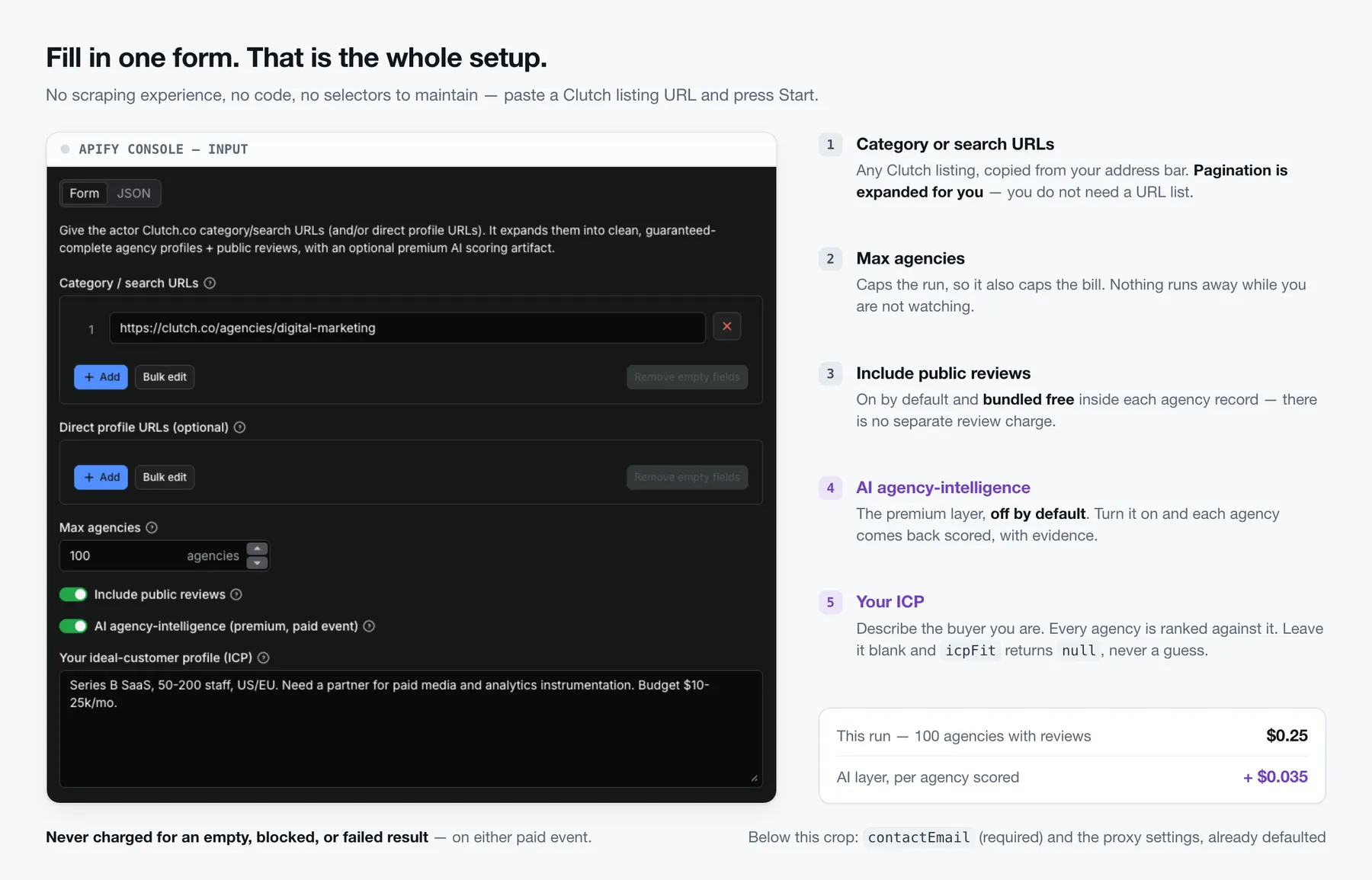
⬇️ Input
1. Expand a whole category into full profiles
2. Scrape specific agencies you already have, with reviews off
3. Category expansion + the AI agency-intelligence artifact
Every input field is documented on the Input tab of this actor.
contactEmailis sent in the scraper'sUser-Agentso the target site can identify and reach the operator — this actor is a polite, identifiable client. It ships with a placeholder default so the actor runs out of the box; replace it with your own address before running at volume.
icpDescriptionis optional and only used by the AI event. Describe the buyer you are — industry, size, region, budget, the work you need — and every agency gets scored against it. Leave it out andicpFitcomes backnullrather than guessed; the rest of the artifact (pain signals, risk flags, outreach angle, evidence) works exactly the same.
Writing a good ICP (the sharper your ICP, the more useful
icpFitand the outreach angle). Name five things: industry / niche, company size, region, budget or deal size, and the work you need done. A ready-to-edit template:"[Industry] company, [N–M] employees, based in [region]. Looking for a partner to [the work]. Budget around [$X]. We care most about [proof point — e.g. measurable ROI, a specific vertical]."
Vague ICPs ("any marketing agency") still work but score everyone middling; specifics are what turn the artifact from a summary into a ranked action list.
⬆️ Output
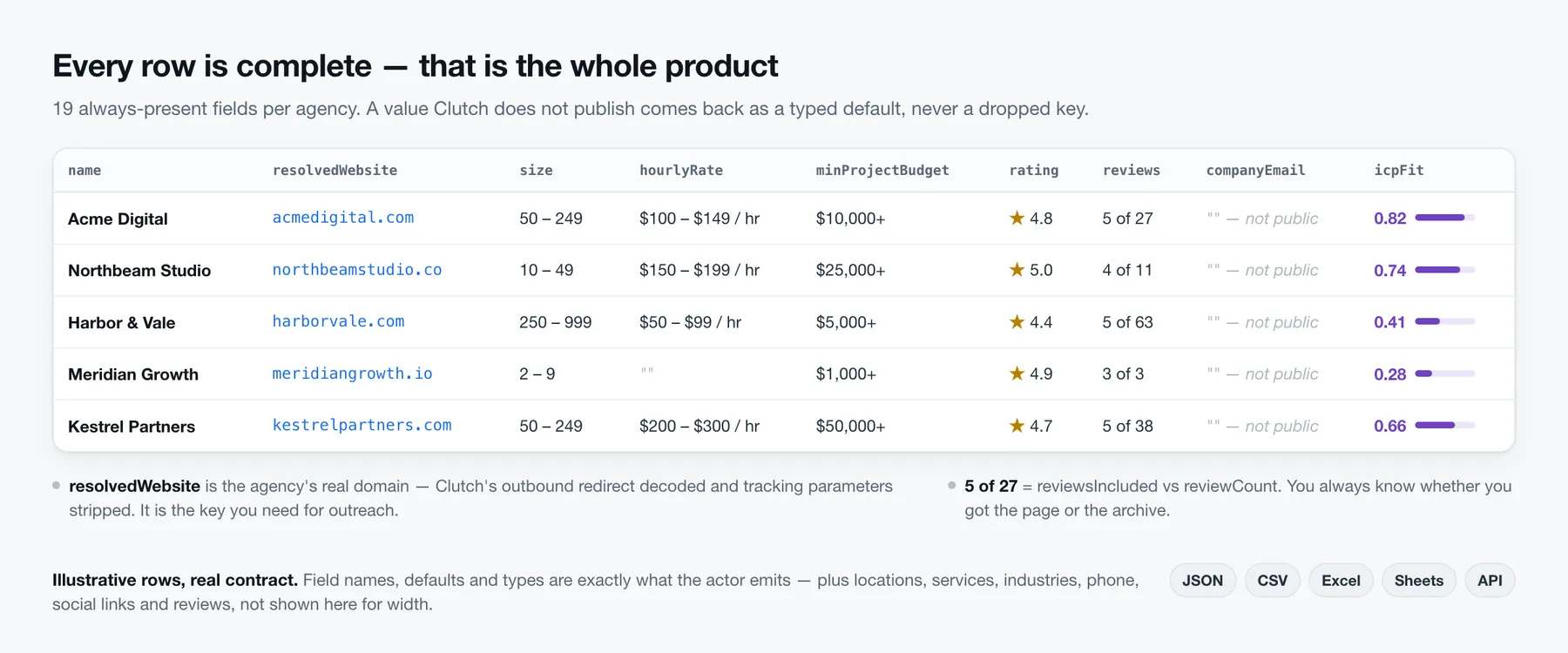
Illustrative example. Field names and shape are the exact contract the actor emits; the
reviews array is shown truncated to one of the five entries reviewsIncluded counts.
How does the AI ICP-fit score rank agencies?
Turn agencyIntelligence on and, for each agency, the actor produces a compact decision
object — not a review summary, but an answer to "who do I act on first, and how?". This is
what makes it different from a plain Clutch.co data export:
| Field | Meaning |
|---|---|
icpFit | How well the agency fits your ideal-customer profile (0–1) |
painSignals | Buyer-relevant pain / opportunity signals found in the profile & reviews |
riskFlags | Reasons to be cautious before acting |
outreachAngle | The single concrete "lead with this" angle |
evidenceQuotes | { quote, sourceUrl } — the verbatim source text behind the claims above |
confidence | The model's own confidence (0–1) |
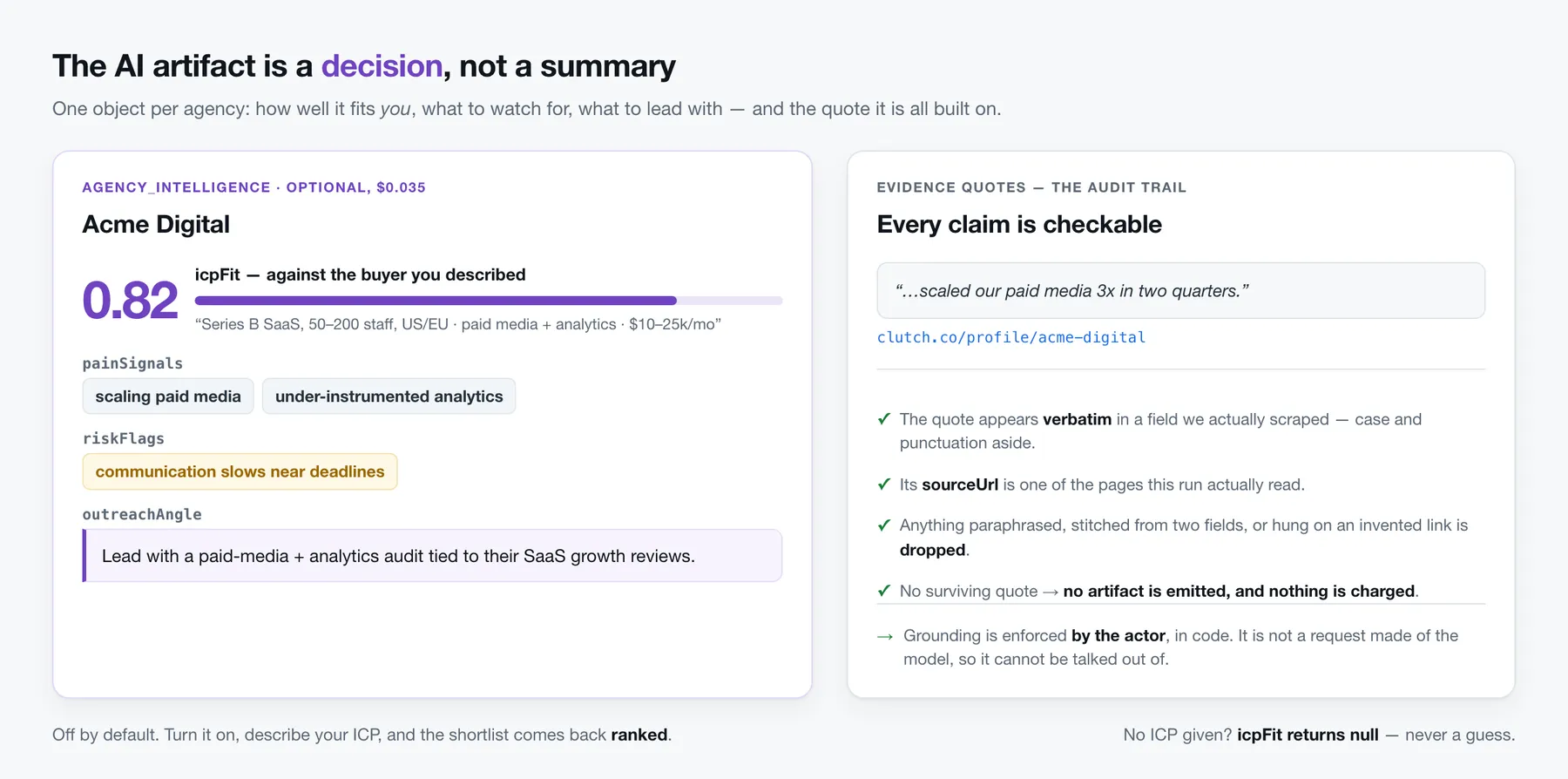
Every artifact you are charged for carries at least one evidence quote with its source URL,
and every quote it carries is real. Grounding is enforced by the actor, not merely requested of
the model: a quote is kept only if its text appears verbatim (modulo case/punctuation) inside
a single field we actually scraped, and its sourceUrl is one of the pages we actually read.
Anything the model paraphrases, stitches together from two different fields, or hangs on an
invented link is dropped — and an artifact with no surviving quote is never emitted and never
charged.
The model is instructed to ground each pain signal, risk flag and the outreach angle in the
quotes it returns, but the actor enforces the quotes themselves, not a per-claim mapping: it
verifies that every quote is real, not that each individual signal is keyed to one. Treat
evidenceQuotes as the checkable audit trail for the artifact — every quote in it is text we
actually scraped, at the URL it names.
sourceUrl is the agency profile URL — Clutch renders no per-review permalink, so quotes
point at the profile the review lives on, not at the individual review.
If the model can't produce a valid grounded artifact (a confidence score, one actionable
signal, and at least one surviving evidence quote), nothing is emitted and nothing is
charged. icpFit is required too — but only when you supplied an ICP; leave icpDescription
empty and it comes back null rather than guessed.
The artifact is a separate dataset row with type: "agency_intelligence", carrying
sourceUrl and agencyName so you can join it back to its agency_profile row:
How reliable is this Clutch.co scraper?
98.1% of pages returned a complete record, and 0% of pages were lost to blocks — measured, not claimed. Numbers below come from live Clutch.co profiles across 15 unattended scheduled runs, 2026-07-31 → 2026-08-04: our own pre-release reliability gate, not estimates.
| Metric | Result |
|---|---|
| Proxy tier | Apify Proxy residential, US-pinned (the default) |
| Profiles tested | 215 across 15 unattended runs on 5 consecutive days |
| Success rate | 98.1% (211 complete records; 4 transient blocks, charged $0.00) |
| Runs completed | 15 / 15 — no run failed, crashed, or needed a manual fix |
| Fields per record | 19 top-level, always present, plus 4-field location objects and 7-field review objects |
| Block rate | 0% of pages lost. Clutch returned a 403 on 6 of the 15 runs; every one was recovered in-run by the block-aware backoff, and no run lost data to a block |
| Cost per 1,000 profiles | $2.50 flat — residential proxy and compute are included and are never billed to you |
The 4 transient blocks are the honest part of this table: Clutch occasionally serves a page that looks fine but contains nothing. The scraper detects it, skips the row, and — per the fair-billing rule — charges you nothing for it.
How it stays reliable: a declared contact User-Agent, token-bucket rate limiting, and a
block-aware retry ladder that backs off and rotates the exit IP instead of hammering the site.
Since v0.3.0 there is one more layer: when Clutch answers with a browser challenge instead of a
page, the scraper opens a real Chrome once per proxy session, passes the challenge, and hands the
resulting pass back to the fast HTTP path — so the challenge is solved once, not per page. If it
cannot be passed, the run reports the blockage honestly and charges you nothing for what it
could not deliver. The proxy defaults to residential, the tier our testing found clears
Clutch's anti-bot most consistently; datacenter is selectable but draws more blocks. Residential
is available on every Apify plan, Free included.
Note on the table above: it was measured on v0.2.x, before the challenge solver existed. Reliability under v0.3.0 is being re-measured; the browser step adds a few seconds and some memory to the first request of each proxy session, and the per-run cost figures will be refreshed here once the new measurement is complete.
What export formats and integrations are supported?
Results are stored in an Apify dataset and export natively to:
- JSON, CSV, Excel (XLSX), XML, HTML table, RSS — one-click download or API.
- Google Sheets, Airtable, Make, Zapier, and Webhooks — Apify-native for every run; plus
this actor's own
webhookUrlsinput to POST each result the moment it's produced. - API & scheduling — pull the dataset over the Apify API, or schedule recurring runs.
What can you use Clutch.co agency data for?
The directory is a buyer's shortlist and a seller's market map at the same time — which one it is depends on which side of the table you sit on.
- Lead generation for agency-services sellers. Software, hosting, analytics, staffing and martech vendors sell to agencies. A category listing is a pre-qualified buyer list with size, budget band, service lines and a real website already attached.
- Shortlisting an agency to hire. Pull a whole category, sort by rating, size and minimum project budget, then read the reviews of the survivors — in a spreadsheet, in minutes, instead of opening 200 profiles by hand.
- Competitive and market research. Track how many agencies serve a niche, what they charge per hour, where they cluster geographically, and how their positioning changes over time by scheduling the same listing weekly.
- Partner and reseller recruitment. Filter by service line and location to find agencies whose offering complements yours rather than competes with it.
- Enriching a CRM.
resolvedWebsiteis the agency's real domain, so each record joins cleanly onto accounts you already have — no fuzzy name matching against a redirect URL.
❓ Frequently asked questions
Do I need to provide the profile URLs myself?
No. Give it a Clutch category or search URL and it expands the listing (with pagination) into individual profiles. Direct profile URLs are also supported if you already have them.
Is there a Clutch.co API?
Clutch.co publishes no public API — the directory exists only as web pages, which is why teams end up copying it by hand. This actor is the practical equivalent: it reads those public pages and returns the same information as clean JSON, over the Apify API, on a schedule if you want one. You get an API-shaped interface to a site that never shipped one.
How many Clutch.co agencies can I scrape in one run?
There is no fixed upper limit — maxAgencies is capped only by your own budget, and because
billing is per stored result you always know what a number costs before you set it (the default 5
= $0.0125, 25 = $0.0625, 1,000 = $2.50). Pagination follows up to 50 pages per listing URL as a
runaway-pager safeguard; to go deeper, split the category into several narrower listing URLs and
pass them together.
One thing to know if you keep the run small: a run of 10 agencies or fewer is treated as a
quick trial and winds down after 3 minutes, returning whatever it has rather than sitting on a
slow day. Any run larger than that has no time limit at all — it runs until your maxAgencies
is met. So if a tiny test run comes back short on a bad day, raise the number rather than retrying
the same small one.
Can I scrape Clutch.co agencies by city, country or service?
Yes — you do the filtering on Clutch itself and hand the result over. Narrow the directory with
Clutch's own filters (service line, location, company size, hourly rate), then copy the URL from
your address bar into Category or search URLs; e.g.
https://clutch.co/agencies/digital-marketing?geo=us scrapes US digital-marketing agencies only.
Whatever the listing shows is exactly what the run returns.
How much does it cost to scrape 1,000 Clutch.co agencies?
$2.50 — $0.0025 per stored agency record, with residential proxy and compute included rather than added to your bill. The AI ICP-fit score, if you switch it on, is $0.035 per agency scored. The Apify Free plan's $5 monthly credit covers 2,000 agency profiles at no cost.
Will I be charged if an agency page is blocked or empty?
No. Both paid events are charged strictly after a real result is stored. Empty, not-found, blocked, and failed results are free.
What does the AI agency-intelligence event cost, and when?
$0.035 per agency, and only when a valid, grounded artifact is produced. If the model can't ground its output, nothing is emitted and nothing is charged.
How do I export Clutch.co data to CSV, Excel or Google Sheets?
Open the finished run's Storage → Dataset tab and download CSV, Excel (XLSX), JSON, XML, HTML or RSS in one click — no code. For a standing pipeline, use the run's Integrations tab to push every run straight into Google Sheets, Airtable, Slack, Make or Zapier, or pull the dataset over the API in the format you name.
Can I use integrations with Clutch.co Scraper?
Yes. Every run can push straight to Google Sheets, Airtable, Slack, Make, Zapier, or any HTTP
endpoint via webhooks — set up on the run's Integrations tab, no code required. This actor
additionally accepts a webhookUrls input to POST each result the moment it is produced.
Can I use Clutch.co Scraper with the Apify API?
Yes. Start runs, poll status, and pull the dataset over the Apify API, with official Python and Node.js clients. Runs can also be scheduled to repeat on a cron, so a shortlist refreshes itself.
Can I use Clutch.co Scraper through an MCP server?
Yes. Apify exposes its Store through the Apify MCP server, so an AI agent — Claude, ChatGPT, Cursor, or your own — can call this actor as a tool and get the ranked agency data back directly. The AI ICP-fit artifact is designed for exactly that: it returns a decision object, not prose an agent has to re-parse.
Do I have to set a contact email?
Not to get started — contactEmail ships with a placeholder default, so the actor runs out of
the box. It is sent in the scraper's User-Agent so the target site can identify and contact the
operator, so replacing it with your own address is strongly recommended: being an
identifiable, polite client is part of how this actor stays reliable.
Which proxy should I use?
The default is Apify Proxy residential — our reliability testing found it stays ahead of
Clutch's anti-bot where datacenter draws far more blocks (blocked pages are skipped and never
charged, so blocks just show up as fewer rows). Residential is available on every Apify plan,
Free included. You can switch to datacenter in proxyConfiguration if you prefer, but expect
more blocks on Clutch.
Is it legal to scrape Clutch.co?
This actor reads only publicly available pages — no logins, no gated or closed data — and scraping public web data is broadly lawful in the EU and the US. What you then do with the data is where the obligations sit: you are responsible for complying with Clutch.co's terms, applicable data-protection law (GDPR/CCPA), and anti-spam rules. Use work contact data for legitimate B2B outreach only. If you have a specific case in doubt, take legal advice.
Does it collect private or logged-in data?
No. It reads only publicly rendered content — no logins, no gated or closed data.
I passed 10 URLs but got fewer rows. Where did they go?
This actor scrapes only clutch.co, so any input URL on another host is dropped before it is
fetched — as is anything in profileUrls that is not a https://clutch.co/profile/<slug> link
(a category URL in that field, or a typo). Each drop is named in the run log with the reason.
Duplicates collapse too: clutch.co/profile/acme, www.clutch.co/profile/acme and
…/profile/acme?utm=x are one agency, fetched once and charged once. Dropped URLs are free.
Your feedback
We are constantly improving this scraper. If you hit a bug, want a field that isn't there, or have an idea for a new feature, open an issue on the Issues tab — it goes straight to the developer, and you will get a reply there. And if the actor did the job, please leave a rating; it is the single most useful thing you can do for it.
Troubleshooting
- Empty dataset / very few results — check that your category/search URL is a valid public
Clutch listing, raise
maxAgencies, and confirm proxy is enabled. Blocked pages are skipped (and never charged), so a high block rate shows up as fewer rows plus a note in the run log. - A big listing stopped short of
maxAgencies— pagination follows at most 50 pages per listing URL as a runaway-pager safeguard. To go deeper, split the category across several narrower listing URLs (by city, size, or service) and pass them together. - A small trial run came back with fewer rows than you asked for — runs of 10 agencies or
fewer wind down after 3 minutes and return what they have, so a quick test never sits there on
a slow day. The run log says so, and you are charged only for the rows you actually got. Runs
above 10 have no time limit; raise
maxAgenciesand the cap disappears. - Run stopped charging mid-run — by design. If the block rate crosses a safe threshold the actor stops charging and cleanly degrades rather than bill for degraded output; the run log records it. Retry with a different proxy tier.
- Run ended before
maxAgencies, and the log says the charge limit was reached — the run hit the maximum charge you set on it, so nothing further could be billed and the actor stopped instead of scraping data you'd never be charged for. Everything already in your dataset is yours. Raise the run's max charge (or lowermaxAgencies) and run again. - Missing fields on some records — those fields simply aren't public on that profile; you still get a complete record with typed defaults, never a broken one.
- No AI artifacts despite enabling the toggle — the model didn't return grounded, valid output for those agencies (so you weren't charged). Rerun, or check the source profiles have enough public review content to ground a decision.
- Webhook not firing — webhook POSTs are best-effort and non-fatal; a failing endpoint is logged but never stops the run.
Legal & responsible use
This actor collects only publicly available data from Clutch.co — no logins, no gated or
closed data. It is a polite, identifiable client (declared contact User-Agent, rate limiting,
retry/backoff).
You are responsible for how you use the extracted data, including any contact information, in compliance with Clutch.co's terms, applicable data-protection law (e.g. GDPR/CCPA), and anti-spam rules. Use work contact data for legitimate B2B outreach only.
Changelog
This actor is actively maintained and every release is public — see the full changelog for the complete release history in plain language: what each change means for your runs.
| Date | What changed for you |
|---|---|
| 2026-08-08 | Clutch started answering with a browser challenge instead of a page, which no plain HTTP scraper can pass. The actor now opens a real browser once per proxy session, passes the challenge, and keeps scraping over the fast HTTP path with the pass it earned — so the slow step happens once, not per page. If the challenge cannot be passed, the run says so and charges you nothing. |
| 2026-08-08 | The automatic proxy-tier fallback now works on any Apify account, not just ours — it previously named a proxy group that most accounts do not have, so it could never actually fire. |
| 2026-08-06 | A first run is now 5 agencies (about a cent) instead of 25, so trying the actor costs nothing worth thinking about — and small trial runs now wind down after 3 minutes instead of sitting on a slow day. Real harvests are unaffected: above 10 agencies there is no time limit. |
| 2026-08-05 | Reviews get their own table view — one row per review, ready for a spreadsheet or sentiment analysis. Plus nine reliability and data-quality fixes from an external code review. |
| 2026-08-05 | A hard ceiling on retry patience per page, so one stubborn profile can no longer eat the run's time budget and starve the agencies queued behind it. |
| 2026-07-30 | Block-aware backoff — when the site throttles the scraper it waits and rotates the exit IP instead of giving up. Proven live: it triggered 6 times during the reliability probe and delivered all 6 times. |
| 2026-07-28 | Every skipped profile now states why it was skipped in the run report, instead of disappearing silently. |
| 2026-07-24 | Sticky US-pinned residential exit IPs and an automatic proxy-tier fallback. A fully blocked run now fails loudly instead of reporting a false success on an empty dataset. |
| 2026-07-19 | scrapedAt on every agency row, so you can tell fresh data from stale, and an accurate reviewsIncluded count next to the site-wide review total. |
| 2026-07-15 | Initial release: category/search + direct-URL input, guaranteed-complete agency schema, public reviews, optional AI agency-intelligence artifact, fair per-event billing, webhooks. |


