

Yelp Advanced Data Scraper
Pricing
from $1.50 / 1,000 results
Yelp Advanced Data Scraper
Search Yelp by keyword and location, or paste filtered search URLs, and get a full record per business: rating, reviews, phone, website, hours, amenities, popular dishes, health scores and Q&A. Filter by price, sort and language. Built for market research.
Pricing
from $1.50 / 1,000 results
Rating
5.0
(29)
Developer

Zebu Data
Maintained by CommunityActor stats
77
Bookmarked
419
Total users
8
Monthly active users
20 days ago
Last modified
Categories
Share
Yelp Advanced Data Scraper builds research-ready datasets from Yelp. Give it a category and a city, or any Yelp search URL. It returns one structured record per business with 40+ fields:
- Reputation: ratings, review counts and review highlights.
- Location: coordinates, neighborhoods and opening hours.
- Offer: price level, amenities, popular dishes and menu links.
- Compliance: health inspection scores, verified licenses and service areas.
- Community: Q&A.
What does Yelp Advanced Data Scraper do?
Yelp Advanced Data Scraper works like an unofficial Yelp API for business data. It runs a search on Yelp and opens every business in the results. For each business it saves the full profile, plus where the business was found: the search keyword, the location and its rank in the results. You get a dataset you can analyze directly, instead of search snippets you have to enrich by hand.
You can build a dataset in two ways:
- Category and location. For example "restaurants" in "Chicago, IL" or "dentists" in "Austin, TX".
- Use Yelp's own Sort and Price options.
- Choose one of 42 Yelp sites and languages, such as yelp.com, yelp.co.uk, yelp.de and yelp.co.jp.
- Yelp search URLs. Filter on Yelp first (neighborhoods, open now, outdoor seating, good for kids and so on). Then copy the URL from your browser and paste it in.
Why use it for research?
- 📊 The deep sections, not just the basics. Records include the parts of a business page that most scrapers skip:
- amenities, returned as true/false features;
- popular dishes and menu links;
- health inspection scores with dates and violations;
- verified licenses, service areas, year established and community Q&A.
- 🗺️ Analysis-ready location data. Each business comes with its latitude and longitude, neighborhoods, and its address split into city, state and ZIP code. That makes it easy to map businesses, or to compare neighborhoods and cities.
- 🏷️ Know where every record came from. Each record carries the search keyword, location, search URL and rank. You can use these to measure market share or track how rankings change over time. Sponsored results are flagged, so organic and paid visibility stay separate.
- 🧮 Consistent formats. Ratings, review counts and claimed status come out in the same format on all 42 Yelp sites, so datasets from different countries can be combined.
- 🧹 One record per business. A business that appears in several searches is saved once per run. Your counts aren't inflated by sponsored repeats.
- 🤖 Ready for your tools. Export to JSON, CSV or Excel. You can also load the data into Python, R, BI tools or AI pipelines through the Apify API or the Apify MCP server.
Popular research use cases
- Restaurant and food-service analytics. Compare menus, popular dishes, price levels and amenities, such as delivery, vegan options or reservations, across a city.
- Food safety and public health studies. Collect health inspection scores and violations for the restaurants in a category or area, where Yelp shows them.
- Local market sizing. Count businesses by category, price level and neighborhood, and see how ratings and review volume are distributed.
- Service-provider research. Look at verified licenses and service areas for contractors, movers, cleaners and other home services.
- Academic and AI datasets. Build structured, well-labeled business datasets for teaching, research papers, recommendation models or RAG pipelines.
What data can you extract from Yelp?
| Group | Fields |
|---|---|
| Identity | name, url, yelp_biz_id, categories, is_claimed, year_established, owner_name |
| Reputation | rating, review_count, reviewhighlights, photo_count |
| Location | full_address, city, state, zipcode, country, neighborhoods, coordinates (latitude, longitude), service_areas |
| Offer | price_level, amenities (feature → true/false), popular_items, menu_url, specialties, about |
| Opening status | hours (by day of the week), is_closed, is_temporarily_closed |
| Compliance | health_inspections (score, date, violations), verified_licenses (trade, license_number, issuing_authority) |
| Community and media | questions_answers, images, videos |
| Contact | phone_number, website |
| Search provenance | search_keyword, search_location, search_url, rank, is_ad, timestamp |
Different kinds of business have different fields:
- Restaurants usually have
popular_items,menu_urlandhealth_inspections. - Home and local services usually have
verified_licensesandservice_areas.
Fields that don't apply to a business stay empty.
How to build a Yelp dataset
- Open the Actor and click Try for free.
- Choose what to collect.
- Option 1: enter categories and locations.
- Option 2: paste Yelp search URLs that already have your filters.
- Choose how much. Set Max results per search (50 by default, up to Yelp's 240).
- Click Start. Records appear in the Output tab as each business is scraped.
- Analyze or export. Download a CSV or Excel file, or pull the dataset into your notebook or BI tool through the API.
How much does it cost?
This Actor uses pay-per-result pricing, and Apify platform usage is included.
- What you pay for: each business record counts as one result. A business is saved only once per run, so repeated sponsored listings aren't billed twice. Businesses that couldn't be loaded aren't charged.
- Capping your spend: you can set a maximum cost for a run, and the Actor stops as soon as that cost is reached.
- Current price: see the Pricing tab. You can try the Actor on the free Apify plan.
Input
| Field | Key | Type | Description |
|---|---|---|---|
| Option 1: search by keyword and location | |||
| Search keywords | keywords | array of strings | What to search for, e.g. restaurants, plumbers |
| Locations | locations | array of strings | Where to search, e.g. Chicago, IL. Each keyword is searched in every location |
| Yelp site / language | languages | string | Which Yelp site to search (42 options, default English (United States)) |
| Sort by | sort | string | Recommended, Highest Rated or Most Reviewed |
| Price | price | array | $, $$, $$$ and/or $$$$ |
| Option 2: search by URL | |||
| Yelp search URLs | urls | array of strings | Yelp search result URLs with your own filters |
| Scraping options (both options) | |||
| Max results per search | maxResults | integer | Businesses to save per keyword + location or per URL (default 50) |
| Include sponsored results | include_ads | boolean | Also scrape businesses Yelp marks as "Sponsored" (default true) |
Here is an example that builds a dataset of the most-reviewed restaurants in two neighborhoods, with organic results only:
Output
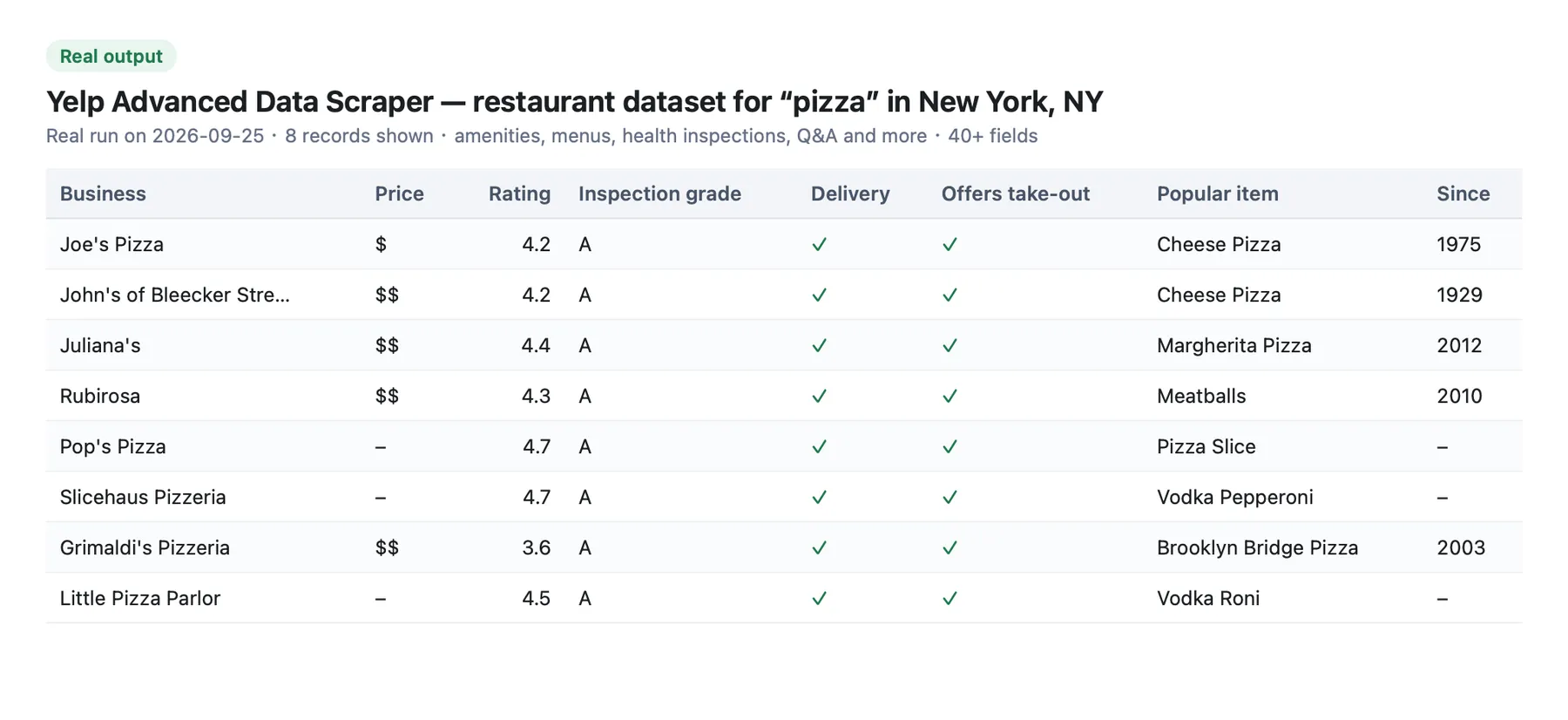
Each business is saved as one dataset record. The example below comes from a real run. Long texts and lists are shortened.
Tips for better datasets
- Cover a whole city. Yelp shows at most 240 organic results per search. To collect more, search neighborhoods, districts or nearby towns as separate locations.
- Separate organic and paid. Set
include_adstofalsefor organic-only rankings. If you keep ads, filter onis_adafterwards. - Take snapshots over time. Schedule the same input weekly or monthly. You can then compare ratings, review counts and rankings between runs by matching records on
yelp_biz_id. - Restore Yelp's order. Records are saved as soon as each business is scraped. Sort by
search_keyword,search_locationandrankto get Yelp's ordering back. - Only want your URLs? If you fill in both Option 1 and Option 2, both run. Clear Search keywords if you only want the pasted URLs.
- Automate it. Run the Actor from code with the Apify API, or connect it with webhooks and integrations.
Related Actors
- Yelp Reviews Scraper: add the review text, reviewer profiles and review dates to your dataset.
- Yelp Business Info Scraper: already have Yelp business URLs? Get the same 40+ fields for each one.
- Yelp Scraper - Business Leads, Phones & Websites: the same search engine, set up for lead lists and outreach.
FAQ and support
How is this different from Yelp Scraper - Business Leads?
Both use the same search engine, return the same fields and follow the same pay-per-result model. This page is written for research datasets. The other is written for lead generation. Pick whichever fits how you work.
Is it legal to scrape Yelp?
This Actor collects only publicly available business information from Yelp. It doesn't extract private user data. However, your results could contain personal data, such as the name of a business owner. Personal data is protected by the GDPR in the European Union and by other regulations around the world. Don't scrape personal data unless you have a legitimate reason to. If you're unsure whether your reason is legitimate, consult a lawyer.
Do I need a Yelp account or API key?
No. Just enter what to search for, or paste Yelp search URLs.
Can I use it with AI agents?
Yes. AI assistants and agents that support MCP can call this Actor through the Apify MCP server. Developers can run it from code with the Apify API or the client libraries.
Why are some fields empty?
Yelp shows different sections for different kinds of business, and not every owner fills in every section. For example, health inspections appear only in cities that publish them. Fields that don't apply to a business come back empty.
Something not working?
Open an issue from the Actor's Issues tab and I'll take a look.


