

Flashscore Tennis Scraper & API: Live Scores, Stats, H2H & Odds
Pricing
from $1.20 / 1,000 matches
Flashscore Tennis Scraper & API: Live Scores, Stats, H2H & Odds
Flashscore tennis data API: fixtures, live scores and results for ATP, WTA, Challenger and ITF matches, with optional match stats, point-by-point, head-to-head (H2H) and betting odds. From $1.50 per 1,000 matches.
Pricing
from $1.20 / 1,000 matches
Rating
0.0
(0)
Developer

Devarq
Maintained by CommunityActor stats
1
Bookmarked
2
Total users
0
Monthly active users
20 days ago
Last modified
Categories
Share
What is Flashscore Tennis Scraper?
Flashscore Tennis Scraper & API extracts tennis fixtures, live scores and results for ATP, WTA, Challenger and ITF matches from Flashscore, with optional match statistics, point-by-point, head-to-head (H2H) and betting odds. From $1.50 per 1,000 matches.
Tell it a date, a match or a player, and it returns clean, ready-to-use match data as JSON, CSV or Excel. There's no account to create on any tennis site, nothing to install and no proxies to configure.
The easiest way to try it: click Try for free, then Start with the default input. About 10 seconds later you'll have today's ATP and WTA matches. Apify's free plan includes $5 of credit every month, which covers about 3,000 matches.
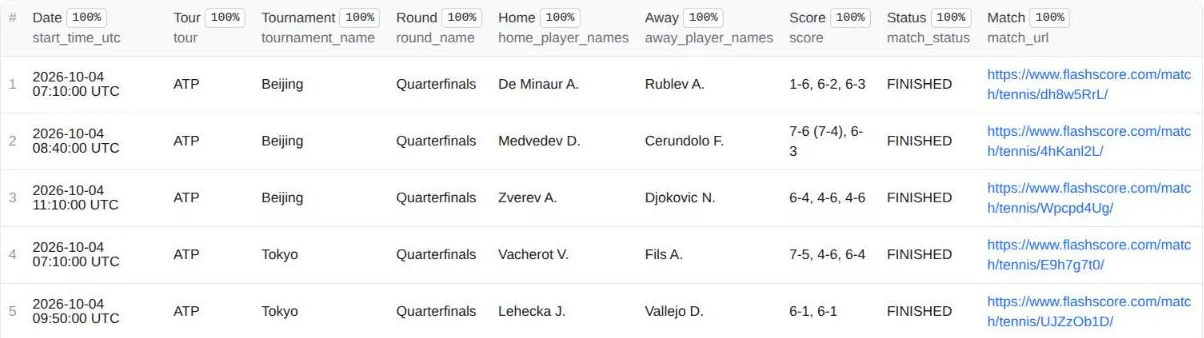
What tennis data can you extract?
- Fixtures and schedules, up to 7 days ahead
- Live scores, with the current game score and server
- Results with set scores, tiebreaks, set durations, rounds, seeds and umpire, up to 7 days back
- Match statistics for the whole match and each set: aces, double faults, serve percentages, break points and more
- Point-by-point, game by game
- Head-to-head records, overall and per surface, with each player's recent form
- Betting odds: pre-match bookmaker odds with opening odds and movement
- Player history: any player's recent results and upcoming matches
- Rankings: current ATP and WTA top-100 singles rankings
Why run it on Apify?
- Schedule it daily or every few minutes.
- Call it as an API from Python, JavaScript or any HTTP client.
- Monitor changes: get only the matches whose score or status changed.
- Connect it to Google Sheets, Zapier, Make or n8n, or let AI agents use it through MCP.
Why use this Actor?
Everything in one run. Most tennis scrapers give you either a basic match list or one kind of detail. This one returns fixtures, live scores, results, match statistics, point-by-point, head-to-head, odds and player history from a single Actor, all in the same format.
You only pay for what you actually get.
- Stats on a match that hasn't started? Not charged.
- A match that fails to load? Not charged.
- Matches removed by your filters? Not charged.
- A typo in a player's name? The run explains what went wrong and charges no results.
The only fixed cost is the $0.002 run start fee, which Apify charges for every run.
Verified data, never guessed. Player rankings are the current ATP and WTA singles rankings (top 100), and odds are real bookmaker prices. Anything that can't be verified is left empty rather than filled with a guess.
Built for automation and AI agents. An empty input already returns today's matches. Dates can be written as "yesterday" or "+2", any Flashscore link works, and every run ends with a plain-English status message.
How it compares with other tennis Actors on the Store
| This Actor | Tennis Scraper (crawlstone) | Flashscore Tennis Matches (extractify-labs) | Tennis Abstract Scraper (ParseForge) | |
|---|---|---|---|---|
| Fixtures, live scores, results | ✅ | ✅ | ✅ | ❌ history only |
| ATP, WTA, Challenger, ITF | ✅ | ✅ | ✅ | ATP & WTA |
| Match statistics | ✅ whole match + each set | per period, in point-by-point mode | ❌ | ✅ serve & return |
| Point-by-point | ✅ | ✅ | ❌ | ❌ |
| Head-to-head & per-surface record | ✅ | ❌ | ❌ | ❌ |
| Betting odds | ✅ with opening odds & movement | ✅ | ❌ | ❌ |
| Player results & upcoming matches | ✅ | ✅ | ❌ | ✅ |
| Rounds, seeds, umpire, set durations | ✅ | partial | partial | partial |
| "Only what changed" monitoring | ✅ | ❌ | ❌ | ❌ |
| Data source | Flashscore | Sofascore + Tennis Abstract | Flashscore | Tennis Abstract |
| Price per 1,000 results | $1.50 (+$2 per add-on used) | $8 (at least 1 result charged per run) | $1 | $21 + $0.0035 per run |
Compared on 2 October 2026 using each Actor's public Store page. Other Actors may have changed since; check their pages for current details.
How to scrape tennis data from Flashscore
- Click Try for free and sign in to Apify (the free plan is enough).
- Choose what you want: a date or date range, a match link, or a player. Or keep the default, which is today's ATP and WTA matches.
- Pick the tours (ATP, WTA, Challenger, ITF) and switch on any add-ons you need: statistics, point-by-point, head-to-head, odds.
- Click Start. Most runs finish in 10–60 seconds.
- Download the results from the Output tab as JSON, CSV or Excel, or fetch them through the API.
- Optional: schedule the run, and turn on
onlyChangesto track live scores cheaply.
What can you do with it? (recipes)
Each recipe shows the input to use. Copy it into the JSON input tab, or send it through the API.
Prefer one click? These ready-made examples run as-is:
- Yesterday's ATP & WTA results with match stats
- Tomorrow's tennis matches with betting odds
- Live tennis scores, only changed matches
- Head-to-head records for today's tennis matches
- Challenger & ITF tennis results: last 2 days
- Any tennis player's recent results and upcoming matches
1. Today's matches (default)
You get every ATP and WTA singles match today: scheduled, live and finished. If there are none today (for example in the December off-season), you get the nearest day's matches instead, and the status message tells you which day.
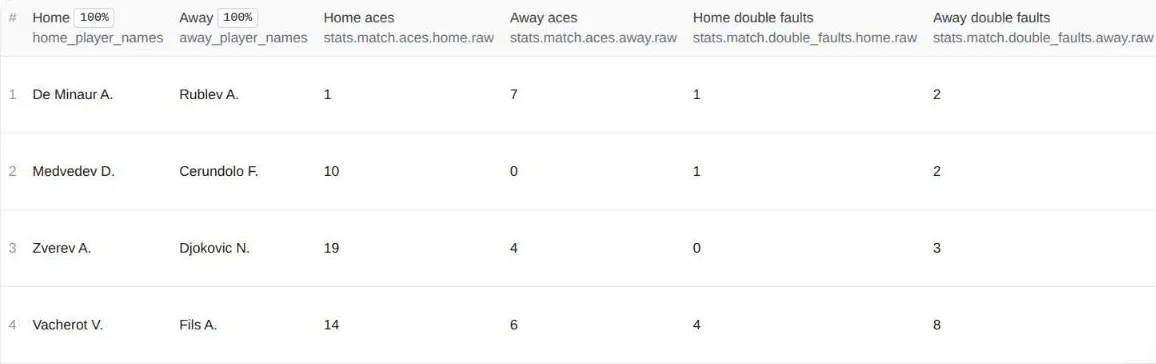
2. Yesterday's results with full statistics
You get each finished match plus aces, double faults, serve percentages, break points and more, for the whole match and each set.
3. Tomorrow's matches with betting odds
You get the schedule plus pre-match home/away odds (current, opening, and whether they've moved up or down).
4. A specific match, in full detail
Paste any Flashscore match link or ID. You always get statistics and point-by-point; add includeH2H for the head-to-head record.
5. A player's recent results and upcoming matches
Type a name ("Sinner", "Świątek" — accents optional) or paste a Flashscore player link. Matches come newest first, so upcoming matches are at the top. Add "status": ["scheduled"] for upcoming matches only.
6. A week of Challenger and ITF results
maxItems: 0 means "no limit". Your Apify maximum charge per run still protects you. A full week like this is over 1,000 matches: it takes about 5 minutes and costs about $1.70.
7. Live score monitoring (only changes)
Schedule this every 10–15 minutes. The first run returns everything; later runs return only matches whose score or status changed, so you only pay for updates.
What you get back
One row per match. A real example (De Minaur vs Navone, Beijing, 1 October 2026):
Each row also includes home_players and away_players (name, ID, country, ranking where available), sets (games and tiebreak points per set), and, while a match is live, current_game_score and current_server.
Add-ons (only when you switch them on)
includeStats adds stats: every statistic for the whole match (match) and for each set (set_1, set_2…). Each one has the original label plus parsed numbers:
Included: aces, double faults, first and second serve won %, break points saved and converted, return points won, service and return games won, total points and games, and more.
includePointByPoint adds point_by_point: every game in every set, showing who served, who won, whether it was a break, and each point's score, with break, set and match points marked.
includeH2H adds h2h: overall wins for each player, the record per surface (clay, grass, hard), past meetings with scores, and each player's recent form.
includeOdds adds odds: a list with one entry per bookmaker, each with current home/away odds, opening odds and the direction of movement. Matches without odds yet (often lower-tier ones the day before) have no odds field:
Ready-made tables
In the Output tab you can switch between Matches (an overview), Stats (key statistics as columns) and a flat CSV/Excel view that opens cleanly in spreadsheets.
How much does it cost to scrape tennis data?
You pay per result, with no subscription and no proxy fees. Prices drop on Apify's paid plans:
| Per 1,000 | Free plan | Starter | Scale | Business |
|---|---|---|---|---|
| Matches | $1.50 | $1.35 | $1.28 | $1.20 |
| Each add-on (stats, H2H, odds) | $2.00 | $1.80 | $1.70 | $1.60 |
The breakdown below uses free-plan prices:
| You get | Price |
|---|---|
| Each run | $0.002 |
| Each match | $0.0015 ($1.50 per 1,000) |
| + statistics and/or point-by-point | $0.002 per match that has them |
| + head-to-head | $0.002 per match that has it |
| + odds | $0.002 per match that has them |
What typical jobs cost:
| Job | About |
|---|---|
| Today's ATP + WTA matches (~25) | $0.04 |
| 100 finished matches with full statistics | $0.35 |
| One match with stats, point-by-point and H2H | $0.008 |
| A player's last 50 matches | $0.08 |
| Monitoring live scores every 15 minutes for a day | about $0.20 + changed matches |
Is it free? Apify's free plan includes $5 of credit every month. That covers about 3,000 matches, 125 daily match lists or 900 detailed single-match lookups.
Use it as an API
One HTTP request runs the scraper and returns the matches as JSON in the same response. Use your Apify API token (Console → Settings → API & Integrations):
Or in Python (pip install apify-client):
Each call starts a short run, so expect a response in roughly 10–60 seconds depending on the add-ons, not milliseconds. For live tracking, schedule a run every few minutes with "onlyChanges": true and you'll only receive (and pay for) matches whose score or status changed.
Use with AI agents (MCP)
Add this Actor to Claude, ChatGPT, Cursor or any MCP client through the Apify MCP server, then just ask:
- "What ATP matches are on tomorrow, with odds?"
- "Get yesterday's WTA results with full statistics."
- "Show Carlos Alcaraz's last 20 matches and his record on clay."
- "Give me the point-by-point of this match: https://www.flashscore.com/match/ldWaJXYa/"
Agents don't need perfect input. Relative dates, names instead of IDs, any Flashscore link and common field aliases are all understood. If something can't be found, the run says so plainly and charges no results (only the $0.002 run start fee).
FAQ
Which matches are included?
ATP, WTA, Challenger and ITF; singles by default, doubles with "matchType": "doubles". Grand Slams, Davis Cup and Billie Jean King Cup can be selected as tours too. Junior, wheelchair and exhibition matches appear as tour "Other" (select them with "tours": ["Other"]).
How far back and ahead can I go?
7 days back and 7 days ahead in date mode. Player mode returns a player's longer match history.
Are walkovers and retirements handled?
Yes. Each has its own status (WALKOVER, RETIRED, CANCELLED, INTERRUPTED) and result_type. The finished status filter returns only matches that were actually played (including retirements); use cancelled for walkovers, cancellations and postponements.
What time zone is used?
All times are UTC, and dates select UTC calendar days. A few matches starting right around midnight UTC may be listed on the neighbouring day.
How live are live scores?
Usually within a few minutes of the real score.
Are rankings always filled in?
Current ATP and WTA top-100 singles rankings are included. Lower-ranked players and Challenger/ITF players may have no ranking.
Are odds always available?
Only when bookmakers offer them for that match. They're never made up. For finished matches you get the closing pre-match odds, which is useful for backtesting betting models.
What if something breaks?
The Actor checks every run. If the data source stops returning valid data, the run fails clearly instead of giving you bad data, and no results are charged.
Is this an official Flashscore product?
No. It's an independent tool, not affiliated with or endorsed by Flashscore. Every row links to its source page.
Is it legal to scrape Flashscore?
This Actor collects only publicly visible match data: schedules, scores, statistics and odds. It collects no personal data beyond players' public names. Scraping publicly available data is generally lawful, but you're responsible for how you use the data and for any terms that apply to you. If you're unsure, check with a lawyer.
Can I send the data to Google Sheets, Zapier or Make?
Yes. Use Apify's built-in integrations (Google Sheets, Google Drive, Zapier, Make, n8n, Slack, webhooks) from the Integrations tab, or download any run's dataset as a CSV or Excel link.
My run returned no matches. Why?
The status message always says why:
- the date is outside the ±7-day window;
- your filters (tour, status, tournament, player) matched nothing;
- or the schedule isn't published yet. Flashscore usually publishes it a few days ahead.
Try the default input to check that everything works.
Do you build custom tennis or sports data solutions?
Yes. For a field, sport or data feed you need, email support@devarq.dev.
Found a bug or need a field?
Open an issue on this page or email support@devarq.dev.
Settings reference
Modes
mode | What to provide | What you get |
|---|---|---|
matches (default) | a date or date range | all matching fixtures, live matches and results |
match | matchIds (IDs or Flashscore links) | those matches with stats and point-by-point |
player | player (name or Flashscore link) | that player's matches, newest first (upcoming matches on top) |
All inputs
| Field | Works in | Type | Default | Description |
|---|---|---|---|---|
mode | – | string | matches | matches, match or player |
date | matches | string | today | YYYY-MM-DD, today, yesterday, tomorrow, or -7 … +7 |
dateFrom, dateTo | matches | string | – | a date range (same formats), within 7 days of today |
tours | matches | list | ["ATP", "WTA"] | ATP, WTA, Challenger, ITF, ITF Men/Women, Challenger Men/Women, Grand Slam, Davis Cup, Billie Jean King Cup, Teams, Other |
matchType | matches | string | singles | singles or doubles |
status | matches, player | list | all | scheduled, live (incl. suspended), finished (played to the end or retired), cancelled (walkovers, cancellations, postponements) |
tournament | matches, player | string | – | only tournaments whose name contains this text |
player | player, matches | string | – | player mode: who to look up (name or Flashscore link). matches mode: optional filter on player name |
matchIds | match | list | – | match IDs or Flashscore links |
maxItems | all | integer | 200 | maximum matches returned; when a date range has more, the ones closest to now are kept (latest results, soonest fixtures); 0 = no limit |
includeStats | all | boolean | false | add match and per-set statistics (always on in match mode) |
includePointByPoint | all | boolean | false | add point-by-point (always on in match mode) |
includeH2H | all | boolean | false | add head-to-head and recent form |
includeOdds | all | boolean | false | add pre-match odds |
onlyChanges | all | boolean | false | on repeated runs with the same input, return only matches that changed |
Inputs that don't apply to the chosen mode are simply ignored.
Output fields
Always present
| Field | Example | Meaning |
|---|---|---|
match_id | ldWaJXYa | Flashscore match ID |
match_url | https://www.flashscore.com/match/tennis/ldWaJXYa/ | link to the match |
start_time_utc | 2026-10-01T03:10:00+00:00 | scheduled start, UTC |
match_status | FINISHED | SCHEDULED, LIVE, FINISHED, RETIRED, WALKOVER, CANCELLED, INTERRUPTED |
tour | ATP | ATP, WTA, Challenger, ITF, Teams or Other |
category | singles | singles or doubles |
tournament_name, tournament_country | Beijing, China | tournament and host country |
surface | hard | hard, clay, grass, hard (indoor)… |
round_name | Round of 32 | round, when known |
home_player_names, away_player_names | De Minaur A. | names as text (doubles: A / B) |
home_players, away_players | list | per player: name, ID, country, ranking (top 100), photo link |
score | 7-6 (7-4), 6-2 | score as text |
sets | list | per set: games for each side, tiebreak points, duration |
winner | home | home, away or empty |
result_type | normal | normal, retired, walkover, cancelled… |
seeds, entries | {"home": "5"} | seeds, and qualifier / lucky loser / wild card flags |
duration_minutes, umpire | 115, Finke T. | when available |
current_game_score, current_server | {"home": "30", "away": "15"}, home | live matches only |
source_url, scraped_at | – | source link and collection time (UTC) |
Only with add-ons: stats (includeStats), point_by_point (includePointByPoint), h2h (includeH2H), odds (includeOdds). If one of them couldn't be loaded for a match, the row still arrives with details_error, h2h_error or odds_error explaining why, and that add-on isn't charged.
Changelog
0.1.11 (4 October 2026): when maxItems caps a date range, the matches closest to now are kept (latest results, soonest fixtures), and the status message says so.
0.1 (October 2026): first release. Date, match and player modes; statistics, point-by-point, head-to-head, odds, rounds and rankings; change-only monitoring; Matches, Stats and CSV/Excel views.


