
TikTok Ads Research Service
Pricing
from $0.03 / 1,000 raw ad results
TikTok Ads Research Service
Research TikTok promotion of a competitor or product in supported markets. Export messages, activity dates and source links for comparison. Paid-ad evidence and public activity are labelled separately.
Pricing
from $0.03 / 1,000 raw ad results
Rating
0.0
(0)
Developer

Diamade Group LLC
Maintained by CommunityActor stats
0
Bookmarked
3
Total users
2
Monthly active users
18 days ago
Last modified
Categories
Share
Research a competitor or product on TikTok
See how a competitor or product appears in your selected markets. Collect messages, activity dates and source links in a dataset you can review, compare and export to CSV, Excel or JSON.
Choose the task that matches your question:
- Research a specific competitor — enter a brand or advertiser and select the market.
- Research a product or topic — enter the phrase you want to investigate and select the market.
Replace the example query and country with your own. Start with Preview to inspect up to 12 unique activities before collecting more.
The service supports 32 European Ads Library markets plus US and Ukraine routes. Sources vary by market: public TikTok activity in US/Ukraine is identified separately from paid-ad evidence. Results depend on source availability; this is not a complete archive.
Example results: United States and Ukraine
Use the results to review a competitor's messaging or collect references for a product/category brief. These examples show public TikTok activity, labelled separately from paid-ad evidence.
| Research market | Query | Creator | Message to review | Source |
|---|---|---|---|---|
| United States | Nike | illestkicks | NIKE ILL SERIES @Nike @Complex Sneakers | View publication |
| Ukraine | ремонт (renovation) | zruchno.ua | Laminated plasterboard installation presented around avoiding dust, plastering and painting (English summary of the caption). | View publication |
The research market identifies the search route. Public posts do not establish paid sponsorship, brand ownership or creator location. Review original sources before using them in a brief.
Optional reports turn collected rows into readable documents from the same research.
Cost before you run
Preview has no result or report event fees; Apify account terms apply. Paid research uses the base-row price for your Apify plan, plus any applicable relevance, Detail or successful country-report events. See live Pricing; the “from” badge is not the complete job price. A successful country report currently costs $0.25 in addition to the applicable research fees.
This is an independent research tool and is not affiliated with or endorsed by TikTok.
What you receive
Readable result
Open Research report for an HTML overview of the run, its outcome, the useful results, and any action you need to take next.
Research results Dataset
The main Results dataset always contains accepted paid ads and, for US/Ukraine searches,
public TikTok activity matched to the query. recordType and the evidence fields
distinguish them; public videos are not claimed to be paid ads. Exact duplicate
public video IDs are collapsed, while different videos from one creator remain
separate. Paid rows merge only on the same canonical source ad ID; different ad IDs
remain separate even when their text is similar. Country observations retain their
provenance rather than being overwritten. Rows stream during acquisition, including
when an activity report is enabled; report documents are separate outputs based on
those rows. The paid-ad fields include:
- Advertiser
- Ad message
- Market
- First seen
- Latest seen
- Estimated audience
- Observed window
- Hashtags used
- Call to action
- Campaign goal
- Traffic destination
- Audience targeting
Supporting outputs
- Advertisers — advertiser identities connected to returned ads.
- Hashtag summary — Unicode-safe hashtag counts derived from returned ad text.
- Rejected candidates — machine-readable exclusions for audit and support.
- Run summary — outcome, completeness, counts, warnings, and next action.
- Run manifest — normalized input and technical provenance for automation or troubleshooting.
- Advertiser report — optional country-scoped verified-advertiser report where supported, or a labeled public-activity brief for US/UA query results.
- Public TikTok activity (US/Ukraine) — in the main Dataset for every research
mode and available in a supporting Dataset. The initial release uses broad query/hashtag
matching for manual review, so some rows may be irrelevant. These videos are not
verified paid ads; a search-market route does not prove creator location,
targeting, or paid sponsorship. Source continuation is not an exhaustive
history. Unique delivered public rows use the existing base-row tariff; no separate
public-only event or unenriched-public semantic/Detail fee is added. Check
SUMMARY.jsonfor source failures. Scheduled Watch runs do not include public activity yet.
Native Dataset export supports JSON, CSV, Excel, XML, RSS, and other Apify formats.
Ukrainian text and Cyrillic
Queries and results support Unicode text, including Ukrainian and other Cyrillic characters. Original query text is preserved; captions retain the text supplied by the source. You can keep native-language text when exporting results for review or analysis. Font appearance depends on the application used to open the data.
Choose the right research type
Product / Topic
Use this for queries such as running shoes, electric vehicles, or summer sale.
With Narrow results by semantic relevance enabled, the query must be a substantial
subject of the ad. If removing the query mention would leave the ad's purpose almost
unchanged, the ad is excluded as incidental.
Product / Topic research discovers relevant advertising. It does not claim that a keyword match proves exact advertiser identity or that every historical ad is present in the public archive.
Specific Competitor
Use this when you want ads that belong to a company or brand. A competitor can be a verified brand cluster containing several related legal advertiser identities — for example, regional entities belonging to the same brand. Each ad still retains the specific advertiser identity that supplied it.
If the name matches unrelated advertisers and they cannot be safely joined, the run does not guess. It returns a clear refinement step so you can choose the intended competitor.
For US/UA public search, Specific Competitor can use a brand-name query without
claiming a verified legal advertiser identity. If a returned public creator is the
intended target, repeat the same query with its competitorSelectionId as
competitorClusterId (for example, tiktok_public:creator:1234567890123456789).
This selects that creator's videos observed in the query results; it is not an
arbitrary creator-ID profile crawl or proof that the creator legally represents
the brand. Public creator IDs are separate from Ads Library business IDs.
Preview, Full research, and optional reports
| Mode | Best for | Depth |
|---|---|---|
| Preview | Checking relevance and output quality before a larger run | Up to 12 unique activities across the whole request; no result or report event fees |
| Full research | A requested research scope for export, analysis, or enrichment | Source-labeled rows with one optional total unique-activity limit |
Enable Add activity report for Summary or Detailed documents alongside your
research rows. Every mode streams the same typed rows to the default Dataset as
they become available. Reports use those collected rows; they do not rerun research
or charge a second row fee. The older researchMode: "report" API value is accepted
as Full research with the report enabled. The form retains Full + Report (legacy
compatibility) so existing Task and API inputs pass native schema validation;
new runs can use Full with Add activity report.
Maximum results (total), maxResults in JSON, is one shared limit on unique
activities across every selected country, query, paid-ad source and public-video
source. Leave it empty in Full research to request source-available results
without a user-set cap; this may take longer and cost more. Clear it for Preview.
For a first Full run, select one or two countries and enter a modest limit.
See the report before you run
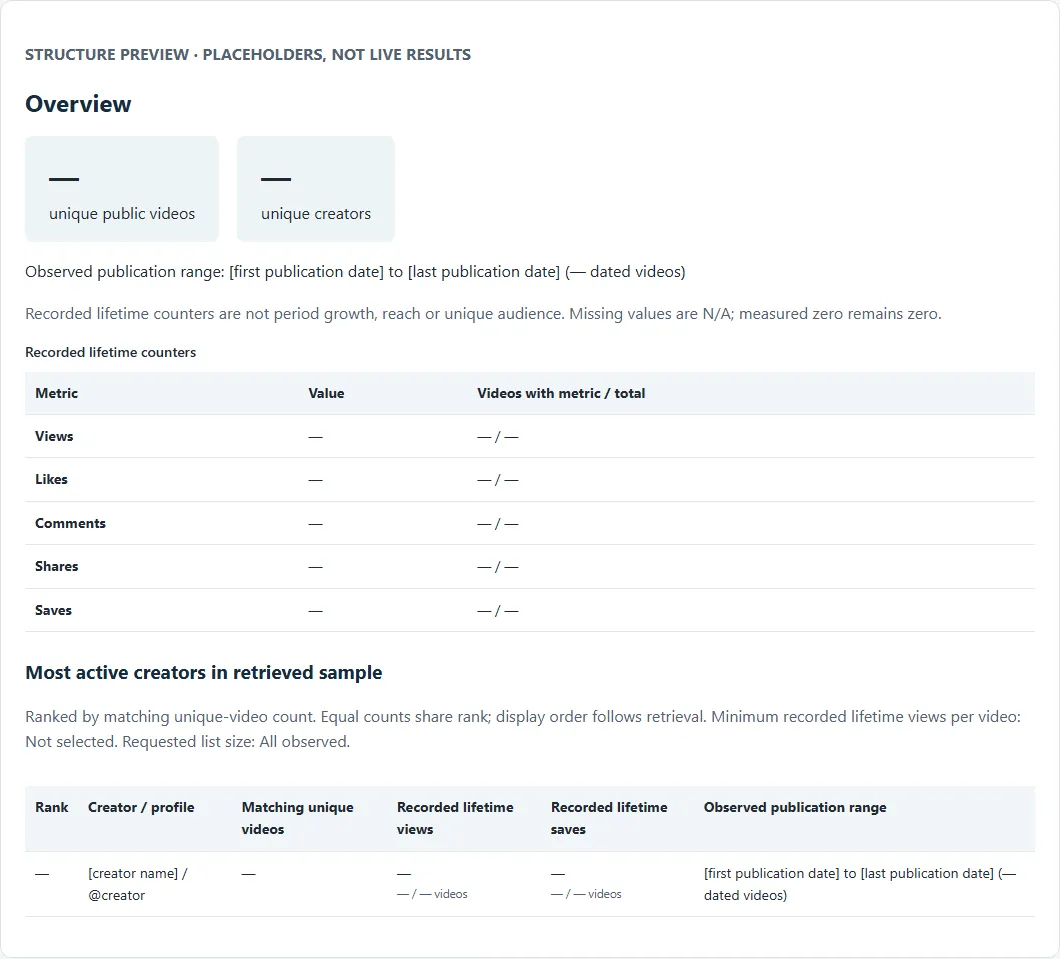
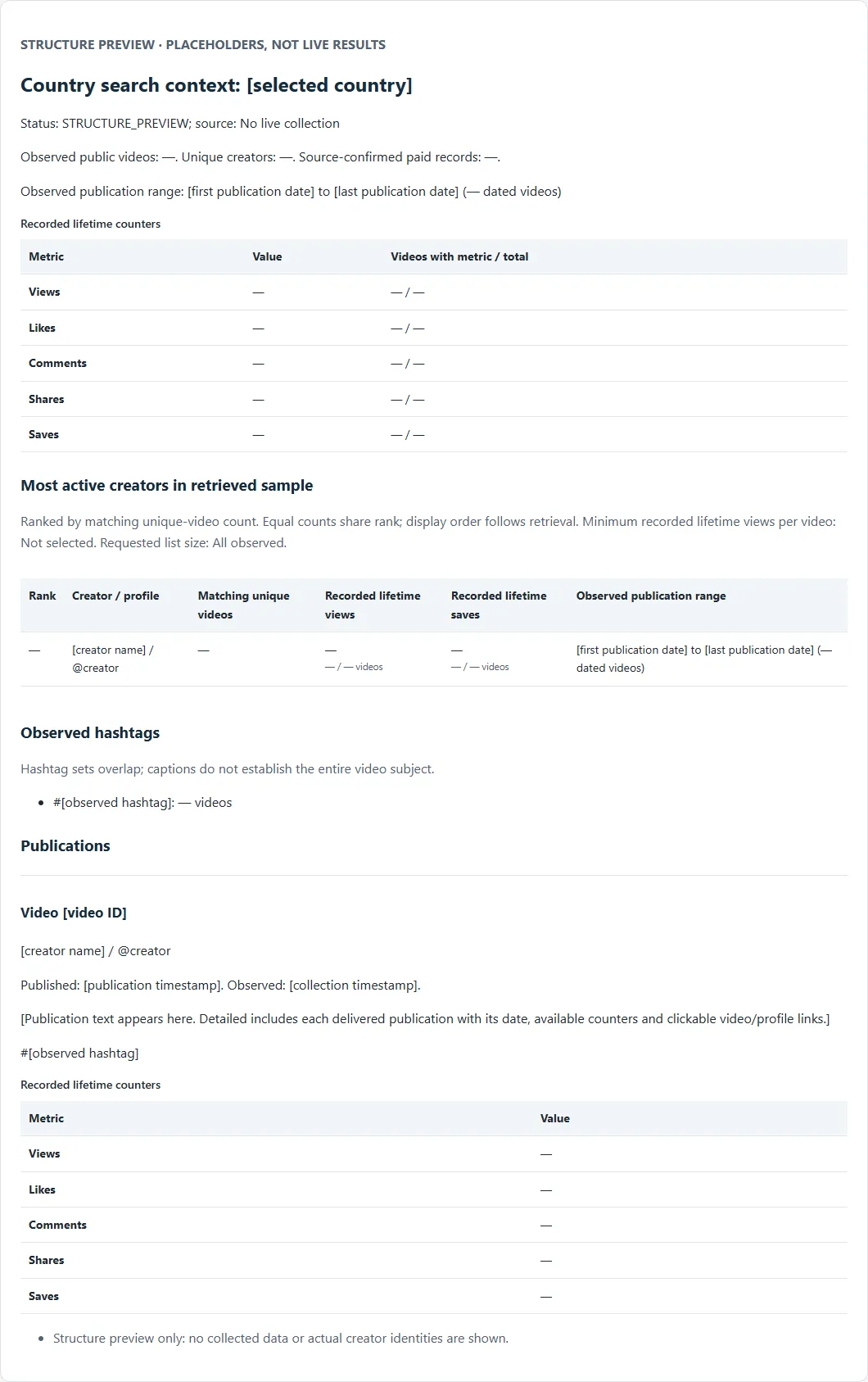
These are structure previews with placeholders, not live results. They show selected sections of the actual UA/US HTML report layout. Click an image to open the complete example structure; no TikTok or Apify login is required.
Summary — the activity overview
See the selected publication period, observed publication and creator counts, recorded lifetime counters, hashtags and most active creators in the retrieved sample.
Detailed — the overview plus publication-by-publication evidence
Includes Summary's scope and metrics plus every delivered public publication: text, publication date, available counters and clickable video/profile links. Actual missing fields are shown as N/A; no unavailable metrics are invented. HTML, plain text and JSON are available for reading, translation and automation. These previews describe UA/US public-activity reports; European advertiser reports retain their separate source-supported presentation.
Report pricing
| Report | Current fee per successfully delivered report |
|---|---|
| Summary | $0.25 per selected company or topic scope, per country |
| UA/US Detailed | $0.25 per selected company or topic scope, per country |
Only one report fee applies to each company/topic scope and country. Multiple countries produce separate report units. One topic report covers the combined selected topic phrases in that country; it is not billed once per phrase. Multiple-company input is not supported. Failed, blocked or empty country sections do not incur successful-report fees.
Research-row and applicable paid-row enrichment charges remain additional. Public activity retains its public-source label and uses the base-row tariff; the billing event's name does not establish paid sponsorship. Unenriched public rows have no semantic relevance or per-ad Detail fee. Preview has no result or report event fees. Check live Pricing for your plan and the full event schedule before running paid research. A report run checks whether its spending limit covers the selected report units.
Dates and market coverage
Use the calendar for From and To dates where custom dates are supported. API/JSON
input also accepts DDMMYYYY, DD.MM.YYYY, DD/MM/YYYY, and YYYY-MM-DD;
recent, now, or today can be used as an end date. Invalid, impossible,
future, and reversed ranges are rejected before research begins with a correction.
The core scope covers 32 supported European Ads Library markets. Explicit market selection also includes United States (US) and Ukraine (UA) through the available TikTok Creative Center and public-search routes. The Creative Center's curated paid-ad view has a source-limited, approximately 30-day lens. That limit does not describe all public-video history: a US public-search sample has included publication dates from 2020 through 2026, without establishing archive completeness. For US/UA, From/To dates filter public videos by their publication dates using inclusive UTC calendar days. Empty boundaries leave that side open. Videos with unknown publication dates are excluded when an interval is requested. Curated paid Creative Center Top Ads are skipped for dated routes because that source does not support arbitrary publication windows. Without dates, available paid and public sources may both contribute. This filter selects observed publications; it does not establish a complete historical archive. European Ads Library markets retain their source time-window semantics.
In the input form, choose Market coverage → Selected markets, then select
🇺🇦 Україна / Ukraine (UA) or 🇺🇸 United States (US) under Selected
countries. All 32 European markets does not include either one.
Full has no fixed 20-row Actor cap: it attempts source continuation and delivers
what it can retrieve, but source interruption or unavailable content can make
coverage incomplete. Public-video search follows available source pages and
deduplicates video IDs, but it is not an exhaustive TikTok archive. A fixed To date
includes the entire UTC day. First seen, Latest seen, and Observed window describe public
source observations; they do not prove uninterrupted activity between those dates.
The Full result limit, including runs with a report, is shared by paid ads and public videos across all countries and queries;
one creator may contribute several distinct videos. Preview samples up to 12
combined rows across the request.
Optional value layers
Ad Detail
Detail enriches the same canonical row with successfully available destination, CTA,
campaign goal, targeting, and media information. You do not have to join a second ad
table. If Detail cannot be verified for an ad, the valid base row remains available
and its detailStatus explains what happened.
Detail applies only where the paid-ad source supports it. Public videos are not enriched or represented as detailed paid ads.
Advertiser Report
Enable Add activity report (advertiserReport: true in JSON), then choose
Summary or Detailed. The level is used only while the report is enabled.
Country reports are additional HTML, TXT and JSON documents built from the same
delivered rows. The default Dataset always contains typed research rows; a report
does not replace them. Per-ad Detail may be enabled alongside a report and applies
only to supported paid-ad rows. Multiple-company input is not supported. Base-row
and eligible paid-row enrichment events remain additional; Summary uses the $0.25
successful-report event. UA/US Detailed currently uses the same $0.25 successful-country-report fee.
Only one report-level fee applies per company/topic scope and country. European
advertiser presentation retains the Summary fee, even if Detailed is selected.
Preview has no result/report event fees. Activity reports do not support Watch.
Older API calls without researchMode still accept resultMode and outputMode.
For those calls, omitted outputMode preserves row delivery.
advertiserReport: true enables the additive report, including with explicit Rows.
New form runs use researchMode and the visible report checkbox; legacy selectors are hidden.
outputMode: "report" requests the report regardless of the legacy flag when
researchMode is omitted. Legacy Preview reports remain free of result/report event fees.
Available for Specific Competitor research. US/UA Product / Topic searches can also
request the public-activity brief described below. The report is country-scoped and
returned in a stable envelope. A successful country remains useful when another country has no
report data or is temporarily unavailable. For US/UA, the report contains a typed
public_activity_brief based on actually delivered public videos and any delivered
paid-ad rows. It summarizes observed videos, creators, dates, hashtags, and available
engagement counts with source-status caveats. Engagement sums are not unique audience
counts. observed_brand_query and exact_public_creator identify the public-query
binding, not a verified legal or paid-ad advertiser affiliation.
UA/US Summary includes query and publication scope, collection timing, global unique-video totals, country sections, hashtags, recorded counters, and the most active observed creators. Detailed adds every delivered public publication with text, publication date, available counters, and video/profile links. European advertiser reports retain their existing country-scoped advertiser presentation.
Most active creators are ranked by matching unique-video count in the retrieved
sample; equal counts share a rank. Optional creatorTopLimit limits the displayed
ranking. Optional creatorMinViews qualifies individual videos by their available
recorded lifetime views for this ranking only. Neither option removes evidence rows
or changes report totals. Counters are lifetime values recorded at collection,
not views gained, reach, or unique audience within the publication period.
Result states you can act on
SUCCESS_WITH_RESULTS— research activities or country reports were delivered; inspectpaidAdRows,marketSignalRows, chosen output, and completeness for evidence class and scope.VALID_EMPTY— the requested sources completed without a delivered result.PARTIAL_RESULT— useful output exists, but part of the requested scope did not complete. The summary says what remains and what to retry.BLOCKED_FAILURE— the run could not produce a trustworthy result. It is never presented as an empty success.INVALID_INPUT— one or more fields need correction before research can begin.TARGET_REFINEMENT_REQUIRED— unrelated advertiser candidates were found; select the verified competitor you intended.
The Actor does not fail silently: every blocked, invalid, or partial run provides a
reason and a recommended next step in SUMMARY.json and the human-readable report.
Common questions
Can I research TikTok activity in Ukraine and the United States?
Yes. Select Ukraine (UA) or United States (US) explicitly. Product / Topic searches
such as ремонт and running shoes can return public videos as well as available
paid-ad results. Specific Competitor searches can discover brand-related activity;
copy a returned competitorSelectionId to refine the same query to one exact public
creator. Brand-name matches alone do not establish ownership or paid sponsorship,
and the search country does not establish where each creator or audience is located.
What does Report output provide for UA/US?
It turns the delivered results into a separate country summary: observed video and
paid-ad counts, distinct public creators, publication dates, frequent hashtags,
available engagement counters, and example links. It does not invent missing
metrics or guarantee a complete archive. All underlying activities remain in the
default Results Dataset, with their source labels.
UA/US reports are available as HTML (RESEARCH_REPORT.html), plain text for reading
or translation (RESEARCH_REPORT.txt), structured activity data (ACTIVITY_REPORT.json),
and the stable country envelope (ADVERTISER_REPORT.json). Summary shows scope,
totals, recorded counters and creator rankings; Detailed adds all delivered public
publications. Paid examples are a bounded sample; the full underlying delivered
activities remain in Results. Full uses the existing additional report PPE event for
each successfully delivered country report; Preview does not charge report events.
An API example for Ukraine with Report output is:
For a US example, use "countries": ["US"] and "query": "running shoes".
Choose your own result limit; 100 is an example, not a permanent Actor ceiling.
These dates select public-video publications and skip curated paid Top Ads.
Check the live Pricing tab and choose a spending limit before a Full run.
Does this provide every TikTok ad ever published?
No. It researches the ads the public source makes available for the selected scope. The Actor makes completeness explicit and never labels a source failure as “no ads”.
Is Product / Topic the same as exact competitor research?
No. Product / Topic finds materially relevant advertising about a subject. Specific Competitor first establishes a trusted advertiser or brand-cluster identity.
What happens when one selected country has no data?
Useful results from other countries remain available. The summary identifies the empty or unavailable country and, for a temporary source problem, recommends trying that country separately later.
Can I research several products or topics in one run?
Yes. Enter the first phrase in query and add other phrases to the optional
Add more products or topics list (queries in JSON). Each phrase is searched
independently. For example, query: "ремонт" and queries: ["вікна"] mean two
searches, not one combined phrase. Keep a multi-word product in one list item;
commas in the main phrase are not automatically split.
The list shares one total Full result limit across all countries and the global 12-result Preview
cap. Searches follow list order; a filled limit can stop later phrases. Same-ID
overlaps merge, and matchedQueries identifies the matching phrases. One topic
Report summarizes the combined delivered results per country; overlap does not
create duplicate row charges. This list is not a multiple-company or Watch mode.
For multi-topic US/Ukraine runs, paid-source acquisition shares a time budget so one stalled source cannot consume the entire run before public search starts. Source interruptions are explained in the Run summary; they are not proof that no matching content exists. Available results are retained with partial coverage.
Are duplicate ads exported twice?
The default Dataset merges repeat observations of the same source ad ID, including
observations in several markets. Different ad IDs remain separate even when their
text looks alike. sourceAdIds, adInstanceCount, and adInstances preserve the
merged same-ID evidence. Public videos are deduplicated by exact video ID, never
by creator.
Does a missing ad mean that it was deleted or stopped?
No. One absence can be caused by the selected window, market scope, filters, or public source visibility. The debut research release does not present one missing observation as proof that an ad was removed.
Is scheduled Watch / Delta monitoring included?
Not in this debut Store surface. Its independent baseline, comparison, notification, and billing lifecycle is being completed separately so ordinary research runs cannot silently create or change monitoring state.
Are there ready-to-run US and Ukraine examples?
Yes. Use the existing regional Preview examples to inspect results, or the Report examples to request Full research with an activity report:
- United States Preview
- Україна: Preview
- United States competitor activity Report
- Україна: звіт про активність конкурента
The Report examples request country summaries with underlying evidence retained. Older Report mode inputs resolve to Full plus an additive report. Review the query, optional result limit and live Pricing before starting Full. Public name matches do not prove brand affiliation. These examples are independent runs, not a scheduled Watch or multi-company mode.
Support
Open SUMMARY.json first. It explains what completed, what did not, and what to do
next. If something does not work as expected, write to us through the Actor's Apify
support channel. We read every report and will respond as quickly as we can with a
practical answer, a fix, or a clear update.
If a missing feature would make the product more useful to you, tell us about it. We cannot promise every request, but we may add it when it fits the product and can be delivered reliably.
Please include the run link whenever possible. Never post passwords, API tokens, identity documents, or other credentials in a support message.
Release notes
See ./CHANGELOG.md for customer-visible changes.
About the example data
The US row is retained from the October 1, 2026 US-route Nike creator-selection test; the Ukraine row is from the September 30, 2026 renovation-topic result. They illustrate source-labelled output, not a newly combined research run, a paid customer case or current acquisition availability. The Ukraine run returned a partial result when source pagination stopped. Dates are shown only where retained in the source data; the Ukraine publication date is September 26, 2026. The US example's publication date was not retained in this evidence extract.


![Tiktok Ads Scraper [PPR] avatar](https://images.apifyusercontent.com/Gjnh30R7vCrBGikmI94ktdFtvTZxfxWqU7l6YW2Ludk/rs:fill:76:76/cb:1/aHR0cHM6Ly9hcGlmeS1pbWFnZS11cGxvYWRzLXByb2QuczMudXMtZWFzdC0xLmFtYXpvbmF3cy5jb20vclJwVHlkc3FrSjl3aG1GYTItYWN0b3ItZTVsNlpTVUhBaWg0Yjd2S1MtSktZWGdkaUlqRy10aWt0b2sucG5n.webp)


