

AI Image Upscaler (Real-ESRGAN 4x / 2x)
Pricing
from $16.00 / 1,000 image upscaled (up to 512x512)s
AI Image Upscaler (Real-ESRGAN 4x / 2x)
Upscale images 4x or 2x with Real-ESRGAN on CPU, no external API. Paste JPEG, PNG or WebP URLs; get PNG, JPEG or WebP files with direct links, transparency kept. From $0.02 per image (up to 512x512 input); failed images free.
Pricing
from $16.00 / 1,000 image upscaled (up to 512x512)s
Rating
0.0
(0)
Developer

Dongjin Kim
Maintained by CommunityActor stats
0
Bookmarked
2
Total users
1
Monthly active users
4 days ago
Last modified
Categories
Features
Share
AI Image Upscaler makes images 4x (or 2x) larger with Real-ESRGAN — the open-source super-resolution model (realesr-general-x4v3, BSD-3-Clause) — running on the CPU, no external API. Paste image URLs (JPEG, PNG, WebP); each upscaled image is saved in the run's key-value store as PNG, JPEG or WebP, with one row per URL: status, input and output size, file size, and a direct download link. Transparent PNG/WebP images keep their transparency.
It is a general-purpose upscaler: it sharpens edges and textures and removes JPEG artifacts and noise. It does not restore faces, repair scratches or damaged photos, colourise, or invent detail that is not there — see Limits.
How to use
- Click Start — the input is prefilled with a 250x250 public-domain (CC0) photo, so you get a 1000x1000 result in under a minute.
- Replace it with your image URLs (paste a list with Bulk edit, one URL per line). Linked or uploaded URL lists are not supported — paste the URLs themselves.
- Optional: scale 2x instead of 4x, output format (PNG / JPEG / WebP), denoise level, the max input size, and a ZIP link for all results.
- Click Start. Each row's
kvUrlopens the upscaled image; export the table as JSON, CSV or Excel, or use the Apify API.
Before and after
Real runs of this actor (2026-11-15), crops at the same zoom — left: the input enlarged with ordinary bicubic resizing, right: this actor's 4x result (denoise: medium).
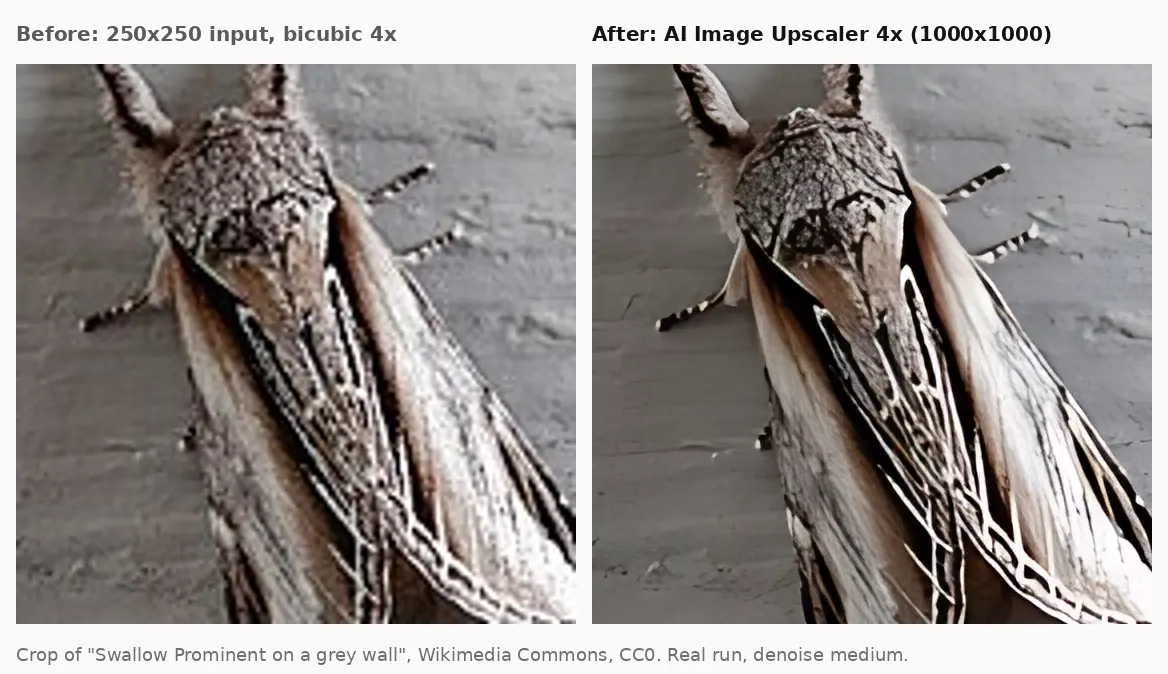
A 250x250 photo of a moth (Wikimedia Commons, CC0) → 1000x1000.
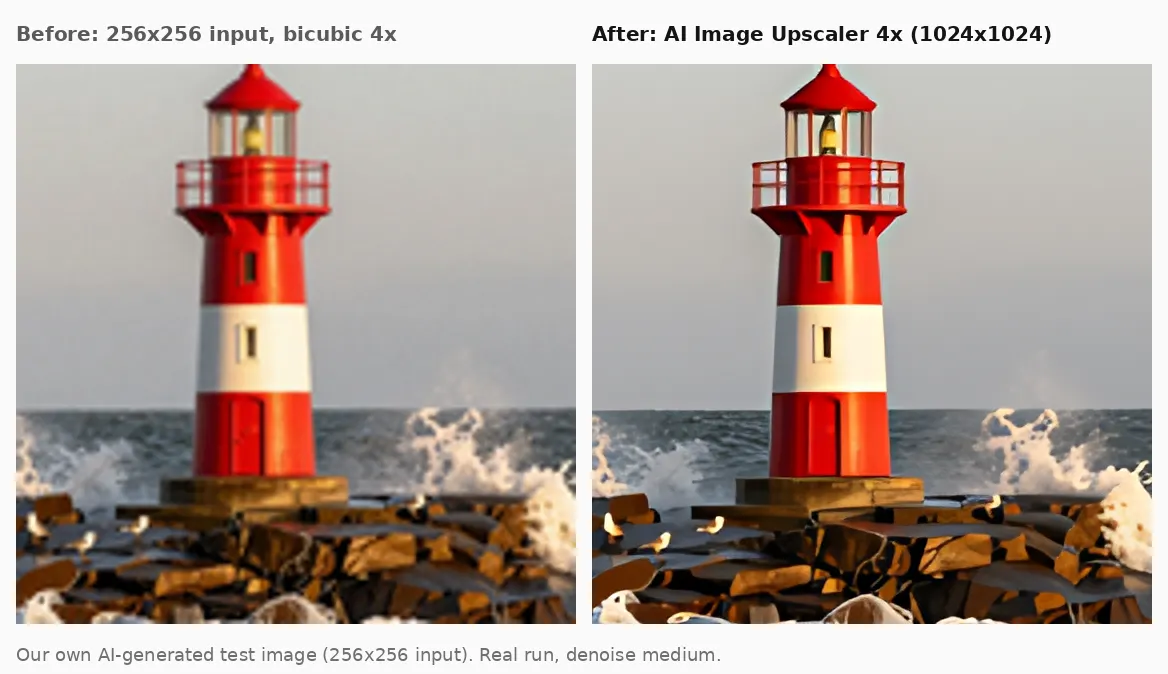
Our own AI-generated test image, shrunk to 256x256 → 1024x1024.
What you get
One row per URL. Rows from a real run (2026-11-15), shortened:
| Field | Meaning |
|---|---|
url | The image URL you gave. |
status | ok, or why the image was not upscaled (see the table below). Only ok rows are charged. |
inputWidth / inputHeight / inputFormat | The input image's size in pixels (after applying its EXIF rotation) and format. |
outputWidth / outputHeight / format / bytes | The result's size in pixels, its format (png, jpeg, webp) and file size. |
kvKey | Key of the record in the run's key-value store: upscaled-<name from the URL>-x4.png. If two URLs end in the same name, the later one gets its position added (photo-7). |
kvUrl | Direct link to the upscaled image. It carries a signature, so it opens without an API token — anyone with the link can open the image while the run's storage is kept. |
seconds | Time spent upscaling and encoding this image. |
chargedEvent | Which price event this image was charged as (by input size), or null. |
error / note | Why it failed; or a note for an upscaled image (for example: only the first frame of an animated image, transparency turned white in JPEG). |
ZIP. With zip: true the run report (zipUrl) and the run's status message contain one link that downloads every upscaled image of the run as one ZIP. Apify packs it when you open the link — not charged by this actor. The ZIP link's signature gives read access to the whole run key-value store (including the run report), so share it only with people who may see all of it.
Use cases
- Small product, catalogue or listing photos that look soft on large screens — your own photos or ones you have the rights to.
- Old web graphics, icons and screenshots saved at low resolution.
- AI-generated images (often 512–1024 px) made bigger for print or wallpapers.
- Batch jobs: hundreds of images through the API or a schedule, results as links or one ZIP.
Input
| Field | Default | |
|---|---|---|
imageUrls | — | Direct links to JPEG, PNG or WebP images, up to 1,000 per run, 50 MB per file. |
scale | 4 | 4 = 4x width and height. 2 = the 4x result resized to 2x with Lanczos (sharper than a native 2x pass; same price). |
outputFormat | png | png (lossless, transparency), jpeg (quality 95, 4:4:4; transparent areas become white), webp (quality 95, transparency; sides up to 16,383 px). |
denoise | medium | Real-ESRGAN's denoise strength: weak (0 — keeps grain and fine texture), medium (0.5, the official default), strong (1 — smoother). |
maxInputMegapixels | 2 | Larger inputs are skipped (too_large, free). 1–4. |
maxItems | 100 | Process at most this many URLs (the first ones). |
zip | false | One ZIP link for all results. |
Example (API / JSON input):
Pricing
Pay per event — one event per upscaled image, by the input image's size (the work depends on the input pixels, not on the scale or format you choose):
| Event | Input size | Price (Free plan) | Bronze | Silver and above |
|---|---|---|---|---|
image-upscaled | up to 262,144 px (e.g. 512x512, 640x400) | $0.02 | $0.018 | $0.016 |
large-image-upscaled | up to 1,048,576 px (e.g. 1024x1024, 1280x800) | $0.08 | $0.07 | $0.065 |
xl-image-upscaled | over that, up to 4 MP (e.g. 2000x2000) | $0.30 | $0.27 | $0.25 |
Failed, refused and skipped URLs are free (download errors, not an image, too large, robots.txt, time-outs). No start fee and no per-row fee; the compute is included in the event price. Set a maximum cost per run: before each image the actor checks that its price still fits; at the first image that would go over, the run stops (the remaining URLs are listed as not started in the run report).
Why the bands: the work grows with the input's pixels — a 2000x2000 input is 16x the work of a 500x500 one. Each band's lowest price is over 5x our measured Apify platform cost for the largest image in that band (2026-11-15, 4 GB: about $0.011 per input megapixel; a 4 MP image cost us $0.045). Most upscaling jobs are small images: those cost $0.02 each.
Run report and statuses
RUN_REPORT in the key-value store: images saved, events charged per size band, failed URLs by reason (up to 1,000 with details), compute seconds, whether your maximum cost stopped the run, the ZIP link, the settings used.
| Status | Meaning (never charged) |
|---|---|
ok | Upscaled and saved. Charged once. |
not_an_image | Not a JPEG, PNG or WebP image (a web page, PDF, GIF, HEIC, SVG …), or the file is corrupt / cut off. |
unsupported_format | The file is an image in another format. |
too_large | Over maxInputMegapixels, a side over 8,192 px, or a file over 50 MB. |
too_small | A side under 8 px. |
output_too_large | WebP cannot hold the result (a side over 16,383 px): use PNG / JPEG or scale 2. |
http_error | The server answered with an error (404, 403 …). |
robots_txt | The site's robots.txt does not allow this URL for bots. |
invalid_url / blocked_site / terms_of_use / private_page | Not a public http(s) address (or one with a user name and password in it), or a site on this actor's never-fetch list (see Responsible use). Spaces and non-ASCII characters in a URL are encoded for you, as a browser does. |
download_failed | Network error, a server answer that is not valid HTTP, cut-off download or over 120 s. |
timeout | Upscaling one image took over 15 minutes. |
storage_error | The key-value store refused the result. |
internal_error | An unexpected error for this image (please tell us). |
Speed
Upscaling runs on the CPU with ONNX Runtime, tile by tile (768x768 tiles with a 24 px overlap, so there are no visible seams). On the default 4 GB memory (1 CPU core) it takes about 30–45 seconds per input megapixel (measured on Apify, 2026-11-15) — a 250x250 image about 1.5 s, 500x500 about 5 s, 800x600 about 18 s, 1920x1467 (2.8 MP) about 2 minutes, 2300x1739 (4 MP) about 3 minutes. You can give the run up to 8 GB (2 CPU cores) for faster images; 2 GB works but took twice as long. The price per image is the same whatever the memory.
Run time limit: runs stop after 4 hours by default. At the default 4 GB that is roughly 300–400 MP of input — e.g. 100 images of 2 MP take about 1.5–2.5 hours, 1,000 images of 512x512 about 1.5–2 hours. Images finished before a time-out keep their rows and links (and are charged); for bigger batches raise the run's timeout or split the list. The next image is downloaded while the current one is upscaled.
Limits — be aware
- General upscaling, not photo restoration. Real-ESRGAN makes edges and textures crisp and cleans compression noise. It does not restore faces (no GFPGAN / CodeFormer), fix scratches, tears or blur from camera shake, or bring back detail that is not in the input; on faces and small text it can look painted. Try
denoise: weakif results look too smooth. - Input up to 4 MP (default 2 MP). This is for making small images big — to upscale a 12 MP phone photo, resize it first.
- JPEG, PNG and WebP only (including multi-picture phone JPEGs: the main photo is used). Animated images: only the first frame. 16-bit images are converted to 8 bit. An RGB colour profile (ICC) is kept; other metadata (EXIF, GPS) is not copied to the result.
- Direct image links only. Share pages are web pages (
not_an_image). - Results stay in the run's storage for as long as Apify keeps your runs (your plan's data retention).
Responsible use
- You are responsible for having the right to use and modify the images you upscale. Upscaling does not give you any right to someone else's photo or artwork. Use your own images, images with a licence that allows changes (public domain, Creative Commons — keep the attribution), or images you have permission for.
- Do not use it to pass off a low-quality copy as an original or to mislead about what a photo shows.
- Personal data: photos of people are personal data. You are responsible for having a lawful basis to process them (for example under the GDPR, PIPEDA or Korea's PIPA).
- Your images are not kept or reused. The input is downloaded to a temporary file, upscaled and deleted; only the result is written — to your run's key-value store. We do not keep copies, look at them, or use them to train anything.
- By our own policy the actor never fetches: localhost or private network addresses; video, social and stock-photo platforms and their media hosts (YouTube, TikTok, Instagram / Facebook, Threads, X / Twitter, Reddit, Discord, Pinterest, LinkedIn, Getty Images, iStock, Shutterstock, Adobe Stock and others); Google (Drive, Docs, Images); large retailers and marketplaces and their image hosts (Amazon, eBay, Walmart, Etsy, AliExpress, Temu, Shein and others); login, account, cart and checkout pages.
- The bot identifies itself:
DojitoUpscaleBot/1.0 (+https://apify.com/dojito/ai-image-upscaler; contact djkim@dojito.com), obeys robots.txt and paces requests to each site. It does not rotate proxies or disguise itself. - General information, not legal advice.
FAQ
Which model is it? realesr-general-x4v3 from Real-ESRGAN by Xintao Wang et al. (BSD-3-Clause), the compact general-purpose model, blended with its "weak denoise" twin realesr-general-wdn-x4v3 for the denoise setting — exactly like the official script's --denoise_strength. We converted the official release weights to ONNX ourselves (no third-party copies) and checked the output matches PyTorch.
Why is 2x the same price as 4x? 2x is made from the 4x result (the model is a 4x model), so the work is the same. The 2x result is sharper than a plain 2x resize.
Can I upscale images from my computer? Upload them somewhere that gives a direct public link (your website, an S3 / R2 bucket, an Apify key-value store record), then paste those links.
Is my run charged if all images fail? No. Failed rows are free, and a run where nothing could be upscaled ends as failed with the reasons.
Are images re-done if the run restarts? When Apify moves a run to another server (a migration), the actor saves its progress first, charges nothing more on the old server, and continues where it stopped on the new one, so no image is charged twice. Progress is also saved every minute; if a run crashes for another reason and is resurrected, images finished in the last minute before the crash can be upscaled and charged again.
Not affiliated with Apify, Real-ESRGAN's authors or any website mentioned. Example images: Wikimedia Commons — "Swallow Prominent on a grey wall" (CC0), "PNG transparency demonstration 1" by Ed g2s, Daniel G. and CyberShadow (CC BY-SA 3.0), "Boucherie in São Paulo City" (CC0). Real-ESRGAN © 2021 Xintao Wang, BSD-3-Clause — licence text in the actor's model/LICENSE-Real-ESRGAN.txt.


