
Free PDF to Word Converter Online
Pricing
Pay per usage
Free PDF to Word Converter Online
Convert PDF to Word online free with Zone of Tools. Fast, accurate, layout-preserving PDF to DOCX conversion — no signup, no software needed.
Pricing
Pay per usage
Rating
0.0
(0)
Developer
Download Mate
Maintained by CommunityActor stats
0
Bookmarked
2
Total users
1
Monthly active users
7 days ago
Last modified
Categories
Share
PDF-to-Word-Converter
Convert PDF to Word online free with Zone of Tools. Fast, accurate, layout-preserving PDF to DOCX conversion — no signup, no software needed.
PDF to Word Converter: Convert PDF Files to Editable Word Documents Free
Introduction
PDF files are the standard for sharing documents because they preserve formatting across every device and operating system. But that same strength becomes a limitation the moment you need to edit the content. Copying text out of a PDF often breaks the layout, scrambles tables, and strips out images, leaving you with a mess that takes longer to fix than it would have taken to retype the document from scratch.
The PDF to Word tool on Zone of Tools solves this problem in seconds. Upload any PDF file and get back a fully editable Word document (.docx) with the original formatting, fonts, tables, and images intact. There is no software to install, no account to create, and no cost involved. Whether you are a student editing a research paper, an office professional updating a contract, or a business owner reformatting a proposal, this tool turns a locked PDF into an editable document with a single click.
Try Our Free PDF to Word Converter
Ready to convert your PDF into an editable Word document?
Try Now: PDF to Word Converter →
What Is a PDF to Word Converter?
A PDF to Word converter is an online utility that reads the internal structure of a PDF file — its text blocks, fonts, images, and page layout — and rebuilds that structure inside a Word-compatible file format. Unlike a simple copy-paste, which only extracts raw text, a proper converter analyzes spacing, headings, bullet points, and table cells so the resulting document looks almost identical to the source PDF, except now every word, sentence, and paragraph can be selected, edited, and reformatted freely in Microsoft Word, Google Docs, or LibreOffice Writer.
This matters because a huge number of everyday documents start life as PDFs: scanned forms, downloaded invoices, exported reports, government notices, academic papers, and signed agreements. Once a document is locked in PDF form, making even a small correction — fixing a typo, updating a date, or adding a paragraph — becomes frustrating without the right tool. A dedicated converter removes that friction entirely.
How to Convert PDF to Word Online with Zone of Tools
Converting a PDF file into an editable Word document takes less than a minute and does not require any technical knowledge. The process has been designed to be as simple as possible for anyone, regardless of their comfort level with technology.
- Open the PDF to Word tool page on Zone of Tools in your browser.
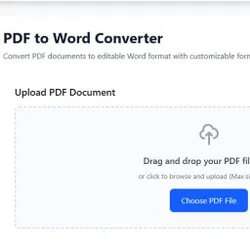
- Click the upload button and select the PDF file from your computer, or drag and drop it directly into the upload box.
- Wait a few seconds while the tool scans the document and converts its content into Word format.
- Download the converted
.docxfile to your device once the conversion is complete. - Open the file in Microsoft Word, Google Docs, or any word processor and start editing immediately.
The entire conversion happens in the browser, so there is nothing to download or install beforehand. It works equally well on a laptop, desktop computer, or mobile phone, which means you can convert a document on the go without needing access to a full computer setup.
Key Features of the Zone of Tools PDF to Word Converter
This tool has been built around the everyday needs of students, office workers, freelancers, and small business owners who deal with PDF files regularly. A few features set it apart from generic converters:
- Accurate layout preservation: paragraphs, headings, spacing, and page breaks are kept as close to the original PDF as possible.
- Table and image retention: tables convert into editable Word tables instead of flattened images, and embedded pictures are placed in their original position.
- Fast processing: most documents convert in a matter of seconds, even multi-page files.
- No file size restrictions that block ordinary use: reports, ebooks, and long contracts can be converted without hassle.
- Cross-device compatibility: works smoothly on Windows, macOS, Android, and iOS through any modern web browser.
- No installation or registration: there is no need to download desktop software or sign up for an account before using the tool.
- Free of cost: the tool is completely free to use, with no hidden charges or subscription requirements.
Why Choose Zone of Tools for PDF to Word Conversion
There are many PDF converters available online, but most either bury the tool behind paywalls after a limited number of free uses, or they produce Word files with broken formatting that requires extensive cleanup. Zone of Tools was built to remove both of those pain points.
The interface is intentionally minimal — there are no distracting advertisements interrupting the workflow, no confusing settings to configure, and no multi-step signup process standing between you and your converted document. You land on the page, upload your file, and receive a usable Word document. This straightforward approach saves time for busy professionals and students who simply need their document converted correctly the first time.
As part of the larger Zone of Tools platform, the PDF to Word converter also sits alongside dozens of other free utilities covering document conversion, image editing, text formatting, and everyday productivity tasks. This means once a document has been converted to Word, related tasks such as compressing a file, converting it to another format, or generating a PDF again can all be handled on the same platform without switching between different websites.
Common Use Cases for Converting PDF to Word
People convert PDF files to Word documents for a wide range of practical reasons. Understanding these use cases helps illustrate why having a reliable converter on hand is valuable in daily work and study routines.
- Students editing research papers, assignments, or thesis chapters that were originally shared as PDFs.
- Job seekers updating a resume or CV that was saved or received only in PDF format.
- Office employees revising contracts, proposals, or internal reports that need quick text changes.
- Small business owners customizing invoice or quotation templates received from suppliers.
- Content writers and translators repurposing PDF articles, guides, or manuals into editable text for further work.
- Anyone needing to extract text from a scanned or downloaded document without retyping it manually.
Is It Safe to Convert PDF Files Online?
Privacy is a valid concern when uploading personal or business documents to any online tool. The PDF to Word converter on Zone of Tools is designed with this concern in mind — uploaded files are processed only for the purpose of conversion and are not shared, published, or used for any other purpose. Sensitive documents such as contracts, academic transcripts, or personal certificates can be converted with confidence.
As a general best practice, it is still wise to avoid uploading highly confidential material to any online converter unless the platform clearly explains its data handling policy, and to remove any converted files from shared or public devices once the task is complete.
Tips for Getting the Best Conversion Results
While the converter is built to handle most PDF files accurately, a few habits can further improve the quality of the final Word document:
- Use PDFs that contain selectable text rather than scanned images for the cleanest conversion, since text-based PDFs preserve formatting more precisely.
- Check the converted document for any minor spacing adjustments, especially in files with complex tables or multiple columns.
- Keep a copy of the original PDF until you have confirmed the Word version meets your needs.
- For scanned documents, look for a dedicated OCR (optical character recognition) tool if the standard conversion does not extract text as expected.
Frequently Asked Questions
Is the Zone of Tools PDF to Word converter really free?
Yes. The tool can be used at no cost, with no hidden fees or subscription required to convert PDF files into editable Word documents.
Will the formatting of my PDF be preserved after conversion?
The tool works to preserve paragraphs, headings, tables, and images as closely as possible to the original PDF layout, though documents with very complex designs may need minor manual adjustments after conversion.
Do I need to install any software to use this tool?
No installation is required. The entire conversion process runs in your web browser, so it works on any device with internet access.
Can I convert scanned PDF files to Word?
Standard PDF to Word conversion works best with text-based PDFs. Scanned documents that are essentially images may require an OCR-based tool to extract editable text accurately.
Is it safe to upload personal or business documents?
Uploaded files are processed solely for conversion purposes and are not shared or published, making it safe to convert most personal and business documents.
Conclusion
Turning a static PDF into an editable Word document no longer needs to be a slow, frustrating process. The PDF to Word converter on Zone of Tools gives students, professionals, and businesses a fast, free, and reliable way to unlock their documents for editing, without installing software or creating an account. Simply upload the file, wait a few seconds, and download a clean, editable Word document ready for your next edit.


