

Bank Statement to CSV/Excel Converter
Pricing
from $40.00 / 1,000 statement processed (per document)s
Bank Statement to CSV/Excel Converter
Convert bank and credit-card statement PDFs to clean CSV and Excel (XLSX). Handles US, UK and EU formats, multi-page tables, debit/credit columns, and Google Drive or Dropbox links. Signed amounts, ISO dates, running balance. Statements are never stored.
Pricing
from $40.00 / 1,000 statement processed (per document)s
Rating
0.0
(0)
Developer

DTK Foundry
Maintained by CommunityActor stats
0
Bookmarked
2
Total users
1
Monthly active users
13 hours ago
Last modified
Categories
Share
Turn bank and credit-card statement PDFs into a clean, normalized transaction table — download it as CSV or Excel, or read it straight from the dataset via API. Built for bookkeepers, accountants, and anyone reconciling accounts whose bank only offers PDF exports.
Features
- Batch conversion: pass any number of statement PDFs in one run.
- Normalized output: ISO dates, signed amounts (negative = money out), running balance, detected currency and account number — the same columns for every bank.
- Deterministic parsing first: fast, free, and exact for table-style statements.
- AI fallback for messy layouts (optional): when a layout defeats the parser, an LLM retries the extraction — with a hard cost cap per document, and only if you enable it.
- CSV + XLSX downloads in the run's key-value store, plus the full dataset for API users.
- Zero retention: your statements are processed in memory and never stored (details below).
How it works
- Paste links to your statement PDFs (Google Drive and Dropbox share links work), or put the PDFs in one of your key-value stores and pick it in the input. PDFs in that store are deleted as soon as the actor has read them. No input? The actor converts a bundled synthetic sample so you can see the output format.
- Each PDF is parsed deterministically (text and table extraction). A confidence check — do the running balances reconcile with the amounts? — decides whether the optional AI fallback is needed.
- Transactions land in the dataset;
transactions.csvandtransactions.xlsxland in the run's key-value store, ready to download.
Input
| Field | Type | Default | Description |
|---|---|---|---|
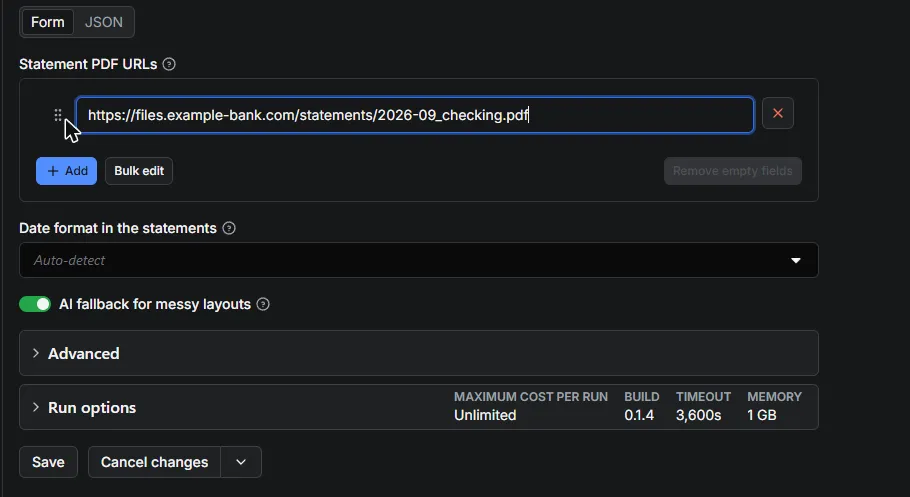
pdfUrls | array | [] | Links to statement PDFs (Drive and Dropbox share links work). |
statementStore | key-value store | none | One of your key-value stores holding statement PDFs. The actor converts every PDF in it and deletes each one once read; other records are left alone. Empty (and no links) = convert the bundled sample. |
dateFormat | enum | auto | month-first (US), day-first (EU/UK), or auto to infer per document. |
llmFallback | boolean | true | Retry unparseable layouts with an LLM. Needs an ANTHROPIC_API_KEY env var on the actor; skipped silently without one. |
llmCostCapCents | integer | 2 | Hard AI spend ceiling per document, in US cents (max 10). |
Output
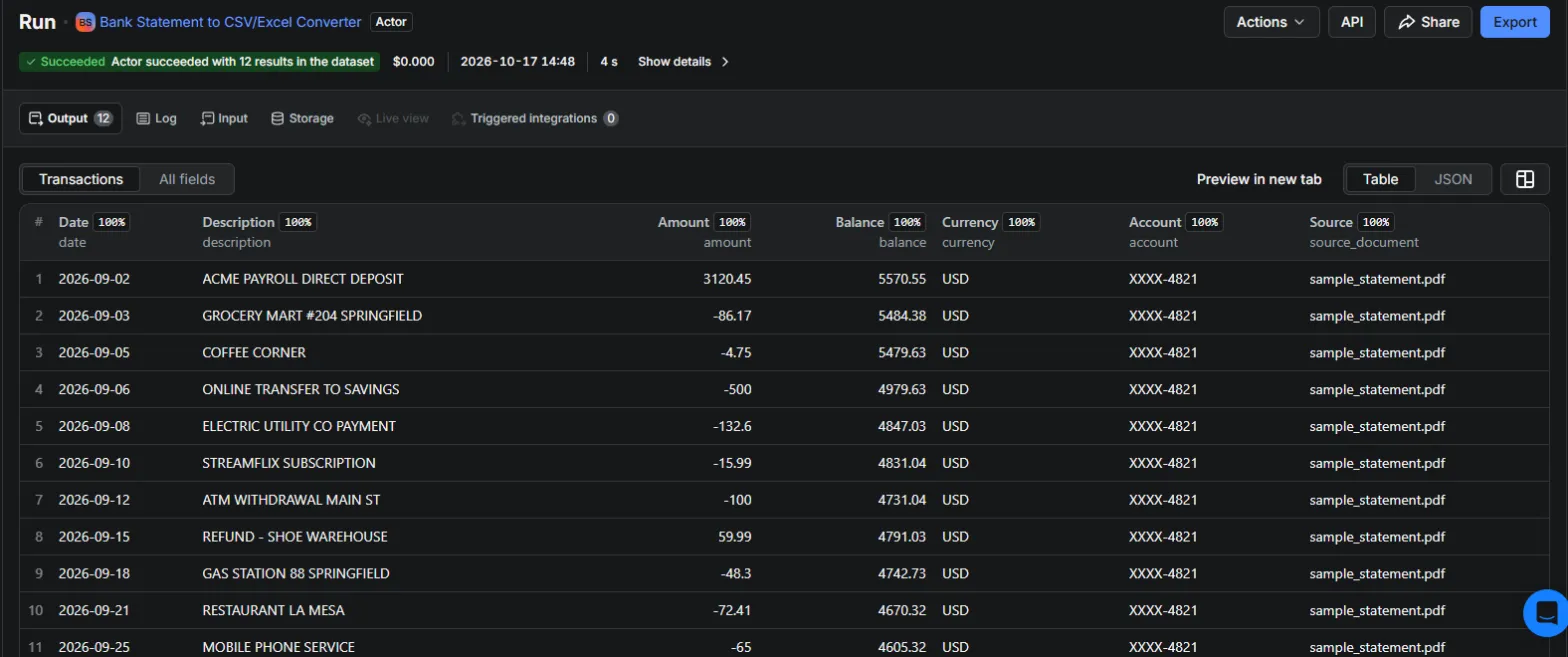
One dataset record per transaction:
amountis signed: negative for money out (purchases, fees, withdrawals), positive for money in.balanceis the running balance when the statement prints one, otherwisenull.- Downloads:
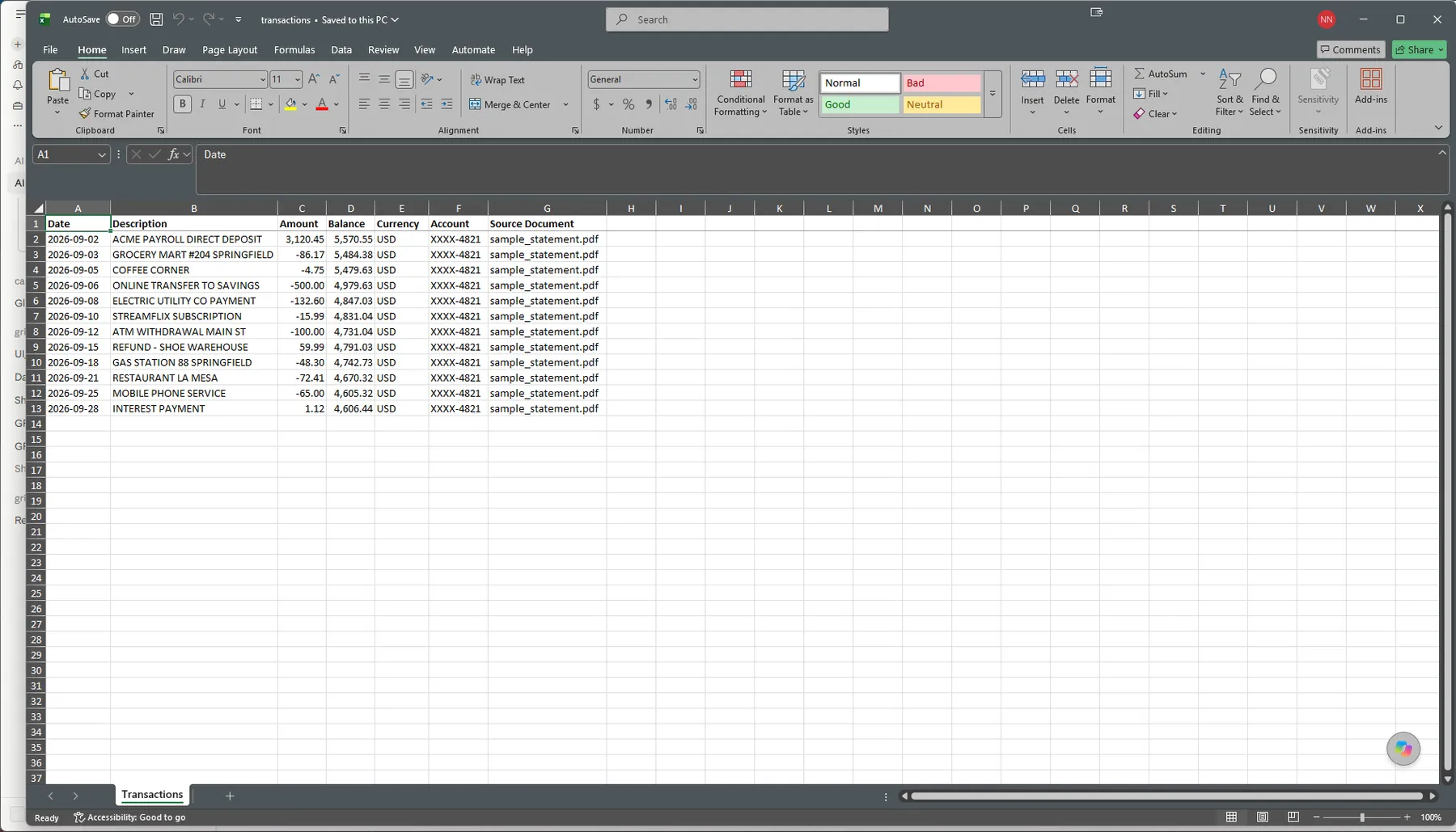
transactions.csvandtransactions.xlsxin the run's key-value store (Storage → Key-value store tab of the run).
Pricing
Pay per event: one charge per processed document — no subscription, no minimum, and failed documents are never charged.
| Statements/month | What you pay (at $0.04/document) |
|---|---|
| 12 (one account, monthly) | ~$0.48 |
| 100 | ~$4 |
| 1,000 | ~$40 |
Compare: manual retyping of one statement takes 15–30 minutes; dedicated statement-conversion SaaS starts around $15/month.
Limitations (please read)
- Scanned/image PDFs are not supported. The PDF must contain selectable text. OCR is on the roadmap; a scanned statement currently fails with a clear log message and is not charged.
- Statements with no per-line dates, or layouts where multiple transactions share one line, may parse incompletely. The AI fallback usually catches these; when it also fails, the document is reported as failed and not charged.
- Ambiguous dates (e.g.
04/05/2026) are inferred per document; setdateFormatexplicitly if you know your bank's convention. - Password-protected PDFs must be unlocked before upload.
- Multi-currency statements report the dominant currency for all rows.
Data privacy (GDPR)
- Statements in your key-value store are deleted. A PDF in the store you pick stays there only until the actor reads it, then the actor deletes it. If the delete ever fails, the run log says so and names the file. Links you paste are only read, never changed.
- Statements are downloaded and processed in memory for the duration of the run only. The actor never writes your documents anywhere, never logs their contents, and keeps no copy after the run ends.
- Extracted transactions are stored only in your own run's dataset and key-value store, under your Apify account's standard data-retention settings — delete them any time.
- With
llmFallbackenabled and an unparseable layout, the statement's text is sent to the Anthropic API solely for extraction. Anthropic's API does not train on this data. SetllmFallback: falsefor strictly local, deterministic processing. - No third party other than (optionally) Anthropic ever receives your data.
Permissions
The actor runs with Apify's limited permissions. It can see only the one key-value store you pick in the input (to read your PDFs and delete each one after reading) and its own run storage. It cannot list, read, or change anything else in your account. Links you paste are only downloaded.
Screenshots
Point it at your statement PDFs:
Get a clean, normalized transaction table:
Download the XLSX and open it straight in Excel:
Support & roadmap
Found a statement this actor cannot parse? Open an issue on the Issues tab — layout reports directly drive the parser's test suite. Typical response: 1 business day.
Roadmap: OCR for scanned statements, QIF/OFX export, per-account split files.


