

Amazon Price & Buy Box Scraper - Change Monitor
Under maintenancePricing
from $1.00 / 1,000 change events
Amazon Price & Buy Box Scraper - Change Monitor
Under maintenanceAmazon change monitor: track price, Buy Box, stock and listing changes on your own and competitor ASINs. Keeps state; first run creates baseline. See changes in Apify (Overview, Detected changes, Competitors) and route structured events to webhooks, n8n, Make, Zapier or AI agents via Apify MCP.
Pricing
from $1.00 / 1,000 change events
Rating
0.0
(0)
Developer

Oleksandr Shcherban
Maintained by CommunityActor stats
0
Bookmarked
2
Total users
2
Monthly active users
13 days ago
Last modified
Categories
Share
🛒 Amazon ASIN Change Monitor
Monitor your Amazon products and competitors for meaningful changes in price, Buy Box, stock and listing data — and see the results directly in Apify.
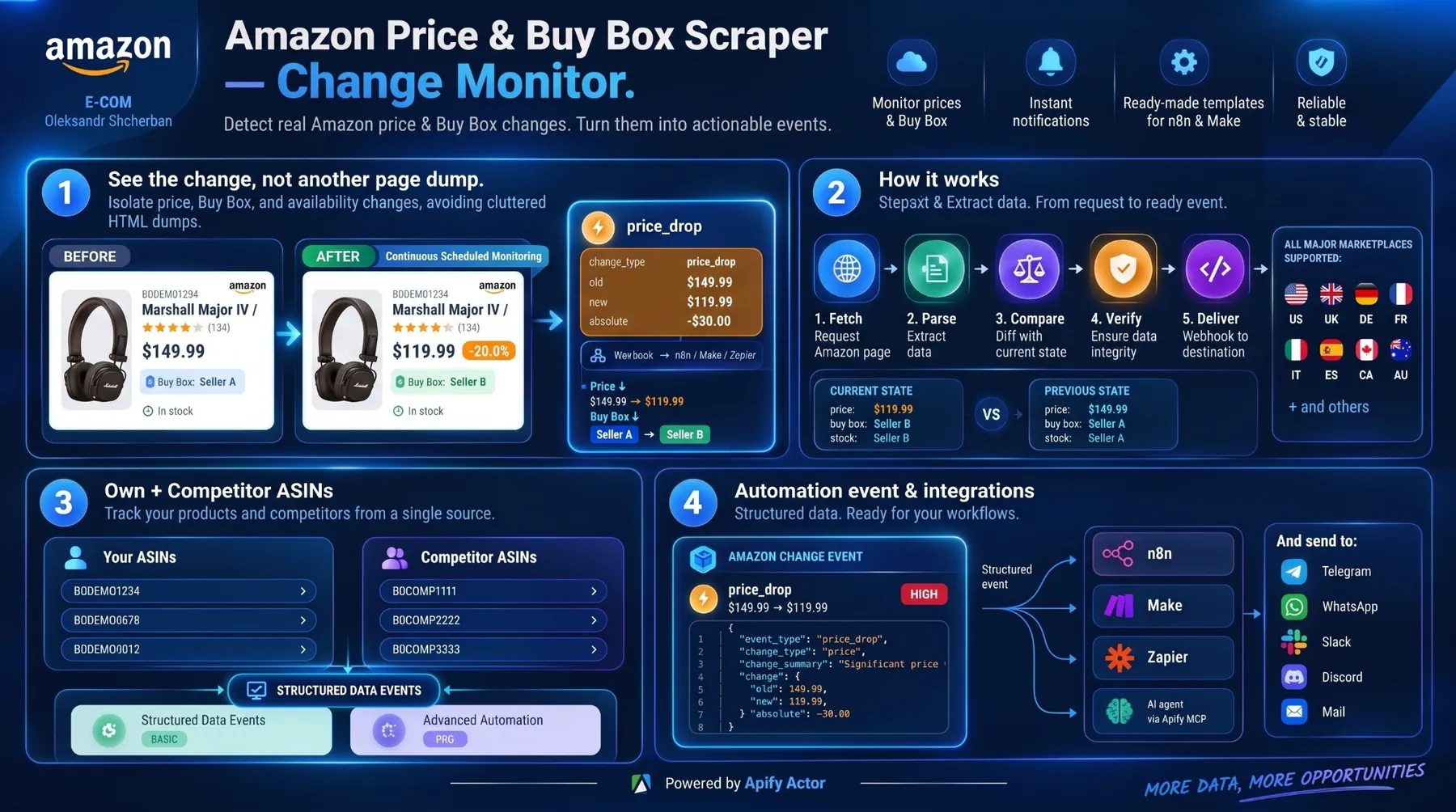
Billed per successful check, from $0.006.
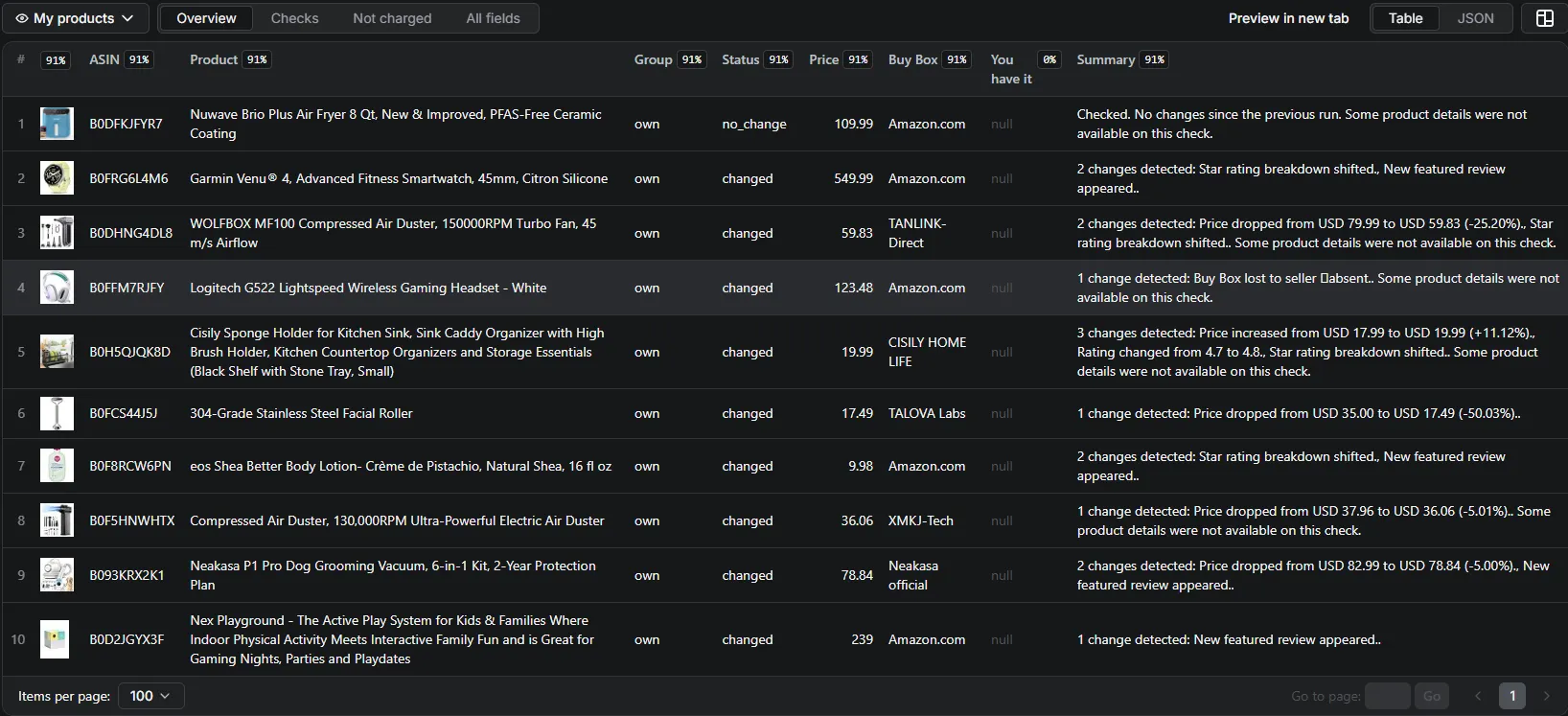
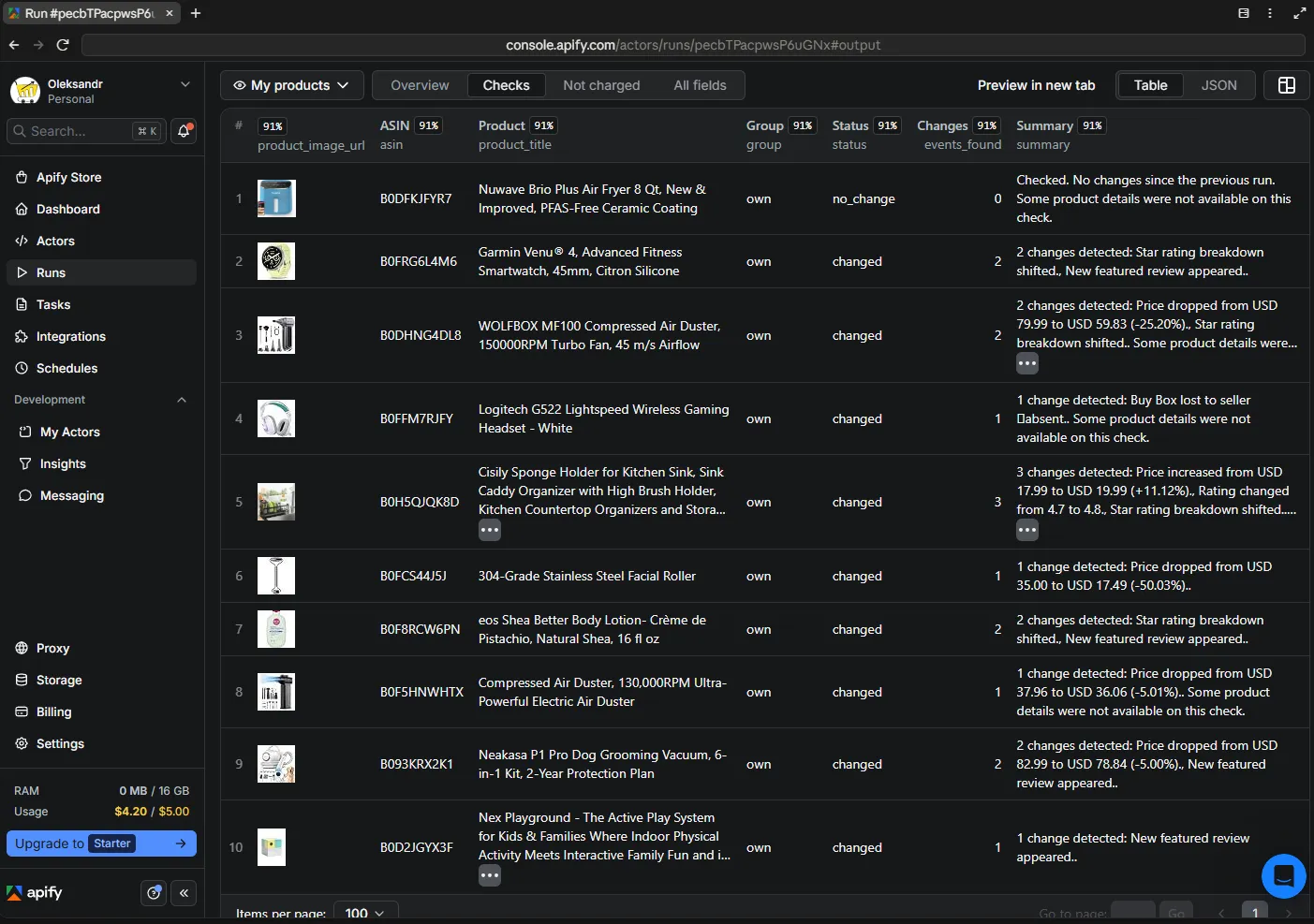
👀 See your Amazon monitoring at a glance
You don't need another dashboard just to understand what happened.
Open the run in Apify and see the current product state, detected changes and competitor information in dedicated views.
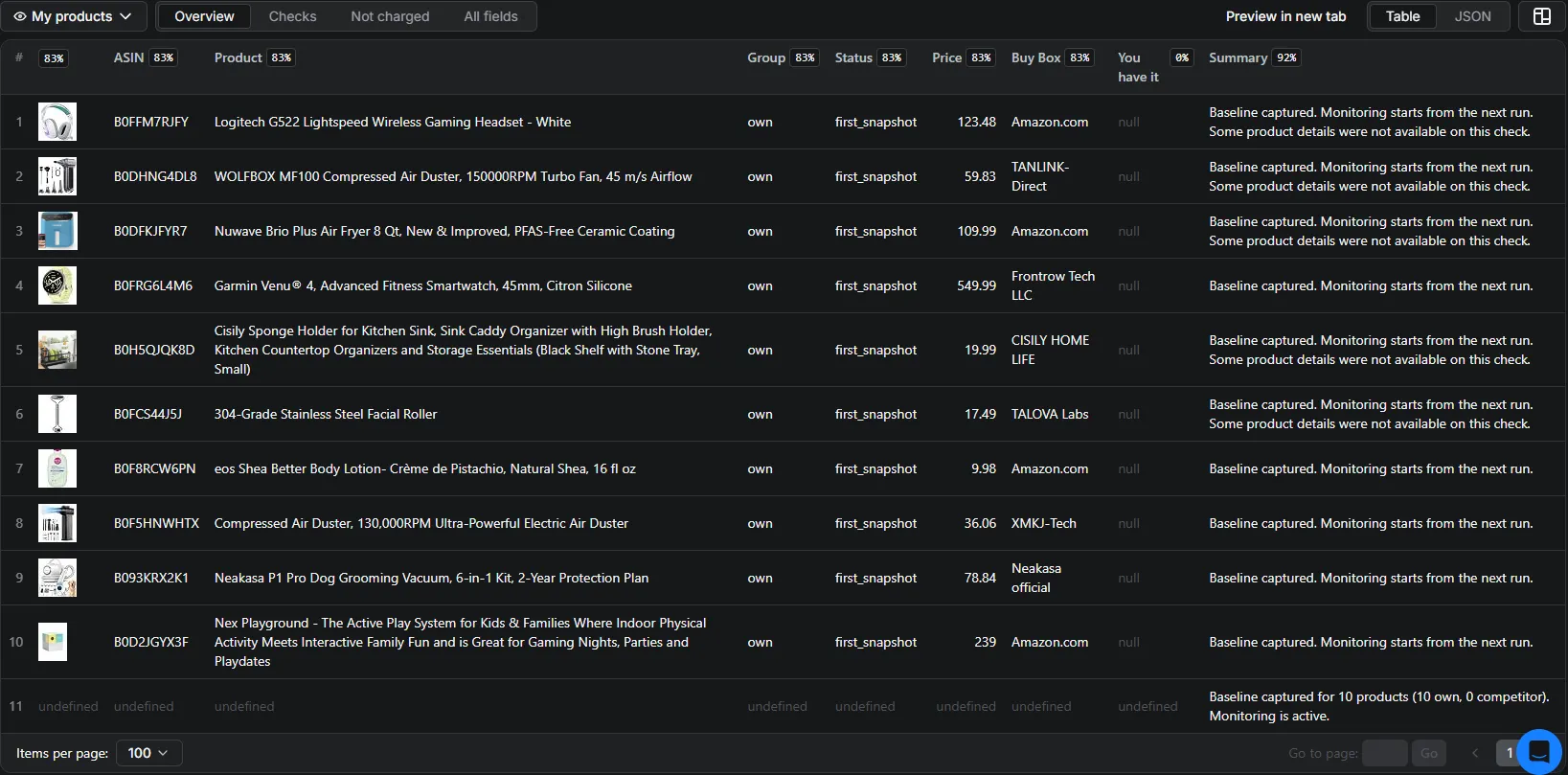
👀 Overview — know the current state
See the information that matters first:
product image · ASIN · title · current price · Buy Box seller · your Buy Box status · plain-English summary
The Overview is designed so you can understand the current state of your monitored products without digging through raw JSON.
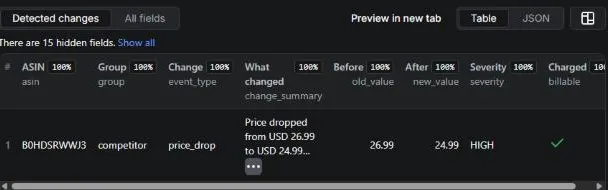
🔴 Detected changes — see what moved
See:
event · previous value · new value · severity · human-readable summary
No need to compare raw JSON just to understand what changed.
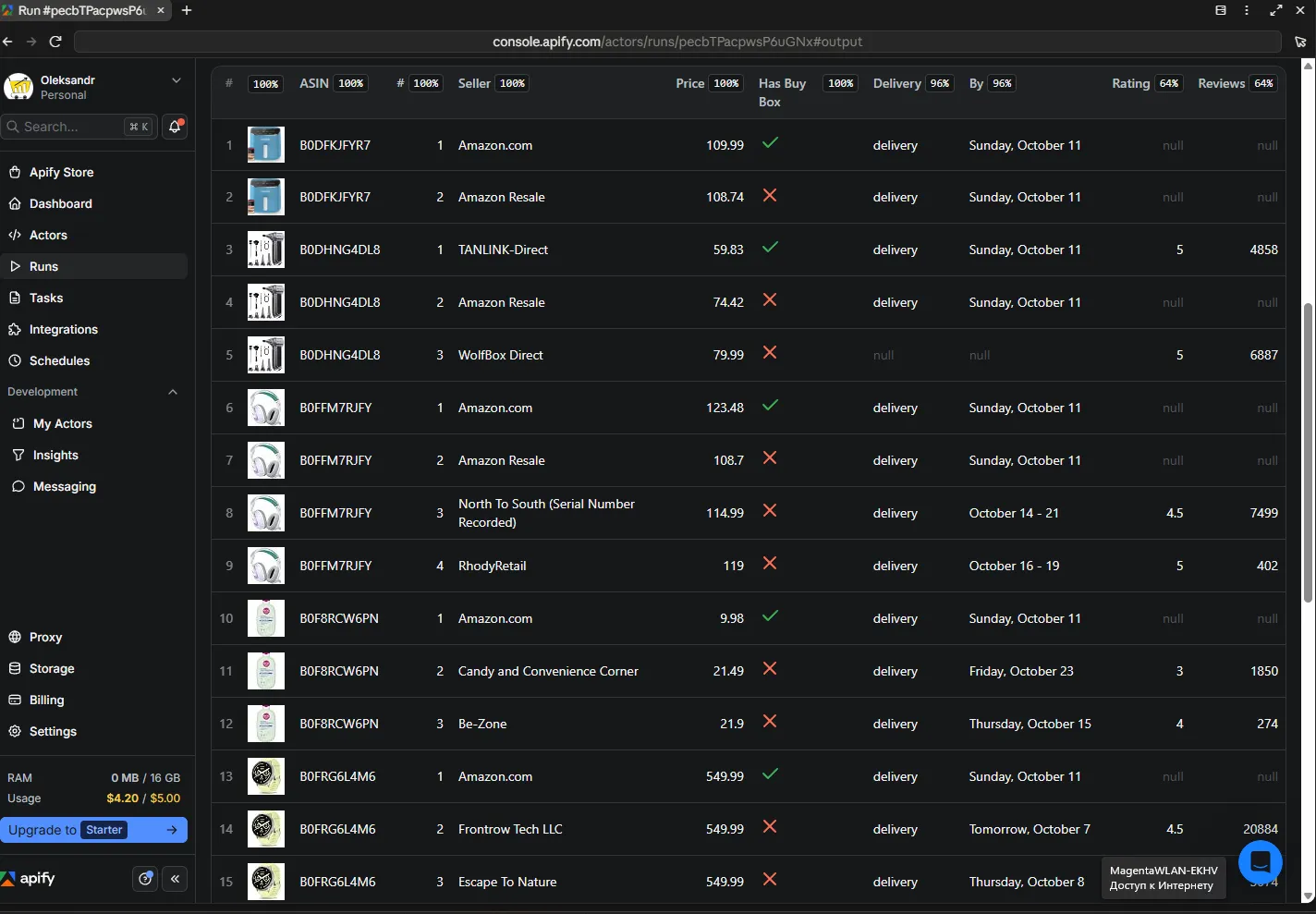
🥊 Competitors — see the sellers around your product
When the one-off competitor-offer scan is enabled, see:
seller position · price · Buy Box status · delivery information · seller rating · seller rating count
📸 First snapshot — see where monitoring starts
The first successful check establishes the baseline.
The output makes that starting point visible, so you know monitoring has started before the first comparison exists.
🎯 What this Actor actually does
This is an ASIN-based Amazon product monitoring Actor.
It reads public Amazon product pages, keeps state between successful checks, compares the current observation with the previous confirmed state, and produces structured change events when a meaningful change is detected.
The result answers one simple question:
What changed since the last successful check?
The Actor is designed for scheduled monitoring, not one-off Amazon catalog scraping.
👤 Who is it for?
✅ Good fit
Amazon sellers, brands, agencies and operators who need scheduled monitoring of their own products and competitor ASINs.
Typical use cases:
- 🛒 Buy Box monitoring
- 💵 Price monitoring
- 📦 Stock and availability monitoring
- 📝 Listing integrity monitoring
- 🥊 Competitor ASIN monitoring
- 🔔 Webhook-based alerts and automation
🚫 Not the right tool for
- Real-time, seconds-level price tracking
- Seller Central or other private Amazon account data
- Authenticated/private product information
- One-off scraping of the Amazon catalog
- CAPTCHA solving
⚡ Start in 60 seconds
A minimal monitoring run needs only:
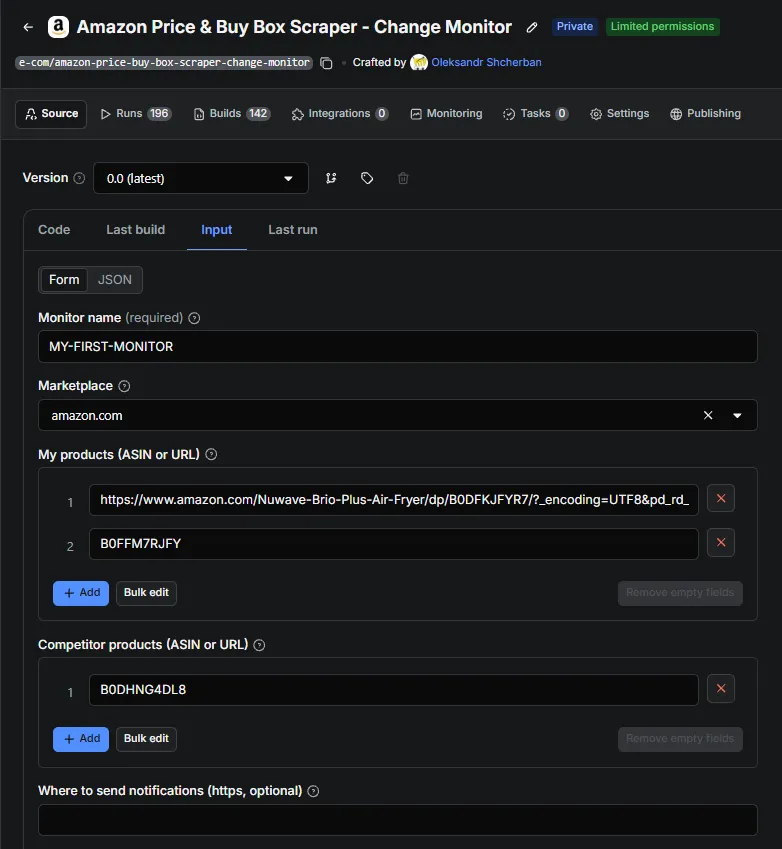
Then run the Actor.
First successful run → baseline
Next successful run → comparison
Change found → structured event
That's it.
🔔 What triggers an event?
The Actor can detect meaningful transitions such as:
price_drop · price_increase · out_of_stock · back_in_stock · stock_changed · buybox_changed · rating_changed · bestseller_rank_changed · star_breakdown_shifted · new_featured_review · listing_unavailable · listing_restored · brand_changed · title_changed · images_changed
For buybox_changed, change_type can distinguish:
seller_changed · seller_and_price_changed · buybox_lost · buybox_gained
The last two require the appropriate ownSellerId configuration.
🔎 A real monitoring cycle
The core workflow is simple:
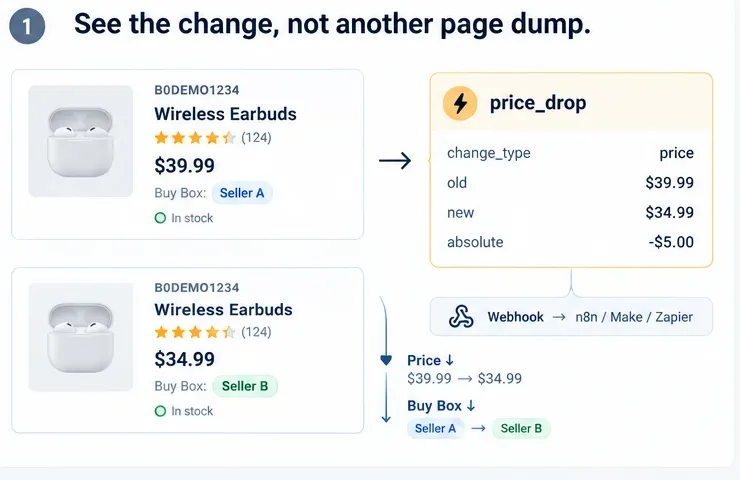
The resulting event contains the old value, new value, change information, severity and a human-readable summary.
One confirmed transition produces one logical change event.
🧱 Your first run creates the baseline
The first successful check is the starting point, not a change report.
There is nothing to compare yet, so the first run establishes the baseline for each ASIN. Later successful checks compare the new observation with that stored state.
A baseline_created control record confirms that monitoring has started.
In plain English: first we learn what the product looks like; then we can tell you what changed.
If the monitor state is reset, for example by changing monitorId, the next successful run creates a new baseline.
💵 How much does it cost?
You pay for successful monitoring work and released changes according to the Actor's event pricing.
| Event | Price | Charged when |
|---|---|---|
monitor_check | $0.006 (~$6 / 1,000) | A check completes successfully |
browser_fallback | $0.025 (~$25 / 1,000) | A check completes through the browser path |
pro_insights | $0.003 (~$3 / 1,000) | PRO data is actually read on a successful check |
change_event | $0.001 (~$1 / 1,000) | A change passes your thresholds and an event is produced |
competitor_offers_scan | $0.010 (~$10 / 1,000) | The one-off seller scan succeeds |
Starting the Actor is free and Dataset records are free.
Blocked, failed, wrong-product and empty checks are not charged as successful monitoring work.
Events below your thresholds can remain visible with billable: false and a not_billable_reason.
Webhook delivery itself does not affect billing.
Example
100 products, checked once per day, core monitoring only, with 2% of checks producing an event:
- 100 × $0.006 = $0.60/day for successful checks
- 2 × $0.001 = $0.002/day for released events
- about $18/month
Turning PRO on for the same 100 products adds $0.003 per successful PRO check, or about $9/month at one check per product per day.
🆚 Why use this instead of another monitoring dashboard?
This Actor runs inside your Apify account and works with the tools you already use:
your schedules · your Dataset · your webhooks · your automation · pay per successful monitoring work
You can inspect results directly in Apify, consume structured events through automation, or connect the Actor to your own application.
There is no separate monitoring dashboard required just to inspect the results.
📈 What can be monitored?
| Area | What you can see |
|---|---|
| 💵 Price | Price drops and increases |
| 🥊 Buy Box | Seller changes; buybox_lost / buybox_gained when ownSellerId is configured |
| 📦 Stock & availability | Out-of-stock, back-in-stock and stock-level changes |
| 📝 Listing integrity | Brand, title, images, listing unavailable and listing restored |
| ⭐ PRO insights | Rating, bestseller rank, star-breakdown shifts and featured reviews |
| 🥊 Competitor ASINs | The same monitoring pipeline for selected competitor products |
🥊 Optional one-off seller scan
checkCompetitorOffers adds a one-off snapshot of up to 10 other sellers competing for the Buy Box on your own listing.
It can show:
seller position · price · delivery estimate · seller rating · current Buy Box holder
This is a snapshot for the run where you enable it — not a continuous seller tracker.
For continuous competitor monitoring, use competitorAsins.
🔔 Get notified when something changes
You don't need to watch Amazon all day.
When a meaningful change is detected, the Actor produces a structured change event.
You can review the event directly in Apify or route it through the integrations and webhooks you configure.
Example alert
🔴 Buy Box changed ASIN: B0XXXXXXX Previous seller: Seller A New Buy Box seller: Seller B Price: $39.99 → $38.49 Detected: 14:32
Example alert format. Delivery to Slack, Telegram, Discord, WhatsApp, email or another destination depends on your configured integration or webhook routing.
Webhook delivery
When webhookUrl is set, each event is POSTed as one JSON object per event and also written to the Apify Dataset.
Webhook requests can include:
x-monitor-signature— HMAC-SHA256 signature whenwebhookSecretis setx-monitor-timestamp— request timestampIdempotency-Key— the same deterministicevent_idcarried in the payload
Delivery is at-least-once, not exactly-once.
Your receiving endpoint should deduplicate using event_id / Idempotency-Key.
🤖 AI agents
The Actor is discoverable and runnable through the Apify MCP server.
Compatible AI-agent workflows can search for the Actor, inspect its schema and run it with an appropriately authorized Apify account.
The Actor does not operate its own MCP server. Discovery and execution go through Apify's platform-level MCP integration.
Examples are included for Claude/MCP and LangChain workflows.
⭐ Optional PRO insights
The core monitoring product covers:
price · Buy Box · stock · listing changes
Optional pro_insights adds deeper signals such as:
- ⭐ Star rating
- 🏆 Bestseller rank
- 📊 Star-breakdown shifts
- 💬 Featured review changes
PRO is an optional depth layer of the same monitoring pipeline.
It can be enabled per ASIN group and is billed through pro_insights when PRO data is actually read.
⚙️ How it works
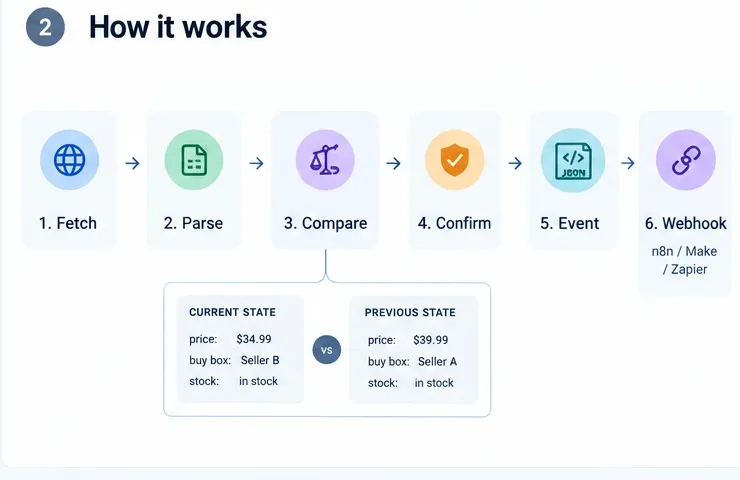
- Fetch the public Amazon product page for each ASIN. HTTP is the default path; browser fallback is optional and has its own price.
- Parse the fields covered by the monitoring configuration: price, availability, Buy Box seller, brand, title hash, image-set hash and, when PRO is enabled, rating/rank/review signals.
- Compare the current observation with the last confirmed state for that ASIN.
- Confirm listing fields such as brand, title, images and listing availability across consecutive observations before releasing them as changes.
- Emit one structured event per released change with event type, severity, old/new value and a human-readable summary.
- Deliver the result to the Apify Dataset and, when configured, to your webhook.
⚙️ Input
Required configuration:
| Field | Description |
|---|---|
monitorId | Names the monitor configuration and isolates its state |
marketplace | Selects the Amazon storefront, such as amazon.com or amazon.de |
asins | Your own ASINs |
competitorAsins | Competitor ASINs |
Useful optional settings:
| Field | Description |
|---|---|
webhookUrl | HTTPS endpoint that receives change events |
ownSellerId | Enables specific buybox_lost / buybox_gained semantics |
enableProInsights / competitorProInsights | Enables PRO depth per group |
checkCompetitorOffers | One-off seller snapshot on your own listing |
enabledEventTypes / competitorEnabledEventTypes | Restricts which event types are delivered/billable |
notificationThresholds / competitorNotificationThresholds | Sets minimum change size for supported metrics |
webhookSecret | Optional HMAC signing secret |
maxAsinsPerRun | Safety cap on products processed per run |
enableBrowserFallback | Allows the browser recovery path for blocked checks |
Each field has a machine-readable description in .actor/input_schema.json.
📦 Output — built for people and machines
The Actor separates the main result types so you can find the right information quickly.
👀 Overview / product results
Current check_result records plus run-level records such as:
check_failure · monitoring_degraded · commit_deferred · baseline_created · run_completed · budget_paused · run_summary_public
🔴 Detected changes
Every confirmed change includes:
what changed · previous value · new value · severity · billing status
🥊 Competitors
Seller rows returned by an enabled checkCompetitorOffers snapshot.
📋 Scan summary
One record per scanned product showing how many competing sellers were found. It is stored with the run and available through the API and dataset export.
Every client-facing record carries schema_version and a human-readable summary.
Dataset row count is not the same as charge count.
🧾 Example event
The same change is designed to be understandable to a person and usable by automation:
The full machine-readable event schema and JSON examples are available in examples/.
🛡️ Reliability and failure handling
The Actor is designed to distinguish successful no-change monitoring from failed or incomplete observations.
✅ Confirmed listing changes
Brand, title, images and listing-availability changes use consecutive observations before release.
❌ Explicit failures
A check_failure record carries a closed stop_reason, a failure_class and charged: false.
🔎 Field-level observation quality
Each check_result includes observation_quality, so automation can distinguish a successful request from a field that was actually observed.
Fields can be:
observedobserved_absentnot_observed
🚫 Missing data is not automatically a change
A field that cannot be observed on a particular check is not treated as evidence that the product changed.
📉 Degradation visibility
monitoring_degraded indicates repeated failures on the same product, so missing data is not silently treated as a stable state.
🔁 Delivery reliability
Webhook delivery is at-least-once and uses a deterministic event_id / Idempotency-Key so receivers can deduplicate retries.
🌎 Supported Amazon marketplaces
22 Amazon storefronts are configured, each with its own language, currency and number format.
amazon.com · amazon.ca · amazon.com.mx · amazon.com.br · amazon.co.uk · amazon.ie · amazon.de · amazon.fr · amazon.it · amazon.es · amazon.nl · amazon.com.be · amazon.se · amazon.pl · amazon.com.tr · amazon.ae · amazon.sa · amazon.eg · amazon.in · amazon.co.jp · amazon.sg · amazon.com.au
Coverage is strongest on the European storefronts. Amazon serves some regions more defensively than others, so start with a short run on your own ASINs to see how a storefront behaves for you before you schedule it. A check that cannot be read is reported and never charged.
⚠️ Important limitations
Amazon access can vary
Amazon may temporarily block requests or return an incomplete page.
The Actor classifies blocked or unusable observations instead of inventing product data.
enableBrowserFallback can retry blocked checks through the browser path and has its own price.
Missing data is not automatically a change
A field that cannot be observed on a particular check is not treated as evidence that the product changed.
Monitoring is schedule-based
The Actor runs when you run it or on your configured Apify schedule.
Detection timing therefore depends on your schedule and any applicable confirmation window.
Buy Box is an observation
Buy Box information reflects what the monitored public page showed for the request context.
Seller Central may differ.
Public pages only
No login, no private seller-account access, no authenticated Amazon data and no CAPTCHA solving.
💬 FAQ
What happens on the first run?
The first successful check creates the baseline. Changes are detected on later comparable checks.
Does this scrape the whole Amazon catalog?
No. It monitors the specific ASINs you provide — your products, competitor products, or both.
Can I monitor my products and competitors together?
Yes. Use asins for your products and competitorAsins for competitors. Each output record identifies its group.
Can the same ASIN be in both lists?
No. The input rejects that combination before any request is made.
Do I need ownSellerId?
Only if you want Buy Box loss/gain identified specifically for your seller. Without it, Buy Box changes are reported neutrally.
What if Amazon returns an incomplete page?
The Actor distinguishes an incomplete or failed observation from a valid product observation. Missing data is not automatically reported as a product change.
Can I choose which changes trigger events?
Yes. Use event-type filters and notification thresholds for the supported metrics and groups.
Can I send alerts to Slack, Telegram or other channels?
The Actor emits structured webhook events. You can route them through the integrations and workflow tools you configure for Slack, Telegram, Discord, WhatsApp, email or other destinations.
Can AI agents use the Actor?
Yes. The Actor is discoverable and runnable through Apify MCP, subject to the permissions and authorization of the MCP client.
Does checkCompetitorOffers continuously track competitors?
No. It is a one-off seller snapshot for the run where you enable it.
For continuous competitor monitoring, use competitorAsins.
Does the Actor store raw Amazon HTML?
No. Raw page HTML is not persisted or logged.
Monitoring state lives in a named key-value store in your Apify account.
🔒 Data handling & responsible use
This Actor reads public Amazon product pages only.
It does not use login credentials, cookies or authenticated seller-account data, and it does not solve CAPTCHAs.
Raw page HTML is not stored or logged.
Monitoring state is kept in a named key-value store in your Apify account.
Amazon and Buy Box are trademarks of Amazon.com, Inc.
This Actor is independent and is not affiliated with, endorsed by, or sponsored by Amazon.
You are responsible for using collected data in accordance with Amazon's terms and applicable law in your jurisdiction.
🧩 Examples & integrations
Ready-to-use examples and agent walkthroughs are available in examples/:
- 🔗 n8n workflow
- 🔗 Make blueprint
- 🔗 Zapier setup guide
- 🤖 LangChain example
- 🤖 Claude / MCP walkthrough
- 📨 Sample webhook payload
See examples/README.md for what each example demonstrates.
🛠️ Support
Questions, an ASIN that isn't parsing the way you expect, or a feature you need?
Open the Issues tab on this Actor's page.
It's the fastest route: your message goes straight to the developer, and the run you are asking about is attached automatically, so there is no need to copy logs by hand.
When reporting an unexpected result, it helps to include:
- the ASIN and the marketplace
- what you expected versus what the run reported
- the run ID visible at the top of the Apify run
Feature requests are welcome through the same channel.
🚀 Ready to try it?
Start with the ASINs that matter most to you.
First successful run → baseline.
Next successful run → comparison.
Change found → clear result + structured event.
👀 You don't need to watch Amazon all day.
Run it on the ASINs that matter to you and let the monitor keep watch.


