

$3.5 Carfax Report by VIN (PDF)✅ - Lookup & Car History Reports
Pricing
from $3.50 / get a carfax report by vin
$3.5 Carfax Report by VIN (PDF)✅ - Lookup & Car History Reports
🚗 Download Carfax PDF reports by VIN (single or bulk) + run low-cost carfax VIN lookup and carfax VIN check for used cars. Pay only for delivered PDFs.
Pricing
from $3.50 / get a carfax report by vin
Rating
5.0
(4)
Developer

Easy Tools
Maintained by CommunityActor stats
7
Bookmarked
201
Total users
21
Monthly active users
7 months ago
Last modified
Categories
Share
Carfax Report by VIN (PDF) — Carfax VIN Lookup, Carfax VIN Check & Vehicle History Report | $3.5 ONLY
🚗📄 Purchase and download a carfax vehicle history report PDF (single VIN or bulk), and use carfax vin check to check report availability when needed.
Support
For issues, use the Actor page Issues or send email artur.novikk@gmail.com or message in Telegram
What you get after each run 🎁
- Direct PDF link: if a report is delivered, you get a direct download link to the carfax vehicle history report PDF.
- Clear result for each VIN: you immediately see whether the report was found, not found, or delivered.
Prices 💵
- CHECK_ONLY: $0.99 per 100 VINs checked.
- AUTO_PURCHASE: $3.5 per delivered PDF report (availability check included).
This is designed for people comparing Carfax cost and looking for a carfax cheap / low cost carfax way to run checks at scale.
Quick start (UI) 🚀
- Open the Actor page. 🌐
- Paste VINs into
vinCodes(single VIN or multiple VINs). 🧾 - Choose
mode:CHECK_ONLY— paid availability check only 🔎 (this is not “free carfax by vin” / “check carfax free”)AUTO_PURCHASE— purchases a report 🧾 only when it’s found and delivered and gives you a direct PDF link
- Run the Actor. ▶️
- Review the result for each VIN. 📊
- If a report is delivered, open the direct PDF link in
reportFileUrlOutput.
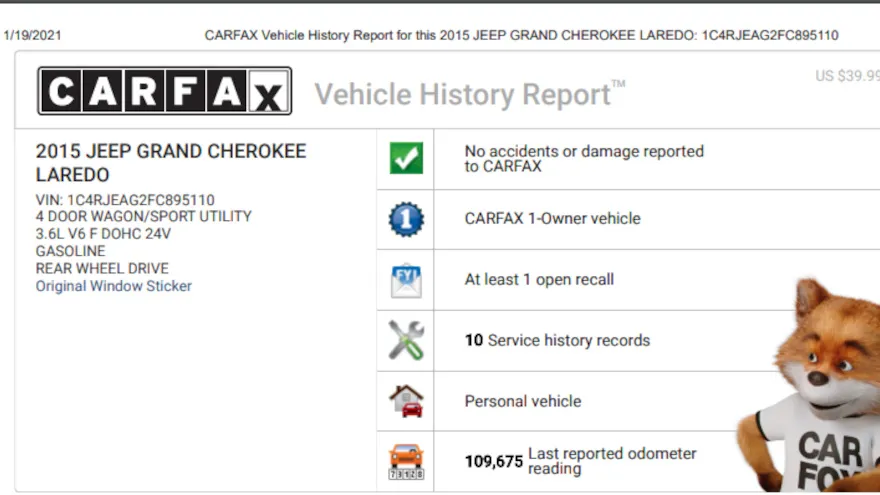
Built for carfax used cars workflows: dealers, importers, marketplaces, and buyers who want scale without paying for missing reports.
What this Actor does (carfax report by vin number) 🧠
For each VIN, the Actor can:
- Validate VIN format (17 characters; letters/digits only; normalized to uppercase).
- Perform a carfax vin check (availability-only): whether a report exists for that VIN.
- In
AUTO_PURCHASEmode: purchase the carfax vehicle history report and return a direct PDF download link.
If you’re comparing a carfax report by vin number workflow vs doing it manually, this is the automation piece.
Pricing & Run policy (Carfax cost / Carfax price) 💸
IMPORTANT NOTE ABOUT PRICING
CHECK_ONLYnever purchases PDFs.AUTO_PURCHASEcharges only when a report is found and delivered.- If a VIN has no report, no purchase is made.
How it works (check → buy → PDF) 🔁
- Normalize VIN input (single VIN or list; de-duplicate; keep first-seen order).
- Validate VIN format.
- Perform availability check for each VIN.
- If
mode = AUTO_PURCHASEand a report exists:- charge for that VIN,
- fetch the PDF,
- return a direct PDF link in the results.
VINs are processed sequentially.
Input (check VIN / carfax vin lookup) ⌨️
Fields
mode(optional):CHECK_ONLY|AUTO_PURCHASE(default:AUTO_PURCHASE)
Provide VINs via vinCodes (string, optional) — flexible bulk input:
- newline-separated
- comma-separated
- JSON array encoded as a string (e.g.
["VIN1","VIN2"])
Input examples
1) Single VIN PDF (AUTO_PURCHASE):
2) Bulk availability (CHECK_ONLY):
3) VIN list as a JSON string (vinCodes):
What you receive after the run 📦
For most users
CHECK_ONLY: you see whether each VIN isFOUNDorNOT_FOUND.AUTO_PURCHASE: if the report is delivered, you get a direct PDF link inreportFileUrl.- You can process one VIN or many VINs in a single run.
Example result
How to download the PDF
When status = DELIVERED, open reportFileUrl to download the carfax vehicle history report PDF.
Statuses & error codes 🧾
Statuses
INVALID_INPUT— VIN failed validation.FOUND— report found (CHECK_ONLY).NOT_FOUND— report not found.DELIVERED— report purchased and PDF is ready to download.FAILED_AFTER_CHARGE— PDF could not be delivered due to a service error (contact support with Run ID).API_ERROR— upstream API error.BUDGET_EXCEEDED— spend limit reached (run stopped).SKIPPED_BUDGET— skipped due to spend limit.SKIPPED_FAILSAFE— skipped due to a safety stop.
Common error codes (errorCode)
CARFAX_CHECK_FAILED—/checkrequest failedCARFAX_CHECK_INVALID— invalid/checkresponseCARFAX_HASH_FETCH_FAILED— failed to fetch hashCARFAX_HASH_INVALID— missing/invalid hashPDF_INVALID— PDF too small / invalidPDF_RENDER_FAILED— PDF rendering failedCONFIG_INVALID_API_KEY— invalid API keyCONFIG_INVALID_MONETIZATION— monetization configuration errorCHARGE_FAILED— charging failedSUPPLIER_BALANCE_LOW— if you received this error, please contact support using the contacts in the Support section. We will promptly increase your limit so you can continue.
FAQ ❓
How do I check Carfax with VIN?
Run mode = CHECK_ONLY to do an availability-only carfax vin lookup / carfax vin check.
You’ll get FOUND or NOT_FOUND for each VIN.
Is this a “free carfax by vin” / “check carfax free” / “free car report carfax” tool?
No, it’s not a free Carfax product.
People often search for free carfax by vin, check carfax free, free car report carfax, or free carfax vin check. This Actor provides a low-cost automation flow:
CHECK_ONLY= availability check only (paid, but inexpensive)AUTO_PURCHASE= buys PDFs only when available and delivered
How much does it cost (Carfax cost)?
CHECK_ONLY: $0.99 / 100 VINsAUTO_PURCHASE: $3.5 per delivered PDF report
Do I pay if a report is not found?
No. In AUTO_PURCHASE, you pay only when the report is found and delivered (DELIVERED).
Where do I download the PDF?
Use reportFileUrl from the result. If the report was delivered, that link downloads the PDF directly.
Can I use this as a “car fax vin checker” for used cars?
Yes. Many users run it as a car fax vin checker for carfax used cars pipelines: first check availability in bulk, then purchase only the VINs they need.
Technical details
This section is for users who want the implementation-level output details.
Structured output
- The Actor writes one structured result per VIN.
- Results can be exported to JSON, CSV, or Excel.
- In technical terms, delivered PDFs are stored by the run and exposed through
reportFileUrl.
Full technical example
Technical field reference
vin— VIN codestatus— final processing statuschecked— availability result (truefound,falsenot found,nullunknown/error)reportFileKey— internal PDF file key for delivered reportsreportFileUrl— direct PDF download linkerrorCode— short error code (if any)


![AutoScout24 Scraper [Just 💰$0.49] — 930K Cars, 9 Countries avatar](https://images.apifyusercontent.com/GGVP7U5OhjobAmoXntlp9IP8YVBJOoTXcAFYLZ5NFtk/rs:fill:76:76/cb:1/aHR0cHM6Ly9hcGlmeS1pbWFnZS11cGxvYWRzLXByb2QuczMudXMtZWFzdC0xLmFtYXpvbmF3cy5jb20vclB1SjNjc1NCUjVsaTVmd1QtYWN0b3ItRGNrZXozdVhiRjZkaDZkTWUtMWQ0OWdhcExzMy1hdXRvc2NvdXQyNF9sb2cucG5n.webp)


![Mobile.de [$0.8💰] Unlimited Search & Detail [Richest Output] avatar](https://images.apifyusercontent.com/45_qonAW8nei1lrox9bVYiI0EEkVcit6aif80yOz4zw/rs:fill:76:76/cb:1/aHR0cHM6Ly9hcGlmeS1pbWFnZS11cGxvYWRzLXByb2QuczMudXMtZWFzdC0xLmFtYXpvbmF3cy5jb20vbmduOHZSRVNUa3NleVdFNnAtYWN0b3ItdXk0ZzRRcUtrMm1pUWUybGItN040N3hOMEZ0Wi1tb2JpbGUucG5n.webp)
