

Asos Product Search Scraper
Pricing
Pay per usage
Asos Product Search Scraper
Automate product data extraction from ASOS.com's extensive fashion catalog. Collect pricing, descriptions, images, brand information, and availability status for competitive analysis, price monitoring, and trend research in the global fashion e-commerce market.
Pricing
Pay per usage
Rating
0.0
(0)
Developer

ecomscrape
Maintained by CommunityActor stats
0
Bookmarked
3
Total users
1
Monthly active users
9 days ago
Last modified
Categories
Share
Contact
If you encounter any issues or need to exchange information, please feel free to contact us through the following link: My profile
ASOS.com Product Search Scraper: Extract Fashion Data for Market Intelligence & Price Monitoring
Introduction
ASOS.com stands as one of the world's leading online fashion retailers, offering over 85,000 products across clothing, footwear, accessories, and beauty categories. With a global presence serving customers in over 200 countries, ASOS represents a critical data source for fashion market intelligence, competitive pricing analysis, and trend forecasting.
For fashion retailers, e-commerce analysts, brand managers, and market researchers, accessing structured product data from ASOS is essential for understanding market dynamics, monitoring competitor pricing strategies, identifying trending styles, and making informed merchandising decisions. However, manually collecting product information across thousands of listings is impractical and time-consuming.
The ASOS.com Product Search Scraper automates this data extraction process, enabling systematic collection of product details, pricing information, availability status, and visual assets. Whether you're tracking competitor prices, analyzing brand positioning, researching fashion trends, or building product databases, this scraper provides the automated data collection capabilities needed for comprehensive fashion e-commerce intelligence.
Scraper Overview
The ASOS.com Product Search Scraper is a specialized data extraction tool designed to systematically collect product information from ASOS's extensive online catalog. This scraper leverages advanced web automation techniques to navigate search results and extract detailed product data efficiently.
The tool offers several key advantages including configurable retry mechanisms for handling network issues, flexible pagination controls for managing large product catalogs, and comprehensive data extraction covering pricing, product details, images, and availability indicators. It's particularly valuable for e-commerce analysts, fashion retailers, pricing intelligence teams, and market research professionals who need access to structured fashion product data.
The scraper handles various search parameters including keyword-based queries, price sorting options (high to low, low to high), freshness filters, and custom pagination controls. It maintains high data accuracy while implementing best practices for ethical web scraping, allowing users to customize extraction parameters to focus on specific product categories, brands, price ranges, or other criteria relevant to their research objectives.
Input and Output Details
Example url 1: https://www.asos.com/search/?q=shoe¤tpricerange=0-500&sort=priceasc
Example url 2: https://www.asos.com/search/?q=shirt¤tpricerange=0-500&sort=priceasc&page=2
Example url 3: https://www.asos.com/men/t-shirts-vests/cat/?cid=7616&page=2
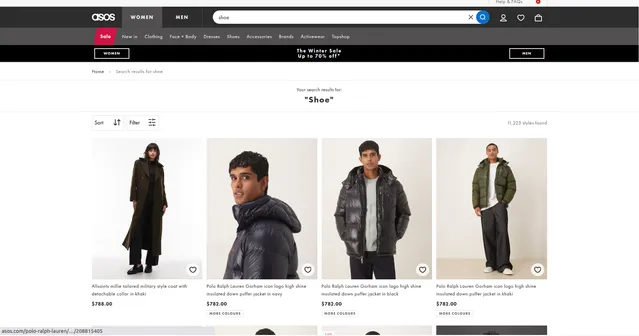
Example Screenshot of product information page:
Input Format
The scraper accepts a JSON configuration that allows precise control over the data extraction process. The input structure includes several critical parameters that determine how the scraping operation will be executed.
Scrape with URLs:
The urls parameter: Add the URLs of product search or category pages you want to scrape. You can paste URLs one by one, or use the Bulk edit section to add a prepared list. This is ideal when you have specific search result pages, filtered views, or category pages you want to extract.
The ignore_url_failures parameter: If set to true, the scraper will continue running even if some URLs fail to be scraped after the maximum number of retries is reached. This ensures that one problematic URL doesn't stop your entire scraping job.
When you provide a list of URLs for scraping, all options in the "Scrape with search filters" section will be disabled. The system will only collect data from the URLs you specified.
Scrape with Search Filters:
The keyword parameter: Enter the search keyword to find products (e.g., "sneakers", "dress", "jacket", "handbag", "Nike", "Adidas"). Use general product categories, specific brands, or style descriptors.
The sort_by parameter: Control how results are sorted. Available options:
""(empty) - Relevance (default ASOS sorting)"freshness"- Newest arrivals first"pricedesc"- Price: High to Low"priceasc"- Price: Low to High
The page parameter: Specify the page number to start scraping from. Useful for resuming interrupted scrapes or targeting specific result ranges in large product catalogs.
When using search filters for scraping, you need to leave the urls field empty in the "Scrape with URLs" configuration.
General Options:
The max_items_per_url parameter: Limit the number of items per URL or search filters you want to scrape. The default value is 20, providing a manageable batch size while allowing for comprehensive data collection. Increase for larger datasets.
The max_retries_per_url parameter: Limit the number of retries for each URL or search filters if the scrape is detected as a bot or the page fails to load. The default value is 2, providing a good balance between thoroughness and efficiency.
The proxy parameter: Proxy configuration for maintaining anonymity and avoiding detection. Select proxies to be used by your scraper. While ASOS is generally accessible, proxies can help with high-volume scraping.
Output Format
The scraper returns comprehensive product data in the following format, with each field serving specific purposes for e-commerce intelligence and market analysis:
-
ID: Unique ASOS product identifier. Essential for database management, tracking products over time, and preventing duplicates in your data warehouse.
-
Product Code: ASOS internal product code/SKU. Critical for inventory tracking, cross-referencing with supplier databases, and product lifecycle analysis.
-
URL: Direct link to the product page on ASOS. Valuable for manual verification, customer redirection, affiliate linking, and accessing updated product information.
-
Price: Current product price. Primary metric for competitive pricing analysis, price monitoring, and market positioning strategies.
-
Description: Product name and description. Provides context for categorization, SEO analysis, and understanding product positioning.
-
Image: Primary product image URL. Essential for visual catalogs, image-based search, machine learning training data, and marketing materials.
-
Badge Type: Product badge indicator (e.g., "New", "Sale", "Limited Edition"). Identifies promotional status and marketing strategies used by ASOS.
-
Product Type: Category classification (e.g., "Shoes", "Dress", "Jacket"). Critical for accurate product categorization, inventory segmentation, and category-specific analysis.
-
Colour Way ID: Identifier for color variant. Useful for tracking color availability, analyzing color preferences, and managing variant-level inventory.
-
Is Sale: Boolean indicating if product is on sale. Quick filter for identifying discounted items, analyzing promotional patterns, and monitoring sale strategies.
-
Reduced Price: Original price before discount. Essential for calculating discount percentages, analyzing markdown strategies, and understanding pricing patterns.
-
Has Multiple Prices: Boolean indicating price variations (sizes/options). Identifies products with size-based or option-based pricing, important for accurate price comparison.
-
Is Outlet: Boolean showing if product is in outlet section. Differentiates clearance items from regular stock, useful for inventory lifecycle analysis.
-
Is Selling Fast: Indicator of high demand/low stock. Signals trending products, helps identify popular items, and indicates inventory urgency.
-
Brand Name: Product brand. Critical for brand-level analysis, competitor tracking, and brand portfolio research.
-
Colour: Product color description. Important for trend analysis, customer preference research, and color-based segmentation.
-
Has More Colours: Boolean indicating additional color options. Shows product variant availability and merchandising breadth.
-
Price Local Currency: Price in local currency format. Essential for multi-market analysis and currency-specific pricing strategies.
-
Is Sponsored: Boolean indicating paid placement. Identifies advertising investment, competitive ad strategies, and promotional product placement.
-
Is Restocking Soon: Indicator of upcoming restock. Valuable for inventory planning, demand forecasting, and identifying popular out-of-stock items.
-
Advertisement: Advertisement-related data. Provides insights into ASOS's promotional strategies and sponsored content placement.
-
Additional Image URLs: Array of supplementary product images. Comprehensive visual assets for detailed product analysis and machine learning applications.
-
Video URL: Product video link if available. Indicates enhanced product presentation, useful for analyzing merchandising strategies.
-
Show Video: Boolean for video availability. Quick indicator of video content presence, shows investment in rich product content.
-
Early Access: Early access program indicator. Identifies VIP/loyalty program products and exclusive launch strategies.
-
Tile ID: Display tile identifier in search results. Technical metadata for understanding ASOS's frontend structure and A/B testing.
Each field serves specific purposes in competitive intelligence workflows, pricing strategy development, fashion trend analysis, and e-commerce market research.
Example Output:
Usage Guide
Option 1: Scraping with URLs
To effectively use the ASOS scraper with URLs, start by constructing targeted search or category URLs on ASOS.com that match your research criteria. Navigate to the website, perform your desired search using filters for category, price range, brand, size, or style, then copy the resulting URL into the urls array in your input configuration.
Best practices for URL-based scraping:
- Test URLs individually before batch processing to ensure they return expected results
- Include page parameters in URLs for systematic pagination (e.g.,
&page=2) - Use ASOS's built-in filters to narrow results before scraping (price ranges, categories, brands)
- Monitor extraction progress for any blocked requests or rate limiting
- Keep backup lists of working URLs as some filtered views may expire
- Leverage ASOS's category URLs for comprehensive brand or category coverage
Common troubleshooting:
- Verify URL structure hasn't changed if scraping fails
- Check if filters in URL are still valid (ASOS occasionally updates filter parameters)
- Reduce
max_items_per_urlif experiencing timeouts on large result sets - Adjust retry settings if encountering intermittent connection issues
Option 2: Scraping with Search Filters
Setting Up Product Search Criteria
Use search filters to automatically generate product searches based on keywords and sorting preferences. This method is ideal for systematic product monitoring and trend research.
Step 1: Define Search Keyword
Enter a keyword parameter targeting specific products, categories, or brands:
- Product categories: "shoes", "dresses", "jeans", "jackets", "bags", "accessories"
- Specific items: "sneakers", "boots", "maxi dress", "leather jacket", "crossbody bag"
- Brands: "Nike", "Adidas", "ASOS DESIGN", "New Balance", "Topshop"
- Styles: "vintage", "oversized", "cropped", "high waisted", "minimalist"
- Materials: "leather", "denim", "cotton", "wool", "sustainable"
Step 2: Configure Sorting Strategy
Use sort_by parameter to control result ordering based on your analysis goals:
- Relevance (
""): Default ASOS ranking, useful for general product discovery - Freshness (
"freshness"): Newest arrivals first, ideal for trend monitoring and new product tracking - Price: High to Low (
"pricedesc"): Highest priced first, useful for luxury segment analysis and premium product research - Price: Low to High (
"priceasc"): Lowest priced first, ideal for budget segment analysis and finding entry-level products
Step 3: Set Pagination Start Point
Configure the page parameter to control where scraping begins:
- Set to
1to start from the first page of results - Use higher page numbers to resume interrupted scrapes
- Combine with
max_items_per_urlto extract specific result ranges - Plan pagination strategy for complete catalog coverage
Best Practices for Filter-Based Scraping
Keyword Strategy for Different Use Cases:
Competitive Price Monitoring:
- Use specific brand names to track competitor pricing
- Combine with price sorting to identify pricing tiers
- Focus on high-volume product categories (shoes, basics, dresses)
Trend Research:
- Use style descriptors and seasonal terms
- Sort by "freshness" to catch emerging trends early
- Monitor keyword popularity over time
Brand Analysis:
- Search exact brand names for comprehensive brand presence
- Track new product launches by sorting by freshness
- Monitor brand pricing strategies across categories
Category Intelligence:
- Use broad category terms for market sizing
- Apply price sorting to understand category pricing dynamics
- Track product assortment breadth and depth
Sorting Strategy Selection:
- Price: High to Low: Use for luxury segment research, identifying premium positioning, understanding high-end assortment
- Price: Low to High: Use for value segment analysis, finding competitive entry prices, budget product research
- Freshness: Use for new arrival monitoring, trend spotting, launch pattern analysis
- Relevance: Use for general product discovery and understanding ASOS's merchandising priorities
Systematic Data Collection:
- Start with broad keywords to understand category scope
- Narrow to specific searches based on initial findings
- Use consistent sorting across time periods for trend comparison
- Track same searches regularly for temporal analysis
- Combine multiple sorting methods for comprehensive coverage
Data Validation and Quality Control
After extraction, verify that:
- Product prices are current and match expected ranges
- Image URLs are accessible and high-quality
- Brand names are correctly extracted and standardized
- Product descriptions provide adequate detail
- Sale indicators align with reduced prices
- Pagination captured all intended results without gaps
Common Issue Resolution
Empty or Limited Results:
- Verify keyword spelling and terminology
- Try broader search terms if specific queries return nothing
- Check if filters are too restrictive
- Test keywords directly on ASOS.com first
Price Data Issues:
- Verify local currency settings in your configuration
- Check for products with size-based pricing (
Has Multiple Prices) - Validate sale prices against original prices
- Handle null values appropriately for non-sale items
Pagination Problems:
- Ensure page numbers don't exceed available results
- Adjust
max_items_per_urlbased on actual result counts - Track total results to plan complete coverage
- Handle last page gracefully when results are fewer than limit
Image and Media Access:
- Verify image URLs are complete and properly formatted
- Handle products without images or videos appropriately
- Consider bandwidth when downloading additional images
- Implement fallbacks for missing visual assets
Advanced Scraping Techniques
Comprehensive Brand Monitoring:
- Create keyword lists for all tracked brands
- Schedule regular scrapes for each brand
- Track product count changes over time
- Monitor new product introduction patterns
- Analyze brand pricing strategy evolution
Price Intelligence Programs:
- Scrape same products regularly for price change tracking
- Use Product Code or ID for consistent product matching
- Monitor sale frequency and discount depth
- Compare pricing across different sorting methods
- Track price positioning relative to competitors
Trend Forecasting:
- Monitor freshness-sorted results for emerging styles
- Track "Selling Fast" indicators for demand signals
- Analyze new product velocity by category
- Identify color and style trends from new arrivals
- Correlate trends with seasonal patterns
Multi-Category Analysis:
- Scrape multiple category URLs systematically
- Compare assortment breadth across categories
- Identify cross-category pricing patterns
- Analyze category-specific promotional strategies
- Track category performance indicators
Benefits and Applications
The ASOS.com Product Search Scraper delivers significant efficiency gains for fashion e-commerce intelligence. What would require days of manual research is reduced to hours of automated extraction, enabling teams to focus on analysis and strategic decision-making rather than data gathering.
Primary Applications:
Competitive Pricing Intelligence: E-commerce teams can monitor competitor pricing strategies, track price changes over time, identify promotional patterns, and optimize their own pricing based on market data.
Fashion Trend Research: Trend analysts can identify emerging styles through new arrivals, track color and design trends, monitor brand positioning strategies, and forecast seasonal trends based on ASOS's merchandising decisions.
Brand Performance Monitoring: Brand managers can track their brand's presence on ASOS, monitor product assortment and availability, analyze pricing positioning versus competitors, and identify promotional opportunities.
Market Assortment Analysis: Retailers can benchmark product range against ASOS, identify category gaps and opportunities, analyze successful product types and styles, and inform buying decisions with market intelligence.
Price Optimization: Pricing teams can establish competitive price positioning, identify optimal price points by category, track discount patterns and promotional cycles, and develop dynamic pricing strategies based on market data.
Inventory Intelligence: Merchandising teams can identify high-demand products through "Selling Fast" indicators, track product lifecycle from launch to clearance, monitor restocking patterns, and forecast demand based on ASOS's inventory signals.
The scraper provides competitive advantages through:
- Real-time access to one of the world's largest fashion e-commerce catalogs
- Comprehensive product data including pricing, availability, and promotional status
- Visual assets for image-based analysis and machine learning applications
- Demand indicators for understanding market preferences
- Scalable data collection supporting both targeted research and broad market analysis
The structured output integrates seamlessly with business intelligence platforms, pricing optimization tools, and fashion analytics systems, enabling immediate activation of collected data for strategic decision-making.
Conclusion
The ASOS.com Product Search Scraper transforms time-consuming manual product research into efficient automated data collection. By providing structured access to ASOS's extensive fashion catalog, it empowers e-commerce teams, fashion analysts, and retail strategists to make data-driven decisions based on comprehensive market intelligence.
Whether you're monitoring competitive pricing, researching fashion trends, analyzing brand positioning, or building product databases for machine learning applications, this scraper provides the systematic data extraction capabilities needed to accelerate your fashion e-commerce intelligence programs.
Ready to streamline your ASOS product data collection? Start extracting valuable fashion market insights today and transform your competitive intelligence and trend research capabilities.
Related Actors
- Asos.com Product Details Scraper: A specialized data extraction solution engineered to harvest comprehensive product information from Asos.com's.
Your feedback
We are always working to improve Actors' performance. So, if you have any technical feedback about Asos.com Product Search Scraper or simply found a bug, please create an issue on the Actor's Issues tab in Apify Console.


