

Autotempest Cars Search Scraper
Pricing
Pay per usage
Autotempest Cars Search Scraper
Extract comprehensive vehicle listings from AutoTempest.com, the meta-search engine that aggregates cars from multiple marketplaces including AutoTrader, Cars.com, CarGurus, and Craigslist. Perfect for dealers, price analysts, and car shoppers seeking complete market coverage.
Pricing
Pay per usage
Rating
0.0
(0)
Developer

ecomscrape
Maintained by CommunityActor stats
1
Bookmarked
40
Total users
3
Monthly active users
23 days ago
Last modified
Categories
Share
Contact
If you encounter any issues or need to exchange information, please feel free to contact us through the following link: My profile
AutoTempest.com Car Search Scraper: Aggregate Multi-Site Vehicle Listings for Smarter Car Shopping
Introduction
AutoTempest.com is a powerful automotive meta-search platform that aggregates vehicle listings from major car marketplaces across the United States. Unlike individual car shopping sites, AutoTempest searches multiple sources simultaneously—including AutoTrader, Cars.com, CarGurus, eBay Motors, and Craigslist—providing users with the most comprehensive view of available vehicles in any given market.
For automotive dealers, market researchers, price analysts, and data-driven car shoppers, AutoTempest's aggregated data represents an invaluable resource. However, manually tracking thousands of listings across multiple sources is impractical. The AutoTempest Car Search Scraper automates this process, enabling systematic extraction of vehicle data for competitive pricing analysis, inventory research, market trend identification, and automated deal discovery.
Scraper Overview
The AutoTempest Car Search Scraper is a specialized data extraction tool designed to collect comprehensive vehicle listings from AutoTempest's aggregated search results. By scraping AutoTempest, you effectively capture data from multiple automotive marketplaces in a single operation, making it far more efficient than scraping individual sites separately.
Key advantages include residential proxy support for reliable access, configurable retry mechanisms for handling connection issues, and flexible pagination controls for large datasets. The scraper is particularly valuable for used car dealerships conducting competitive pricing analysis, automotive data analysts tracking market trends, private buyers seeking deals across all platforms, and inventory management systems requiring comprehensive market visibility.
The tool handles various search parameters including make/model queries, geographic radius targeting, zip code-based location searches, and custom filters. It maintains high data accuracy while implementing ethical scraping practices and respecting rate limits.
Input and Output Details
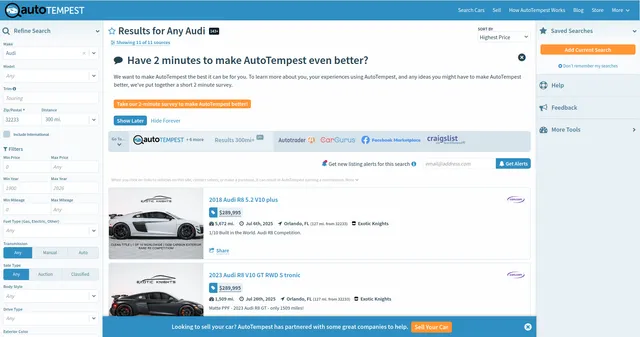
Example url 1: https://www.autotempest.com/results?make=audi&radius=300&zip=32233
Example url 2: https://www.autotempest.com/results?make=amc&radius=300&zip=32233
Example url 3: https://www.autotempest.com/results?bodystyle=coupe&make=amc&model=concord&radius=300&saletype=auction&transmission=man&zip=32233
Example Screenshot of automotive list by query page:
Input Format
The scraper accepts JSON configuration for precise control over data extraction:
Scrape with URLs:
The urls parameter: Add AutoTempest search result URLs you want to scrape. Paste URLs individually or use Bulk edit for prepared lists. Navigate to AutoTempest, configure your search with desired filters (make, model, location, radius), then copy the resulting URL.
The ignore_url_failures parameter: Set to true to continue scraping even if some URLs fail after maximum retries, ensuring one problematic search doesn't halt your entire job.
When providing URLs, all "Scrape with search filters" options are disabled.
Scrape with Search Filters:
The keyword parameter: Enter search terms for vehicles (e.g., "honda civic", "ford f150", "bmw 3 series"). Can include make, model, or both.
The zip_code parameter: Enter zip code to center your geographic search (e.g., 90210, 10001, 60601).
The radius parameter: Specify search radius in miles from zip code (e.g., 25, 50, 100, 300).
When using search filters, leave the urls field empty.
General Options:
The max_items_per_url parameter: Limit items per URL or search. Default is 20, balancing data volume with extraction efficiency.
The max_retries_per_url parameter: Set retry attempts for failed requests. Default is 2, providing good balance between thoroughness and speed.
The proxy parameter: Configure proxy settings to avoid detection. US-based residential proxies recommended for AutoTempest access.
Output Format
The scraper returns comprehensive vehicle data with fields serving specific purposes for automotive analysis and deal discovery:
-
Date: Listing creation date. Track listing freshness, identify new inventory, analyze posting patterns.
-
End Date: Auction or listing end date. Critical for time-sensitive purchases, auction deadline tracking.
-
Archive Date: Date listing was archived or removed. Track inventory turnover, identify sold vehicles.
-
Location: Vehicle location description. Geographic analysis, logistics planning, local market research.
-
Location Code: Standardized location identifier. Database normalization, programmatic location filtering.
-
Country Code: Country identifier. Multi-country analysis, market segmentation.
-
Pending Sale: Boolean indicating pending transaction. Filter out unavailable vehicles, track sales velocity.
-
Dealer Name: Selling dealer or individual name. Dealer reputation research, seller reliability analysis.
-
Title: Vehicle listing title. Quick identification, listing quality assessment.
-
Trim: Vehicle trim level (e.g., LX, Sport, Limited). Precise model matching, feature comparison, accurate pricing.
-
Current Bid: Active auction bid amount. Real-time price tracking for auction listings.
-
Bids: Number of bids received. Popularity indicator, demand assessment, competitive intensity.
-
Highlight Unseen: Flag for new/unseen listings. Identify fresh inventory, automated alert systems.
-
Distance: Miles from search location. Logistics cost calculation, proximity filtering.
-
Price History Diff: Recent price change amount. Identify price drops, negotiation opportunities.
-
Price History Extended: Complete price change timeline. Long-term pricing trends, seller motivation assessment.
-
Price History: Condensed price change data. Quick price movement overview.
-
Price Recent Change: Latest price adjustment. Immediate deal detection, motivated seller identification.
-
Price: Current asking price. Primary valuation metric, comparison baseline.
-
Listing History: Record of listing changes and updates. Track modifications, identify relisting patterns.
-
CTime: Creation timestamp. Precise temporal analysis, chronological sorting.
-
Site Code: Source marketplace identifier (AutoTrader, Cars.com, etc.). Multi-platform comparison, source reliability analysis.
-
Mileage: Odometer reading. Value assessment, wear estimation, price correlation.
-
Make: Vehicle manufacturer. Brand analysis, inventory categorization.
-
Model: Vehicle model name. Specific model targeting, comparison grouping.
-
Backend Model: System model identifier. Database integration, programmatic filtering.
-
Year: Model year. Depreciation calculation, generation identification.
-
External ID: Marketplace-specific listing ID. Cross-reference verification, duplicate detection.
-
VIN: Vehicle Identification Number. Vehicle history lookup, exact matching, fraud prevention.
-
ID: AutoTempest internal listing ID. Unique record tracking, database primary key.
-
Seller Type: Dealer or private party. Seller category filtering, pricing strategy differentiation.
-
Has Pic: Boolean for image availability. Quality filtering, listing completeness indicator.
-
Is Hot Car: Trending/popular vehicle flag. Demand indicator, competitive listing identification.
-
Deal Gauge: Value rating score. Quick deal assessment, automated bargain detection.
-
Vehicle Title: Title status (clean, salvage, rebuilt). Critical purchase decision factor, risk assessment.
-
Vehicle Title Source: Origin of title information. Data reliability verification.
-
Listing Type: Sale type (standard, auction, classified). Purchase process planning, timing strategy.
-
Vehicle Title Desc: Detailed title description. Comprehensive title understanding, legal considerations.
-
URL: Direct link to listing. Manual verification, detailed inspection, contact sellers.
-
Source Name: Marketplace name (human-readable). User-friendly source identification.
-
Logo Src: Marketplace logo URL. UI enrichment, source visualization.
-
Img Fallback: Backup image URL. Reliable image display, data completeness.
-
Img Source: Primary image source. Image origin tracking, quality assessment.
-
Img: Main listing image URL. Visual vehicle identification, listing quality.
-
Source Code String: Technical source identifier. Programmatic source filtering.
-
Details Short: Brief vehicle description. Quick overview, mobile display.
-
Details Mid: Medium-length description. Balanced information density.
-
Details Long: Comprehensive description. Full feature listing, detailed analysis.
-
Details Extra Long: Maximum detail level. Complete specification capture.
-
Backend Site Code: System site identifier. Database relationships, technical filtering.
-
Phone: Seller contact number. Direct communication, immediate inquiries.
-
Placeholder Img Src: Default image URL. Consistent UI, missing image handling.
-
Share Is Supported: Social sharing availability. User experience features.
-
Deal Gauge Class: CSS class for deal rating. UI styling, visual prioritization.
-
Hot Car: Duplicate hot car indicator. Popularity confirmation.
Example Output:
Usage Guide
Option 1: Scraping with URLs
Navigate to AutoTempest.com and construct your search using their interface. Configure filters for make, model, location (zip code), search radius, price range, mileage, year, and other criteria. Once you have results matching your needs, copy the URL from your browser's address bar.
Add URLs to the urls array in your JSON configuration. You can scrape multiple different searches simultaneously—for example, one search for Toyota Camrys in Los Angeles, another for Honda Accords in New York, and a third for Ford F-150s nationwide.
Best practices:
- Test individual URLs before batch processing to verify they return expected results
- Use descriptive search parameters in URLs for easier tracking
- Monitor for rate limiting when processing many URLs
- Save working URLs as AutoTempest may update their URL structure
- Include diverse geographic areas to capture broader market data
Troubleshooting:
- If URLs fail, verify they still work in a browser first
- Check for special characters that may need encoding
- Ensure proxy configuration matches your target geography
- Reduce
max_items_per_urlif experiencing timeouts
Option 2: Scraping with Search Filters
Setting Up Vehicle Search Criteria
Step 1: Define Keyword Search
Enter vehicle search terms in the keyword parameter:
- Make only: "ford", "toyota", "honda", "chevrolet"
- Make + Model: "toyota camry", "honda civic", "ford f150"
- Specific variants: "bmw 3 series", "mercedes e class", "jeep wrangler unlimited"
Step 2: Configure Geographic Parameters
Set zip_code to center your search:
- Urban centers: 90210 (Beverly Hills), 10001 (NYC), 60601 (Chicago)
- Suburban areas: Use local zip codes for regional coverage
- Multiple markets: Run separate searches for each major metro area
Configure radius in miles:
- Local searching: 25-50 miles for metro areas
- Regional coverage: 100-200 miles for broader markets
- Nationwide deals: 300+ miles for rare vehicles or best prices
Step 3: Set Extraction Limits
Adjust max_items_per_url based on needs:
- Quick sampling: 20-50 items
- Market analysis: 100-200 items
- Comprehensive research: 500+ items
Best Practices for Filter-Based Scraping
Keyword Strategy:
- Use exact make/model names as they appear on AutoTempest
- Test keywords on AutoTempest website first to verify results
- Combine specific models with broader searches for complete coverage
- Include common misspellings or variations if relevant
Geographic Coverage:
- Start with major metro areas for highest inventory density
- Expand radius gradually if initial results are insufficient
- Consider regional price variations when planning searches
- Run parallel searches across multiple cities for market comparison
Systematic Data Collection:
- Begin with high-volume models in major markets
- Expand to secondary markets and niche vehicles
- Implement regular scraping schedules for price trend tracking
- Archive historical data for long-term analysis
Data Validation and Quality Control
After extraction, verify:
- All vehicles match your search criteria (make, model, location)
- Price data is reasonable and not erroneous placeholder values
- VINs are valid format (17 characters) when present
- Distance calculations align with specified zip code
- Source marketplace diversity reflects AutoTempest's aggregation
- Recent listings are included (check Date field)
Common Issue Resolution
Empty Results:
- Verify keyword spelling matches AutoTempest's format
- Expand search radius if local inventory is limited
- Check if make/model combination exists in market
- Test search directly on AutoTempest website
Incomplete Data:
- Some fields may be null depending on source marketplace
- Private sellers typically have less complete data than dealers
- Older listings may lack recent price history
- Not all listings include VIN information
Geographic Issues:
- Confirm zip code is valid and correctly formatted
- Verify radius is reasonable for target area
- Consider that some listings may not have precise location data
- Distance calculations depend on available location information
Rate Limiting:
- Reduce
max_items_per_urlto smaller batches - Increase delays between requests via proxy configuration
- Use residential proxies for better success rates
- Distribute large scraping jobs over longer time periods
Advanced Scraping Techniques
Market Trend Analysis:
- Schedule daily/weekly scrapes of same searches to track pricing trends
- Monitor price history fields to identify seasonal patterns
- Track deal gauge scores to understand market value shifts
- Analyze listing duration via date fields for inventory turnover
Competitive Intelligence:
- Scrape competitor dealer inventory by location
- Monitor pricing strategies across different markets
- Track which marketplaces have most competitive pricing
- Identify geographic areas with better deals
Deal Discovery Automation:
- Filter results by deal gauge scores above threshold
- Monitor price history for significant recent drops
- Set alerts for specific make/model combinations
- Track hot car indicators for trending vehicles
Multi-Market Comparison:
- Run identical searches across different zip codes
- Compare average pricing by region
- Identify arbitrage opportunities between markets
- Analyze regional preferences and inventory levels
Proxy Configuration Best Practices
US Residential Proxies:
- Essential for AutoTempest access as it's US-focused
- Rotate proxies to avoid detection patterns
- Match proxy location to search geography when possible
- Higher success rates than datacenter proxies
Configuration Tips:
- Enable
useApifyProxy: truefor managed proxy solution - Use
RESIDENTIALproxy group for best results - Set
apifyProxyCountry: "US"for AutoTempest - Monitor proxy performance and rotate if needed
Benefits and Applications
The AutoTempest scraper provides significant advantages over manual searching or single-site scraping. By aggregating data from multiple marketplaces in one operation, it reduces research time from days to hours while ensuring complete market coverage.
Primary Applications:
Used Car Dealership Pricing: Dealers can monitor competitive pricing across all major platforms, identify underpriced inventory opportunities, set competitive retail prices based on market data, and track competitor inventory levels and pricing strategies.
Automotive Market Research: Analysts can track pricing trends over time, analyze supply and demand by model and region, identify emerging market patterns, and generate comprehensive market reports with multi-source data.
Private Buyer Deal Discovery: Individual buyers can monitor multiple marketplaces for best deals automatically, track price drops on specific vehicles, compare prices across geographic regions, and identify motivated sellers via pricing history.
Inventory Management Systems: Dealers can integrate real-time market data into pricing algorithms, automate competitive analysis workflows, monitor turn times and pricing effectiveness, and optimize inventory acquisition strategies.
Data-Driven Car Shopping: Build custom alerts for specific criteria, analyze historical pricing for negotiation leverage, identify optimal buying opportunities, and make informed purchase decisions with complete market visibility.
Competitive Advantages:
- Single scraping operation captures data from 5+ major automotive marketplaces
- Comprehensive price history enables trend analysis and deal identification
- VIN data allows precise vehicle tracking and history verification
- Geographic flexibility enables national or hyper-local market analysis
- Source diversity provides complete market picture unavailable from single platforms
The structured output integrates with CRM systems, pricing tools, inventory management platforms, and custom analysis applications, enabling immediate activation for automotive business intelligence and consumer applications.
Conclusion
The AutoTempest Car Search Scraper transforms automotive market research from a time-consuming manual process into efficient automated data collection. By capturing aggregated listings from multiple major marketplaces in a single operation, it provides unmatched market visibility for dealers, analysts, and car shoppers.
Whether you're pricing inventory competitively, conducting market research, hunting for deals, or building automotive data products, this scraper delivers the comprehensive, multi-source data necessary for informed decision-making in today's complex automotive marketplace.
Ready to gain complete automotive market visibility? Start extracting comprehensive vehicle listings from AutoTempest today and transform your car shopping or dealership operations with data-driven intelligence.
Your feedback
We are always working to improve Actors' performance. So, if you have any technical feedback about autotempest.com Property Search Scraper or simply found a bug, please create an issue on the Actor's Issues tab in Apify Console.


