
Costco Product Search Scraper (.com, .ca)
Pricing
Pay per usage
Costco Product Search Scraper (.com, .ca)
Extract comprehensive product data from Costco.com (or .ca) including pricing, inventory, ratings, and specifications. Our advanced scraper captures 70+ data fields from gaming computers, laptops, household items, and more for competitive analysis and market research.
Pricing
Pay per usage
Rating
0.0
(0)
Developer

ecomscrape
Maintained by CommunityActor stats
0
Bookmarked
19
Total users
2
Monthly active users
9 days ago
Last modified
Categories
Share
Contact
If you encounter any issues or need to exchange information, please feel free to contact us through the following link: My profile
costco.com Scraper: Extract Product Data & Pricing Intelligence
Introduction
Costco.com serves as the digital gateway to one of America's largest membership warehouse clubs, offering electronics, computers, furniture, outdoor living, appliances, and jewelry with low warehouse prices on name-brand products delivered to your door. The platform operates on a unique business model that combines membership-based shopping with volume purchasing efficiencies, making it a critical data source for competitive analysis, pricing intelligence, and market research.
The challenge lies in accessing this valuable data at scale, as Costco.com reflects live, real-time inventory with limited promotional offers. Manual data collection is time-consuming and impractical for businesses needing comprehensive market insights. Our Costco.com Product Search Scraper addresses this challenge by automating the extraction of detailed product information, pricing data, and inventory status across multiple categories.
Comprehensive Costco.com Data Extraction Solution
Our Costco.com scraper is designed specifically to handle the complexities of extracting data from one of the most sophisticated e-commerce platforms in the retail industry. The tool successfully navigates Costco's dynamic layout changes and anti-bot protection systems while extracting crucial data points like pricing, stock status, product titles, SKUs, and location availability.
The scraper excels at processing large-scale product categories including gaming computers, laptops, bath & body products, household essentials, appliances, and seasonal items. It's particularly valuable for retailers, e-commerce businesses, market researchers, and pricing analysts who need comprehensive competitive intelligence from Costco's extensive product catalog.
Target Users:
- E-commerce businesses seeking competitive pricing data
- Market research firms analyzing retail trends
- Retailers developing pricing strategies
- Inventory management teams tracking stock availability
- Business intelligence analysts monitoring consumer electronics markets
Input and Output Details
Example url 1: https://www.costco.com/gaming-computers.html
Example url 2: https://www.costco.ca/mac.html
Example url 3: https://www.costco.com/bath-body.html
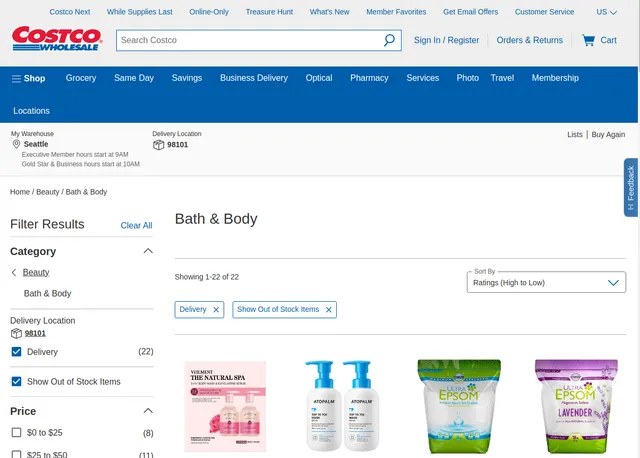
Example Screenshot of product information page:
Input Format
The scraper accepts configuration through a JSON object with several key parameters:
Scrape with URLs:
The urls parameter: Add the URLs of the product list pages you want to scrape. You can paste URLs one by one, or use the Bulk edit section to add a prepared list.
The ignore_url_failures parameter: If set to true, the scraper will continue running even if some URLs fail to be scraped after the maximum number of retries is reached. This ensures that one problematic URL doesn't stop your entire scraping job.
When you provide a list of URLs for scraping, all options in the "Scrape with search filters" section will be disabled. The system will only collect data from the URLs you specified.
Scrape with Search Filters:
The keyword parameter: Enter the keyword to search for items (e.g., "tank top", "laptop", "television", "furniture").
The region parameter: Select the region to search for items:
"com"- United States"ca"- Canada
The rating parameter: Filter items by minimum rating:
""- Any"1"- 1 Star & Up"2"- 2 Star & Up"3"- 3 Star & Up"4"- 4 Star & Up
The price_range parameter: Filter items by price range:
""- Any"0-25"- $0 - $25"25-50"- $25 - $50"50-100"- $50 - $100"100-200"- $100 - $200"200-500"- $200 - $500"1000-2000"- $1000 - $2000
The sort_by parameter: Sort items by specific criteria:
""- Any"item_location_pricing_salePrice+desc"- Price - High to Low"item_location_pricing_salePrice+asc"- Price - Low to High"item_ratings+desc"- Rating - High to Low"item_startDate+desc"- Date - New to Old"item_page_views+desc"- Views - High to Low
The page parameter: Specify the page number to start scraping from (e.g., 1, 2, 3...).
When using search filters for scraping, you need to leave the urls field empty in the "Scrape with URLs" configuration.
General Options:
The max_items_per_url parameter: Limit the number of items per URL or search filters you want to scrape. The default value is 20, providing a manageable batch size while allowing for comprehensive data collection.
The max_retries_per_url parameter: Limit the number of retries for each URL or search filters if the scrape is detected as a bot or the page fails to load. The default value is 2, providing a good balance between thoroughness and efficiency.
The proxy parameter: Proxy configuration is essential for maintaining anonymity and avoiding detection. The residential proxy option ensures that your scraping activities appear as legitimate browsing, reducing the risk of being blocked or rate-limited. You should choose a country that matches the location of the website you're scraping (e.g., US for costco.com, CA for costco.ca).
Output Format
You get the output from the costco.com Product Search Scraper stored in a tab. The following is an example of the Information Fields collected after running the Actor.
Our scraper extracts over 70 data fields, providing complete product intelligence:
Core Product Information:
- Product Name/Item Name: Primary product identifier for catalog management
- Description/Short Description: Detailed and abbreviated product descriptions for content optimization
- Product Number/ID/Group ID: Unique identifiers for inventory tracking and database integration
- Brand Attributes: Manufacturer information for brand analysis and supplier intelligence
Pricing and Financial Data:
- Price per Unit/Sale Price/List Price: Current and original pricing for profit margin analysis
- Min Sale Price/Max Sale Price: Price range data for dynamic pricing strategies
- Currency Code: International currency support for global market analysis
- FSA Eligible: Health Savings Account eligibility for healthcare market segments
Inventory and Availability:
- Stock Status/In Stock: Real-time inventory levels for supply chain optimization
- Warehouse Status/Delivery Status: Location-specific availability for logistics planning
- Location Availability/Location Number: Regional stock distribution intelligence
- Backorder Flag/Backorder Quantity: Out-of-stock product forecasting data
Customer Intelligence:
- Ratings/Review Ratings/Average Rating: Customer satisfaction metrics for quality assessment
- Review Count/Product Review Count: Engagement metrics for popularity analysis
- Rating Values: Detailed rating breakdowns for sentiment analysis
Marketing and Merchandising:
- Marketing Features/Marketing Content Keywords: SEO and content strategy insights
- Marketing Statement: Promotional messaging analysis
- Primary Image/Images: Visual content for competitive design analysis
- Category Path/AS400 Department: Product categorization for market segmentation
Step-by-Step Usage Guide
Method 1: Scrape with URLs
1. Configuration Setup Configure your scraping parameters based on data volume needs and target categories. Set appropriate retry limits and proxy settings to ensure consistent data collection without triggering anti-bot measures.
2. URL Selection
Add specific Costco.com category pages or product listing URLs to the urls array. Focus on categories most relevant to your competitive analysis - electronics, appliances, or household items typically provide rich datasets. You can paste URLs one by one, or use the Bulk edit section to add a prepared list.
3. Execution and Monitoring Launch the scraper and monitor progress through built-in logging. The tool handles pagination automatically and manages rate limiting to maintain consistent data flow.
4. Data Processing Review extracted data for completeness and accuracy. The scraper provides structured output in JSON format, ready for database import or analytical processing.
Method 2: Scrape with Search Filters
1. Configuration Setup Configure your scraping parameters including proxy settings and retry limits to ensure reliable data collection.
2. Search Criteria Definition Define your search criteria using the available filters:
- Keyword: Enter the product search term (e.g., "laptop", "television", "furniture")
- Region: Select United States (com) or Canada (ca) to target specific market
- Rating: Filter products by minimum star rating (1-4 stars & up)
- Price Range: Narrow results to specific price brackets ($0-$25, $25-$50, etc.)
- Sort By: Choose sorting criteria (price, rating, date, or views)
- Start Page: Specify which page to begin scraping from
3. Execution and Monitoring Launch the scraper with your configured filters. The tool automatically navigates through search results, handles pagination, and manages rate limiting to maintain consistent data flow.
4. Data Processing Review extracted data for completeness and accuracy. The scraper provides structured output in JSON format, ready for database import or analytical processing.
Best Practices:
- Start Small: Begin with smaller page limits to test configuration and validate results
- Use Residential Proxies: Maintain consistent access and avoid detection by using residential proxy groups
- Regular Collection: Schedule regular data collection for pricing trend analysis and market monitoring
- Data Validation: Implement validation checks for critical fields like pricing, availability, and ratings
- Region-Specific Scraping: Match your proxy country setting with the target region (US for .com, CA for .ca)
- Filter Optimization: When using search filters, start broad and gradually refine to ensure you capture all relevant products
- Leave URLs Empty: When using search filters, ensure the
urlsfield is empty to avoid conflicts
Business Value and Applications
Time Efficiency: Automated data collection replaces hours of manual research with comprehensive datasets delivered in minutes. Businesses can effectively monitor real-time stock availability, track restocking schedules, and investigate intricate inventory trends.
Competitive Intelligence: Access to Costco's pricing strategies, product positioning, and inventory management provides crucial competitive advantages for retailers and e-commerce businesses.
Market Research Applications:
- Pricing strategy development and dynamic pricing implementation
- Product assortment analysis and gap identification
- Seasonal trend monitoring and demand forecasting
- Supply chain optimization through inventory pattern analysis
ROI Impact: Companies typically see 300-500% ROI through improved pricing decisions, better inventory management, and enhanced competitive positioning based on comprehensive Costco market intelligence.
Conclusion
Our Costco.com Product Search Scraper delivers comprehensive e-commerce intelligence through automated data extraction of pricing, inventory, and product information. With over 70 data fields and robust handling of Costco's sophisticated platform, it provides the competitive advantages businesses need for data-driven decision making.
Transform your market research and competitive analysis capabilities with reliable, real-time Costco product data. Start extracting valuable insights from one of retail's most important platforms today.
Your feedback
We are always working to improve Actors' performance. So, if you have any technical feedback about costco.com Product Search Scraper or simply found a bug, please create an issue on the Actor's Issues tab in Apify Console.


