

Kleinanzeigen Product Search Scraper
Pricing
Pay per usage
Kleinanzeigen Product Search Scraper
Powerful Kleinanzeigen.de product search scraper that automatically extracts listings data including prices, descriptions, images, and locations. Perfect for market research, price monitoring, and competitive analysis on Germany's #1 classified ads platform.
Pricing
Pay per usage
Rating
0.0
(0)
Developer

ecomscrape
Maintained by CommunityActor stats
0
Bookmarked
12
Total users
0
Monthly active users
12 days ago
Last modified
Categories
Share
Contact
If you encounter any issues or need to exchange information, please feel free to contact us through the following link: My profile
Kleinanzeigen Scraper: Extract Fashion Data Across Europe
Introduction (English version)
Germany's leading classified ads marketplace, Kleinanzeigen.de (formerly eBay Kleinanzeigen), serves as the country's most visited online platform for buying and selling goods. With over 50 million ads posted across various categories spanning consumer goods, jobs, real estate and more, this marketplace represents a goldmine of valuable data for businesses, researchers, and entrepreneurs. However, manually collecting and analyzing this vast amount of information is time-consuming and impractical, making automated data extraction essential for anyone serious about leveraging this platform's insights.
Overview of the Kleinanzeigen.de Product Search Scraper
The Kleinanzeigen.de Product Search Scraper is a sophisticated automation tool designed to efficiently extract comprehensive product information from Germany's premier classified ads platform. This scraper navigates through search result pages, category listings, and individual product pages to collect structured data that can be immediately used for analysis, monitoring, or integration into other systems.
Key Advantages:
- High-Volume Data Collection: Process multiple URLs simultaneously with configurable item limits
- Residential Proxy Support: Avoid detection and IP blocking with built-in proxy rotation
- Retry Mechanism: Robust error handling ensures maximum data collection success
- Structured Output: Clean, standardized data format ready for immediate use
- Category Flexibility: Works across all Kleinanzeigen.de categories and search filters
Target Users:
- Market researchers analyzing pricing trends
- E-commerce businesses monitoring competitors
- Data analysts studying consumer behavior
- Price comparison services
- Academic researchers investigating online marketplaces
Input and Output Details
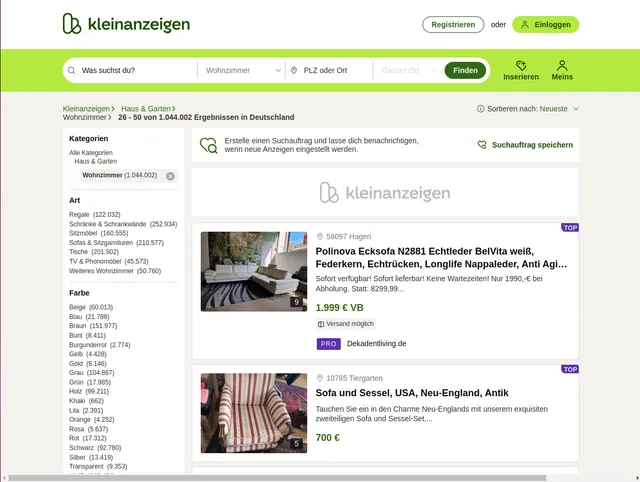
Example url 1: https://www.kleinanzeigen.de/s-wohnzimmer/seite:2/c88
Example url 2: https://www.kleinanzeigen.de/s-wohnzimmer/c88+wohnzimmer.color_s:gelb
Example url 3: https://www.kleinanzeigen.de/s-wohnzimmer/c88+wohnzimmer.color_s:gelb+wohnzimmer.material_s:oak
Example Screenshot of product information page:
Input Format
The scraper accepts configuration through a JSON object with several key parameters:
Scrape with URLs:
The urls parameter: Add the URLs of the product list pages you want to scrape. You can paste URLs one by one, or use the Bulk edit section to add a prepared list.
The ignore_url_failures parameter: If set to true, the scraper will continue running even if some URLs fail to be scraped after the maximum number of retries is reached. This ensures that one problematic URL doesn't stop your entire scraping job.
When you provide a list of URLs for scraping, all options in the "Scrape with search filters" section will be disabled. The system will only collect data from the URLs you specified.
Scrape with Search Filters:
The keyword parameter: Enter the keyword to search for items (e.g., "iPhone", "fahrrad", "wohnung", "auto", "möbel").
The sort_by parameter: Select the sorting method for the search results:
""- Relevance (most relevant first)"preis"- Cheapest (price low to high)"teuerste"- Most expensive (price high to low)
The page parameter: Specify the page number to start scraping from, useful for continuing interrupted scrapes or targeting specific result ranges.
When using search filters for scraping, you need to leave the urls field empty in the "Scrape with URLs" configuration.
General Options:
The max_items_per_url parameter: Limit the number of items per URL or search filters you want to scrape. The default value is 20, providing a manageable batch size while allowing for comprehensive data collection.
The max_retries_per_url parameter: Limit the number of retries for each URL or search filters if the scrape is detected as a bot or the page fails to load. The default value is 2, providing a good balance between thoroughness and efficiency.
The proxy parameter: Proxy configuration is essential for maintaining anonymity and avoiding detection. The residential proxy option ensures that your scraping activities appear as legitimate browsing, reducing the risk of being blocked or rate-limited. You should choose a country that matches the location of the website you're scraping (e.g., Germany/DE for kleinanzeigen.de).
Output Format
You get the output from the kleinanzeigen Product Search Scraper stored in a tab. The following is an example of the Information Fields collected after running the Actor.
The scraper returns structured data with eight essential fields that capture the complete product information:
Field Significance:
- ID: Unique identifier enabling tracking, deduplication, and database integration
- Name: Product title crucial for categorization, search optimization, and customer appeal analysis
- URL: Direct link for detailed inspection, automated monitoring, or customer redirection
- Price: Essential for competitive analysis, pricing strategies, and market trend identification
- Description: Rich text providing condition details, features, and seller information for quality assessment
- Image: Visual content URL for automated image analysis, catalog building, or quality verification
- Location: Geographic data enabling local market analysis, logistics planning, and regional pricing studies
- Date: Temporal information crucial for trend analysis, freshness assessment, and seasonal pattern identification
Implementation Guide
Option 1: Implementation with URLs
Step-by-Step Usage:
-
URL Preparation: Collect target URLs from Kleinanzeigen.de by browsing categories or performing searches. Copy the complete URLs including any filters or pagination parameters.
-
Configuration Setup: Customize the JSON input with your specific requirements:
- Add URLs to the
urlsarray - Set
max_items_per_urlbased on your data needs (default: 20) - Configure proxy settings with appropriate country (Germany recommended)
- Enable
ignore_url_failuresto ensure one problematic URL doesn't stop your job
- Add URLs to the
-
Execution: Submit the configuration to the scraper and monitor the progress through the provided dashboard or logs.
-
Data Processing: Review the extracted data and implement any necessary post-processing filters or transformations based on your specific use case.
Best Practices:
- Start with smaller batches (5-10 URLs) to test configuration before scaling up
- Use German proxies (
apifyProxyCountry: "DE") for optimal access to Kleinanzeigen.de - Monitor extraction rates and adjust
max_items_per_urlto balance speed and completeness - Implement data validation checks to ensure quality and completeness
Option 2: Implementation with Search Filters
Step-by-Step Usage:
-
Define Search Criteria: Instead of manually creating URLs, configure search filters to automatically generate searches based on your needs.
-
Configure Keyword: Enter the
keywordparameter with the item or category you want to search (e.g., "iPhone", "fahrrad", "wohnung"). -
Set Sorting Preference: Choose the
sort_byparameter:- Leave empty for relevance-based results
- Use
"preis"for cheapest items first (good for bargain hunting) - Use
"teuerste"for most expensive items first (good for premium items)
-
Configure Pagination: Set the
pageparameter to start from a specific result page if needed. -
Execution: Submit the configuration and monitor progress.
-
Data Processing: Review and process the extracted data based on your requirements.
Best Practices for Filter-Based Scraping:
Keyword Strategy: Use specific, clear keywords for better results:
- Product names: "iPhone 13", "Samsung TV", "MacBook Pro"
- Categories: "fahrrad" (bicycle), "auto" (car), "wohnung" (apartment)
- Brands: "Nike", "IKEA", "Bosch"
- German terminology works best for local listings
Sorting Strategy: Choose sorting based on your goals:
- Use relevance (empty
sort_by) for general searches and broad categories - Use
"preis"(cheapest) when looking for deals or budget items - Use
"teuerste"(most expensive) when researching premium or high-value items - Run multiple searches with different sorting to get comprehensive market view
Pagination Planning:
- Start from page 1 for complete coverage
- Use specific page numbers to resume interrupted scrapes
- Set appropriate
max_items_per_urlto control how many items per page - Monitor total results to plan complete data collection
Progressive Search Approach: For comprehensive data collection:
- Start with broad keywords (e.g., "smartphone")
- Run separate searches for specific brands or models
- Try different sorting methods to capture different item segments
- Combine results from multiple keyword variations
Data Validation: After extraction, verify that:
- Items match your keyword criteria
- Sorting order corresponds to your
sort_byselection - No duplicate listings across multiple searches
- All expected data fields are populated
Common Use Cases:
Price Research:
- Search with keyword, sort by
"preis"for lowest prices - Search same keyword with
"teuerste"for price range analysis - Compare results to understand market pricing
Market Analysis:
- Run searches for competing products
- Use relevance sorting to see most popular items
- Track listing volume and pricing trends
Deal Hunting:
- Use specific product keywords
- Sort by
"preis"(cheapest) - Schedule regular scrapes to catch new low-priced listings
Inventory Monitoring:
- Search for specific brands or categories
- Use relevance sorting for best matches
- Track availability and pricing over time
Common Issues and Solutions:
Keyword Issues:
- No results: Try more general keywords or German translations
- Too many results: Use more specific keywords or brand names
- Irrelevant results: Use exact product names or model numbers
Sorting Problems:
- Unexpected order: Verify
sort_byparameter spelling is correct - Price sorting not working: Ensure items have prices listed
- Relevance inconsistent: Try adding more specific keywords
Empty Results:
- Verify keyword exists on Kleinanzeigen.de by manual search
- Try alternative spellings or German translations
- Remove or adjust filters that might be too restrictive
Data Quality:
- Missing prices: Some listings don't include prices (free items, contact for price)
- Incomplete data: Not all sellers provide full information
- Duplicate listings: Same item may be reposted; use unique identifiers
Blocked Requests:
- Increase retry limits with
max_retries_per_url - Ensure proxy configuration is active with German proxies
- Reduce scraping speed by lowering
max_items_per_url
Rate Limiting:
- Use residential proxies (
apifyProxyGroups: ["RESIDENTIAL"]) - Reduce concurrent requests or increase delays between requests
- Set reasonable
max_items_per_urlvalues (20-50)
Proxy Configuration:
- Use German proxies for best results:
"apifyProxyCountry": "DE" - Enable residential proxies to reduce detection risk
- Monitor proxy usage and rotate as needed
Language Considerations:
- Kleinanzeigen.de is primarily in German
- Use German keywords for better results (e.g., "fahrrad" not "bicycle")
- Some international items may use English terms
- Category names are in German (e.g., "wohnung" for apartments)
General Best Practices
Testing Strategy:
- Start with small batch tests (1-2 searches) to validate configuration
- Test different keywords and sorting combinations
- Verify data quality before scaling up
- Monitor error rates and adjust parameters
Scheduling:
- Schedule regular scrapes for market monitoring
- Daily scrapes for fast-moving categories (electronics, vehicles)
- Weekly scrapes for slower categories (furniture, real estate)
- Track changes over time for trend analysis
Data Management:
- Store extracted data with timestamps and search parameters
- Implement deduplication logic using item IDs or URLs
- Archive historical data for trend analysis
- Export to appropriate formats (CSV, JSON, database)
Performance Optimization:
- Balance
max_items_per_urlbetween speed and completeness - Use appropriate proxy settings for your scale
- Monitor and adjust retry settings based on success rates
- Implement efficient data storage and processing
Business Benefits and Applications
Time and Resource Efficiency: Manual data collection from Kleinanzeigen.de would require countless hours of browsing, copying, and organizing information. This scraper automates the entire process, reducing a multi-day manual task to minutes of automated execution.
Real-World Applications:
- Competitive Intelligence: Monitor competitor pricing, product descriptions, and market positioning
- Market Research: Analyze product availability, pricing trends, and consumer demand patterns
- Inventory Management: Track similar products to optimize your own listings and pricing strategies
- Academic Studies: Research consumer behavior, market dynamics, and e-commerce trends in the German market
- Price Optimization: Develop data-driven pricing strategies based on comprehensive market analysis
Strategic Value: Access to structured, up-to-date marketplace data enables informed decision-making, competitive advantage, and market opportunity identification that would be impossible through manual research methods.
Conclusion
The Kleinanzeigen.de Product Search Scraper transforms Germany's largest classified ads platform into a structured data source for business intelligence and market research. By automating the complex process of data extraction from this high-volume marketplace, users can focus on analysis and strategy rather than manual data collection.
Ready to unlock the full potential of Kleinanzeigen.de's marketplace data? Start extracting valuable insights today with this comprehensive scraping solution.
Einführung (Deutsche Version)
Deutschlands führender Kleinanzeigen-Marktplatz, Kleinanzeigen.de (ehemals eBay Kleinanzeigen), dient als das meistbesuchte Online-Portal des Landes für den Kauf und Verkauf von Waren. Mit über 50 Millionen Anzeigen in verschiedenen Kategorien, die Konsumgüter, Jobs, Immobilien und mehr umfassen, stellt dieser Marktplatz eine Goldgrube wertvoller Daten für Unternehmen, Forscher und Unternehmer dar. Jedoch ist das manuelle Sammeln und Analysieren dieser enormen Informationsmenge zeitaufwändig und unpraktisch, was die automatisierte Datenextraktion für jeden unerlässlich macht, der die Erkenntnisse dieser Plattform ernsthaft nutzen möchte.
Überblick über den Kleinanzeigen.de Produktsuche Scraper
Der Kleinanzeigen.de Produktsuche Scraper ist ein hochentwickeltes Automatisierungstool, das entwickelt wurde, um effizient umfassende Produktinformationen von Deutschlands führender Kleinanzeigen-Plattform zu extrahieren. Dieser Scraper navigiert durch Suchergebnisseiten, Kategorienlisten und individuelle Produktseiten, um strukturierte Daten zu sammeln, die sofort für Analysen, Überwachung oder Integration in andere Systeme verwendet werden können.
Hauptvorteile:
- Hochvolumige Datensammlung: Verarbeitung mehrerer URLs gleichzeitig mit konfigurierbaren Artikellimits
- Residential Proxy-Unterstützung: Vermeidung von Erkennung und IP-Blockierung mit eingebauter Proxy-Rotation
- Wiederholungsmechanismus: Robuste Fehlerbehandlung gewährleistet maximalen Datensammlungserfolg
- Strukturierte Ausgabe: Sauberes, standardisiertes Datenformat für sofortige Nutzung bereit
- Kategorienflexibilität: Funktioniert über alle Kleinanzeigen.de-Kategorien und Suchfilter
Zielnutzer:
- Marktforscher, die Preistrends analysieren
- E-Commerce-Unternehmen, die Konkurrenten überwachen
- Datenanalysten, die Verbraucherverhalten studieren
- Preisvergleichsdienste
- Akademische Forscher, die Online-Marktplätze untersuchen
Ein- und Ausgabedetails
Beispiel-URL 1: https://www.kleinanzeigen.de/s-wohnzimmer/seite:2/c88
Beispiel-URL 2: https://www.kleinanzeigen.de/s-wohnzimmer/c88+wohnzimmer.color_s:gelb
Beispiel-URL 3: https://www.kleinanzeigen.de/s-wohnzimmer/c88+wohnzimmer.color_s:gelb+wohnzimmer.material_s:oak
Beispiel-Screenshot der Produktinformationsseite:
Eingabeformat
Der Scraper akzeptiert JSON-Konfiguration mit mehreren Schlüsselparametern:
Eingabe:
Eingabeparameter erklärt:
- max_retries_per_url: Steuert die Beharrlichkeit beim Zugriff auf URLs und gewährleistet maximale Datensammlung, auch wenn Seiten vorübergehend nicht verfügbar sind
- Proxy-Konfiguration: Wesentlich für großangelegtes Scraping, um Bot-Erkennung und IP-Blockierung zu vermeiden
- max_items_per_url: Begrenzt die Anzahl der pro Suchseite extrahierten Artikel und ermöglicht es Ihnen, Datenvolumen und Verarbeitungszeit zu kontrollieren
- URLs-Array: Akzeptiert Kategorieseiten, Suchergebnisseiten und gefilterte Auflistungen mit spezifischen Parametern wie Farbe, Material oder Standort
Ausgabeformat
Sie erhalten die Ausgabe vom Kleinanzeigen Produktsuche Scraper in einem Tab gespeichert. Das Folgende ist ein Beispiel der Informationsfelder, die nach dem Ausführen des Actors gesammelt werden.
Der Scraper gibt strukturierte Daten mit acht wesentlichen Feldern zurück, die die vollständigen Produktinformationen erfassen:
Feldbedeutung:
- ID: Eindeutige Kennzeichnung ermöglicht Verfolgung, Deduplikation und Datenbankintegration
- Name: Produkttitel entscheidend für Kategorisierung, Suchoptimierung und Kundenattraktivitätsanalyse
- URL: Direkter Link für detaillierte Inspektion, automatisierte Überwachung oder Kundenweiterleitung
- Price: Wesentlich für Wettbewerbsanalyse, Preisstrategien und Markttrendidentifikation
- Description: Reichhaltiger Text mit Zustandsdetails, Funktionen und Verkäuferinformationen für Qualitätsbewertung
- Image: Visueller Inhalt-URL für automatisierte Bildanalyse, Katalogaufbau oder Qualitätsverifikation
- Location: Geografische Daten ermöglichen lokale Marktanalyse, Logistikplanung und regionale Preisstudien
- Date: Zeitliche Informationen entscheidend für Trendanalyse, Frischebewertung und saisonale Musteridentifikation
Implementierungsleitfaden
Schrittweise Nutzung:
-
URL-Vorbereitung: Sammeln Sie Ziel-URLs von Kleinanzeigen.de durch das Durchsuchen von Kategorien oder das Durchführen von Suchen. Kopieren Sie die vollständigen URLs einschließlich aller Filter oder Paginierungsparameter.
-
Konfigurationseinrichtung: Passen Sie die JSON-Eingabe an Ihre spezifischen Anforderungen an. Für umfangreiche Scraping-Operationen aktivieren Sie immer die Proxy-Nutzung, um konsistenten Zugang zu gewährleisten.
-
Ausführung: Übermitteln Sie die Konfiguration an den Scraper und überwachen Sie den Fortschritt über das bereitgestellte Dashboard oder die Protokolle.
-
Datenverarbeitung: Überprüfen Sie die extrahierten Daten und implementieren Sie alle notwendigen Nachbearbeitungsfilter oder Transformationen basierend auf Ihrem spezifischen Anwendungsfall.
Best Practices:
- Beginnen Sie mit kleineren Chargen (5-10 URLs), um die Konfiguration zu testen, bevor Sie hochskalieren
- Verwenden Sie standortgerechte Proxy-Länder (Deutschland empfohlen für Kleinanzeigen.de)
- Überwachen Sie Extraktionsraten und passen Sie max_items_per_url an, um Geschwindigkeit und Vollständigkeit auszubalancieren
- Implementieren Sie Datenvalidierungsprüfungen, um Qualität und Vollständigkeit sicherzustellen
Häufige Probleme und Lösungen:
- Blockierte Anfragen: Erhöhen Sie Wiederholungslimits und stellen Sie sicher, dass die Proxy-Konfiguration aktiv ist
- Fehlende Daten: Einige Auflistungen haben möglicherweise unvollständige Informationen; implementieren Sie Null-Wert-Behandlung
- Ratenbegrenzung: Reduzieren Sie gleichzeitige Anfragen oder erhöhen Sie Verzögerungen zwischen Anfragen
Geschäftsvorteile und Anwendungen
Zeit- und Ressourceneffizienz: Die manuelle Datensammlung von Kleinanzeigen.de würde unzählige Stunden des Durchsuchens, Kopierens und Organisierens von Informationen erfordern. Dieser Scraper automatisiert den gesamten Prozess und reduziert eine mehrtägige manuelle Aufgabe auf Minuten automatisierter Ausführung.
Reale Anwendungen:
- Competitive Intelligence: Überwachen Sie Konkurrentenpreise, Produktbeschreibungen und Marktpositionierung
- Marktforschung: Analysieren Sie Produktverfügbarkeit, Preistrends und Verbrauchernachfragemuster
- Bestandsverwaltung: Verfolgen Sie ähnliche Produkte, um Ihre eigenen Anzeigen und Preisstrategien zu optimieren
- Akademische Studien: Erforschen Sie Verbraucherverhalten, Marktdynamiken und E-Commerce-Trends im deutschen Markt
- Preisoptimierung: Entwickeln Sie datengetriebene Preisstrategien basierend auf umfassender Marktanalyse
Strategischer Wert: Der Zugang zu strukturierten, aktuellen Marktplatzdaten ermöglicht informierte Entscheidungsfindung, Wettbewerbsvorteile und Marktchancenidentifikation, die durch manuelle Forschungsmethoden unmöglich wären.
Fazit
Der Kleinanzeigen.de Produktsuche Scraper transformiert Deutschlands größte Kleinanzeigen-Plattform in eine strukturierte Datenquelle für Business Intelligence und Marktforschung. Durch die Automatisierung des komplexen Prozesses der Datenextraktion aus diesem hochvolumigen Marktplatz können sich Nutzer auf Analyse und Strategie konzentrieren anstatt auf manuelle Datensammlung.
Bereit, das volle Potenzial der Marktplatzdaten von Kleinanzeigen.de zu erschließen? Beginnen Sie noch heute mit der Extraktion wertvoller Erkenntnisse mit dieser umfassenden Scraping-Lösung.
Related Actors
- Kleinanzeigen Product Details Scraper: A specialized data extraction solution engineered to harvest comprehensive product information from Kleinanzeigen's.
Your feedback
We are always working to improve Actors' performance. So, if you have any technical feedback about Kleinanzeigen Product Search Scraper or simply found a bug, please create an issue on the Actor's Issues tab in Apify Console.


