

Pinterest Board Listings Scraper
Pricing
from $2.00 / 1,000 results
Pinterest Board Listings Scraper
Scrape Pinterest board listings from search results or profile pages. Extract board names, pin counts, follower data, cover images, collaboration details, privacy settings, and 35+ metadata fields for research, trend analysis, and content strategy.
Pricing
from $2.00 / 1,000 results
Rating
0.0
(0)
Developer

ecomscrape
Maintained by CommunityActor stats
1
Bookmarked
19
Total users
0
Monthly active users
7 months ago
Last modified
Categories
Share
Contact
If you encounter any issues or need to exchange information, please feel free to contact us through the following link: My profile
Pinterest Board Listing Scraper: Extract Board Data & Metadata at Scale
Introduction
Pinterest hosts hundreds of millions of boards spanning fashion, home décor, recipes, art, travel, and virtually every visual niche imaginable. Each board represents a curated collection tied to a theme, audience, and creator — making board-level data valuable for trend researchers, marketers, and competitive analysts who need to understand content organization patterns at scale.
Manually browsing Pinterest board listings is inefficient beyond a few pages. The Pinterest Board Listing Scraper automates extraction of comprehensive board metadata from search result pages, giving you structured, analysis-ready data across dozens of fields without manual effort.
Scraper Overview
This scraper retrieves detailed metadata from Pinterest board listing pages — search results, category pages, or any URL that surfaces a list of boards. It captures not just surface-level details like board names and pin counts, but also collaboration settings, privacy status, follower metrics, cover image URLs, and internal classification data.
Key capabilities:
- Dual input modes — scrape via direct URLs or keyword-based search
- Configurable item limits — control how many boards are extracted per URL
- Retry logic — automatically retries failed requests up to a configurable limit
- Error resilience — skips failed URLs without halting the full job
- Rich metadata coverage — 35+ fields per board record
Ideal for social media researchers mapping content ecosystems, marketers benchmarking competitor boards, trend analysts studying popular topics, and data scientists building Pinterest datasets.
Input Configuration
Example url 1: https://www.pinterest.com/collectsideshow/marvel-collectibles/x-men/
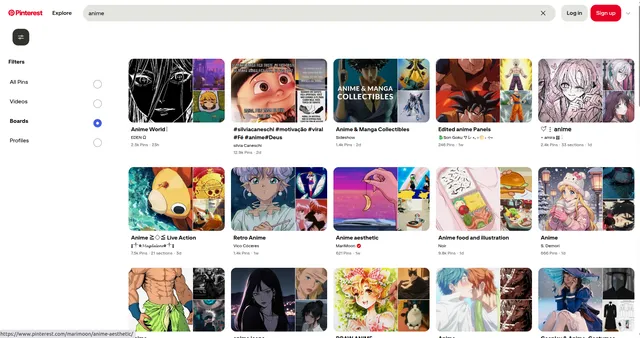
Example url 2: https://www.pinterest.com/search/pins/?q=anime&rs=content_type_filter
Example url 3: https://www.pinterest.com/AegonTheGreat/anime-world/
Example Screenshot of product information page:
Input Format
The scraper supports two modes: URL-based scraping and keyword search. These are mutually exclusive — if URLs are provided, keyword filters are ignored.
urls — An array of Pinterest board listing page URLs. Supports search results (/search/boards/?q=...), profile board pages, and category listing URLs. Add one by one or use Bulk edit for larger lists.
ignore_url_failures (boolean) — When true, the scraper continues processing remaining URLs if any individual URL fails after the maximum retry attempts. Strongly recommended for batch runs.
keyword (optional, alternative to URLs) — Enter a search keyword instead of URLs to have the scraper construct and query Pinterest board search results automatically. Leave URLs empty when using this mode.
max_items_per_url (integer, default: 20) — Limits the number of boards extracted per URL or per keyword search. Increase for broader coverage; reduce for faster, targeted runs.
max_retries_per_url (integer, default: 2) — Number of retry attempts per URL if the page fails to load or the request is identified as automated. Increasing this can improve success rates on flaky connections.
Output Format
Each board record contains the following fields:
| Field | Type | Description |
|---|---|---|
| Node ID | String | Internal graph node identifier for the board. Useful for deduplication and API cross-referencing. |
| ID | String | Pinterest's unique board ID. Primary key for identifying boards across datasets. |
| Name | String | Board display name. Core field for content categorization and keyword analysis. |
| Description | String | Creator-written board description. Valuable for NLP, topic modeling, and intent analysis. |
| URL | String | Full Pinterest URL to the board. Use for direct linking or follow-up scraping. |
| Owner | Object | Data about the board's creator, including username and profile details. |
| Privacy | String | Board visibility setting (e.g., public, secret). Key for filtering publicly accessible boards. |
| Pin Count | Integer | Total number of pins on the board. Primary engagement metric. |
| Follower Count | Integer | Number of users following the board. Measures audience reach and popularity. |
| Section Count | Integer | Number of sections the board is organized into. Indicates structural complexity. |
| Collaborator Count | Integer | Number of collaborators contributing to the board. |
| Collaborating Users | Array | List of users with contributor access to the board. |
| Is Collaborative | Boolean | Whether the board accepts contributions from multiple users. |
| Collaborated By Me | Boolean | Whether the authenticated user is a collaborator on this board. |
| Collaborator Requests Enabled | Boolean | Whether the board owner allows collaboration requests. |
| Viewer Collaborator Join Requested | Boolean | Whether the current viewer has a pending join request. |
| Images | Object | Thumbnail image data associated with the board. |
| Image Cover URL | String | Standard-resolution cover image URL. For previews and thumbnails. |
| Image Cover HD URL | String | High-resolution cover image URL. For visual analysis or display applications. |
| Cover Images | Array | Additional cover image variations at different sizes. |
| Cover Pin | Object | The pin used as the board's cover image, including its metadata. |
| Has Custom Cover | Boolean | Whether the creator manually set a custom cover vs. auto-generated. |
| Created At | Timestamp | Board creation date and time. Useful for temporal analysis and trend tracking. |
| Board Order Modified At | Timestamp | When the board's pin order was last changed. Indicates recency of active curation. |
| Event Date | String | Date associated with event-type boards (e.g., wedding boards). |
| Event Start Date | String | Start date for event boards. |
| Place Saves Count | Integer | Number of place-tagged pins saved to the board. Relevant for travel and location research. |
| Followed By Me | Boolean | Whether the authenticated user follows this board. |
| Access | Array | Access permission levels for the board. |
| Allow Homefeed Recommendations | Boolean | Whether Pinterest may recommend this board in home feeds. |
| Should Show More Ideas | Boolean | Whether Pinterest surfaces related ideas below the board. |
| Should Show Shop Feed | Boolean | Whether a shopping feed is shown on the board. Indicates commercial intent. |
| Should Show Board Collaborators | Boolean | Whether collaborator avatars are displayed publicly. |
| Is Ads Only | Boolean | Whether the board is restricted to promoted/advertising content. |
| Archived By Me At | Timestamp | If the authenticated user archived this board, the timestamp when. |
| Board Vase | Object | Internal Pinterest classification metadata. |
| Type | String | Content type classification of the board. |
| Tracking Params | String | Analytics tracking parameters associated with the board. |
Example Output
Usage Guide
Step 1: Choose Your Input Mode
URL mode — Navigate to a Pinterest board search page (e.g., pinterest.com/search/boards/?q=your-topic) and copy the URL. This gives you precise control over which listing page is scraped.
Keyword mode — Leave urls empty and set keyword to your target term. The scraper handles search query construction automatically.
Step 2: Set Item and Retry Limits
- Set
max_items_per_urlbased on your needs. The default of 20 is suitable for quick tests; increase to 100+ for comprehensive research runs. - Keep
max_retries_per_urlat 2–3 for most use cases. Increase only if you're experiencing frequent load failures.
Step 3: Enable Error Handling
Always set ignore_url_failures: true for multi-URL batches to prevent one failed page from terminating the job.
Step 4: Process and Filter Output
After extraction, common post-processing steps include:
- Filter by
privacy: "public"to retain only publicly accessible boards - Sort by
follower_countorpin_countto identify high-authority boards - Use
is_collaborativeto segment community boards from solo-curated ones - Extract
ownerdetails for channel-level grouping
Best Practices
- Test with a small
max_items_per_urlfirst (10–20) before scaling up - Use specific search URLs for niche research rather than broad keyword queries
- Cross-reference
node_idandidwhen merging data from multiple runs to avoid duplicates - Monitor
board_order_modified_atto identify actively maintained boards vs. dormant ones
Benefits and Applications
Trend & Niche Research: Identify popular board themes, naming conventions, and pin volumes within a topic area to understand what content resonates with Pinterest audiences.
Competitive Intelligence: Analyze competitor brand boards — follower counts, section structures, collaboration settings, and cover aesthetics — to inform your own Pinterest strategy.
Influencer & Creator Discovery: Use owner and follower_count data to surface high-reach board curators in specific niches for partnership or outreach opportunities.
Dataset Creation: Build labeled Pinterest board datasets for machine learning projects, social media research, or visual content classification systems.
Content Planning: Leverage keywords from board names and descriptions to map content gaps and identify underserved topics in your niche.
Conclusion
The Pinterest Board Listing Scraper delivers structured, comprehensive board metadata that would take hours to collect manually. With 35+ fields per record and flexible input options, it supports everything from quick competitive snapshots to large-scale research datasets.
Your feedback
We are always working to improve Actors' performance. So, if you have any technical feedback about Pinterest Search Scraper or simply found a bug, please create an issue on the Actor's Issues tab in Apify Console.


