

Trulia Property Search Scraper
Pricing
Pay per usage
Trulia Property Search Scraper
The Trulia.com Property Search Scraper extracts property information from Trulia.com. Capture data such as price, rating, features, location and more by providing Property Search Query URLs.
Pricing
Pay per usage
Rating
0.0
(0)
Developer

ecomscrape
Maintained by CommunityActor stats
0
Bookmarked
3
Total users
0
Monthly active users
20 days ago
Last modified
Categories
Share
Contact
If you encounter any issues or need to exchange information, please feel free to contact us through the following link: My profile
Trulia.com Property Data Extraction Made Simple
Introduction
Trulia.com stands as one of America's leading real estate platforms, featuring over 1 million active MLS listings that provide comprehensive property information across the United States. For real estate professionals, investors, and market analysts, accessing this vast repository of property data manually can be time-consuming and inefficient. The Trulia.com Property Search Scraper addresses this challenge by automating the data extraction process, enabling users to gather structured property information at scale for market analysis, competitive research, and investment decision-making.
The real estate market moves quickly, and having timely access to property data can make the difference between securing profitable deals and missing opportunities. This scraper transforms the manual process of browsing through hundreds of listings into an automated workflow that delivers clean, structured data ready for analysis.
Scraper Overview
The Trulia.com Property Search Scraper is a powerful web automation tool designed to extract comprehensive property data from Trulia's extensive real estate database. Built to handle Trulia's robust search system with 35+ filters and custom keyword search capabilities, this scraper efficiently navigates through property listings and captures essential real estate information.
The scraper excels in handling large-scale data collection while maintaining data accuracy and consistency. It's engineered to work with Trulia's dynamic web interface, adapting to various property types including single-family homes, condominiums, townhouses, and rental properties. The tool is particularly valuable for real estate agents, property investors, market researchers, and data analysts who need reliable access to current market information.
Target users include real estate professionals conducting market analysis, investors identifying investment opportunities, researchers studying housing trends, and businesses requiring comprehensive property data for their applications or services.
Input and Output Specifications
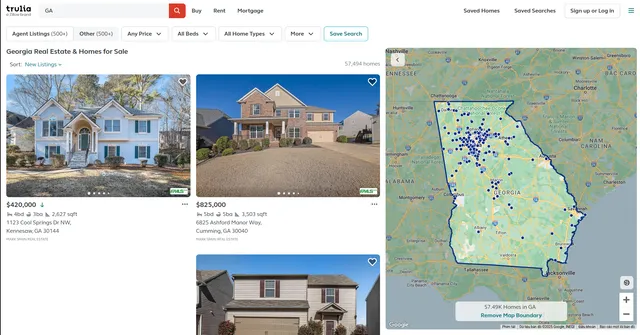
Example url 1: https://www.trulia.com/GA/
Example url 2: https://www.trulia.com/GA/Marietta/
Example url 3: https://www.trulia.com/SC/
Example Screenshot of property list by query page:
Input Format
The scraper accepts configuration through a JSON object with several key parameters:
Scrape with URLs:
The urls parameter: Add the URLs of the property list pages you want to scrape. You can paste URLs one by one, or use the Bulk edit section to add a prepared list.
The ignore_url_failures parameter: If set to true, the scraper will continue running even if some URLs fail to be scraped after the maximum number of retries is reached. This ensures that one problematic URL doesn't stop your entire scraping job.
When you provide a list of URLs for scraping, all options in the "Scrape with search filters" section will be disabled. The system will only collect data from the URLs you specified.
Scrape with Search Filters:
The location parameter: Enter the location to search for items. Make sure the location is accurate by selecting a location on the website and then searching. Copy the value from selected location (e.g., "10023", "GA", "Dunwoody, GA").
The property_type parameter: Filter properties by type:
"SINGLE-FAMILY_HOME"- House"APARTMENT,CONDO,COOP"- Condo"TOWNHOUSE"- Townhome"MULTI-FAMILY"- Multi-Family"LOT|LAND"- Land"MOBILE_MANUFACTURED"- Mobile/Manufactured"OTHER"- Other
The operation_type parameter: Filter properties by operation type:
"for_sale"- Buy"for_rent"- Rent"sold"- Sold
The price_range parameter: Filter properties by price range (e.g., "1000-10000", "200000-500000"). Specify minimum and maximum price separated by a hyphen.
The square_feet_range parameter: Filter properties by square feet range (e.g., "1000-2000", "1500-3000"). Specify minimum and maximum square feet separated by a hyphen.
The min_bedrooms parameter: Filter properties by minimum number of bedrooms:
""- Studio+"1"- 1+"2"- 2+"3"- 3+"4"- 4+
The min_bathrooms parameter: Filter properties by minimum number of bathrooms:
""- Any"1"- 1+"2"- 2+"3"- 3+"4"- 4+"5"- 5+
The min_lot_size parameter: Filter properties by minimum lot size:
""- No Min"0.0459p"- 2000+ sqft"0.0689p"- 3000+ sqft"0.0918p"- 4000+ sqft"0.1148p"- 5000+ sqft"0.1722p"- 7500+ sqft"0.25p"- 0.25+ acre / 10890+ sqft"0.5p"- 0.5+ acre / 21780+ sqft"1p"- 1+ acre"2p"- 2+ acres"5p"- 5+ acres"10p"- 10+ acres
The page parameter: Specify the page number to start scraping from, useful for continuing interrupted scrapes or targeting specific result ranges.
When using search filters for scraping, you need to leave the urls field empty in the "Scrape with URLs" configuration.
General Options:
The max_items_per_url parameter: Limit the number of items per URL or search filters you want to scrape. The default value is 20, providing a manageable batch size while allowing for comprehensive data collection.
The max_retries_per_url parameter: Limit the number of retries for each URL or search filters if the scrape is detected as a bot or the page fails to load. The default value is 2, providing a good balance between thoroughness and efficiency.
The proxy parameter: Proxy configuration is essential for maintaining anonymity and avoiding detection. Select proxies to be used by your scraper.
Output Format
You get the output from the Trulia.com Property Search Scraper stored in a tab. The following is an example of the Information Fields collected after running the Actor.
The scraper delivers structured JSON data containing comprehensive property information:
Core Data Fields:
- ID: Unique property identifier from Trulia's system, essential for tracking and avoiding duplicates
- URL: Direct link to the property listing, enabling quick access for detailed review
- Name: Property title or address as displayed on Trulia, providing immediate identification
- Location: Comprehensive address including street, city, state, and ZIP code for geographic analysis
- Tags: Property categorization labels (e.g., "New Construction," "Recently Sold") indicating listing status
- Image URLs: Array of property photo links for visual analysis and marketing purposes
- Price: Current listing price or recent sale price, fundamental for market valuation
- Currency: Price denomination (typically USD), ensuring proper financial calculations
- Floor Space: Interior square footage, critical for price-per-square-foot analysis
- Lot Size: Property land area, important for development potential assessment
- Bedrooms: Number of bedrooms, key metric for property categorization
- Bathrooms: Number of bathrooms, essential for comparative market analysis
- Date Listed: Listing publication date, crucial for understanding market timing and inventory turnover
Each field serves specific analytical purposes: pricing data enables market trend analysis, property specifications support comparative assessments, and temporal data helps identify market dynamics.
Usage Instructions
Step-by-Step Implementation
Option 1: Scraping with URLs
Step 1: Prepare Trulia URLs
- Navigate to Trulia.com and use the website's search filters to create targeted result pages
- Apply filters for location, property type, price range, and other criteria
- Copy the resulting search page URLs from your browser
- Prepare URLs for specific markets or property types you want to analyze
- Compile multiple URLs if you want to scrape different regions or property segments
Step 2: Configure Input Parameters
- Add your collected URLs to the
urlsarray in the configuration - Set appropriate retry limits (2-3 recommended) using
max_retries_per_url - Enable
ignore_url_failuresto ensure partial success even if some URLs fail - Start with smaller
max_items_per_urlvalues (10-20) to test configuration before scaling up
Step 3: Configure Proxy Settings
- Use residential proxies to maintain consistent access and avoid rate limiting
- Select proxy locations matching your target market regions (US locations recommended)
- Configure the proxy settings in your JSON configuration
Step 4: Execute and Monitor
- Launch the scraper with your configured parameters
- The tool will systematically process each URL, extract property data, and compile results
- Monitor extraction progress and adjust retry settings based on network conditions
- Review logs for any errors or warnings
Step 5: Validate Output
- Implement data validation checks to ensure output quality
- Check for missing data fields (some properties may lack complete information; handle null values appropriately)
- Verify price, location, and property specification accuracy
- Export data in your preferred format for analysis
Option 2: Scraping with Search Filters
Step 1: Identify Target Location
- Visit Trulia.com and search for your desired location
- Select a location from the website's suggestions
- Copy the location value (e.g.,
"10023"for ZIP code,"GA"for state,"Dunwoody, GA"for city) - Ensure the location is valid by verifying it works on the Trulia website
Step 2: Configure Search Filters
- Set location: Add the
locationparameter with the selected value - Define property type: Choose
property_type(e.g.,"SINGLE-FAMILY_HOME"for houses,"APARTMENT,CONDO,COOP"for condos) - Set operation type: Configure
operation_type("for_sale"for buy,"for_rent"for rent,"sold"for sold properties) - Configure price range: Set
price_rangein USD (e.g.,"200000-500000"for properties between $200K and $500K) - Set square feet range: Configure
square_feet_range(e.g.,"1500-3000"for properties between 1,500 and 3,000 sqft) - Specify room requirements: Set
min_bedroomsandmin_bathroomsto filter by property features - Set lot size: Use
min_lot_sizeto filter by land area (particularly useful for houses and land) - Configure pagination: Use
pageparameter to start from a specific result page
Step 3: Configure General Settings
- Set
max_items_per_urlto control the number of properties to scrape (start with 20) - Configure proxy settings with US location for optimal access
- Set
max_retries_per_url(2-3 is typically sufficient) - Leave the
urlsfield empty when using search filters
Step 4: Execute and Monitor
- Submit your filter configuration to the scraping platform
- The scraper will automatically construct search URLs based on your filters
- Monitor the execution progress and review logs for any issues
- Adjust retry settings based on network conditions if needed
Step 5: Validate and Process Output
- Export the resulting data in your preferred format (JSON, CSV, Excel)
- Validate that scraped properties match your filter criteria
- Implement data validation checks to ensure output quality
- Handle missing data fields (some properties may lack complete information)
- Check for price, location, and property specification accuracy
- Integrate into your analysis pipeline or database
Best Practices
General Optimization:
- Use Residential Proxies: Maintain consistent access and avoid rate limiting with residential proxies from US locations
- Start Small: Test with smaller
max_items_per_urlvalues (10-20) before scaling up to larger datasets - Monitor Progress: Track extraction progress and adjust retry settings based on network conditions
- Data Validation: Implement validation checks to ensure output quality and handle null values
- Handle Errors: Monitor for network timeouts, missing data, and proxy issues
URL Strategy:
- Use URLs when you need to scrape specific, predefined searches with complex filter combinations
- Create targeted result pages using Trulia's search filters before adding URLs
- Test URLs individually before adding to large batch configurations
- Verify URLs return active listings and haven't expired
- Collect URLs from different US markets for comprehensive analysis
Filter Strategy:
- For location-specific searches: Use specific location values (ZIP codes, cities) with property_type and operation_type
- For market research: Start with broader filters (state or metro area + operation_type), then narrow down
- For budget analysis: Use
price_rangewith specific location to understand local pricing - For specific property types: Combine property_type with square_feet_range and bedroom/bathroom requirements
- For land searches: Use
"LOT|LAND"property type withmin_lot_sizefilter - For comparative analysis: Use consistent filters across different locations to compare markets
Location Parameter Tips:
- Trulia accepts multiple location formats: ZIP codes (
"10023"), states ("GA"), cities ("Dunwoody, GA") - Use specific locations (ZIP codes or cities) for targeted searches
- Use state codes for broader market coverage
- Verify location format matches Trulia's autocomplete suggestions
- Test location values on the website before using in configuration
Price and Size Range Tips:
- Format ranges as
"min-max"(e.g.,"200000-500000"for price,"1500-3000"for square feet) - US real estate prices vary widely by region: $100K-$300K in smaller markets, $500K-$1M+ in major metros
- Square feet typically ranges: 800-1,500 sqft for condos, 1,500-3,000 sqft for houses, 3,000+ sqft for luxury homes
- Leave ranges empty to get all properties without restrictions
- Consider regional market conditions when setting price ranges
Lot Size Strategy:
- Lot size is particularly relevant for
"SINGLE-FAMILY_HOME"and"LOT|LAND"property types - Urban properties typically have smaller lots (2,000-5,000 sqft)
- Suburban properties often have 0.25-1 acre lots
- Rural properties and land can be 2+ acres
- Use
""(No Min) for condos and apartments which typically don't include lot size
Bedroom and Bathroom Filters:
- Studios and 1-bedroom units are common in urban areas
- 2-3 bedrooms are standard for family homes
- 4+ bedrooms indicate larger, luxury properties
- Bathroom count typically correlates with bedroom count (2 bed = 2 bath, etc.)
- Use
""for minimal restrictions to see full market inventory
Common Issues and Solutions
General Issues:
- Network Timeouts: Increase retry limits and add delays between requests. Reduce
max_items_per_urlif timeouts persist - Missing Data Fields: Some properties may lack complete information; implement null value handling in your analysis. Common missing fields include lot size, year built, and property tax information
- Proxy Rotation: Ensure proxy configuration matches your target geographic regions. Use US-based proxies for best results
- Slow Performance: Reduce batch sizes or check proxy performance. Consider spreading requests over time
- Rate Limiting: Implement appropriate delays between requests and use residential proxies
URL-Specific Issues:
- Invalid URLs: Ensure URLs are from Trulia.com and properly formatted
- Outdated URLs: Trulia may change URL structure; verify URLs still work on the website
- Duplicate Results: Different URLs may return overlapping properties; deduplicate using property IDs or addresses
- Empty Results: Verify the URL still contains active listings and search criteria haven't become too restrictive
Filter-Specific Issues:
- No results from filters: Verify location parameter is correctly formatted. Try broadening criteria by removing restrictive filters
- Location not found: Ensure location value matches Trulia's autocomplete suggestions exactly
- Invalid location format: Use formats like
"10023","GA", or"Dunwoody, GA"as they appear in Trulia's search - Price range issues: Ensure min is less than max and values are realistic for the target market. Format as
"min-max"without spaces - Square feet range errors: Verify format is
"min-max"and values are reasonable (typically 500-5000 sqft) - Too few results: Broaden filters by increasing price/size ranges or reducing bedroom/bathroom requirements
US Market Specifics:
- Regional price variations: California and New York properties cost significantly more than Midwest or Southern states
- Property type availability: Condos are more common in cities; single-family homes dominate suburbs
- Market dynamics: "for_sale" vs "sold" data can show market trends; use sold data for historical pricing analysis
- Seasonal patterns: Real estate inventory varies by season; spring/summer typically have more listings
- Data completeness: Lot size and property tax data may be missing for condos and apartments
Data Validation Tips:
- Check for missing critical fields (price, beds, baths, square feet, address)
- Validate prices are within expected ranges for the region
- Verify bedroom/bathroom counts are realistic (e.g., not 0 beds in a house)
- Handle properties with "Call for Price" or missing price data appropriately
- Cross-reference locations with known US cities, states, and ZIP codes
- Implement range checks for square feet (typically 500-10,000 sqft)
- Validate lot sizes are reasonable for the property type and location
Benefits and Applications
The Trulia.com Property Search Scraper delivers significant time savings by automating data collection that would otherwise require hours of manual browsing. Real estate professionals can conduct comprehensive market analysis across multiple neighborhoods simultaneously, enabling data-driven decision-making and competitive advantage.
Practical Applications:
- Market Research: Analyze pricing trends, inventory levels, and property characteristics across different markets
- Investment Analysis: Identify undervalued properties and emerging market opportunities
- Competitive Intelligence: Monitor competitor listings and pricing strategies
- Portfolio Management: Track property values and market conditions for existing investments
The business value extends beyond time savings to include improved data accuracy, comprehensive market coverage, and the ability to detect market trends and opportunities that manual research might miss.
Conclusion
The Trulia.com Property Search Scraper transforms real estate data collection from a time-intensive manual process into an efficient automated workflow. By providing structured access to Trulia's comprehensive property database, this tool empowers real estate professionals with the data insights needed for informed decision-making and competitive advantage.
Ready to streamline your real estate data collection? Deploy the Trulia.com Property Search Scraper and unlock the power of automated market intelligence for your real estate business.
Related Actors
- Trulia.com Propert Details Scraper: Your comprehensive tool for extracting valuable property information from Trulia.com's extensive real estate platform.
Your feedback
We are always working to improve Actors' performance. So, if you have any technical feedback about Trulia.com Property Search Scraper or simply found a bug, please create an issue on the Actor's Issues tab in Apify Console.


