
eBay Keyword Research Tool: Find Keywords That Actually Sell
Pricing
from $12.00 / 1,000 keyword analyzeds
eBay Keyword Research Tool: Find Keywords That Actually Sell
Find eBay keywords that actually sell. Turn one product idea into hundreds of long-tail keywords, each with eBay's real 90-day sales, sell-through, sold prices and best title words. Pay per keyword, no subscription.
Pricing
from $12.00 / 1,000 keyword analyzeds
Rating
0.0
(0)
Developer

Epic Scrapers
Maintained by CommunityActor stats
0
Bookmarked
1
Total users
1
Monthly active users
3 days ago
Last modified
Categories
Share
eBay Keyword Research: long-tail keywords scored on real 90-day sales, sell-through and sold prices
eBay Keyword Research turns a product idea into hundreds of long-tail eBay keywords and measures each one on eBay itself: how many listings sold in the last 90 days, how many are listed now, how fast supply sells through, what buyers paid, who sells it, and which words the sold titles use. Every run also builds an interactive dashboard with an opportunity map and a title builder.
- Measured on eBay, not modeled. Sold and active counts are eBay's own result counts for the keyword. Prices, sellers and title words come from the keyword's latest ~200 sales. Every row links to eBay's sold and active searches so you can check any number.
- Hundreds of keywords per seed. Each seed is expanded through eBay's search suggestions, plus the seed followed by every letter and digit, so
leather walletreturnsleather wallet bifold,portland leather goods wallet,harley davidson leather wallet with chainand so on. Deep expansion goes further. - Built for volume. Up to 50,000 keywords per run, 5–7 keywords a second, change tracking between scheduled runs, and rows that export cleanly to CSV, Excel or Google Sheets.
- 17 eBay marketplaces. ebay.com, .co.uk, .de, .fr, .it, .es, .ca, .com.au, .nl, .at, .ch, .ie, .pl and the Asian sites, each with its own suggestions, currency and item specifics.
- $2 per 100 keywords, no subscription. Keywords with no listings or sales are free, and a minimum-sales filter lets you pay only for keywords that sell. No eBay account, API key, browser extension or proxy setup.
Scope: This actor researches keywords. For every sold listing of a search (dates, prices, Best Offer flags, sellers), use eBay Sold Listings API. For live listings, use eBay Search Results Scraper.
What can you do with it?
| Goal | How |
|---|---|
| Find what to source | Sweep many seeds, filter to grade A/B, and sort by sellThroughPct: keywords where sales keep up with supply. |
| Write titles that match buyers | Use the title builder, or copy titleKeywordsText: the words that appear most in the titles of recent sales. |
| Fill the right item specifics | buyerFilters lists the item specifics buyers filter this search by (Brand, Style, Size…) with their common values. |
| Price a product line | Compare soldPriceP25–soldPriceP75 with medianActivePrice and eBay's own price bands per keyword. |
| Avoid crowded niches | daysOfSupply and topSellerSharePct show whether supply piles up or one seller owns the market. |
| Track a niche week by week | Schedule the same task: every row carries the change in sales, listings, price and score since the last run. |
| Compare markets | Run the same seeds on ebay.com, ebay.co.uk and ebay.de, in each site's language. |
| Feed your own tools or AI agents | Pull the dataset through the API, or connect Make, Zapier, n8n or Google Sheets. |
How it compares
| What you need | eBay Keyword Research | Suggestion-only keyword tools | Research subscriptions |
|---|---|---|---|
| Keywords per seed | Hundreds (suggestions, letters and digits, deep mode) | Autosuggest list | Varies, often capped per day |
| Demand per keyword | eBay's 90-day sold count and sales per day | None | Modeled "search volume" or sales |
| Supply and sell-through | Active listings, sell-through, days of supply | None | Sometimes |
| Sold prices | Median, middle half, min/max, vs eBay's price bands | None | Usually |
| Title words and item specifics | Counted from sold titles; eBay's buyer filters | No | Title builders in some tools |
| Change since last check | On every row of a scheduled run | No | In some apps |
| Bulk and API | Up to 50,000 keywords per run, full API, JSON/CSV/Excel | Yes | Limited exports, API rarely |
| Marketplaces | 17 | Several | Varies |
| Price | $0.02 per keyword ($0.012 on Gold), no monthly fee | About $0.004 per keyword | A monthly fee, often $40–90 |
eBay doesn't publish search volume, so every "monthly searches" number you see for eBay is a model. This actor reports what eBay does publish, sold and active counts, and shows the listings behind them.
Quick start
- Click Try for free and sign in to Apify.
- Add a seed to Seed keywords, for example
leather wallet. Short product ideas work best. - Pick the eBay marketplace. Write seeds in that site's language (
geldbörse lederfor ebay.de). - Click Start. 100 keywords take about half a minute.
- Open the Output tab: Dashboard opens the visual report, and the dataset has every number.
The dashboard
Every run saves dashboard.html to its key-value store and links it in the Output tab. It's one self-contained file with no outside requests that works on a phone and in dark mode, so you can download it, share it or print it.
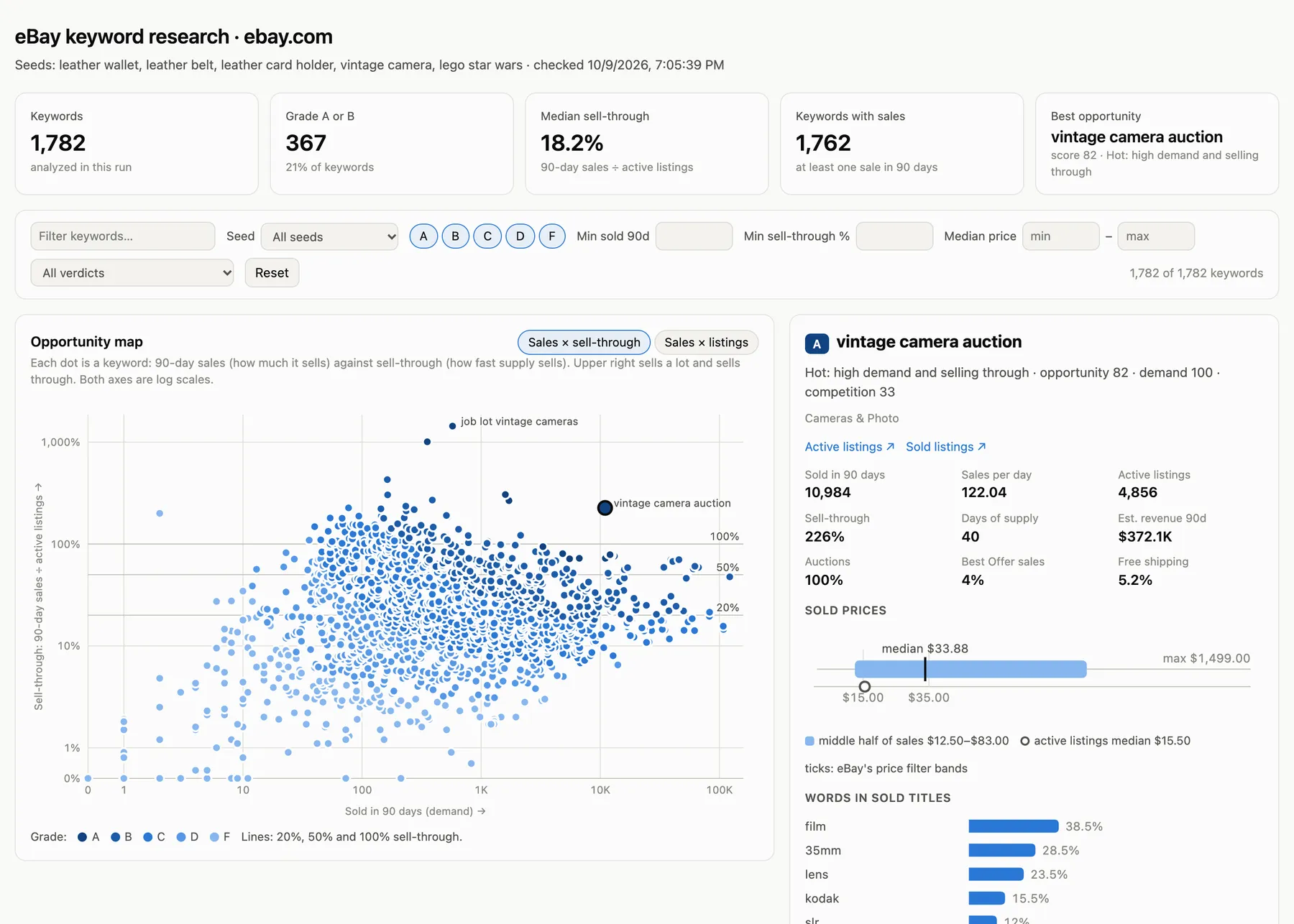
- Summary: keywords analyzed, grade A/B count, median sell-through, keywords with sales and the best opportunity.
- Filters for text, seed, grade, minimum sales, minimum sell-through, price range and verdict. Every chart and the table follow them.
- Opportunity map: each keyword by 90-day sales and sell-through (upper right sells a lot and sells through), or by sales and active listings with sell-through diagonals. Hover for numbers, click for details.
- Keyword details: sold price range against eBay's price bands, words in sold titles, item specifics buyers filter by, seller concentration, condition mix, change since the last run, and recent sales linked to eBay.
- Title builder: the words of recent sales across your keywords, weighted by how much each keyword sells. Click words to build a title with an 80-character counter.
- Revenue leaders: keywords by estimated 90-day revenue.
- Movers: on scheduled runs, keywords whose sales rose or fell since the previous check.
- Keyword table: sortable, with checkboxes to scope the title builder and the export, Copy keywords and Export CSV.
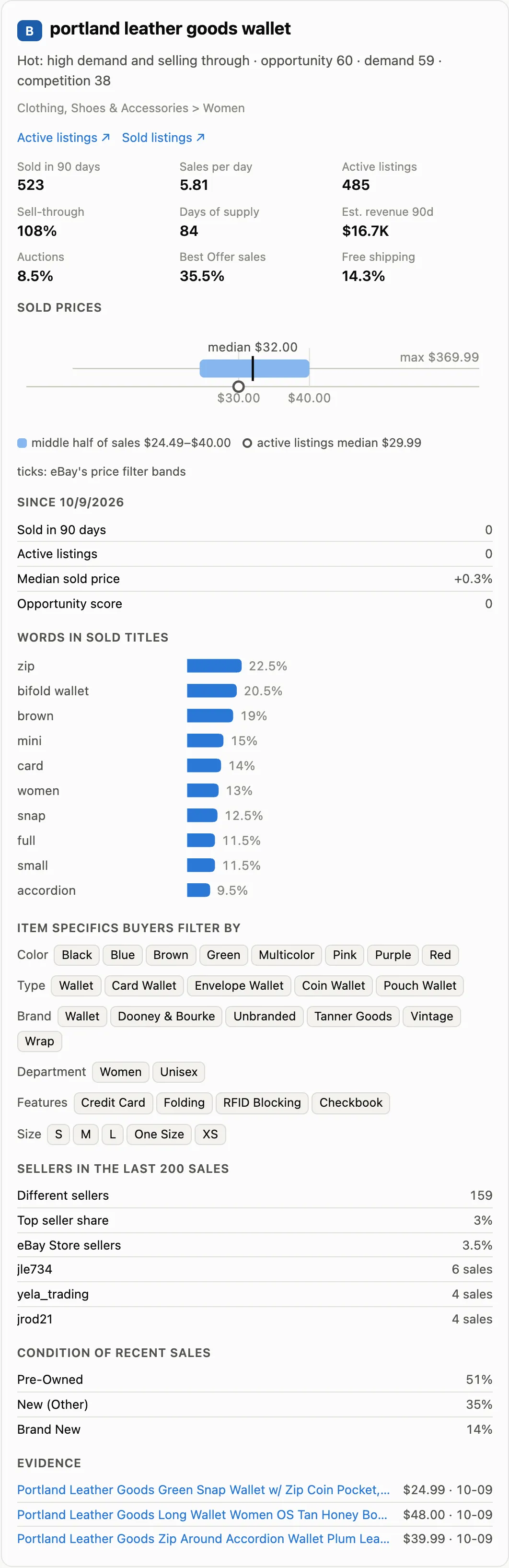
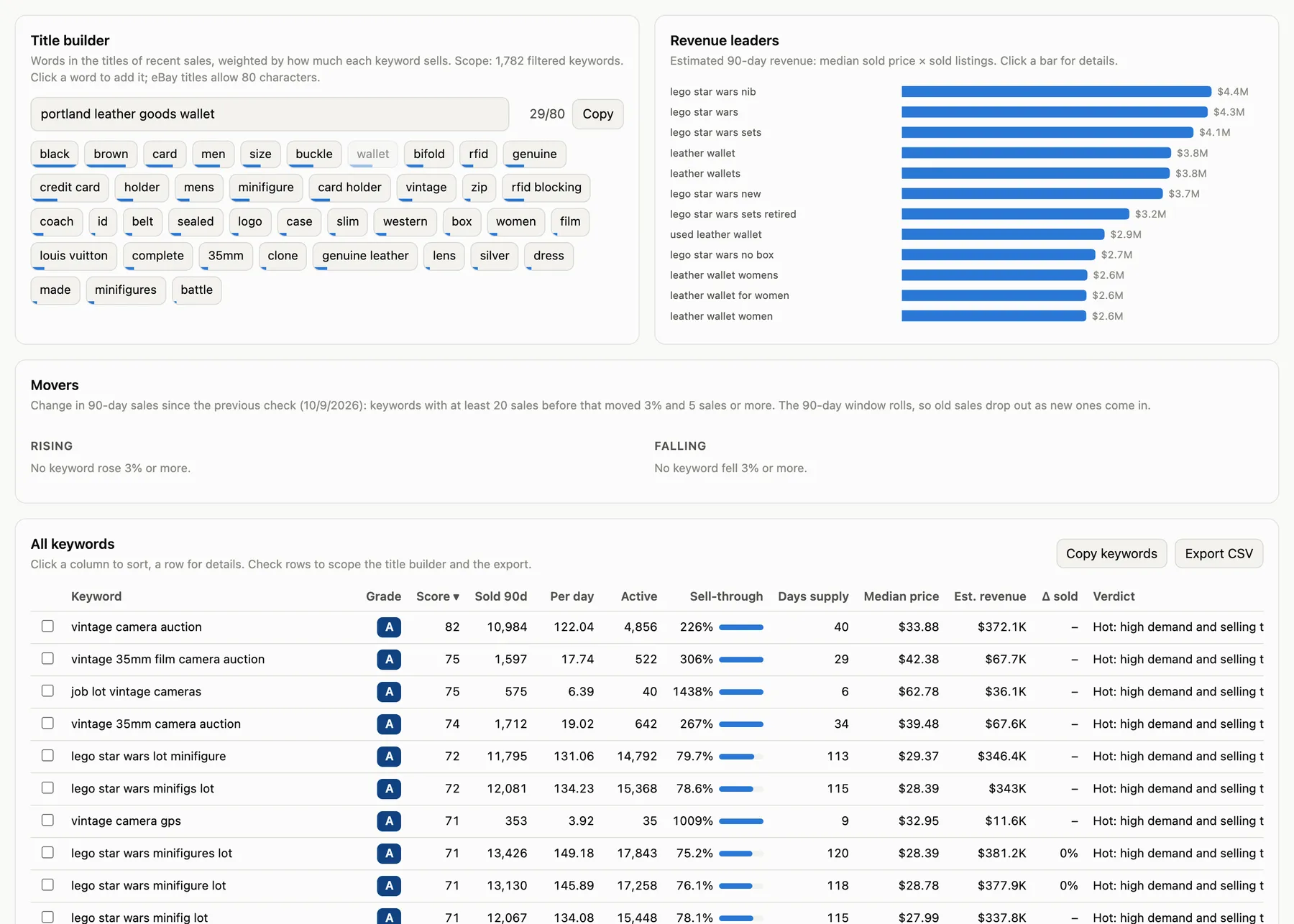
The page holds the 3,000 best keywords of a run; the dataset always has all of them.
What data can you extract?
Every row is one keyword.
| Group | Fields |
|---|---|
| Keyword | keyword, site, seed, source (seed, suggestion, alphabet, deep, input), suggestPosition, suggestedFor, suggestCategory, searchUrl, soldSearchUrl |
| Scores | opportunityScore, grade, verdict, demandScore, competitionScore |
| Demand | soldListings90d, soldPerDay, sellThroughPct, daysOfSupply, estimatedRevenue90d, activeWithSalesPct, bestSellerQuantitySold |
| Supply | activeListings, sellersInSample, topSellerSharePct, topSellers, storeSellerPct, medianSellerFeedback |
| Price | currency, medianSoldPrice, averageSoldPrice, soldPriceP25, soldPriceP75, minSoldPrice, maxSoldPrice, medianActivePrice, ebayPriceBands |
| Sales mix | auctionPct, bestOfferPct, freeShippingPct, topConditions |
| Listing help | titleKeywords (term and share of sold titles), titleKeywordsText, buyerFilters (item specifics and values), category (id, name, path), topLeafCategory |
| Changes | previousCheckedAt, soldListings90dChange, soldListings90dChangePct, activeListingsChange, activeListingsChangePct, medianSoldPriceChangePct, opportunityScoreChange |
| Evidence | recentSales (title, price, date, seller, URL), bestSellingListing, soldSampleSize, activeSampleSize, queryRewritten, checkedAt |
How the score works
All scores are 0–100 and computed from the row's own numbers:
- Demand = sales per day on a log scale: 0.1 a day ≈ 10, 1 a day ≈ 35, 10 a day ≈ 67, 100 or more = 100.
- Competition = 75% days of supply (active listings ÷ daily sales: 30 days ≈ 19, 90 ≈ 37, 180 ≈ 49, 450 ≈ 65) + 25% the listing count itself (1,000 ≈ 50, 1 million = 100), because a huge result set is hard to rank in even when it sells.
- Opportunity = √(Demand × (100 − Competition)), so a keyword needs both sales and room.
Grades: A 70+, B 55–69, C 40–54, D 25–39, F below 25. The verdict uses the sell-through bands resellers use (50%+ sells well, 20–50% average, under 20% slow): for example "Hot: high demand and selling through", "High demand, oversupplied" or "Solid niche: steady sales, selling through".
Busy, healthy niches score mostly C and B, and A is rare. Compare keywords within a run rather than chasing a grade.
Research at scale
Big keyword lists
Turn off Discover keywords and paste your own list (thousands of keywords) to measure exactly those. Or sweep many seeds with discovery on. A run analyzes 5–7 keywords a second at the default 4 GB memory; less memory is slower but costs the same.
Scheduled tracking
- Set your seeds and marketplace, then click Save as a new task.
- In Apify Console, go to Schedules, click Create new, pick a time (for example weekly on Monday at 06:00) and add the task. See Schedules.
- Keep Track changes between runs on. Each row then has the change in 90-day sales, active listings, median price and score since the last check, and the dashboard shows the movers.
- Connect Google in the task's Integrations tab to append every run to Google Sheets, or use Make, Zapier or n8n.
The history lives in the key-value store ebay-keyword-tool-history on your account, one small record per marketplace, filters and keyword, so different tasks with the same keywords share it.
| Use case | Frequency | Cron expression |
|---|---|---|
| Sourcing and niche tracking | Weekly (Monday) | 0 6 * * 1 |
| Seasonal items (Q4, holidays) | Daily | 0 6 * * * |
| Monthly market review per site | Monthly | 0 6 1 * * |
Use it from code
maxTotalChargeUsd caps the cost of the run: the actor stops exactly at the limit and keeps everything collected. The dashboard is at https://api.apify.com/v2/key-value-stores/<defaultKeyValueStoreId>/records/dashboard.html and a run summary at …/records/SUMMARY. The actor also works with the Apify API clients for JavaScript and Python.
Input reference
| Field | Type | Default | Effect |
|---|---|---|---|
keywords | Array of strings | Required | Seeds to expand, or the exact keywords to measure when discovery is off. |
expandKeywords | Boolean | true | Expand each seed through eBay's search suggestions. Off: analyze only your list. |
alphabetExpansion | Boolean | true | Also expand seed a … seed z and seed 0 … seed 9. |
deepExpansion | Boolean | false | Also expand every keyword found. More long tail; raise the limits with it. |
maxKeywordsPerSeed | Integer | 100 | Keywords per seed, 1–5,000. The seed's own suggestions come first, then the top suggestion of each letter. |
maxKeywords | Integer | 1000 | Keywords per run, 1–50,000. |
site | String | "ebay.com" | One of 17 eBay marketplaces. Prices come in its currency. |
categoryId | String | none | Limit every search to an eBay category ID, e.g. 2996 for Wallets. |
condition | String | "all" | all, new or used. |
minPrice | Integer | none | Count only listings and sales at or above this price. |
maxPrice | Integer | none | Count only listings and sales at or below this price. |
minSoldListings90d | Integer | 0 | Save only keywords with at least this many sales in 90 days. Keywords below it are free. |
trackChanges | Boolean | true | Add the change since the previous check of each keyword. |
includeListings | Boolean | true | Add the 3 latest sales and the best-selling active listing to each row. |
Ready-to-run examples
Sweep a product line for sourcing ideas
In the dashboard, set Min sell-through to 50 and sort the table by score.
Measure your own keyword list
Research the German market
Suggestions, item specifics and prices come back in German and euros.
Go deep in one category
Analyze the results with ChatGPT or Claude
Export the dataset as CSV (the Opportunities view keeps it small) and attach it to a chat. Some prompts to start with:
Pick what to source. "These are eBay keywords with 90-day sales, active listings, sell-through and median sold price. Group them into product ideas and, for each idea, give the three keywords with the best sell-through that sell at least once a day. Recommend two ideas for a reseller with a $500 budget and explain why."
Write a listing. "Using the titleKeywordsText and buyerFilters columns of the grade A and B keywords, write an eBay title of at most 80 characters for [your item] and list the item specifics I should fill in."
Compare markets. "These are the same seeds on ebay.com and ebay.co.uk. Per keyword pair, compare sell-through and median price and list where the UK looks easier."
Output
Results go to the run's default dataset, with the views Opportunities, Prices and sellers and Changes since last run, and to dashboard.html and SUMMARY in the key-value store.
This is a real row from a leather wallet run on October 9, 2026, with lists shortened:
Notes on fields
soldListings90dandactiveListingsare eBay's own result counts for the keyword, so they include eBay's loose matches, the same as eBay's website. eBay keeps about 90 days of sold listings, and a multi-quantity listing counts once however many units it sold.sellThroughPct= 90-day sold listings ÷ active listings × 100, the usual reseller formula. It can go above 100%.- Prices, sellers, conditions and title words come from the latest ~200 sales (
soldSampleSize). Best Offer sales are left out of the price figures, because eBay shows the asking price, not the accepted offer. - On ebay.co.uk, ebay.fr and ebay.it, prices are what buyers saw, including eBay's Buyer Protection fee on private sellers' items.
ebayPriceBandsare the price steps eBay offers as a filter for the search, limited to your price range.estimatedRevenue90dismedianSoldPrice × soldListings90d, an estimate.queryRewrittenis true when eBay found nothing for the exact words and showed "results matching fewer words"; those loose results are not counted.suggestPositionis the keyword's position in the eBay suggestion list that surfaced it (1 = first).- Missing values are
null. Every row hascheckedAtin UTC.
FAQ
Why no search volume?
eBay doesn't publish it, so every eBay "search volume" figure is an estimate. Sold listings show demand that turned into orders, and active listings show the supply you compete with.
Why fewer keywords than my limit?
The limit is a maximum. eBay suggests only so many searches for some seeds. Keywords with no listings and no sales are skipped and not charged. Turn on deep expansion or add related seeds to get more.
How fresh is the data?
Every run reads eBay live; nothing is cached between runs.
Does it work outside the US?
Yes, on 17 eBay sites. eBay has no suggestion list for the Hong Kong, Malaysia, Philippines and Singapore sites, so discovery there uses the US list; the numbers are still from the site you chose.
How fast is it?
5–7 keywords a second at the default 4 GB memory: 1,782 keywords took 6 minutes in a test, including discovery.
Why did my run stop early?
If the status says the spending limit was reached, the run hit its maximum cost. Everything analyzed before that is saved, and the dashboard covers it.
Do I need proxies, an eBay account or an API key?
No. The actor handles connections and retries itself and doesn't log in.
Is it legal?
The actor reads publicly visible search data and no buyer data. You are responsible for how you use it, including eBay's terms and laws such as GDPR.
Cost
Pay per analyzed keyword, with no subscription. Platform usage and proxies are included.
| Event | Price | Charged when |
|---|---|---|
| Keyword analyzed | $0.02 ($20 per 1,000), less on paid plans | A keyword is saved. Keywords without listings or sales, below your minimum, or failed are free. |
| Actor start | $0.00005 | Once per run (per GB of memory). |
On Apify's paid plans a keyword costs $0.018 (Bronze), $0.015 (Silver) or $0.012 (Gold and above).
| Run | Cost (free plan) |
|---|---|
| 1 seed, 100 keywords | $2 |
| 4 seeds × 200 keywords | $16 |
| 200 tracked keywords, weekly for a month | $16 |
| 5,000 keywords from your own list | $100 |
A research subscription costs $40–60 a month whether you use it or not. Here that buys 2,000–3,000 keywords, each with eBay's sold data, and a month without research costs nothing.
Set minSoldListings90d to skip keywords that barely sell; they are not charged. Set a maximum cost per run and the actor stops exactly there. The Pricing tab always shows the current prices.
Support
Report problems or request features in the Issues tab. Include the run ID, the input and what you expected. We read every issue.
This actor is not affiliated with or endorsed by eBay Inc. "eBay" is a trademark of eBay Inc. Terapeak, ZIK Analytics, Algopix and KeywordTool.io are trademarks of their respective owners; this actor is not affiliated with them.