

Tech Stack Detector & WHOIS, SSL Checker: BuiltWith Alternative
Pricing
from $3.20 / 1,000 domains
Tech Stack Detector & WHOIS, SSL Checker: BuiltWith Alternative
Detect the technology stack of any website (7,000+ technologies, Wappalyzer & BuiltWith alternative) plus WHOIS domain age and expiry, DNS, SPF/DMARC, email provider, SSL expiry, hosting, security grade and SEO audit. Bulk domains or a Google Sheet; one JSON per domain.
Pricing
from $3.20 / 1,000 domains
Rating
0.0
(0)
Developer

Fernando Guiraud
Maintained by CommunityActor stats
0
Bookmarked
1
Total users
1
Monthly active users
15 days ago
Last modified
Categories
Share
What does Tech Stack Detector & WHOIS, SSL Checker do?
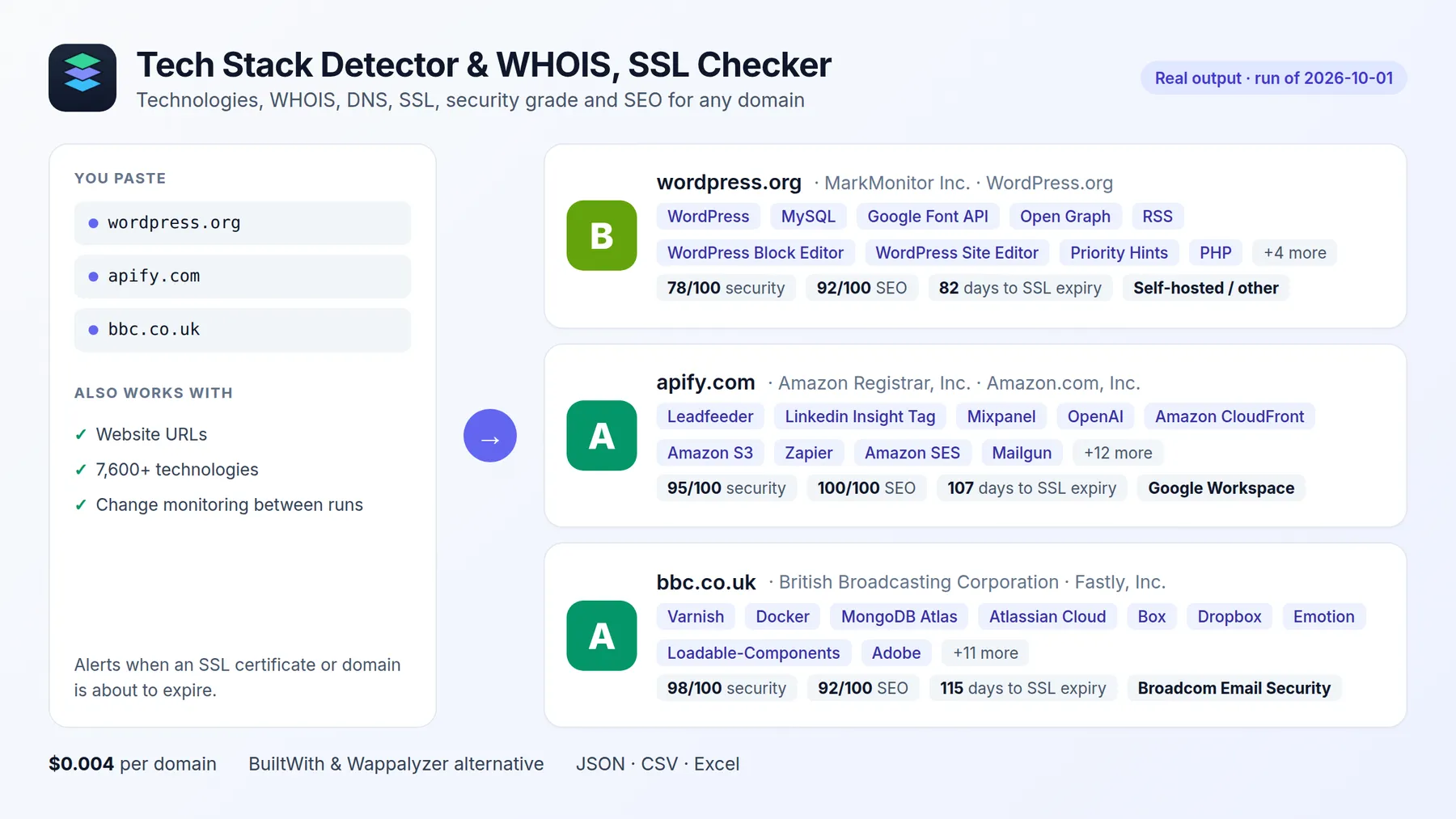
A tech stack detector (a BuiltWith and Wappalyzer alternative), WHOIS lookup, domain age and expiry checker, DNS lookup, SSL certificate checker and SEO audit in one Actor. Give it a list of domains or URLs (or a Google Sheet) and get one clean JSON record per domain.
$4 per 1,000 domains, 7,600+ technologies detected, and WHOIS, DNS, SSL, security grade and SEO in the same record.
| This Actor | Most-used tech stack Actor in Apify Store (checked 2026-10-01) | |
|---|---|---|
| Price per 1,000 domains | $4 | $100 |
| Technologies it can detect | 7,600+ | 251 |
Every record includes:
- 🧩 Technology stack: 7,600+ technologies (CMS, ecommerce, analytics, frameworks, CDN, hosting, marketing tools) detected from the website, plus SaaS tools revealed by DNS (Google Workspace, Microsoft 365, HubSpot, Atlassian, Stripe…). Each one comes with its category and version when it can be detected.
- 📇 WHOIS / RDAP: registrar, registration date, domain age, expiry date, status codes, nameservers, DNSSEC. Uses RDAP, with an automatic classic-WHOIS fallback for ccTLDs such as .io, .co, .de, .it, .jp, .me, .mx, .se and .eu.
- 🌐 DNS records: A, AAAA, MX, NS, TXT, CAA, SOA, CNAME, the SPF and DMARC setup, and the company's email provider (Google Workspace, Microsoft 365, Zoho, Proofpoint…).
- 🛡️ Security grade A-F with a 0-100 score and the individual checks behind it (valid certificate, TLS 1.3, HTTPS redirect, HSTS, CSP, clickjacking/sniffing protection, SPF, enforced DMARC, CAA, DNSSEC).
- 🔒 SSL certificate: issuer, validity dates, days until expiry, SANs, TLS version, and whether the certificate chain is valid.
- ⚡ HTTP & site profile: final URL after redirects, status code, response time, title, description, language, and a security headers score (HSTS, CSP, X-Frame-Options…).
- 🏢 Hosting provider: who owns the server's network (Cloudflare, AWS, Google Cloud, Hetzner, OVH…), with IP range, from official IP registries.
- 🔔 Alerts and change monitoring: every result lists problems worth acting on (SSL or domain expiring soon, site down, noindex, missing DMARC), and
monitorChangesreports what changed since the last run (technologies added/removed, new certificate, DNS/MX/hosting moves, title or SEO score). - 🔗 Company social profiles linked from the home page: LinkedIn, X/Twitter, Facebook, Instagram, YouTube, GitHub, TikTok.
- 🔎 SEO audit with a 0-100 score and a plain-English issue list: title and meta description length, H1s, canonical, noindex,
lang, mobile viewport, Open Graph, JSON-LD structured data, images without alt text, robots.txt and XML sitemap (with URL count). - 🚀 Performance: time to first byte, HTML size, compression, caching, HTTP/3, and render-blocking and third-party scripts. Add your own free Google API key to also get Lighthouse scores and Core Web Vitals (LCP, INP, CLS) from PageSpeed Insights.
All of this comes from one call instead of six different tools, with no API keys. It runs on Apify, so you get an API, scheduling, integrations (Make, Zapier, n8n, Google Sheets) and access for AI agents through the Apify MCP server.
Why use it?
- Sales and lead enrichment: find companies using Shopify, HubSpot or Salesforce, and qualify leads by their stack.
- Competitive research: see which analytics, CDN, hosting and marketing tools competitors use, and get notified when they add or drop one (weekly schedule +
monitorChanges). - SEO and web agencies: audit prospects' or clients' sites in bulk and turn the issue list into a sales pitch or a fix list.
- Security and IT monitoring: catch SSL certificates and domains that are about to expire, missing DMARC, or weak security headers across a portfolio of sites.
- Due diligence: check a domain's age, registrar and infrastructure in seconds.
How to look up a website's tech stack, WHOIS and SSL
- Click Try for free.
- Enter domains or URLs, one per line.
- Optionally choose which checks to run (all are on by default).
- Click Start, then download the results as JSON, CSV, Excel or HTML, or fetch them via API.
Input
| Field | Description | Default |
|---|---|---|
domains | Domains or URLs | domains or domainsFromUrl required |
domainsFromUrl | Link to a TXT/CSV file or a Google Sheet (shared as "Anyone with the link") with one domain per row; extra columns and headers are ignored | - |
checks | Any of tech, whois, dns, ssl, http, seo, performance, hosting | all |
monitorChanges | Report differences since the previous run (state kept in your account) | false |
alertDaysBeforeExpiry | Alert when SSL/domain expires within N days | 30 |
pageSpeedApiKey | Optional: your Google API key, for Lighthouse scores and Core Web Vitals | — |
pageSpeedStrategy | mobile or desktop (PageSpeed only) | mobile |
maxConcurrency | Domains analyzed in parallel | 10 |
failOnError | Mark the run FAILED if a domain returns no data | false |
Output
One record per domain. You can download the dataset in various formats such as JSON, HTML, CSV, or Excel.
status is ok, partial (some checks failed, see errors) or error (nothing could be retrieved, not billed).
How much does it cost?
Pay per event, with no monthly fee:
| Event | Price |
|---|---|
| Run start (per GB of memory, default 1 GB) | $0.001 |
| Domain analyzed (all selected checks) | $0.004 (about $4 per 1,000 domains) |
Domains that return no data at all are not billed. Set Max cost per run in the run options, and the Actor stops cleanly at that limit.
Lighthouse scores and Core Web Vitals (optional)
Create a free API key in the Google Cloud Console: enable PageSpeed Insights API and create an API key. Paste it into pageSpeedApiKey. Each domain then also gets performance.pageSpeed with Lighthouse performance, SEO, accessibility and best-practices scores, lab metrics (LCP, FCP, CLS, TBT) and real-user Core Web Vitals from the Chrome UX Report when available. Google's free quota is 25,000 requests per day. The key is stored as a secret input.
Monitor competitors or your own sites
- Enable
monitorChangesand keep the domain list stable. - Create an Apify schedule (daily or weekly).
- Each run lists
changesper domain andalertsfor expiring certificates/domains, downtime or noindex. Connect a webhook, Slack, Zapier or Make integration to get notified only when something changes.
Use it with AI agents (MCP): Claude, ChatGPT, Cursor
This Actor works as a tool for AI agents through the Apify MCP server. Add it to Claude Desktop, Claude Code, Cursor, VS Code or any MCP client with this server URL:
Then just ask in plain language, for example:
- "What CMS, analytics and ecommerce platform does example.com use?"
- "Check when the SSL certificates and domains of these 20 client sites expire"
- "Which of these companies use Shopify and Google Workspace? (list of domains)"
Smallest useful input for an agent:
- Selecting only the
checksyou need makes each call faster and the answer shorter. technologyNamesandtechnologiesByCategorygive the agent a compact summary of the stack.- Every result has an
alertslist with problems worth acting on (expiring SSL/domain, site down, noindex).
Agents pay per result like everyone else (Apify also supports agentic payments), so there is no subscription to set up.
Agent-friendly input: common field names such as url, urls, startUrls, query or keywords are accepted, and an empty input runs a small sample from the input form (with a note in the results) instead of failing.
Tips
- Have a lead list in a spreadsheet? Paste the Google Sheets link in
domainsFromUrlinstead of copying the domains one by one. - Long runs are safe: if the platform restarts or migrates the run, domains already analyzed are skipped, so they are never charged twice.
- Put many domains in one run. They are processed in parallel, and the start fee is paid once.
- Only need expiry monitoring? Run
checks: ["whois", "ssl"]on a schedule and alert ondaysUntilExpiry. detectedVia: ["dns"]means the service was found in DNS records (for example a domain-verification TXT record), so the company uses that tool even if it is not visible on the website.
Related tools
- Only need registration data? Bulk WHOIS Domain Lookup returns one flat row per domain (age, expiry, registrar, availability, email provider, SSL expiry) at half the price.
FAQ and limitations
- JavaScript is not executed, so technologies that are only visible after JS runs may be missed. This keeps the Actor fast and cheap.
- WHOIS uses RDAP first and falls back to classic WHOIS (
whois.sourcesays which one was used). A few registries restrict automated WHOIS (for example.esand.ch), and some (for example.de) publish only status and nameservers. Registrant personal contact data is never collected, and neither are emails or phone numbers from websites. - Some sites block automated requests. The other checks (DNS, WHOIS, SSL) still work, and the result is marked
partial. - Technology fingerprints come from the open-source webappanalyzer project (GPL-3.0) and are refreshed on every build.
Questions or a missing technology? Open an issue in the Issues tab.
- Did it save you time? A short review on the Reviews tab helps other people find this Actor.


