

n8n Security and Workflow Hygiene Audit
Pricing
from $5.00 / 1,000 workflows
n8n Security and Workflow Hygiene Audit
Find hard-coded secrets, open webhooks, duplicates and missing error paths in n8n. Get ranked findings through its read-only API. Secret values stay out of results. Free demo; $0.005 per workflow audited.
Pricing
from $5.00 / 1,000 workflows
Rating
0.0
(0)
Developer

Jessy Mariau
Maintained by CommunityActor stats
0
Bookmarked
1
Total users
0
Monthly active users
6 days ago
Last modified
Categories
Share
Find the n8n workflows that need attention before the next handover or production change. This read-only audit returns findings by workflow, their severity and the five fixes to tackle first.
What the audit returns
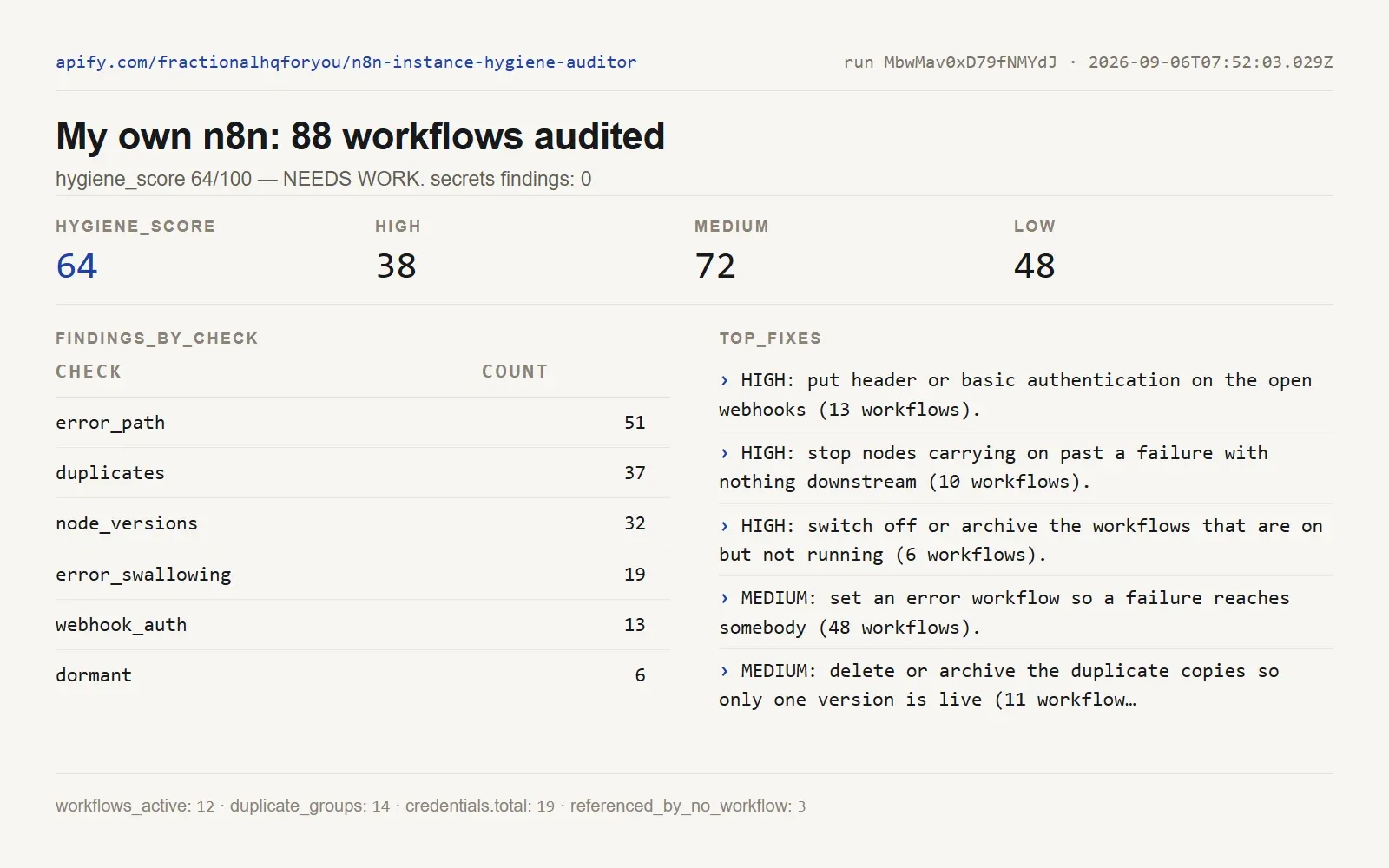
Own-instance example, 6 September 2026: 88 workflows, score 64/100, no secret findings in that run. This earlier result does not describe the current state of that instance or yours.
The free demo exercises the checks against six fictional workflows. Selected fields from one demo finding:
| Field | Demo value |
|---|---|
| workflow | Lead scraper (copy) |
| check | secrets |
| severity | high |
| node | Score leads |
| parameter | jsCode |
| pattern | openai_style_key |
No matched secret is included. The full row contains the finding under findings, alongside other checks.
Start free: leave n8nApiKey empty. For a live audit, add your instance URL and a key with read access. Set maxWorkflows to cap the number charged.
| Setup detail | What to expect |
|---|---|
| API access | Workflows and executions; credentials where that endpoint is available |
| Missing credential endpoint | Credential checks are skipped; other checks continue |
| Node versions | Compared with versions in your instance, not a global catalogue |
| Network | Your instance must be reachable from Apify; localhost is not your computer |
What it does
You give it your instance URL and an n8n API key. It reads every workflow through the official n8n public API, never writes anything, and hands back one flat row per workflow plus an instance summary row.
Each workflow row carries the name, id, active flag, node count, trigger type, tags, last execution, and a list of findings. Every finding has a severity of high, medium or low and one plain sentence saying what is wrong. These are the checks:
| Check | What it catches |
|---|---|
secrets | credential-shaped strings sitting in node parameters: sk- and Stripe keys, Slack tokens, GitHub tokens, AWS key ids, bearer tokens, JWTs, database connection URIs with a password in them, and any api_key or password field assigned a long literal. A JWT is classified from its own claims, not its shape. |
webhook_auth | Webhook trigger nodes with authentication set to none, and whether the path is a guessable word or a random one. |
duplicates | identical names, names that differ only by a copy or version suffix, and workflows whose node graph is identical to another one. |
dormant | workflows switched on with no executions at all, workflows switched on that have not run in staleDays, and workflows switched off and untouched for over a year. |
error_path | no error workflow set in the settings and no node handling a failure, so a break tells nobody. |
error_swallowing | nodes set to carry on past a failure with nothing running after them, so the failure vanishes without trace. |
pinned_data | pinned editor data still attached to a live workflow, the classic works-in-the-editor-lies-in-production fault. |
node_versions | community node types, and nodes running an older typeVersion than the same node type elsewhere on your instance. |
credentials | at instance level: how many credentials you hold, by type, how many are shared with nobody, and how many no workflow references. |
A JWT gets read, not guessed at
A JWT payload is base64url, so anyone can decode it without a key, and it tells you what the token is for. I had the scanner guessing from the shape instead. It does not any more. When it matches a JWT it decodes the payload and classifies the token from the claims. The severity comes from what those claims say, not from the string starting with eyJ.
| What the claims say | Reported as | Severity |
|---|---|---|
role: anon with a project ref | Supabase anon key | low, and the finding says plainly that this key is public by design and fenced in by row-level security. |
role: service_role | Supabase service-role key | high, because it bypasses row-level security completely. |
iss: n8n or aud: public-api | n8n public API key | high, because it grants read and write across the instance, which includes every other workflow and every secret sitting in one. |
| anything else | unrecognised JWT | medium, and it says the claims name no service rather than inventing one |
I read exp as well. An expired token is reported as expired and drops to low, because it opens nothing. A token with no expiry claim at all gets that said out loud, since a full-privilege key that never lapses on its own is worth knowing about.
The classification comes back on the finding as pattern, with role, iss, aud and the expiry state under claims. Those four are the only things I let out of the decoder, and the token itself is dropped the moment the classification is made.
The secret check never prints your secret
This is the part I want you to be able to trust before you point it at a production instance. When the scanner matches something, the finding it emits carries four things: the workflow, the node name, the parameter path, and the class of pattern that matched. On a JWT it adds the four claims above. The matched text is never captured, never returned and never logged. There is no truncated preview and no first-six-characters hint, and decoding a JWT to classify it does not change that: the payload is read, the classification is kept, the token is dropped.
The Actor ships with a test that plants a fake key of every shape it knows into a workflow, runs the full audit, and fails if any fragment of any planted value appears anywhere in the output. The free demo lets you inspect the redacted findings without connecting your instance.
What you need
An n8n API key with read access. Create one in n8n under Settings, then n8n API. Nothing else: no proxy, no browser, no second tool. Apify stores the key as a secret and it never appears in the log or the dataset.
Run it with no key and you get a demo audit of six sample workflows, nothing charged, so you can see the output shape before you connect anything real.
How to run it
A full audit of everything:
Just the security half, on live workflows only:
Leave includeInactive on for a first run. Switched-off workflows are exactly where the duplicates and the forgotten keys accumulate, and mine were no exception.
The OUTPUT record in the key-value store holds the instance summary: the score, the totals per check and per severity, the credential picture and the top 5 things to fix first.
Output fields
| Field | What it holds |
|---|---|
workflow, workflow_id | as named in n8n. |
active, archived | live flag, and whether n8n has it archived. |
created_at, updated_at | from the workflow record. |
node_count | executable nodes, sticky notes excluded. |
trigger | schedule / webhook / form / error / sub-workflow / manual / chat / app-event / none. |
tags | the workflow's tags. |
last_execution | id, status and start time of the most recent run, or null when none is retained. |
findings | every finding: check, severity, a one-line reason, plus node, parameter and pattern where they apply. |
findings_count, highest_severity | the row's totals, for sorting. |
duplicate_group_id | workflows sharing a group id are copies of each other. |
row_type | instance_summary on the last row, absent on workflow rows. |
hygiene_score, score_band | on the summary row. |
findings_by_check, findings_by_severity | on the summary row. |
credentials | on the summary row: total, by type, shared with nobody, referenced by no workflow. |
error_trigger_workflow_exists | on the summary row: whether the instance has an Error Trigger workflow anywhere. |
top_fixes | on the summary row: the 5 things to do first, in plain sentences. |
The score
The score is a rate, not a count, so a large instance is not condemned for being large. It starts at 100 and takes off a share of each weight based on what proportion of your workflows carry a finding at that severity.
| Component | Weight | How it is applied |
|---|---|---|
| workflows with a high finding | 55 | multiplied by the share of audited workflows that have one |
| workflows with a medium finding | 25 | same |
| workflows with a low finding | 10 | same |
| no Error Trigger workflow anywhere | 8 | flat, once, at instance level |
| credentials no workflow uses | 5 | multiplied by their share of all credentials |
| Band | Score |
|---|---|
| HEALTHY | 80 to 100 |
| NEEDS WORK | 50 to 79 |
| AT RISK | below 50 |
The score helps sort configuration findings. It does not certify that an instance is secure. Review high-severity findings even when the overall score is healthy.
Pricing
Pay per event: one workflow-audited charge per workflow actually audited, and nothing else. Every check runs inside that one charge, so switching more of them on does not cost more. A demo run charges nothing. maxWorkflows is your ceiling: set it to 100 and you are charged for at most 100 workflows however many the instance holds.
At $0.005 per workflow, 100 workflows cost $0.50 in Actor events. Auditing those same workflows four times costs $2. Each scheduled audit is charged again.
These examples describe Actor event charges. Any additional platform or proxy charges shown by Apify are separate. Review run costs before scheduling repeated checks.
Limits
- It is read-only. It never changes, activates, deactivates or deletes anything on your instance.
- It audits what the n8n API exposes, and different n8n versions expose different things.
GET /credentialsin particular is not on every version. Where it is missing, the credential section is skipped and the rest of the audit runs as normal. - Secret detection is pattern based everywhere except JWTs. It finds shapes, not meanings. A key in a format I have never seen will slip through. So will one split across two fields, or built at runtime. It misses in the other direction too: a long random string that merely looks like a token gets flagged. Treat a finding as a place to look rather than a verdict.
- A JWT is the exception, because its payload is readable. The claims are whatever the issuer wrote, so I report a token that names no service as unclassified rather than guessing at it. I never check a signature and never call the issuer to confirm anything.
- It is not a penetration test. It reads configuration; it does not send a request to your webhooks, try your credentials or probe anything from outside.
- It is not legal or compliance advice.
- Outdated nodes are judged against the newest version of that same node type in use on your own instance, because the API does not publish the version catalogue. A node type you only use once cannot be judged that way and is not flagged.
- By default it refuses a loopback or private-range URL, which would be pointing it at Apify's own network rather than yours. Set
allowPrivateNetworkif you genuinely mean it.
Pair it with a workflow
Run this quarterly and the Silent-Success Watchdog daily. This one tells you the estate is built badly; that one tells you a workflow stopped producing while still reporting success. Between them you have the two failures that never show up in the executions list.
Use it from an AI agent
Run this audit from an AI agent by adding the Actor as an MCP server, the way I do from mine. The endpoint is https://fractionalhqforyou--n8n-instance-hygiene-auditor.apify.actor/mcp, with one tool, audit_n8n_instance, that connects to your instance and returns the same findings the dataset would hold. The per-event price stays the same for an agent call. Clients that only accept the Apify MCP server can use apify/actors-mcp-server with fractionalhqforyou/n8n-instance-hygiene-auditor named in its Actor list.
Related Actors I publish
An instance audit is one layer of an ops check, and these Actors cover the layers around it.
- Silent-Success Watchdog for n8n: catches n8n workflows that report success while producing nothing.
- Vendor Policy and Subprocessor Change Watch: tells you when a vendor quietly changes its terms or its subprocessor list.
- E-Invoice Validator: validates XRechnung, ZUGFeRD and Peppol invoices before they bounce.
Help and maintenance
Built and maintained by Jessy Mariau. For a bug, open this Actor's Issues tab with the run ID and expected result. Remove keys and private data before sharing an input.


