

Linkedin Search Comments Spider
Pricing
from $9.00 / 1,000 results
Linkedin Search Comments Spider
Extract LinkedIn comments using keyword search with this powerful Apify Actor. Collect comment text, author details, profile URLs, timestamps, and activity data using valid LinkedIn session cookies (JsessionId and LiAt). Perfect for lead generation, research, and social listening.
Pricing
from $9.00 / 1,000 results
Rating
0.0
(0)
Developer

GetDataForMe
Maintained by CommunityActor stats
0
Bookmarked
4
Total users
0
Monthly active users
5 months ago
Last modified
Categories
Share
Extract LinkedIn post comments based on keyword search results. This Apify Actor helps you discover public engagement around specific topics by collecting comments, authors, timestamps, and LinkedIn activity data.
Perfect for lead generation, audience research, recruitment analysis, social listening, and engagement monitoring on LinkedIn.
Features
- 🔍 Search LinkedIn comments using custom keywords
- 💬 Extract full comment text and LinkedIn activity details
- 👤 Collect author profile information and LinkedIn profile URLs
- ⏱ Retrieve timestamps and edited status
- 🚀 Fast and scalable Apify Actor ready for automation
Input Example
Users need to provide valid LinkedIn session cookies along with a search query.
Input Parameters
| Parameter | Type | Required | Description |
|---|---|---|---|
JsessionId | String | Yes | Your LinkedIn JSESSIONID session cookie |
LiAt | String | Yes | Your LinkedIn li_at authentication cookie |
Query | String | Yes | Keyword used to search LinkedIn comments |
Output Example
Use Cases
This Actor can be useful for:
- Lead generation from LinkedIn discussions
- Market and audience research
- Recruitment and hiring outreach
- Tracking engagement around industry topics
- Social listening and competitor analysis
- Discovering active LinkedIn users in specific niches
How It Works
- Provide your LinkedIn session cookies (
JsessionIdandLiAt) - Enter your target keyword in the
Query - Run the Actor
- Receive structured LinkedIn comments data in JSON format
How to Get JsessionId and LiAt
To use this Actor, you need valid LinkedIn session cookies:
JsessionIdLiAt
The easiest way to extract them is by using the Cookie-Editor browser extension.
Step 1: Install Cookie-Editor Extension
Install the Cookie-Editor extension for your browser:
Step 2: Login to LinkedIn
Open LinkedIn and log into your account.
Step 3: Open Cookie-Editor
Click the Cookie-Editor extension icon in your browser toolbar.
You may see a permission popup like this:
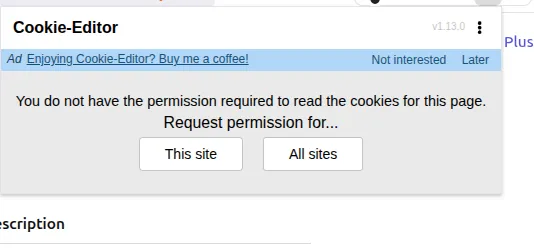
Click:
- This site
This grants the extension permission to read cookies for LinkedIn.
Step 4: Copy Required Cookies
After granting access, search for these cookies inside Cookie-Editor:
JSESSIONIDli_at
Copy their values and use them in the Actor input.
Example Input
Important Notes
- Use fresh cookies for the best results
- Do not share your LinkedIn cookies publicly
- Expired cookies may cause authorization errors
Important Notes
- A valid LinkedIn authenticated session is required
- Use fresh cookies to avoid authorization issues
- Excessive requests may temporarily limit LinkedIn access
Support
For more custom/simplified outputs or bug reports, please contact:
- support@getdataforme.com
- Or contact us here: GetDataForMe Contact Page
Please use the email subject:
Thank you!


![LinkedIn Post Comment & Reaction Extractor [NO COOKIES] ✅ avatar](https://images.apifyusercontent.com/Ui3wLB4OtGL6cNa3H11VQAStZ9Fewq6t-oBZpMw0IjU/rs:fill:76:76/cb:1/aHR0cHM6Ly9hcGlmeS1pbWFnZS11cGxvYWRzLXByb2QuczMudXMtZWFzdC0xLmFtYXpvbmF3cy5jb20vc0NDU2R3bm1LTUoxUTJzVG4tYWN0b3ItY2tTeGZhTWZQNkZiZzc2ZGYtMnRWSk1vOTdaRS1oZC1zcXVhcmUtYmxhY2stb3V0bGluZS1saW5rZWRpbi1pY29uLXBuZy03MDE3NTE2OTUwNDU1NTM1Y3ppaXkx.webp)


