

Nursing Home Leads Scraper
Under maintenancePricing
from $6.00 / 1,000 leads
Nursing Home Leads Scraper
Under maintenanceExtract verified data on every U.S. nursing home and skilled nursing facility from CMS Medicare/Medicaid certification records. Filter by state, ownership type, bed count, and star rating. Ideal for healthcare software vendors, medical suppliers, staffing agencies, and compliance consultants.
Pricing
from $6.00 / 1,000 leads
Rating
0.0
(0)
Developer

GoCreative AI
Maintained by CommunityActor stats
0
Bookmarked
2
Total users
1
Monthly active users
25 days ago
Last modified
Categories
Share
Nursing Home and SNF Leads - CMS Medicare/Medicaid Data
📊 Example output (real run)
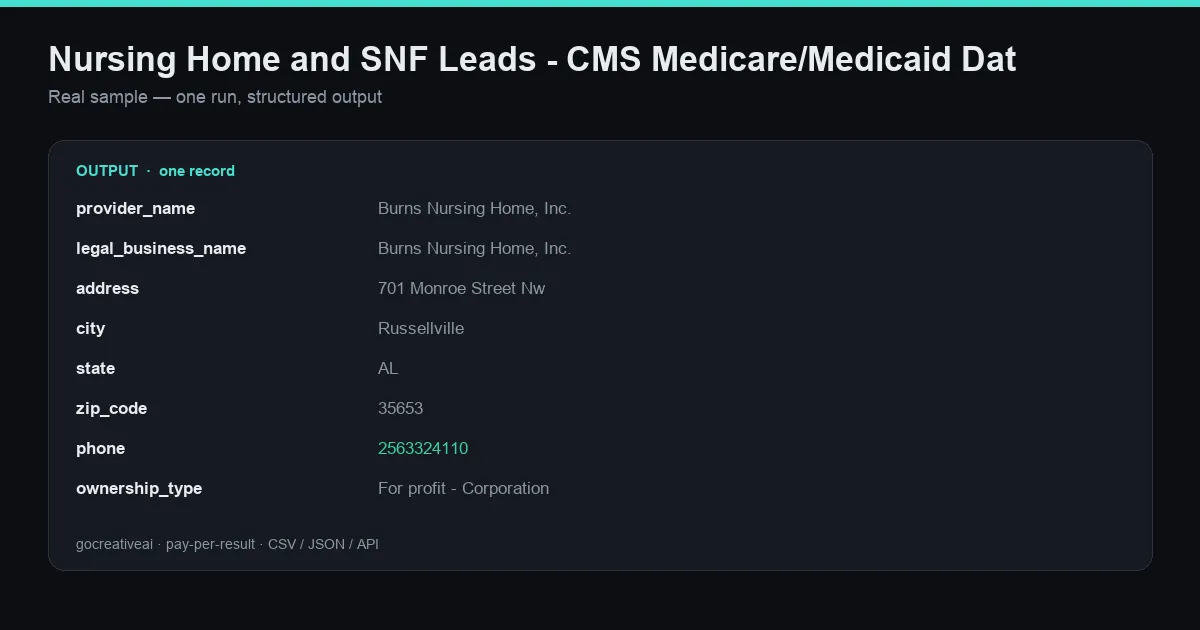
A real record from a live run — clean structured data, exported as CSV / JSON / Excel or via API.
Extract verified data on every U.S. nursing home and skilled nursing facility from CMS Medicare/Medicaid certification records. Filter by state, ownership type, bed count, and star rating. Ideal for healthcare software vendors, medical suppliers, staffing agencies, and compliance consultants.
No API key, no signup, no subscription — pay only for what you scrape. Clean, structured output ready for CSV, JSON, Excel, or direct API export into your own pipeline.
What this scraper does
Extract verified data on every U.S. nursing home and skilled nursing facility from CMS Medicare/Medicaid certification records. Filter by state, ownership type, bed count, and star rating. Ideal for healthcare software vendors, medical suppliers, staffing agencies, and compliance consultants.
Every run pulls fresh data straight from the source and pushes clean, typed records to the dataset — ready for your CRM, spreadsheet, AI agent, or data pipeline.
Use cases
- B2B lead generation — build targeted prospect lists with verified, structured data
- Sales prospecting — find companies and contacts that match your ICP
- Market research & competitive intelligence — track an industry or niche in structured form
- AI agents & automation — feed agents clean external data without scraping infra
- Data enrichment — append fresh fields to your existing lists
Input
| Field | Description |
|---|---|
state | Filter by US state (2-letter code, e.g. CA, TX, NY). Leave blank for all states. |
ownershipType | Filter by ownership: for profit, non profit, or government. Leave blank for all types. |
minBeds | Only return facilities with at least this many certified beds (0 = no minimum). |
minRating | Only return facilities with this CMS star rating or higher (1-5, 0 = no filter). |
maxResults | Maximum number of facility records to return (1-5000). |
Output
Every result is a clean structured record. Export the full dataset as CSV, JSON, or Excel from the Apify console, or pull it via the Apify API straight into your own tools.
Why use this actor
- Scrape nursing home leads — fast, structured, reliable.
- Nursing home leads data export (csv, json, excel) — fast, structured, reliable.
- Nursing home leads api alternative — no key required — fast, structured, reliable.
- Automated nursing home leads monitoring on a schedule — fast, structured, reliable.
- Structured nursing home leads records for ai agents and pipelines — fast, structured, reliable.
How it works
This actor pulls data directly from the source, structures it into clean rows, and pushes each result to the dataset. It runs on Apify's infrastructure — reliable, schedulable, and pay-per-result so you only pay for data you actually get.
Pricing
Pay-per-result via the Apify Store. No monthly subscription, no minimums — run it once or schedule it daily; you're only charged for the results returned.
FAQ
Do I need an API key or account? No. Just provide your input and run it.
Can I schedule it to run automatically? Yes — use Apify Schedules to run it hourly, daily, or weekly and get fresh data on autopilot.
What formats can I export? CSV, JSON, Excel, or via the Apify API.
Can I integrate it into my own app? Yes — call it via the Apify API and pull results directly into your pipeline.
Is the data accurate and fresh? Data is pulled live from the source on each run, so it reflects what's available at run time.


