

SEC XBRL Public Company Financial Screener — Keyless Leads
Pricing
from $8.00 / 1,000 leads
SEC XBRL Public Company Financial Screener — Keyless Leads
Screen SEC-registered public companies by financial metric — revenue, assets, R&D, net income, and more. Uses the free EDGAR XBRL API. Filter by value range, US state, and SIC code. Results include company name, CIK, ticker, exchange, SIC, phone, and EDGAR URL.
Pricing
from $8.00 / 1,000 leads
Rating
0.0
(0)
Developer

GoCreative AI
Maintained by CommunityActor stats
0
Bookmarked
2
Total users
1
Monthly active users
a month ago
Last modified
Categories
Share
SEC XBRL Public Company Financial Screener — Keyless, Pay Per Result
📊 Example output (real run)
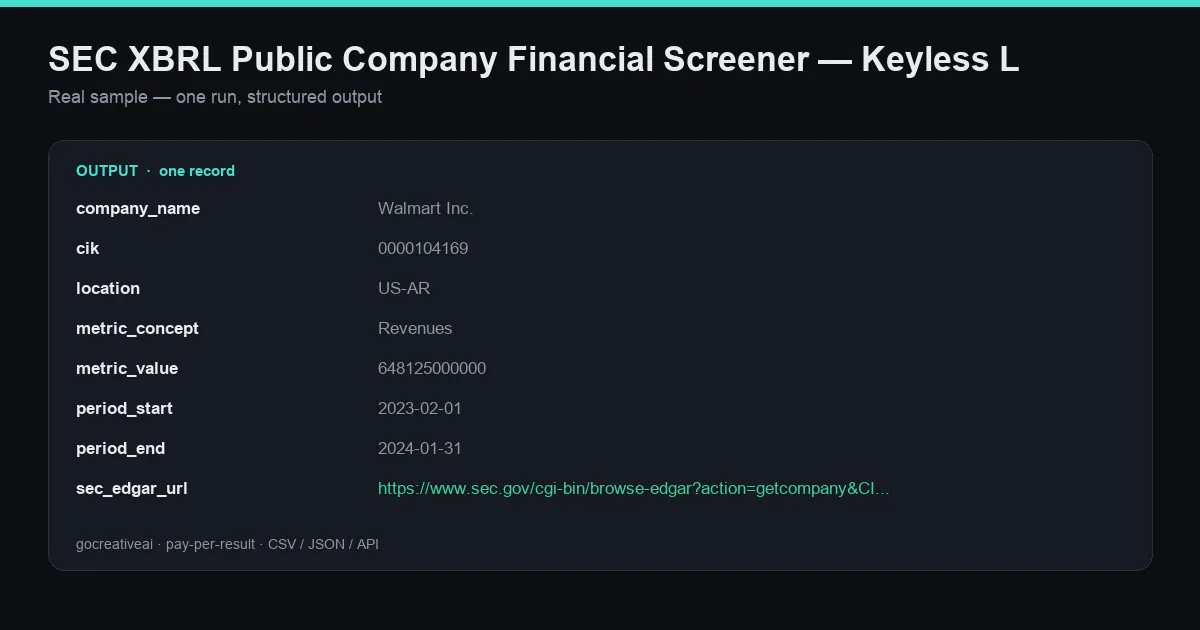
A real record from a live run — clean structured data, exported as CSV / JSON / Excel or via API.
Screen thousands of SEC-registered public companies by financial metric — revenue, assets, R&D spend, net income, and more — straight from the official EDGAR XBRL data. Filter by value range, US state, and SIC industry code, and get clean structured records with company name, CIK, ticker, exchange, EIN, and the direct EDGAR filing URL.
Keyless. No signup. No sales call. Pay per result. Ideal for B2B prospecting, competitive intelligence, and investment research — primary-source financials with no seat license, no credit plan, and no gated pages.
Where this fits: this is primary-source financial sales intent — screen for companies above/below a revenue or asset threshold in a specific state or industry, in one keyless call. It's a data shape the seat-based prospecting DBs (ZoomInfo, Crunchbase Pro) don't sell per-call, sourced from the same filings the SEC publishes.
What you get
Every record returned by a live run (fields verified against real output):
| Field | Description |
|---|---|
company_name | Registered company name |
cik | SEC Central Index Key |
location | Business location (e.g. US-AR) |
metric_concept | The XBRL financial concept screened (e.g. Revenues) |
metric_value | Metric value in USD |
period_start / period_end | Reporting period of the metric |
ticker | Stock ticker (when listed) |
exchange | Listing exchange |
sic / sic_description | Standard Industrial Classification code + label |
state_of_incorporation | State of incorporation |
phone | Company phone number |
website | Company website (when available) |
ein | Employer Identification Number |
fiscal_year_end | Fiscal year-end (MMDD) |
sec_edgar_url | Direct link to the EDGAR company filings |
Inputs
| Input | Type | Default | Notes |
|---|---|---|---|
preset | string | revenues | Financial-metric preset (revenues, assets, R&D, net income, …) |
minValue | integer | — | Minimum metric value (USD) |
maxValue | integer | — | Maximum metric value (USD) |
maxResults | integer | 100 | Cap on records returned |
enrichWithDetails | boolean | true | Append ticker, exchange, SIC, EIN, phone, etc. |
stateCode | string | — | Filter by US state (EDGAR loc code, e.g. CA) |
sicCode | string | — | Filter by SIC industry code |
period | string | — | Override the reporting period |
Example output
Example use cases
- B2B prospecting — find public companies above a revenue or asset threshold in a target state or SIC industry.
- Competitive & market intelligence — build a peer set by financial metric and industry code.
- Investment research — screen the market for companies matching a revenue/assets/R&D profile with links to the source filings.
- Data enrichment — append CIK, ticker, exchange, SIC, and EIN to an existing company list.
Why this over the incumbents
| This actor | ZoomInfo / Crunchbase Pro / PitchBook | |
|---|---|---|
| Access | Keyless, no signup | Seat license / subscription |
| Pricing | Pay per result, no minimum | $49/mo (Crunchbase) → thousands/yr (PitchBook) |
| Source | Official SEC EDGAR XBRL (primary) | Aggregated third-party data |
| Screen by financial metric | Yes, per-call | Behind higher tiers |
| Agent-native | Yes — callable from AI agents | No |
Output formats
Export to CSV, JSON, or Excel, or stream through the Apify API into your CRM, research pipeline, or data warehouse. Agent-native and callable over MCP + x402 through the GoCreative gateway.
Tips
- Set
minValueto a revenue floor to target mid-market/enterprise public companies only. - Combine
stateCode+sicCodeto build a tight, industry-specific territory list. - Every record links back to the primary EDGAR filing (
sec_edgar_url) so any number is auditable.


