Audit Tools → Score, Benchmark, & Compare Apify Actors
Pricing
from $0.01 / 1,000 metadata evaluations
Audit Tools → Score, Benchmark, & Compare Apify Actors
Which Actor should I use? Apify actor evaluation with receipts: benchmark, score & compare actors on cost, quality & permission posture, or any criteria in plain English. Unlimited criteria: the 24 built-in are a head start, not a limit. Metadata $0.00001 per actor, $1 deep scan: audit-tools.ai
Pricing
from $0.01 / 1,000 metadata evaluations
Rating
0.0
(0)
Developer

Cecily Robyn Lough
Maintained by CommunityActor stats
0
Bookmarked
3
Total users
1
Monthly active users
6 days ago
Last modified
Categories
Security
Limited permissionsShare
Know which Apify actor is worth paying for.
Check its published information for free, or test it on real inputs for $1 per actor. Measured, not marketed.
Metadata check: $0.00001 per actor.
Deep scan: $1 per actor. No minimum on Apify.
Start here: Click Try for free, enter the actor you want checked, choose Full deep scan, and click Start. Apify bills your account.
Prefer to pay by card? Buy five deep scans for $5 on our website.
Want a free metadata check? Use our website.
Why run a deep scan? Find out whether the actor returns the data it promises, how consistently it works, and what usable results cost.
A metadata check tells you what the listing says. A deep scan tests what the actor actually delivers. Use it before committing your budget or building a workflow around the wrong actor.
Audit Tools - Compare & Score Apify Actors Before You Buy
Score any Apify actor against any criteria you define in plain English, before you commit to using it. Unlimited criteria: the 24 built-in are a head start, not a limit. Independent, evidence-backed, agent-first. Measured, not marketed.
🌐 Full methodology, published audits & live evaluations: audit-tools.ai
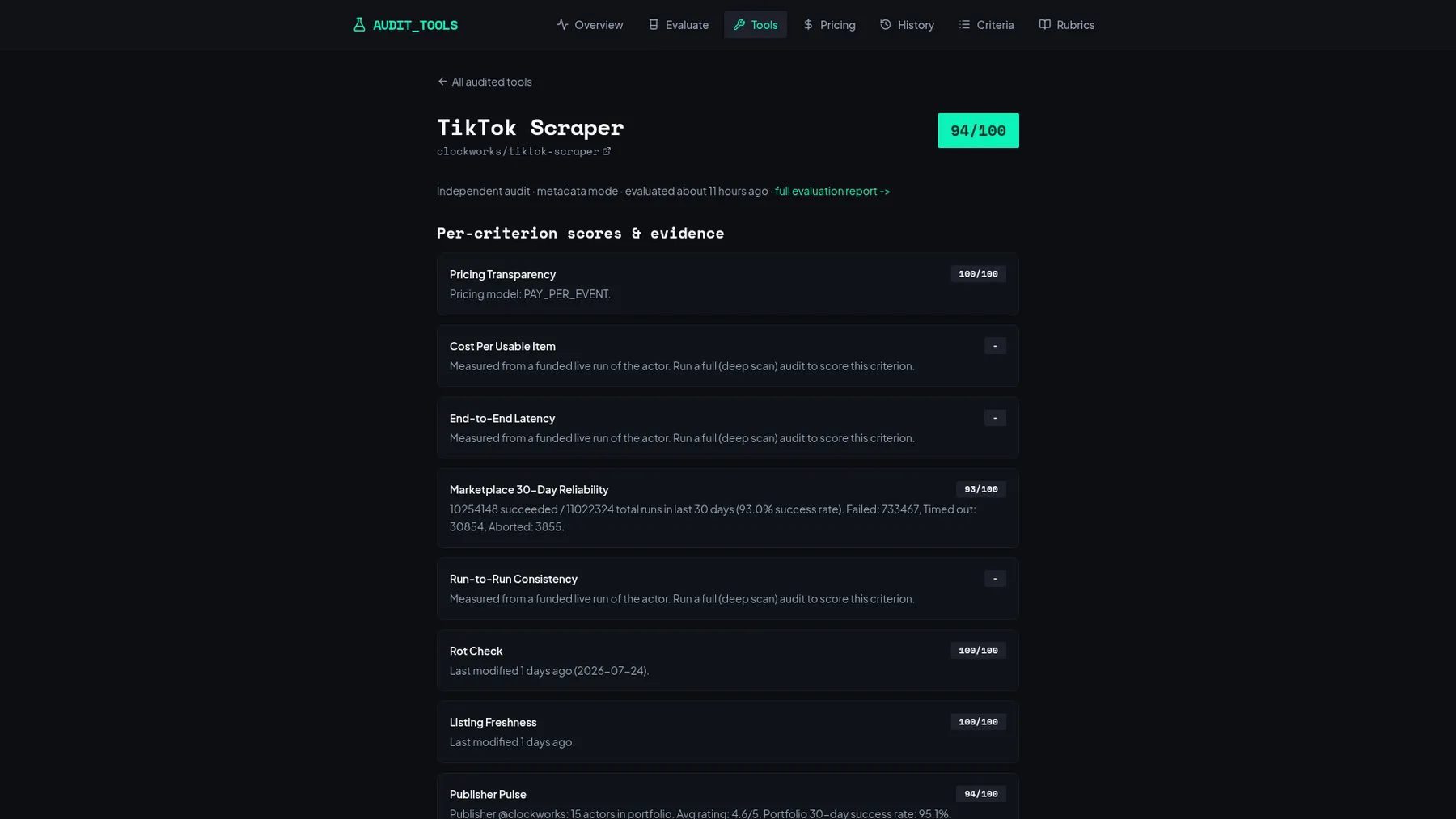 A published audit report: every score comes with the measurement behind it.
Why you need it
Picking the wrong actor costs you twice: once in wasted spend, and again when your pipeline breaks on data you trusted. Audit Tools catches that before you commit:
- Avoid abandoned actors. The rot check flags listings that no longer build or have gone stale.
- See real reliability, not marketing. 30-day success rates from actual run data, with the evidence behind every number.
- Compare before you buy. Score 4 competing scrapers head to head and pick with numbers instead of screenshots.
- Screen for agent-readiness. Know whether an actor can sit in an autonomous pipeline at all (permission posture, pay-per-event pricing, x402 eligibility) before you wire it in.
- Audit your own listing. Publishers: find out what is dragging your ranking down before Apify AI passes you over for a competitor.
What you get
Give it one or more actor IDs. For each actor you get back:
- Overall score from 0 to 100 across your chosen criteria
- Verdict: Recommended, Acceptable, or Avoid
- Per-criterion breakdown: reliability, documentation quality, pricing transparency, input schema completeness, agent-readiness, and more
- Evidence for every score: the data behind the number, not just a rating
Pricing
Metadata evaluation is effectively free at $0.00001 per actor. The deep scan is $1.00 per actor evaluated, with no minimum.
New to Apify? The free plan includes $5 of monthly credit, which now covers thousands of metadata evaluations, so you can audit your entire shortlist before spending anything. You are charged once per successfully evaluated actor, nothing for failures.
When to use this
- Comparing multiple actors for the same task (e.g. 4 TikTok scrapers)
- Before building a pipeline that depends on an actor you haven't used
- Re-auditing actors you already depend on
- Screening an actor for agent-readiness before wiring it into an autonomous pipeline
Unlimited criteria. The 24 built-in are a head start, not a limit
Metadata criteria (no execution of the target): rot check (does it still exist and build), 30-day reliability, freshness, x402 payability, permission posture (full-permission actors are an agent-pipeline blocker), pricing transparency, publisher pulse, user trajectory, documentation quality, input schema completeness, and more.
Deep-scan criteria (live probes on real inputs, in Full deep scan mode here or at audit-tools.ai/evaluate): advertised-field truth, cost per usable item, end-to-end latency, memory fit, run-to-run consistency, README structure, and quality delta across repeat audits.
Full rubric with one-paragraph definitions: audit-tools.ai/criteria. You can also define custom criteria in plain English and have any actor scored against what actually matters to you: audit-tools.ai/rubrics.
Why this over metadata-only scorers?
Most actor-quality tools score the listing: stats, user counts, description quality. Audit Tools covers the full 41,000+ actor store and, in deep-scan mode, runs the actor on real inputs and scores what comes back, with an evidence receipt behind every number. It is also the only evaluator that scores the agent-economy criteria (x402 payability and permission posture) that decide whether an actor can sit in an autonomous pipeline at all. Published, dated audit reports live at audit-tools.ai/tools.
No human approval, anywhere
This actor runs with limited permissions (it can never touch your account data) and meets Apify's x402 eligibility rules: pay-per-event pricing, limited permissions, no Standby. That means an autonomous agent can discover it and run it end to end with zero sign-off steps. No permission approval screen, no human in the loop.
Example: compare the four TikTok scrapers
We audited all four clockworks TikTok scrapers the morning Apify unified their pricing (June 30, 2026). Score spread: 71 to 84. Price parity is not quality parity. Read the full audit. The exact input for that comparison is in the developer section below.
First-run FAQ
Which mode should I start with? metadata. It is effectively free at $0.00001 per actor and covers the criteria that catch most bad picks (rot, reliability, permission posture), so you can screen a whole shortlist before spending anything.
Do I need any special permissions? No. This is a limited-permission actor; there is no first-run human approval step.
What does an empty or partial result mean? An invalid actor ID comes back as a notice row naming the target and saying what to fix, and the run still succeeds. If one target in a batch fails, you are only charged for the ones that succeeded.
Why does my billing not show charges immediately? Apify's billing counters can lag a few minutes behind the run.
Where are deep scans? Right here. Select Full deep scan in the mode dropdown and each target is measured on real funded runs at $1.00 per actor. There is no minimum on this listing. The same scan is sold at audit-tools.ai, where a card purchase starts at five.
Rank higher in Apify AI and Store search
Apify AI (launched July 2026) recommends Actors based on three things: a strong Actor quality score, a clear README, and well documented input and output schemas. Those are exactly what Audit Tools measures. Run an actor evaluation on your own Actor to see which signals are holding it back before Apify AI passes it over for a competitor.
Use cases: audit actors, evaluate tools, score actor quality
- Audit actors before you buy: audit actors and evaluate tools with a full evidence trail, so you never build on a listing you have not measured
- Tool evaluation for AI agents: score any Apify Actor against unlimited criteria, 24 built-in included, before an agent spends money on it
- Actor scoring for publishers: audit your own listing (README quality, schema completeness, reliability, pricing transparency) and fix what lowers your ranking
- Actor comparison / tool comparison: head to head scoring of two or more Actors solving the same problem, with evidence for every number
- Web scraper evaluation: reliability, rot check, and cost per item for scrapers before you build on them
- MCP and x402 readiness check: is this Actor payable by autonomous agents (Pay Per Event, agentic payment whitelist, permission posture)?
For developers & agents: schemas, costs, and a smoke test
Everything below is reference material for programmatic use. If you just want to evaluate an actor, use the input form above.
Input schema
targets(required): 1-5 actor IDs inusername/actor-nameformat.mode:"metadata"(default, $0.00001 per actor),"estimate"(cost preview only, no probes, never billed), or"full"(the live-probe deep scan, $1.00 per actor, charged only when a report is produced).
Output record (one per actor, pushed to the dataset)
Fields an agent can branch on:
verdictis a stable enum:Recommended(score >= 80),Acceptable(60-79),Avoid(below 60).overallScoreis always 0-100. Per-criterionscorevalues are also 0-100.- A failed target comes back as a
recordType: "notice"row whosemessagesays what happened, rather than a silent empty record or a failed run. Rows you can score on always carryrecordType: "result".
Cost formula
Smoke test (cheapest possible first run)
Run this exact input, one metadata evaluation of a well-known actor:
Expected: one dataset record with overallScore (0-100), a verdict from the enum above, and a non-empty scores array with evidence strings. Expected cost: $0.00001, effectively free and comfortably inside Apify's free plan credit. If your integration parses that record, you're done.
The TikTok comparison input
Run it from Claude, Cursor, LangChain, or curl
Agents can run Audit Tools through Apify's official MCP server or plain HTTP. A free smoke test is built in: set "mode": "estimate" and the run costs nothing.
Claude Desktop / Claude Code / Cursor (MCP). Add this to your MCP config (claude_desktop_config.json, .mcp.json, or Cursor's MCP settings). Replace YOUR_APIFY_TOKEN with your token from Apify Console:
Then ask your agent: "Use audit-tools to evaluate apify/instagram-scraper in estimate mode." That first call is free.
Plain curl (Apify API):
LangChain:
More agent options, including paying per report with USDC via x402 and no Apify account, at audit-tools.ai/docs. The x402 endpoint is listed in Coinbase's x402 Bazaar, on x402scan, and graded A on x402-list.com.
Built by the team behind audit-tools.ai - independent actor evaluation with a receipt for every score.
Audit before you adopt. Monitor after you adopt with Datasource Pulse - Actor, API and scraper health monitoring from the same maker. Also from us: Demand Discovery AI™.