
Floor Plan Takeoff: PDF Room Areas, Wall LF & Door Counts
Pricing
from $2,500.00 / 1,000 sheet measureds
Floor Plan Takeoff: PDF Room Areas, Wall LF & Door Counts
Construction takeoff from vector floor-plan PDFs: room square footage and perimeters, wall linear feet by thickness, door counts and a room overlay PNG per sheet. Scale self-check against printed dimensions. $2.50 per measured sheet; failed sheets are free.
Pricing
from $2,500.00 / 1,000 sheet measureds
Rating
0.0
(0)
Developer

Haniel Azevedo
Maintained by CommunityActor stats
0
Bookmarked
2
Total users
1
Monthly active users
9 hours ago
Last modified
Categories
Share
English · Português (Brasil)
Give it a vector floor-plan PDF (exported from CAD or Revit, not a scan), by public link or from your own Apify key-value store, plus the sheet scale. For every sheet you get:
- Room areas: square feet and perimeter per enclosed room, plus the total floor SF.
- Wall linear feet: a centerline total and a schedule grouped by wall thickness, with wall surface SF at a height you choose.
- Door counts: grouped by leaf width, with uncertain doors flagged for review.
- An overlay PNG: the sheet with every measured room shaded and numbered, so you can check the takeoff in seconds.
- Self-checks: the printed dimension strings are compared against your scale, and room labels such as "312 SF" are compared against what was measured.
Who it's for
- US estimators and subcontractors (flooring, drywall, paint, framing, ceilings, low-voltage) who need fast first-pass quantities to bid with, or to cross-check a manual takeoff.
- Contractors bidding public work who download plan sets from SAM.gov or other bid boards and want floor SF and wall LF before deciding to bid.
- Developers of estimating tools and AI agents who need a takeoff API that returns JSON per sheet.
This is a first-pass measuring tool, not a stamped quantity survey. Check the overlay before you bid. Every sheet reports how closely its rooms match the SF printed on the drawing, so you can see where the takeoff is reliable.
Try it free
Run the Actor with the prefilled input (or an empty input {}). It measures page 5 of a public-domain USDA Forest Service drawing (Superintendent's Office, 1/4" = 1'-0"). The demo sheet is never charged (a run still pays the small start fee below, $0.0001 at the default 2 GB memory). The prefilled link is a stable public mirror of that drawing: https://api.apify.com/v2/key-value-stores/SWMFhT4MgOApOedsR/records/usfs-bent-creek-building-diagrams.pdf. See NOTICE.md for the source and license.
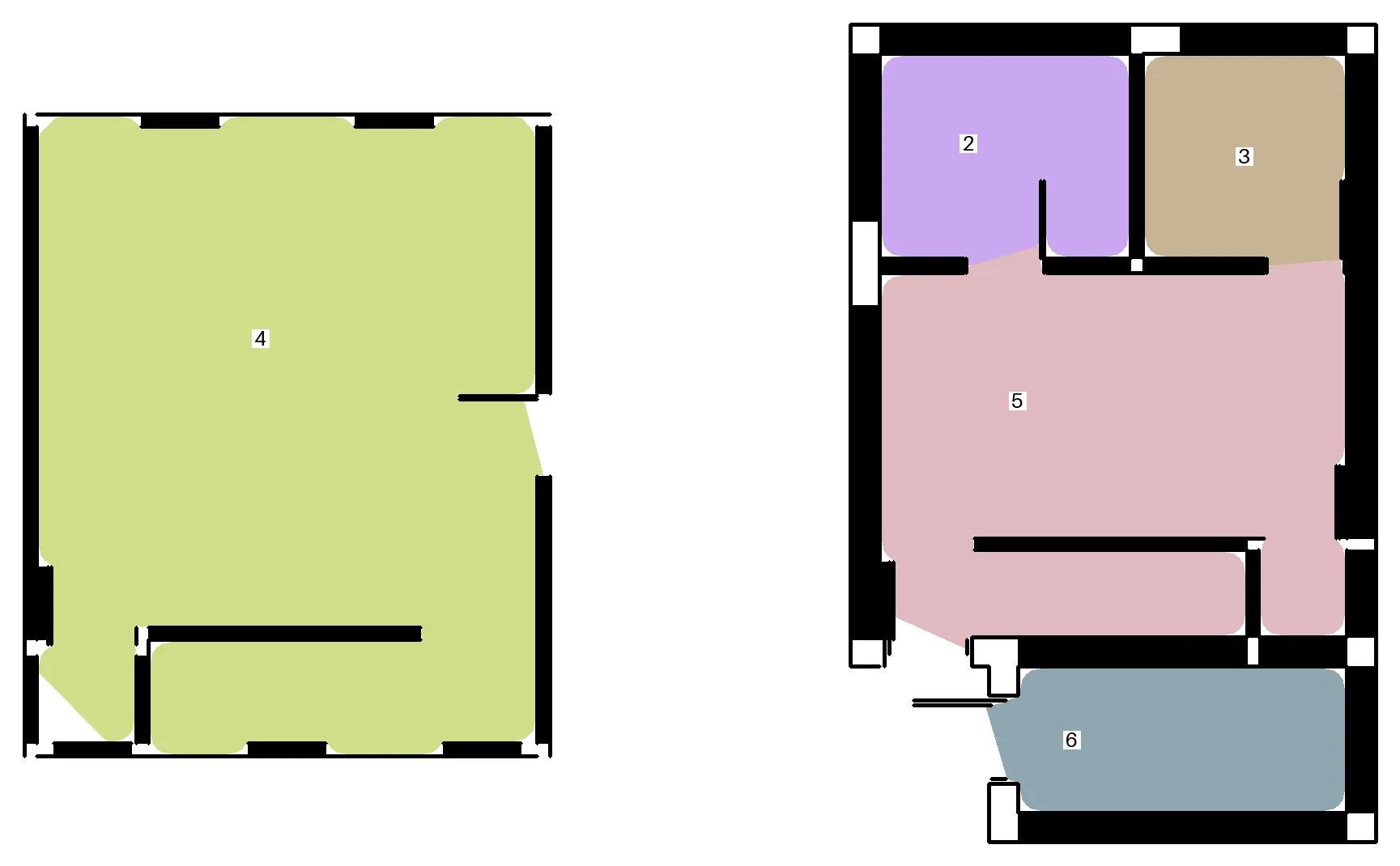
Result for that sheet: 5 rooms, 701.7 SF total, 7 doors, 151.7 LF of wall centerline. Four rooms have printed SF to compare against:
| Room | Measured | Printed on sheet | Δ |
|---|---|---|---|
| 4 | 352.2 SF | 312 SF | +12.9 % |
| 5 | 189.3 SF | 157 SF | +20.6 % |
| 2 | 57.1 SF | 60 SF | −4.9 % |
| 3 | 46.9 SF | 49 SF | −4.3 % |
The two small rooms come within 5%. The two large ones read 13–21% high, so treat flagged rooms as "review". The Actor also reports that this sheet's printed dimensions imply a scale about 4% off the declared 1/4" (SCALE_MISMATCH warning). That's the kind of issue you want to know about before you bid.
How to do a construction takeoff from a PDF floor plan (step by step)
- Get a vector PDF. Export the floor plan from CAD or Revit, or download the architectural set from the bid site. If you can select the text in a PDF viewer, it's usually vector.
- Find the page and scale. Note the page number of each floor-plan sheet and the scale printed in its title block, for example
1/4" = 1'-0". - Add the file. Paste a public link into PDF URLs (public), or upload the PDF to a key-value store and pick it in PDF key-value store.
- Enter pages and scale. For example
pages: "3-4"andscale: "1/8". Optionally set a wall height for wall surface SF. - Set a max cost per run (each measured sheet is $2.50) and click Start.
- Check the overlay PNG for each sheet, read
warningsandprintedSfCheck, then export the dataset to Excel, CSV or JSON.
Input
| Field | Example | Notes |
|---|---|---|
pdfUrls | ["https://example.com/A-101.pdf"] | Public http(s) links to PDFs. You can pass several. |
pdfStore | your store, chosen in the picker | Your own files: upload the PDFs to a key-value store (Console → Storage → Key-value stores) and select it here. Selecting it gives this run read-only access to that one store. |
pdfKeys | ["A-101.pdf"] | Optional record keys in pdfStore. Leave empty to measure every record whose key ends in .pdf. |
pages | "3", "1-4,7", "all" | Page numbers are 1-based and apply to every PDF. |
scale | 1/4"=1'-0", 1/8, 3/16"=1', 1:48, 0.25 | Architectural or ratio scale. A number means paper inches per foot. Use the printed scale of a full-size sheet. Half-size prints need half the scale. |
profile | auto | Drawing-style preset. auto probes each sheet; pick one manually only if auto gets it wrong. |
overlayImage | true | Saves overlay-f{file}-p{page}.png to the key-value store. |
wallHeightFt | 9 | Used for wall surface SF. |
maxSheets, maxFileSizeMb, sheetTimeoutSecs | 50 / 100 / 300 | Safety limits. |
pdfUrls and pdfStore can be combined. With neither, the Actor measures the free demo sheet.
Why a store picker and not a plain upload? The Actor runs with Apify's limited permissions, so it can only read storages you explicitly select in a field that requests access (pdfStore). A file uploaded anywhere else, or a Console record link pasted into pdfUrls without selecting its store, is refused by Apify with HTTP 403 and comes back as ACCESS_DENIED (not charged). In the API, pass the store ID (or username~store-name) as pdfStore.
Output
You get one dataset row per sheet. The main fields are status, errorCode, areas.totalFloorSf, areas.rooms[], lengths.wallCenterlineLf, lengths.wallSchedule[], counts.doors, counts.doorsBySize, assemblies[], scaleCheck, printedSfCheck, warnings[], overlayUrl and charged. The OUTPUT record in the key-value store holds the run summary.
Sample output (JSON)
One dataset row from the demo run, shortened: rooms and assemblies show only the first entry, and warnings shows only the codes (each warning also has a message).
Errors are reported per sheet. A bad sheet never stops the run:
errorCode | Meaning | Charged? |
|---|---|---|
ACCESS_DENIED | The file's server, or Apify for a key-value store you didn't select in pdfStore, refused access (HTTP 401/403) | No |
NOT_FOUND | The URL, store or record key doesn't exist (HTTP 404/410), or pdfStore has no .pdf record | No |
HTTP_ERROR | Any other HTTP error while downloading (5xx/429 are marked retryable) | No |
INVALID_URL, BLOCKED_URL, DNS_ERROR, DOWNLOAD_FAILED, DOWNLOAD_TIMEOUT | The link is malformed, points to a private address, doesn't resolve, or the download failed or timed out | No |
FILE_TOO_LARGE | The file is bigger than maxFileSizeMb | No |
BAD_PDF | The file was downloaded but isn't a readable PDF: empty, not a PDF, password-protected, or corrupt | No |
PAGE_OUT_OF_RANGE | The requested page doesn't exist in that PDF | No |
SCALE_INVALID | The scale couldn't be parsed or is out of range | No |
ENGINE_ERROR | The engine failed or timed out on that sheet | No |
BUDGET_EXCEEDED | Your max-cost-per-run limit was reached | No |
How much does a PDF takeoff cost?
You pay per event, with no extra platform-usage charge:
| Event | Price | When |
|---|---|---|
sheet-processed | $2.50 | Once for each sheet that succeeds and contains at least one measured room |
| Actor start | $0.00005 per GB of memory | Once per run ($0.0001 at the default 2 GB) |
Failed sheets, sheets with no rooms (cover sheets, schedules, details) and the demo sheet are free. Set a "max cost per run" and the Actor stops cleanly when it's reached.
| Job | Cost |
|---|---|
| The demo sheet | $0.0001 (start fee only) |
| 1 floor-plan sheet | $2.50 |
| 4 floor-plan sheets from a 20-page set (cover, schedules and details skipped or roomless) | $10.00 |
| 20 measured floor-plan sheets | $50.00 |
What works well, and what doesn't
- ✅ Vector PDFs from AutoCAD, Revit, ArchiCAD or Vectorworks with closed wall lines. Sheets that keep named wall layers (A-WALL…) work best.
- ⚠️ Open-plan areas without doors or walls between spaces get merged into one room. Very small closets can be missed.
- ⚠️ Rooms are measured to the inside face of the walls the engine detects. Printed SF that uses wall centerlines or gross area will differ.
- ❌ Scans, photos and raster-only PDFs: the run returns no rooms and you're not charged.
- ❌ Site plans, elevations, sections, MEP and structural sheets: not supported.
- The engine doesn't read room names in every drawing style (
namecan be null), and it doesn't price materials.
FAQ
Can it measure a scanned or photographed plan? No. It needs vector linework. A scan returns no rooms, and that sheet isn't charged.
How accurate is it? On the demo sheet the two small rooms came within 5% of the printed SF and the two large ones read 13–21% high. Every sheet reports printedSfCheck and scaleCheck so you can see how well it matched, and the overlay shows exactly what was measured. Treat it as a first pass and check the overlay.
What if my drawing is metric? Enter the ratio scale, for example 1:50 or 1:100. Results are still reported in SF and LF.
What if I printed the sheet at half size? Use half the printed scale (for example 1/8 for a 1/4" sheet printed at half size). A SCALE_MISMATCH warning usually means the scale is off.
Does it count windows, fixtures or outlets? No. It returns room areas, wall lengths and door counts only.
Can I run it from my own estimating software or an AI agent? Yes. Call it through the Apify API, the Python or JavaScript client, or the Apify MCP server (https://mcp.apify.com?tools=hanielazevedo/floor-plan-takeoff), and read the dataset as JSON.
Privacy
Your PDFs are downloaded into the run's container, processed, and deleted when the run ends. The only things kept are the results in your own dataset and key-value store. The Actor runs with limited permissions: it can't see the rest of your Apify account, and it gets read-only access only to the store you pick in pdfStore.
Other Actors by Haniel
- PDF to Markdown & Text Extractor with OCR (DOCX): PDF, scanned PDF, DOCX, HTML and images to clean Markdown or text for RAG and AI agents. $3 per 1,000 documents.
- SAM.gov Scraper: Federal Contract Opportunities Monitor: New SAM.gov contract opportunities, RFPs and sources sought by NAICS, set-aside and agency. No API key. $2 per 1,000 notices.
- Consulta CNPJ em Lote: Brazil CNPJ Lookup (Receita Federal): Bulk Brazil CNPJ lookup: legal name, CNAE, partners (QSA), address, Simples Nacional and MEI. $1.20 per 1,000 companies.
- Greenhouse, Lever & Ashby Jobs Scraper: New Jobs Monitor: Jobs from Greenhouse, Lever and Ashby career pages, with a monitor mode that returns only new postings. $1.50 per 1,000 jobs.
Português (Brasil)
Takeoff de plantas baixas: áreas de ambientes, metros lineares de parede e contagem de portas a partir de PDF.
Informe um PDF vetorial de planta baixa (exportado de CAD ou Revit, não digitalizado), por link público ou a partir do seu key-value store na Apify, e a escala da prancha. Para cada prancha você recebe:
- Áreas dos ambientes: em pés quadrados (SF), com o perímetro de cada ambiente e a área total.
- Paredes: comprimento de eixo e tabela por espessura, em pés lineares (LF), com a área de superfície na altura que você escolher.
- Portas: contagem por largura de folha, com as duvidosas marcadas para revisão.
- Imagem de conferência (PNG): cada ambiente medido aparece colorido e numerado.
- Autoverificação: as cotas impressas são comparadas com a escala informada, e as áreas impressas ("312 SF") com o que foi medido.
As unidades seguem o padrão dos EUA (SF, LF e escala em polegadas por pé), porque o público-alvo são orçamentistas e subempreiteiros americanos.
Para quem é
- Orçamentistas e subempreiteiros (pisos, drywall, pintura, forros) que precisam de quantitativos rápidos para orçar ou conferir um levantamento manual.
- Empresas que baixam projetos de licitações (SAM.gov e outros portais) e querem a área antes de decidir se vão participar.
- Desenvolvedores de ferramentas de orçamento e agentes de IA que precisam de uma API de takeoff em JSON.
É uma ferramenta de levantamento preliminar, não um quantitativo certificado. Confira a imagem de sobreposição antes de orçar.
Teste grátis
Rode com a entrada vazia {}. O Actor mede a página 5 de um desenho de domínio público do Serviço Florestal dos EUA (USDA), em escala 1/4" = 1'-0". A prancha de demonstração nunca é cobrada (a execução paga apenas a taxa de início, US$ 0,0001 com a memória padrão de 2 GB). Resultado: 5 ambientes, 701,7 SF e 7 portas. Comparando com as áreas impressas, os dois ambientes pequenos ficaram dentro de 5% (−4,9% e −4,3%) e os dois grandes vieram 13–21% acima (+12,9% e +20,6%). O Actor também avisa que as cotas impressas indicam uma escala cerca de 4% diferente da declarada.
Como fazer o levantamento de uma planta em PDF (passo a passo)
- Use um PDF vetorial, exportado do CAD ou Revit ou baixado do portal da licitação.
- Anote o número da página de cada planta baixa e a escala do carimbo, por exemplo
1/4" = 1'-0"ou1:50. - Cole um link público em PDF URLs (public) ou envie o PDF para um key-value store e selecione-o em PDF key-value store.
- Informe as páginas e a escala, por exemplo
pages: "3-4"escale: "1/8". - Defina um custo máximo por execução (US$ 2,50 por prancha medida) e clique em Start.
- Confira o PNG de cada prancha e os avisos (
warnings), e exporte o dataset para Excel, CSV ou JSON.
Entrada
pdfUrls: links públicos (http/https) para os PDFs.pdfStore: para usar seus próprios arquivos, envie os PDFs para um key-value store (Console → Storage → Key-value stores) e selecione-o aqui. Isso dá a esta execução acesso somente leitura a esse store.pdfKeys: chaves dos registros nopdfStore(opcional). Vazio = todos os registros cuja chave termina em.pdf.pages: páginas, contadas a partir de 1. Exemplos: "3", "1-4,7" ou "all".scale: escala da prancha. Exemplos:1/4"=1'-0",1/8,1:48ou0.25(polegadas de papel por pé). Em impressão meia-folha, use metade da escala.profile: estilo do desenho.autoé o recomendado.overlayImage: salva o PNG de conferência.wallHeightFt: pé-direito, usado na área de parede.
O Actor roda com permissões limitadas da Apify: só lê os stores que você seleciona em pdfStore. Um arquivo enviado em outro lugar, ou um link de registro do Console colado em pdfUrls sem selecionar o store, é recusado com HTTP 403 e volta como ACCESS_DENIED (sem cobrança). Sem pdfUrls e sem pdfStore, o Actor mede a prancha de demonstração.
Saída e erros
A saída tem uma linha por prancha. Os erros vêm por prancha e não derrubam a execução. Download: ACCESS_DENIED (HTTP 401/403, por exemplo um store não selecionado), NOT_FOUND (HTTP 404/410, store ou chave inexistente), HTTP_ERROR (outros erros HTTP), INVALID_URL, BLOCKED_URL, DNS_ERROR, DOWNLOAD_FAILED, DOWNLOAD_TIMEOUT e FILE_TOO_LARGE. Arquivo: BAD_PDF (baixado, mas vazio, não é PDF, protegido por senha ou corrompido). Prancha: PAGE_OUT_OF_RANGE, SCALE_INVALID, ENGINE_ERROR e BUDGET_EXCEEDED. Nenhuma prancha com erro é cobrada.
Quanto custa um takeoff em PDF?
A cobrança é por evento, sem cobrança extra de uso da plataforma: US$ 2,50 por sheet-processed (uma vez por prancha concluída com pelo menos um ambiente medido) e US$ 0,00005 por GB de memória a cada início de execução (US$ 0,0001 com os 2 GB padrão). Pranchas com erro, sem ambientes ou de demonstração são gratuitas. Defina um "custo máximo por execução" e o Actor para quando ele for atingido.
Limitações
- Funciona com PDFs vetoriais de CAD ou BIM com paredes fechadas.
- Não funciona com digitalizações, fotos ou PDFs só raster. Nesses casos a execução retorna zero ambientes e não há cobrança.
- Não suporta implantação, cortes, fachadas e pranchas de instalações.
- Ambientes integrados sem paredes entre si são somados num só.
- A área é medida pela face interna das paredes detectadas.
- Não precifica materiais.
Perguntas frequentes
- Funciona com planta digitalizada? Não. Precisa de linhas vetoriais. Uma digitalização retorna zero ambientes e não é cobrada.
- Qual a precisão? Na prancha de demonstração, os ambientes pequenos ficaram dentro de 5% da área impressa e os grandes vieram 13–21% acima. Cada prancha traz
printedSfCheck,scaleChecke o PNG de conferência. - E se o desenho for métrico? Informe a escala em proporção, por exemplo
1:50. Os resultados continuam em SF e LF. - Posso usar com agentes de IA? Sim, pela API da Apify, pelo cliente Python ou pelo servidor MCP da Apify (
https://mcp.apify.com?tools=hanielazevedo/floor-plan-takeoff).
Privacidade
Os PDFs são apagados ao fim da execução. O Actor roda com permissões limitadas e só tem acesso de leitura ao store escolhido em pdfStore.
Outros Actors do Haniel
- PDF to Markdown & Text Extractor with OCR (DOCX): PDF, PDF escaneado, DOCX, HTML e imagens para Markdown ou texto limpo, para RAG e agentes de IA. US$ 3 por 1.000 documentos.
- SAM.gov Scraper: Federal Contract Opportunities Monitor: Novas oportunidades de contratos federais dos EUA no SAM.gov por NAICS, set-aside e órgão. Sem chave de API. US$ 2 por 1.000.
- Consulta CNPJ em Lote: Brazil CNPJ Lookup (Receita Federal): Consulta CNPJ em lote: razão social, CNAE, sócios (QSA), endereço, Simples Nacional e MEI. US$ 1,20 por 1.000 empresas.
- Greenhouse, Lever & Ashby Jobs Scraper: New Jobs Monitor: Vagas de páginas de carreira Greenhouse, Lever e Ashby, com modo monitor que traz só as vagas novas. US$ 1,50 por 1.000 vagas.


