

Google Play API & Scraper — Apps, Search & Reviews, No Login
Pricing
Pay per event
Google Play API & Scraper — Apps, Search & Reviews, No Login
Google Play apps and reviews from links, searches or developers: installs, rating, histogram, price, ads, versions, and reviews with developer replies, no reviewer names. Unofficial Google Play API. Android app reviews scraper, Android apps data, mobile app reviews.
Pricing
Pay per event
Rating
0.0
(0)
Developer

yestrue
Maintained by CommunityActor stats
0
Bookmarked
1
Total users
1
Monthly active users
3 hours ago
Last modified
Categories
Share
Google Play Scraper — Apps, Search & Reviews, No Login
Get Google Play apps and their reviews as clean data: installs, rating, star histogram, price, ads, version and recent changes, and reviews with developer replies. No reviewer names.
Price: $1.00 per 1,000 apps and $0.10 per 1,000 reviews, the same on every plan. You pay only for what is delivered.
Run it now — the Input tab is prefilled, one click starts a run.
| App | Genre | Rating | Ratings | Installs | Price | Version |
|---|---|---|---|---|---|---|
| Loop Habit Tracker | Productivity | 4.72 | 63,535 | 5,000,000+ | free | 2.3.1 |
| Review | Stars | Date | App version | Developer reply |
|---|---|---|---|---|
| Love the seamless UI, statistic dashboard a… | 5 | 2026-10-19 | 2.3.1 | no |
| Wish more apps were this simple! Had this a… | 5 | 2026-10-19 | 2.3.1 | no |
| best minimal habit tracker for free! | 5 | 2026-10-19 | 2.3.1 | no |
Sample rows from a live run on 2026-10-20; every record has more fields.
Use it to:
- Watch competitor apps: installs, rating, the 1-5 star histogram, version and what changed in the last update.
- Mine reviews for what users love and complain about: rating, text, date and the app version reviewed.
- See how developers answer: each review comes with the developer's reply and its date, when there is one.
- Compare a whole market: search a word or add a developer, and every app found comes with full details.
- Check your own store listing: description, screenshots, genre and content rating as Google Play shows them.
Get Google Play apps — by link, package name, search word or developer — with installs, rating, the full rating histogram, price, in-app purchases, ads, versions and store listing. Switch on reviews and get the written reviews of every app, with the developer's reply. No login, no browser, no Google account.
Why this one
- 📱 Apps and reviews in one run. Search
habit tracker, add a competitor's app and a developer, switch on reviews — one run delivers every app and its reviews, each row labelled. A live test run delivered 32 apps and 20,667 reviews in 212 seconds. - 📊 Full details for search results too. Google Play search only shows a summary. This Actor opens every app it finds, so search results come with installs, rating count, histogram and version like any other app.
- 💬 Developer replies included. Every review comes with the developer's answer and its date, when there is one — 6,430 of the 20,667 reviews in the test run had one.
- 🔒 No reviewer names. Reviews are delivered without reviewer names or pictures.
- 💸 You pay only for what is delivered. An unknown app or a search with no results comes back as a free record with the reason.
What you get
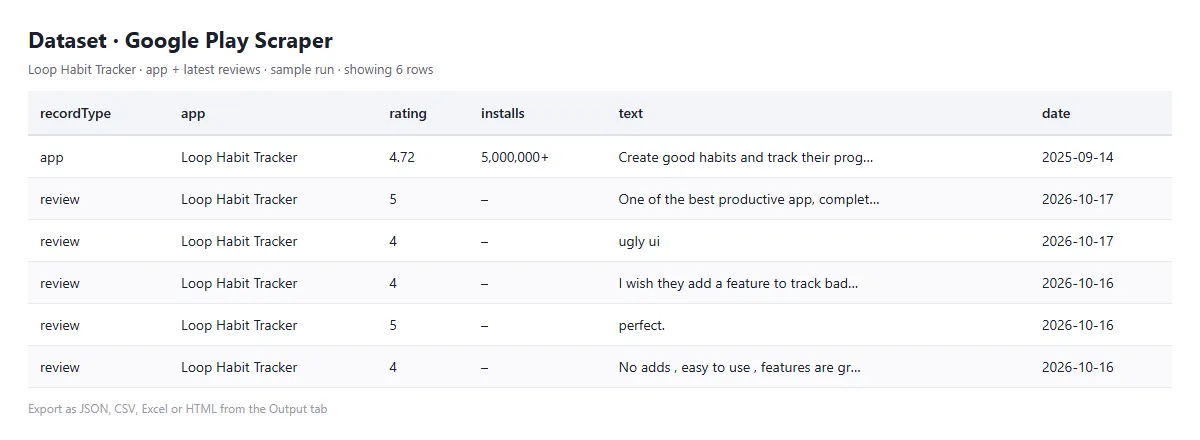
Every row has a recordType: app or review.
Apps
| Field | What it is |
|---|---|
appId, name, url | the app (package name) |
developer, developerId, developerWebsite | who makes it |
rating, ratingCount, reviewCount, histogram | average rating, number of ratings and written reviews, and the 1–5 star breakdown |
installs, minInstalls, maxInstalls | install range as shown ("5,000,000+") and as numbers |
price, currency, free, offersInAppPurchases, inAppPriceRange, containsAds | money |
genre, genreId, contentRating | category and age rating |
version, androidVersion, updated, released, recentChanges | versions and dates |
summary, description, icon, headerImage, screenshots, video, privacyPolicy | store listing |
input, inputType, position, country, language | where it came from, and its place in a search |
Reviews
| Field | What it is |
|---|---|
appId, appName | which app |
rating, title, text | the review |
appVersion, date, thumbsUp | the version reviewed, when, and how many found it useful |
developerReply, developerReplyDate | the developer's answer |
sort, reviewId, country, language | which list it came from, and its id |
Example
Real records from a live run, 24 September 2026 (some app fields left out here):
How to use it
- Add Apps (Google Play links or package names), Search words and/or Developers.
- Set the Country and Language — they decide the price, the texts and which reviews you get.
- For reviews, switch on Also get reviews, pick the Review order and the Max reviews per app.
- Press Start, and download the results from the Output tab as JSON, CSV or Excel. Filter on
recordTypeto separate apps from reviews.
To follow your ratings or a competitor's reviews, save your input as a task and schedule it daily or weekly.
You can also call it from the Apify API, from Make, Zapier or n8n, or from an AI agent through the Apify MCP server.
Pricing
You are charged per app and per review delivered — see the prices on this page. Unknown apps and empty searches are free. If your run has a Maximum charge, the Actor stops cleanly when it is reached.
FAQ
Why at most 30 apps per search? That is how many Google Play shows for a search. For more, add more search words, or add developers.
How many reviews can I get? As many as Google Play lists for the chosen language and country — set Max reviews per app. In the test run, apps with more than 1,000 reviews gave the full 1,000 asked for.
Is this affiliated with Google? No. This is an independent tool that reads public Google Play data. It uses the open-source google-play-scraper library.
Like it? A short review on the Store page helps other people find this Actor. Something missing or broken? Tell us on the Issues tab — we read every one.
Related Actors
- Chrome Web Store Scraper — Extensions, Themes & Ratings — Chrome Web Store extensions with users, ratings and versions
- GitHub Trending Scraper — Repos by Language, Stars & Topics — GitHub Trending repos by language, date range and stars gained
- Steam Scraper — Games, Prices & Reviews, No Login — Steam games with prices, discounts, Metacritic scores and reviews
- Hacker News Scraper — Stories, Comments & Search — Hacker News stories, comments and search results


