
Google Play Scraper & App Store Scraper: App Details, Search
Pricing
from $1.50 / 1,000 app details returneds
Google Play Scraper & App Store Scraper: App Details, Search
Google Play scraper and App Store scraper in one run: app details and keyword search from both stores in one schema. Ratings, star histograms, Play installs, prices, versions, developers. Package names, iOS bundle IDs, Apple IDs or store URLs in; bad IDs give free error rows. Unofficial.
Pricing
from $1.50 / 1,000 app details returneds
Rating
0.0
(0)
Developer
hiver
Maintained by CommunityActor stats
0
Bookmarked
2
Total users
1
Monthly active users
10 days ago
Last modified
Categories
Share
Google Play Scraper & App Store Scraper: App Details and Keyword Search
A Google Play scraper and App Store scraper in one Actor: get Google Play and Apple App Store app details in one table. Supply Play package names, iOS bundle IDs (com.spotify.client), numeric Apple IDs, public store URLs, or search terms. The same columns cover both stores: developer, rating, rating count, star histogram, price, currency, version and dates. Google Play install bands are included when published; Apple does not publish installs.
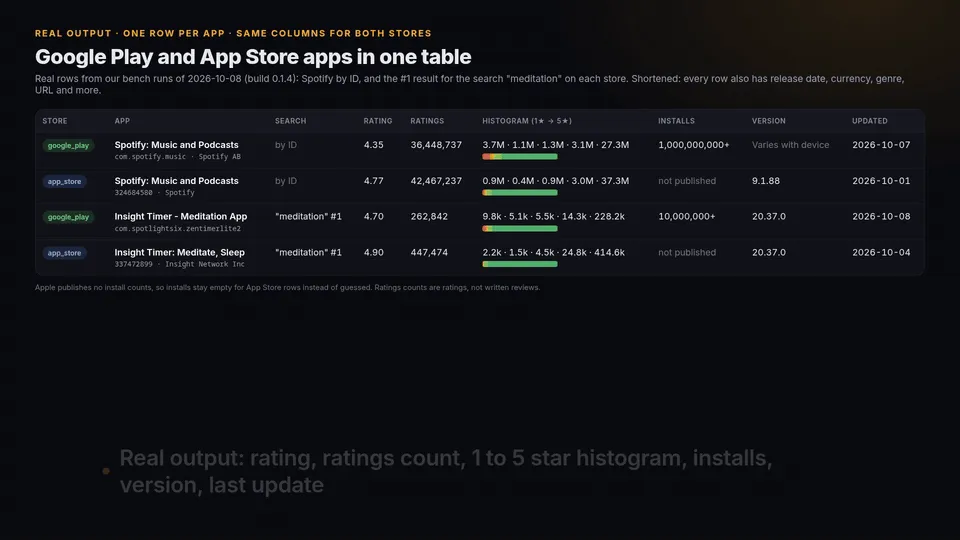
Watch the 82-second walkthrough (MP4)
One row per distinct app. Invalid IDs and unavailable apps produce error rows instead of stopping the run. Keyword results are enriched with full app details, not just title and a link. Optional Apple histogram failures keep the API metadata and add a warning.
Unofficial; not affiliated with Google or Apple.
App details by iOS bundle ID
Know your iOS apps by bundle ID (com.spotify.client) rather than by their numeric App Store ID? Put the bundle IDs in apps, next to Play package names. When Google Play has no app with that ID, the Actor looks it up on the App Store in the run's country (the lookup is free) and returns the full App Store details. Every App Store row carries bundleId, so you can join it to App Store Connect exports or your own app list. An ID found on neither store returns one free error row that says so.
Board test run n5eeLeUsVEzrkT8BY, 2026-10-12, build 0.1.8, input ["com.spotify.client", "ios:com.zhiliaoapp.musically", "com.spotify.music", "com.hiver.doesnotexist"]: 4 rows in 7.9 s, 3 apps charged.
| Input | store | appId | bundleId | appName |
|---|---|---|---|---|
com.spotify.client | app_store | 324684580 | com.spotify.client | Spotify: Music and Podcasts |
ios:com.zhiliaoapp.musically | app_store | 835599320 | com.zhiliaoapp.musically | TikTok - Videos, Shop & LIVE |
com.spotify.music | google_play | com.spotify.music | null | Spotify: Music and Podcasts |
com.hiver.doesnotexist | (error row, free) | not found on Google Play or the App Store (us) |
Some apps use the same ID on both stores (TikTok com.zhiliaoapp.musically). Without a prefix you get the Google Play app; write ios: in front, as the test run did, or set dottedIdStore to app_store when every dotted ID in the list is an iOS bundle ID.
Measured against the most-used app-details Actors
Our board's Lab bench gave this Actor, the most-used Google Play and App Store app-details Actors on the Apify Store, and a low-cost Google Play Actor the same four jobs: details for 4 apps on Google Play (Spotify, Minecraft, Wikipedia, Duolingo), the same 4 apps on the App Store, and a search for "meditation" (up to 10 apps) in each store. Answers were checked against 26 facts read from the stores' own pages and Apple's lookup API (name, developer, rating, price, genre, installs, release year, version, histogram present). Bench run 2026-10-08 14:30 UTC, build 0.1.4.
| This Actor | Most-used Google Play Actor (159 monthly users) | Most-used App Store Actor (109) | Low-cost Google Play Actor (93) | |
|---|---|---|---|---|
| Google Play details: facts matched | 10 of 10 | 10 of 10 | Play not supported | 10 of 10 |
| Google Play search: fields filled | 97.7% | 98.5% | Play not supported | 45.4% |
| App Store details: facts matched | 10 of 10 | App Store not supported | 9 of 10 | App Store not supported |
| App Store details: fields filled | 92.3% | App Store not supported | 84.6% | App Store not supported |
| Both stores in one run, one set of columns | yes | no | no | no |
| Price per 1,000 apps in these runs | $1.81 | $2.50 to $3.25 | $3.56 to $4.25 | $0.30 |
| Run time per job it supports | 5.8 to 15.5 s | 2.6 to 5.3 s | 1.2 to 3.3 s | 2.3 to 4.7 s |
On Google Play this Actor matched every fact the most-used Play Actor matched; that Actor filled slightly more search fields (98.5% vs 97.7%). On the App Store this Actor matched one more fact and filled more fields than the most-used App Store Actor. It costs less than either, and one run covers both stores. The low-cost Play Actor is cheaper but filled less than half the fields on search, and the others are faster: this Actor spaces its requests and fetches full details for every search result. Monthly users are from the Apify Store on 2026-10-08. Four jobs are a small sample; later builds have not been benched again yet.
Input
stores:google_play,app_store, or both (default). IDs are auto-detected. If an ID belongs to an excluded store, it produces an uncharged error row.apps: Play package IDs, iOS bundle IDs such ascom.spotify.client, numeric Apple IDs or public store URLs. Useios:/appstore:for Apple andandroid:/play:for Google. At most 1,000 per run; malformed IDs are not repaired.dottedIdStore:auto(default),app_storeorgoogle_play. Auto tries Play first, then an Apple bundle-ID lookup in the run country, only falling back after an explicit not-found response. If both stores have the ID, Play wins and the status message explains how to select Apple. Lookups are free; only successful app rows are charged. Apple rows include the publishedbundleId; Play rows leave it null.searchTerms: at most 50 keywords, each 1–200 characters. Both stores are searched independently. Each result getssearchTermand its one-based sourcerank.maxResultsPerTerm: 1–200, default 20, per term and store. This is an upper bound: iTunes may return fewer and Google Play uses only the first public search page. No infinite scrolling or private pagination is used.country: two-letter storefront, defaultus. This input governs all requests, including app URLs that contain another country.language: requested interface language, defaulten. A store may fall back to its storefront's language; Apple iTunes does not support every language code. Text is never machine-translated or invented.
Direct IDs are processed first. Duplicate app IDs within the same store, including matches across multiple search terms, are returned only once. The first occurrence wins; direct detail rows have null search fields. Search ranks retain the source's original order and may have gaps after deduplication.
Output and source limits
| Field | Meaning |
|---|---|
store, appId, appName, developer | Source store (google_play or app_store), exact ID, published title and developer |
rating, ratingsCount | Average stars and number of ratings, not written-review count |
histogram, histogramUnit | Published exact rating counts keyed "1"…"5"; unit ratings. Missing distribution is null, never an invented zero histogram. Apple counts come from the public app page; its displayed percentages are not converted to counts. |
installs | Google Play's displayed band, such as 1,000,000,000+. Always null for Apple. |
price, currency | Up-front app download price and currency. A free app has numeric zero, not null. In-app subscriptions/purchases are not this price. |
version | Published version, including the English Play About dialog's “Varies with device” label for an explicitly device-specific version record. Missing or malformed records remain null; the label is not a default for every missing version. Other languages retain null for this label rather than an invented translation. |
releasedAt | Apple's ISO release timestamp or Google's exact localized release-date label. Do not treat a label without a timezone as a UTC timestamp. |
updatedAt, genre, url | ISO update timestamp, primary store genre and country-specific public app URL |
searchTerm, rank | First matching search term and one-based source rank; null on direct rows |
country, language | Requested country/language, not a guarantee the store translated every field |
warnings, error | Optional enrichment warnings; null error on app data. Failed targets have an error and null data fields. |
Apple API average ratings can be more precise than the one-decimal average on its public page. Both values change over time, and page/API caches can differ. The Actor preserves the API's rating rather than substituting the rounded page score. Histogram bins remain the values published on that page; they are not rescaled to force a sum to match a separately cached API rating count. Apple sometimes serializes a count with floating-point residue (for example a value just below an integer); that source value is retained rather than rounding or inventing counts.
Need review text, review dates and developer replies? Use App Reviews Scraper, which covers both stores in a review-level schema. This Actor returns app-level details and search ranks, not reviews or user profiles.
Price
Pay per returned app: Free $1.90, Starter/Bronze $1.80, Silver $1.70, Gold $1.50 per 1,000 app rows. Search enrichment is included; no extra per-search fee. Invalid IDs, failed app fetches and omitted duplicates are uncharged. Metadata retained after optional histogram failure is still an app row and is charged.
Apify also applies its native $0.00005 Actor-start event. For example, 1,000 Free-plan app rows cost $1.90 + $0.00005 = $1.90005. A one-app run costs $0.00195. Platform usage is included in pay-per-event pricing. The board applies and verifies the cloud price; the source pricing file alone is not proof that prices are live.
Reliability and respectful access
Requests are spaced per source host (Google Play at least 1 second, iTunes and the Apple public app page each at least 1.5 seconds). A refusal on Apple's optional histogram page stops that host without disabling the independent iTunes metadata API. Transient network errors, HTTP 429 and server errors receive at most three attempts with exponential backoff. Retry-After is honored; a request for a long wait stops the store for this run. HTTP 401/403, consent redirects and refusing Google pages are not bypassed. No proxies, login credentials, CAPTCHA solving or block evasion are used.
A bad app never intentionally fails the whole run. This does not make every run useful: check the error rows, warnings, and SUMMARY key-value record. All-error runs finish with explicit errors and no billable apps; zero results for a keyword may be legitimate. Store pages can change; missing fields remain null rather than guessed. Unexpected infrastructure errors can still fail a run.
FAQ
Can I compare both versions of the same app? Yes. Supply the Android package ID and the Apple numeric ID or bundle ID; each is a separate row. Matching titles are not merged across stores.
Are installs, versions and histograms always available? No. Apple publishes no installs, some Play web pages publish no version, and optional histogram enrichment can be unavailable. Null means unavailable, not zero.
Are these personalized search results or all apps matching a keyword? No. These are the stores' public country-specific results, with the first Play page and the iTunes software-search API's result window. Ranking changes and can differ from a logged-in device.
Can I schedule this daily? Yes, use an Apify schedule. Each run returns current app details; no historical database or only-new mode is implied. Store responses may be cached by the stores themselves.
My Python google-play-scraper search() returns appId None for the app I searched. Does this Actor have the same problem?
No. In our check on 2026-10-14, PyPI google-play-scraper 1.2.7 returned appId: None for the top result on 10 of 10 app names (Spotify, WhatsApp, Duolingo and 7 more), the large best-match card Google Play shows above the list (its GitHub issue #238; an unmerged fix is PR #239). This Actor reads the result links Google Play shows: a local run of its code the same day returned com.spotify.music, com.whatsapp, com.duolingo and com.calm.android as the top hits for those names, each with full details. Use searchTerms with stores: ["google_play"].
Something looks wrong? Open an issue on this Actor with the run link, input, expected field and public source. Do not include credentials. Respect the stores' terms and applicable law when using the data.


